
centos7配置国内yum源
1、什么是yum仓库?
yum仓库就是使用yum命令下载软件的镜像地址。
我们通常使用 yum install 命令来在线安装 linux系统的软件, 这种方式可以自动处理依赖性关系,并且一次安装所有依赖的软体包,但是经常会遇到从国外镜像下载速度慢,无法下载的情况。那么此时我们就需要把我们的yum 源改为国内的镜像。
yum的配置文件
yum 的配置文件在 /etc/yum.repos.d 目录下, 其中有多个配置文件,每一个配置文件中都可以配置一个或多个repository, 但是最终会被合并为一个交给系统,所以多个文件只是为了方便管理。
2、yum仓库配置
下面提供了多个镜像仓库配置说明,实际使用时,选择其中一个配置即可。
2.1、阿里镜像仓库配置
进入阿里镜像仓库网站 https://opsx.alibaba.com/mirror

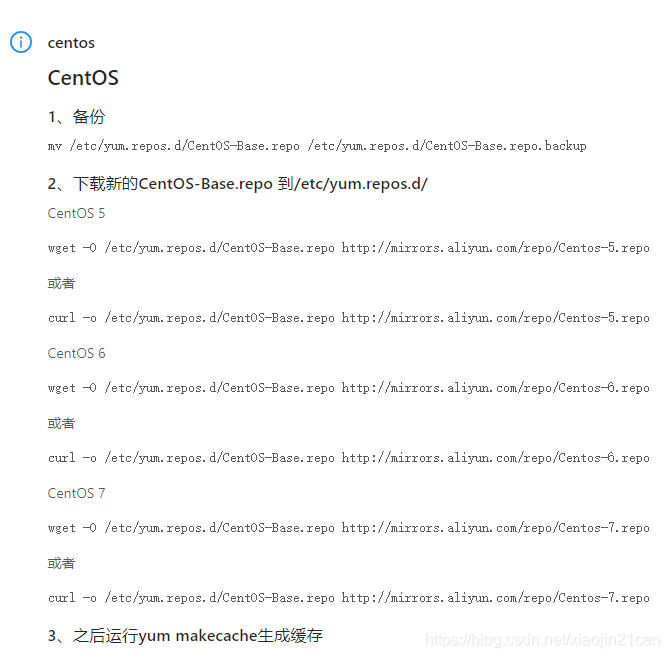
找到centos,点击右边的 帮助 ,看到阿里镜像仓库给出的yum的配置说明。
2.1.1、配置步骤
根据官网的说明,我们详细说说每步骤的意思。
(1)、备份,将 CentOS-Base.repo 为CentOS-Base.repo.backup
mv /etc/yum.repos.d/CentOS-Base.repo /etc/yum.repos.d/CentOS-Base.repo.backup
(2)、下载新的 http://mirrors.aliyun.com/repo/Centos-7.repo,并命名为CentOS-Base.repo
wget -O /etc/yum.repos.d/CentOS-Base.repo http://mirrors.aliyun.com/repo/Centos-7.repo

或者

curl -o /etc/yum.repos.d/CentOS-Base.repo http://mirrors.aliyun.com/repo/Centos-7.repo
(3)、清除缓存
yum clean all     # 清除系统所有的yum缓存

yum makecache     # 生成yum缓存

yum update
2.1.2、epel源 安装和配置
(1)、查看可用的epel源
[java@localhost yum.repos.d]$ yum list | grep epel-release

epel-release.noarch                         7-11                       extras

[java@localhost yum.repos.d]$
(2)、安装 epel
[java@localhost yum.repos.d]$ yum install -y epel-release

......省略.....
(3)、配置阿里镜像提供的epel源
wget -O /etc/yum.repos.d/epel-7.repo http://mirrors.aliyun.com/repo/epel-7.repo
4、清除缓存
yum clean all     # 清除系统所有的yum缓存

yum makecache     # 生成yum缓存

yum update
2.1.3、查看yum源
查看所有的yum源:
yum repolist all
查看可用的yum源:
yum repolist enabled
2.2、配置 清华大学镜像仓库
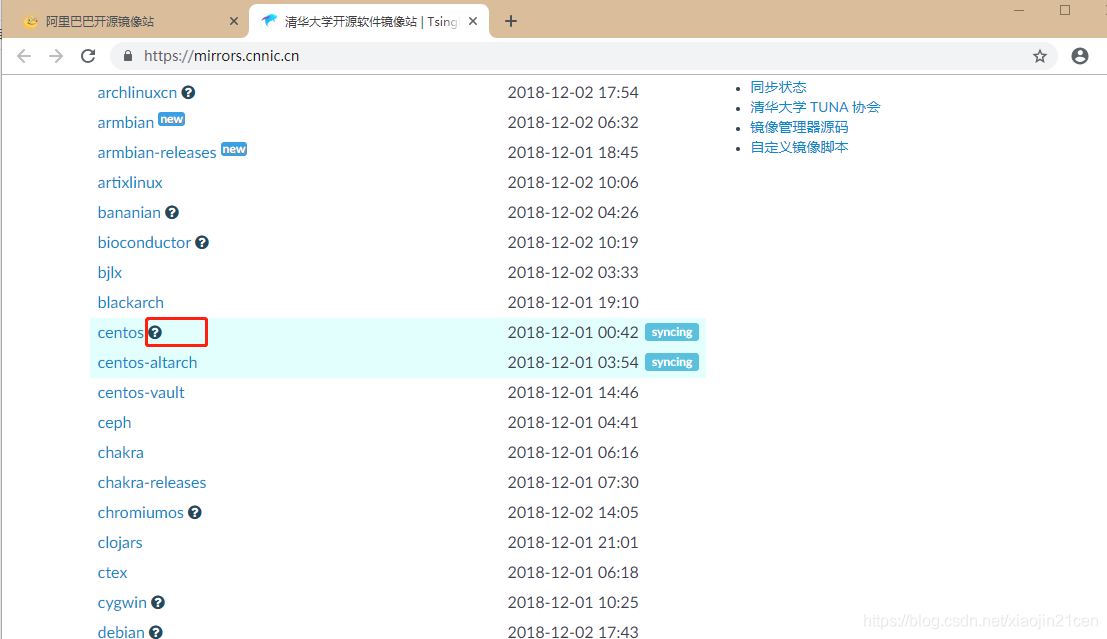
点击 ? 进入帮助说明页面 https://mirrors.cnnic.cn/help/centos/。
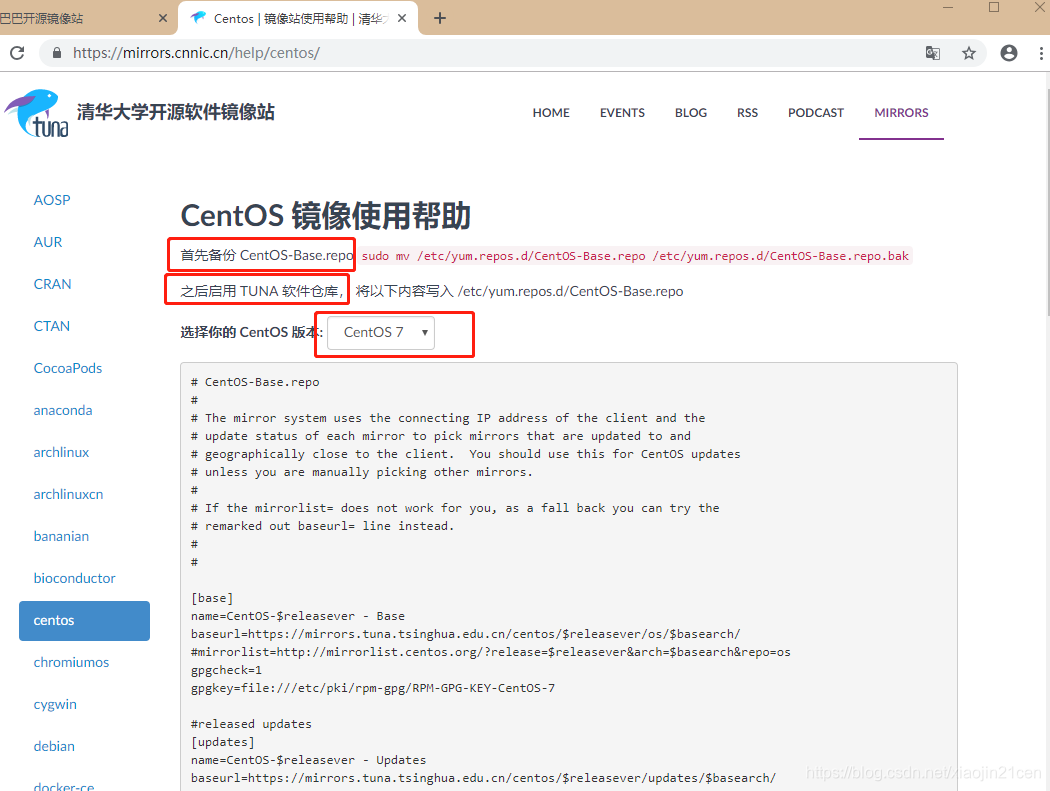
页面提供了 CentOS5,CentOS6、CentOS7 的镜像仓库配置,下面列出的是CentOS7的配置。
(1)、首先备份 CentOS-Base.repo
mv /etc/yum.repos.d/CentOS-Base.repo /etc/yum.repos.d/CentOS-Base.repo.bak
(2)、之后启用 TUNA 软件仓库, 将清华大学镜像仓库信息写入 /etc/yum.repos.d/CentOS-Base.repo
# CentOS-Base.repo

#

# The mirror system uses the connecting IP address of the client and the

# update status of each mirror to pick mirrors that are updated to and

# geographically close to the client.  You should use this for CentOS updates

# unless you are manually picking other mirrors.

#

# If the mirrorlist= does not work for you, as a fall back you can try the

# remarked out baseurl= line instead.

#

#

[base]


name=CentOS-$releasever - Base


baseurl=https://mirrors.tuna.tsinghua.edu.cn/centos/$releasever/os/$basearch/
mirrorlist=http://mirrorlist.centos.org/?release=$releasever&arch=$basearch&repo=os

gpgcheck=1


gpgkey=file:///etc/pki/rpm-gpg/RPM-GPG-KEY-CentOS-7
released updates

[updates]


name=CentOS-$releasever - Updates


baseurl=https://mirrors.tuna.tsinghua.edu.cn/centos/$releasever/updates/$basearch/
mirrorlist=http://mirrorlist.centos.org/?release=$releasever&arch=$basearch&repo=updates

gpgcheck=1


gpgkey=file:///etc/pki/rpm-gpg/RPM-GPG-KEY-CentOS-7
additional packages that may be useful

[extras]


name=CentOS-$releasever - Extras


baseurl=https://mirrors.tuna.tsinghua.edu.cn/centos/$releasever/extras/$basearch/
mirrorlist=http://mirrorlist.centos.org/?release=$releasever&arch=$basearch&repo=extras

gpgcheck=1


gpgkey=file:///etc/pki/rpm-gpg/RPM-GPG-KEY-CentOS-7
additional packages that extend functionality of existing packages

[centosplus]


name=CentOS-$releasever - Plus


baseurl=https://mirrors.tuna.tsinghua.edu.cn/centos/$releasever/centosplus/$basearch/
mirrorlist=http://mirrorlist.centos.org/?release=$releasever&arch=$basearch&repo=centosplus

gpgcheck=1


enabled=0


gpgkey=file:///etc/pki/rpm-gpg/RPM-GPG-KEY-CentOS-7
(3)、清除缓存
yum clean all     # 清除系统所有的yum缓存

yum makecache     # 生成yum缓存

yum update
</div>
原文地址:https://blog.csdn.net/xiaojin21cen/article/details/84726193
centos7配置国内yum源的更多相关文章
- centos7 配置国内yum源
配置清华大学镜像仓库 URL:https://mirrors.cnnic.cn/ CentOS 镜像使用帮助 https://mirrors.cnnic.cn/help/centos/ 建议先备份 C ...
- contos 配置国内yum源
contos配置国内yum源 前言 rpm管理软件包的命令,很难用,需要手动解决以来关系,所以最好用 yum 的理念是使用一个中心仓库(repository)管理一部分甚至一个distribution ...
- contos配置国内yum源
contos配置国内yum源 前言 rpm管理软件包的命令,很难用,需要手动解决以来关系,所以最好用 yum 的理念是使用一个中心仓库(repository)管理一部分甚至一个distribution ...
- CentOS7 配置163 yum源(详细步骤)
CentOS7 配置163 yum源 1)下载repo文件 wget http://mirrors.163.com/.help/CentOS7-Base-163.repo 2)备份并替换系统的r ...
- linux 配置本地yum源,配置国内yum源,配置epel源
目录 一.配置本地yum源 二.配置国内yum源和epel源 一.配置本地yum源 1.挂载ISO镜像 mount -o loop /mnt/yum-iso/CentOS-7-x86_64-DVD-1 ...
- 虚拟机centos7配置本地yum源
在虚拟机中要使用yum命令,就要先配置一下yum源,下面就分享一下这个过程: 1. 挂载iso到vmware,首先得确保CD/DVD连接到镜像.可以这样操作 2. 执行下面的命令 # mkdir /m ...
- CentOS6配置国内yum源
在安装完CentOS后为了加快安装.更新rpm包的速度.需要将yum源改为国内源,国内比较快的源有中科大.163.sohu源.下面修改为163源为例子: 首先进入源的配置目录:执行 cd /etc/y ...
- Centos配置国内yum源
网易(163)yum源是国内最好的yum源之一 ,无论是速度还是软件版本,都非常的不错,将yum源设置为163yum,可以提升软件包安装和更新的速度,同时避免一些常见软件版本无法找到.具体设置方法如下 ...
- [转]Centos配置国内yum源
原文地址:http://blog.chinaunix.net/uid-23683795-id-3477603.html 网易(163)yum源是国内最好的yum源之一 ,无论是速度还是软件版本,都非常 ...
随机推荐
- 安装python3.6 pip3 flake8
apt-get install python3-pip # Python3 ➜ ~ pip3 -V pip 9 ...
- ADO 输入输出文本及获取指定字符串
---恢复内容开始--- 1.获取文本:声明别量,指定文本路径,获取文本内容. string Text=System.IO.File.ReadAllText(@"C:\xxx\xxx\xxx ...
- C++利用偏移量对文件操作
对输入流操作:seekg()与tellg()对输出流操作:seekp()与tellp()下面以输入流函数为例介绍用法: seekg()是对输入文件定位,它有两个参数:第一个参数是偏移量,第二个参数是基 ...
- C#数组排序方法
在C#中常用的数组排序的方法有:选择排序法.冒泡排序法.插入排序法和希尔排序法等. 一.选择排序法 using System;using System.Collections.Generic;usin ...
- 使用max函数计算EXCEL个税公式
1.Max()函数是求括号内的数的最大值.2.其中,第一和第二个大括号{}内的数,相信作为财务的应该很清楚,就是个人所得税的缴税比例,以及速算个人应缴所得税的相关数据.3.在EXCEL中,使用{}表示 ...
- 【转】 VC中TCP实现 异步套接字编程的原理+代码
所谓的异步套接字编程就是 调用了 如下函数 WSAAsyncSelect 设置了 套接字的状态为异步,有关函数我会在下面详细介绍... 异步套接字解决了 套接字编程过程中的堵塞问题 .... ...
- 洛谷 P3328 【[SDOI2015]音质检测】
这题我做的好麻烦啊... 一开始想分块来着,后来发现可以直接线段树 首先考虑一个性质,我们如果有数列的相邻两项f[i]和 f[i+1]那么用这两项向后推k项其线性表示系数一定(表示为f[i+k]=a∗ ...
- redis+PHP消息队列实现及应用
学习视频: http://www.imooc.com/learn/852 学习笔记: https://blog.csdn.net/qq_33862644/article/details/7938564 ...
- GOPATH和GOROOT
安装指定版本golang apt-get purge golang* //删除之前安装的文件 add-apt-repository ppa:evarlast/golang-1.8 apt-get up ...
- drf分页器
drf分页器 1.第一种分页: 类似于django中的分页 2.第二种分页: 偏移分页 3.第三种分页: 加密分页(查询速度快) 无法跳跃 基本参数 from rest_framework.pagin ...