
为centos7配置阿里yum源遇到的问题以及解决方法
【问题背景】
卸载安装的Ambari,之前都是因为卸载不干净。这次重写安装,卸载完之后,发现httpd无法启动,所以想卸载httpd进行重新安装,但是执行命令yum list | grep httpd报错。
【遇到的问题】
配置过程很简单,去https://opsx.alibaba.com/mirror 获得执行命令:
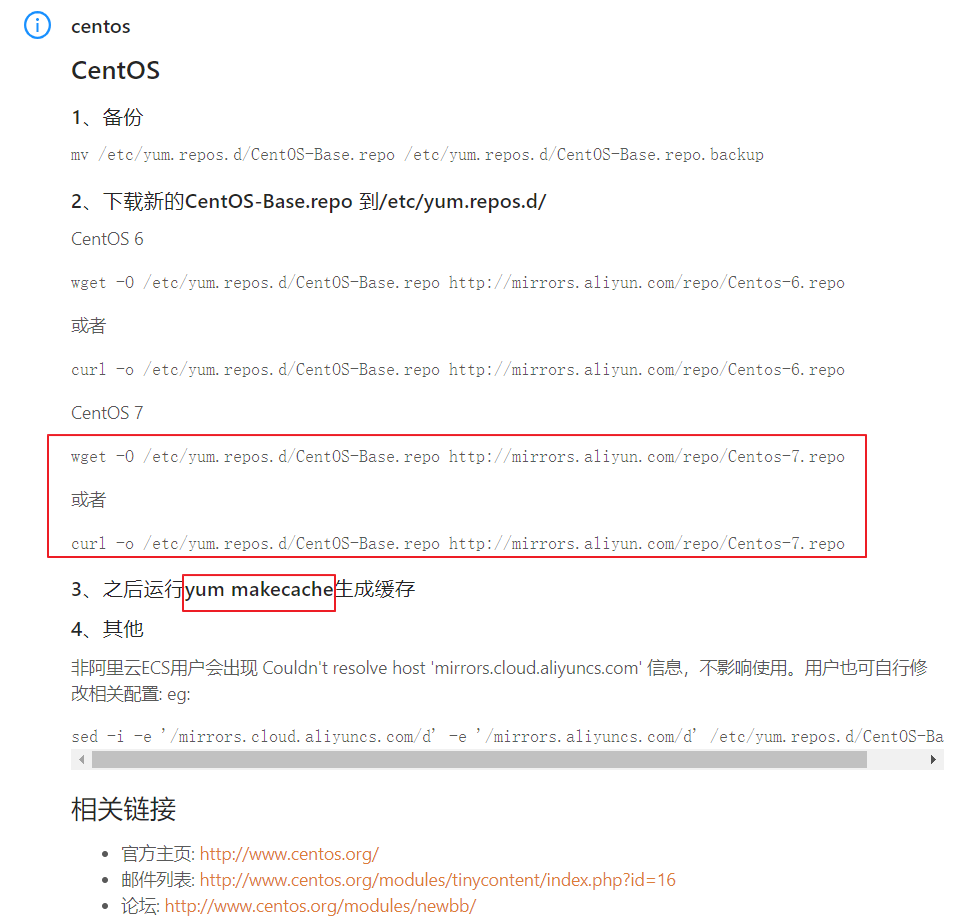
但是我在执行yum makecache时报错,报错信息如下:
Loaded plugins: fastestmirror, langpacks, priorities

Repository epel is listed more than once in the configuration

Cleaning repos: base epel extras updates

Cleaning up everything

Maybe you want: rm -rf /var/cache/yum, to also free up space taken by orphaned data from disabled or removed repos

Cleaning up list of fastest mirrors

[root@hadoop01 yum.repos.d]# yum makecache

Loaded plugins: fastestmirror, langpacks, priorities

Repository epel is listed more than once in the configuration

Determining fastest mirrors

 * base: mirrors.aliyun.com

 * extras: mirrors.aliyun.com

 * updates: mirrors.aliyun.com

http://mirrors.aliyun.com/centos/%24releasever/os/x86_64/repodata/repomd.xml: [Errno 14] HTTP Error 404 - Not Found

Trying other mirror.

To address this issue please refer to the below wiki article

https://wiki.centos.org/yum-errors

If above article doesn't help to resolve this issue please use https://bugs.centos.org/.

http://mirrors.aliyuncs.com/centos/%24releasever/os/x86_64/repodata/repomd.xml: [Errno 12] Timeout on http://mirrors.aliyuncs.com/centos/$releasever/os/x86_64/repodata/repomd.xml: (28, 'Connection timed out after 30000 milliseconds')

Trying other mirror.

http://mirrors.cloud.aliyuncs.com/centos/%24releasever/os/x86_64/repodata/repomd.xml: [Errno 14] curl#6 - "Could not resolve host: mirrors.cloud.aliyuncs.com; Unknown error"

Trying other mirror.

http://mirrors.aliyuncs.com/centos/%24releasever/os/x86_64/repodata/repomd.xml: [Errno 12] Timeout on http://mirrors.aliyuncs.com/centos/$releasever/os/x86_64/repodata/repomd.xml: (28, 'Connection timed out after 30001 milliseconds')

Trying other mirror.

http://mirrors.aliyuncs.com/centos/%24releasever/os/x86_64/repodata/repomd.xml: [Errno 12] Timeout on http://mirrors.aliyuncs.com/centos/$releasever/os/x86_64/repodata/repomd.xml: (28, 'Connection timed out after 30001 milliseconds')

Trying other mirror.

http://mirrors.aliyuncs.com/centos/%24releasever/os/x86_64/repodata/repomd.xml: [Errno 12] Timeout on http://mirrors.aliyuncs.com/centos/$releasever/os/x86_64/repodata/repomd.xml: (28, 'Connection timed out after 30001 milliseconds')

Trying other mirror.

http://mirrors.aliyuncs.com/centos/%24releasever/os/x86_64/repodata/repomd.xml: [Errno 12] Timeout on http://mirrors.aliyuncs.com/centos/$releasever/os/x86_64/repodata/repomd.xml: (28, 'Connection timed out after 30001 milliseconds')

Trying other mirror.

http://mirrors.aliyuncs.com/centos/%24releasever/os/x86_64/repodata/repomd.xml: [Errno 12] Timeout on http://mirrors.aliyuncs.com/centos/$releasever/os/x86_64/repodata/repomd.xml: (28, 'Connection timed out after 30001 milliseconds')

Trying other mirror.

...
【解决方法】
在网上找了好多帖子,都没能解决我的问题,后来看到是HTTP请求失败,尝试本地访问之前wget下来的 CentOS-Base.repo 发现其中的:
http://mirrors.aliyun.com/centos/$releasever/os/$basearch/
等URL通过http的形式根本无法访问,此时将变量$releasever改为7(我的系统是centos 7),发现可以访问了,顺便将所有的变量$releasever都改为7。感觉这个变量$releasever根本就没起作用呀。
改完之后,执行yum clean all 以及 yum makecache 成功。
oaded plugins: fastestmirror, langpacks

Determining fastest mirrors

 * base: mirrors.aliyun.com

 * extras: mirrors.aliyun.com

 * updates: mirrors.aliyun.com

base                                                                                                                 | 3.6 kB  ::

extras                                                                                                               | 3.4 kB  ::

updates                                                                                                              | 3.4 kB  ::

(/): base/x86_64/group_gz                                                                                         |  kB  ::

(/): base/x86_64/primary_db                                                                                       | 6.0 MB  ::

(/): base/x86_64/filelists_db                                                                                     | 7.1 MB  ::

(/): base/x86_64/other_db                                                                                         | 2.6 MB  ::

(/): extras/x86_64/prestodelta                                                                                    |   kB  ::

(/): extras/x86_64/primary_db                                                                                     |  kB  ::

(/): extras/x86_64/other_db                                                                                       |  kB  ::

(/): extras/x86_64/filelists_db                                                                                   |  kB  ::

(/): updates/x86_64/prestodelta                                                                                   |  kB  ::

(/): updates/x86_64/filelists_db                                                                                 | 5.2 MB  ::

(/): updates/x86_64/other_db                                                                                     |  kB  ::

(/): updates/x86_64/primary_db                                                                                   | 7.4 MB  ::

Metadata Cache Created
为centos7配置阿里yum源遇到的问题以及解决方法的更多相关文章
- centos7配置阿里yum源
首先刚刚安装完的centos并不像Ubuntu系统那样有很多的源来可以供您使用 所以我们需要通过下载阿里云的yum源在下载epel-release.noarch扩展包就可以了 操作如下: 1.首先这是 ...
- 配置阿里yum源,设置命令
配置阿里yum源 #linux的软件包管理 安装 软件的方式有三种 .源代码编译安装() .下载python3的源代码 .解压缩源代码 .进入源代码目录,开始编译安装 .配置环境变量 .yum方式安装 ...
- CentOS7 配置163 yum源(详细步骤)
CentOS7 配置163 yum源 1)下载repo文件 wget http://mirrors.163.com/.help/CentOS7-Base-163.repo 2)备份并替换系统的r ...
- 虚拟机centos7配置本地yum源
在虚拟机中要使用yum命令,就要先配置一下yum源,下面就分享一下这个过程: 1. 挂载iso到vmware,首先得确保CD/DVD连接到镜像.可以这样操作 2. 执行下面的命令 # mkdir /m ...
- CentOS7使用阿里yum源安装Docker
yum install -y yum-utils device-mapper-persistent-data lvm2安装所需的包 # yum-config-manager --add-repo ht ...
- centos7配置国内yum源
文章目录 1.什么是yum仓库? 2.yum仓库配置 2.1.阿里镜像仓库配置 2.1.1.配置步骤 2.1.2.epel源 安装和配置 2.1.3.查看yum源 2.2.配置 清华大学镜像仓库 1. ...
- 详解centos7配置本地yum源的方法
近在使用虚拟机时遇到一些麻烦,因为公司内部有网络管理,所以vm连接不上外网,yum无法安装软件,怎么解决呢?–使用iso做本地yum源,可以解决大部份的包安装. vm安装的是centos7. 1.挂载 ...
- centos 7下配置阿里yum源
1.打开centos的yum文件夹 cd /etc/yum.repos.d/ 2.用wget下载repo文件 wget http://mirrors.aliyun.com/repo/Centos-7. ...
- CentOS7配置本地Yum源
从CentOS7官网下载DVD中存在需要的大部分软件,所以在没有网络的情况下可以配置yum源为本地的DVD,下载速度快,软件稳定.1. 如果使用虚拟机,那么就在虚拟机中挂载DVD的iso文件.2. 使 ...
随机推荐
- VBA switch语句
当用户想要根据Expression的值执行一组语句时,使用Switch Case语句. 每个值被称为一个”情况”,并根据每种情况变量接通测试.如果测试表达式与用户指定的任何Case不匹配,则执行Cas ...
- 步步截图的SMM框架入门实战指引(SpringBoot、Mybatis Plus、Maven)
前提是对spring.springmvc.mybatis有初步学习和理解,因为要全部讲这些框架的知识点太多了,自己学习,这里是实战示范(大部分人学了知识之后去实战会出现很多问题,所以出此教程) 开发环 ...
- 【转载】Sqlserver存储过程中使用Select和Set给变量赋值
Sqlserver存储过程是时常使用到的一个数据库对象,在存储过程中会使用到Declare来定义存储过程变量,定义的存储过程变量可以通过Set或者Select等关键字方法来进行赋值操作,使用Set对存 ...
- 虚拟机安装master,克隆slave0、slave1(多台机相连,网络匹配)
1.在虚拟机中创建一个名叫master的主机 2.创建成功后,打开编辑选项——虚拟网络网络编辑器,填网关 3.打开终端,进入root权限,编写命令 设置虚拟机DNS 4.给master网络配置好后,克 ...
- 【python cookbook】找出序列中出现次数最多的元素
问题 <Python Cookbook>中有这么一个问题,给定一个序列,找出该序列出现次数最多的元素.例如: words = [ 'look', 'into', 'my', 'eyes', ...
- C++——流类库和输入/输出
前言 数据是怎么写道磁盘的? 代码里面我们一个读写调用似乎就能将数据从磁盘读写.仿佛代码是直接和磁盘打交道.以我们最常见的笔记本.或台式机的磁盘SATA盘为例,其受南桥上ATA控制器支配,这里面传输的 ...
- 数据库管理工具-Navicat Premium 12
首先感谢下github上大佬,我才能使用这个软件.也可以直接浏览https://github.com/DoubleLabyrinth/navicat-keygen进行安装,非常详细. 1.https: ...
- 无法访问此网站 ERR_CONTENT_DECODING_FAILED
这个错误挺少见的. 百度了下: 1,说是文件编码格式不正确: 2,说是Nginx的压缩和tomcat的压缩冲突了,关闭gzip压缩: 3,……………… 不管是哪一种情况,都是编码问题,所以逐一排查,根 ...
- Java学习笔记——第2篇
Java程序的基本规则 Java程序的组织形式:纯粹的面向对象的程序设计语言,所以Java程序必须以类的形式存在,类是Java程序的最小程序单位,Java程序不允许可执行语句.方法等成分独立存在,所有 ...
- Mybatis3.0-[tp_28-29]-映射文件-resultMap_自定义结果集映射规则_及关联环境的搭建
笔记要点出错分析与总结工程组织 1.定义接口 EmployeeMapperPlus.java package com.dao; import com.bean.*; public interface ...