
nim_duilib(1)之第一个dui executable(including configure setting in vs2017)
before starting
- clone nim_duilib: https://github.com/netease-im/NIM_Duilib_Framework
- 迁出github的源码即可。 方法有两种: A: 使用 Github Desktop 迁出; B: 使用命令 git clone https://github.com/netease-im/NIM_Duilib_Framework
- install VS2017: you could get the install package at here or there
lets go
You could build the a demo of directUI with nim_duilib framework if these upon have already got ready.
Or you could do it from the official tutorial according to here
stage 1
- create a windows 桌面应用程序 项目。
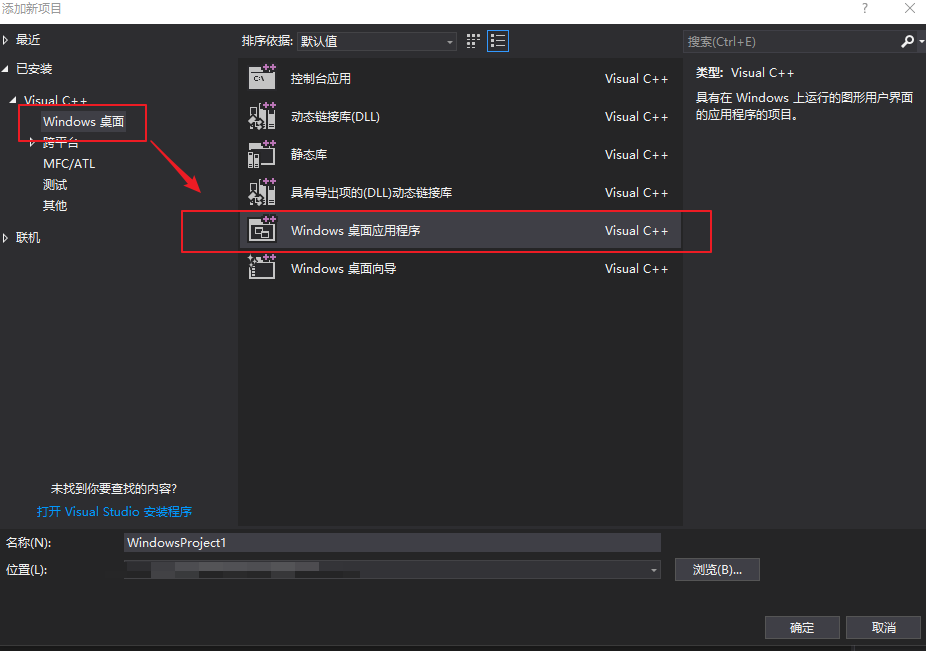
- my program's name is demo_xml.
stage 2
- open the demo_xml.cpp file
- delete other code but the following:
#include "framework.h"

int APIENTRY wWinMain(_In_ HINSTANCE hInstance,

                     _In_opt_ HINSTANCE hPrevInstance,

                     _In_ LPWSTR    lpCmdLine,

                     _In_ int       nCmdShow)

{

    UNREFERENCED_PARAMETER(hPrevInstance);

    UNREFERENCED_PARAMETER(lpCmdLine);

      return 0;

}
stage 3
open the demo_xml folder and build a folder named kit.
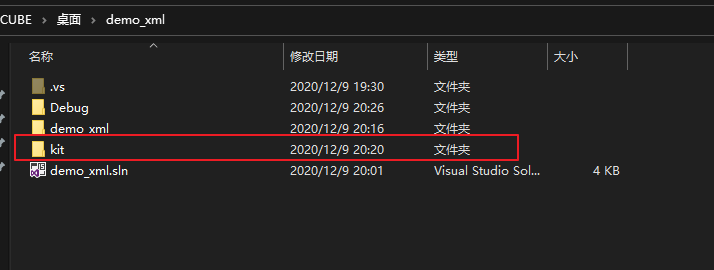
copy base, build and duilib folders which are from NIM_Duilib_Framework folder to kit foder.

(alternative)go back to the demo_xml solution in vs2017, and build an folder named kit .
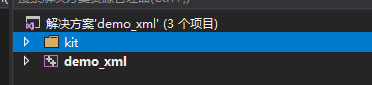
add the base and duilib projects from the kit folder into the demo_xml solution.

set the base and duilib projects' properties:
| name | value |
|---|---|
| 输出目录 | $(SolutionDir)$(Configuration)| |
| 中间目录 | $(Configuration)| |
 |
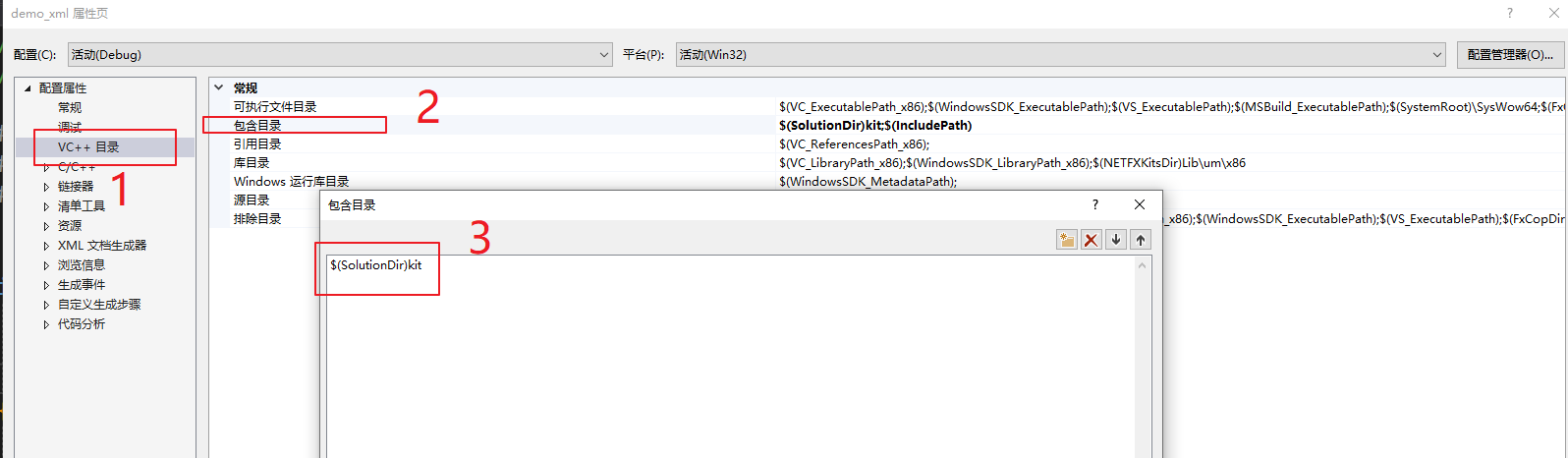
- set the demo_xml project's including path, the value is the following:
$(SolutionDir)kit
stage 4
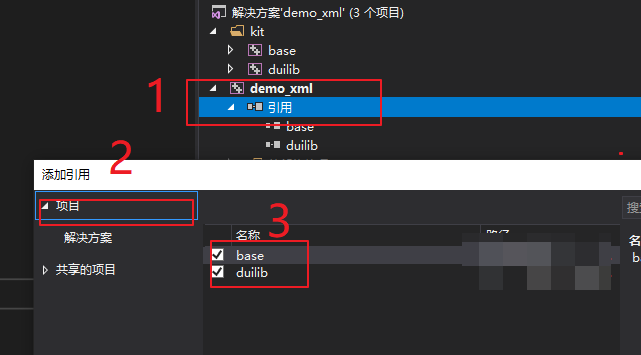
go back to the demo_xml, 引用项目base和duilib
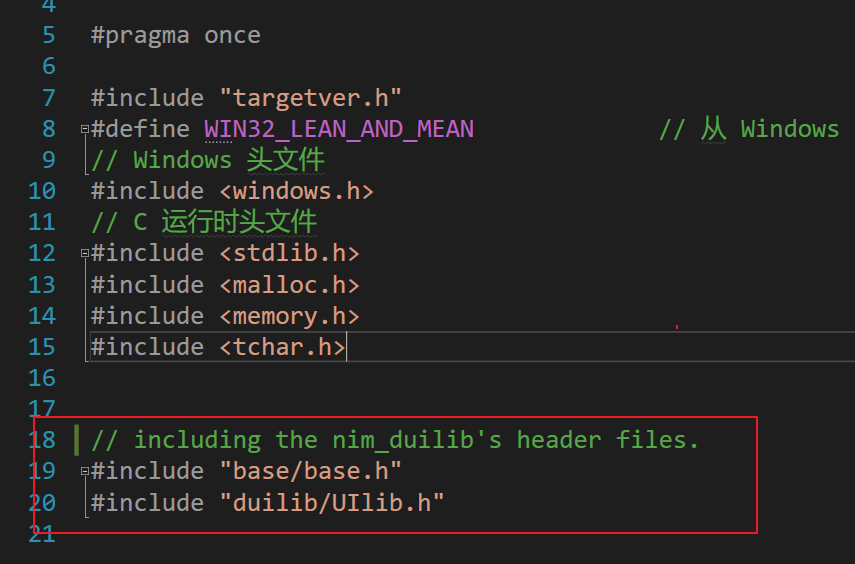
including the header files in the framework.h file:
// including the nim_duilib's header files.

#include "base/base.h"

#include "duilib/UIlib.h"
- build a new header file, constdef.h, whose file type is .h , and the content is the following :
#pragma once

enum ThreadId

{

	kThreadUI

};
stage 5
- create a new class, named MainThread.
- copy the following code to the MainThread.h:
#pragma once

#include "framework.h"

class MainThread : public nbase::FrameworkThread

{

public:

	MainThread() : nbase::FrameworkThread("MainThread") {}

	virtual ~MainThread() {}

private:

	virtual void Init() override;

	virtual void Cleanup() override;

};
- and the MainThread.cpp's content is the following:
#include "MainThread.h"

#include "constdef.h"

#include "BasicForm.h"

#include "base/win32/path_util.h"

//

//	@brief:

//

void MainThread::Init()

{

	nbase::ThreadManager::RegisterThread(kThreadUI);

	// 获取资源路径,初始化全局参数

	std::wstring theme_dir = nbase::win32::GetCurrentModuleDirectory();

#ifdef _DEBUG

	// Debug 模式下使用本地文件夹作为资源

	// 默认皮肤使用 resources\\themes\\default

	// 默认语言使用 resources\\lang\\zh_CN

	// 如需修改请指定 Startup 最后两个参数

	ui::GlobalManager::Startup(theme_dir + L"resources\\", ui::CreateControlCallback(), false);

#else

	// Release 模式下使用资源中的压缩包作为资源

	// 资源被导入到资源列表分类为 THEME,资源名称为 IDR_THEME

	// 如果资源使用的是本地的 zip 文件而非资源中的 zip 压缩包

	// 可以使用 OpenResZip 另一个重载函数打开本地的资源压缩包

	ui::GlobalManager::OpenResZip(MAKEINTRESOURCE(IDR_THEME), L"THEME", "");

	// ui::GlobalManager::OpenResZip(L"resources.zip", "");

	ui::GlobalManager::Startup(L"resources\\", ui::CreateControlCallback(), false);

#endif

	// 创建一个默认带有阴影的居中窗口

	BasicForm* window = new BasicForm();

	window->Create(NULL, BasicForm::kClassName.c_str(), WS_OVERLAPPEDWINDOW & ~WS_MAXIMIZEBOX, 0);

	window->CenterWindow();

	window->ShowWindow();

}

//

//	@brief:

//

void MainThread::Cleanup()

{

	ui::GlobalManager::Shutdown();

	SetThreadWasQuitProperly(true);

	nbase::ThreadManager::UnregisterThread();

}
stage 6
- establish a new class, named BasicForm.
- BasicForm.h:
#pragma once

#include "framework.h"

class ui::WindowImplBase;

class BasicForm : public ui::WindowImplBase

{

public:

	BasicForm() {}

	virtual ~BasicForm() {}

	/**

	 * 一下三个接口是必须要覆写的接口,父类会调用这三个接口来构建窗口

	 * GetSkinFolder		接口设置你要绘制的窗口皮肤资源路径

	 * GetSkinFile			接口设置你要绘制的窗口的 xml 描述文件

	 * GetWindowClassName	接口设置窗口唯一的类名称

	 */

	virtual std::wstring GetSkinFolder() override;

	virtual std::wstring GetSkinFile() override;

	virtual std::wstring GetWindowClassName() const override;

	/**

	 * 收到 WM_CREATE 消息时该函数会被调用,通常做一些控件初始化的操作

	 */

	virtual void InitWindow() override;

	/**

	 * 收到 WM_CLOSE 消息时该函数会被调用

	 */

	virtual LRESULT OnClose(UINT uMsg, WPARAM wParam, LPARAM lParam, BOOL& bHandled);

	static const std::wstring kClassName;

};
- BasicForm.cpp:
#include "BasicForm.h"

const std::wstring BasicForm::kClassName = L"Basic";

//

//	@brief:

//

std::wstring BasicForm::GetSkinFolder()

{

	return L"basic";

}

//

//	@brief:

//

std::wstring BasicForm::GetSkinFile()

{

	return L"basic.xml";

}

//

//	@brief:

//

std::wstring BasicForm::GetWindowClassName() const

{

	return kClassName;

}

//

//	@brief:

//

void BasicForm::InitWindow()

{

}

//

//	@brief:

//

LRESULT BasicForm::OnClose(UINT uMsg, WPARAM wParam, LPARAM lParam, BOOL& bHandled)

{

	PostQuitMessage(0L);

	return __super::OnClose(uMsg, wParam, lParam, bHandled);

}
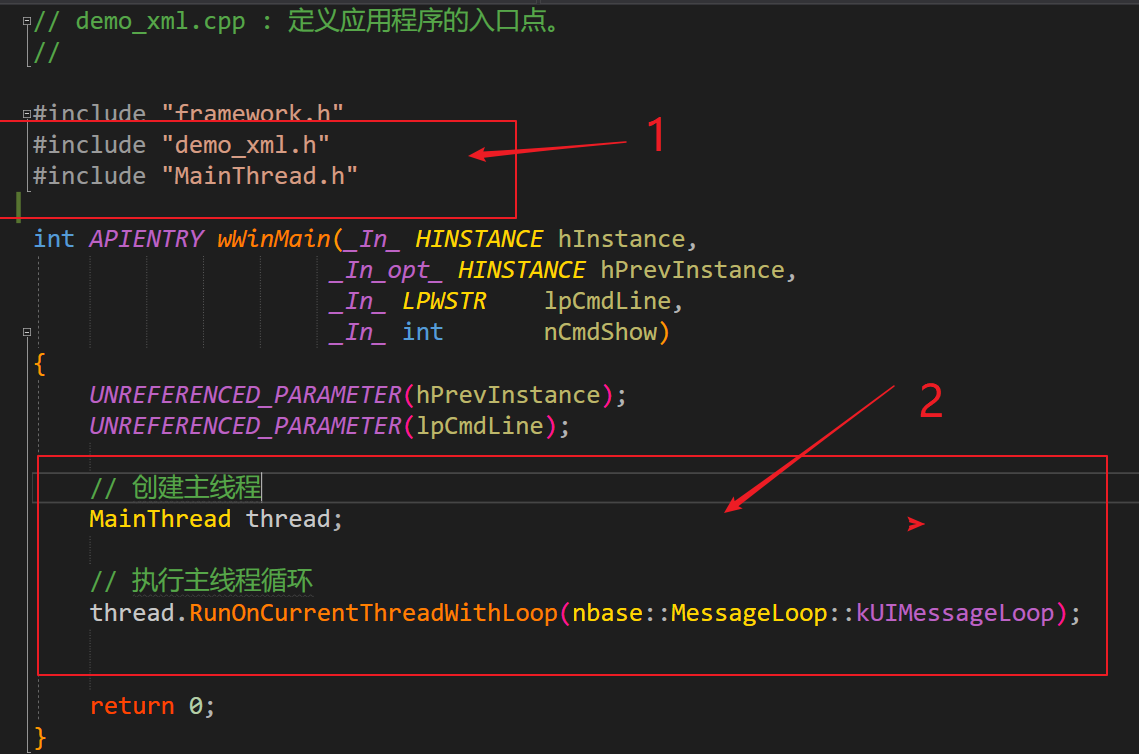
- go back to demo_xml.cpp, then write the following code:
#include "demo_xml.h"

#include "MainThread.h"
- in the demo_xml.cpp, you should add the following code in the wWinMain function between UNREFERENCED_PARAMETER(lpCmdLine); and return 0; :
	// 创建主线程

	MainThread thread;

	// 执行主线程循环

	thread.RunOnCurrentThreadWithLoop(nbase::MessageLoop::kUIMessageLoop);
stage 7
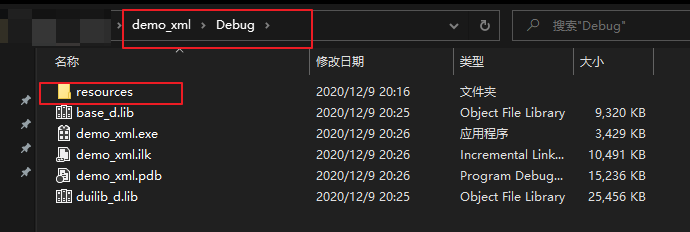
- back to the **NIM_Duilib_Framework ** folder, open the bin folder, and copy the resources to the demo_xml\Debug.
stage 8
build the demo_xml project.
without any error, you will get the first duirectUI demo, demo_xml.exe, where is the demo_xml\debug folder.

then you could launch it. Congratulations.
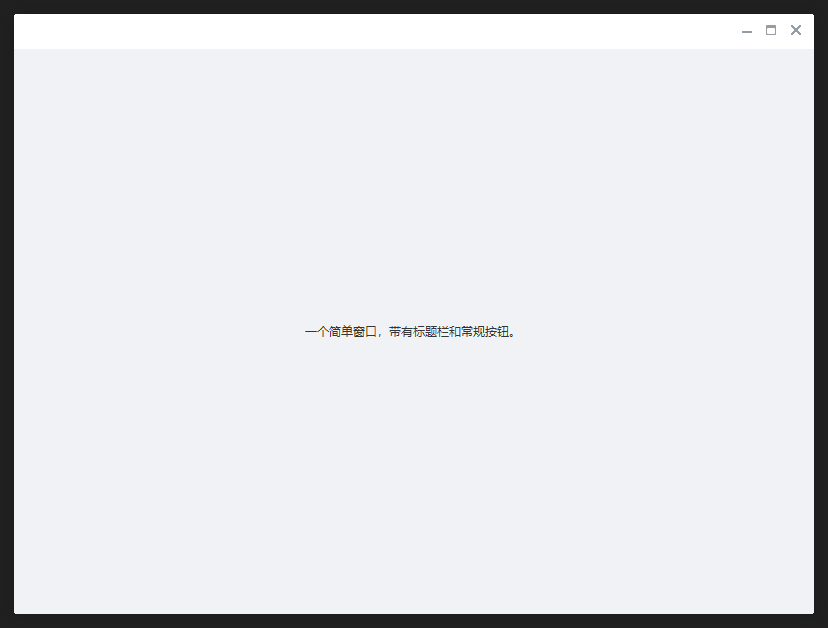
global.xml
global.xml文件源码
<?xml version="1.0" encoding="UTF-8"?>

<Global>

    <!--所有字体-->

    <Font id="system_12" name="system" size="12" default="true"/>

    <Font id="system_14" name="system" size="14"/>

    <Font id="system_16" name="system" size="16"/>

    <Font id="system_18" name="system" size="18"/>

    <Font id="system_20" name="system" size="20"/>

    <Font id="system_22" name="system" size="22"/>

    <Font id="system_bold_12" name="system" size="12" bold="true"/>

    <Font id="system_bold_14" name="system" size="14" bold="true"/>

    <Font id="system_bold_16" name="system" size="16" bold="true"/>

    <Font id="system_bold_18" name="system" size="18" bold="true"/>

    <Font id="system_bold_20" name="system" size="20" bold="true"/>

    <Font id="system_bold_22" name="system" size="22" bold="true"/>

    <Font id="arial_12" name="arial" size="12"/>

    <Font id="arial_14" name="arial" size="14"/>

    <Font id="arial_16" name="arial" size="16"/>

    <Font id="arial_18" name="arial" size="18"/>

    <Font id="arial_20" name="arial" size="20"/>

    <Font id="arial_22" name="arial" size="22"/>

    <Font id="arial_bold_12" name="arial" size="12" bold="true"/>

    <Font id="arial_bold_14" name="arial" size="14" bold="true"/>

    <Font id="arial_bold_16" name="arial" size="16" bold="true"/>

    <Font id="arial_bold_18" name="arial" size="18" bold="true"/>

    <Font id="arial_bold_20" name="arial" size="20" bold="true"/>

    <Font id="arial_bold_22" name="arial" size="22" bold="true"/>

    <Font id="system_underline_12" name="system" size="12" underline="true"/>

    <Font id="system_underline_14" name="system" size="14" underline="true"/>

    <Font id="system_underline_16" name="system" size="16" underline="true"/>

    <Font id="system_underline_18" name="system" size="18" underline="true"/>

    <Font id="system_underline_20" name="system" size="20" underline="true"/>

    <Font id="system_underline_22" name="system" size="22" underline="true"/>

    <!--一些常规固定颜色-->

    <TextColor name="white" value="#ffffffff"/>

    <TextColor name="black" value="#ff000000"/>

    <TextColor name="darkcolor" value="#ff333333"/>

    <TextColor name="lightcolor" value="#ff888888"/>

    <TextColor name="gray" value="#ff8e99a6"/>

    <TextColor name="light_gray" value="#ffa8a8a8"/>

    <TextColor name="dark_gray" value="#ff72797f"/>

    <TextColor name="green" value="#ff00bb96"/>

    <TextColor name="light_green" value="#ff21c7a6"/>

    <TextColor name="blue" value="#ff006DD9"/>

    <TextColor name="red" value="#ffC63535"/>

    <!--文字色值,不带透明层-->

    <TextColor name="textdefaultcolor" value="#ff333333"/>

    <TextColor name="textdefaultdisablecolor" value="#ffa1aebc"/>

    <!--窗口常用背景色-->

    <TextColor name="bk_main_wnd_title" value="#ff238efa"/>

    <TextColor name="bk_main_wnd_search" value="#ff1e7ad7"/>

    <TextColor name="bk_wnd_darkcolor" value="#fff0f2f5"/>

    <TextColor name="bk_wnd_lightcolor" value="#ffffffff"/>

    <TextColor name="bk_menuitem_hovered" value="#ffe1e6eb"/>

    <TextColor name="bk_menuitem_selected" value="#ffced4db"/>

    <TextColor name="bk_listitem_hovered" value="#fff0f2f5"/>

    <TextColor name="bk_listitem_selected" value="#ffe4e7eb"/>

    <!--置顶项的背景颜色-->

    <TextColor name="bk_topitem_normal" value="#ffffffe0"/>

    <TextColor name="bk_topitem_hovered" value="#ffffffeb"/>

    <TextColor name="bk_topitem_selected" value="#fffafacd"/>

    <!--进度条专用-->

    <TextColor name="bk_progress_bk" value="#ffe3ecf5"/>

    <TextColor name="bk_progress_progress" value="#ff2aceae"/>

    <!--背景色值,半透明-->

    <TextColor name="transbkblack" value="#80000000"/>

    <!--第一级分割线,较深-->

    <TextColor name="splitline_level1" value="#ffd2d4d6"/>

    <!--第二级分割线,较浅-->

    <TextColor name="splitline_level2" value="#ffebedf0"/>

    <!--调色板色值-->

    <TextColor name="color_palette1" value="#ffff2600"/>

    <TextColor name="color_palette2" value="#ffffeb00"/>

    <TextColor name="color_palette3" value="#ff61ed00"/>

    <TextColor name="color_palette4" value="#ff00b4ff"/>

    <TextColor name="color_palette5" value="#ffa100ff"/>

    <TextColor name="color_palette6" value="#ff000000"/>

    <TextColor name="color_palette7" value="#ff545454"/>

    <TextColor name="color_palette8" value="#ffa8a8a8"/>

    <TextColor name="color_palette9" value="#ffffffff"/>

    <!--字体大小-->

    <Class name="font_title" font="system_14"/>

    <!--标题栏-->

    <Class name="caption" height="34" bkimage="file='../public/caption/caption_public.png' corner='0,0,0,1'" padding="10,0,5,0" />

    <!--滚动条-->

    <Class name="vscrollbar" width="14" fadealpha="true" thumbnormalimage="file='../public/vscrollbar/thumb_normal.png'  corner='0,8,0,8'" thumbhotimage="file='../public/vscrollbar/thumb_hovered.png' corner='0,8,0,8'" bkhotimage="file='../public/vscrollbar/bk_hovered.png' corner='0,4,0,4'" showbutton1="false" showbutton2="false" />

    <Class name="hscrollbar" height="14" fadealpha="true" thumbnormalimage="file='../public/hscrollbar/thumb_normal.png' corner='8,0,8,0'" thumbhotimage="file='../public/hscrollbar/thumb_hovered.png' corner='8,0,8,0'" bkhotimage="file='../public/hscrollbar/bk_hovered.png' corner='4,0,4,0'" showbutton1="false" showbutton2="false"/>

    <!--单选框-->

    <Class name="option" selectednormalimage="../public/option/selected.png" selectedhotimage="../public/option/selectedhover.png" selectedpushedimage="../public/option/selectedhover.png"/>

    <Class name="circle_option" normalimage="../public/option/circle_unselected.png" disabledimage="../public/option/circle_unselected_disabled.png"/>

    <Class name="circle_option_2" height="18" textpadding="25,0,0,0" font="system_12" normaltextcolor="darkcolor" normalimage="file='../public/option/circle_unselected.png' dest='0,0,18,18'" selectednormalimage="file='../public/option/circle_selected.png' dest='0,0,18,18'"/>

    <!--复选框-->

    <Class name="checkbox_font12" height="16" textpadding="20,0,0,0" font="system_12" normaltextcolor="darkcolor" normalimage="file='../public/CheckBox/check_no.png' dest='0,0,16,16'" disabledimage="file='../public/CheckBox/check_no.png' dest='0,0,16,16' fade='80'" selectednormalimage="file='../public/CheckBox/check_yes.png' dest='0,0,16,16'" selecteddisabledimage="file='../public/CheckBox/check_yes.png' dest='0,0,16,16' fade='80'"/>

    <Class name="checkbox_font14" height="20" textpadding="20,0,0,0" font="system_14" normaltextcolor="darkcolor" normalimage="file='../public/CheckBox/check_no.png' dest='0,2,16,18'" disabledimage="file='../public/CheckBox/check_no.png' dest='0,2,16,18' fade='80'" selectednormalimage="file='../public/CheckBox/check_yes.png' dest='0,2,16,18'" selecteddisabledimage="file='../public/CheckBox/check_yes.png' dest='0,2,16,18' fade='80'"/>

    <Class name="checkbox_green" normalimage="file='../public/CheckBox/check_green_no.png'" disabledimage="file='../public/CheckBox/check_green_no.png' fade='80'" selectednormalimage="file='../public/CheckBox/check_green_yes.png'" selecteddisabledimage="file='../public/CheckBox/check_green_yes.png' fade='80'"/>

    <!--按钮-->

    <Class name="btn_global_blue_80x30" font="system_bold_14" normaltextcolor="white" normalimage="file='../public/button/btn_global_blue_80x30_normal.png'" hotimage="file='../public/button/btn_global_blue_80x30_hovered.png'" pushedimage="file='../public/button/btn_global_blue_80x30_pushed.png'" disabledimage="file='../public/button/btn_global_blue_80x30_normal.png' fade='30'"/>

    <Class name="btn_global_white_80x30" font="system_bold_14" normaltextcolor="dark_gray" normalimage="file='../public/button/btn_global_white_80x30_normal.png'" hotimage="file='../public/button/btn_global_white_80x30_hovered.png'" pushedimage="file='../public/button/btn_global_white_80x30_pushed.png'" disabledimage="file='../public/button/btn_global_white_80x30_normal.png' fade='128'"/>

    <Class name="btn_global_red_80x30" font="system_bold_14" normaltextcolor="white" normalimage="file='../public/button/btn_global_red_80x30_normal.png'" hotimage="file='../public/button/btn_global_red_80x30_hovered.png'" pushedimage="file='../public/button/btn_global_red_80x30_pushed.png'" disabledimage="file='../public/button/btn_global_red_80x30_normal.png' fade='80'"/>

    <!--窗口右上角按钮 灰色版 -->

    <Class name="btn_wnd_min" width="auto" height="auto" forenormalimage="file='../public/button/btn_wnd_gray_min.png' dest='4,4,16,16'" normalimage="" hotimage="../public/button/btn_wnd_gray_min_hovered.png" pushedimage="../public/button/btn_wnd_gray_min_pushed.png"/>

    <Class name="btn_wnd_close" width="20" height="20" normalimage="file='../public/button/btn_wnd_gray_close.png' dest='4,4,16,16'" hotimage="../public/button/btn_wnd_white_close_hovered.png" pushedimage="../public/button/btn_wnd_white_close_pushed.png" fadehot="false"/>

    <Class name="btn_wnd_max" width="auto" height="auto" forenormalimage="file='../public/button/btn_wnd_gray_max.png' dest='4,4,16,16'" normalimage="" hotimage="../public/button/btn_wnd_gray_max_hovered.png" pushedimage="../public/button/btn_wnd_gray_max_pushed.png"/>

    <Class name="btn_wnd_restore" width="auto" height="auto" forenormalimage="file='../public/button/btn_wnd_gray_restore.png' dest='4,4,16,16'" normalimage="" hotimage="../public/button/btn_wnd_gray_restore_hovered.png" pushedimage="../public/button/btn_wnd_gray_restore_pushed.png"/>

    <Class name="btn_wnd_settings" width="auto" height="auto" forenormalimage="file='../public/button/btn_wnd_settings.png' source='1,1,21,21'" hotimage="../public/button/btn_wnd_bk_hovered.png" pushedimage="../public/button/btn_wnd_bk_pushed.png"/>

    <!--窗口右上角按钮 白色版 -->

    <Class name="btn_wnd_white_min" width="auto" height="auto" forenormalimage="file='../public/button/btn_wnd_white_min.png'" normalimage="" hotimage="../public/button/btn_wnd_white_min_hovered.png" pushedimage="../public/button/btn_wnd_white_min_pushed.png"/>

    <Class name="btn_wnd_white_close" width="auto" height="auto" forenormalimage="file='../public/button/btn_wnd_white_close.png'" normalimage="" hotimage="../public/button/btn_wnd_white_close_hovered.png" pushedimage="../public/button/btn_wnd_white_close_pushed.png"/>

    <Class name="btn_wnd_white_max" width="auto" height="auto" forenormalimage="file='../public/button/btn_wnd_white_max.png' dest='4,4,16,16'" normalimage="" hotimage="../public/button/btn_wnd_white_max_hovered.png" pushedimage="../public/button/btn_wnd_white_max_pushed.png"/>

    <Class name="btn_wnd_white_menu" width="auto" height="auto" forenormalimage="file='../public/button/btn_wnd_white_menu.png' dest='4,5,16,15'" normalimage="" hotimage="../public/button/btn_wnd_white_menu_hovered.png" pushedimage="../public/button/btn_wnd_white_menu_pushed.png"/>

    <!--删除按钮通用样式-->

    <Class name="btn_delete" normalimage="file='../public/button/funcicon.png' source='0,0,26,26'" hotimage="file='../public/button/funcicon.png' source='31,0,57,26'" pushedimage="file='../public/button/funcicon.png' source='62,0,88,26'" disabledimage="file='../public/button/funcicon.png' source='93,0,119,26'"/>

    <Class name="btn_recycle" width="auto" height="auto" normalimage="file='../public/button/btn_recycle_normal.png'" hotimage="file='../public/button/btn_recycle_hovered.png'" pushedimage="file='../public/button/btn_recycle_pushed.png'" disabledimage="file='../public/button/btn_recycle_normal.png' fade='80'"/>

    <Class name="btn_refresh" width="auto" height="auto" normalimage="file='../public/button/btn_refresh_normal.png'" hotimage="file='../public/button/btn_refresh_hovered.png'" pushedimage="file='../public/button/btn_refresh_pushed.png'" disabledimage="file='../public/button/btn_refresh_normal.png' fade='80'"/>

    <Class name="btn_del_search" normalimage="../public/button/btn_del_search_normal_gray.png" hotimage="../public/button/btn_del_search_hover_gray.png" pushedimage="../public/button/btn_del_search_pushed_gray.png"/>

    <!--列表通用样式-->

    <Class name="list" bkcolor="bk_wnd_lightcolor" vscrollbar="true"/>

    <Class name="listitem" hotcolor="bk_listitem_hovered" pushedcolor="bk_listitem_selected" selectednormalcolor="bk_listitem_selected" fadehot="false"/>

    <Class name="list_topitem" normalcolor="bk_topitem_normal" hotcolor="bk_topitem_hovered" pushedcolor="bk_topitem_selected" selectednormalcolor="bk_topitem_selected" fadehot="false"/>

    <!--进度条通用样式, 注意进度条的值使用`_value`属性-->

    <Class name="progress_blue" valign="center" _value="0" bkimage="../public/progress/progress_blue_bg.png" height="3" width="stretch" hor="true" max="100" min="0" progressimage="../public/progress/progress_blue_fg.png"/>

    <Class name="slider_green" width="stretch" height="14" margin="4,0,0,0" valign="center" thumbsize="14,14" min="0" max="255" progressbarpadding="0,6,0,6" bkimage="file='../public/slider/slider_hor_bk.png' dest='0,6,1000,8'" progresscolor="bk_progress_progress" thumbnormalimage="../public/slider/slider_thumb.png"/>

    <!--菜单通用样式-->

    <Class name="menu" width="auto" height="auto" bkcolor="bk_wnd_lightcolor"/>

    <Class name="menu_element" padding="20,0,20,0" height="40" hotcolor="bk_menuitem_hovered" pushedcolor="bk_menuitem_selected" selectednormalcolor="bk_menuitem_selected"/>

    <Class name="menu_text" normaltextcolor="darkcolor" font="system_14" valign="center"/>

    <!--分割线通用样式-->

    <Class name="splitline_hor_level1" bkcolor="splitline_level1" height="1"/>

    <Class name="splitline_hor_level2" bkcolor="splitline_level2" height="1"/>

    <Class name="splitline_ver_level1" bkcolor="splitline_level1" width="1"/>

    <!--富文本控件通用样式-->

    <Class name="simple" multiline="false" autohscroll="true" wantreturnmsg="true" wanttab="false" rich="false" normaltextcolor="darkcolor" disabledtextcolor="textdefaultdisablecolor"/>

    <Class name="prompt" promptmode="true" promptcolor="light_gray"/>

    <Class name="edit" hotimage="file='../public/edit/edit1.png' corner='10,10,10,10'" focusedimage="file='../public/edit/edit2.png' corner='10,10,10,10'"/>

    <Class name="input" normalimage="file='../public/edit/edit0.png' corner='10,10,10,10'" hotimage="file='../public/edit/edit0.png' corner='10,10,10,10'" focusedimage="file='../public/edit/edit0.png' corner='10,10,10,10'" disabledimage="file='../public/edit/edit0.png' corner='10,10,10,10' fade='80'"/>

   <!--头像蒙版-->

    <Class name="icon_headimage_mask_40x40" width="40" height="40" bkimage="../public/headmask/icon_headimage_mask_40x40_normal.png"/>

</Global>
nim_duilib(1)之第一个dui executable(including configure setting in vs2017)的更多相关文章
- ASP.NET Core 中文文档 第二章 指南(3)用 Visual Studio 发布一个 Azure 云 Web 应用程序
原文:Getting Started 作者:Rick Anderson 翻译:谢炀(Kiler) 校对:孟帅洋(书缘).刘怡(AlexLEWIS).何镇汐 设置开发环境 安装最新版本的 Azure S ...
- 创建第一个Hiberntae工程
一.前言 很久之前已经对Hibernate有所了解,在项目中进行过简单的应用,基本了解hibernate的简单应用,没有深入的了解,来Shine公司快三个月了,公司的ORM框架就是用Hiberante ...
- 自己动手写一个简易对象关系映射,ORM(单例版和数据库池版)
准备知识 DBUtils模块 <<-----重点 DBUtils是Python的一个用于实现数据库连接池的模块 此连接池有两种连接模式: DBUtils提供两种外部接口: Persist ...
- 小姐姐教你定制一个Logstash Java Filter
Logstash是用来收集数据,解析处理数据,最终输出数据到存储组件的处理引擎.数据处理流程为: Logstash Java Filter 就是基于Logstash的Filter扩展API开发一个用J ...
- sqldeveloper
阅读文档:e12152-08 preferences 首选项,参数 panes 窗格 tabs 标签,选项卡 pin 别针,钉住 detach,move,dock 分离,移动,停靠 find data ...
- UI神器-SOUI
前言 在Windows平台上开发客户端产品是一个非常痛苦的过程,特别是还要用C++的时候.尽管很多语言很多方法都可以开发Windows桌面程序,目前国内流行的客户端产品都是C++开发的,比如QQ,YY ...
- Android Permission 访问权限大全(转)
程序执行需要读取到安全敏感项必需在androidmanifest.xml中声明相关权限请求, 完整列表如下: android.permission.ACCESS_CHECKIN_PROPERTIES允 ...
- .NET应用程序调试—原理、工具、方法
阅读目录: 1.背景介绍 2.基本原理(Windows调试工具箱..NET调试扩展SOS.DLL.SOSEX.DLL) 2.1.Windows调试工具箱 2.2..NET调试扩展包,SOS.DLL.S ...
- DirectUI 收集资料
1.[ZsUI]一步一步写个DirectUI.[连载贴] (http://tieba.baidu.com/p/1625954225) ps: 虽然是vb写的,也很简陋,不过有代码,并且作者每节都给出了 ...
随机推荐
- 【Plink】Error: Multiple instances of '_' in sample ID.?
目录 前言 原因 解决方法 方法一:修改样本名 方法二:修改--id-delim 方法三:加入--double_id或--const-fid参数 前言 将vcf转化为plink格式时,命令如下: pl ...
- 【GS文献】植物全基因组选择育种技术原理与研究进展
目录 1. 优势杂交育种预测 2. GS育种原理与模型算法 岭回归和LASSO回归 贝叶斯方法 GBLUP和RRBLUP 偏最小二乘法 支持向量机/支持向量回归 其他方法 3. 模型预测能力验证 4. ...
- Pacbio三代基因组组装简介
参考: 视频PPT来自欧易生物讲座:如何开启一个动植物基因组三代de novo项目?
- KVM原理
虚拟化是云计算的基础.简单的说,虚拟化使得在一台物理的服务器上可以跑多台虚拟机,虚拟机共享物理机的 CPU.内存.IO 硬件资源,但逻辑上虚拟机之间是相互隔离的.物理机我们一般称为宿主机(Host), ...
- “equals”有值 与 “==”存在 “equals”只是比较值是否相同,值传递,==地址传递,null==a,避免引发空指针异常,STRING是一个对象==null,对象不存在,str.equals("")对象存在但是包含字符‘''
原文链接:http://www.cnblogs.com/lezhou2014/p/3955536.html "equals" 与 "==" "equa ...
- 用原生CSS编写-怦怦跳的心
<!DOCTYPE html> <html> <head> <meta charset="utf-8"> <title> ...
- 自定义控件CustomAlertView
[记录][完整代码最下] 效果如下: 可行性分析: 由于系统自带的UIAlertView样式简单,只有两种样式,想要理想的样式就要自定义控件了 文件名取为:CustomAlertView 创建文件如下 ...
- 【编程思想】【设计模式】【行为模式Behavioral】策略模式strategy
Python版 转自https://github.com/faif/python-patterns/blob/master/behavioral/strategy.py #!/usr/bin/env ...
- Java中的对于多态的理解
一.什么是多态 面向对象的三大特性:封装.继承.多态 多态的定义:指允许不同类的对象对同一消息做出响应.即同一消息可以根据发送对象的不同而采用多种不同的行为方式.(发送消息就是函数调用) 实现多态的技 ...
- OAuth2.0实战:认证、资源服务异常自定义!
大家好,我是不才陈某~ 这是<Spring Security 进阶>的第4篇文章,往期文章如下: 实战!Spring Boot Security+JWT前后端分离架构登录认证! 妹子始终没 ...