
【OpenXml】Pptx的边框虚线转为WPF的边框虚线
安装Openxml sdk
首先,我们先安装nuget的需要的有关的Openxml sdk,我们开源了解析pptx的Openxml拍平层,下面两种方式都可以安装:
- nuget包管理器控制台:
Install-Package dotnetCampus.DocumentFormat.OpenXml.Flatten -Version 2.0.0
- csproj引用:
<PackageReference Include="dotnetCampus.DocumentFormat.OpenXml.Flatten" Version="2.0.0" />
解析Pptx
我这里用PPTX的7种直线,分别设置7种能够设置的虚线类型,PPTX的显示效果是这样的:
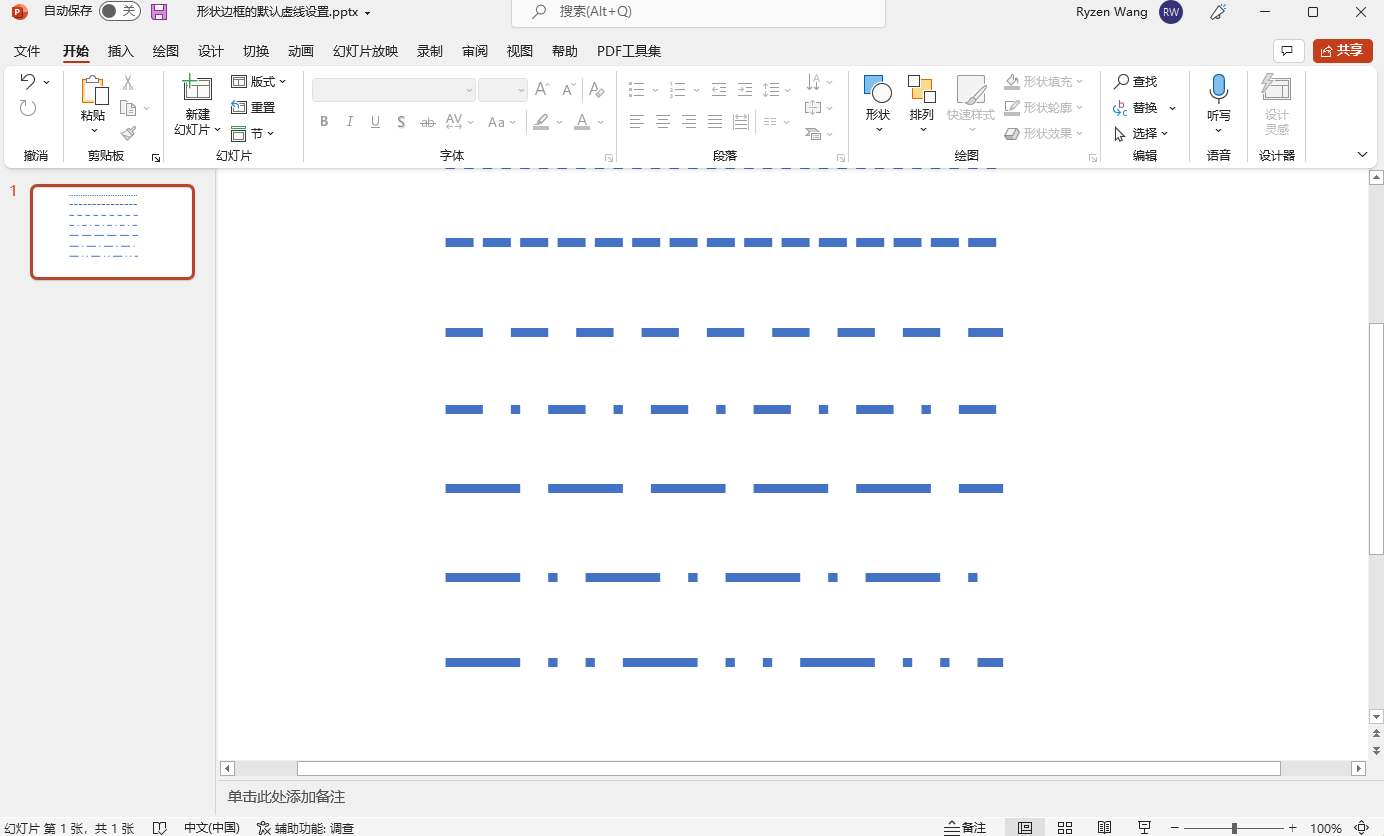
然后解析代码如下,解析主要逻辑部分:
        private void PptxToGeometry(string filePath)

        {

            if (!File.Exists(filePath) || !filePath.EndsWith(".pptx", StringComparison.OrdinalIgnoreCase))

            {

                return;

            }

            var lines = new List<Line>();

            using var presentationDocument = PresentationDocument.Open(filePath, false);

            var presentationPart = presentationDocument.PresentationPart;

            var presentation = presentationPart?.Presentation;

            var slideIdList = presentation?.SlideIdList;

            if (slideIdList == null)

            {

                return;

            }

            foreach (var slideId in slideIdList.ChildElements.OfType<SlideId>())

            {

                var slidePart = (SlidePart)presentationPart.GetPartById(slideId.RelationshipId);

                var slide = slidePart.Slide;

                foreach (var shapeProperties in slide.Descendants<ShapeProperties>())

                {

                    var presetGeometry = shapeProperties.GetFirstChild<PresetGeometry>();

                    if (presetGeometry != null && presetGeometry.Preset.HasValue)

                    {

                        if (presetGeometry.Preset == ShapeTypeValues.StraightConnector1)

                        {

                            var transform2D = shapeProperties.GetFirstChild<Transform2D>();

                            var extents = transform2D?.GetFirstChild<Extents>();

                            if (extents != null)

                            {

                                var width = new Emu(extents.Cx!.Value).ToPixel().Value;

                                var height = new Emu(extents.Cy!.Value).ToPixel().Value;

                                var presetDash = shapeProperties.GetFirstChild<Outline>()?.GetFirstChild<PresetDash>()?.Val;

                                var dashArray = GetDashArrayByPresetLineDashValues(presetDash);

                                var line = ConverterToGeometry( width, height, dashArray);

                                lines.Add(line);

                            }

                        }

                    }

                }

            }

            this.ListBox.ItemsSource = lines;

        }
PPTX映射成WPF虚线的方法:
        private DoubleCollection GetDashArrayByPresetLineDashValues(PresetLineDashValues presetLineDashValues)

        {

            DoubleCollection dashStyle = presetLineDashValues switch

            {

                PresetLineDashValues.Solid => new(),

                PresetLineDashValues.Dot => new() { 0, 2 },

                PresetLineDashValues.Dash => new() { 3, 3 },

                PresetLineDashValues.LargeDash => new() { 8, 3 },

                PresetLineDashValues.DashDot => new() { 3, 3, 1, 3 },

                PresetLineDashValues.LargeDashDot => new() { 7.5, 3.5, 1, 3.5 },

                PresetLineDashValues.LargeDashDotDot => new() { 8, 3, 1, 3, 1, 3 },

                PresetLineDashValues.SystemDash => new() { 3, 1 },

                PresetLineDashValues.SystemDot => new() { 1, 1 },

                PresetLineDashValues.SystemDashDot => new() { 2, 2, 0, 2 },

                PresetLineDashValues.SystemDashDotDot => new() { 2, 2, 0, 2 },

                _ => new DoubleCollection()

            };

            return dashStyle;

        }
最终绘制线条的方法:
        private Line ConverterToGeometry(double width, double height, DoubleCollection dashDoubleCollection)

        {

            var line = new Line

            {

                X1 = 0,

                Y1 = 0,

                X2 = width,

                Y2 = height,

                StrokeDashArray = dashDoubleCollection,

                Stroke = Stroke,

                StrokeThickness = StrokeThickness

            };

            return line;

        }
最终的效果:
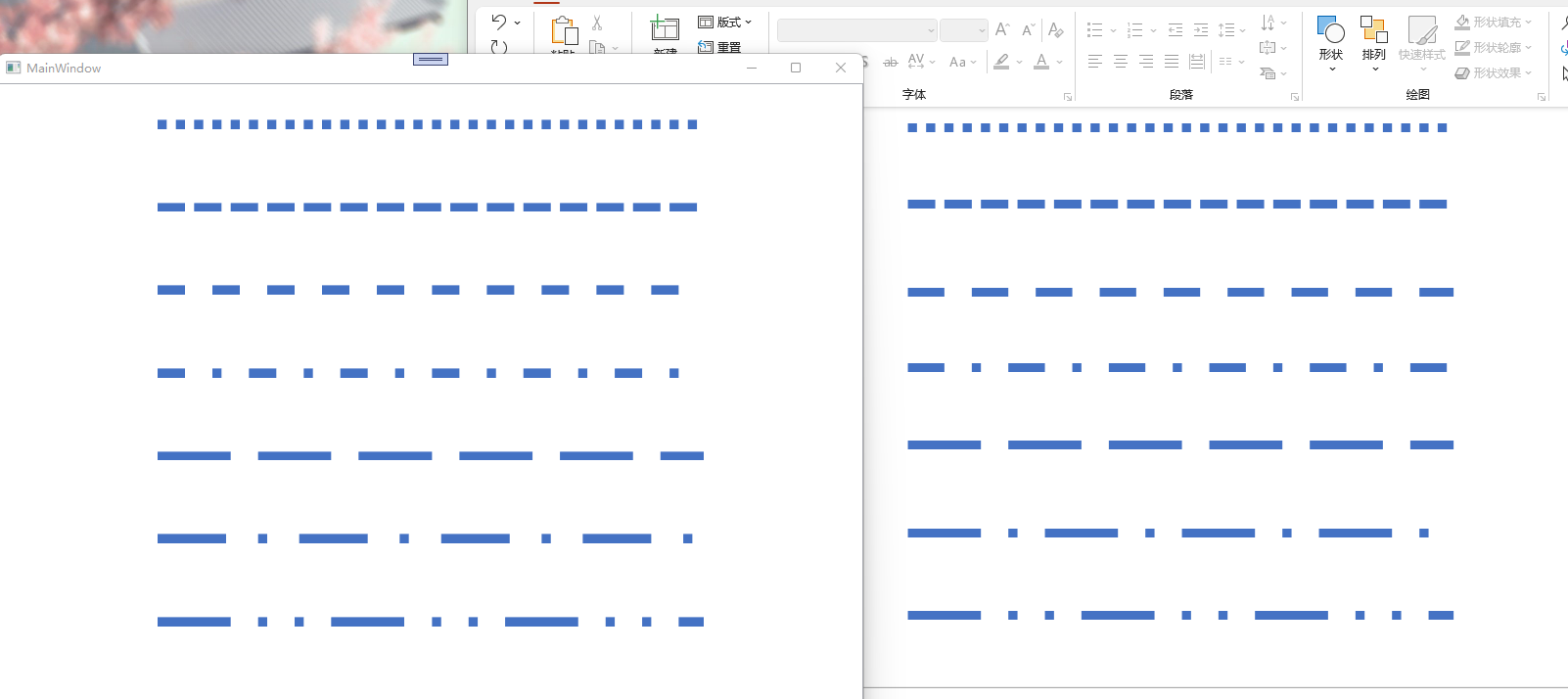
我们可以看到几乎是接近的效果了,当然你也可以根据我的代码去微调更精确的值,只需要稍微改下GetDashArrayByPresetLineDashValues方法内相对应的值即可
后话
实际上,openxml文档是给出了PresetDash的值的,大致如下:
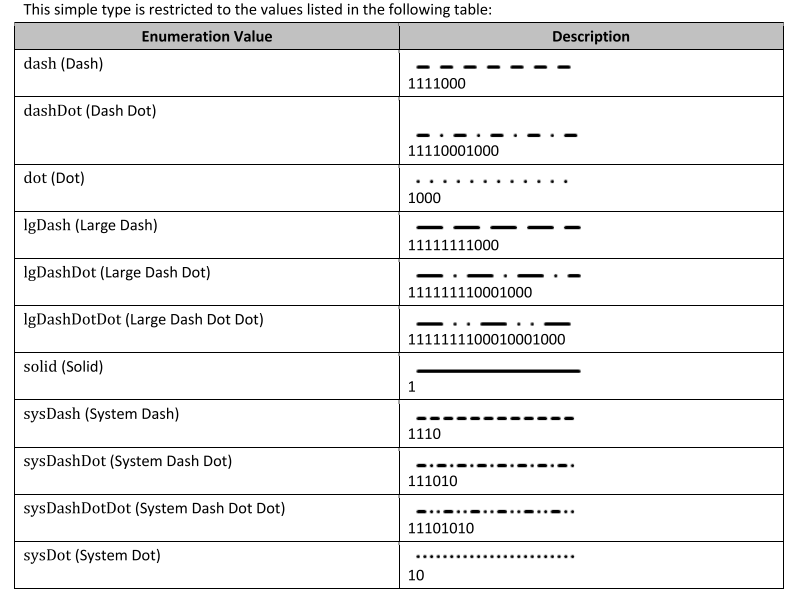
但是其值跟WPF的设置Dash的DoubleCollection不对应,因此以上的映射值都是我自己微调的
源码
BlogCodeSample/PptDashConverToWpfSample at main · ZhengDaoWang/BlogCodeSample
【OpenXml】Pptx的边框虚线转为WPF的边框虚线的更多相关文章
- Pptx的多路径形状转为WPF的Path
本文是将演示如何解析pptx文件的多路径的形状转换到WPF,绘制多个Shape的Path Shape Path 这是Pptx的[标注:弯曲曲线(无边框)]形状的OpenXml定义部分: <cal ...
- Pptx的形状转为WPF的Geometry
本文是将演示如何解析pptx文件的形状到WPF当中,并且绘制显示出来 安装Openxml sdk 首先,我们先安装nuget的openxml sdk,下面两种方式都可以安装: nuget包管理器控制台 ...
- 【Openxml】将Openxml的椭圆弧线arcTo转为Svg的椭圆弧线
本文将介绍如何将OpenXml的actTo转为Svg的弧线(a) OpenXml的artTo 首先下面是一段OpenXml的arcTo弧线 <arcTo wR="152403" ...
- C# .net WPF无边框移动窗体
转自 http://download.csdn.net/detail/xiang348352/3095084 WPF无边框移动窗体,先在<Window>里添加 MouseLeftButto ...
- WPF去除边框的方法
原文:WPF去除边框的方法 版权声明:本文为博主原创文章,未经博主允许不得转载. https://blog.csdn.net/yangsen600/article/details/81978125 W ...
- wpf无边框窗体移动和大小调整
原文:wpf无边框窗体移动和大小调整 using System; using System.Windows; using System.Windows.Interop; namespace Wpf ...
- WPF无边框捕获消息改变窗口大小
原文:WPF无边框捕获消息改变窗口大小 文章大部分转载自http://blog.csdn.net/fwj380891124,如有问题,请联系删除 最近一直在学习 WPF,看着别人做的WPF程序那么漂 ...
- WPF无边框拖动、全屏、缩放
原文:WPF无边框拖动.全屏.缩放 版权声明:本文为博主原创文章,转载请注明出处. https://blog.csdn.net/lwwl12/article/details/78059361 先看效果 ...
- WPF中画虚线
原文:WPF中画虚线 在WPF中,画线的方法十分简单,只要声明一个Line然后添加到指定的位置就可以了,但Line并不仅仅只能画一条直线,还可以对直线进行修饰. 1.Line.StrokeDashAr ...
随机推荐
- 02 eclipse中配置Web项目(含eclipse基本配置和Tomcat的配置)
eclipse搭建web项目 一.Eclipse基本配置 找到首选项: (一)配置编码 (二)配置字体 (三)配置jdk (四)配置Tomcat 二.Tomcat配置 三.切换视图,检查Tomcat ...
- 栈常考应用之括号匹(C++)
思路在注释里.还是使用链栈的API,为啥使用链栈呢,因为喜欢链栈. //header.h #pragma once #include<iostream> using namespace s ...
- 时光网内地影视票房Top100爬取
为了和艺恩网的数据作比较,让结果更精确,在昨天又写了一个时光网信息的爬取,这次的难度比艺恩网的大不少,话不多说,先放代码 # -*- coding:utf-8 -*-from __future__ i ...
- Tomcat源码分析 | 一文详解生命周期机制Lifecycle
目录 什么是Lifecycle? Lifecycle方法 LifecycleBase 增加.删除和获取监听器 init() start() stop() destroy() 模板方法 总结 前言 To ...
- Linux学习 - 流程控制
一.if语句 1 单分支if条件语句 (1) if [ 条件判断式 ];then 程序 fi (2) if [ 条件判断式 ] then 程序 fi 例:检测根分区的使用量 2 双分支if条件语 ...
- Linux基础命令---lynx浏览器
lynx lynx是一个字符界面的全功能www浏览器,它没有图形界面,因此占用的资源较少. 此命令的适用范围:RedHat.RHEL.Ubuntu.CentOS.Fedora. 1.语法 ...
- Oracle trunc和round的区别
1.关于trunc 和round函数比较 整体概括: round函数 四舍五入trunc函数 直接截取 对于时间: Round函数对日期进行"四舍五入",Trunc函数对日期进行截 ...
- docker配置国内阿里云镜像源
使用docker默认镜像源下载镜像会很慢,因此很多情况下,我们在安装完docker以后都会修改为国内的镜像,这样在下载镜像的时候就不用等那么长时间了. 配置docker的镜像为阿里云镜像 方法一 $ ...
- 用工具堆砌的DevOps 幻觉
作者:顾宇 thoughtworks高级咨询师 在第一届 DevOpsDays结束后,DevOps 运动则如星火燎原之势在全球发展开来.随着 DevOps 思想的不断传播,相对的质疑和批评也从未停止过 ...
- Jenkins配置代码化
目录 一.简介 二.init.groovy 脚本命令行调试 一.简介 Jenkins用久了,会有一种莫名的紧张感.因为没人清楚Jenkins都配置了什么,以至于没人敢动它. 但凡使用界面进行配置的都会 ...