
maven打包插件详解
maven-jar-plugin插件的使用及详解
该插件的xml配置及详解如下:
<plugin>

	<groupId>org.apache.maven.plugins</groupId>

	<artifactId>maven-jar-plugin</artifactId>

	<version>2.4</version>

	<configuration>

		<archive>

			<!-- 生成的jar中,包含pom.xml和pom.properties这两个文件 -->

			<addMavenDescriptor>true</addMavenDescriptor>

			<!-- 生成MANIFEST.MF的设置 -->

			<manifest>

				<!--这个属性特别关键,如果没有这个属性,有时候我们引用的包maven库

				下面可能会有多个包,并且只有一个是正确的,其余的可能是带时间戳的,

				此时会在classpath下面把那个带时间戳的给添加上去,

				然后我们在依赖打包的时候,打的是正确的,所以两头会对不上,报错。 -->

				<useUniqueVersions>false</useUniqueVersions>

				<!-- 为依赖包添加路径, 这些路径会写在MANIFEST文件的Class-Path下 -->

				<addClasspath>true</addClasspath>

				<!-- 这个jar所依赖的jar包添加classPath的时候的前缀,如果这个jar本身

				和依赖包在同一级目录,则不需要添加 -->

				<classpathPrefix>lib/</classpathPrefix>

				<!-- jar启动入口类 -->

				<mainClass>com.ht.pojo.Test</mainClass>

			</manifest>

			<manifestEntries>

				<!-- 在Class-Path下添加配置文件的路径 -->

				<Class-Path>../config/</Class-Path>

				<!-- 假如这个项目可能要引入一些外部资源,但是你打包的时候并不想把

				这些资源文件打进包里面,这个时候你必须在这边额外指定一些这些资源

				文件的路径,这个位置指定的话,要根据你预期的这些位置去设置,我这边

				所有jar都在lib下,资源文件都在config下,lib和config是同级的

				同时还需要注意另外一个问题,假如你的pom文件里面配置了

				<scope>system</scope>,就是你依赖是你本地的资源,这个时候使用

				这个插件,classPath里面是不会添加,所以你得手动把这个依赖添加进

				这个地方,用空格隔开就行 -->

			</manifestEntries>

		</archive>

		<!-- jar包的位置 -->

		<outputDirectory>${project.build.directory}/lib</outputDirectory>

		<includes>

			<!-- 打jar包时,打包class文件和config目录下面的 properties文件 -->

			<!-- 有时候可能需要一些其他文件,这边可以配置,包括剔除的文件等等 -->

			<include>**/*.class</include>

			<include>**/*.properties</include>

		</includes>

	</configuration>

</plugin>
使用clean package命令打包成功后,目录结构如下所示:

打开meventest-0.0.1-SNAPSHOT.jar文件,查看打包成功后的项目结构

maven-dependency-plugin插件的使用及详解
简介
maven-dependency-plugin是处理与依赖相关的插件。它有很多可用的goal,大部分是和依赖构建、分析和解决相关的goal,这部分goal可以直接用maven的命令操作,例如:mvn dependency:tree、mvn dependency:analyze 。
但是我们最常用到的是 dependency:copy,dependency:copy-dependencies 及dependency:unpack ,dependency:unpack-dependencies 这四个。
使用
插件声明:
<plugin>

    <groupId>org.apache.maven.plugins</groupId>

    <artifactId>maven-dependency-plugin</artifactId>

    <version>2.8</version>

</plugin>
dependency:copy
将一系列在此插件内列出的artifacts ,将他们copy到一个特殊的地方,重命名或者去除其版本信息。这个可以解决远程仓库存在但是本地仓库不存在的依赖问题,copy操作可以用来将某个(些)maven artifact(s)拷贝到某个目录下。添加phase和goal如下
<build>

    <plugins>

        <plugin>

            <groupId>org.apache.maven.plugins</groupId>

            <artifactId>maven-dependency-plugin</artifactId>

            <version>2.8</version>

            <executions>

                <execution>

                    <phase>package</phase>

                    <goals>

                        <goal>copy</goal>

                    </goals>

                </execution>

            </executions>

        </plugin>

    </plugins>

</build>
比如把junit拷到libs目录下
<plugin>

    <groupId>org.apache.maven.plugins</groupId>

    <artifactId>maven-dependency-plugin</artifactId>

    <version>2.8</version>

    <executions>

        <execution>

            <phase>package</phase>

            <goals>

                <goal>copy</goal>

            </goals>

            <configuration>

                <artifactItems>

                    <artifactItem>

                        <groupId>junit</groupId>

                        <artifactId>junit</artifactId>

                        <version>4.11</version>

                        <outputDirectory>${project.build.directory}/libs</outputDirectory>

                    </artifactItem>

                </artifactItems>

            </configuration>

        </execution>

    </executions>

</plugin>
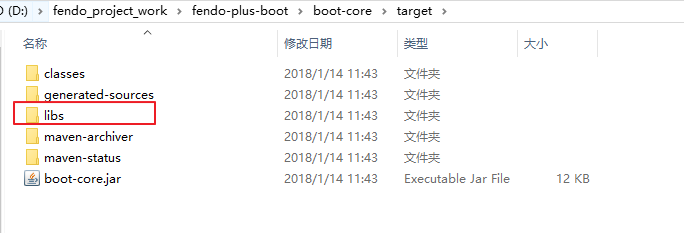
执行mvn package打包命令之后,会多出libs目录
dependency:unpack
unpack和copy类似,只不过它会把拷来的包解开,例如:
<plugin>

    <groupId>org.apache.maven.plugins</groupId>

    <artifactId>maven-dependency-plugin</artifactId>

    <version>2.8</version>

    <executions>

        <execution>

            <phase>package</phase>

            <goals>

                <goal>unpack</goal>

            </goals>

            <configuration>

                <artifactItems>

                    <artifactItem>

                        <groupId>org.slf4j</groupId>

                        <artifactId>slf4j-log4j12</artifactId>

                        <version>1.7.7</version>

                    </artifactItem>

                    <artifactItem>

                        <groupId>junit</groupId>

                        <artifactId>junit</artifactId>

                        <version>4.11</version>

                        <outputDirectory>${project.build.directory}/libs</outputDirectory>

                    </artifactItem>

                </artifactItems>

                <outputDirectory>lib</outputDirectory>

            </configuration>

        </execution>

    </executions>

</plugin>
执行mvn package打包命令之后,slf4j复制到lib目录下,junit复制到libs目录下
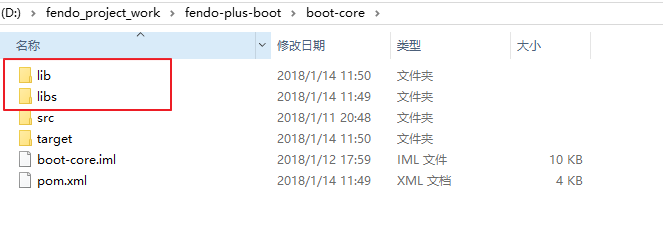
junit和slf4j-log4j12拷完以后,放到lib和libs下的不再是Jar包,还是Jar包里的内容。
copy-dependencies 和 unpack-dependencies
上面介绍的copy 和 unpack操作是由要拷某个包,这个包需要具体指定要拷哪个包,与当前工程的依赖没有关系。
copy-dependencies和它有点类似,但是它是用来拷当前工程的依赖包的,典型的,例如我们有一个web应用,当打成war包的时候,它所有的依赖也需要被打到应用中。
copy-dependencies的参数有很多,详细的可以参考:copy-dependencies Doc,但是几乎所有都有默认值。所以一个最简单的定义如下:
<plugin>

    <groupId>org.apache.maven.plugins</groupId>

    <artifactId>maven-dependency-plugin</artifactId>

    <version>2.8</version>

    <executions>

        <execution>

            <phase>package</phase>

            <goals>

                <goal>copy-dependencies</goal>

            </goals>

        </execution>

    </executions>

</plugin>
这里没有指定任何配置,所有的参数都用默认值,则当前工程的所有依赖(直接、间接的)都会被拷到target/dependency目录下。
也可以使用outputDirectory指定存放在。另外,以下几个参数可以控制哪些依赖将被拷出(或排除):
Name Type Since Description
| excludeArtifactIds | String |
2.0 |
Comma separated list of Artifact names to exclude. User property is: excludeArtifactIds. |
| excludeClassifiers | String |
2.0 |
Comma Separated list of Classifiers to exclude. Empty String indicates don't exclude anything (default). User property is: excludeClassifiers. |
| excludeGroupIds | String |
2.0 |
Comma separated list of GroupId Names to exclude. User property is: excludeGroupIds. |
| excludeScope | String |
2.0 |
Scope to exclude. An Empty string indicates no scopes (default). User property is: excludeScope. |
| excludeTransitive | boolean |
2.0 |
If we should exclude transitive dependencies Default value is: false. User property is: excludeTransitive. |
| excludeTypes | String |
2.0 |
Comma Separated list of Types to exclude. Empty String indicates don't exclude anything (default). User property is: excludeTypes. |
| includeArtifactIds | String |
2.0 |
Comma separated list of Artifact names to include. User property is: includeArtifactIds. |
| includeClassifiers | String |
2.0 |
Comma Separated list of Classifiers to include. Empty String indicates include everything (default). User property is: includeClassifiers. |
| includeGroupIds | String |
2.0 |
Comma separated list of GroupIds to include. User property is: includeGroupIds. |
| includeScope | String |
2.0 |
Scope to include. An Empty string indicates all scopes (default). The scopes being interpreted are the scopes as Maven sees them, not as specified in the pom. In summary:runtime scope gives runtime and compile dependencies,compile scope gives compile, provided, and system dependencies,test (default) scope gives all dependencies,provided scope just gives provided dependencies,system scope just gives system dependencies. User property is: includeScope. |
| includeTypes | String |
2.0 |
Comma Separated list of Types to include. Empty String indicates include everything (default). User property is: includeTypes. |
例如当前工程有以下依赖:
<dependencies>

    <dependency>

        <groupId>junit</groupId>

        <artifactId>junit</artifactId>

        <version>4.11</version>

        <scope>test</scope>

    </dependency>

    <dependency>

        <groupId>org.slf4j</groupId>

        <artifactId>slf4j-log4j12</artifactId>

        <version>1.7.7</version>

        <scope>test</scope>

    </dependency>

    <dependency>

        <groupId>org.apache.camel</groupId>

        <artifactId>camel-script</artifactId>

        <version>2.13.2</version>

    </dependency>

    <dependency>

        <groupId>org.apache.camel</groupId>

        <artifactId>camel-spring</artifactId>

        <version>2.13.2</version>

    </dependency>

    <dependency>

        <groupId>org.apache.camel</groupId>

        <artifactId>camel-xstream</artifactId>

        <version>2.13.2</version>

    </dependency>

    <dependency>

        <groupId>org.springframework</groupId>

        <artifactId>spring-jms</artifactId>

        <version>3.2.4.RELEASE</version>

    </dependency>

    <dependency>

        <groupId>org.springframework</groupId>

        <artifactId>spring-tx</artifactId>

        <version>3.2.4.RELEASE</version>

    </dependency>

    <dependency>

        <groupId>org.apache.activemq</groupId>

        <artifactId>activemq-all</artifactId>

        <version>5.10.0</version>

    </dependency>

    <dependency>

        <groupId>com.thoughtworks.xstream</groupId>

        <artifactId>xstream</artifactId>

        <version>1.4.7</version>

    </dependency>

    <dependency>

        <groupId>org.ogce</groupId>

        <artifactId>xpp3</artifactId>

        <version>1.1.6</version>

    </dependency>

</dependencies>
要排除所有scope为test的依赖:
<plugin>

    <groupId>org.apache.maven.plugins</groupId>

    <artifactId>maven-dependency-plugin</artifactId>

    <version>2.8</version>

    <executions>

        <execution>

            <phase>package</phase>

            <goals>

                <goal>copy-dependencies</goal>

            </goals>

        </execution>

    </executions>

    <configuration>

        <includeScope>compile</includeScope>

    </configuration>

</plugin>
注意:这里不能<excludeScope>test</excludeScope>,这样会把所有compile级别的也排除。看下图:
Copied From: Dependencies Scopes
| scope/phase-> | compile | test | run | assembly |
|---|---|---|---|---|
| compile | U | U | U | U |
| provided | U | ! | ! | ! |
| runtime | ! | U | U | U |
| test | ! | U | ! | ! |
说明:最左侧是表示dependency的scope级别,顶行表示maven的阶段,可以看出:compile级别的dependency会在所有阶段都被使用。
要排除所有camel的依赖,如下:
<configuration>

    <excludeGroupIds>org.apache.camel</excludeGroupIds>

</configuration>
要排除除camel-spring外的所有其他依赖如下:
<configuration>

    <includeArtifactIds>camel-spring</includeArtifactIds>

</configuration>
例子
打包需求描述
1、导出单独的项目jar包(精简,不包含依赖jar)
2、项目依赖的所有jar包导出到lib目录下
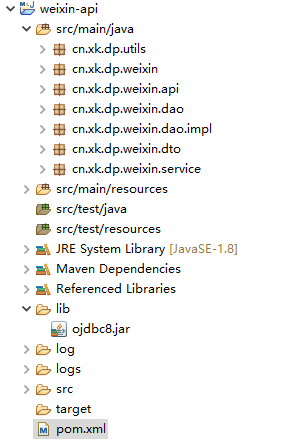
3、项目依赖oracle ojdbc8.jar,假设在maven仓库中并不存在,需要一并导出并添加进MANIFEST.MF文件中的Class-Path。--也可以将ojdbc8安装到本地maven仓库后直接导出
工程目录:
maven pom.xml
<project xmlns="http://maven.apache.org/POM/4.0.0"

	xmlns:xsi="http://www.w3.org/2001/XMLSchema-instance"

	xsi:schemaLocation="http://maven.apache.org/POM/4.0.0

    http://maven.apache.org/xsd/maven-4.0.0.xsd">

	<modelVersion>4.0.0</modelVersion>

	<parent>

		<groupId>cn.xk.dp</groupId>

		<artifactId>thirdparty</artifactId>

		<version>0.0.1-SNAPSHOT</version>

	</parent>

	<artifactId>weixin-api</artifactId>

	<properties>

		<project.build.sourceEncoding>UTF-8</project.build.sourceEncoding>

		<log4j.version>2.13.0</log4j.version>

	</properties>

	<dependencies>

		<dependency>

			<groupId>org.slf4j</groupId>

			<artifactId>slf4j-api</artifactId>

			<version>1.7.30</version>

		</dependency>

		<dependency>

			<groupId>org.apache.logging.log4j</groupId>

			<artifactId>log4j-core</artifactId>

			<version>${log4j.version}</version>

		</dependency>

		<dependency>

			<groupId>org.apache.logging.log4j</groupId>

			<artifactId>log4j-slf4j-impl</artifactId>

			<version>${log4j.version}</version>

		</dependency>

		<dependency>

			<groupId>org.apache.httpcomponents</groupId>

			<artifactId>httpclient</artifactId>

			<version>4.5.11</version>

			<exclusions>

				<exclusion>

					<groupId>commons-logging</groupId>

					<artifactId>commons-logging</artifactId>

				</exclusion>

			</exclusions>

		</dependency>

		<dependency>

			<groupId>org.slf4j</groupId>

			<artifactId>jcl-over-slf4j</artifactId>

			<version>1.7.30</version>

		</dependency>

		<dependency>

			<groupId>com.alibaba</groupId>

			<artifactId>fastjson</artifactId>

			<version>1.2.66</version>

		</dependency>

		<dependency> <!--添加本地jar包依赖-->

   			<groupId>oracle</groupId>

   			<artifactId>ojdbc8</artifactId>

   			<version>1.0</version>

   			<scope>system</scope>

   			<systemPath>${pom.basedir}/lib/ojdbc8.jar</systemPath>

		</dependency>

	</dependencies>

	<build>

		<plugins>

		 <plugin>

                <groupId>org.apache.maven.plugins</groupId>

                <artifactId>maven-jar-plugin</artifactId>

                <version>3.2.0</version>

                <configuration>

                    <archive>

                        <manifest>

                            <addClasspath>true</addClasspath>

                            <useUniqueVersions>false</useUniqueVersions>

                            <classpathPrefix>lib/</classpathPrefix>

                            <mainClass>cn.xk.dp.weixin.Driver</mainClass>

                        </manifest>

                        <manifestEntries>  <!--将ojdbc8-1.0.jar写进MANIFEST.MF文件中的Class-Path-->

   				           <Class-Path>lib/ojdbc8-1.0.jar</Class-Path>

  			            </manifestEntries>

                    </archive>

                    <excludes>   <!--排除用于测试的日志配置资源文件-->

                        <exclude>log4j2-test.xml</exclude>

                    </excludes>

                </configuration>

           </plugin>

		<plugin>  <!--在打包阶段将依赖的jar包导出到lib目录下-->

		  <groupId>org.apache.maven.plugins</groupId>

		  <artifactId>maven-dependency-plugin</artifactId>

		  <executions>

		    <execution>

			<id>copy-dependencies</id>

                        <phase>package</phase>

			<goals>

			  <goal>copy-dependencies</goal>

			</goals>

			<configuration>

			  <type>jar</type>

			  <includeTypes>jar</includeTypes>

	          <outputDirectory>${project.build.directory}/lib</outputDirectory>

			</configuration>

		    </execution>

		  </executions>

	     </plugin>

      </plugins>

	</build>

</project>
maven打包插件详解的更多相关文章
- Maven系列第6篇:生命周期和插件详解,此篇看过之后在maven的理解上可以超越同级别90%的人!
maven系列目标:从入门开始开始掌握一个高级开发所需要的maven技能. 这是maven系列第6篇. 整个maven系列的内容前后是有依赖的,如果之前没有接触过maven,建议从第一篇看起,本文尾部 ...
- 【maven】maven pom文件详解
maven pom文件详解 最近配置maven中的pom文件,maven中有些属性不太清楚,在这里记录一下 <project xmlns="http://maven.apache.or ...
- 用Advanced Installer制作DotNetBar for Windows Forms 12.0.0.1_冰河之刃重打包版详解
关于 DotNetBar for Windows Forms 12.0.0.1_冰河之刃重打包版 --------------------11.8.0.8_冰河之刃重打包版-------------- ...
- Uploadify 上传文件插件详解
Uploadify 上传文件插件详解 Uploadify是JQuery的一个上传插件,实现的效果非常不错,带进度显示.不过官方提供的实例时php版本的,本文将详细介绍Uploadify在Aspnet中 ...
- 转 vagrant package[打包命令]详解
转 vagrant package[打包命令]详解 vagrant的一个非常重要的功能就是在你的同事之间分享你的box从而使大家的开发环境保持同步,打包[package]正是实现这一功能的关键所在 ...
- Google自写插件详解
谷歌插件详解,跳转至个人主页查看. GoogleExtension
- ThreeJS系列1_CinematicCameraJS插件详解
ThreeJS系列1_CinematicCameraJS插件详解 接着上篇 ThreeJS系列1_CinematicCameraJS插件介绍 看属性的来龙去脉 看方法作用 通过调整属性查看效果 总结 ...
- maven生命周期和插件详解
生命周期 什么是生命周期? maven的生命周期就是对所有的构建过程进行抽象和统一.maven从大量项目和构建工具中总结了一套高度完善的.易扩展的生命周期.这个生命周期包含项目的清理.初始化.编译.测 ...
- maven pom文件详解
http://www.blogjava.net/hellxoul/archive/2013/05/16/399345.html http://blog.csdn.net/houpengfei111/a ...
随机推荐
- PTA 7-1 还原二叉树 (25分)
PTA 7-1 还原二叉树 (25分) 给定一棵二叉树的先序遍历序列和中序遍历序列,要求计算该二叉树的高度. 输入格式: 输入首先给出正整数N(≤50),为树中结点总数.下面两行先后给出先序和中序遍历 ...
- Spring Boot程序中@JsonIgnoreProperties与@JsonIgnore基本使用
问题由来: springboot项目中定义了很多类,我们在rest返回中直接返回或者在返回对象中使用这些类,spring已经使用jackson自动帮我们完成这些的to json.但是有时候自动转的js ...
- 将Linux中文语言修改成英文的具体操作方法及报错解决
1 2 3 4 5 6 7 8 9 10 11 12 13 14 15 16 17 18 19 20 21 22 23 24 25 26 27 28 29 30 31 32 33 34 35 36 3 ...
- Hi3516开发笔记(一):海思HI3516DV300芯片介绍,入手开发板以及Demo测试
前言 目前主流国产芯片为RV11XX.RK33XX.Hi35XX系列,本系列开启Hi3516系列的开发教程. Hi3516DV300芯片介绍 Hi3516DV300为专业行Smart IP ...
- Python基础(类和实例)
class Point(object): def __init__(self,name,score): self.__name = name self.__score = score def prin ...
- 『学了就忘』Linux软件包管理 — 48、给源码包打补丁
目录 1.补丁的生成 2.补丁的打入 在以前的软件源码包,需要打补丁的时候比较多.现在的源码包很少进行打补丁了,因为根据需求安装不同的版本即可,比较商业化了.(也就是知道如何给源码包打补丁就可以了,了 ...
- 力扣 - 剑指 Offer 52. 两个链表的第一个公共节点
题目 剑指 Offer 52. 两个链表的第一个公共节点 思路1(栈) 若两个链表相遇,则从它开始相遇的地方到链表末尾应该都是相同的,那么我们可以将两个链表分别放入两个栈中,然后依次循环比较两个栈顶的 ...
- 13-Semi-supervised Learning
半监督学习(semi-supervised learning) 1.introduction 2.Semi-supervised Learning for Generative Model 3.Low ...
- [luogu7340]Balance
构造一个坐标系,共有$n$个黑点和百点,第$i$个黑点为$(p_{i},a_{i})$,第$i$个白点为$(-q_{i},-b_{i})$ 考虑第$i$个黑点和第$j$个白点连线的斜率,恰好就是$f( ...
- [luogu6702]Path
维护每一个点到根路径的异或和(记作$d_{k}$),根据异或自反性,$(x,y)$的异或和即$d_{x}\oplus d_{y}$ 考虑两条路径的lca,选择其中深度较大的点,另一条路径必然在其子树外 ...