
selenium3+python自动化50-环境搭建(firefox)
前言
有不少小伙伴在安装selenium环境后启动firefox报错,因为现在selenium升级到3.0了,跟2.0的版本还有有一点区别的。
安装环境过程中主要会遇到三个坑:
1.'geckodriver' executable needs to be in PATH
2.Expected browser binary location, but unable to find binary in default location
3.Unsupported Marionette protocol version 2, required 3
环境准备:
--python3.6
--selenium3.0
--firefox50
一、安装python
1.安装python这个简单,下载版本后傻瓜式安装就行了。
2.安装好之后,看下这个目录D:\python\Scripts,有没pip.exe和easy_install.exe(一般都有,没有的话得重新安装一次了)
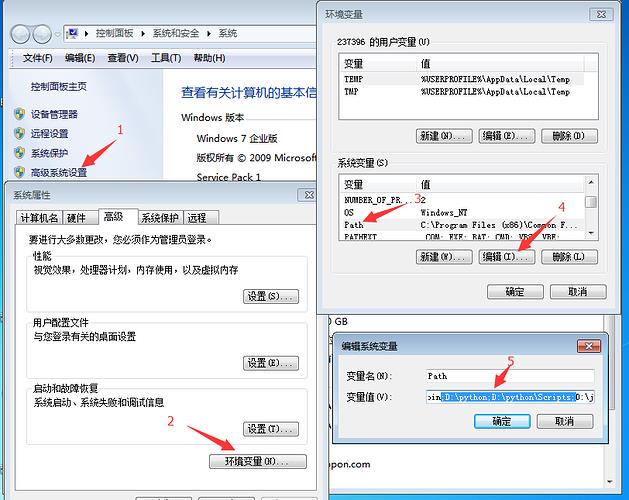
3.将D:\python和D:\python\Scripts,添加到环境变量path下
二、检查pip工具
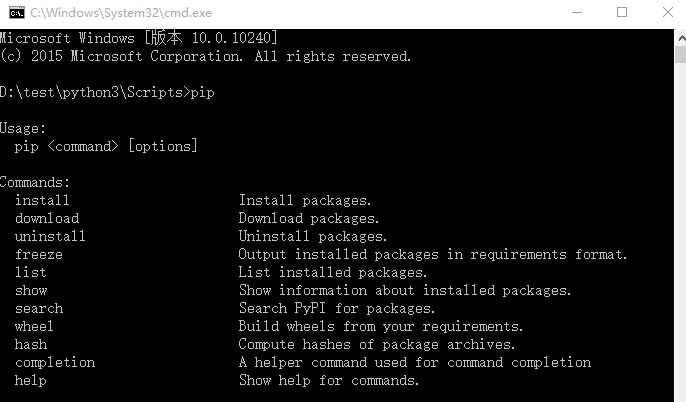
1.打开cmd,输入:pip,出现如下图界面,说明pip环境OK.
>>pip
2.要是出现异常提示:Did not provide a command,就看这篇解决:Selenium2+python自动化3-解决pip使用异常
三、安装selenium3.0
1.cmd输入:pip install selenium
>>pip install selenium
2.首次安装要看到100%完成,中途失败就重新多输入几次安装。

四、检查selenium环境
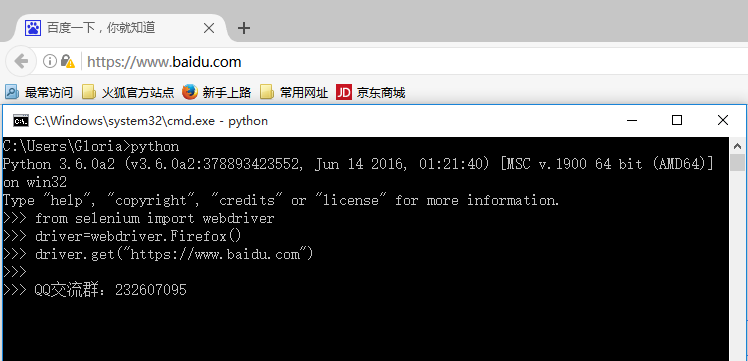
1.在cmd输入如下指令检查环境
>>python
>>from selenium import webdriver
>>driver=webdriver.Firefox()
>>driver.get("https://www.baidu.com")
2.能看到浏览器正常启动,说明环境OK,如果遇到异常就继续看下面解决方案。
五、遇到第一个坑:'geckodriver' executable needs to be in PATH
1.如果启动浏览器过程中报如下错误
Traceback (most recent call last):
File "<stdin>", line 1, in <module>
File "D:\test\python3\lib\site-packages\selenium\webdriver\firefox\webdriver.py", line 145, in __init__
self.service.start()
File "D:\test\python3\lib\site-packages\selenium\webdriver\common\service.py", line 81, in start
os.path.basename(self.path), self.start_error_message)
selenium.common.exceptions.WebDriverException: Message: 'geckodriver' executable needs to be in PATH.
2.这个是因为最新的selenium3.0启动firefox需要geckodriver.exe这个驱动文件。
3.下载之后,配置到环境变量path下(可以直接放python根目录)
六、遇到第二坑:Expected browser binary location, but unable to find binary in default location
1.如果启动浏览器过程中报如下错误
Traceback (most recent call last):
File "<stdin>", line 1, in <module>
File "D:\test\python3\lib\site-packages\selenium\webdriver\firefox\webdriver.py", line 155, in __init__
keep_alive=True)
File "D:\test\python3\lib\site-packages\selenium\webdriver\remote\webdriver.py", line 92, in __init__
self.start_session(desired_capabilities, browser_profile)
File "D:\test\python3\lib\site-packages\selenium\webdriver\remote\webdriver.py", line 179, in start_session
response = self.execute(Command.NEW_SESSION, capabilities)
File "D:\test\python3\lib\site-packages\selenium\webdriver\remote\webdriver.py", line 238, in execute
self.error_handler.check_response(response)
File "D:\test\python3\lib\site-packages\selenium\webdriver\remote\errorhandler.py", line 193, in check_response
raise exception_class(message, screen, stacktrace)
selenium.common.exceptions.WebDriverException: Message: Expected browser binary location, but unable to find binary in default location, no 'moz:firefoxOptions.binary' capability provided, and no binary flag set on the command line
2.这个是因为firefox.exe这个文件也需要配置到环境变量path下
3.这个路径就是安装完firefox后,找到firefox.exe这个文件的地址,加到path下

七、遇到第三坑:Unsupported Marionette protocol version 2, required 3
1.如果启动浏览器过程中出现如下错误
Traceback (most recent call last):
File "<stdin>", line 1, in <module>
File "D:\test\python3\lib\site-packages\selenium\webdriver\firefox\webdriver.py", line 155, in __init__
keep_alive=True)
File "D:\test\python3\lib\site-packages\selenium\webdriver\remote\webdriver.py", line 92, in __init__
self.start_session(desired_capabilities, browser_profile)
File "D:\test\python3\lib\site-packages\selenium\webdriver\remote\webdriver.py", line 179, in start_session
response = self.execute(Command.NEW_SESSION, capabilities)
File "D:\test\python3\lib\site-packages\selenium\webdriver\remote\webdriver.py", line 238, in execute
self.error_handler.check_response(response)
File "D:\test\python3\lib\site-packages\selenium\webdriver\remote\errorhandler.py", line 193, in check_response
raise exception_class(message, screen, stacktrace)
selenium.common.exceptions.WebDriverException: Message: Unsupported Marionette protocol version 2, required 3
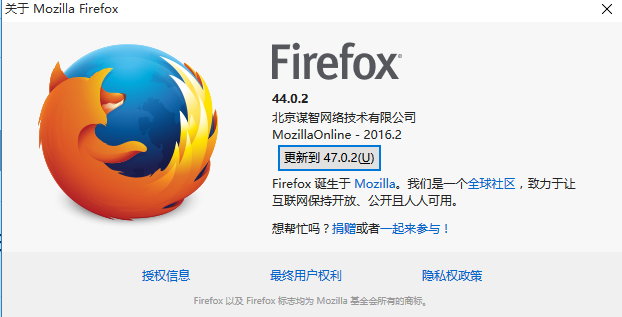
2.这个错误原因是firefox版本过低了,最新的selenium3.0版本支持firefox47以上的版本,升级版本就可以了
总结:整个环境的配置是python3.6+selenium3.0+firefox47以上版本,当然python用2.7版本也是可以的
要是觉得selenium3.0比较坑的话,可以继续用selenium2.0版本也是可以的,看这篇环境搭建:Selenium2+python自动化1-环境搭建
在安装过程中有遇到疑问和问题的,可以加selenium(python+java) QQ群交流:646645429
要是觉得对你有帮助,就在右下角点个赞吧!
selenium+python高级教程》已出书:selenium webdriver基于Python源码案例
(购买此书送对应PDF版本)

selenium3+python自动化50-环境搭建(firefox)的更多相关文章
- selenium3+python自动化50-环境搭建(firefox)【转载】
前言 有不少小伙伴在安装selenium环境后启动firefox报错,因为现在selenium升级到3.0了,跟2.0的版本还有有一点区别的. 安装环境过程中主要会遇到三个坑: 1.'geckodri ...
- Selenium3+python自动化006-环境搭建
一.selenium简介 1.Selenium历史 (1)Selenium 1.0: Selenium IDE Selenium Grid Selenium RC(核心功能) Sele ...
- Appium+Python自动化 1 环境搭建(适用windows系统-Android移动端自动化)
一.安装并配置 java jdk ①下载 java jdk后 安装,安装完成后,配置环境变量 打开计算机->系统属性->高级系统设置->环境变量->新建(系统变量),如图所示: ...
- Android自动化测试之环境搭建
Android自动化测试之环境搭建 一.Android-sdk介绍 SDK(Software development kit)软件开发工具包.被软件开发工程师用于为特定的软件包.软件框架.硬件平台. ...
- Python+Selenium+webdriver环境搭建(windows)以及相关资源下载链接
今天记录一下测试小菜鸟alter在测试入门的一点关于python+Selenium+webdriver环境搭建的经历以及资源分享.欢迎交流学习,批评指正. 一.Python的下载与安装 1.pytho ...
- Robot Framework自动化_环境搭建以及第一个用例
Robot Framework自动化_环境搭建以及第一个脚本 培训老师:肖能尤 2016/06/07 课程目的 一.Robot framework 环境搭建以及第一个脚本 课程内容 1 安装前准 ...
- 基于Python的Appium环境搭建合集
自动化一直是测试圈中的热聊,也是大家追求的技术方向.在测试中,往往回归测试也是测试人员的“痛点”.对于迭代慢.变更少的功能,就能用上自动化来替代人工回归,减轻工作量. 问题 在分享环境搭建之前,先抛出 ...
- python+Eclipse+pydev环境搭建
python+Eclipse+pydev环境搭建 本文重点介绍使用Eclipse+pydev插件来写Python代码, 以及在Mac上配置Eclipse+Pydev 和Windows配置Ecli ...
- Python开发:环境搭建(python3、PyCharm)
Python开发:环境搭建(python3.PyCharm) python3版本安装 PyCharm使用(完全图解(最新经典))
随机推荐
- CF2B The least round way 题解
都是泪呀...↑ 题目传送门 题意(直接复制了QWQ) 题目描述 给定由非负整数组成的\(n \times n\)的正方形矩阵,你需要寻找一条路径: 以左上角为起点, 每次只能向右或向下走, 以右下角 ...
- overlay实现容器跨主机通信
本节内容: Docker容器跨主机通信方案 环境信息 升级内核 安装docker 防火墙设置和开启内核转发 安装启动consul 启动Docker 创建overlay network 创建容器 测试容 ...
- JavaScript工程师都应懂的33个概念
最近福利发的有点多啊,各种硬干货,小伙伴们是不是觉得很爽啊.Github真的蕴含着各种各样的宝藏,难怪各个大厂也都纷纷贡献自己的代码到Github上. 所以各种干货还是会源源不断的po给大家,觉得有帮 ...
- sicily 1046. Plane Spotting(排序求topN)
DescriptionCraig is fond of planes. Making photographs of planes forms a major part of his daily lif ...
- MyEclipse 10、9、8 添加jadClipse反编译插件
jad是一个使用比较广泛的Java反编译软件,jadClipse是jad在eclipse下的插件,如何将jadclipse加入到MyEclipse10.X,9.X,8.X当中: http://nchc ...
- js constructor 和 instanceof
说到这两个属性,那不得不说一下_proto_这个属性,通常这个属性是隐藏属性,是不允许被暴露的,而某些浏览器为了开发者能够很好的理解,而将这个属性暴露出来,比如Mozilla FireFox,这就是为 ...
- PHP isset和empty 详细比较
找了几篇博文,这应该是说的最清楚的.链接如下:http://blog.chinaunix.net/uid-25311424-id-3966622.html
- Extjs设置或获取cookie
设置cookie var myCookie = Ext.util.Cookie.set(‘YourCookieName’,'YourValue’); 读取cookie Ext.util.Cookie. ...
- python3.6.5中pip3无法使用
1.在python命令行窗口中: python3 -m ensurepip 创建出pip3.exe.2.再在python3.6的安装目录下的Scripts路径下命令行 pip3 install XXX ...
- iOS系统中导航栏的转场解决方案与最佳实践
背景 目前,开源社区和业界内已经存在一些 iOS 导航栏转场的解决方案,但对于历史包袱沉重的美团 App 而言,这些解决方案并不完美.有的方案不能满足复杂的页面跳转场景,有的方案迁移成本较大,为此我们 ...