
渐变显示渐变消失的BackgroundView
渐变显示渐变消失的BackgroundView
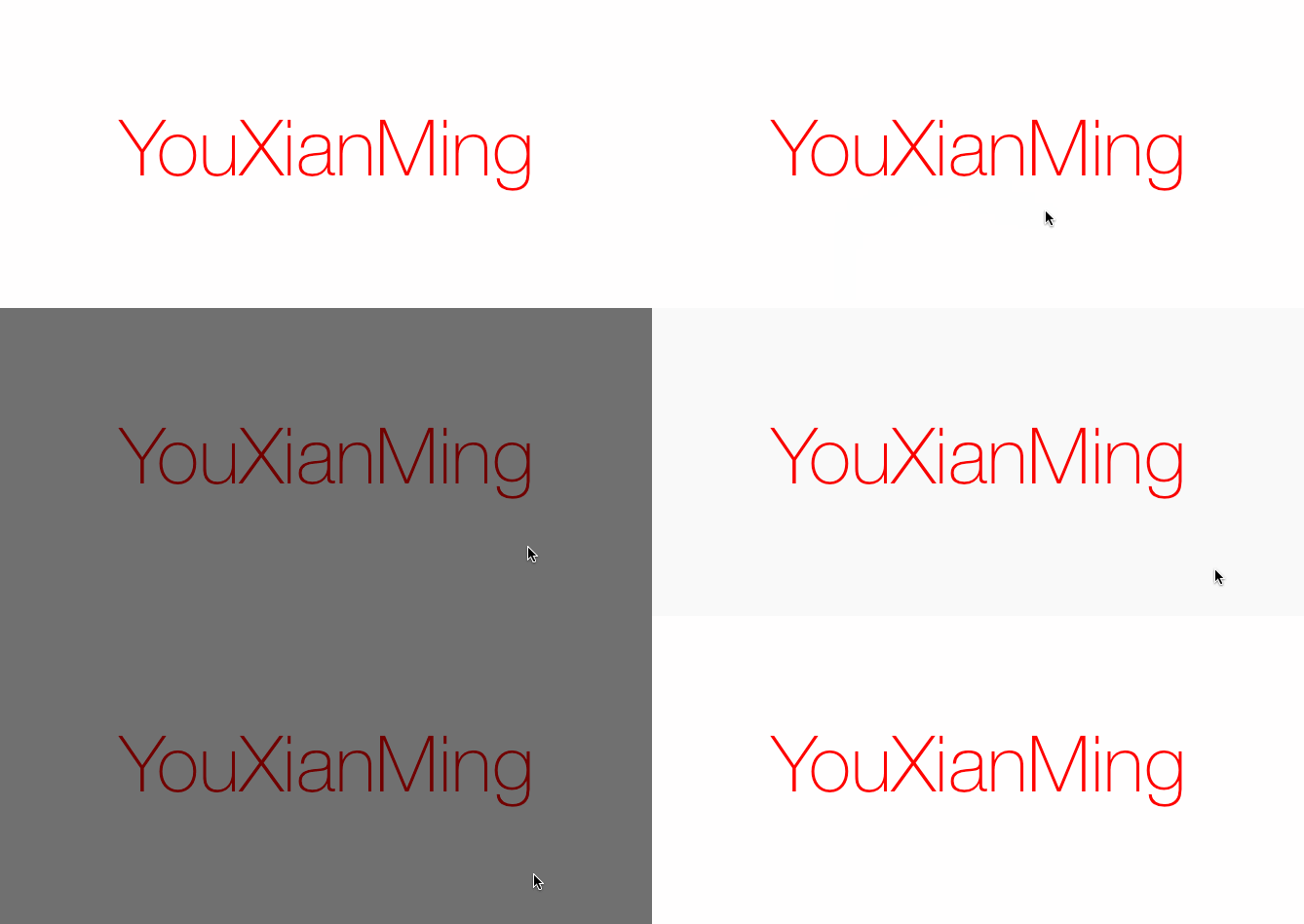
效果如下:
源码:
BackgroundView.h 与 BackgroundView.m
//

//  BackgroundView.h

//  TestHUD

//

//  Created by YouXianMing on 14-9-30.

//  Copyright (c) 2014年 YouXianMing. All rights reserved.

//

#import <UIKit/UIKit.h>

@interface BackgroundView : UIView

@property (nonatomic, assign) NSTimeInterval  startDuration; // 动画开始时持续时间

@property (nonatomic, assign) NSTimeInterval  endDuration;   // 动画结束时持续时间

- (instancetype)initInView:(UIView *)view;

// 开始附加到view中

- (void)addToView;

// 将自己从view中移除掉

- (void)removeSelf;

@end
//

//  BackgroundView.m

//  TestHUD

//

//  Created by YouXianMing on 14-9-30.

//  Copyright (c) 2014年 YouXianMing. All rights reserved.

//

#import "BackgroundView.h"

#ifdef DEBUG

#define BackgroundView_DLog(fmt, ...) NSLog((@"BackgroundView.m:%s:%d" fmt), __PRETTY_FUNCTION__, __LINE__, ##__VA_ARGS__);

#else

#define BackgroundView_DLog(...)

#endif

@interface BackgroundView ()

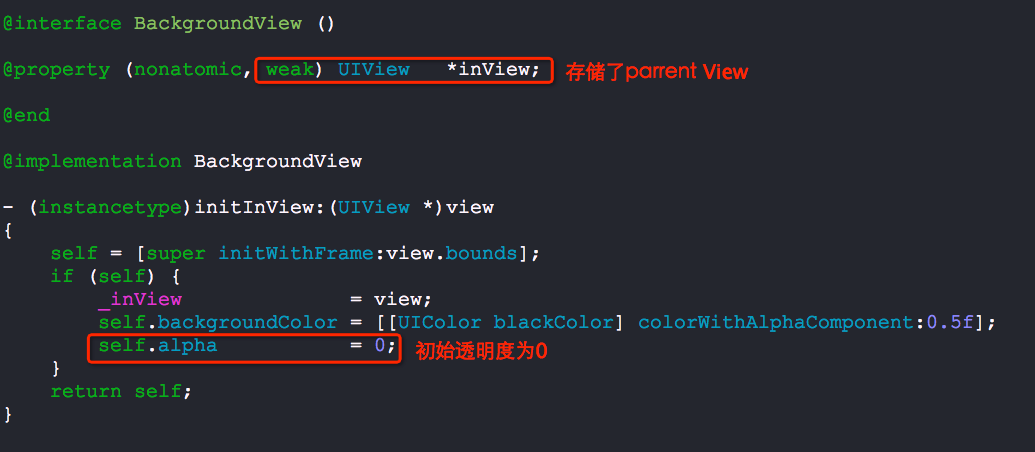
@property (nonatomic, weak) UIView   *inView;

@end

@implementation BackgroundView

- (instancetype)initInView:(UIView *)view

{

    self = [super initWithFrame:view.bounds];

    if (self) {

        _inView              = view;

        self.backgroundColor = [[UIColor blackColor] colorWithAlphaComponent:0.5f];

        self.alpha           = ;

    }

    return self;

}

- (void)addToView

{

    // 添加到view中

    [_inView addSubview:self];

    // 开始执行动画

    NSTimeInterval duration = 0.2;

    if (_startDuration > ) {

        duration = _startDuration;

    }

    [UIView animateWithDuration:duration animations:^{

        self.alpha = .f;

    }];

}

- (void)removeSelf

{

    // 开始执行动画

    NSTimeInterval duration = 0.2;

    if (_endDuration > ) {

        duration = _endDuration;

    }

    [UIView animateWithDuration:duration animations:^{

        self.alpha = .f;

    } completion:^(BOOL finished) {

        [self removeFromSuperview];

    }];

}

- (void)dealloc

{

    BackgroundView_DLog(@" 安全释放");

}

@end
category文件:
//

//  UIView+BackgroundView.h

//  BackgroundView

//

//  Created by YouXianMing on 14-10-3.

//  Copyright (c) 2014年 YouXianMing. All rights reserved.

//

#import <UIKit/UIKit.h>

#import "BackgroundView.h"

typedef void (^ConfigBackgroundViewBlock)(BackgroundView *configView);

@interface UIView (BackgroundView)

- (void)showBackgroundViewAndConfig:(ConfigBackgroundViewBlock)block;

- (void)removeBackgroundView;

@end
//

//  UIView+BackgroundView.m

//  BackgroundView

//

//  Created by YouXianMing on 14-10-3.

//  Copyright (c) 2014年 YouXianMing. All rights reserved.

//

#import "UIView+BackgroundView.h"

#define TAG_DATA  0x3d2894

@implementation UIView (BackgroundView)

- (void)showBackgroundViewAndConfig:(ConfigBackgroundViewBlock)block

{

    if (self == nil) {

        return;

    }

    BackgroundView *backView = [[BackgroundView alloc] initInView:self];

    backView.tag = TAG_DATA;

    block(backView);

    [backView addToView];

}

- (void)removeBackgroundView

{

    BackgroundView *backView = (BackgroundView *)[self viewWithTag:TAG_DATA];

    if (backView) {

        [backView removeSelf];

    }

}

@end
使用的源码:
//

//  ViewController.m

//  BackgroundView

//

//  Created by YouXianMing on 14-10-3.

//  Copyright (c) 2014年 YouXianMing. All rights reserved.

//

#import "ViewController.h"

#import "UIView+BackgroundView.h"

@interface ViewController ()

@end

@implementation ViewController

- (void)viewDidLoad {

    [super viewDidLoad];

    // 添加手势

    UITapGestureRecognizer *tap = [[UITapGestureRecognizer alloc] initWithTarget:self

                                                                          action:@selector(tapEvent:)];

    [self.view addGestureRecognizer:tap];

    UILabel *label      = [[UILabel alloc] initWithFrame:self.view.bounds];

    label.text          = @"YouXianMing";

    label.textAlignment = NSTextAlignmentCenter;

    label.font          = [UIFont fontWithName:@"HelveticaNeue-Thin" size:.f];

    label.textColor     = [UIColor redColor];

    [self.view addSubview:label];

}

- (void)tapEvent:(UITapGestureRecognizer *)tap

{

    // 显示

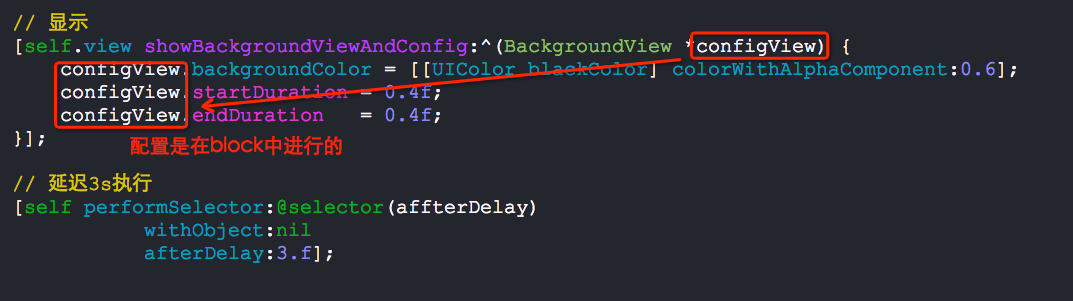
    [self.view showBackgroundViewAndConfig:^(BackgroundView *configView) {

        configView.backgroundColor = [[UIColor blackColor] colorWithAlphaComponent:0.6];

        configView.startDuration = 0.4f;

        configView.endDuration   = 0.4f;

    }];

    // 延迟3s执行

    [self performSelector:@selector(affterDelay)

               withObject:nil

               afterDelay:.f];

}

- (void)affterDelay

{

    // 隐藏

    [self.view removeBackgroundView];

}

@end
以下是需要注意的地方:
渐变显示渐变消失的BackgroundView的更多相关文章
- js渐变显示渐变消失
以下是渐变的js代码(表示多余三行的要隐藏,点击"more"显示剩下的,点击“less”要逐渐隐藏): function showAccomplishmentTableRow(){ ...
- 功能整合(一):滚动条的变相隐藏、js控制div的渐变显示、滚动条监听
1.滚动条的变相隐藏 思路: 1. 把body的横向,纵向的超出部分隐藏,宽设置100%:高设置100%.就没有body的滚动条了, 2. 然后把最外层的div的宽设置的比body的宽宽一点,把d ...
- WPF在3D Cad模型中利用TextureCoordinates实现颜色渐变显示偏差值的变化
原文:WPF在3D Cad模型中利用TextureCoordinates实现颜色渐变显示偏差值的变化 注:最近在做3D机械模型重建方面的软件,需要根据光栅传感器采集的数据绘制3D图形,并显示出色差以及 ...
- CSS3渐变——径向渐变
上节在<再说CSS3渐变——线性渐变>和大家一起学习了CSS3 Gradient中径向渐变最新语法(称得上是W3C的标准语法)相关知识以及其基本使用.今天我们在这一篇中主要和大家一起来了解 ...
- [js高手之路] html5 canvas系列教程 - 线形渐变,径向渐变与阴影设置
接着上文[js高手之路] html5 canvas系列教程 - 像素操作(反色,黑白,亮度,复古,蒙版,透明)继续. 一.线形渐变 线形渐变指的是一条直线上发生的渐变. 用法: var linear ...
- 使用jquery实现文本框输入特效:文字逐个显示逐个消失反复循环
前两天看到某个网站上的输入框有个小特效:文字逐个显示,并且到字符串最大长度后,逐个消失,然后重新循环显示消失,循环显示字符串数组.我对这个小特效有点好奇,于是今天自己尝试用jquery写一个简单的小d ...
- 【转】CSS设置DIV背景色渐变显示
[原链接]http://www.2cto.com/kf/201310/248187.html <style type="text/css"> .linear{ ...
- CSS设置DIV背景色渐变显示
本文转载自:http://blog.csdn.net/gingerredjade/article/details/12191741 <style type="text/css" ...
- jqury+animation+setTimeOut实现渐变显示与隐藏动画
初始效果 实现效果 1,编写HTMl结构代码 <div class="box"> <i class="icon"></i> ...
随机推荐
- ActiveMQ消息持久化到Mysql数据库
1.把连接MySQL数据库的jar文件,放到ActiveMQ的lib目录下 2.修改ActiveMQ的conf目录下的activemq.xml文件,修改数据持久化的方式2.1 修改原来的kahadb的 ...
- Pyltp使用
1.先使用pip安装pyltp-0.2.1-cp36-cp36m-win_amd64.whl 2.再参考API文档进行具体的使用:http://pyltp.readthedocs.io/zh_CN/d ...
- PTA (Advanced Level) 1024 Palindromic Number
Palindromic Number A number that will be the same when it is written forwards or backwards is known ...
- redis实战笔记(6)-第6章 使用 Redis构建应用程序组件
本章主要内容 1.构建两个前缀匹配自 动补全程序 2.通过构建分布式锁来提高性能 3.通过开发计数信号量来控制并发 4.构建两个不同用途的任务队列 5.通过消息拉取系统来实现延迟消息传递 6.学习 ...
- ARP地址解析协议原理
概述 网络层以上的协议用IP地址来标识网络接口,但以太数据帧传输时,以物理地址来标识网络接口.因此我们需要进行IP地址与物理地址之间的转化. 对于IPv4来说,我们使用ARP地址解析协议来完成IP地址 ...
- 美赛LaTeX急救指南
目录 1 关于easymcm宏包的基本信息,以及编译系统的若干问题 2 图片.表格.数学公式.网址的处理 3 样式.字体字号.段落的设置 4 目录.交叉引用的相关问题 关于标题不能换行的问题:这里有解 ...
- 一个形式较精细的Strling公式的证明
近日整理书稿,在整理至Strling公式处时,发现当时数学老师所讲的是形式比较精细的一种: Strling公式:\(n!=\sqrt{2\pi n}\left(\dfrac{n}{\mathrm{e} ...
- centOS7.2下 搭建gitlab使用git为团队管理代码
最近更换了阿里云服务器 使用centOS7.2,目前配置1核2G,搭建gitlab有点吃力,另外如果1核1g就不要搭建了,推荐配置是2核4G以上 下面来简单记录整个搭建过程 注意: 本次实验OS为c ...
- c#基础学习(0628)之使用进程打开指定的文件、模拟磁盘打开文件
使用进程打开指定的文件 模拟磁盘打开文件 class Program { static void Main(string[] args) { while(true) { Console.WriteLi ...
- 关于发布程序之后js文件存在缓存问题
把js文件加上版本号即可解决 如: <script src="../Static/js/Contract/ContractRateEdit.js?t=20181210"> ...