
搜索菜单栏侧滑效果控件SearchView
搜索菜单栏侧滑效果控件SearchView
本人视频教程系类 iOS中CALayer的使用
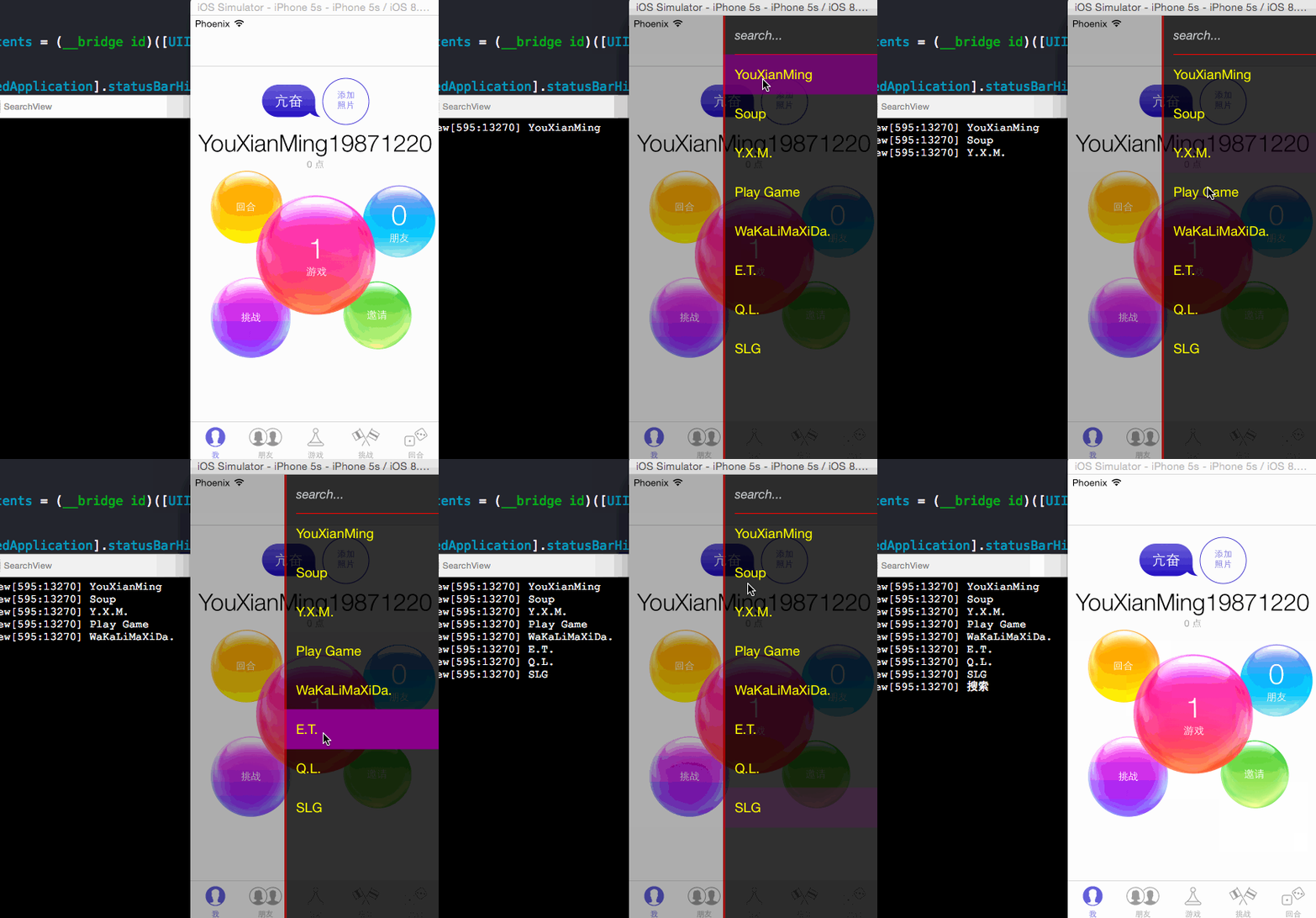
效果1:
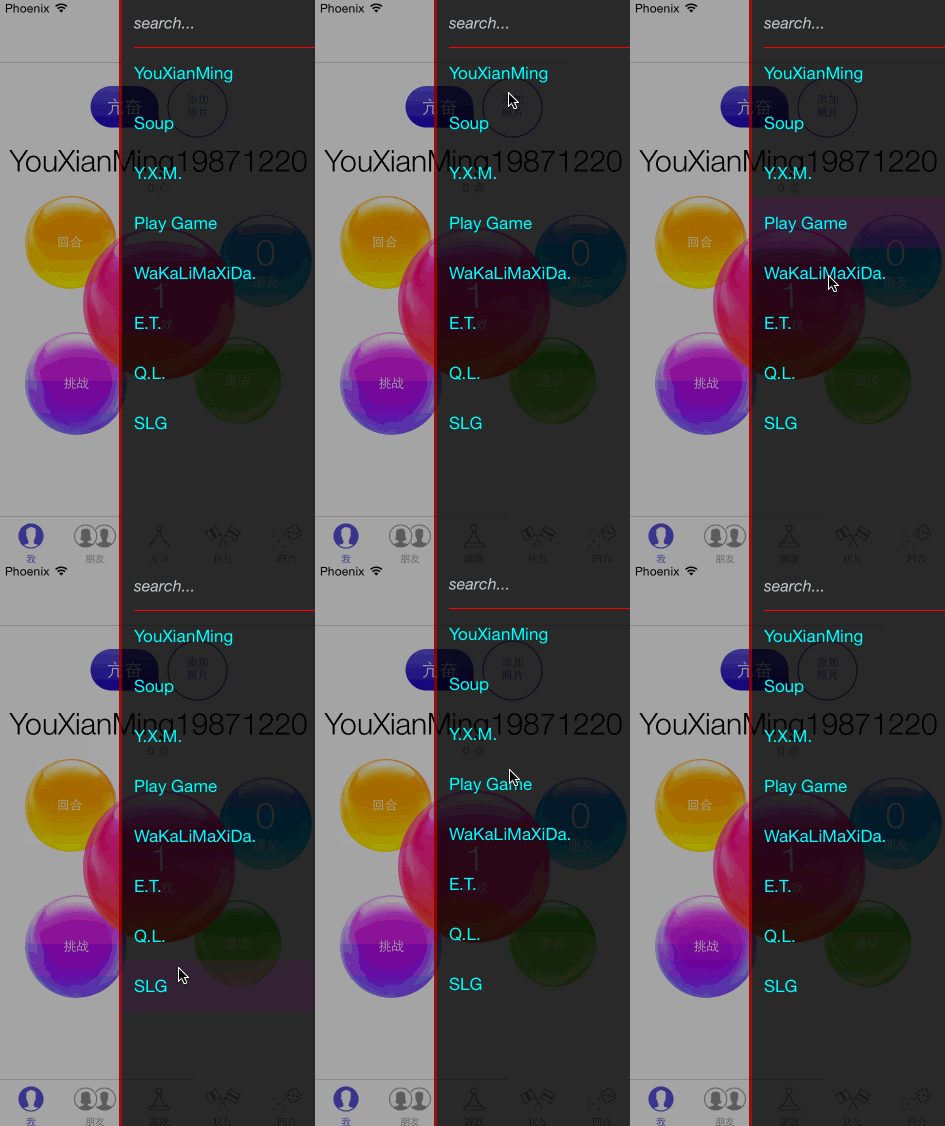
效果2:
项目中用到的图片 bgImg@2x.png:

源码:
SearchView.h + SearchView.m
//

//  SearchView.h

//  SearchView

//

//  Created by YouXianMing on 14/12/25.

//  Copyright (c) 2014年 YouXianMing. All rights reserved.

//

#import <UIKit/UIKit.h>

#define SearchView_ScreenWidth    [[UIScreen mainScreen] bounds].size.width

#define SearchView_ScreenHeight   [[UIScreen mainScreen] bounds].size.height

@protocol SearchViewDelegate <NSObject>

@optional

- (void)searchViewTapEventString:(NSString *)string;

@end

@interface SearchView : UIView

@property (nonatomic, weak)   id<SearchViewDelegate>   delegate;

@property (nonatomic, assign) CGRect    startFrame;

@property (nonatomic, assign) CGRect    endFrame;

@property (nonatomic, strong) NSArray  *dataStringArray; // 数据源数组

- (void)expendCellAnimated:(BOOL)animated;

@end
//

//  SearchView.m

//  SearchView

//

//  Created by YouXianMing on 14/12/25.

//  Copyright (c) 2014年 YouXianMing. All rights reserved.

//

#import "SearchView.h"

#import "SearchViewCell.h"

static NSString *searchViewCell = @"searchViewCell";

@interface SearchView ()<UITableViewDataSource, UITableViewDelegate>

@property (nonatomic, strong) UITableView *tableView;

@property (nonatomic, strong) NSArray     *stringArray; // 数据源

@end

@implementation SearchView

- (instancetype)initWithFrame:(CGRect)frame

{

    self = [super initWithFrame:frame];

    if (self) {

        // 初始化TableView

        self.tableView = [[UITableView alloc] initWithFrame:self.bounds

                                                      style:UITableViewStylePlain];

        self.tableView.delegate   = self;

        self.tableView.dataSource = self;

        self.tableView.backgroundColor = [[UIColor blackColor] colorWithAlphaComponent:0.75];

        self.tableView.separatorStyle = UITableViewCellSeparatorStyleNone;

        [self.tableView registerClass:[SearchViewCell class]

               forCellReuseIdentifier:searchViewCell];

        [self addSubview:self.tableView];

    }

    return self;

}

#pragma mark - 代理方法

- (NSInteger)tableView:(UITableView *)tableView numberOfRowsInSection:(NSInteger)section {

    return self.stringArray.count + ;

}

- (UITableViewCell *)tableView:(UITableView *)tableView cellForRowAtIndexPath:(NSIndexPath *)indexPath {

    SearchViewCell *cell = [tableView dequeueReusableCellWithIdentifier:searchViewCell];

    if (indexPath.row == ) {

        cell.textLabel.text      = @"search...";

        cell.textLabel.textColor = [UIColor colorWithRed:0.780 green:0.800 blue:0.812 alpha:];

        cell.textLabel.font      = [UIFont italicSystemFontOfSize:.f];

        cell.selectionStyle      = UITableViewCellSelectionStyleNone;

        cell.backgroundColor     = [UIColor clearColor];

        cell.showLine            = YES;

        return cell;

    }

    // 获取文本

    cell.textLabel.text      = self.stringArray[indexPath.row - ];

    cell.textLabel.textColor = [UIColor yellowColor];

    cell.backgroundColor     = [UIColor clearColor];

    return cell;

}

- (CGFloat)tableView:(UITableView *)tableView heightForRowAtIndexPath:(NSIndexPath *)indexPath {

    return .f;

}

- (void)tableView:(UITableView *)tableView didSelectRowAtIndexPath:(NSIndexPath *)indexPath {

    if (indexPath.row == ) {

        if (_delegate && [_delegate respondsToSelector:@selector(searchViewTapEventString:)]) {

            [_delegate searchViewTapEventString:@"搜索"];

        }

    } else {

        if (_delegate && [_delegate respondsToSelector:@selector(searchViewTapEventString:)]) {

            [_delegate searchViewTapEventString:self.stringArray[indexPath.row - ]];

        }

    }

    UITableViewCell *cell = [tableView cellForRowAtIndexPath:indexPath];

    [cell setSelected:NO animated:YES];

}

- (void)expendCellAnimated:(BOOL)animated {

    // 如果为空,则直接返回

    if (self.dataStringArray == nil) {

        return;

    }

    self.stringArray = [NSArray arrayWithArray:self.dataStringArray];

    if (animated) {

        NSMutableArray *indexPathArray = [NSMutableArray array];

        for (int i = ; i < self.stringArray.count; i++) {

            NSIndexPath *path = [NSIndexPath indexPathForRow:i+ inSection:];

            [indexPathArray addObject:path];

        }

        [self.tableView insertRowsAtIndexPaths:indexPathArray

                              withRowAnimation:UITableViewRowAnimationTop];

    } else {

        [self.tableView reloadData];

    }

}

#pragma mark - 重写setter,getter方法

@synthesize startFrame = _startFrame;

- (void)setStartFrame:(CGRect)startFrame {

    _startFrame = startFrame;

    self.frame  = startFrame;

}

- (CGRect)startFrame {

    return _startFrame;

}

@end
SearchViewCell.h + SearchViewCell.m
//

//  SearchViewCell.h

//  SearchView

//

//  Created by YouXianMing on 14/12/25.

//  Copyright (c) 2014年 YouXianMing. All rights reserved.

//

#import <UIKit/UIKit.h>

@interface SearchViewCell : UITableViewCell

@property (nonatomic, assign) BOOL showLine;

@end
//

//  SearchViewCell.m

//  SearchView

//

//  Created by YouXianMing on 14/12/25.

//  Copyright (c) 2014年 YouXianMing. All rights reserved.

//

#import "SearchViewCell.h"

@interface SearchViewCell ()

@property (nonatomic, strong) UIView *line;

@end

@implementation SearchViewCell

- (instancetype)initWithStyle:(UITableViewCellStyle)style reuseIdentifier:(NSString *)reuseIdentifier {

    self = [super initWithStyle:style reuseIdentifier:reuseIdentifier];

    if (self) {

        self.selectedBackgroundView    = [self createSelectedBackgroundView];

        // 线条view

        _line                 = [[UIView alloc] initWithFrame:CGRectMake(, , , )];

        _line.backgroundColor = [UIColor redColor];

        _line.alpha           = ;

        [self addSubview:_line];

    }

    return self;

}

- (UIView *)createSelectedBackgroundView {

    UIView *selectedView = [[UIView alloc] initWithFrame:CGRectMake(, , , )];

    selectedView.backgroundColor = [UIColor purpleColor];

    return selectedView;

}

- (void)setSelected:(BOOL)selected animated:(BOOL)animated {

    [super setSelected:selected animated:animated];

}

@synthesize showLine = _showLine;

- (void)setShowLine:(BOOL)showLine {

    _showLine   = showLine;

    if (showLine == YES) {

        _line.alpha = .f;

    } else {

        _line.alpha = .f;

    }

}

- (BOOL)showLine {

    return _showLine;

}

@end
控制器源码:
//

//  ViewController.m

//  SearchView

//

//  Created by YouXianMing on 14/12/25.

//  Copyright (c) 2014年 YouXianMing. All rights reserved.

//

#import "ViewController.h"

#import "SearchView.h"

/**

 枚举值

 */

typedef enum : NSUInteger {

    UIVIEW_BackgroundView = 0x19871220,

    UIVIEW_SearchView,

} EnumViewController;

@interface ViewController ()<SearchViewDelegate>

@property (nonatomic, strong) SearchView  *searchView;

@end

#define ScreenWidth    [[UIScreen mainScreen] bounds].size.width

#define ScreenHeight   [[UIScreen mainScreen] bounds].size.height

@implementation ViewController

- (void)viewDidLoad {

    [super viewDidLoad];

    // 设置背景图

    self.view.layer.contents = (__bridge id)([UIImage imageNamed:@"bgImg"].CGImage);

    // 隐藏状态栏

    [UIApplication sharedApplication].statusBarHidden = YES;

    // 按钮

    UIButton *button = [[UIButton alloc] initWithFrame:self.view.bounds];

    [self.view addSubview:button];

    [button addTarget:self

               action:@selector(buttonEvent:)

     forControlEvents:UIControlEventTouchUpInside];

}

/**

 *  代理方法

 *

 *  @param string 被点击的字符串

 */

- (void)searchViewTapEventString:(NSString *)string {

    NSLog(@"%@", string);

}

/**

 *  创建出SearchView

 *

 *  @param duration 动画执行时间

 */

- (void)createSearchViewWithAnimatedDuration:(CGFloat)duration {

    SearchView *searchView     = \

        [[SearchView alloc] initWithFrame:CGRectMake(ScreenWidth, , ScreenWidth, ScreenHeight)];

    searchView.alpha           = .f;

    searchView.delegate        = self;

    searchView.tag             = UIVIEW_SearchView;

    searchView.dataStringArray = @[@"YouXianMing", @"Soup", @"Y.X.M.", @"Play Game",

                                   @"WaKaLiMaXiDa.", @"E.T.", @"Q.L.", @"SLG"];

    [self.view addSubview:searchView];

    UIView *lineView         = [[UIView alloc] initWithFrame:CGRectMake(, , , ScreenHeight)];

    lineView.backgroundColor = [[UIColor redColor] colorWithAlphaComponent:0.5f];

    [searchView addSubview:lineView];

    [UIView animateWithDuration:duration

                          delay:.f

         usingSpringWithDamping:.f

          initialSpringVelocity:.f

                        options:UIViewAnimationOptionLayoutSubviews

                     animations:^{

                         searchView.alpha = .f;

                         searchView.frame = CGRectMake(, , ScreenWidth, ScreenHeight);

                     }

                     completion:^(BOOL finished) {

                         [searchView expendCellAnimated:YES];

                     }];

}

/**

 *  移除SearchView

 *

 *  @param duration 动画执行时间

 */

- (void)removeSearchViewWithAnimatedDuration:(CGFloat)duration {

    UIView *searchView = [self.view viewWithTag:UIVIEW_SearchView];

    [UIView animateWithDuration:duration animations:^{

        searchView.frame = CGRectMake(ScreenWidth, , ScreenWidth, ScreenHeight);

        searchView.alpha = .f;

    } completion:^(BOOL finished) {

        [searchView removeFromSuperview];

    }];

}

/**

 *  创建出背景View

 *

 *  @param duration 动画执行时间

 */

- (void)createBackgroundViewWithAnimatedDuration:(CGFloat)duration {

    UIView *backedgroundView                = [[UIView alloc] initWithFrame:self.view.bounds];

    backedgroundView.backgroundColor        = [UIColor blackColor];

    backedgroundView.tag                    = UIVIEW_BackgroundView;

    backedgroundView.alpha                  = .f;

    backedgroundView.userInteractionEnabled = NO;

    [self.view addSubview:backedgroundView];

    [UIView animateWithDuration:duration animations:^{

        backedgroundView.alpha = 0.35;

    }];

}

/**

 *  移除背景View

 *

 *  @param duration 动画执行时间

 */

- (void)removeBackgroundViewWithAnimatedDuration:(CGFloat)duration {

    UIView *backedgroundView = [self.view viewWithTag:UIVIEW_BackgroundView];

    [UIView animateWithDuration:duration animations:^{

        backedgroundView.alpha = .f;

    } completion:^(BOOL finished) {

        [backedgroundView removeFromSuperview];

    }];

}

/**

 *  按钮点击事件

 *

 *  @param button 按钮

 */

- (void)buttonEvent:(UIButton *)button {

    if (button.selected == NO) {

        button.selected = YES;

        [self createBackgroundViewWithAnimatedDuration:0.45];

        [self createSearchViewWithAnimatedDuration:0.45];

    } else {

        button.selected = NO;

        [self removeBackgroundViewWithAnimatedDuration:0.45];

        [self removeSearchViewWithAnimatedDuration:0.45];

    }

}

@end
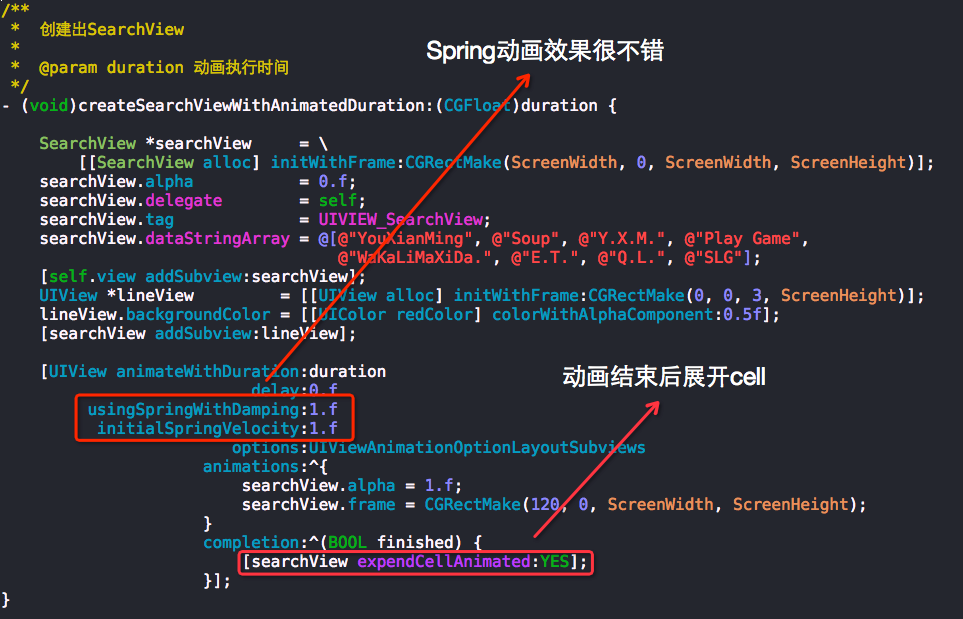
以下是需要注意的一些小地方:
搜索菜单栏侧滑效果控件SearchView的更多相关文章
- Android 自定义View修炼-打造完美的自定义侧滑菜单/侧滑View控件
一.概述 在App中,经常会出现侧滑菜单,侧滑滑出View等效果,虽然说Android有很多第三方开源库,但是实际上 咱们可以自己也写一个自定义的侧滑View控件,其实不难,主要涉及到以下几个要点: ...
- Android 自定义支持快速搜索筛选的选择控件(一)
Android 自定义支持快速搜索筛选的选择控件 项目中遇到选择控件选项过多,需要快速查找匹配的情况. 做了简单的Demo,效果图如下: 源码地址:https://github.com/whieenz ...
- Android 打造完美的侧滑菜单/侧滑View控件
概述 Android 打造完美的侧滑菜单/侧滑View控件,完全自定义实现,支持左右两个方向弹出,代码高度简洁流畅,兼容性高,控件实用方便. 详细 代码下载:http://www.demodashi. ...
- ASwipeLayout一个强大的侧滑菜单控件
Android中侧滑的场景有很大,大部分是基于RecyclerView,但是有些时候你可以动态地addView到一个布局当中,也希望它实现侧滑,所以就产生了ASwipeLayout,该控件不仅支持在R ...
- Android打造完美的刮刮乐效果控件
技术:Android+Java 概述 趁着元旦假期之际,首先在这里,我祝福大家在新的2019年都一个个的新健康,新收入,新顺利,新如意!!! 上一偏,我介绍了用Xfermode实现自定义圆角和椭圆 ...
- Android改进版CoverFlow效果控件
最近研究了一下如何在Android上实现CoverFlow效果的控件,其实早在2010年,就有Neil Davies开发并开源出了这个控件,Neil大神的这篇博客地址http://www.inter- ...
- 009 Android Fragment动态用法(实现动态菜单栏)设置控件为满屏状态
·1.MainActivity采用线性布局 2.在app--->res--->layout,右击new--->xml---->layout xml FILE <1> ...
- js搜索相同类型的控件全选、取值(Checkbox)
function selectAll(obj) { if (obj.checked) { $("input[type='checkbox']").each(function () ...
- 8.效果控件之移动&&缩放
1.移动应用(横摇.竖摇) 1.移动应用(横向缩小跟踪排列) 1.移动应用(自由缩小跟踪排列)
随机推荐
- go语言的unsafe包(转)
The unsafe Package in Golang Golang的unsafe包是一个很特殊的包. 为什么这样说呢? 本文将详细解释. 来自go语言官方文档的警告 unsafe包的文档是这么说的 ...
- Java虚拟机(二):JVM内存模型
所有的Java开发人员可能会遇到这样的困惑?我该为堆内存设置多大空间呢?OutOfMemoryError的异常到底涉及到运行时数据的哪块区域?该怎么解决呢?其实如果你经常解决服务器性能问题,那么这些问 ...
- 解释mysql 语句 ——解释CREATE DATABASE `test` DEFAULT CHARACTER SET utf8 COLLATE utf8_general_ci
在我们创建mysql数据库的时候我们经常会用到这句SQL:CREATE DATABASE `test` DEFAULT CHARACTER SET utf8 COLLATE utf8_general_ ...
- SpringBoot入门 (三) 日志配置
上一篇博文记录了再springboot项目中读取属性文件中配置的属性,本文学习在springboot项目中记录日志. 日志记录在项目中是很常见的一个功能了,对排查问题有很大帮助,也可以做分类分析及统计 ...
- Web 后端--PHP 与数据库的交互
网页要处理数据,数据置于数据库之中.今天看了书,不能让知识遗忘,遂及时记下. 用 PHP 操作 MySQL ,实现数据的交换,还要多练练.... PS: 以下 mysql 字段与mysqli 字段皆 ...
- 《小岛经济学--鱼、美元和经济的故事》Digest
作者:彼得.D.希夫(Peter D. Schiff)安德鲁.J.希(Andrew J. Schiff) How an Economy Grows and Why It Crashes 打车到清华,车 ...
- mysql与mysqli的一些区别和方法
一.mysql与mysqli的概念相关: 1.mysql与mysqli都是php方面的函数集,与mysql数据库关联不大. 2.在php5版本之前,一般是用php的mysql函数去驱动mysql数据库 ...
- Winform 常用的方法
一,Winform 如何内嵌窗体 1,判断窗体中是否以还有内嵌窗体 private void ClosePreForm() { foreach (Control item in this.spCont ...
- 概述Java集合框架
JAVA集合框架主要分为三个部分:接口,实现和算法.接口是指以Collection和Map为起始的一系列公用接口,其中还有Vector接口,也就是迭代器,Collection接口下面又有List 和S ...
- 为什么不要 "lock(this)" ? lock object 并是readonly(转载)
一. 为什么要lock,lock了什么? 当我们使用线程的时候,效率最高的方式当然是异步,即各个线程同时运行,其间不相互依赖和等待.但当不同的线程都需要访问某个资源的时候,就需要同步机制了,也就是 ...