
监听器 ServletRequestAttributeListener&ServletRequestListener详解
在web开发中,监听器不仅可以对Application监听,同时还可以对seesion和request对象进行监听;
该文章主要演示的是对request对象的创建和request属性的监听。
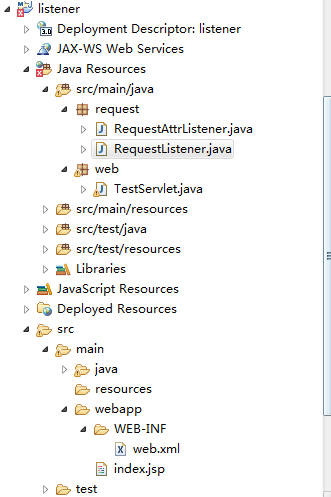
项目结构(红叉不需要关注,是maven环境的问题,不影响我们的主线)
web.xml
<?xml version="1.0" encoding="UTF-8"?>
<web-app xmlns:xsi="http://www.w3.org/2001/XMLSchema-instance"
xmlns="http://java.sun.com/xml/ns/javaee"
xsi:schemaLocation="http://java.sun.com/xml/ns/javaee http://java.sun.com/xml/ns/javaee/web-app_3_0.xsd"
id="WebApp_ID" version="3.0">
  <display-name>gzipfilter</display-name>
  <listener>
    <listener-class>request.RequestListener</listener-class>
    <listener-class>request.RequestAttrListener</listener-class>
  </listener>
  <servlet>
    <servlet-name>TestServlet</servlet-name>
    <servlet-class>web.TestServlet</servlet-class>
  </servlet>
  <servlet-mapping>
    <servlet-name>TestServlet</servlet-name>
    <url-pattern>/servlet/test</url-pattern>
  </servlet-mapping>
  <welcome-file-list>
    <welcome-file>index.jsp</welcome-file>
  </welcome-file-list>
</web-app>
pom.xml
    <dependencies>
        <dependency>
            <groupId>javax.servlet</groupId>
            <artifactId>jstl</artifactId>
            <version>1.2</version>
            <type>jar</type>
        </dependency>
        <dependency>
            <groupId>javax.servlet</groupId>
            <artifactId>servlet-api</artifactId>
            <version>2.5</version>
            <scope>provided</scope>
        </dependency>
        <dependency>
            <groupId>javax.servlet.jsp</groupId>
            <artifactId>jsp-api</artifactId>
            <version>2.1</version>
            <scope>provided</scope>
        </dependency>
    </dependencies>
RequestAttrListener
public class RequestAttrListener implements ServletRequestAttributeListener{

    public void attributeAdded(ServletRequestAttributeEvent event) {
        System.out.println("request域添加了属性:" + event.getName() + "=" + event.getValue());
    }

    public void attributeRemoved(ServletRequestAttributeEvent event) {
        System.out.println("request域删除了属性:" + event.getName() + "=" + event.getValue());
    }

    public void attributeReplaced(ServletRequestAttributeEvent event) {
        System.out.println("request域修改了属性(这里展示的是被替换的):" + event.getName() + "=" + event.getValue());
    }

}
RequestListener
public class RequestListener implements ServletRequestListener{

    public void requestDestroyed(ServletRequestEvent even) {
        System.out.println("request对象销毁了 ......");
    }

    public void requestInitialized(ServletRequestEvent even) {
        System.out.println("request对象创建了 ......");
    }

}
TestServlet
public class TestServlet extends HttpServlet {
    public void doGet(HttpServletRequest request, HttpServletResponse response)
            throws ServletException, IOException {
         request.setAttribute("a", "aaaa");
         request.setAttribute("a", "bbbb");
         request.removeAttribute("a");
         response.getOutputStream().print("over");
    }
}
index.jsp
<%@ page language="java" import="java.util.*" pageEncoding="UTF-8"%>
<%
String path = request.getContextPath();
String basePath = request.getScheme()+"://"+request.getServerName()+":"+request.getServerPort()+path+"/";
%>
<!DOCTYPE HTML PUBLIC "-//W3C//DTD HTML 4.01 Transitional//EN">
<html>
<head>
<base href="<%=basePath%>">
<title>My JSP 'index.jsp' starting page</title>
<meta http-equiv="pragma" content="no-cache">
<meta http-equiv="cache-control" content="no-cache">
</head>
<body>
  <a href="servlet/test">点点</a>
</body>
</html>
访问测试:
http://localhost:8080/listener/


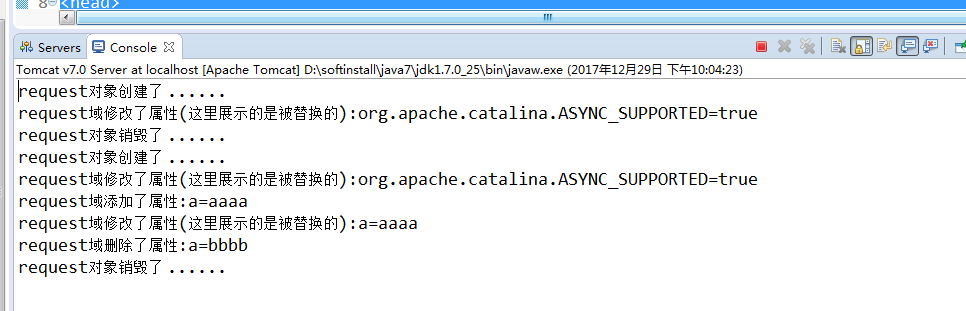
结果解析:
这三行是http://localhost:8080/listener/生成的request对象创建了 ......
request域修改了属性(这里展示的是被替换的):org.apache.catalina.ASYNC_SUPPORTED=true
request对象销毁了 ......

//以下是点击了index.jsp页面超链接生成的
request对象创建了 ......
request域修改了属性(这里展示的是被替换的):org.apache.catalina.ASYNC_SUPPORTED=true
request域添加了属性:a=aaaa
request域修改了属性(这里展示的是被替换的):a=aaaa
request域删除了属性:a=bbbb
request对象销毁了 ......
监听器 ServletRequestAttributeListener&ServletRequestListener详解的更多相关文章
- Jmeter(十九) - 从入门到精通 - JMeter监听器 -上篇(详解教程)
1.简介 监听器用来监听及显示JMeter取样器测试结果,能够以树.表及图形形式显示测试结果,也可以以文件方式保存测试结果,JMeter测试结果文件格式多样,比如XML格式.CSV格式.默认情况下,测 ...
- Jmeter(二十) - 从入门到精通 - JMeter监听器 -下篇(详解教程)
1.简介 监听器用来监听及显示JMeter取样器测试结果,能够以树.表及图形形式显示测试结果,也可以以文件方式保存测试结果,JMeter测试结果文件格式多样,比如XML格式.CSV格式.默认情况下,测 ...
- Web监听器导图详解(转)
阅读目录 Web监听器 监听器的分类 Servlet版本与Tomcat版本 getAttribute与getParameter的区别 参考 监听器是JAVA Web开发中很重要的内容,其中涉及到的知识 ...
- Java监听器Listener使用详解
监听器用于监听web应用中某些对象.信息的创建.销毁.增加,修改,删除等动作的发生,然后作出相应的响应处理.当范围对象的状态发生变化的时候,服务器自动调用监听器对象中的方法.常用于统计在线人数和在线用 ...
- java Web监听器导图详解
监听器是JAVA Web开发中很重要的内容,其中涉及到的知识,可以参考下面导图: Web监听器 1 什么是web监听器? web监听器是一种Servlet中的特殊的类,它们能帮助开发者监听web中的特 ...
- Web监听器导图详解
监听器是JAVA Web开发中很重要的内容,其中涉及到的知识,可以参考下面导图: Web监听器 1 什么是web监听器? web监听器是一种Servlet中的特殊的类,它们能帮助开发者监听web中的特 ...
- js事件监听器用法实例详解
这篇文章主要介绍了js事件监听器用法,以实例形式较为详细的分析了javascript事件监听器使用注意事项与相关技巧,需要的朋友可以参考下本文实例讲述了js事件监听器用法.分享给大家供大家参考.具体分 ...
- js事件监听器用法实例详解-注册与注销监听封装
本文实例讲述了js事件监听器用法.分享给大家供大家参考.具体分析如下: 1.当同一个对象使用.onclick的写法触发多个方法的时候,后一个方法会把前一个方法覆盖掉,也就是说,在对象的onclick事 ...
- javaweb之监听器详解
在servlet中定义了多种类型的监听器,他们用于监听事件源分别是servletContext,httpsession,servletrequest 这三个域对象. servlet中监听器主要有三类: ...
随机推荐
- 细数不懂Spring底层原理带来的伤与痛
原文链接:https://www.jianshu.com/p/c9de414221ac?utm_campaign=haruki&utm_content=note&utm_medium= ...
- git-bash.exe参数
baidu搜了很多, 没有结果.估计大家都没有这个场景.google了一下, 几篇非常不错的结果: https://superuser.com/questions/1104567/how-can-i- ...
- 【leetcode】473. Matchsticks to Square
题目如下: 解题思路:居然把卖火柴的小女孩都搬出来了.题目的意思是输入一个数组,判断能否把数组分成四个子数组,使得每个子数组的和相等.首先我们可以很容易的求出每个子数组的和应该是avg = sum(n ...
- 8:Spring Boot中thymeleaf模板中使用 Shiro标签
1,添加 pom.xml grade: compile('com.github.theborakompanioni:thymeleaf-extras-shiro:1.2.1') 2, Subject ...
- Ubuntu 16.04下使用docker部署MySQL主从复制
(以下docker相关的命令,需要在root用户环境下或通过sudo提升权限来进行操作.) 首先更新 软件源 https://mirrors.tuna.tsinghua.edu.cn/help/ubu ...
- SpringBoot属性配置-第三章
1.application.yml配置#自定义参数对象book: name: A id: 1 page: 100 2.创建实体类: /** * @Auther: youqc * @Date: 2018 ...
- jsp页面a标签URL转码问题
简单的办法只有一句话,在后台对传过来的字符串(value)加一句: String value = new String(value.getBytes("ISO-8859-1"),& ...
- 2019年CCPC网络赛 HDU 6703 array【权值线段树】
题目大意:给出一个n个元素的数组A,A中所有元素都是不重复的[1,n].有两种操作:1.将pos位置的元素+1e72.查询不属于[1,r]中的最小的>=k的值.强制在线. 题解因为数组中的值唯一 ...
- IBM Security App Scan Standard 工具的使用
1.AppScan是什么? AppScan是IBM的一款web安全扫描工具,可以利用爬虫技术进行网站安全渗透测试,根据网站入口自动对网页链接进行安全扫描,扫描之后会提供扫描报告和修复建议等. AppS ...
- docker学习与应用
概要 众所周知,Docker是当前非常火的虚拟化容器技术,对于它的优势以及使用场景网上的资料非常多,这里我推荐大家去这个网站去详细学习docker. 我这里就写一下作为一名后端开发程序员,自己学习do ...