
ASP.NET MVC视图中的@Html.xxx(...)
问题
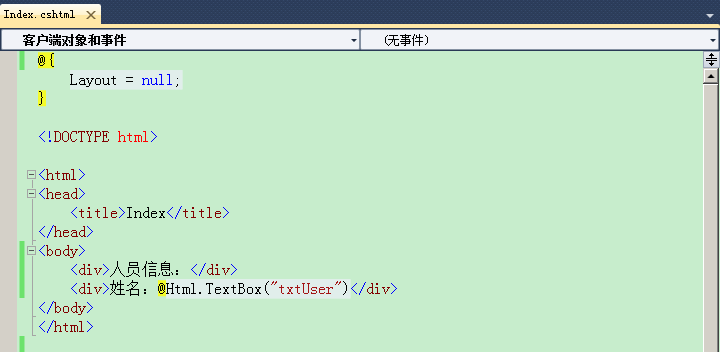
在视图页中@Html.xxx(...)是什么?如何被执行?
如下图所示:
解疑
视图页中@Html.xxx(...)涉及的内容有:
- 视图页被编译后的类继承自 WebViewPage<T>:WebViewPage:WebPageBase:WebPageRenderingBase:WebPageExecutingBase
- 在进行View呈现过程中,创建视图页对象实例,此时 初始化了一个HtmlHelper对象,并赋值给其父类的一个名为Html的属性,@Html.xxx(...)中的Html就是该属性
- 视图页中的@Html.xxx(...),经过编译之后,则变成该视图页对象Execute方法中的一段代码,即:this.Write(this.Html.xxx(xxx));
- xxx是HtmlHelper类的扩展方法
以@Html.TextBox(...)为例进行详细分析:
在ASP.NET MVC 中,视图页都被编译成继承自WebViewPage<T>的类,而在进行 View呈现 的过程中,需要通过反射创建视图页类的实例(Object类型),然后再将该实例转换为WebViewPage类型,并进行一些初始化操作,就在初始化时,创建了HtmlHelper对象,并赋值给其属性Html。
public abstract class BuildManagerCompiledView : IView

{

    public void Render(ViewContext viewContext, TextWriter writer)

    {

        if (viewContext == null)

        {

            throw new ArgumentNullException("viewContext");

        }

        object instance = null;

        //获取被编译的视图页(cshtml文件)的类型

        Type type = BuildManager.GetCompiledType(ViewPath);

        if (type != null)

        {

            //通过SingleServiceResolver利用反射和缓存的原理创建视图页的实例,过程类似SingleServiceResolver类对Controller的激活。

            instance = ViewPageActivator.Create(_controllerContext, type);

        }

        if (instance == null)

        {

            throw new InvalidOperationException(

                String.Format(

                    CultureInfo.CurrentCulture,

                    MvcResources.CshtmlView_ViewCouldNotBeCreated,

                    ViewPath));

        }

        //执行RenderView方法

        RenderView(viewContext, writer, instance);

    }

}

public class RazorView : BuildManagerCompiledView

{

    protected override void RenderView(ViewContext viewContext, TextWriter writer, object instance)

    {

        if (writer == null)

        {

            throw new ArgumentNullException("writer");

        }

        //将视图页实例转换为WebViewPage对象。

        WebViewPage webViewPage = instance as WebViewPage;

        if (webViewPage == null)

        {

            throw new InvalidOperationException(

                String.Format(

                    CultureInfo.CurrentCulture,

                    MvcResources.CshtmlView_WrongViewBase,

                    ViewPath));

        }

        webViewPage.OverridenLayoutPath = LayoutPath;//母板路径(在第二步中,创建RazorView对象时,由构造函数导入)

        webViewPage.VirtualPath = ViewPath;          //该视图路径

        webViewPage.ViewContext = viewContext;       //视图上下文,其中有TempData、controllerContext、ViewData等

        webViewPage.ViewData = viewContext.ViewData;

        //WebViewPage对象初始化,执行创建3个xxHelper对象AjaxHelper、HtmlHelper、UrlHelper。

        webViewPage.InitHelpers();

        if (VirtualPathFactory != null)

        {

            webViewPage.VirtualPathFactory = VirtualPathFactory;

        }

        if (DisplayModeProvider != null)

        {

            webViewPage.DisplayModeProvider = DisplayModeProvider;

        }

        WebPageRenderingBase startPage = null;

        if (RunViewStartPages)

        {

            startPage = StartPageLookup(webViewPage, RazorViewEngine.ViewStartFileName, ViewStartFileExtensions);

        }

        //按层次结构处理视图页的内容。

        webViewPage.ExecutePageHierarchy(new WebPageContext(context: viewContext.HttpContext, page: null, model: null), writer, startPage);

    }

}
创建视图页对象-->转换为WebViewPage类型
public abstract class WebViewPage : WebPageBase, IViewDataContainer, IViewStartPageChild

{

    //省略其他代码...

    public AjaxHelper<object> Ajax

    {

        get;

        set;

    }

    public HtmlHelper<object> Html

    {

        get;

        set;

    }

    public UrlHelper Url

    {

        get;

        set;

    }

    public ViewContext ViewContext

    {

        get;

        set;

    }

    public virtual void InitHelpers()

    {

        this.Ajax = new AjaxHelper<object>(this.ViewContext, this);

        this.Html = new HtmlHelper<object>(this.ViewContext, this);

        this.Url = new UrlHelper(this.ViewContext.RequestContext);

    }

}
WebViewPage
“_Index.cshtml”经编译后的结果为:
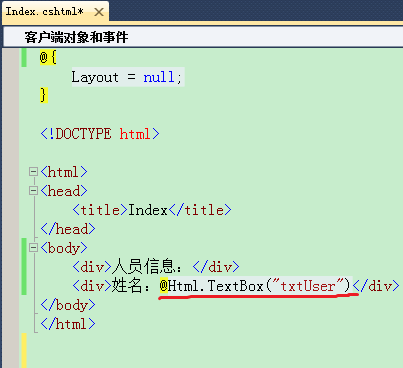
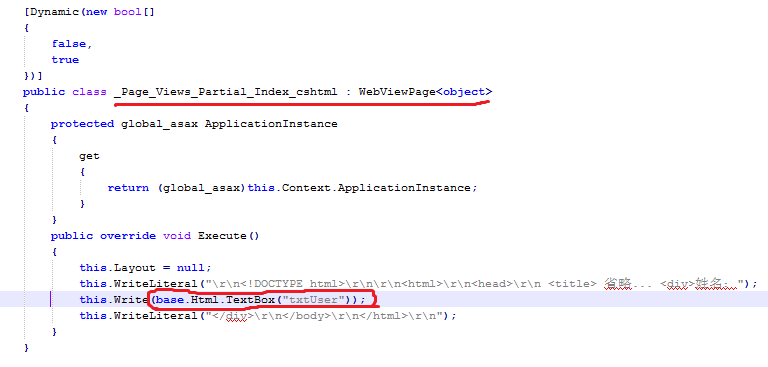
如上图所示,“@Html.TextBox(‘txtUser’)” 经过编译后,就是去执行base.Html.TextBox("txtUser"),又由类继承关系可知,base.Html的值就是一个HtmlHelper对象(视图页对象转换为WebViewPage类型后,初始化时创建的)。而TextBox("txtUser"),则是HtmlHelper的扩展方法!
public static class InputExtensions

{

    //省略其他代码...

    // TextBox

    public static MvcHtmlString TextBox(this HtmlHelper htmlHelper, string name)

    {

        return TextBox(htmlHelper, name, value: null);

    }

    public static MvcHtmlString TextBox(this HtmlHelper htmlHelper, string name, object value)

    {

        return TextBox(htmlHelper, name, value, format: null);

    }

    public static MvcHtmlString TextBox(this HtmlHelper htmlHelper, string name, object value, string format)

    {

        return TextBox(htmlHelper, name, value, format, htmlAttributes: (object)null);

    }

    public static MvcHtmlString TextBox(this HtmlHelper htmlHelper, string name, object value, object htmlAttributes)

    {

        return TextBox(htmlHelper, name, value, format: null, htmlAttributes: htmlAttributes);

    }

    public static MvcHtmlString TextBox(this HtmlHelper htmlHelper, string name, object value, string format, object htmlAttributes)

    {

        return TextBox(htmlHelper, name, value, format, HtmlHelper.AnonymousObjectToHtmlAttributes(htmlAttributes));

    }

    public static MvcHtmlString TextBox(this HtmlHelper htmlHelper, string name, object value, IDictionary<string, object> htmlAttributes)

    {

        return TextBox(htmlHelper, name, value, format: null, htmlAttributes: htmlAttributes);

    }

    public static MvcHtmlString TextBox(this HtmlHelper htmlHelper, string name, object value, string format, IDictionary<string, object> htmlAttributes)

    {

        return InputHelper(htmlHelper,

                           InputType.Text,

                           metadata: null,

                           name: name,

                           value: value,

                           useViewData: (value == null),

                           isChecked: false,

                           setId: true,

                           isExplicitValue: true,

                           format: format,

                           htmlAttributes: htmlAttributes);

    }

    [SuppressMessage("Microsoft.Design", "CA1006:DoNotNestGenericTypesInMemberSignatures", Justification = "This is an appropriate nesting of generic types")]

    public static MvcHtmlString TextBoxFor<TModel, TProperty>(this HtmlHelper<TModel> htmlHelper, Expression<Func<TModel, TProperty>> expression)

    {

        return htmlHelper.TextBoxFor(expression, format: null);

    }

    [SuppressMessage("Microsoft.Design", "CA1006:DoNotNestGenericTypesInMemberSignatures", Justification = "This is an appropriate nesting of generic types")]

    public static MvcHtmlString TextBoxFor<TModel, TProperty>(this HtmlHelper<TModel> htmlHelper, Expression<Func<TModel, TProperty>> expression, string format)

    {

        return htmlHelper.TextBoxFor(expression, format, (IDictionary<string, object>)null);

    }

    [SuppressMessage("Microsoft.Design", "CA1006:DoNotNestGenericTypesInMemberSignatures", Justification = "This is an appropriate nesting of generic types")]

    public static MvcHtmlString TextBoxFor<TModel, TProperty>(this HtmlHelper<TModel> htmlHelper, Expression<Func<TModel, TProperty>> expression, object htmlAttributes)

    {

        return htmlHelper.TextBoxFor(expression, format: null, htmlAttributes: htmlAttributes);

    }

    [SuppressMessage("Microsoft.Design", "CA1006:DoNotNestGenericTypesInMemberSignatures", Justification = "This is an appropriate nesting of generic types")]

    public static MvcHtmlString TextBoxFor<TModel, TProperty>(this HtmlHelper<TModel> htmlHelper, Expression<Func<TModel, TProperty>> expression, string format, object htmlAttributes)

    {

        return htmlHelper.TextBoxFor(expression, format: format, htmlAttributes: HtmlHelper.AnonymousObjectToHtmlAttributes(htmlAttributes));

    }

    [SuppressMessage("Microsoft.Design", "CA1006:DoNotNestGenericTypesInMemberSignatures", Justification = "This is an appropriate nesting of generic types")]

    public static MvcHtmlString TextBoxFor<TModel, TProperty>(this HtmlHelper<TModel> htmlHelper, Expression<Func<TModel, TProperty>> expression, IDictionary<string, object> htmlAttributes)

    {

        return htmlHelper.TextBoxFor(expression, format: null, htmlAttributes: htmlAttributes);

    }

    [SuppressMessage("Microsoft.Design", "CA1006:DoNotNestGenericTypesInMemberSignatures", Justification = "This is an appropriate nesting of generic types")]

    public static MvcHtmlString TextBoxFor<TModel, TProperty>(this HtmlHelper<TModel> htmlHelper, Expression<Func<TModel, TProperty>> expression, string format, IDictionary<string, object> htmlAttributes)

    {

        ModelMetadata metadata = ModelMetadata.FromLambdaExpression(expression, htmlHelper.ViewData);

        return TextBoxHelper(htmlHelper,

                             metadata,

                             metadata.Model,

                             ExpressionHelper.GetExpressionText(expression),

                             format,

                             htmlAttributes);

    }

    private static MvcHtmlString TextBoxHelper(this HtmlHelper htmlHelper, ModelMetadata metadata, object model, string expression, string format, IDictionary<string, object> htmlAttributes)

    {

        return InputHelper(htmlHelper,

                           InputType.Text,

                           metadata,

                           expression,

                           model,

                           useViewData: false,

                           isChecked: false,

                           setId: true,

                           isExplicitValue: true,

                           format: format,

                           htmlAttributes: htmlAttributes);

    }

    // Helper methods

    private static MvcHtmlString InputHelper(HtmlHelper htmlHelper, InputType inputType, ModelMetadata metadata, string name, object value, bool useViewData, bool isChecked, bool setId, bool isExplicitValue, string format, IDictionary<string, object> htmlAttributes)

    {

        string fullName = htmlHelper.ViewContext.ViewData.TemplateInfo.GetFullHtmlFieldName(name);

        if (String.IsNullOrEmpty(fullName))

        {

            throw new ArgumentException(MvcResources.Common_NullOrEmpty, "name");

        }

        TagBuilder tagBuilder = new TagBuilder("input");

        tagBuilder.MergeAttributes(htmlAttributes);

        tagBuilder.MergeAttribute("type", HtmlHelper.GetInputTypeString(inputType));

        tagBuilder.MergeAttribute("name", fullName, true);

        string valueParameter = htmlHelper.FormatValue(value, format);

        bool usedModelState = false;

        switch (inputType)

        {

            case InputType.CheckBox:

                bool? modelStateWasChecked = htmlHelper.GetModelStateValue(fullName, typeof(bool)) as bool?;

                if (modelStateWasChecked.HasValue)

                {

                    isChecked = modelStateWasChecked.Value;

                    usedModelState = true;

                }

                goto case InputType.Radio;

            case InputType.Radio:

                if (!usedModelState)

                {

                    string modelStateValue = htmlHelper.GetModelStateValue(fullName, typeof(string)) as string;

                    if (modelStateValue != null)

                    {

                        isChecked = String.Equals(modelStateValue, valueParameter, StringComparison.Ordinal);

                        usedModelState = true;

                    }

                }

                if (!usedModelState && useViewData)

                {

                    isChecked = htmlHelper.EvalBoolean(fullName);

                }

                if (isChecked)

                {

                    tagBuilder.MergeAttribute("checked", "checked");

                }

                tagBuilder.MergeAttribute("value", valueParameter, isExplicitValue);

                break;

            case InputType.Password:

                if (value != null)

                {

                    tagBuilder.MergeAttribute("value", valueParameter, isExplicitValue);

                }

                break;

            default:

                string attemptedValue = (string)htmlHelper.GetModelStateValue(fullName, typeof(string));

                tagBuilder.MergeAttribute("value", attemptedValue ?? ((useViewData) ? htmlHelper.EvalString(fullName, format) : valueParameter), isExplicitValue);

                break;

        }

        if (setId)

        {

            tagBuilder.GenerateId(fullName);

        }

        // If there are any errors for a named field, we add the css attribute.

        ModelState modelState;

        if (htmlHelper.ViewData.ModelState.TryGetValue(fullName, out modelState))

        {

            if (modelState.Errors.Count > )

            {

                tagBuilder.AddCssClass(HtmlHelper.ValidationInputCssClassName);

            }

        }

        tagBuilder.MergeAttributes(htmlHelper.GetUnobtrusiveValidationAttributes(name, metadata));

        if (inputType == InputType.CheckBox)

        {

            // Render an additional <input type="hidden".../> for checkboxes. This

            // addresses scenarios where unchecked checkboxes are not sent in the request.

            // Sending a hidden input makes it possible to know that the checkbox was present

            // on the page when the request was submitted.

            StringBuilder inputItemBuilder = new StringBuilder();

            inputItemBuilder.Append(tagBuilder.ToString(TagRenderMode.SelfClosing));

            TagBuilder hiddenInput = new TagBuilder("input");

            hiddenInput.MergeAttribute("type", HtmlHelper.GetInputTypeString(InputType.Hidden));

            hiddenInput.MergeAttribute("name", fullName);

            hiddenInput.MergeAttribute("value", "false");

            inputItemBuilder.Append(hiddenInput.ToString(TagRenderMode.SelfClosing));

            return MvcHtmlString.Create(inputItemBuilder.ToString());

        }

        return tagBuilder.ToMvcHtmlString(TagRenderMode.SelfClosing);

    }

    private static RouteValueDictionary ToRouteValueDictionary(IDictionary<string, object> dictionary)

    {

        return dictionary == null ? new RouteValueDictionary() : new RouteValueDictionary(dictionary);

    }

}
InputExtensions
代码中,TextBox等扩展方法最终调用InputHelper方法,从而生成对应字符串类型的html标签(如:<input type='text"...>),然后将标签封装到一个MvcHtmlString对象中,并返回。即:base.Html.TextBox("txtUser")的执行结果就是一个封装了html标签内容的MvcHtmlString对象。之后执行this.Write(base.Html.TextBox("txtUser"))时,会执行MvcHtmlString对象的 ToHtmlString()方法获取html标签,最终将标签内容写入到响应给客户端的内容中!
public interface IHtmlString

{

    string ToHtmlString();

}
IHtmlString
public class HtmlString : IHtmlString

{

    private string _htmlString;

    [TargetedPatchingOptOut("Performance critical to inline this type of method across NGen image boundaries")]

    public HtmlString(string value)

    {

        this._htmlString = value;

    }

    public string ToHtmlString()

    {

        return this._htmlString;

    }

    public override string ToString()

    {

        return this._htmlString;

    }

}
HtmlString
public sealed class MvcHtmlString : HtmlString

{

    [SuppressMessage("Microsoft.Security", "CA2104:DoNotDeclareReadOnlyMutableReferenceTypes", Justification = "MvcHtmlString is immutable")]

    public static readonly MvcHtmlString Empty = Create(String.Empty);

    private readonly string _value;

    public MvcHtmlString(string value)

        : base(value ?? String.Empty)

    {

        _value = value ?? String.Empty;

    }

    public static MvcHtmlString Create(string value)

    {

        return new MvcHtmlString(value);

    }

    public static bool IsNullOrEmpty(MvcHtmlString value)

    {

        return (value == null || value._value.Length == );

    }

}
MvcHtmlString
以下展示如何从MmvHtmlString对象中得到被封装的html标签(如:<input type='text"...>),并写入到Http响应内容中!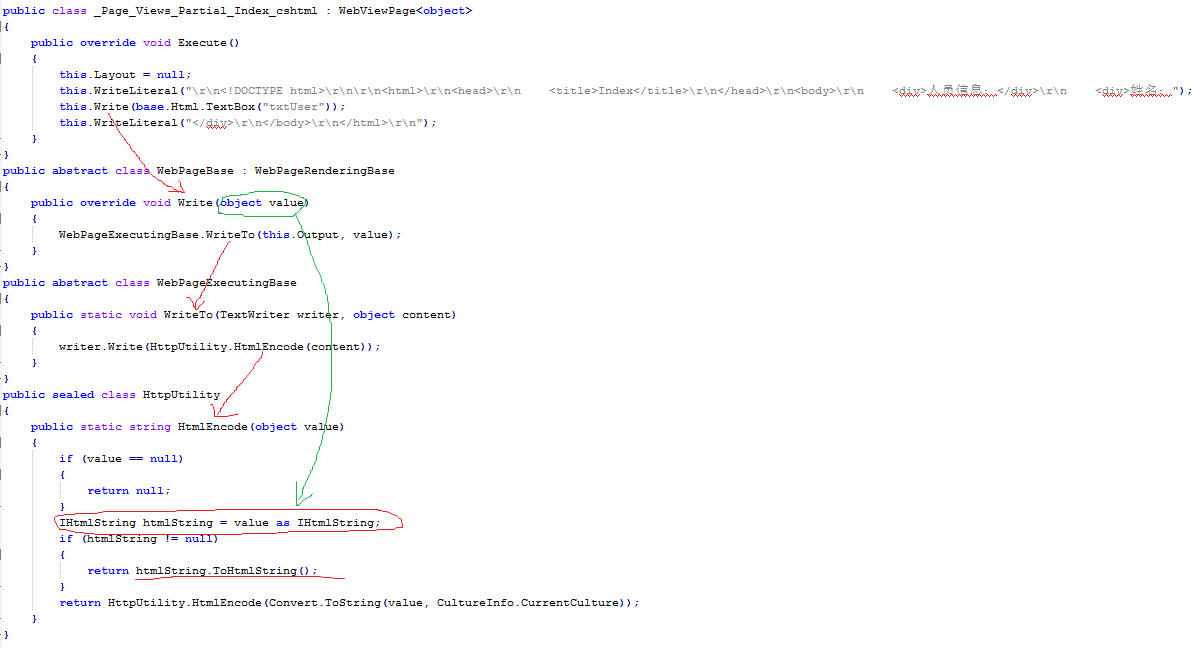
最终,将生成的html标签以字符串的形式写入到Http响应内容中!
以上只对HtmlHelper的扩展方法TextBox进行了介绍,其他的扩展方法童鞋们自行补脑了!上述如有不适之处,请指正!!!
扩展:
可以通过创建一个HtmlHelper的扩展方法,从而实现一个自定义控件!
ASP.NET MVC视图中的@Html.xxx(...)的更多相关文章
- MVC视图中的@Html.xxx(...)
ASP.NET MVC视图中的@Html.xxx(...) 问题 在视图页中@Html.xxx(...)是什么?如何被执行? 如下图所示: 解疑 视图页中@Html.xxx(...)涉及的内容有: ...
- asp.net mvc视图中使用entitySet类型数据时提示出错
asp.net mvc5视图中使用entitySet类型数据时提示以下错误 检查了一下引用,发现已经引用了System.Data.Linq了,可是还是一直提示出错, 后来发现还需要在Views文件夹下 ...
- asp.net mvc视图中嵌套分部视图
asp.net mvc中Layout相当于webForm中母版页,分部视图相当于webForm中的用户控件. 下面例子是一个视图如何嵌套分部视图: A是分部视图,B是一般视图(A,B中的代码省略) 我 ...
- [转]在 ASP.NET MVC 4 中创建为移动设备优化的视图
原文链接 https://msdn.microsoft.com/zh-cn/magazine/dn296507.aspx 如果深入探讨有关编写移动设备网站的常识性考虑因素,会发现其中有一种内在矛盾. ...
- ASP.NET MVC 4中如何为不同的浏览器自适应布局和视图
在ASP.NET MVC 4中,可以很简单地实现针对不同的浏览器自适应布局和视图.这个得归功于MVC中的"约定甚于配置"的设计理念. 默认的自适应 MVC 4自动地为移动设备浏览器 ...
- 【ASP.NET MVC系列】浅谈ASP.NET MVC 视图与控制器传递数据
ASP.NET MVC系列文章 [01]浅谈Google Chrome浏览器(理论篇) [02]浅谈Google Chrome浏览器(操作篇)(上) [03]浅谈Google Chrome浏览器(操作 ...
- ASP.NET MVC 视图(五)
ASP.NET MVC 视图(五) 前言 上篇讲解了视图中的分段概念.和分部视图的使用,本篇将会对Razor的基础语法简洁的说明一下,前面的很多篇幅中都有涉及到视图的调用,其中用了很多视图辅助器,也就 ...
- ASP.NET MVC 视图(四)
ASP.NET MVC 视图(四) 前言 上篇对于利用IoC框架对视图的实现进行依赖注入,最后还简单的介绍一下自定义的视图辅助器是怎么定义和使用的,对于Razor语法的细节和辅助器的使用下篇会说讲到, ...
- ASP.NET MVC 视图(三)
ASP.NET MVC 视图(三) 前言 上篇对于Razor视图引擎和视图的类型做了大概的讲解,想必大家对视图的本身也有所了解,本篇将利用IoC框架对视图的实现进行依赖注入,在此过程过会让大家更了解的 ...
随机推荐
- HTTPS 原理解析(转)
一 前言 在说HTTPS之前先说说什么是HTTP,HTTP就是我们平时浏览网页时候使用的一种协议.HTTP协议传输的数据都是未加密的,也就是明文的,因此使用HTTP协议传输隐私信息非常不安全.为了保证 ...
- SPFA算法
SPFA算法 一.算法简介 SPFA(Shortest Path Faster Algorithm)算法是求单源最短路径的一种算法,它是Bellman-ford的队列优化,它是一种十分高效的最短路算法 ...
- MathType的公式在word中跟文字不对齐
引用http://blog.sina.com.cn/s/blog_4d1f40c00100net8.html 部分Mathtype公式与文档文字没有很好的对齐,而是浮起来了,也就是说Mathtype公 ...
- 如何将一个对象存到网页中并在js中使用
需求:希望在js中使用Controller传过来的对象,特别是对象里存有list的数据. 不希望循环使用隐藏域. 解决办法:在View中使用Json.Net序列化: @{ string jsonStr ...
- db2工具优化
- SQL Server2008清空日志文件
USE[master] GO ALTER DATABASE mydbname SET RECOVERY SIMPLE WITH NO_WAIT GO ALTER DATABASE mydbname S ...
- 再说memcache的multiget hole(无底洞)
关键词:multiget hole,memcache 适用于:java,php 基础知识背景: 1)multiget 是什么: multiget 指的是从 memcache(或其他分布式缓存) ...
- Centos 下面升级系统内核(转)
1.导入public key 1 rpm --import https://www.elrepo.org/RPM-GPG-KEY-elrepo.org 2.安装ELRepo到CentOS 6. ...
- 最大乘积 Maximun Product
最大乘积 题目链接:http://acm.hust.edu.cn/vjudge/contest/view.action?cid=84562#problem/B 题意: 输入n个元素组成的序列s,你需要 ...
- iOS中JSONModel的使用
iOS中JSONModel的使用 流弊的JSON数据模型框架 https://github.com/jsonmodel/jsonmodel 版本 1.3.0 如果你喜欢JSONModel,并且使用 ...