
黄聪: Bootstrap之Form表单验证神器: BootstrapValidator(转)
前言:做Web开发的我们,表单验证是再常见不过的需求了。友好的错误提示能增加用户体验。博主搜索bootstrap表单验证,搜到的结果大部分都是文中的主题:bootstrapvalidator。今天就来看看它如何使用吧。
一、源码及API地址
介绍它之前,还是给出它的源码以及API的地址吧。
bootstrapvalidator源码:https://github.com/nghuuphuoc/bootstrapvalidator
boostrapvalidator api:http://bv.doc.javake.cn/api/
二、代码以及效果展示
1、初级用法
来看bootstrapvalidator的描述:A jQuery form validator for Bootstrap 3。从描述中我们就可以知道它至少需要jQuery、bootstrap的支持。我们首先引入需要的js组件

   <script src="~/Scripts/jquery-1.10.2.js"></script>

    <script src="~/Content/bootstrap/js/bootstrap.min.js"></script>

    <link href="~/Content/bootstrap/css/bootstrap.min.css" rel="stylesheet" />

    <script src="~/Content/bootstrapValidator/js/bootstrapValidator.min.js"></script>

    <link href="~/Content/bootstrapValidator/css/bootstrapValidator.min.css" rel="stylesheet" />
我们知道,既然是表单验证,那么我们在cshtml页面就必须要有一个Form,并且我们知道Form里面取元素都是通过name属性去取值的,所以,表单里面的元素都要有一个name的属性值。
     <form>

            <div class="form-group">

                <label>Username</label>

                <input type="text" class="form-control" name="username" />

            </div>

            <div class="form-group">

                <label>Email address</label>

                <input type="text" class="form-control" name="email" />

            </div>

            <div class="form-group">

                <button type="submit" name="submit" class="btn btn-primary">Submit</button>

            </div>

        </form>
有了表单元素之后,就是我们的js初始化了。
    $(function () {

        $('form').bootstrapValidator({
        message: 'This value is not valid',
             feedbackIcons: {
                        valid: 'glyphicon glyphicon-ok',
                        invalid: 'glyphicon glyphicon-remove',
                        validating: 'glyphicon glyphicon-refresh'
                       },
            fields: {

                username: {

                    message: '用户名验证失败',

                    validators: {

                        notEmpty: {

                            message: '用户名不能为空'

                        }

                    }

                },

                email: {

                    validators: {

                        notEmpty: {

                            message: '邮箱地址不能为空'

                        }

                    }

                }

            }

        });

    });
内容应该很容易看懂。来看效果:
验证通不过,提交按钮灰掉不能点击

验证通过,提交按钮恢复

看看效果先感受下,最大优点:使用简单,界面友好。下面我们来看看重叠验证。
2、中级用法
上面我们知道了非空验证的写法,除此之外肯定还有其他验证方式啊。别急,我们慢慢来看。上面的代码cshtml部分不动,js部分我们稍作修改:
  $(function () {

        $('form').bootstrapValidator({

            message: 'This value is not valid',

            feedbackIcons: {

                valid: 'glyphicon glyphicon-ok',

                invalid: 'glyphicon glyphicon-remove',

                validating: 'glyphicon glyphicon-refresh'

            },

            fields: {

                username: {

                    message: '用户名验证失败',

                    validators: {

                        notEmpty: {

                            message: '用户名不能为空'

                        },

                        stringLength: {

                            min: 6,

                            max: 18,

                            message: '用户名长度必须在6到18位之间'

                        },

                        regexp: {

                            regexp: /^[a-zA-Z0-9_]+$/,

                            message: '用户名只能包含大写、小写、数字和下划线'

                        }

                    }

                },

                email: {

                    validators: {

                        notEmpty: {

                            message: '邮箱不能为空'

                        },

                        emailAddress: {

                            message: '邮箱地址格式有误'

                        }

                    }

                }

            }

        });

    });
加上了重叠验证我们来看效果:
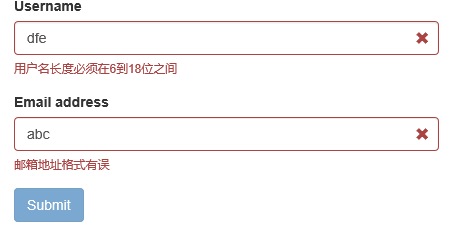


由上面的代码可以看出在validators属性对应一个Json对象,里面可以包含多个验证的类型:
notEmpty:非空验证;
stringLength:字符串长度验证;
regexp:正则表达式验证;
emailAddress:邮箱地址验证(都不用我们去写邮箱的正则了~~)
除此之外,在文档里面我们看到它总共有46个验证类型,我们抽几个常见的出来看看:
base64:64位编码验证;
between:验证输入值必须在某一个范围值以内,比如大于10小于100;
creditCard:身份证验证;
date:日期验证;
ip:IP地址验证;
numeric:数值验证;
phone:电话号码验证;
uri:url验证;
更多验证类型详见:http://bv.doc.javake.cn/validators/。当然涉及中文的验证可能会有些小问题,园友们如果有需要可以自行下去用代码测试下。
还有一个比较常用的就是submitHandler属性,它对应着提交按钮的事件方法。使用如下:
$(function () {

        $('form').bootstrapValidator({

            message: 'This value is not valid',

            feedbackIcons: {

                valid: 'glyphicon glyphicon-ok',

                invalid: 'glyphicon glyphicon-remove',

                validating: 'glyphicon glyphicon-refresh'

            },

            fields: {

                username: {

                    message: '用户名验证失败',

                    validators: {

                        notEmpty: {

                            message: '用户名不能为空'

                        },

                        stringLength: {

                            min: 6,

                            max: 18,

                            message: '用户名长度必须在6到18位之间'

                        },

                        regexp: {

                            regexp: /^[a-zA-Z0-9_]+$/,

                            message: '用户名只能包含大写、小写、数字和下划线'

                        }

                    }

                },

                email: {

                    validators: {

                        notEmpty: {

                            message: '邮箱不能为空'

                        },

                        emailAddress: {

                            message: '邮箱地址格式有误'

                        }

                    }

                }

            },

            submitHandler: function (validator, form, submitButton) {

                alert("submit");

            }

        });

    });
在它的Demo里面介绍了很多验证的实例。我们简单看看它的效果,至于实现代码,其实很简单,有兴趣的可以直接看api。
颜色验证

Tab页表单验证

按钮验证

转载:http://www.cnblogs.com/landeanfen/p/5035608.html
黄聪: Bootstrap之Form表单验证神器: BootstrapValidator(转)的更多相关文章
- Bootstrap之Form表单验证神器: BootstrapValidator(转)
前言:做Web开发的我们,表单验证是再常见不过的需求了.友好的错误提示能增加用户体验.博主搜索bootstrap表单验证,搜到的结果大部分都是文中的主题:bootstrapvalidator.今天就来 ...
- JS组件系列——Form表单验证神器: BootstrapValidator
前言:做Web开发的我们,表单验证是再常见不过的需求了.友好的错误提示能增加用户体验.博主搜索bootstrap表单验证,搜到的结果大部分都是文中的主题:bootstrapvalidator.今天就来 ...
- Form表单验证神器: BootstrapValidator
前言:做Web开发的我们,表单验证是再常见不过的需求了.友好的错误提示能增加用户体验.博主搜索bootstrap表单验证,搜到的结果大部分都是文中的主题:bootstrapvalidator.今天就来 ...
- jQuery表单验证组件BootstrapValidator
github:https://github.com/nghuuphuoc/bootstrapvalidator 参考博客:JS组件系列——Form表单验证神器: BootstrapValidator ...
- 基于Bootstrap+jQuery.validate Form表单验证实践
基于Bootstrap jQuery.validate Form表单验证实践 项目结构 : github 上源码地址:https://github.com/starzou/front-end- ...
- Bootstrap学习总结笔记(24)-- 基于BootstrapValidator的Form表单验证
Form表单进行数据验证是十分必要的,我们可以自己写JS脚本或者使用JQuery Validate 插件来实现.对于Bootstrap而言,利用BootstrapValidator来做Form表单验证 ...
- web框架-(六)Django补充---form表单验证
一.form表单验证 1. 常规html页面的form表单验证 常规页面中,如果想实现对表单中用户输入信息的数据验证,需要配合Ajax来实现. 使用前我们先来熟悉下函数参数:request,其中包含的 ...
- form表单验证-Javascript
Form表单验证: js基础考试内容,form表单验证,正则表达式,blur事件,自动获取数组,以及css布局样式,动态清除等.完整代码如下: <!DOCTYPE html PUBLIC &qu ...
- django之form表单验证
django中的Form一般有两种功能: 输入html 验证用户输入 #!/usr/bin/env python # -*- coding:utf- -*- import re from django ...
随机推荐
- Objective-C( Foundation框架 一 字符串)
Objective-C 中核心处理字符串的类是 NSString 与 NSMutableString ,这两个类最大的区别就是NSString 创建赋值以后该字符串的内容与长度不能在动态的更改,除非重 ...
- Question and Answer
1.VS2013使用EntityFrame问题解决办法 解决办法参照博客http://pinter.org/?p=2374 使用到EntityFrame的项目配置文件修改如下: 项目中凡是使用到DbC ...
- 用MySQL实现分页查询
MySQL中实现分页查询语句: //定义分页需要的变量 int pageNow=2;//当前页 int pageSize=3;//指定每页显示3条记录 int pageCount=1;//该值是计算出 ...
- cocos2d-x 中的坐标系
cocos2d-x 中的坐标系是笛卡尔坐标系,向右为 x 轴正方向,向上为 y 轴正方向,以像素为单位 原点在屏幕左下角的坐标系叫世界坐标系,是整个游戏中的根基,直接添加到场景中的节点,设置的位置都是 ...
- css布局之三列布局
网站上使用三列布局的还是比较多的,不过三列和两列有些相似: 1.自适应三列 <!DOCTYPE html> <html lang="en"> <hea ...
- Linux摄像头驱动学习之:(五)UVC-分析设备描述符
linux系统上插上USB摄像头设备后,内存就会有相应的设备描述符信息,后期可以根据这些信息进一步写驱动程序. 流程:Device(设备) -> Configuration(配置) -> ...
- Asp.net MVC 视图(三)
Html辅助方法(HtmlHelper类) 可以通过视图的Html属性调用HTML辅助方法,也可以通过Url属性调用URL辅助方法,还可以通过Ajax属性调用Ajax辅助方法. 在控制器中也存在Url ...
- zlhome.com Deal
using AnfleCrawler.Common; using System; using System.Collections.Generic; using System.Linq; using ...
- <Java中的继承和组合之间的联系和区别>
//Java中的继承和组合之间的联系和区别 //本例是继承 class Animal { private void beat() { System.out.println("心胀跳动...& ...
- Ubuntu中查看32还是64
安装ubuntu在pc上,不推荐在32位pc安装64位操作系统,64位pc安装32位操作系统 方法/步骤 1 按ctrl+shift+t 快捷键,打开终端,输入sudo uname --m ,按下 ...