
Bootstrap学习总结笔记(24)-- 基于BootstrapValidator的Form表单验证
Form表单进行数据验证是十分必要的,我们可以自己写JS脚本或者使用JQuery Validate 插件来实现。对于Bootstrap而言,利用BootstrapValidator来做Form表单验证是个相当不错的选择,两者完全兼容,我们也不用去关注CSS样式等美工效果。
0x01 引入BootstrapValidator
官网:BootstrapValidator,作为一个纯粹的使用者,我们可以在上面的链接处下载相关文件并引入,也可以利用CDN方式引入:
<link href="//cdn.bootcss.com/bootstrap-validator/0.5.3/css/bootstrapValidator.min.css" rel="stylesheet">

<script src="//cdn.bootcss.com/bootstrap-validator/0.5.3/js/bootstrapValidator.min.js"></script>- 1
- 2
0x02 用户注册实例
下面使用一个用户注册的实例,来总结BootstrapValidator的基本使用方法(其中的JS和CSS文件的引入,请根据自己的实际位置进行调整):
<!DOCTYPE html>

<html lang="zh-cn">

<head>

    <meta charset="UTF-8">

    <title>用户注册</title>

    <meta name="viewport" content="width=device-width, initial-scale=1">

    <link href="../../../css/bootstrap.min.css" rel="stylesheet">

    <link href="//cdn.bootcss.com/bootstrap-validator/0.5.3/css/bootstrapValidator.min.css" rel="stylesheet">

    <script src="http://cdn.bootcss.com/jquery/1.11.1/jquery.min.js"></script>

    <script src="../../../js/bootstrap.min.js"></script>

    <script src="//cdn.bootcss.com/bootstrap-validator/0.5.3/js/bootstrapValidator.min.js"></script>

</head>

<body>

<div class="container col-lg-3 col-lg-offset-3">

    <div class="page-header">

        <h3>用户注册</h3>

    </div>

    <div>

        <form id="registerForm" method="POST" class="form-horizontal" action="用户注册.html">

            <div class="form-group">

                <!--注册的用户名-->

                <label class="control-label" for="username">*请输入注册用户名:</label>

                <input type="text" class="form-control" placeholder="请输入注册用户名" name="username" id="username">

            </div>

            <div class="form-group">

                <!--注册密码-->

                <label class="control-label" for="password">*请输入注册密码:</label>

                <input type="password" class="form-control" placeholder="请输入注册密码" name="password" id="password">

            </div>

            <div class="form-group">

                <!--确认密码-->

                <label class="control-label" for="repassword">*请输入确认密码:</label>

                <input type="password" class="form-control" placeholder="请输入确认密码" name="repassword" id="repassword">

            </div>

            <div class="form-group">

                <label class="control-label" for="phone">*请输入手机号码:</label>

                <input type="text" class="form-control" placeholder="请输入手机号码" name="phone" id="phone">

            </div>

            <div class="form-group">

                <label class="control-label" for="email">*请输入电子邮箱:</label>

                <input type="text" class="form-control" placeholder="请输入电子邮箱" name="email" id="email">

            </div>

            <div class="form-group">

                <label class="control-label" for="inviteCode">*请输入邀请码:</label>

                <input type="text" class="form-control" placeholder="请输入邀请码" name="inviteCode" id="inviteCode">

            </div>

            <div class="form-group">

                <button type="submit" class="btn btn-primary form-control">提交注册</button>

            </div>

        </form>

    </div>

</div>

<script>

    $(function () {

        <!--数据验证-->

        $("#registerForm").bootstrapValidator({

            message:'This value is not valid',

//            定义未通过验证的状态图标

            feedbackIcons: {/*输入框不同状态,显示图片的样式*/

                valid: 'glyphicon glyphicon-ok',

                invalid: 'glyphicon glyphicon-remove',

                validating: 'glyphicon glyphicon-refresh'

            },

//            字段验证

            fields:{

//                用户名

                username:{

                    message:'用户名非法',

                    validators:{

//                        非空

                        notEmpty:{

                            message:'用户名不能为空'

                        },

//                        限制字符串长度

                        stringLength:{

                            min:3,

                            max:20,

                            message:'用户名长度必须位于3到20之间'

                        },

//                        基于正则表达是的验证

                        regexp:{

                            regexp:/^[a-zA-Z0-9_\.]+$/,

                            message:'用户名由数字字母下划线和.组成'

                        }

                    }

                },

//                密码

                password:{

                    message:'密码非法',

                    validators:{

                        notEmpty:{

                            message:'密码不能为空'

                        },

//                        限制字符串长度

                        stringLength:{

                            min:3,

                            max:20,

                            message:'密码长度必须位于3到20之间'

                        },

//                        相同性检测

                        identical:{

//                            需要验证的field

                            field:'password',

                            message:'两次密码输入不一致'

                        },

//                        基于正则表达是的验证

                        regexp:{

                            regexp:/^[a-zA-Z0-9_\.]+$/,

                            message:'密码由数字字母下划线和.组成'

                        }

                    }

                },

                //                确认密码

                repassword:{

                    message:'密码非法',

                    validators:{

                        notEmpty:{

                            message:'密码不能为空'

                        },

//                        限制字符串长度

                        stringLength:{

                            min:3,

                            max:20,

                            message:'密码长度必须位于3到20之间'

                        },

//                        相同性检测

                        identical:{

//                            需要验证的field

                            field:'password',

                            message:'两次密码输入不一致'

                        },

//                        基于正则表达是的验证

                        regexp:{

                            regexp:/^[a-zA-Z0-9_\.]+$/,

                            message:'密码由数字字母下划线和.组成'

                        }

                    }

                },

//                电子邮箱

                email:{

                    validators:{

                        notEmpty:{

                            message:'邮箱地址不能为空'

                        },

                        emailAddress:{

                            message:'请输入正确的邮箱地址'

                        }

                    }

                },

//                手机号码

                phone:{

                    validators:{

                        notEmpty:{

                            message:'手机号码不能为空'

                        },

                        stringlength:{

                            min:11,

                            max:11,

                            message:'请输入11位手机号码'

                        },

                        regexp:{

                            regexp:/^1[3|5|8]{1}[0-9]{9}$/,

                            message:'请输入正确的手机号码'

                        }

                    }

                },

//                邀请码

                inviteCode:{

                    validators:{

                        notEmpty:{

                            message:'邀请码不能为空'

                        },

                        stringlength:{

                            min:9,

                            max:9,

                            message:'请输入9位邀请码'

                        },

                        regexp:{

                            regexp:/^[\w]{8}$/,

                            message:'邀请码由数字和字母组成'

                        }

                    }

                }

            }

        })

    })

</script>

</body>

</html>- 1
- 2
- 3
- 4
- 5
- 6
- 7
- 8
- 9
- 10
- 11
- 12
- 13
- 14
- 15
- 16
- 17
- 18
- 19
- 20
- 21
- 22
- 23
- 24
- 25
- 26
- 27
- 28
- 29
- 30
- 31
- 32
- 33
- 34
- 35
- 36
- 37
- 38
- 39
- 40
- 41
- 42
- 43
- 44
- 45
- 46
- 47
- 48
- 49
- 50
- 51
- 52
- 53
- 54
- 55
- 56
- 57
- 58
- 59
- 60
- 61
- 62
- 63
- 64
- 65
- 66
- 67
- 68
- 69
- 70
- 71
- 72
- 73
- 74
- 75
- 76
- 77
- 78
- 79
- 80
- 81
- 82
- 83
- 84
- 85
- 86
- 87
- 88
- 89
- 90
- 91
- 92
- 93
- 94
- 95
- 96
- 97
- 98
- 99
- 100
- 101
- 102
- 103
- 104
- 105
- 106
- 107
- 108
- 109
- 110
- 111
- 112
- 113
- 114
- 115
- 116
- 117
- 118
- 119
- 120
- 121
- 122
- 123
- 124
- 125
- 126
- 127
- 128
- 129
- 130
- 131
- 132
- 133
- 134
- 135
- 136
- 137
- 138
- 139
- 140
- 141
- 142
- 143
- 144
- 145
- 146
- 147
- 148
- 149
- 150
- 151
- 152
- 153
- 154
- 155
- 156
- 157
- 158
- 159
- 160
- 161
- 162
- 163
- 164
- 165
- 166
- 167
- 168
- 169
- 170
- 171
- 172
- 173
- 174
- 175
- 176
- 177
- 178
- 179
- 180
- 181
- 182
- 183
- 184
- 185
- 186
- 187
- 188
- 189
- 190
- 191
- 192
- 193
- 194
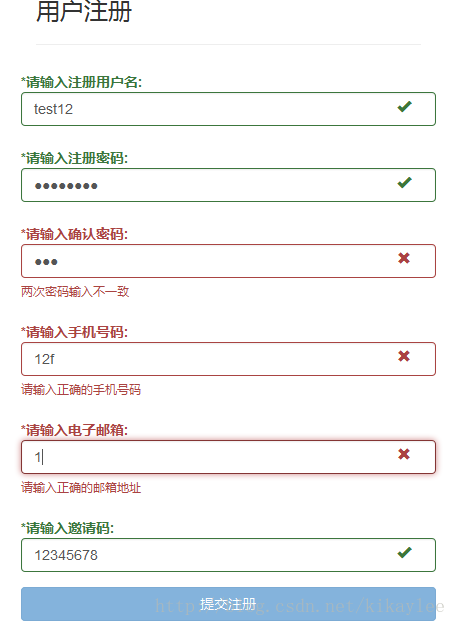
验证效果如下:
0x03 后记
在实际应用中,可能还会遇到类似Ajax提交验证的问题,处理过程是类似的,以后再结合实际的应用来讲这个问题。
类似BootstrapValidator这种基于JS来做验证的过程只是客户端验证,只是为了提高用户体验,并不能保证提交数据的安全性,后端开发者还要做相应的后台验证。
转自https://blog.csdn.net/kikaylee/article/details/53576062
Bootstrap学习总结笔记(24)-- 基于BootstrapValidator的Form表单验证的更多相关文章
- 基于Bootstrap+jQuery.validate Form表单验证实践
基于Bootstrap jQuery.validate Form表单验证实践 项目结构 : github 上源码地址:https://github.com/starzou/front-end- ...
- 基于Jquery Validate 的表单验证
基于Jquery Validate 的表单验证 jquery.validate.js是jquery下的一个验证插件,运用此插件我们可以很便捷的对表单元素进行格式验证. 在讲述基于Jquery Vali ...
- 基于jQuery的Validate表单验证
表单验证可以说在前端开发工作中是无处不在的~ 有数据,有登录,有表单, 都需要前端验证~~ 而我工作中用到最多的就是基于基于jQuery的Validate表单验证~ 就向下面这样~ 因为今天有个朋 ...
- 黄聪: Bootstrap之Form表单验证神器: BootstrapValidator(转)
前言:做Web开发的我们,表单验证是再常见不过的需求了.友好的错误提示能增加用户体验.博主搜索bootstrap表单验证,搜到的结果大部分都是文中的主题:bootstrapvalidator.今天就来 ...
- Bootstrap之Form表单验证神器: BootstrapValidator(转)
前言:做Web开发的我们,表单验证是再常见不过的需求了.友好的错误提示能增加用户体验.博主搜索bootstrap表单验证,搜到的结果大部分都是文中的主题:bootstrapvalidator.今天就来 ...
- JS组件系列——Form表单验证神器: BootstrapValidator
前言:做Web开发的我们,表单验证是再常见不过的需求了.友好的错误提示能增加用户体验.博主搜索bootstrap表单验证,搜到的结果大部分都是文中的主题:bootstrapvalidator.今天就来 ...
- bootstrapValidator.js 做表单验证
有这样的一个场景,我们在提交form表单的时候 可能要做一些验证,比如判断是不是为空,电话的格式验证,邮箱的格式验证等等,手写起来也是可以得. 但是今天我介绍一个bootstrap插件简化开发.就是b ...
- [转]bootstrapValidator.js 做表单验证
本文转自:https://www.cnblogs.com/nele/p/5493414.html 作者:@nele本文为作者原创,转载请注明出处:https://www.cnblogs.com/nel ...
- Form表单验证神器: BootstrapValidator
前言:做Web开发的我们,表单验证是再常见不过的需求了.友好的错误提示能增加用户体验.博主搜索bootstrap表单验证,搜到的结果大部分都是文中的主题:bootstrapvalidator.今天就来 ...
随机推荐
- 用OpenGL实现跳跃的立体小球
一.目的 掌握OpenGL中显示列表对象的使用方法. 二.示例代码 Github地址 #include "stdafx.h" #include <GL/glut.h> ...
- Linux 安装 MongoDB数据库
1下载: wget https://fastdl.mongodb.org/linux/mongodb-linux-x86_64-3.0.7.tgz (下载较慢) 2.安装: mv mongodb-li ...
- R语言ggplot2 简介
ggplot2是一个绘制可视化图形的R包,汲取了R语言基础绘图系统(graphics) 和l attice包的优点,摒弃了相关的缺点,创造出来的一套独立的绘图系统: ggplot2 有以下几个特点: ...
- MyBatis通用Mapper技巧
一.排序 错误代码:example.orderBy(BaseEntity.Field.GMTUpdate + " desc"); 正确方式: 一是:通过注解 @OrderBy(va ...
- 算法-Java组合
code: import org.assertj.core.util.Lists; import java.util.ArrayList; import java.util.Collections; ...
- hive 添加自增列
比如一个表里只有contact字段 ;
- 基于HBase Hadoop 分布式集群环境下的MapReduce程序开发
HBase分布式集群环境搭建成功后,连续4.5天实验客户端Map/Reduce程序开发,这方面的代码网上多得是,写个测试代码非常容易,可是真正运行起来可说是历经挫折.下面就是我最终调通并让程序在集群上 ...
- 用好这6个APP,学英语SO EASY!
http://www.jianshu.com/p/30a27af18340
- jquery方法.serializeArray()获取name和value并转为json数组
jquery的.serializeArray()方法可以获取形如以下 [ {name: 'firstname', value: 'Hello'}, {name: 'lastname', value: ...
- Alpine Linux:如何配置GUI的图形桌面环境:x Desktop Environment
alpine linux 真是不错.小巧.迅捷! 官方的各个版本的alpine镜像内没有带图形环境的.那我们如何构建自己的桌面图形环境呢? 其实:这个问题,在起官网的wiki内有指南,我们根据那些相关 ...