
[转]What is Blue Prism?
本文转自:https://www.guru99.com/blue-prism-tutorial.html#5
What is Blue Prism?
Blue Prism is a UK-based software development company in the field of Robotic Process Automation. The group supplies software robot which helps to automate clerical back office processes that work exactly like a human.
The Robotic Process Automation which is shortly known as (RPA) was invented by Blue Prism. This fact itself shows that the company is pioneers in RPA software development.
Blue Prism software enables business operations to be agile and cost effective by automating, manual, rule-based, repetitive back-office processes and improving accuracy by developing a "Digital Workforce.". The Blue prism tool offers flow chart like designer with drag and drop feature to automate each step of the business processes.
In this tutorial, you will learn
- What is Blue Prism?
- Blue prism Features
- Components of Blue Prism
- What is Object Studio?
- What is Process studio?
- What is Business Objects
- Benefits of using Blueprism
- Blue-prism International Case Studies
Blue prism Features
- Secure, scalable, and central management of a virtual workforce of software robots
- Complete automation solution that results in work distribution and queue management
- Blue prism has many robust features like load balancing, encryption, and audit. It also offers robots that are defined and managed centrally
- Blue Prism comes with various types of spying modes for different application types
- It has many improved featues to configure Dashboards so that session information can be directed to external Analytics and monitoring systems
- The latest version 6 of Blue prism provide support for Microsoft Azure and Amazon AWS cloud deployment patterns
- Exception stages can be set to save a screen capture. When it is used in the production environment, this feature can resolve resource processing issues in a secure manner
- You can automate Excel, XML, csv, pdf, image, etc.
- There is no need to write any code while working with the Blue prism tool
- It can automate software developed in Java, Mainframe, Web-based, Windows Applications
Components of Blue Prism
Blue Prism is a set of libraries, tools, and runtime environments for RPA.
Every software robot has two main parts:
- Process Studio
- Object Studio
What is Object Studio?
Object studio is a where we can create the Visual Business Object. It is abbreviated as VBO. VBO are created to interact with other applications.
We will see that Object Studio looks very like Process Studio. There are key differences, which are:
- Object Studio offers some "stage" which are not available in the Process Studio
- Object Studio does not have a Main Page, but it does have two default pages
- Pages are organized as a flat group instead of hierarchy like in the Process Studio
Benefits of Developing VBO:
- Consistency and scalability
- Lesser Bot creation time for subsequent processes
- System changes only needed to be updated in one location instead of for each process. Bot maintaince becomes easy
What is Process studio?
Process studio looks similar to a traditional flowchart. It is an area where an actual process is created. Apart from features offered by Object studio, it allows business logic, control loops, variables, and object call to be sequenced, and tested in a visible business flow. Each Page in Process has its tab, and generally, the process defined in the Process Studio is pretty similar to a flowchart.
A process acts like a human user. It implements a software robot's logic. It is almost similar to personal interaction with several applications to carry out a series of steps which can invoke actions to carry out same steps.
Process diagram:
- Process diagrams are comprised of various stages connected together using links to form logical structures.
- Stages are selected from the toolbar and placed on the diagram using the mouse.
- They can be selected, moved, resized, formatted, cut, copied, pasted, and deleted, much as you might expect.
- Stages also have various properties that can be accessed by double -clicking.
- Links are created using the link tool by dragging the mouse from the center of one stage to the center of another.
- Dragging without the link tool can be used to select more than one stage at a time.
How to Create a New Process
From the main Blue Prism window, select "Studio" from tabbed menu at the top of the screen.

Figure: Main screen Toolbar
Or select the Studio icon from the left-hand navigation menu.

- Right- click the Processes heading under studio and then select "Create a Process" from the context menu.
- Name the new Process "First Process".
- Enter a brief description of the Process.
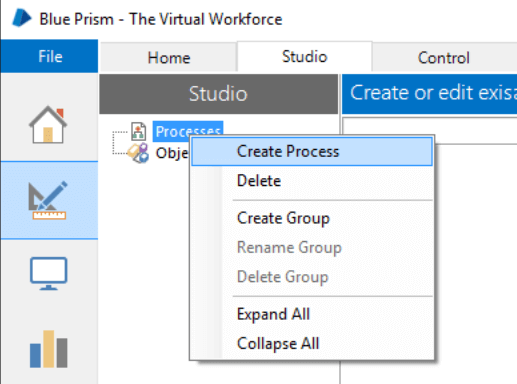
- The new process will appear beneath the Processes heading. Now double-click it to open it.
- Along the left-hand side of the screen is the Stages toolbar. To put a stage on the page click and drag it into position. Try this by dragging a few different stages onto the page.
- You will notice that one of the stages in the stages toolbar has a blue rectangle highlighting it. Whichever stage is highlighted will be the one added if you click directly on the page. Click on the calculation stage on the toolbar to highlight it.

Figure: Process Studio Stages Toolbar
Here, you can notice how the cursor changes and has the calculation stage icon next to it. Now click on the process page to add a calculation stage. This saves you having to return to the toolbar if you have several stages of the same type to add.
Even with the calculation stage cursor you can still drag and place other stage types.
When stages are on the page you can:
- Double click on various stages to view their properties
- Press the Save button but keep the diagram open.
Space in Process Studio is effectively infinite, and pan and zoom tools can be used to maneuver around the diagram. The grid lines and "snap" settings are on by default, but these can be switched off (via the View menu) if necessary.
Advantages of Process Studio
- A process is very much similar to a business object.
- Every process is defined by using one or more pages
- Each page contains various stages and data
- Always begins at its Main page
- Each page in a process has an individual tab, which allows you to divide he processes into various logical groupings.
- A process acts like a human user who thinks and types very fast.
- Need to publish the process then only it visible to Control Room.
- The biggest advantage of the process studio allows you to design the logic by assembling the design surface graphically.
What is Business Objects
To implement RPA system in any organization, a real process would be needed to do some useful tasks and to do so; it would need to work with external applications.
The interface to an application is never contained in the process diagram, but in a separate diagram which is called Business Object.
- A Business Object is never configured in Process Studio but in a distinct, environment which is called Object Studio.
- The main aim of Business Object is to provide an interface to single application.
- A Business Object is not exposed to Control Room and is never used on its own. Instead, it is always used by a Process.
Benefits of using Blueprism
- It doesn't need IT skills to implement
- It can be easily implemented in the short time span of 4 to 6 weeks
- Provides the highest return of your ROI, tremendous payback with self-funding returns
- Automates the application's controls and fields, irrespective of their onscreen position to increase bot's speed
- Custom Digital Front- ends integrate front office agents and back-office automation to improve human-robot interactivity and productivity
- Robust and feature rich analytics suite.
- Double-byte character set support allows you to expand RPA to systems and processes that need double-byte such as Asian languages
- Multi-tiered Encryption Algorithms provides secure connectivity, data storage, and access
- Enterprise-wide Password Vaults with certified CyberArk Credential Management for consistent enterprise-wide credentials
- Custom Permissions feature allows user-specific access to robot groups, robots, processes for secure robotic automation process
- Improved Control Room to offer real-time feedback on robot status and allows you to get the complete insight into the digital workforce.
- Build highly efficient and automated end-to-end business processes
Blue-prism International Case Studies
Following are 2 prominent case studies of Blueprism implementation.
Case 1: National Retail Bank
- Allows them to perform the Inter-bank transfer in just 20 sec using Blue Prism vs. 10 min manual process
- 130 processes automated
- 100 robots deployed
- 200 + FTE saved audit conducted in 1 min with automation versus entire working day process of almost 8 hours.
Case 2: Global Telco
The Telco launched RPA software in 2013. They wanted to optimize their back-office operations.
Blue prism RPA capabilities covered:
- 15 core processes covered
- 1.000-1.200 FTE replaced
- 400-500k cases per month
- 160 robots decoyed: run by a team of 3
- 12 months payback period
- 3 years ROI of 650-800%
Other Popular RPA tools:
- Blue Prism
- Automation Anywhere
- UI Path
- Openspan
- Work Fusion
Summary
- Blue Prism is a UK-based software development company in the field of Robotic Process Automation
- It is a complete automation solution that results in work distribution and queue management
- Blue Prism is a set of libraries, tools, and runtime environments for RPA.
- Every software robot has two main parts: 1.)Process Studio 2.) Object Studio
- Object studio is a where we can create the Visual Business Object. It is also called VBO
- Process studio looks similar to a traditional flowchart. It is an area where an actual process is created
- The major benefit of Blue prism RPA tool is that it can easily be implemented in the short time span of 4 to 6 weeks
[转]What is Blue Prism?的更多相关文章
- [转]MS Excel VBO option missing in Blue Prism
本文转自:https://stackoverflow.com/questions/48706743/ms-excel-vbo-option-missing-in-blue-prism 问: I am ...
- [转]Blue Prism Interview Questions and Answers
本文转自:https://www.rpatraining.co.in/blue-prism-interview-questions/ What is a Visual Business Object? ...
- [转]Blue Prism VBO Cheat Sheet
本文转自:https://www.cheatography.com/ethanium/cheat-sheets/blue-prism-vbo/ Blue Prism MAPIEx Configure ...
- [转]How to Download and Setup Blue Prism
本文转自:https://www.hopetutors.com/blog/uncategorized/how-to-download-and-setup-blue-prism/ The Downloa ...
- [转]Blue Prism Architecture
本文转自:https://mindmajix.com/blue-prism-architecture Introduction Automation technology is widely bloo ...
- [转]Blue Prism Login Agent 使用指导手册
本文转自:https://cloud.tencent.com/developer/news/83035 咳!咳!咳! 第一篇RPA技术文,还是贼拉鸡冻.各位大侠要多多支持啊 1.Login Agent ...
- [转]How to mouse hover using Blue prism on a web page
本文转自:https://stackoverflow.com/questions/53126436/how-to-mouse-hover-using-blue-prism-on-a-web-page/ ...
- [转]Blue Prism Opening a password protected Excel workbook?
本文转自:https://www.rpaforum.net/threads/opening-a-password-protected-excel-workbook.470/ 问: As the tit ...
- [Blue Prism] Data item 的使用
1.用于存储各种数据类型的变量,支持的数据类型如下: Binary - 用于存储二进制 blob,例如文本文件. Date - 用于存储日期. 此数据类型与 DateTime 类似,只是 Date ...
随机推荐
- C++ boost.python折腾笔记
为了让当年研究生时写的图像处理系统重出江湖起到更大的作用,应研究生导师的意见,对原有的c++框架做了python扩展处理,为了避免遗忘,备注如下: 一.boost 编译 下载boost源码,这里使用b ...
- spring配置问题
产生原因缺少包common-logging-1.2.jar 在该字段所在的类中没有提供该字段的set方法.
- 《java多线程编程核心技术》(一)使用多线程
了解多线程 进程和多线程的概念和线程的优点: 提及多线程技术,不得不提及"进程"这个概念.百度百科对"进程"的解释如下: 进程(Process)是计算机中的程序 ...
- pycharm断点应用
1.在需要打断点行处,单击鼠标左键打断点 2.调试程序开始,在第一个断点之前停止 3.跳过第一个断点进入到下一个断点
- 背水一战 Windows 10 (114) - 后台任务: 后台任务的 Demo(与 app 不同进程), 后台任务的 Demo(与 app 相同进程)
[源码下载] 背水一战 Windows 10 (114) - 后台任务: 后台任务的 Demo(与 app 不同进程), 后台任务的 Demo(与 app 相同进程) 作者:webabcd 介绍背水一 ...
- 前端开发掌握nginx常用功能之server&location匹配规则
nginx主要是公司运维同学必须掌握的知识,涉及到反向代理.负载均衡等服务器配置.前端开发尤其是纯前端开发来说对nginx接触的并不多,但是在一些情况下,nginx还是需要前端自己来搞:例如我们公司的 ...
- Ubuntu 16.04下Samba服务器搭建和配置(配截图)
一.相关介绍 Samba是在Linux和UNIX系统上实现SMB协议的一个免费软件,由服务器及客户端程序构成.SMB(Server Messages Block,信息服务块)是一种在局域网上共享文件和 ...
- 一键访问Google和YouTube等国外知名网站
1.首先打开快速安全通道网站,点击注册!网站地址 https://www.faststunnel.xyz/GWx6uy0M 2.注册好之后下载插件 3.将插件下载完后拖到浏览器安装 4.登录插件,即可 ...
- PHP LDAP 目录协议函数库
在 LDAP 的协议之中,很像硬盘目录结构或倒过来的树状结构.LDAP 的根就是全世界,第一级是属于国别 (countries) 性质的层级,之后可能会有公司 (organization) 的层级,接 ...
- MySQL结构
MySQL属于关系型数据库管理系统(RDBMS),使用RDBMS时,最常见的系统结构就是客户端/服务器类型(C/S类型)这种结构. 服务器指的是用来接收其他程序发出的请求,并对该请求进行相应处理的程序 ...