
[转]What is Blue Prism?
本文转自:https://www.guru99.com/blue-prism-tutorial.html#5
What is Blue Prism?
Blue Prism is a UK-based software development company in the field of Robotic Process Automation. The group supplies software robot which helps to automate clerical back office processes that work exactly like a human.
The Robotic Process Automation which is shortly known as (RPA) was invented by Blue Prism. This fact itself shows that the company is pioneers in RPA software development.
Blue Prism software enables business operations to be agile and cost effective by automating, manual, rule-based, repetitive back-office processes and improving accuracy by developing a "Digital Workforce.". The Blue prism tool offers flow chart like designer with drag and drop feature to automate each step of the business processes.
In this tutorial, you will learn
- What is Blue Prism?
- Blue prism Features
- Components of Blue Prism
- What is Object Studio?
- What is Process studio?
- What is Business Objects
- Benefits of using Blueprism
- Blue-prism International Case Studies
Blue prism Features
- Secure, scalable, and central management of a virtual workforce of software robots
- Complete automation solution that results in work distribution and queue management
- Blue prism has many robust features like load balancing, encryption, and audit. It also offers robots that are defined and managed centrally
- Blue Prism comes with various types of spying modes for different application types
- It has many improved featues to configure Dashboards so that session information can be directed to external Analytics and monitoring systems
- The latest version 6 of Blue prism provide support for Microsoft Azure and Amazon AWS cloud deployment patterns
- Exception stages can be set to save a screen capture. When it is used in the production environment, this feature can resolve resource processing issues in a secure manner
- You can automate Excel, XML, csv, pdf, image, etc.
- There is no need to write any code while working with the Blue prism tool
- It can automate software developed in Java, Mainframe, Web-based, Windows Applications
Components of Blue Prism
Blue Prism is a set of libraries, tools, and runtime environments for RPA.
Every software robot has two main parts:
- Process Studio
- Object Studio
What is Object Studio?
Object studio is a where we can create the Visual Business Object. It is abbreviated as VBO. VBO are created to interact with other applications.
We will see that Object Studio looks very like Process Studio. There are key differences, which are:
- Object Studio offers some "stage" which are not available in the Process Studio
- Object Studio does not have a Main Page, but it does have two default pages
- Pages are organized as a flat group instead of hierarchy like in the Process Studio
Benefits of Developing VBO:
- Consistency and scalability
- Lesser Bot creation time for subsequent processes
- System changes only needed to be updated in one location instead of for each process. Bot maintaince becomes easy
What is Process studio?
Process studio looks similar to a traditional flowchart. It is an area where an actual process is created. Apart from features offered by Object studio, it allows business logic, control loops, variables, and object call to be sequenced, and tested in a visible business flow. Each Page in Process has its tab, and generally, the process defined in the Process Studio is pretty similar to a flowchart.
A process acts like a human user. It implements a software robot's logic. It is almost similar to personal interaction with several applications to carry out a series of steps which can invoke actions to carry out same steps.
Process diagram:
- Process diagrams are comprised of various stages connected together using links to form logical structures.
- Stages are selected from the toolbar and placed on the diagram using the mouse.
- They can be selected, moved, resized, formatted, cut, copied, pasted, and deleted, much as you might expect.
- Stages also have various properties that can be accessed by double -clicking.
- Links are created using the link tool by dragging the mouse from the center of one stage to the center of another.
- Dragging without the link tool can be used to select more than one stage at a time.
How to Create a New Process
From the main Blue Prism window, select "Studio" from tabbed menu at the top of the screen.

Figure: Main screen Toolbar
Or select the Studio icon from the left-hand navigation menu.

- Right- click the Processes heading under studio and then select "Create a Process" from the context menu.
- Name the new Process "First Process".
- Enter a brief description of the Process.
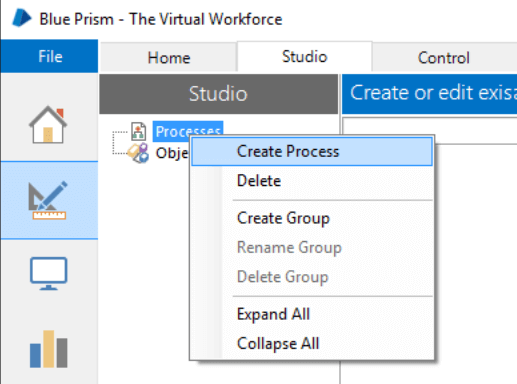
- The new process will appear beneath the Processes heading. Now double-click it to open it.
- Along the left-hand side of the screen is the Stages toolbar. To put a stage on the page click and drag it into position. Try this by dragging a few different stages onto the page.
- You will notice that one of the stages in the stages toolbar has a blue rectangle highlighting it. Whichever stage is highlighted will be the one added if you click directly on the page. Click on the calculation stage on the toolbar to highlight it.

Figure: Process Studio Stages Toolbar
Here, you can notice how the cursor changes and has the calculation stage icon next to it. Now click on the process page to add a calculation stage. This saves you having to return to the toolbar if you have several stages of the same type to add.
Even with the calculation stage cursor you can still drag and place other stage types.
When stages are on the page you can:
- Double click on various stages to view their properties
- Press the Save button but keep the diagram open.
Space in Process Studio is effectively infinite, and pan and zoom tools can be used to maneuver around the diagram. The grid lines and "snap" settings are on by default, but these can be switched off (via the View menu) if necessary.
Advantages of Process Studio
- A process is very much similar to a business object.
- Every process is defined by using one or more pages
- Each page contains various stages and data
- Always begins at its Main page
- Each page in a process has an individual tab, which allows you to divide he processes into various logical groupings.
- A process acts like a human user who thinks and types very fast.
- Need to publish the process then only it visible to Control Room.
- The biggest advantage of the process studio allows you to design the logic by assembling the design surface graphically.
What is Business Objects
To implement RPA system in any organization, a real process would be needed to do some useful tasks and to do so; it would need to work with external applications.
The interface to an application is never contained in the process diagram, but in a separate diagram which is called Business Object.
- A Business Object is never configured in Process Studio but in a distinct, environment which is called Object Studio.
- The main aim of Business Object is to provide an interface to single application.
- A Business Object is not exposed to Control Room and is never used on its own. Instead, it is always used by a Process.
Benefits of using Blueprism
- It doesn't need IT skills to implement
- It can be easily implemented in the short time span of 4 to 6 weeks
- Provides the highest return of your ROI, tremendous payback with self-funding returns
- Automates the application's controls and fields, irrespective of their onscreen position to increase bot's speed
- Custom Digital Front- ends integrate front office agents and back-office automation to improve human-robot interactivity and productivity
- Robust and feature rich analytics suite.
- Double-byte character set support allows you to expand RPA to systems and processes that need double-byte such as Asian languages
- Multi-tiered Encryption Algorithms provides secure connectivity, data storage, and access
- Enterprise-wide Password Vaults with certified CyberArk Credential Management for consistent enterprise-wide credentials
- Custom Permissions feature allows user-specific access to robot groups, robots, processes for secure robotic automation process
- Improved Control Room to offer real-time feedback on robot status and allows you to get the complete insight into the digital workforce.
- Build highly efficient and automated end-to-end business processes
Blue-prism International Case Studies
Following are 2 prominent case studies of Blueprism implementation.
Case 1: National Retail Bank
- Allows them to perform the Inter-bank transfer in just 20 sec using Blue Prism vs. 10 min manual process
- 130 processes automated
- 100 robots deployed
- 200 + FTE saved audit conducted in 1 min with automation versus entire working day process of almost 8 hours.
Case 2: Global Telco
The Telco launched RPA software in 2013. They wanted to optimize their back-office operations.
Blue prism RPA capabilities covered:
- 15 core processes covered
- 1.000-1.200 FTE replaced
- 400-500k cases per month
- 160 robots decoyed: run by a team of 3
- 12 months payback period
- 3 years ROI of 650-800%
Other Popular RPA tools:
- Blue Prism
- Automation Anywhere
- UI Path
- Openspan
- Work Fusion
Summary
- Blue Prism is a UK-based software development company in the field of Robotic Process Automation
- It is a complete automation solution that results in work distribution and queue management
- Blue Prism is a set of libraries, tools, and runtime environments for RPA.
- Every software robot has two main parts: 1.)Process Studio 2.) Object Studio
- Object studio is a where we can create the Visual Business Object. It is also called VBO
- Process studio looks similar to a traditional flowchart. It is an area where an actual process is created
- The major benefit of Blue prism RPA tool is that it can easily be implemented in the short time span of 4 to 6 weeks
[转]What is Blue Prism?的更多相关文章
- [转]MS Excel VBO option missing in Blue Prism
本文转自:https://stackoverflow.com/questions/48706743/ms-excel-vbo-option-missing-in-blue-prism 问: I am ...
- [转]Blue Prism Interview Questions and Answers
本文转自:https://www.rpatraining.co.in/blue-prism-interview-questions/ What is a Visual Business Object? ...
- [转]Blue Prism VBO Cheat Sheet
本文转自:https://www.cheatography.com/ethanium/cheat-sheets/blue-prism-vbo/ Blue Prism MAPIEx Configure ...
- [转]How to Download and Setup Blue Prism
本文转自:https://www.hopetutors.com/blog/uncategorized/how-to-download-and-setup-blue-prism/ The Downloa ...
- [转]Blue Prism Architecture
本文转自:https://mindmajix.com/blue-prism-architecture Introduction Automation technology is widely bloo ...
- [转]Blue Prism Login Agent 使用指导手册
本文转自:https://cloud.tencent.com/developer/news/83035 咳!咳!咳! 第一篇RPA技术文,还是贼拉鸡冻.各位大侠要多多支持啊 1.Login Agent ...
- [转]How to mouse hover using Blue prism on a web page
本文转自:https://stackoverflow.com/questions/53126436/how-to-mouse-hover-using-blue-prism-on-a-web-page/ ...
- [转]Blue Prism Opening a password protected Excel workbook?
本文转自:https://www.rpaforum.net/threads/opening-a-password-protected-excel-workbook.470/ 问: As the tit ...
- [Blue Prism] Data item 的使用
1.用于存储各种数据类型的变量,支持的数据类型如下: Binary - 用于存储二进制 blob,例如文本文件. Date - 用于存储日期. 此数据类型与 DateTime 类似,只是 Date ...
随机推荐
- 性能测试---CPU内存部分
CPU内存的测试可以通过top命令来测试 ,如下是我写的bat脚本,其中的测试进程可以替换为你自己需要测试的进程. @echo offecho============================= ...
- Spring Boot中Web应用的统一异常处理 转载来自翟永超
我们在做Web应用的时候,请求处理过程中发生错误是非常常见的情况.Spring Boot提供了一个默认的映射:/error,当处理中抛出异常之后,会转到该请求中处理,并且该请求有一个全局的错误页面用来 ...
- 我的C#跨平台之旅(六):发布应用
由于此架构从一开始就将.NET Framework 的依赖降低到最低,且不依赖IIS,在ORM层面,完全实现代码优先,即真正做到数据库无关: Windows服务器部署: 在Windows应用服务器上安 ...
- springcloud config 提取公共参数
每个微服务都有自己的配置文件application-local.yml和bootstrap.yml, 这个两个配置文件的读取顺序是先读取bootstrap.yml文件,在读取application-l ...
- scrapy爬虫之模拟ajax post请求获取数据
实质:分析真实请求地址,根据规则构造新地址从而获得数据. 分析发现数据是通过异步ajax方式→post 获得的 于是通过分析response ↓↓↓↓↓↓↓↓↓↓↓↓↓↓↓↓↓↓↓↓ 发现每次翻页 网 ...
- weblogic 控制台访问速度很慢的解决方案
实际是JVM在Linux下的bug 他想调用一个随机函数 但取不到 暂时的解决办法是 1)较好的解决办法: 在Weblogic启动参数里添加 “- Djava.security.egd=file:/d ...
- 关于c++的一篇随笔
众所周知c++是一门极其深奥的学科,正因为其深奥之处,才会让人们觉得学习起来特别难.当然,我想说我自己也不例外,想起当初就像一场噩梦一样,直到今日还历历在目.尽管如此,c++还是一门相当有魅力的课程, ...
- 【腾讯Bugly干货分享】Android 插件技术实战总结
本文来自于腾讯Bugly公众号(weixinBugly),未经作者同意,请勿转载,原文地址:https://mp.weixin.qq.com/s/1p5Y0f5XdVXN2EZYT0AM_A 前言 安 ...
- Flask上下文
Flask的核心机制!关于请求处理流程和上下文 学习一样东西不能只停留在表面,我们要探索其中的细节,学习作者的编程思想,这样才能更进一步. 关于WSGI WSGI(全称Web Server Gatew ...
- Eclipse环境搭建并且运行wordcount程序
一.安装Hadoop插件 1. 所需环境 hadoop2.0伪分布式环境平台正常运行 所需压缩包:eclipse-jee-luna-SR2-linux-gtk-x86_64.tar.gz 在Linu ...