
nodejs配置nginx 以后链接mongodb数据库
服务器 :windows server2008 R2
反向代理 :nginx 1.15.1 for window 64位
数据库:mongodb 4 64位
使用框架express
首先下载nodejs 在官网或者中文网下载都可以 https://nodejs.org/zh-cn/
然后将写好的项目打包成zip 上传 一定要带上 package.json
这样做可以使用npm install 直接将所有的资源全部加载 。以防出现module 找不到;
注意一点:下载mongodb时 在最后下载时 一定要去掉 可视化管理工具下载
不然你会等很久 如果网不好可能就卡死了。 这时候 需要你关闭下载的进程
如果找不到只能重新启动服务器。
如果没有看懂。直接百度mongodb下载卡死 就好了。
npm是node自带的包管理器。
将node部署到服务器上运行时 。我们需要在
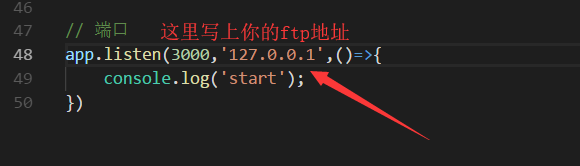
因为我们配置nginx时 ,是需要修改localhost的 所有我们需要写上'127.0.0.1';
在操作数据时,我们也应该修改成

否则会导致数据库链接失败。
接下来我们配置nginx服务
首先下载nginx http://nginx.org/en/download.html 下载最新版本 注意是window版
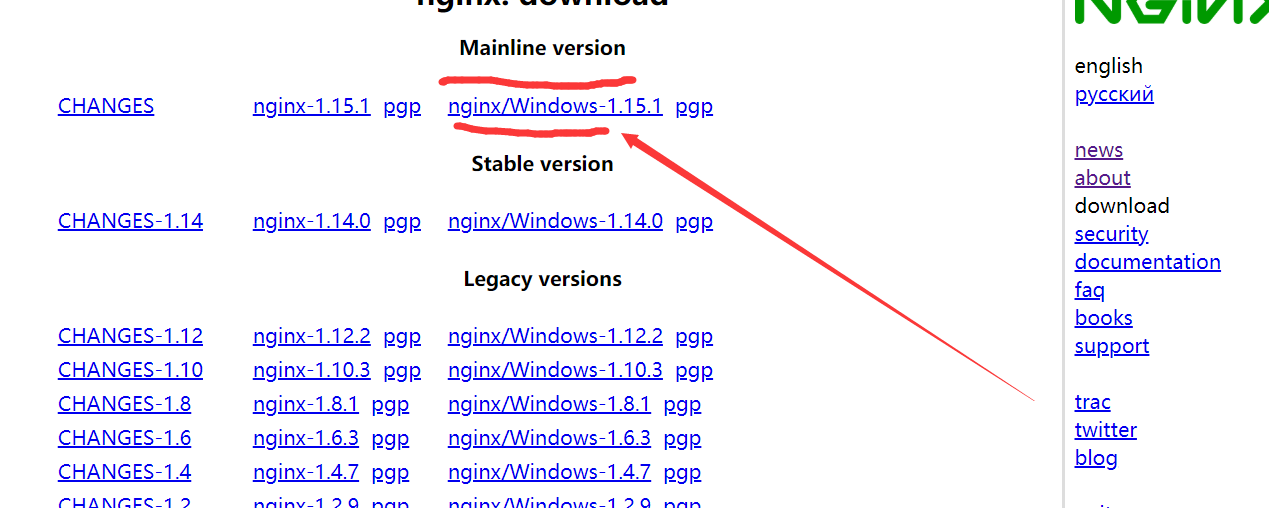
然后安装nginx。将zip包进行解压 切记不要用鼠标直接去运行nginx.exe。
我在这里需要打开cmd进入改目录下 然后 输入 start nginx或者 start nginx.exe 去运行。
只运行一次就好。如果多次运行会开启多个服务,这是一个大坑。
多开了就任务管理器关掉就好了。
不出意外的话。应该是这样的画面
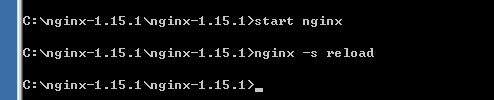
他和node不一样 运行没有报错就说明已经开启了 但是还是会切回命令行模式。这是正常的。
你如果为了确认是否开启nginx 你可以打开任务管理器在进程里查看
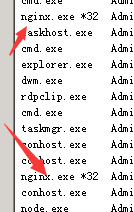
有2个nginx就是正常启动了 ,这时候你可以访问localhost:8080
出现了welcome to nginx 说明启动运行成功。
反向代理配置:nginx.conf文件 这里配置的是 http服务 https 只需要改成 443 端口 就可了
#user  nobody;

worker_processes  1;

#error_log  logs/error.log;

#error_log  logs/error.log  notice;

#error_log  logs/error.log  info;

#pid        logs/nginx.pid;

events {

worker_connections  1024;

}

http {

include       mime.types;

default_type  application/octet-stream;

#log_format  main  '$remote_addr - $remote_user [$time_local] "$request" '

#                  '$status $body_bytes_sent "$http_referer" '

#                  '"$http_user_agent" "$http_x_forwarded_for"';

#access_log  logs/access.log  main;

sendfile        on;

#tcp_nopush     on;

#keepalive_timeout  0;

keepalive_timeout  65;

#gzip  on;

upstream nodejs {

        server 127.0.0.1:3000;  #你配置的端口

        keepalive 64;

    }

server {

    listen       80;

    server_name  www.xiaobaiblog.cn; #你需要解析的域名

     location / {

        proxy_set_header X-Real-IP $remote_addr;

        proxy_set_header X-Forwarded-For $proxy_add_x_forwarded_for;

        proxy_set_header Host  $http_host;

        proxy_set_header X-Nginx-Proxy true;

        proxy_set_header Connection "";

        proxy_pass      http://nodejs;

        }

    #error_page  404              /404.html;

    # redirect server error pages to the static page /50x.html

    #

    error_page   500 502 503 504  /50x.html;

    location = /50x.html {

        root   html;

    }

    # proxy the PHP scripts to Apache listening on 127.0.0.1:80

    #

    #location ~ \.php$ {

    #    proxy_pass   http://127.0.0.1;

    #}

    # pass the PHP scripts to FastCGI server listening on 127.0.0.1:9000

    #

    #location ~ \.php$ {

    #    root           html;

    #    fastcgi_pass   127.0.0.1:9000;

    #    fastcgi_index  index.php;

    #    fastcgi_param  SCRIPT_FILENAME  /scripts$fastcgi_script_name;

    #    include        fastcgi_params;

    #}

    # deny access to .htaccess files, if Apache's document root

    # concurs with nginx's one

    #

    #location ~ /\.ht {

    #    deny  all;

    #}

}

# another virtual host using mix of IP-, name-, and port-based configuration

#

#server {

#    listen       8000;

#    listen       somename:8080;

#    server_name  somename  alias  another.alias;

#    location / {

#        root   html;

#        index  index.html index.htm;

#    }

#}

# HTTPS server

#

#server {

#    listen       443 ssl;

#    server_name  localhost; #你的域名

#    ssl_certificate      cert.pem;

#    ssl_certificate_key  cert.key;

#    ssl_session_cache    shared:SSL:1m;

#    ssl_session_timeout  5m;

#    ssl_ciphers  HIGH:!aNULL:!MD5;

#    ssl_prefer_server_ciphers  on;

#    location / {

#        root   html;

#        index  index.html index.htm;

#    }

#}

}
在云解析 将域名设置指向你的公网ip就可以了
此时你的网站应该是可以访问了 。
nodejs配置nginx 以后链接mongodb数据库的更多相关文章
- nodejs链接mongodb数据库
nodeJs链接mongodb数据库有两种方式,第一种是利用官方自己开发的npm包mongodb链接,第二种是利用第三方npm包mongoose链接:这里如果是window操作系统,建议用mongoo ...
- nodejs学习笔记二——链接mongodb
a.安装mongoose库用来链接mongodb数据库 安装mongodb数据库参考mongodb安装 前言(怨言) 本来是想安装mongodb库来链接mongodb的,命令行到nodejs工程目录: ...
- 在IDEA中用三个jar包链接MongoDB数据库——实现增删改查
安装Robo 3T连接MongoDB数据库教程:https://blog.csdn.net/baidu_39298625/article/details/98845789 使用Robo 3T操作Mon ...
- Nodejs通过账号密码连接MongoDB数据库
转自https://blog.csdn.net/szu_lzz/article/details/77435804#commentBox 1.创建管理员 首先开启Mongo服务,然后切换admin数据库 ...
- nodejs+mysql入门实例(链接到数据库)
//连接数据库 var mysql = require('mysql'); var connection = mysql.createConnection({ host: '******', //数据 ...
- nodejs 初次链接 mongodb 的详细细节
时间 2016-06-2613:05:16 在前端的学习也有一段时间了,学习了html,css,javascript,jqery,ajax,php,mysql,学习了这些,了解了一些皮毛,也没有什么 ...
- mongoVUE破解与配置、Mongodb数据库安装
一.mongoVUE 1.5.3破解: 1) 开始-运行-regedit-搜索:B1159E65-821C3-21C5-CE21-34A484D54444 2.) 然后把1,2,3项数值删除,然后重新 ...
- vue+node+mongoDB 火车票H5(六)---城市列表保存到MongoDB数据库并且启用node.js服务
把车站列表保存到数据库,并且从本地创建服务 node.js创建httpserver 1.搭建基于express的运行环境 全局安装express-gengerator cnpm install -g ...
- ubuntu18.04 安装mongodb并使用Robo 3T连接Mongodb数据库
1.前提: 系统:ubuntu18.04 64位 数据库:mongodb GUI:Robo 3T 2018.3.0 描述: mongodb 安装在局域网内的ubuntu的机子上面, 在win 下 ...
随机推荐
- InfluxDB部署
InfluxDB介绍 官网:https://www.influxdata.com/ 文档:https://docs.influxdata.com/influxdb/v1.2/introduction/ ...
- Tesseract-OCR识别
参考 https://studygolang.com/topics/4527/comment/13217 安装版Windows下链接: https://digi.bib.uni-mannheim.de ...
- java让数字显示千分位 mark
/** * 格式化数字为千分位显示: * @param 要格式化的数字: * @return */ public static String fmtMicrometer(String text) { ...
- list.remove操作注意点
通过源码分析一下结果public class Test { public static void main(String[] args) { // test1(); // test2(); test3 ...
- object detection[content]
近些年,随着DL的不断兴起,计算机视觉中的对象检测领域也随着CNN的广泛使用而大放异彩,其中Girshick等人的<R-CNN>是第一篇基于CNN进行对象检测的文献.本文欲通过自己的理解来 ...
- JVM-Java内存区域
JVM虚拟机运行时数据区结构分为: 其中方法区和堆是所有线程共享的内存区域,而Java栈.本地方法栈.程序计数器是线程私有的. 我们详细介绍运行时数据区的各个区域及其作用. 程序计数器: 一块较小的内 ...
- element-ui中 table表格hover 修改背景色
增加样式级别就行啦 .el-table--enable-row-hover .el-table__body tr:hover>td{ background-color: #212e3e !i ...
- [HNOI2019]多边形[二叉树建模、组合计数]
题意 题目链接 分析 不难发现终态一定是 \([2,n-2]\) 中的每个点都与 \(n\) 连边. 关于凸多边形的划分问题,可以将它看作一棵二叉树:每个树点可以看做点可以看做边. 本题中看做点来处理 ...
- IT面试技巧终身受益
面试前的准备 首先我们要穿的得体,因为第一印象对一个面试官来说真的很重要,如果我们面试的时候都不能以一种非常认真的态度去对待,那么可想而知其实我们离面试成功的路渐行渐远,当然这只是说第一印象,并不能代 ...
- functools下的partial模块应用
问题 你有一个被其他python代码使用的callable对象,可能是一个回调函数或者是一个处理器, 但是它的参数太多了,导致调用时出错. 解决方案 如果需要减少某个函数的参数个数,你可以使用 fun ...