
Android:认识R类、findViewById方法查找组件、@string查找字符、@color查找颜色、@drawable查找图片、@dimen某个组件尺寸定义、项目引入资源国际化
导入
之前都是断断续续的看了一些于如何使用android开发的文章、资料等,到目前位置很多基础的东西都不清楚,于是去学习了别人的课程,才了认识了R类、findViewById方法查找组件、项目引入资源国际化、@string查找字符。
在学习之前我们需要安装环境,这里我采用开发环境是:win7 x64+jdk8+adt-bundle-windows-x86_64-20131030.zip(adt-bundle是集成了adt、eclipse、andrlid sdk等,解压运行eclipse.exe就可以直接使用)
jdk8+adt-bundle-windows-x86_64-20131030.zip下载链接: https://pan.baidu.com/s/1gfoyKN5 密码: d8dt
adt-bundleide运行效果如下:
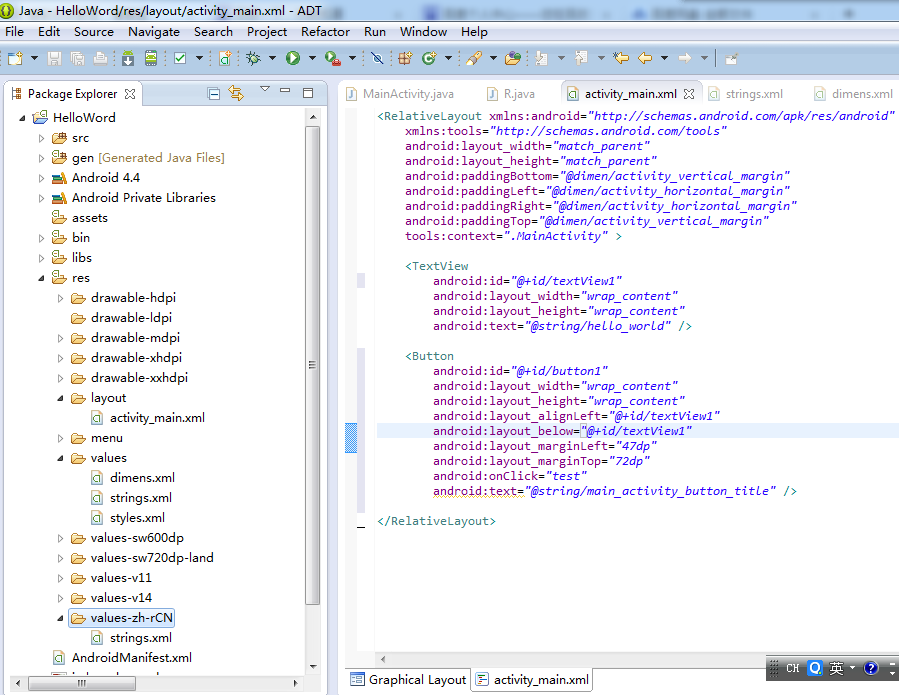
认识R类
R类管理资源包含:
1)layout下中的andoid:id、android:text等资源信息等
    public static final class id {

        public static final int action_settings=0x7f080002;

        public static final int button1=0x7f080001;

        public static final int textView1=0x7f080000;

    }
    public static final class string {

        public static final int action_settings=0x7f050001;

        public static final int app_name=0x7f050000;

        public static final int hello_world=0x7f050002;

        public static final int main_activity_button_title=0x7f050005;

        public static final int main_activity_msg=0x7f050003;

        public static final int main_activity_textView_text=0x7f050004;

    }
2)string对应的字段是res/values/strings.xml中的配置项信息(自动生成的,不需要认为的修改R类,包含id也一样)。
<?xml version="1.0" encoding="utf-8"?>

<resources>

    <string name="app_name">HelloWord</string>

    <string name="action_settings">Settings</string>

    <string name="hello_world">Hello world!</string>

    <string name="main_activity_msg">Welcome hello word!</string>

    <string name="main_activity_textView_text">text view text,hello word!</string>

    <string name="main_activity_button_title">Button</string>

</resources>
3)@color查找颜色
color对应的字段是res/values/colors.xml中的配置项信息(自动生成的,不需要认为的修改R类,包含id也一样)。
<?xml version="1.0" encoding="utf-8"?>

<resources>

    <color name="yellow">#FFFF00</string>

    <color name="red">#FF0000</string>

    <color name="black">#000000</string>

</resources>
使用时:
<Button

...

android:background="@color/red"/>
4)@drawable查找图片
只需要把png/jpeg/gif文件拷贝到新建的/res/drawable目录下,或者拷贝到工程新建的默认drawable-xx目录下
使用时:
<xx

android:src="@drawable/img1"

/>
注意:官网推荐使用png,不推荐使用gif图片。
drawable-xx文件夹的区别:
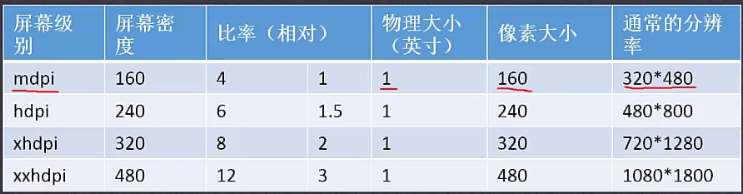
5)@dimen某个组件尺寸定义
需要在res/values/目录下新建一个dimen.xml文件:
 <?xml version="1.0" encoding="utf-8"?>

 <resources>

     <dimen name="btn_height">24dp</dimen>

     <dimen name="btn_weight">56dp</dimen>

 </resources>
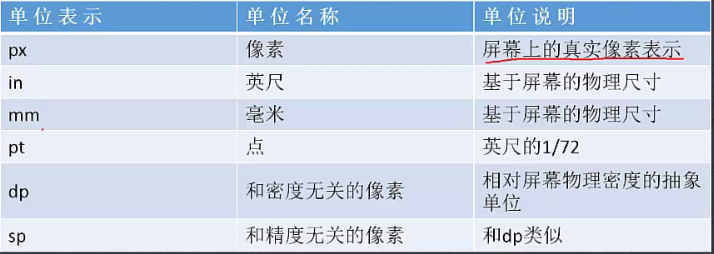
尺寸单位:
findViewById方法查找组件
为了实现findViewById查找组件,于是在新建的android项目的MainActivity布局中拖拉如一个buttong(id=button1)
    <Button

        android:id="@+id/button1"

        android:layout_width="wrap_content"

        android:layout_height="wrap_content"

        android:layout_alignLeft="@+id/textView1"

        android:layout_below="@+id/textView1"

        android:layout_marginLeft="47dp"

        android:layout_marginTop="72dp"

        android:onClick="test"

        android:text="Button" />
button1添加android:onClick事件,并在MainActivity.java中添加监听函数test
    public void test(View view) {

        Toast.makeText(MainActivity.this, R.string.main_activity_msg,

                Toast.LENGTH_SHORT).show();

        TextView textView = (TextView) this.findViewById(R.id.textView1);

        textView.setText(R.string.main_activity_textView_text);

    }
备注:
1)其中test事件函数的参数:响应的是哪个控件则参数view就是哪个控件对象;
2)Toast.makText是弹出提示框用的,想javascript中的alter函数;
3)findViewById这里是通过R.id.textView1来搜索textView1,找到后修改了textView1的text属性值。
@string查找字符
在我们默认添加一个button等按钮时,其text值默认是Button值。这样是android不推荐的使用方式,不利于国际化配置,扩展性不好。
上边我们的textView.text修改时采用了R.string.man_activity_textView_text的找到了新的text,该text使其是配置在res/values/strings.xml配置项中,其实我们这里的button也是支持从strings.xml配置项读取方式:
    <Button

        android:id="@+id/button1"

        android:layout_width="wrap_content"

        android:layout_height="wrap_content"

        android:layout_alignLeft="@+id/textView1"

        android:layout_below="@+id/textView1"

        android:layout_marginLeft="47dp"

        android:layout_marginTop="72dp"

        android:onClick="test"

        android:text="@string/main_activity_button_title" />
项目引入资源国际化
步骤一:在res/下新建中文资源国际化文件夹values-zh-rCN;
步骤二:把res/values下的strings.xml拷贝到res/values-zh-rCN下,并修改res/values-zh-rCN/strings.xml内容:
<?xml version="1.0" encoding="utf-8"?>

<resources>

    <string name="app_name">HelloWord</string>

    <string name="action_settings">Settings</string>

    <string name="hello_world">Hello world!</string>

    <string name="main_activity_msg">欢迎进入!</string>

    <string name="main_activity_textView_text">textView的内容!</string>

    <string name="main_activity_button_title">按钮</string>

</resources>
重新发布项目,并修改测试机的语言设置为中文,之后查看该app:
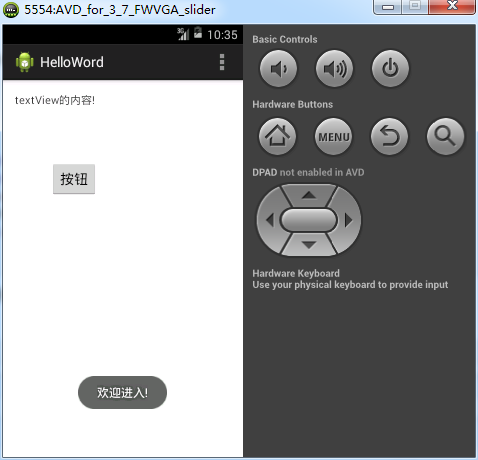
修改测试机的语言设置为英文,之后查看该app:

Android:认识R类、findViewById方法查找组件、@string查找字符、@color查找颜色、@drawable查找图片、@dimen某个组件尺寸定义、项目引入资源国际化的更多相关文章
- Android之TelephonyManager类的方法详解
TelephonyManager类主要提供了一系列用于访问与手机通讯相关的状态和信息的get方法.其中包括手机SIM的状态和信息.电信网络的状态及手机用户的信息.在应用程序中可以使用这些get方法获取 ...
- Android中GPS类及方法简介
GPS是Global Positioning System(全球定位系统)的简称,它的作用就是为全球的物体提供定位功能.GPS定位是一门高新技术,但对于Android程序员来说,开发GPS功能的应用程 ...
- android Activity基类通用方法
public class BaseActivity extends Activity { Resources res; // 通用资源缩写 @Override protected void onCre ...
- 为什么android的R类要定义成16进制
联想到c语言中的宏定义:我想是一个原因 如: #define SDL_INIT_TIMER 0x00000001 #define SDL_INIT_AUDIO 0x00000010 #define S ...
- java 调用 C# 类库搞定,三步即可,可以调用任何类及方法,很简单,非常爽啊
java 调用 C# 类库搞定,三步即可,可以调用任何类及方法,很简单,非常爽啊 java 调用 C# 类库搞定,可以调用任何类及方法,很简单,非常爽啊 总体分三步走: 一.准备一个 C# 类库 (d ...
- 安卓中Paint类和Canvas类的方法汇总
Paint类的常用的方法 1.setColor方法,用于设置画笔的颜色,public void setColor(int color)//参数color为颜色值,也可以使用Color类定义的颜色Col ...
- 洗礼灵魂,修炼python(47)--巩固篇—定义类的方法之@classmethod,@staticmethod
定义类的方法,相信你会说,不就是在class语句下使用def () 就是定义类的方法了嘛,是的,这是定义的方法的一种,而且是最普通的方式 首先,我们已经知道有两种方式: 1.普通方法: 1)与类无关的 ...
- 关于Android项目中,突然就R类找不到已存在的资源文件的解决方法
项目代码早上打开正常,下午开的时候突然提示R类找不到已存在的布局文件,于是试了各种方法,CLEAN啊,重启啊,均无效,然后去网上搜了下,遇到这个问题的人还不少. 看到其中有这么一条解决方法,删除导入的 ...
- Android笔记:如何在Fragment里使用findViewById()方法?
在Activity中,可以直接用findViewById(int id),通过xml的id来找到对应的View. 查找官方的api,具体如下: https://developer.android.go ...
随机推荐
- Centos7数据实时同步
Rsync+inotify 功能要求 通过rsync+inotify将数据库指定目录实时同步到备份服务器. 环境说明 M:192.168.10.11 数据库服务器 S:192.168.10.13 备份 ...
- 解决Centos7本机时间与实际时间相差8小时
# timedatectl Local -- :: CST Universal -- :: UTC #相差8小时 RTC -- :: Time zone: Asia/Shanghai (CST, +) ...
- 笔记:MyBatis XML配置-typeAliases 内建别名表
别名 映射的类型 _byte byte _long long _short short _int int _integer int _double double _float float _boole ...
- vuex2中使用mapMutations/mapActions报错解决方法 BabelLoaderError: SyntaxError: Unexpected token
在尝鲜vuex2时,发现vuex2增加了 mapGetters 和 mapActions 的方法,借助stage2的 Object Rest Operator 特性,可以写出下面代码:methods: ...
- 交换排序—快速排序(Quick Sort)
基本思想: 1)选择一个基准元素,通常选择第一个元素或者最后一个元素, 2)通过一趟排序讲待排序的记录分割成独立的两部分,其中一部分记录的元素值均比基准元素值小.另一部分记录的 元素值比基准值大. 3 ...
- 【Python】 更多数据类型collections&简易数据文件shelve
■collections collections在python内建的数据类型基础上新增一些实用的数据类型,其目的在于增加代码的可读性?(虽然我自己没怎么用过..) ① deque 双端队列 q = d ...
- 201621123040《Java程序设计》第十一周学习总结
1.本周学习总结 1.1以你喜欢的方式(思维导图或其他)归纳总结多线程相关内容. 2.书面作业 2.1源代码阅读:多线程程序BounceThread 2.1.1BallRunnable类有什么用?为什 ...
- Mysql5.7.17中文乱码问题
写Java web调数据库,老是出现汉字乱码,一直没理睬,今天决定好好"整治"一下,却发现并没有那么简单.从网上找的方法,大部分都尝试了一遍都有一些问题. 有的改完了,数据库启动不 ...
- python API的安全认证
我们根据pid加客户端的时间戳进行加密md5(pid|时间戳)得到的单向加密串,与时间戳,或者其它字段的串的url给服务端. 服务端接收到请求的url进行分析 客户端时间与服务端的时间戳之差如果大于规 ...
- DML数据操作语言之复杂查询
1.视图(View) 我们知道,在关系型数据库中,用来保存实际数据记录的是数据表.和表同等概念也是用来保存东西是:视图. 但是数据表是用来保存实际数据记录的,而视图是用来保存常用select语句的. ...