
Jetson TX2上的demo(原创)
Jetson TX2上的demo
一、快速傅里叶-海动图 sample
The CUDA samples directory is copied to the home directory on the device by JetPack. The built binaries are in the following directory:
/home/ubuntu/NVIDIA_CUDA-<version>_Samples/bin/armv7l/linux/release/gnueabihf/
这里的version需要看你自己安装的CUDA版本而定
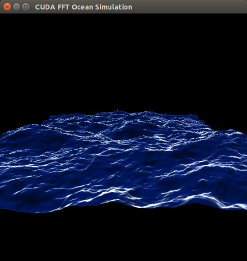
Run the samples at the command line or by double-clicking on them in the file browser. For example, when you run the oceanFFT sample, the following screen is displayed.
二、车辆识别加框sample
nvidia@tegra-ubuntu:~/tegra_multimedia_api/samples/backend$
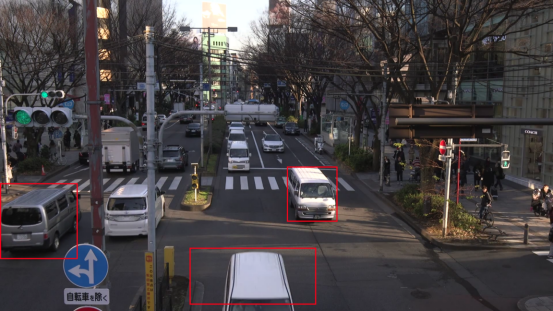
./backend 1 ../../data/Video/sample_outdoor_car_1080p_10fps.h264 H264
--trt-deployfile ../../data/Model/GoogleNet_one_class/GoogleNet_modified_oneClass_halfHD.prototxt
--trt-modelfile ../../data/Model/GoogleNet_one_class/GoogleNet_modified_oneClass_halfHD.caffemodel --trt-forcefp32 0 --trt-proc-interval 1 -fps 10
三、GEMM(通用矩阵乘法)测试
nvidia@tegra-ubuntu:/usr/local/cuda/samples/7_CUDALibraries/batchCUBLAS$ ./batchCUBLAS -m1024 -n1024 -k1024
batchCUBLAS Starting...
GPU Device 0: "NVIDIA Tegra X2" with compute capability 6.2
==== Running single kernels ====
Testing sgemm#### args: ta=0 tb=0 m=1024 n=1024 k=1024 alpha = (0xbf800000, -1) beta= (0x40000000, 2)#### args: lda=1024 ldb=1024 ldc=1024
^^^^ elapsed = 0.00372291 sec GFLOPS=576.83@@@@ sgemm test OK
Testing dgemm#### args: ta=0 tb=0 m=1024 n=1024 k=1024 alpha = (0x0000000000000000, 0) beta= (0x0000000000000000, 0)#### args: lda=1024 ldb=1024 ldc=1024
^^^^ elapsed = 0.10940003 sec GFLOPS=19.6296@@@@ dgemm test OK
==== Running N=10 without streams ====
Testing sgemm#### args: ta=0 tb=0 m=1024 n=1024 k=1024 alpha = (0xbf800000, -1) beta= (0x00000000, 0)#### args: lda=1024 ldb=1024 ldc=1024
^^^^ elapsed = 0.03462315 sec GFLOPS=620.245@@@@ sgemm test OK
Testing dgemm#### args: ta=0 tb=0 m=1024 n=1024 k=1024 alpha = (0xbff0000000000000, -1) beta= (0x0000000000000000, 0)#### args: lda=1024 ldb=1024 ldc=1024
^^^^ elapsed = 1.09212208 sec GFLOPS=19.6634@@@@ dgemm test OK
==== Running N=10 with streams ====
Testing sgemm#### args: ta=0 tb=0 m=1024 n=1024 k=1024 alpha = (0x40000000, 2) beta= (0x40000000, 2)#### args: lda=1024 ldb=1024 ldc=1024
^^^^ elapsed = 0.03504515 sec GFLOPS=612.776@@@@ sgemm test OK
Testing dgemm#### args: ta=0 tb=0 m=1024 n=1024 k=1024 alpha = (0xbff0000000000000, -1) beta= (0x0000000000000000, 0)#### args: lda=1024 ldb=1024 ldc=1024
^^^^ elapsed = 1.09177494 sec GFLOPS=19.6697@@@@ dgemm test OK
==== Running N=10 batched ====
Testing sgemm#### args: ta=0 tb=0 m=1024 n=1024 k=1024 alpha = (0x3f800000, 1) beta= (0xbf800000, -1)#### args: lda=1024 ldb=1024 ldc=1024
^^^^ elapsed = 0.03766394 sec GFLOPS=570.17@@@@ sgemm test OK
Testing dgemm#### args: ta=0 tb=0 m=1024 n=1024 k=1024 alpha = (0xbff0000000000000, -1) beta= (0x4000000000000000, 2)#### args: lda=1024 ldb=1024 ldc=1024
^^^^ elapsed = 1.09389901 sec GFLOPS=19.6315@@@@ dgemm test OK
Test Summary0 error(s)
四、内存带宽测试
nvidia@tegra-ubuntu:/usr/local/cuda/samples/1_Utilities/bandwidthTest$ ./bandwidthTest
[CUDA Bandwidth Test] - Starting...
Running on...
Device 0: NVIDIA Tegra X2
Quick Mode
Host to Device Bandwidth, 1 Device(s)
PINNED Memory Transfers
Transfer Size (Bytes) Bandwidth(MB/s)
33554432 20215.8
Device to Host Bandwidth, 1 Device(s)
PINNED Memory Transfers
Transfer Size (Bytes) Bandwidth(MB/s)
33554432 20182.2
Device to Device Bandwidth, 1 Device(s)
PINNED Memory Transfers
Transfer Size (Bytes) Bandwidth(MB/s)
33554432 35742.8
Result = PASS
NOTE: The CUDA Samples are not meant for performance measurements. Results may vary when GPU Boost is enabled.
五、设备查询
nvidia@tegra-ubuntu:~/work/TensorRT/tmp/usr/src/tensorrt$ cd /usr/local/cuda/samples/1_Utilities/deviceQuery
nvidia@tegra-ubuntu:/usr/local/cuda/samples/1_Utilities/deviceQuery$ ls
deviceQuery deviceQuery.cpp deviceQuery.o Makefile NsightEclipse.xml readme.txt
nvidia@tegra-ubuntu:/usr/local/cuda/samples/1_Utilities/deviceQuery$ ./deviceQuery
./deviceQuery Starting...
CUDA Device Query (Runtime API) version (CUDART static linking)
Detected 1 CUDA Capable device(s)
Device 0: "NVIDIA Tegra X2"
CUDA Driver Version / Runtime Version 8.0 / 8.0
CUDA Capability Major/Minor version number: 6.2
Total amount of global memory: 7851 MBytes (8232062976 bytes)
( 2) Multiprocessors, (128) CUDA Cores/MP: 256 CUDA Cores
GPU Max Clock rate: 1301 MHz (1.30 GHz)
Memory Clock rate: 1600 Mhz
Memory Bus Width: 128-bit
L2 Cache Size: 524288 bytes
Maximum Texture Dimension Size (x,y,z) 1D=(131072), 2D=(131072, 65536), 3D=(16384, 16384, 16384)
Maximum Layered 1D Texture Size, (num) layers 1D=(32768), 2048 layers
Maximum Layered 2D Texture Size, (num) layers 2D=(32768, 32768), 2048 layers
Total amount of constant memory: 65536 bytes
Total amount of shared memory per block: 49152 bytes
Total number of registers available per block: 32768
Warp size: 32
Maximum number of threads per multiprocessor: 2048
Maximum number of threads per block: 1024
Max dimension size of a thread block (x,y,z): (1024, 1024, 64)
Max dimension size of a grid size (x,y,z): (2147483647, 65535, 65535)
Maximum memory pitch: 2147483647 bytes
Texture alignment: 512 bytes
Concurrent copy and kernel execution: Yes with 1 copy engine(s)
Run time limit on kernels: No
Integrated GPU sharing Host Memory: Yes
Support host page-locked memory mapping: Yes
Alignment requirement for Surfaces: Yes
Device has ECC support: Disabled
Device supports Unified Addressing (UVA): Yes
Device PCI Domain ID / Bus ID / location ID: 0 / 0 / 0
Compute Mode:
< Default (multiple host threads can use ::cudaSetDevice() with device simultaneously) >
deviceQuery, CUDA Driver = CUDART, CUDA Driver Version = 8.0, CUDA Runtime Version = 8.0, NumDevs = 1, Device0 = NVIDIA Tegra X2Result = PASS
六、大型项目的测试
详情查看https://developer.nvidia.com/embedded/jetpack
这里面还有一些项目
Jetson TX2上的demo(原创)的更多相关文章
- 在Jetson TX2上显示摄像头视频并使用python进行caffe推理
参考文章:How to Capture Camera Video and Do Caffe Inferencing with Python on Jetson TX2 与参考文章大部分都是相似的,如果 ...
- 在Jetson TX2上捕获、显示摄像头视频
参考文章:How to Capture and Display Camera Video with Python on Jetson TX2 与参考文章大部分都是相似的,如果不习惯看英文,可以看看我下 ...
- 在Jetson TX2上安装caffe和PyCaffe
caffe是Nvidia TensorRT最支持的深度学习框架,因此在Jetson TX2上安装caffe很有必要.顺便说一句,下面的安装是支持python3的. 先决条件 在Jetson TX2上完 ...
- 在Jetson TX2上安装OpenCV(3.4.0)
参考文章:How to Install OpenCV (3.4.0) on Jetson TX2 与参考文章大部分都是相似的,如果不习惯看英文,可以看看我下面的描述 在我们使用python3进行编程时 ...
- Jetson TX2安装tensorflow(原创)
Jetson TX2安装tensorflow 大致分为两步: 一.划分虚拟内存 原因:Jetson TX2自带8G内存这个内存空间在安装tensorflow编译过程中会出现内存溢出引发的安装进程奔溃 ...
- Jetson TX2 安装JetPack3.3教程
Jetson TX2 刷机教程(JetPack3.3版本) 参考网站:https://blog.csdn.net/long19960208/article/details/81538997 版权声明: ...
- 02-NVIDIA Jetson TX2 通过JetPack 3.1刷机完整版(踩坑版)
未经允许,不得擅自改动和转载 文 | 阿小庆 2018-1-20 本文继第一篇文章:01-NVIDIA Jetson TX2开箱上电显示界面 TX2 出厂时,已经自带了 Ubuntu 16.04 系统 ...
- Jetson TX2火力全开
Jetson Tegra系统的应用涵盖越来越广,相应用户对性能和功耗的要求也呈现多样化.为此NVIDIA提供一种新的命令行工具,可以方便地让用户配置CPU状态,以最大限度地提高不同场景下的性能和能耗. ...
- 在TX2上多线程读取视频帧进行caffe推理
参考文章:Multi-threaded Camera Caffe Inferencing TX2之多线程读取视频及深度学习推理 背景 一般在TX2上部署深度学习模型时,都是读取摄像头视频或者传入视频文 ...
随机推荐
- Python面试题解答
1. 一个谜题 >>> t = (1, 2, [30, 40]) >>> t[2] += [50, 60] 到底会发生下面 4 种情况中的哪一种? a. t变成(1 ...
- flask WTForms源码分析及自定义WTForms
首先我们来创建一个From类 from wtforms.form import Form from wtforms import StringField from wtforms.validators ...
- 【Zookeeper】Zookeeper安装配置
本文演示使用三台Linux服务器安装Zookeeper,使用的是zookeeper-3.4.5版本,将zookeeper-3.4.5.tar.gz上传到linux服务器, 使用如下命令解压到/usr/ ...
- viewport预备知识
dpr === dppx dpr:device pixel ratio 设备像素比 dppx:Number of dots per px unit 每像素有多少点 . 1dppx = 96dpi dp ...
- 基于Grafana+SimpleJson的灵活报表解决方案
在时序分析及监控展现领域,Grafana无疑是开源解决方案中的翘楚,其灵活的插件机制,支持各种漂亮的面板.丰富的数据源以及强大的应用.典型的面板有Graph.Text.Singlestat.PieCh ...
- hdu_1015(dfs)
题意:根据给出的计算公式,给一个n和一个字符集,问能不能在字符串集中找到不重复的五个字符,让其计算结果等于给定的n,如果有多个解输出字典序最大的一个 题解:dfs直接上代码了 code: #inclu ...
- JqGrid 多行表头设置
1.我想要统计的效果是这样的 2.只要在初始化表格中加上如下代码就可以了: jQuery("#tbAbroadStatisticByUnit").jqGrid('setGroupH ...
- 安装linux的关键步骤
- [国嵌攻略][162][USB协议分析]
USB设备逻辑结构 在USB设备的逻辑组织中,包含设备.配置.接口和端点4个层次.设备通常有一个或多个配置,配置通常有一个或多个接口,接口通常有零个或多个端点. USB设备描述符 当我们把USB设备( ...
- Cxf -wsdl2java 使用参数介绍
wsdl2java -h 可以得到详细的参考文档: G:\cxf\apache-cxf-3.1.6\bin>wsdl2java -h wsdl2java -fe|-frontend <fr ...