
OpenStack镜像服务基本操作
查询Glance服务状态
#glance-control all status
[root@controller ~]# glance-control all status

glance-api (pid ) is running...

glance-registry (pid ) is running...

glance-scrubber is stopped
查询glance-api版本
# glance-api --version
[root@controller ~]# glance-api --version

2014.1.
查询glance-control版本
# glance-control --version
[root@controller ~]# glance-control --version

2014.1.
下面的命令作用是启动相关服务,并设置为开机启动。
# service openstack-glance-api start
# service openstack-glance-registry start
# chkconfig openstack-glance-api on
# chkconfig openstack-glance-registry on
下载CirrOS镜像文件
# mkdir /tmp/images
# cd /tmp/images/
# wget http://download.cirros-cloud.net/0.3.2/cirros-0.3.2-x86_64-disk.img
查看文件信息
# file cirros-0.3.4-x86_64-disk.img
[root@controller ~]# file cirros-0.3.-x86_64-disk.img

cirros-0.3.-x86_64-disk.img: Qemu Image, Format: Qcow , Version:
使用命令行创建镜像
# glance image-create --name "cirros-0.3.4-x86_64-disk" --disk-format qcow2 --container-format bare --is-public True --progress < cirros-0.3.4-x86_64-disk.img
[root@controller ~]# glance image-create --name "cirros-0.3.4-x86_64-disk" --disk-format qcow2 --container-format bare --is-public True --progress < cirros-0.3.-x86_64-disk.img

[=============================>] %

+------------------+--------------------------------------+

| Property         | Value                                |

+------------------+--------------------------------------+

| checksum         | ee1eca47dc88f4879d8a229cc70a07c6     |

| container_format | bare                                 |

| created_at       | --26T19::                  |

| deleted          | False                                |

| deleted_at       | None                                 |

| disk_format      | qcow2                                |

| id               | c0508642-29f2-4d57-b7ca-7417668e1908 |

| is_public        | True                                 |

| min_disk         |                                     |

| min_ram          |                                     |

| name             | cirros-0.3.-x86_64-disk             |

| owner            | 18e38545a20f4fbb8dba8944118d43bc     |

| protected        | False                                |

| size             |                              |

| status           | active                               |

| updated_at       | --26T19::                  |

| virtual_size     | None                                 |

+------------------+--------------------------------------+
创建成功后,可以登录界面,查看镜像信息
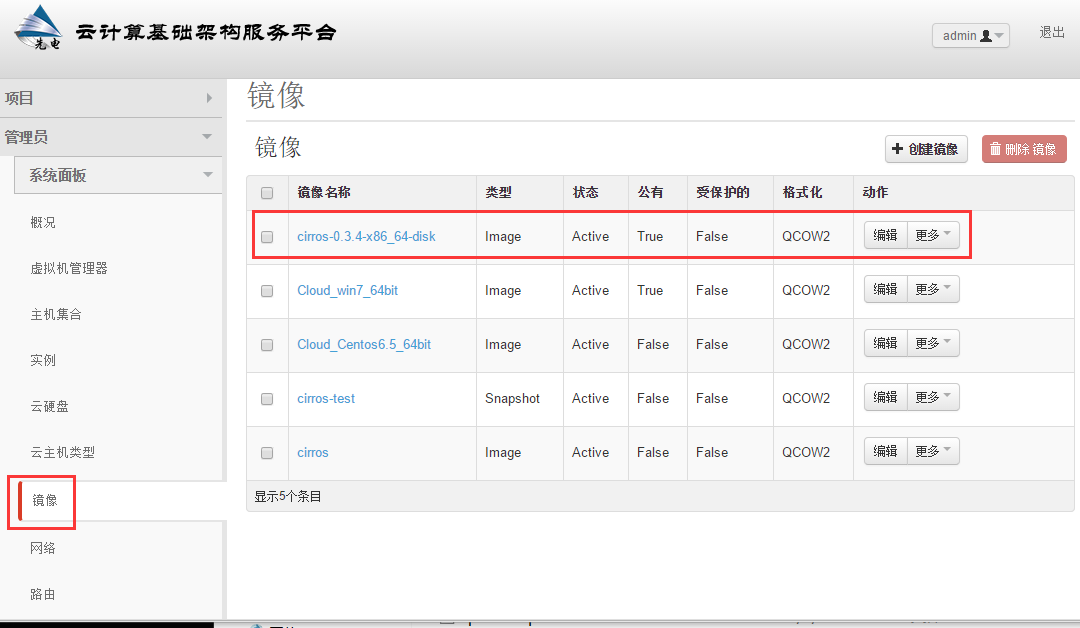
查看镜像列表
# glance image-list
[root@controller ~]# glance image-list

+--------------------------------------+--------------------------+-------------+------------------+------------+--------+

| ID                                   | Name                     | Disk Format | Container Format | Size       | Status |

+--------------------------------------+--------------------------+-------------+------------------+------------+--------+

| b3f9088f-ca51-4a03-ab9a-66e9c4baacce | cirros                   | qcow2       | bare             |    | active |

| c0508642-29f2-4d57-b7ca-7417668e1908 | cirros-0.3.-x86_64-disk | qcow2       | bare             |    | active |

| b408a7da-7fff--8f17-9e48f34553ef | cirros-test              | qcow2       | bare             |    | active |

| c6e2e980-935c--94ae-0595988065d2 | Cloud_Centos6.5_64bit    | qcow2       | bare             |  | active |

| 54e5faa2--40de-89ce-4511623ce649 | Cloud_win7_64bit         | qcow2       | bare             |  | active |

+--------------------------------------+--------------------------+-------------+------------------+------------+--------+
查看镜像的详细信息
参数可以是镜像id或者镜像名称
# glance image-show Cloud_Centos6.5_64bit
[root@controller ~]# glance image-show Cloud_Centos6.5_64bit

+------------------+--------------------------------------+

| Property         | Value                                |

+------------------+--------------------------------------+

| checksum         | d6e6a71c69f1996350970489f9513402     |

| container_format | bare                                 |

| created_at       | --22T10::                  |

| deleted          | False                                |

| disk_format      | qcow2                                |

| id               | c6e2e980-935c--94ae-0595988065d2 |

| is_public        | False                                |

| min_disk         |                                     |

| min_ram          |                                     |

| name             | Cloud_Centos6.5_64bit                |

| owner            | 18e38545a20f4fbb8dba8944118d43bc     |

| protected        | False                                |

| size             |                            |

| status           | active                               |

| updated_at       | --22T10::                  |

+------------------+--------------------------------------+
更改镜像
如果需要改变镜像启动硬盘最低要求值(min-disk)时,min-disk默认单位为G
更新镜像信息
# glance image-update --min-disk=1 cirros-0.3.4-x86_64-disk
[root@controller ~]# glance image-update --min-disk= cirros-0.3.-x86_64-disk

+------------------+--------------------------------------+

| Property         | Value                                |

+------------------+--------------------------------------+

| checksum         | ee1eca47dc88f4879d8a229cc70a07c6     |

| container_format | bare                                 |

| created_at       | --26T19::                  |

| deleted          | False                                |

| deleted_at       | None                                 |

| disk_format      | qcow2                                |

| id               | c0508642-29f2-4d57-b7ca-7417668e1908 |

| is_public        | True                                 |

| min_disk         |                                     |

| min_ram          |                                     |

| name             | cirros-0.3.-x86_64-disk             |

| owner            | 18e38545a20f4fbb8dba8944118d43bc     |

| protected        | False                                |

| size             |                              |

| status           | active                               |

| updated_at       | --26T19::                  |

| virtual_size     | None                                 |

+------------------+--------------------------------------+
删除镜像
# glance image-delete cirros-0.3.4-x86_64-disk
[root@controller ~]# glance image-delete cirros-0.3.-x86_64-disk

[root@controller ~]#

[root@controller ~]# glance image-list

+--------------------------------------+-----------------------+-------------+------------------+------------+--------+

| ID                                   | Name                  | Disk Format | Container Format | Size       | Status |

+--------------------------------------+-----------------------+-------------+------------------+------------+--------+

| b3f9088f-ca51-4a03-ab9a-66e9c4baacce | cirros                | qcow2       | bare             |    | active |

| b408a7da-7fff--8f17-9e48f34553ef | cirros-test           | qcow2       | bare             |    | active |

| c6e2e980-935c--94ae-0595988065d2 | Cloud_Centos6.5_64bit | qcow2       | bare             |  | active |

| 54e5faa2--40de-89ce-4511623ce649 | Cloud_win7_64bit      | qcow2       | bare             |  | active |

+--------------------------------------+-----------------------+-------------+------------------+------------+--------+
end
OpenStack镜像服务基本操作的更多相关文章
- OpenStack 镜像服务 Glance部署(六)
Glance介绍 创建虚拟机我们需要有glance的支持,因为glance是提供镜像的服务. Glance有两个比较重要的服务: Glance-api:接受云系统镜像的构建.删除.读取请求 Glanc ...
- OpenStack 镜像服务 Glance部署(七)
创建虚拟机我们需要有glance的支持,因为glance是提供镜像的服务. Glance有两个比较重要的服务: Glance-api:接受云系统镜像的构建.删除.读取请求 Glance-Registr ...
- openstack镜像服务(glance)
1.Use the database access client to connect to the database server as the root user: $ mysql -u root ...
- 云计算管理平台之OpenStack镜像服务glance
一.glance简介 openstack中的glance服务是用来存储在openstack上启动虚拟机所需镜像:它主要用于发现.注册及检索虚拟机镜像:它通过提供RESTful风格的api对外提供服务: ...
- 【openstack N版】——镜像服务glance
一.openstack镜像服务glance 1.1 glance介绍 glance主要是由三部分组成 glance-api:接收云系统镜像的创建,删除,读取请求,类似nova-api,通过其他模块(g ...
- Openstack(八)部署镜像服务glance
8.1glance镜像服务介绍 Glance是OpenStack镜像服务组件,glance服务默认监听在9292端口,其接收REST API请求,然后通过其他模块(glance-registry及im ...
- Openstack glance 镜像服务 (五)
Openstack glance 镜像服务 (五) 引用: 官方文档glance安装 https://docs.openstack.org/ocata/zh_CN/install-guide-rdo/ ...
- OpenStack-Ocata版+CentOS7.6 云平台环境搭建 — 4.镜像服务(glance)
节点配置信息说明: 控制节点:controller: IP:192.168.164.128 hostname&hosts:likeadmin 计算加点:Nova: IP:192.168.164 ...
- 4.openstack之mitaka搭建glance镜像服务
部署镜像服务 一:安装和配置服务 1.建库建用户 mysql -u root -p CREATE DATABASE glance; GRANT ALL PRIVILEGES ON glance.* T ...
随机推荐
- python编译hello
pycharm无法找到解释器,将无法编译. 所以在编译之前进行统一设置 点击File,选择settings,点击 添加解释器 最后点击Apply.等待系统配置. 如果我们需要添加新的模块,点击绿色+号 ...
- linux----磁盘介绍
1.磁盘简图: 2.常见分区 mbr:主引导区,共512byte 扩展分区 逻辑分区
- LNMP环境包安装IonCube教程
ioncube是业内优秀的php加密解密解决方案.和zend guard相比,ioncube具有如下优势: 1. 安全:zend guard的版本不是非常安全,网络上有破解使用zend,下面我们来看I ...
- 【shell编程】之基础知识-流程控制
和Java.PHP等语言不一样,sh的流程控制不可为空,如(以下为PHP流程控制写法): <?php if (isset($_GET["q"])) { search(q); ...
- mysqldump命令之常用选项
===============================================mysqldump常用选项-h, --host=name:服务器IP-u, --user=name:登录名 ...
- BINLOG和REDO/UNDO LOG的区别
BINLOG和REDO/UNDO LOG的区别1.处理层次不同,REDO/UNDO LOG由Innodb存储引擎处理,而BINLOG由MySQL 服务层处理.2.记录内容不同,REDO/UNDO LO ...
- SolrCore Initialization Failures - Max direct memory is likely too low
org.apache.solr.common.SolrException:org.apache.solr.common.SolrException: The max direct memory is ...
- Web 单点登录(SSO) 实现模型
有网友问起, 前后端分离 架构下的 Web 单点验证 怎么做, 我画了个图 : Temp Token 就 相当于 短信验证码 . Web 单点登录 都可以用这个 模型, 不仅仅是 前后端分离 .
- 如何优化JavaScript的构造函数
首先看一个构造函数User,我们在调用User创建一个实例的的时候,一般都是要写上new操作符的.在这里说明一下,如果使用new关键字调用构造函数,那么构造函数里面的this总是是指向一个全新的对象( ...
- linux shell获取键盘输入
linux shell从键盘获取输入 代码1: #!/bin/bash #提示“Input your choice:”,把用户的输入保存入变量choice_user中read -p "Inp ...