
OpenStack镜像服务基本操作
查询Glance服务状态
#glance-control all status
[root@controller ~]# glance-control all status

glance-api (pid ) is running...

glance-registry (pid ) is running...

glance-scrubber is stopped
查询glance-api版本
# glance-api --version
[root@controller ~]# glance-api --version

2014.1.
查询glance-control版本
# glance-control --version
[root@controller ~]# glance-control --version

2014.1.
下面的命令作用是启动相关服务,并设置为开机启动。
# service openstack-glance-api start
# service openstack-glance-registry start
# chkconfig openstack-glance-api on
# chkconfig openstack-glance-registry on
下载CirrOS镜像文件
# mkdir /tmp/images
# cd /tmp/images/
# wget http://download.cirros-cloud.net/0.3.2/cirros-0.3.2-x86_64-disk.img
查看文件信息
# file cirros-0.3.4-x86_64-disk.img
[root@controller ~]# file cirros-0.3.-x86_64-disk.img

cirros-0.3.-x86_64-disk.img: Qemu Image, Format: Qcow , Version:
使用命令行创建镜像
# glance image-create --name "cirros-0.3.4-x86_64-disk" --disk-format qcow2 --container-format bare --is-public True --progress < cirros-0.3.4-x86_64-disk.img
[root@controller ~]# glance image-create --name "cirros-0.3.4-x86_64-disk" --disk-format qcow2 --container-format bare --is-public True --progress < cirros-0.3.-x86_64-disk.img

[=============================>] %

+------------------+--------------------------------------+

| Property         | Value                                |

+------------------+--------------------------------------+

| checksum         | ee1eca47dc88f4879d8a229cc70a07c6     |

| container_format | bare                                 |

| created_at       | --26T19::                  |

| deleted          | False                                |

| deleted_at       | None                                 |

| disk_format      | qcow2                                |

| id               | c0508642-29f2-4d57-b7ca-7417668e1908 |

| is_public        | True                                 |

| min_disk         |                                     |

| min_ram          |                                     |

| name             | cirros-0.3.-x86_64-disk             |

| owner            | 18e38545a20f4fbb8dba8944118d43bc     |

| protected        | False                                |

| size             |                              |

| status           | active                               |

| updated_at       | --26T19::                  |

| virtual_size     | None                                 |

+------------------+--------------------------------------+
创建成功后,可以登录界面,查看镜像信息
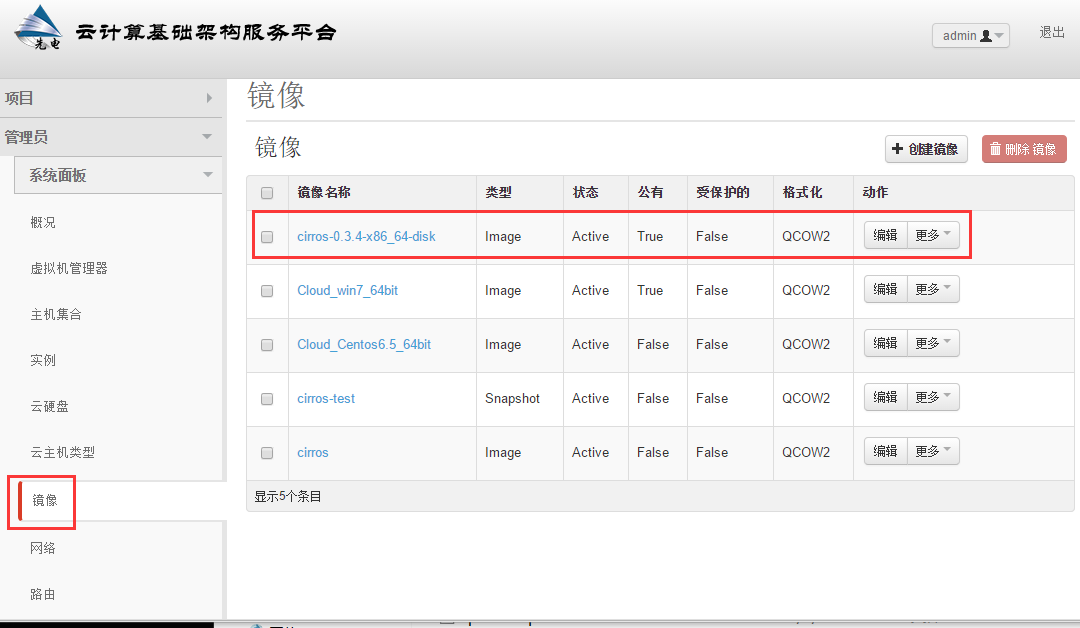
查看镜像列表
# glance image-list
[root@controller ~]# glance image-list

+--------------------------------------+--------------------------+-------------+------------------+------------+--------+

| ID                                   | Name                     | Disk Format | Container Format | Size       | Status |

+--------------------------------------+--------------------------+-------------+------------------+------------+--------+

| b3f9088f-ca51-4a03-ab9a-66e9c4baacce | cirros                   | qcow2       | bare             |    | active |

| c0508642-29f2-4d57-b7ca-7417668e1908 | cirros-0.3.-x86_64-disk | qcow2       | bare             |    | active |

| b408a7da-7fff--8f17-9e48f34553ef | cirros-test              | qcow2       | bare             |    | active |

| c6e2e980-935c--94ae-0595988065d2 | Cloud_Centos6.5_64bit    | qcow2       | bare             |  | active |

| 54e5faa2--40de-89ce-4511623ce649 | Cloud_win7_64bit         | qcow2       | bare             |  | active |

+--------------------------------------+--------------------------+-------------+------------------+------------+--------+
查看镜像的详细信息
参数可以是镜像id或者镜像名称
# glance image-show Cloud_Centos6.5_64bit
[root@controller ~]# glance image-show Cloud_Centos6.5_64bit

+------------------+--------------------------------------+

| Property         | Value                                |

+------------------+--------------------------------------+

| checksum         | d6e6a71c69f1996350970489f9513402     |

| container_format | bare                                 |

| created_at       | --22T10::                  |

| deleted          | False                                |

| disk_format      | qcow2                                |

| id               | c6e2e980-935c--94ae-0595988065d2 |

| is_public        | False                                |

| min_disk         |                                     |

| min_ram          |                                     |

| name             | Cloud_Centos6.5_64bit                |

| owner            | 18e38545a20f4fbb8dba8944118d43bc     |

| protected        | False                                |

| size             |                            |

| status           | active                               |

| updated_at       | --22T10::                  |

+------------------+--------------------------------------+
更改镜像
如果需要改变镜像启动硬盘最低要求值(min-disk)时,min-disk默认单位为G
更新镜像信息
# glance image-update --min-disk=1 cirros-0.3.4-x86_64-disk
[root@controller ~]# glance image-update --min-disk= cirros-0.3.-x86_64-disk

+------------------+--------------------------------------+

| Property         | Value                                |

+------------------+--------------------------------------+

| checksum         | ee1eca47dc88f4879d8a229cc70a07c6     |

| container_format | bare                                 |

| created_at       | --26T19::                  |

| deleted          | False                                |

| deleted_at       | None                                 |

| disk_format      | qcow2                                |

| id               | c0508642-29f2-4d57-b7ca-7417668e1908 |

| is_public        | True                                 |

| min_disk         |                                     |

| min_ram          |                                     |

| name             | cirros-0.3.-x86_64-disk             |

| owner            | 18e38545a20f4fbb8dba8944118d43bc     |

| protected        | False                                |

| size             |                              |

| status           | active                               |

| updated_at       | --26T19::                  |

| virtual_size     | None                                 |

+------------------+--------------------------------------+
删除镜像
# glance image-delete cirros-0.3.4-x86_64-disk
[root@controller ~]# glance image-delete cirros-0.3.-x86_64-disk

[root@controller ~]#

[root@controller ~]# glance image-list

+--------------------------------------+-----------------------+-------------+------------------+------------+--------+

| ID                                   | Name                  | Disk Format | Container Format | Size       | Status |

+--------------------------------------+-----------------------+-------------+------------------+------------+--------+

| b3f9088f-ca51-4a03-ab9a-66e9c4baacce | cirros                | qcow2       | bare             |    | active |

| b408a7da-7fff--8f17-9e48f34553ef | cirros-test           | qcow2       | bare             |    | active |

| c6e2e980-935c--94ae-0595988065d2 | Cloud_Centos6.5_64bit | qcow2       | bare             |  | active |

| 54e5faa2--40de-89ce-4511623ce649 | Cloud_win7_64bit      | qcow2       | bare             |  | active |

+--------------------------------------+-----------------------+-------------+------------------+------------+--------+
end
OpenStack镜像服务基本操作的更多相关文章
- OpenStack 镜像服务 Glance部署(六)
Glance介绍 创建虚拟机我们需要有glance的支持,因为glance是提供镜像的服务. Glance有两个比较重要的服务: Glance-api:接受云系统镜像的构建.删除.读取请求 Glanc ...
- OpenStack 镜像服务 Glance部署(七)
创建虚拟机我们需要有glance的支持,因为glance是提供镜像的服务. Glance有两个比较重要的服务: Glance-api:接受云系统镜像的构建.删除.读取请求 Glance-Registr ...
- openstack镜像服务(glance)
1.Use the database access client to connect to the database server as the root user: $ mysql -u root ...
- 云计算管理平台之OpenStack镜像服务glance
一.glance简介 openstack中的glance服务是用来存储在openstack上启动虚拟机所需镜像:它主要用于发现.注册及检索虚拟机镜像:它通过提供RESTful风格的api对外提供服务: ...
- 【openstack N版】——镜像服务glance
一.openstack镜像服务glance 1.1 glance介绍 glance主要是由三部分组成 glance-api:接收云系统镜像的创建,删除,读取请求,类似nova-api,通过其他模块(g ...
- Openstack(八)部署镜像服务glance
8.1glance镜像服务介绍 Glance是OpenStack镜像服务组件,glance服务默认监听在9292端口,其接收REST API请求,然后通过其他模块(glance-registry及im ...
- Openstack glance 镜像服务 (五)
Openstack glance 镜像服务 (五) 引用: 官方文档glance安装 https://docs.openstack.org/ocata/zh_CN/install-guide-rdo/ ...
- OpenStack-Ocata版+CentOS7.6 云平台环境搭建 — 4.镜像服务(glance)
节点配置信息说明: 控制节点:controller: IP:192.168.164.128 hostname&hosts:likeadmin 计算加点:Nova: IP:192.168.164 ...
- 4.openstack之mitaka搭建glance镜像服务
部署镜像服务 一:安装和配置服务 1.建库建用户 mysql -u root -p CREATE DATABASE glance; GRANT ALL PRIVILEGES ON glance.* T ...
随机推荐
- da shu mo ban
#include<bits/stdc++.h> using namespace std; ;/*精度位数,自行调整*/ //1.如果需要控制输出位数的话,在str()里面把len调成需要的 ...
- oracle查询A表中主键都被哪些表引用了?
select r.TABLE_NAME from USER_CONSTRAINTS p, USER_CONSTRAINTS r where p.TABLE_NAME = 'IAM_AUDIT_FIND ...
- ionic中 ng-repeat下使用ng-model获取不到选中数据问题:
在这种情况下点击了单选框并不能获取$scope.unitcode的值: <ion-list> <ion-radio ng-repeat="item in userInfos ...
- Axure RP chrome插件显示已损坏或者无法安装的解决方法
http://www.cnplugins.com/zhuanti/arux-rp-bug.html 1.Axure RP chrome插件无法安装的解决方法. 首先Axure RP chrome插件的 ...
- Nginx:承受3万并发连接数,胜过Apache 10倍
编者按:Nginx是目前比较重要的开源性负载均衡技术,新浪.网易.六间房等很多网站都将Nginx部署进自己的网站系统架构,并解决部分问题.本文是作者长期的实战经验,很有参考价值. 本文是我撰写的关于搭 ...
- loging日志文件
此文件要放到django 项目中的setting文件夹,可以对文件进行一些配置和修改 # 定义一下log文件存放的位置 BASE_LOG_DIR = os.path.join(BASE_DIR, &q ...
- JavaScript Constructor & prototype
阮一峰 JavaScript OOD 三部曲: 封装 JS 是一种基于对象(object-based)的语言. 但是JS不是一种真正的OOP语言, 因为语法中没有class. 以下就是简单的封装. 把 ...
- perventDefault, stopPropagation, stopImmediatePropagation 三者的区别
event有三种特别容易混淆的方法, 用来阻止默认事件的发生 1. e.preventDefault(); 2. e.stopPropagation(); 3. e.stopImmediatePro ...
- vue-cli、create-react-app 项目如何查看打包分析?
vue-cli.create-react-app 项目如何查看打包分析? 项目 如何查看打包分析 vue-cli 创建的项目 已经集成 webpack-bundle-analyzer,运行npm ru ...
- git add -A /git add -u/git add .的用法
git的指令详解 在git中有好多的指令,但是今天这几个指令就很容易忘记而且还容易混淆 git add -u <==> git add –update 提交所有被删除和修改的文件到数据暂存 ...