
数据库操作之整合Mybaties和事务讲解 5节课
1、SpringBoot2.x持久化数据方式介绍
简介:介绍近几年常用的访问数据库的方式和优缺点
1、原始java访问数据库
开发流程麻烦
1、注册驱动/加载驱动
Class.forName("com.mysql.jdbc.Driver")
2、建立连接
Connection con = DriverManager.getConnection("jdbc:mysql://localhost:3306/dbname","root","root");
3、创建Statement
4、执行SQL语句
5、处理结果集
6、关闭连接,释放资源
2、apache dbutils框架
比上一步简单点
官网:https://commons.apache.org/proper/commons-dbutils/
3、jpa框架
spring-data-jpa
jpa在复杂查询的时候性能不是很好
4、Hiberante 解释:ORM:对象关系映射Object Relational Mapping
企业大都喜欢使用hibernate
5、Mybatis框架
互联网行业通常使用mybatis
不提供对象和关系模型的直接映射,半ORM
2、SpringBoot2.x整合Mybatis3.x注解实战
简介:SpringBoot2.x整合Mybatis3.x注解配置实战
1、使用starter, maven仓库地址:http://mvnrepository.com/artifact/org.mybatis.spring.boot/mybatis-spring-boot-starter
2、加入依赖(可以用 http://start.spring.io/ 下载)
<!-- 引入starter-->
<dependency>
<groupId>org.mybatis.spring.boot</groupId>
<artifactId>mybatis-spring-boot-starter</artifactId>
<version>1.3.2</version>
<scope>runtime</scope>
</dependency>
<!-- MySQL的JDBC驱动包 -->
<dependency>
<groupId>mysql</groupId>
<artifactId>mysql-connector-java</artifactId>
<scope>runtime</scope>
</dependency>
<!-- 引入第三方数据源 -->
<dependency>
<groupId>com.alibaba</groupId>
<artifactId>druid</artifactId>
<version>1.1.6</version>
</dependency>
3、加入配置文件(application.properties)
#mybatis.type-aliases-package=net.xdclass.base_project.domain
#可以自动识别
#spring.datasource.driver-class-name =com.mysql.jdbc.Driver
spring.datasource.url=jdbc:mysql://localhost:3306/movie?useUnicode=true&characterEncoding=utf-8
spring.datasource.username =root
spring.datasource.password =password
#如果不使用默认的数据源 (com.zaxxer.hikari.HikariDataSource)
spring.datasource.type =com.alibaba.druid.pool.DruidDataSource
加载配置,注入到sqlSessionFactory等都是springBoot帮我们完成
4、启动类增加mapper扫描
@MapperScan("net.xdclass.base_project.mapper")
技巧:保存对象,获取数据库自增id
@Options(useGeneratedKeys=true, keyProperty="id", keyColumn="id")
说明:keyProperty java对象的属性;keyColumn表示数据库的字段
4、开发mapper
参考语法 http://www.mybatis.org/mybatis-3/zh/java-api.html
5、sql脚本
CREATE TABLE `user` (
`id` int(11) unsigned NOT NULL AUTO_INCREMENT,
`name` varchar(128) DEFAULT NULL COMMENT '名称',
`phone` varchar(16) DEFAULT NULL COMMENT '用户手机号',
`create_time` datetime DEFAULT NULL COMMENT '创建时间',
`age` int(4) DEFAULT NULL COMMENT '年龄',
PRIMARY KEY (`id`)
) ENGINE=InnoDB AUTO_INCREMENT=18 DEFAULT CHARSET=utf8;
controller——存放api
domain——存放实体类
mapper/dao——访问数据库接口
service——业务层
utils——工具类
警告:WARN: Establishing SSL connection without server's identity verification is not recommended. According to MySQL 5.5.45+, 5.6.26+ and 5.7.6+ requirements SSL connection must be established by default if explicit option isn't set. For compliance with existing applications not using SSL the verifyServerCertificate property is set to 'false'. You need either to explicitly disable SSL by setting useSSL=false, or set useSSL=true and provide truststore for server certificate verification.
解决:在数据库配置文件中加入useSSL=false
代码实例:
controller/UserController.java:
  1 package net.xdclass.base_project.controller;

  2

  3

  4 import java.util.Date;

  5

  6 import net.xdclass.base_project.domain.JsonData;

  7 import net.xdclass.base_project.domain.User;

  8 import net.xdclass.base_project.service.UserService;

  9

 10 import org.springframework.beans.factory.annotation.Autowired;

 11 import org.springframework.web.bind.annotation.GetMapping;

 12 import org.springframework.web.bind.annotation.RequestMapping;

 13 import org.springframework.web.bind.annotation.RestController;

 14

 15 @RestController

 16 @RequestMapping("/api/v1/user")

 17 public class UserController {

 18

 19

 20 	@Autowired

 21 	private UserService userService;

 22

 23

 24 	/**

 25 	 * 功能描述: user 保存接口

 26 	 * @return

 27 	 */

 28 	@GetMapping("add")

 29 	public Object add(){

 30

 31 		User user = new User();

 32 		user.setAge(11);

 33 		user.setCreateTime(new Date());

 34 		user.setName("xdclass");

 35 		user.setPhone("10010000");

 36 		int id = userService.add(user);

 37

 38        return JsonData.buildSuccess(id);

 39 	}

 40

 41 //	@Autowired

 42 //	private UserMapper userMapper;

 43 //

 44 //

 45 //

 46 //	@GetMapping("findAll")

 47 //	public Object findAll(){

 48 //

 49 //       return JsonData.buildSuccess(userMapper.getAll());

 50 //	}

 51 //

 52 //

 53 //

 54 //	@GetMapping("findById")

 55 //	public Object findById(long id){

 56 //       return JsonData.buildSuccess(userMapper.findById(id));

 57 //	}

 58 //

 59 //

 60 //	@GetMapping("del_by_id")

 61 //	public Object delById(long id){

 62 //	userMapper.delete(id);

 63 //       return JsonData.buildSuccess();

 64 //	}

 65 //

 66 //	@GetMapping("update")

 67 //	public Object update(String name,int id){

 68 //		User user = new User();

 69 //		user.setName(name);

 70 //		user.setId(id);

 71 //		userMapper.update(user);

 72 //	    return JsonData.buildSuccess();

 73 //	}

 74 //

 75

 76 //	//测试事务

 77 //	@GetMapping("transac")

 78 //	public Object transac(){

 79 //		int id = userService.addAccount();

 80 //	    return JsonData.buildSuccess(id);

 81 //	}

 82 //

 83 //

 84

 85 }

 86
实体类User.java:
  1 package net.xdclass.base_project.domain;

  2

  3 import java.util.Date;

  4

  5 public class User {

  6

  7 	private int id;

  8

  9 	private String name;

 10

 11 	private String phone;

 12

 13 	private int age;

 14

 15 	private Date createTime;

 16

 17 	public int getId() {

 18 		return id;

 19 	}

 20

 21 	public void setId(int id) {

 22 		this.id = id;

 23 	}

 24

 25 	public String getName() {

 26 		return name;

 27 	}

 28

 29 	public void setName(String name) {

 30 		this.name = name;

 31 	}

 32

 33 	public String getPhone() {

 34 		return phone;

 35 	}

 36

 37 	public void setPhone(String phone) {

 38 		this.phone = phone;

 39 	}

 40

 41 	public int getAge() {

 42 		return age;

 43 	}

 44

 45 	public void setAge(int age) {

 46 		this.age = age;

 47 	}

 48

 49 	public Date getCreateTime() {

 50 		return createTime;

 51 	}

 52

 53 	public void setCreateTime(Date createTime) {

 54 		this.createTime = createTime;

 55 	}

 56

 57

 58

 59

 60 }

 61
UserMapper.java:
  1 package net.xdclass.base_project.mapper;

  2

  3 import net.xdclass.base_project.domain.User;

  4

  5 import org.apache.ibatis.annotations.Insert;

  6 import org.apache.ibatis.annotations.Options;

  7

  8 public interface UserMapper {

  9

 10

 11 	//推荐使用#{}取值,不要用${},因为存在注入的风险

 12 	 @Insert("INSERT INTO user(name,phone,create_time,age) VALUES(#{name}, #{phone}, #{createTime},#{age})")

 13 	 @Options(useGeneratedKeys=true, keyProperty="id", keyColumn="id")   //keyProperty java对象的属性;keyColumn表示数据库的字段

 14 	 int insert(User user);

 15

 16

 17

 18

 19 //

 20 //    @Select("SELECT * FROM user")

 21 //    @Results({

 22 //        @Result(column = "create_time",property = "createTime")  //javaType = java.util.Date.class

 23 //    })

 24 //    List<User> getAll();

 25 //

 26 //

 27 //

 28 //    @Select("SELECT * FROM user WHERE id = #{id}")

 29 //    @Results({

 30 //    	 @Result(column = "create_time",property = "createTime")

 31 //    })

 32 //    User findById(Long id);

 33 //

 34 //

 35 //

 36 //    @Update("UPDATE user SET name=#{name} WHERE id =#{id}")

 37 //    void update(User user);

 38 //

 39 //    @Delete("DELETE FROM user WHERE id =#{userId}")

 40 //    void delete(Long userId);

 41 //

 42 }
UserService.java:
  1 package net.xdclass.base_project.service;

  2

  3 import net.xdclass.base_project.domain.User;

  4

  5 public interface UserService {

  6

  7 	public int add(User user);

  8

  9

 10

 11 	//public int addAccount();

 12

 13 }

 14
UserServiceImpl.java:
  1 package net.xdclass.base_project.service.impl;

  2

  3 import java.util.Date;

  4

  5 import net.xdclass.base_project.domain.User;

  6 import net.xdclass.base_project.mapper.UserMapper;

  7 import net.xdclass.base_project.service.UserService;

  8

  9 import org.springframework.beans.factory.annotation.Autowired;

 10 import org.springframework.stereotype.Service;

 11 import org.springframework.transaction.annotation.Transactional;

 12

 13 @Service

 14 public class UserServiceImpl implements UserService{

 15

 16 	@Autowired

 17 	private UserMapper userMapper;

 18

 19 	@Override

 20 	public int add(User user) {

 21 		userMapper.insert(user);

 22 		int id = user.getId();

 23 		return id;

 24 	}

 25

 26

 27

 28

 29

 30

 31 }

 32
浏览器输入:http://localhost:8080/api/v1/user/add
数据库查看:

添加成功
相关资料:
http://www.mybatis.org/spring-boot-starter/mybatis-spring-boot-autoconfigure/#Configuration
https://github.com/mybatis/spring-boot-starter/tree/master/mybatis-spring-boot-samples
整合问题集合:
https://my.oschina.net/hxflar1314520/blog/1800035
https://blog.csdn.net/tingxuetage/article/details/80179772
3、SpringBoot2.x整合Mybatis3.x增删改查实操和控制台打印SQL语句
讲解:SpringBoot2.x整合Mybatis3.x增删改查实操, 控制台打印sql语句
1、控制台打印sql语句
#增加打印sql语句,一般用于本地开发测试
mybatis.configuration.log-impl=org.apache.ibatis.logging.stdout.StdOutImpl
2、增加mapper代码
@Select("SELECT * FROM user")
@Results({
@Result(column = "create_time",property = "createTime") //javaType = java.util.Date.class
})
List<User> getAll();
@Select("SELECT * FROM user WHERE id = #{id}")
@Results({
@Result(column = "create_time",property = "createTime")
})
User findById(Long id);
@Update("UPDATE user SET name=#{name} WHERE id =#{id}")
void update(User user);
@Delete("DELETE FROM user WHERE id =#{userId}")
void delete(Long userId);
3、增加API
@GetMapping("find_all")
public Object findAll(){
return JsonData.buildSuccess(userMapper.getAll());
}
@GetMapping("find_by_Id")
public Object findById(long id){
return JsonData.buildSuccess(userMapper.findById(id));
}
@GetMapping("del_by_id")
public Object delById(long id){
userMapper.delete(id);
return JsonData.buildSuccess();
}
@GetMapping("update")
public Object update(String name,int id){
User user = new User();
user.setName(name);
user.setId(id);
userMapper.update(user);
return JsonData.buildSuccess();
}
4、事务介绍和常见的隔离级别,传播行为
简介:讲解什么是数据库事务,常见的隔离级别和传播行为
1、介绍什么是事务,单机事务,分布式事务处理等
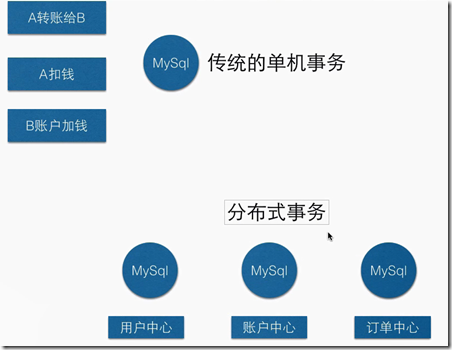
2、讲解场景的隔离级别
Serializable: 最严格,串行处理,消耗资源大
Repeatable Read:保证了一个事务不会修改已经由另一个事务读取但未提交(回滚)的数据
Read Committed:大多数主流数据库的默认事务等级
Read Uncommitted:保证了读取过程中不会读取到非法数据。
3、讲解常见的传播行为
PROPAGATION_REQUIRED--支持当前事务,如果当前没有事务,就新建一个事务,最常见的选择。
PROPAGATION_SUPPORTS--支持当前事务,如果当前没有事务,就以非事务方式执行。
PROPAGATION_MANDATORY--支持当前事务,如果当前没有事务,就抛出异常。
PROPAGATION_REQUIRES_NEW--新建事务,如果当前存在事务,把当前事务挂起, 两个事务之间没有关系,一个异常,一个提交,不会同时回滚
PROPAGATION_NOT_SUPPORTED--以非事务方式执行操作,如果当前存在事务,就把当前事务挂起。
PROPAGATION_NEVER--以非事务方式执行,如果当前存在事务,则抛出异常
5、SpringBoot整合mybatis之事务处理实战
简介:SpringBoot整合Mybatis之事务处理实战
1、service逻辑引入事务 @Transactional(propagation=Propagation.REQUIRED)
2、service代码
@Override
@Transactional(propagation=Propagation.REQUIRED)
public int addAccount() {
User user = new User();
user.setAge(9);
user.setCreateTime(new Date());
user.setName("事务测试");
user.setPhone("000121212");
userMapper.insert(user);
int a = 1/0;
return user.getId();
}
数据库操作之整合Mybaties和事务讲解 5节课的更多相关文章
- 【SpringBoot】数据库操作之整合Mybaties和事务讲解
========================8.数据库操作之整合Mybaties和事务讲解 ================================ 1.SpringBoot2.x持久化数 ...
- 小D课堂 - 零基础入门SpringBoot2.X到实战_第8节 数据库操作之整合Mybaties和事务讲解_32..SpringBoot2.x持久化数据方式介绍
笔记 1.SpringBoot2.x持久化数据方式介绍 简介:介绍近几年常用的访问数据库的方式和优缺点 1.原始java访问数据库 开发流程麻烦 ...
- 一个基于PDO的数据库操作类(新) 一个PDO事务实例
<?php /* * 作者:胡睿 * 日期:2011/03/19 * 电邮:hooray0905@foxmail.com * * 20110319 * 常用数据库操作,如:增删改查,获取单条记录 ...
- mysql数据库操作语句整合
查看版本:select version();显示当前时间:select now(); 注意:在语句结尾要使用分号; 远程连接 一般在公司开发中,可能会将数据库统一搭建在一台服务器上,所有开发人员共用一 ...
- ThinkPHP 数据库操作(六) : 查询事件、事务操作、监听SQL
查询事件 查询事件(V5.0.4+) 从 5.0.4+ 版本开始,增加了数据库的CURD操作事件支持,包括: 查询事件仅支持 find . select . insert . update 和 del ...
- SpringBoot整合定时任务和异步任务处理 3节课
1.SpringBoot定时任务schedule讲解 定时任务应用场景: 简介:讲解什么是定时任务和常见定时任务区别 1.常见定时任务 Java自带的java.util.Timer类 ...
- 十三、EnterpriseFrameWork框架核心类库之数据库操作(多数据库事务处理)
本章介绍框架中封装的数据库操作的一些功能,在实现的过程中费了不少心思,针对不同数据库的操作(SQLServer.Oracle.DB2)这方面还是比较简单的,用工厂模式就能很好解决,反而是在多数据库同时 ...
- Spring Boot学习——数据库操作及事务管理
本文讲解使用Spring-Data-Jpa操作数据库. JPA定义了一系列对象持久化的标准. 一.在项目中使用Spring-Data-Jpa 1. 配置文件application.properties ...
- JDBC:数据库操作:事务
事务特征:原子性,一致性,独立性,持久性. 要想操作事务,必须按照以下步骤完成. 1,取消掉自动提交(SET AUTOCOMMIT=0):每次执行数据库更新的时候实际上发出SQL命令之后就已经提交上去 ...
随机推荐
- BZOJ4538 HNOI2016网络(树链剖分+线段树+堆/整体二分+树上差分)
某两个点间的请求只对不在这条路径上的询问有影响.那么容易想到每次修改除该路径上的所有点的答案.对每个点建个两个堆,其中一个用来删除,线段树维护即可.由于一条路径在树剖后的dfs序中是log个区间,所以 ...
- POJ3176-基础DP
很基础的dp题.有一头奶牛想接尽量多的苹果,有w此移动机会. dp[i][w] = max(dp[i-1][w+1] + 能否吃到苹果 ,dp[i-1][w] + 能否吃到苹果) //从上一分钟是否 ...
- JVM 内存区域 (运行时数据区域)
JVM 内存区域 (运行时数据区域) 链接:https://www.jianshu.com/p/ec479baf4d06 运行时数据区域 Java 虚拟机在执行 Java 程序的过程中会把它所管理的内 ...
- BZOJ 4556: [Tjoi2016&Heoi2016]字符串(后缀数组 + 二分答案 + 主席树 + ST表 or 后缀数组 + 暴力)
题意 一个长为 \(n\) 的字符串 \(s\),和 \(m\) 个询问.每次询问有 \(4\) 个参数分别为 \(a,b,c,d\). 要你告诉它 \(s[a...b]\) 中的所有子串 和 \(s ...
- 学习Spring Boot:(二十七)Spring Boot 2.0 中使用 Actuator
前言 主要是完成微服务的监控,完成监控治理.可以查看微服务间的数据处理和调用,当它们之间出现了异常,就可以快速定位到出现问题的地方. springboot - version: 2.0 正文 依赖 m ...
- [SHOI2013]发牌 解题报告
[SHOI2013]发牌 题意 对一个\(1\sim n(n\le 7\times 10^5)\)的环,指标最开始在\(1\),每次删去顺时针往后第\(d_i\)个元素,指标移到下一个位置.要求输出每 ...
- SqlServer存储过程详解
SqlServer存储过程详解 1.创建存储过程的基本语法模板: if (exists (select * from sys.objects where name = 'pro_name')) dro ...
- HDU 3605 Escape (网络流,最大流,位运算压缩)
HDU 3605 Escape (网络流,最大流,位运算压缩) Description 2012 If this is the end of the world how to do? I do not ...
- C# ADO.NET基础&实战
什么是ADO.NET:数据库访问技术! 作用:通过程序来连接访问数据库! 一.基础: using System.Data.SqlClient; //数据库连接命名空间 string connec ...
- JS面试题(一)
1.JS六种基本数据类型:string Boolean number object undefined function typeof返回的是字符串,有六种:string Boolean number ...