
[Laravel] 06 - Project: from Usercase to View
故事背景
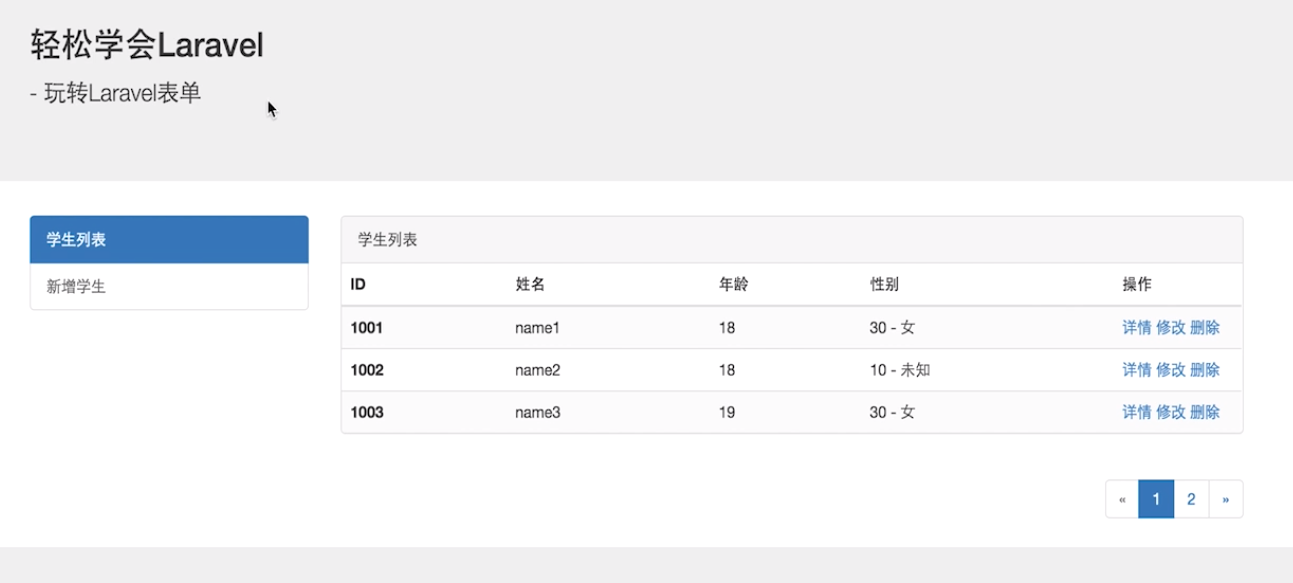
一、项目预览
From: https://www.imooc.com/video/12518
二、知识点
通过项目复习之前的重难点,在此列出并解决。
/* implement */
项目开始
一、布局分析
- 通过纯html文件给布局打底稿
共同的头部
共同的侧边栏
共同的尾部
只是右侧内容不同。
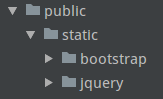
- Move/add bootstrap and jquery under public/static/
二、打通 MVC
- 路由
Route::get('student/index', ['uses' => 'StudentController@index']); ----> 控制器文件
- 控制器
[StudentController.php]
class StudentController extends Controller

{

    // 学生列表页

    public function index()

    {
     return view('student.index');  ----> 视图文件
    }
}
- 视图
[resources/views/student/index.blade.php]
只是一个blade模板布局。可以暂时随便写点什么显示出来打通MVC即可。
- 模型
暂时不用
三、Usercase到视图
视图也就是usercase的直接对接物,所以从这里开始。
- 静态资源管理 以及 模板布局
Ref: https://www.imooc.com/video/12519, 06:38 / 11:48
[views/common/layouts.blade.php]
第一步,静态页面,找到共同部分
<!DOCTYPE html>
<html lang="zh-CN"> ---------------------------------------------------------------------------
<head>
<meta charset="utf-8">
<meta http-equiv="X-UA-Compatible" content="IE=edge">
<meta name="viewport" content="width=device-width, initial-scale=1">
<title>轻松学会Laravel</title>
<title>轻松学会Laravel - @yield('title')</title>
# 占位符
<!-- Bootstrap CSS 文件 -->
<link rel="stylesheet" href="./static/bootstrap/css/bootstrap.min.css">
<link rel="stylesheet" href="{{ asset('./static/bootstrap/css/bootstrap.min.css') }}"> @section('style')
// Jeff: 难点一
@show
</head> ---------------------------------------------------------------------------
<body> <!-- 头部 -->
<div class="jumbotron">
<div class="container">
<h2>轻松学会Laravel</h2> <p> - 玩转Laravel表单</p>
</div>
</div> <!-- 中间内容区局 -->
<div class="container">
<div class="row">
--------------------------------------------------------------
@section(...)
<!-- 左侧菜单区域 -->
<div class="col-md-3">
<div class="list-group">
<a href="#" class="list-group-item active">学生列表</a>
<a href="#" class="list-group-item">新增学生</a>
</div>
</div>
@show
---------------------------------------------------------------
<!-- 右侧内容区域 -->
<div class="col-md-9">
---------------------------------------------------------------------------------
单独放在另一个文件中,例如同级目录下的message.blade.php
---------------------------------------------------------------------------------
<!-- 成功提示框 -->
<div class="alert alert-success alert-dismissible" role="alert">
<button type="button" class="close" data-dismiss="alert" aria-label="Close">
<span aria-hidden="true">×</span>
</button>
<strong>成功!</strong> 操作成功提示!
</div> <!-- 失败提示框 -->
<div class="alert alert-danger alert-dismissible" role="alert">
<button type="button" class="close" data-dismiss="alert" aria-label="Close">
<span aria-hidden="true">×</span>
</button>
<strong>失败!</strong> 操作失败提示!
</div>
---------------------------------------------------------------------------------- ##################################################################################
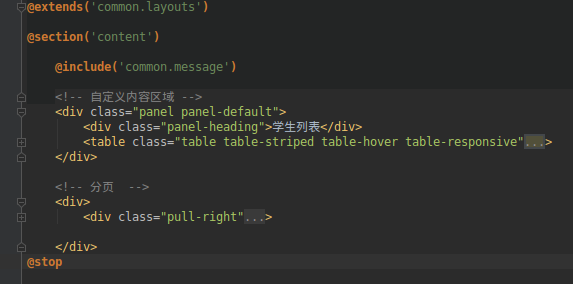
以下就是内容区域,移动到index文件中,单独处理。
这里使用占位符:@yield('content')
当然,这个index文件要继承该模板,通过 @extends('common.layouts')
##################################################################################
<!-- 自定义内容区域 -->
<div class="panel panel-default">
<div class="panel-heading">学生列表</div>
<table class="table table-striped table-hover table-responsive">
<thead>
<tr>
<th>ID</th>
<th>姓名</th>
<th>年龄</th>
<th>性别</th>
<th>添加时间</th>
<th width="120">操作</th>
</tr>
</thead>
<tbody>
<tr>
<th scope="row">1</th>
<td>Mark</td>
<td>18</td>
<td>男</td>
<td>2016-01-01</td>
<td>
<a href="">详情</a>
<a href="">修改</a>
<a href="">删除</a>
</td>
</tr>
<tr>
<th scope="row">1</th>
<td>Mark</td>
<td>18</td>
<td>男</td>
<td>2016-01-01</td>
<td>
<a href="">详情</a>
<a href="">修改</a>
<a href="">删除</a>
</td>
</tr>
<tr>
<th scope="row">1</th>
<td>Mark</td>
<td>18</td>
<td>男</td>
<td>2016-01-01</td>
<td>
<a href="">详情</a>
<a href="">修改</a>
<a href="">删除</a>
</td>
</tr>
</tbody>
</table>
</div> <!-- 分页 -->
<div>
<ul class="pagination pull-right">
<li>
<a href="#" aria-label="Previous">
<span aria-hidden="true">«</span>
</a>
</li>
<li class="active"><a href="#">1</a></li>
<li><a href="#">2</a></li>
<li><a href="#">3</a></li>
<li><a href="#">4</a></li>
<li><a href="#">5</a></li>
<li>
<a href="#" aria-label="Next">
<span aria-hidden="true">»</span>
</a>
</li>
</ul>
</div>
################################################################################## </div>
</div>
</div> <!-- 尾部 -->
<div class="jumbotron" style="margin:0;">
<div class="container">
<span> @2016 imooc</span>
</div>
</div> <!-- jQuery 文件 -->
<script src="./static/jquery/jquery.min.js"></script>
<!-- Bootstrap JavaScript 文件 -->
<script src="./static/bootstrap/js/bootstrap.min.js"></script>
@section('javascript')
// Jeff 留给js的一块地皮
@show
</body>
</html>
- 使用模板
- 先继承模板;
- 再填充content的内容:@yield('content')
- 提示内容通过调用子视图搞定:@include
- 样式调整
asset 到底是什么?
asset()方法用于引入 CSS/JavaScript/images 等文件,文件必须存放在public文件目录下。
[1] <link rel="stylesheet" href="./static/bootstrap/css/bootstrap.min.css">

[2] <link rel="stylesheet" href="{{ asset('./static/bootstrap/css/bootstrap.min.css') }}">
难点一
Ref: Laravel5.4初试-@yield @section @show @stop @append标签区别
Ref: 关于 @section...@show;@section....@endsection 的用法分析
/* implement */
难点二
保持结构,改变内容
@section...@show可以改变内容
/* implement */
难点三
固定区域,内容灵活
/* implement */
四、分页的实现
分页上是网页内容,也就是Student Info。
所以,需要定义模型。
"模型 --> 控制器 --> 分页视图"
- 视图 - 模板

- 视图 - php循环写网页
  <!-- 自定义内容区域 -->

    <div class="panel panel-default">

        <div class="panel-heading">学生列表</div>

        <table class="table table-striped table-hover table-responsive">

            <thead> #表头

            <tr>

                <th>ID</th>

                <th>姓名</th>

                <th>年龄</th>

                <th>性别</th>

                <th>添加时间</th>

                <th width="120">操作</th>

            </tr>

            </thead>

            <tbody> #表体

            ------------------------------------------------------------------------------------------
                @foreach($students as $student)

                <tr>

                    <th scope="row">{{ $student->id }}</th>

                    <td>{{ $student->name }}</td>

                    <td>{{ $student->age }}</td>

                    <td>{{ $student->sex($student->sex) }}</td>

                    <td>{{ date('Y-m-d', $student->created_at) }}</td>

                    <td>

                        <a href="{{ url('student/detail', ['id' => $student->id]) }}">详情</a>

                        <a href="{{ url('student/update', ['id' => $student->id]) }}">修改</a>

                        <a href="{{ url('student/delete', ['id' => $student->id]) }}"

                           onclick="if (confirm('确定要删除吗?') == false) return false;">删除</a>

                    </td>

                </tr>

                @endforeach
            ------------------------------------------------------------------------------------------

            </tbody>

        </table>

    </div>
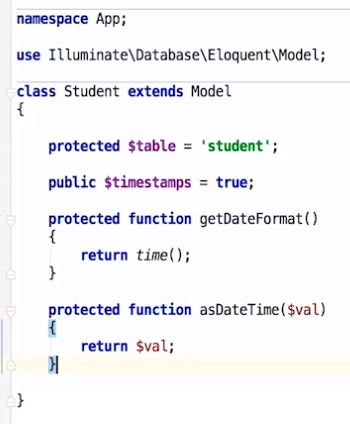
$students 作为参数 是从哪里来的? ---- "模型Student" 中定义
- 控制器 为 视图 提供数据
<?php

namespace App\Http\Controllers;

use App\Student;

use Illuminate\Http\Request;

class StudentController extends Controller

{

    // 学生列表页

    public function index()

    {

        $students = Student::paginate(5);  <----  mysql

        return view('student.index', [

            'students' => $students,         -----> 为'视图'提供参数

        ]);

    }
}
到此,布局设计的套路就有了。
[Laravel] 06 - Project: from Usercase to View的更多相关文章
- [Laravel] 07 - Project: functions in Controller
故事背景 一.项目预览 From: https://www.imooc.com/video/12521 表单操作 一.新增信息 既然是操作,自然会想到:控制器. 控制器 [1] 路由 ----> ...
- Laravel 控制器 Controller 传值到 视图 View 的几种方法总结
单个值的传递 with public function index() { $test = "测试"; return view('test.index')->with(' ...
- [Code::Blocks] Install wxWidgets & openCV
The open source, cross platform, free C++ IDE. Code::Blocks is a free C++ IDE built to meet the most ...
- 本人SW知识体系导航 - Programming menu
将感悟心得记于此,重启程序员模式. js, py, c++, java, php 融汇之全栈系列 [Full-stack] 快速上手开发 - React [Full-stack] 状态管理技巧 - R ...
- [Full-stack] 世上最好语言 - PHP
前言 本篇是对个人PHP, Laravel系列博文的总结与思考. 目的在于理清并熟练如下过程: "需求 --> Usercase --> UI --> 框架 --> ...
- Project Management Process
Project Management ProcessDescription .............................................................. ...
- laravel速记(笔记)
命令行: php artisan controller:make UserController This will generate the controller at /app/controller ...
- laravel 心得
1.安装 使用composer安装laravel ,切换到你想要放置该网站的目录下,运行命令: composer create-project laravel/larevel project 4.1 ...
- [Laravel] 14 - REST API: Laravel from scratch
前言 一.基础 Ref: Build a REST API with Laravel API resources Goto: [Node.js] 08 - Web Server and REST AP ...
随机推荐
- css中display:none与visibility: hidden的区别
display: none; 隐藏元素,不占用其本来空间------对应元素显示用的是display:block; visibility: hidden:元素隐藏,占用其本来的页面空间-------- ...
- 喵哈哈村的魔法考试 Round #15 (Div.2) 题解
哗啦啦村的奇迹果实(一) 题解:显然答案就是最大值减去最小值. #include<bits/stdc++.h> using namespace std; const int maxn = ...
- 使用 IntraWeb (34) - TIWAJAXNotifier
在异步事件中, 可以通过 TIWAJAXNotifier 发出一个通知(通过其 Notify 方法), 该通知会激发其 OnNotify 事件. 这一般用在: 当一个异步事件完成后, 立即处理随后的事 ...
- [原创]Eclipse Memory Analyzer tool(MAT)工个使用介绍
[原创]Eclipse Memory Analyzer tool(MAT)工个使用介绍
- JTAG 引脚自动识别 JTAG Finder, JTAG Pinout Tool, JTAG Pin Finder, JTAG pinout detector, JTAGULATOR, Easy-JTAG, JTAG Enumeration
JTAG Finder Figuring out the JTAG Pinouts on a Device is usually the most time-consuming and frustra ...
- 每次运行caffe代码之前需要考虑修改的地方
Train阶段: (1) train.sh中的solver.prototxt路径 (2) train.sh中的caffemodel路径 (3) train.sh中的 ...
- JNI学习小结
Java中类型与C/C++中对应关系 Java中的类的对应 Sign签名, 用来识别对应各个方法. JDK下的javap.exe能输出签名.用法javap -s -p 完整类名 下面是 ...
- C#.NET使用Task,await,async,异步执行控件耗时事件(event),不阻塞UI线程和不跨线程执行UI更新,以及其他方式比较
使用Task,await,async,异步执行事件(event),不阻塞UI线程和不跨线程执行UI更新 使用Task,await,async 的异步模式 去执行事件(event) 解决不阻塞UI线程和 ...
- MySQL -- Innodb中的change buffer
change buffer是一种特殊的数据结构,当要修改的辅助索引页不在buffer pool中时,用来cache对辅助索引页的修改.对辅助索引页的操作可能是insert.update和delete操 ...
- cmd命令中截取日期字符
%date:~0,10% 表示年份