
.Net Windows Service(服务) 调试安装及System.Timers.Timer 使用
Windows Service(服务) 是运行在后台的进程
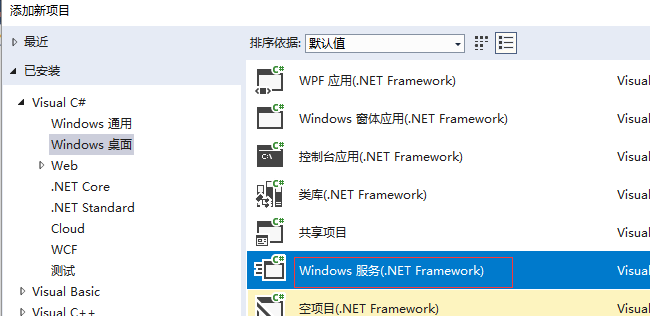
1、VS建立 Windows 服务(.NET Framework)
2、添加Timer
双击Service1.cs可以拖控件(System.Windows.Forms.Timer)这儿注意命名空间哦,
双击 trmer1 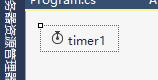 生成事件,修改事件方法如下:
App.config:
<appSettings>

    <add key="TimerExecTime" value="0001-01-01 10:07:00"/>

  </appSettings>
Service1.cs
private void timer1_Tick(object sender, EventArgs e)

        {

            _logger.Info("timer1_Tick");

            DateTime execTime = DateTime.Parse(ConfigurationManager.AppSettings["TimerExecTime"]);

            _logger.Info("timer1_Tick" + execTime.Year);

            if (execTime.Year == )

            {

                _logger.Info("yea"+ execTime.Hour + "Minute"+ execTime.Minute);

                DateTime curTime = DateTime.Now;

                if (execTime.Hour == curTime.Hour && execTime.Minute == curTime.Minute)

                {

                    //每天几小时几分执行代码

                }

            }

        }
进入Service1.Designer.cs 修改如下:
        #region 组件设计器生成的代码

        /// <summary>

        /// 设计器支持所需的方法 - 不要修改

        /// 使用代码编辑器修改此方法的内容。

        /// </summary>

        private void InitializeComponent()

        {

            this.components = new System.ComponentModel.Container();

            //this.timer1 = new System.Timers.Timer(this.components);

            this.timer1 = new System.Timers.Timer();

            //

            // timer1

            //

            this.timer1.Interval = ;

            //this.timer1.Tick += new System.EventHandler(this.timer1_Tick);

            this.timer1.Elapsed += new System.Timers.ElapsedEventHandler(timer1_Tick);

            this.timer1.AutoReset = true;//设置是执行一次(false)还是一直执行(true);

            this.timer1.Enabled = true;//是否执行System.Timers.Timer.Elapsed事件;

            //

            // Service1

            //

            this.ServiceName = "Service1";

        }

        #endregion

        public System.Timers.Timer timer1;
3、调试方法引用:
https://www.cnblogs.com/xiebin1986/archive/2011/12/15/2288893.html
4、安装与卸载
在Service1.cs 右键=》添加安装程序 ,生成 ProjectInstaller.cs
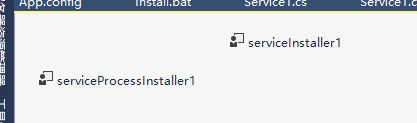
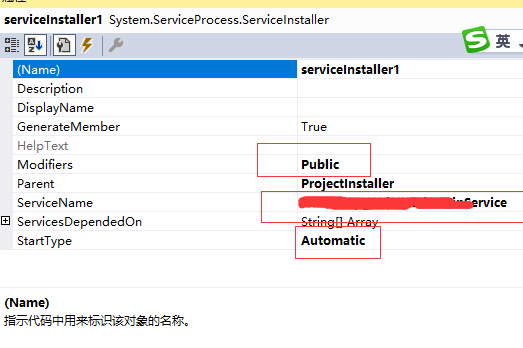
serviceInstaller1 设置如下图:
serviceProcessInstaller1设置如下图:
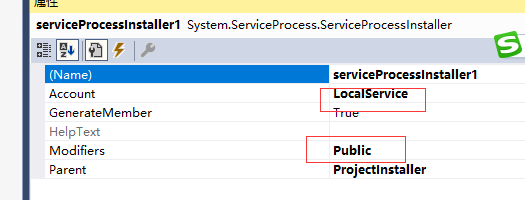
生成时
Install.bat
%SystemRoot%\Microsoft.NET\Framework\v2.0.50727\installutil.exe 路径Release  Service.exe

Net Start 服务名

sc config 服务名 start= auto
Uninstall.bat
%SystemRoot%\Microsoft.NET\Framework\v2.0.50727\installutil.exe /u 路径Release Service.exe
.Net Windows Service(服务) 调试安装及System.Timers.Timer 使用的更多相关文章
- C# Windows Service服务的创建和调试
前言 关于Windows服务创建和调试的文章在网络上的很多文章里面都有,直接拿过来贴在这里也不过仅仅是个记录,不会让人加深印象.所以本着能够更深刻了解服务项目的创建和调试过程及方法的目的,有了这篇记录 ...
- windows Service 之调试过程(附加到进程里调试,而且启动时间不能超过30秒)
最近第一次用C#写了一个windows service ,其实实现的内容比较简单.就是启动remoting 连接,但是调试相对初次写windws service 的我来说,比较烦.没有经验,而且没办法 ...
- C#Windows Service服务程序的安装/卸载、启动/停止 桌面客户端管理程序设计
C#Windows Service服务程序的安装/卸载.启动/停止 桌面客户端管理程序设计 关于Windows Service程序的安装与卸载如果每次使用命令行操作,那简直要奔溃了,太麻烦而且还容易出 ...
- 震惊!Windows Service服务和定时任务框架quartz之间原来是这种关系……
过场CG: 接到公司领导的文件指示,“小熊”需要在6月底去海外执行一个行动代号为[定时任务]的营救计划,这个计划关系到公司某个项目的生死(数据安全漏洞),作战部拟定两个作战方案: 方案一:使用务定 ...
- quartz.net结合Topshelf实现windows service服务托管的作业调度框架
topshelf可以很简单方便的实现windows service服务,详见我的一篇博客的介绍 http://www.cnblogs.com/xiaopotian/articles/5428361.h ...
- Windows Service 服务搭配FluentScheduler实现定时任务调度
Windows Service 服务 创建Windows Service 项目 创建一个Windows Service项目,并将项目名称改为 TaskWindowService 在解决方案资源管理器内 ...
- windows service 2008 R2 安装net4.6环境失败,windows service 2008 R2 升级sp1问题
一.错误 1.因为我的程序是以vs2017开发的,在windows service 2008 R2 IIS部署项目文件报出错误,因此要安装net4.6的环境. 2.windows service 2 ...
- System.Windows.Forms.Timer、System.Timers.Timer、System.Threading.Timer的 区别和用法
System.Windows.Forms.Timer执行的时候,如果你在过程中间加一个sleep整个的界面就死掉了,但是另外两个没有这个情况,System.Timers.Timer.System.Th ...
- 简述System.Windows.Forms.Timer 与System.Timers.Timer用法区别
System.Windows.Forms.Timer 基于窗体应用程序 阻塞同步 单线程 timer中处理时间较长则导致定时误差极大. System.Timers.Timer 基于服务 非阻塞异步 多 ...
随机推荐
- Notes中几个处理多值域的通用函数
1.查找出查找内容在多值域中的索引值 getItemIndex(域名,域值,文档) Public Function getItemIndex(ByVal fieldName As String, By ...
- LaTeX :font size 修改字体大小的几种方式
调整字体大小的几种方式,大小依次增大,具体如下: \tiny \scriptsize \footnotesize \small \normalsize \large \Large \LARGE \hu ...
- JAVA 自定义注解在自动化测试中的使用
在UI自动化测试中,相信很多人都喜欢用所谓的PO模式,其中的P,也就是page的意思,于是乎,在脚本里,或者在其它的page里,会要new很多的page对象,这样很麻烦,前面我们也讲到了注解的使用,很 ...
- 鱼缸的启示:Scale-out和Scale-up架构
提到Scale-out和Scale-up,初看到可能会有点晕.其实我认为Scale-out和Scale-up的概念可以用一个简单的例子来解释. 不知您有没有养过鱼?当你只有六七条鱼的时候,一个小型鱼缸 ...
- git报ssh variant 'simple' does not support setting port解决办法
解决办法 在git bash中输入命令 1 git config --global ssh.variant ssh 照着来一遍,肯定解决
- Spark 核心篇-SparkEnv
本章内容: 1.功能概述 SparkEnv是Spark的执行环境对象,其中包括与众多Executor执行相关的对象.Spark 对任务的计算都依托于 Executor 的能力,所有的 Executor ...
- python工具 - 批量文件重命名
日常工作中经常会遇到这样的情况,需要将某个文件夹下的文件按着一定的规则进行重命名,当文件数量及其庞大的时候手工一个一个的去修需要耗费大量的时间,以下python工具可以协助批量修改文件名. 场景:某文 ...
- 推荐几个Windows工具软件: Stickies - 桌面贴
主页: http://www.zhornsoftware.co.uk/stickies/index.html Stickies work like Post-it notes for your PC. ...
- React Native - FlexBox弹性盒模型
FlexBox布局 1. 什么是FlexBox布局? 弹性盒模型(The Flexible Box Module),又叫FlexBox,意为"弹性布局",旨在通过弹性的方式来对 ...
- 【转】Windows下charles 使用教程指南
1.下载就不用再说了,网上好多破解的安装包 2.下面是pc端的抓包使用情况 Charles支持抓去http.https协议的请求,不支持socket.然后charles会自动配置IE浏览器和工具的代理 ...