
Android + Eclipse + PhoneGap 2.9.0 安卓最新环境配置,部分资料整合网上资料,已成功安装.
前言:最近心血来潮做了一个以品牌为中心的网站,打算推出本地服务o2o应用。快速开发手机应用,最后选择了phonegap,这里我只是讲述我安装的过程,仅供大家参考。
我开发的一个模型http://www.w30.cn 可以看下。看看有多差。
如果有什么问题也可以到小组留言,可以的话,贡献一个ip:)
phonegap小组 http://www.w30.cn/group/4
如果有什么问题也可以加入我们的QQ群:64674997
ok 不多说了,下面是我的安装过程
环境搭建首先要去下载一些安装包:
(下载前注意一下,电脑是32位还是64位的请注意选择安装包)
java环境的JDK:http://www.oracle.com/technetwork/java/javase/downloads/index.html
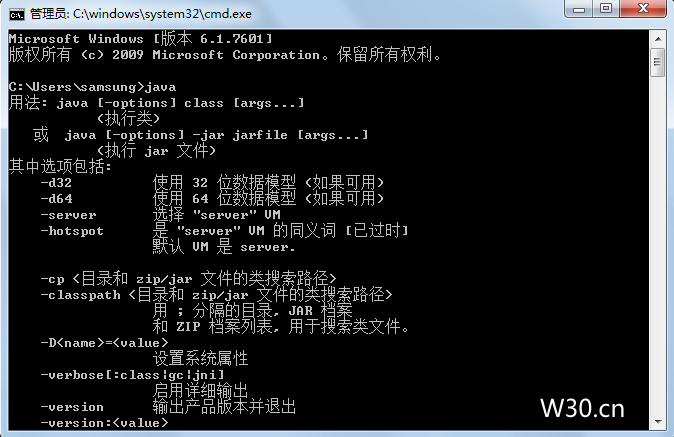
我安装的是64位,下载自己系统环境需要的版本,下载后默认安装,完成后 在 开始 - 输入cmd- 输入java 显示出java版本信息表示安装已经成功
接着安装
一、下载安装ADT。http://developer.android.com/sdk/index.html
二、Android的压缩包为:adt-bundle-windows-x86_64。
解压后,进入eclipse目录,运行eclipse.exe。
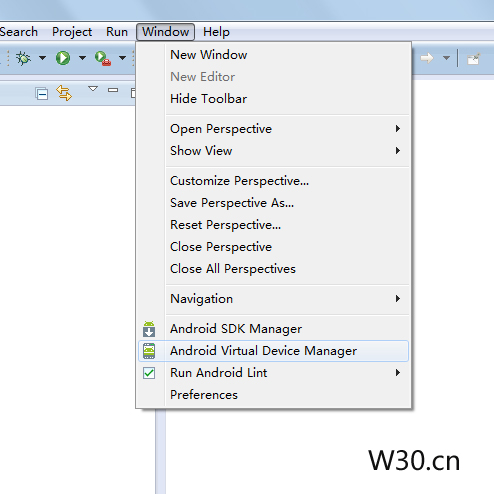
1)先更新Android包:选择 Window -------->Android SDK Manager
全部勾选后,点击 Install packages,将所有包全部打上。

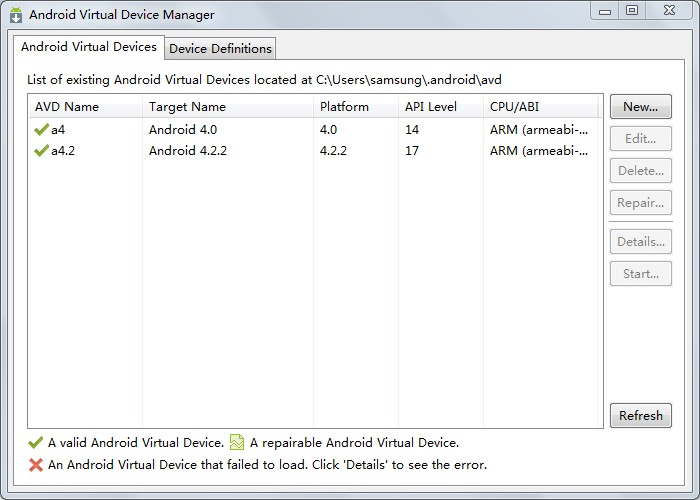
2)配置AVD环境
配置该环境有两种方法:
1、使用界面进行配置,进入方式如图所示:
打开之后,如图所示,点击New新建。
三、配置PhoneGap(这个比较麻烦)
1)先新建一个新的工程。
具体详细可以查看:
http://developer.android.com/intl/zh-CN/training/basics/firstapp/creating-project.html
打开ADT,新建一个安卓应用项目

输入名称,然后下一步
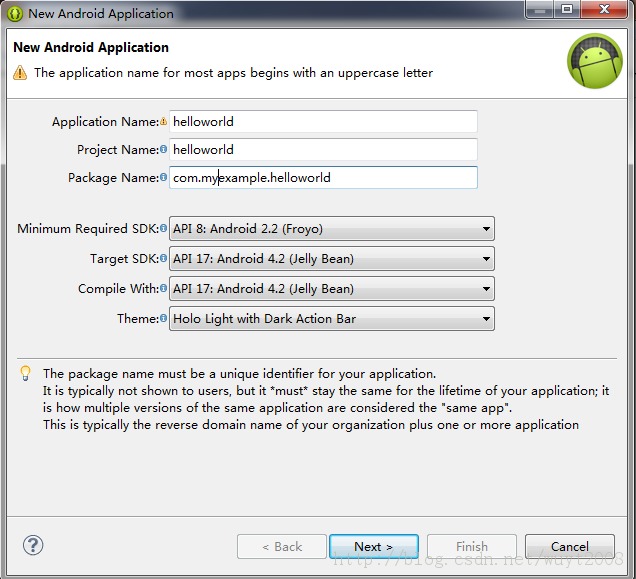
可以选择下项目位置,我的是默认的。
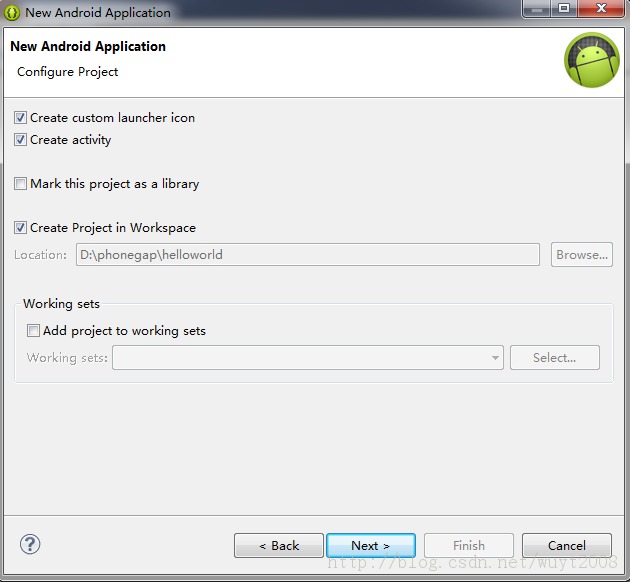
这里可以选择图标。
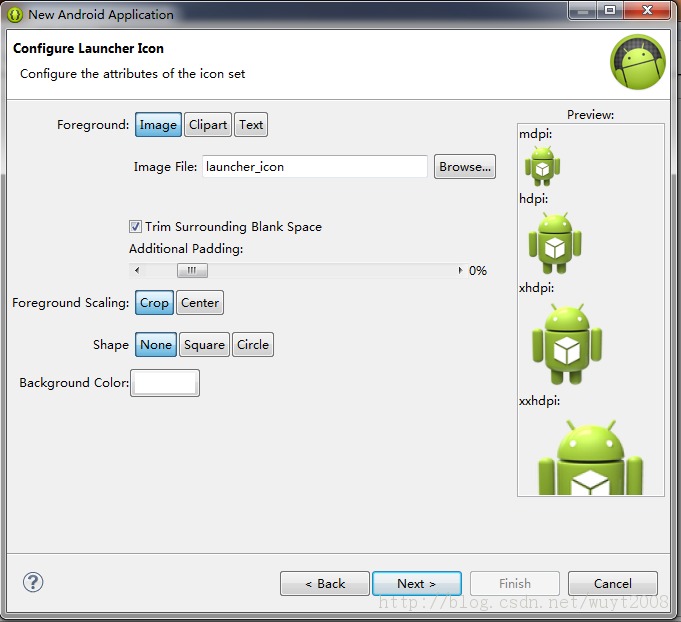
选择第一个
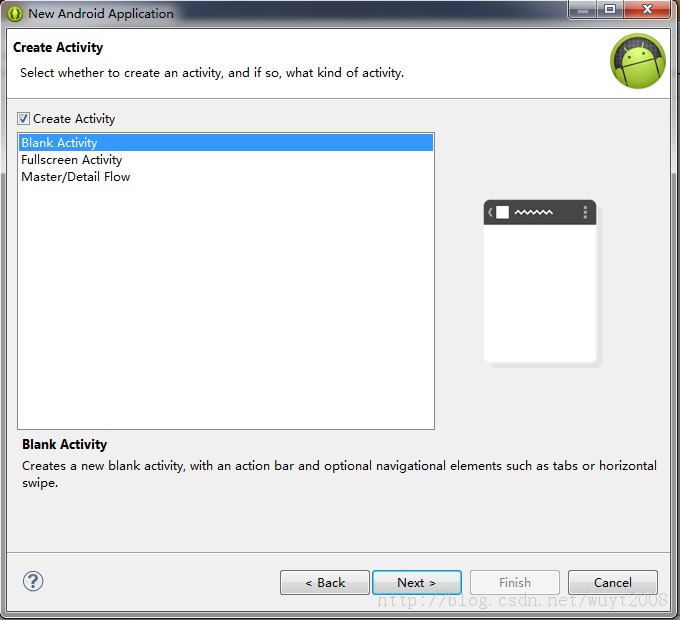
这个时候,一个安卓项目就建好了。
phonegap下载地址:http://phonegap.com/install/
将PhoneGap目录下的android目录下的jar文件拷贝到项目的libs目录下

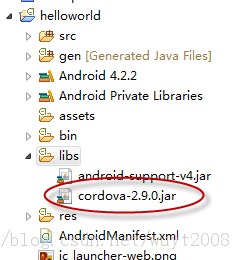
将xml目录拷贝到项目的res目录下
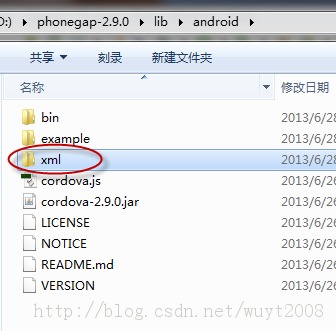
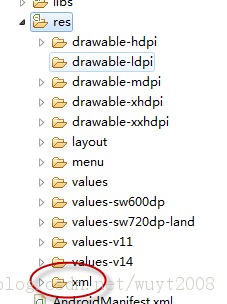
在assetc目录下,建立一个www目录,下面放html内容。为了偷懒,我把phonegap例子里面的内容拷贝过来了。
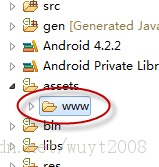
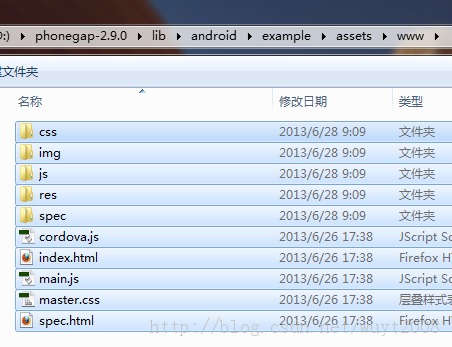
修改Java代码:
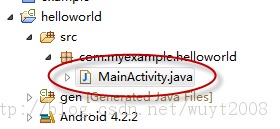
package com.myexample.helloworld;

import android.os.Bundle;

import org.apache.cordova.*;

public class MainActivity extends DroidGap

{

    @Override

    public void onCreate(Bundle savedInstanceState)

    {

        super.onCreate(savedInstanceState);

        // Set by <content src="index.html" /> in config.xml

        super.loadUrl(Config.getStartUrl());

        //super.loadUrl("file:///android_asset/www/index.html")

    }

}

/*

 * 下面是adt生成的代码,注释掉

import android.os.Bundle;

import android.app.Activity;

import android.view.Menu;

public class MainActivity extends Activity {

    @Override

    protected void onCreate(Bundle savedInstanceState) {

        super.onCreate(savedInstanceState);

        setContentView(R.layout.activity_main);

    }

    @Override

    public boolean onCreateOptionsMenu(Menu menu) {

        // Inflate the menu; this adds items to the action bar if it is present.

        getMenuInflater().inflate(R.menu.main, menu);

        return true;

    }

}*/
修改一下项目根目录下的AndroidManifest.xml和res/xml目录下的config.xml文件
AndroidManifest.xml
<?xml version="1.0" encoding="utf-8"?>

<!--

       Licensed to the Apache Software Foundation (ASF) under one

       or more contributor license agreements.  See the NOTICE file

       distributed with this work for additional information

       regarding copyright ownership.  The ASF licenses this file

       to you under the Apache License, Version 2.0 (the

       "License"); you may not use this file except in compliance

       with the License.  You may obtain a copy of the License at

         http://www.apache.org/licenses/LICENSE-2.0

       Unless required by applicable law or agreed to in writing,

       software distributed under the License is distributed on an

       "AS IS" BASIS, WITHOUT WARRANTIES OR CONDITIONS OF ANY

       KIND, either express or implied.  See the License for the

       specific language governing permissions and limitations

       under the License.

-->

<manifest xmlns:android="http://schemas.android.com/apk/res/android"

    package="com.myexample.helloworld"

    android:hardwareAccelerated="true"

    android:versionCode="1"

    android:versionName="1.0"

    android:windowSoftInputMode="adjustPan" >

    <supports-screens

        android:anyDensity="true"

        android:largeScreens="true"

        android:normalScreens="true"

        android:resizeable="true"

        android:smallScreens="true"

        android:xlargeScreens="true" />

    <uses-permission android:name="android.permission.CAMERA" />

    <uses-permission android:name="android.permission.VIBRATE" />

    <uses-permission android:name="android.permission.ACCESS_COARSE_LOCATION" />

    <uses-permission android:name="android.permission.ACCESS_FINE_LOCATION" />

    <uses-permission android:name="android.permission.ACCESS_LOCATION_EXTRA_COMMANDS" />

    <uses-permission android:name="android.permission.INTERNET" />

    <uses-permission android:name="android.permission.RECEIVE_SMS" />

    <uses-permission android:name="android.permission.RECORD_AUDIO" />

    <uses-permission android:name="android.permission.RECORD_VIDEO" />

    <uses-permission android:name="android.permission.MODIFY_AUDIO_SETTINGS" />

    <uses-permission android:name="android.permission.READ_CONTACTS" />

    <uses-permission android:name="android.permission.WRITE_CONTACTS" />

    <uses-permission android:name="android.permission.WRITE_EXTERNAL_STORAGE" />

    <uses-permission android:name="android.permission.ACCESS_NETWORK_STATE" />

    <uses-permission android:name="android.permission.GET_ACCOUNTS" />

    <uses-permission android:name="android.permission.BROADCAST_STICKY" />

    <application

        android:debuggable="true"

        android:hardwareAccelerated="true"

        android:icon="@drawable/ic_launcher"

        android:label="@string/app_name" >

        <activity

            android:name="com.myexample.helloworld.MainActivity"

            android:configChanges="orientation|keyboardHidden|keyboard|screenSize|locale"

            android:label="@string/app_name"

            android:theme="@android:style/Theme.Black.NoTitleBar" >

            <intent-filter>

                <action android:name="android.intent.action.MAIN" />

                <category android:name="android.intent.category.LAUNCHER" />

            </intent-filter>

        </activity>

    </application>

    <uses-sdk

        android:minSdkVersion="7"

        android:targetSdkVersion="17" />

</manifest>
config.xml
<?xml version="1.0" encoding="UTF-8"?>

<!--

 Licensed to the Apache Software Foundation (ASF) under one

 or more contributor license agreements.  See the NOTICE file

 distributed with this work for additional information

 regarding copyright ownership.  The ASF licenses this file

 to you under the Apache License, Version 2.0 (the

 "License"); you may not use this file except in compliance

 with the License.  You may obtain a copy of the License at

 http://www.apache.org/licenses/LICENSE-2.0

 Unless required by applicable law or agreed to in writing,

 software distributed under the License is distributed on an

 "AS IS" BASIS, WITHOUT WARRANTIES OR CONDITIONS OF ANY

 KIND, either express or implied.  See the License for the

 specific language governing permissions and limitations

 under the License.

-->

<widget

    id="com.myexample.helloworld"

    version="2.0.0"

    xmlns="http://www.w3.org/ns/widgets" >

    <name>

helloworld

    </name>

    <description>

        A sample Apache Cordova application that responds to the deviceready event.

    </description>

    <author

        email="dev@cordova.apache.org"

        href="http://cordova.io" >

        Apache Cordova Team

    </author>

    <access origin="*" />

    <!-- <content src="http://mysite.com/myapp.html" /> for external pages -->

    <content src="index.html" />

    <preference

        name="loglevel"

        value="DEBUG" />

    <!--

      <preference name="splashscreen" value="resourceName" />

      <preference name="backgroundColor" value="0xFFF" />

      <preference name="loadUrlTimeoutValue" value="20000" />

      <preference name="InAppBrowserStorageEnabled" value="true" />

      <preference name="disallowOverscroll" value="true" />

    -->

    <feature name="App" >

        <param

            name="android-package"

            value="org.apache.cordova.App" />

    </feature>

    <feature name="Geolocation" >

        <param

            name="android-package"

            value="org.apache.cordova.GeoBroker" />

    </feature>

    <feature name="Device" >

        <param

            name="android-package"

            value="org.apache.cordova.Device" />

    </feature>

    <feature name="Accelerometer" >

        <param

            name="android-package"

            value="org.apache.cordova.AccelListener" />

    </feature>

    <feature name="Compass" >

        <param

            name="android-package"

            value="org.apache.cordova.CompassListener" />

    </feature>

    <feature name="Media" >

        <param

            name="android-package"

            value="org.apache.cordova.AudioHandler" />

    </feature>

    <feature name="Camera" >

        <param

            name="android-package"

            value="org.apache.cordova.CameraLauncher" />

    </feature>

    <feature name="Contacts" >

        <param

            name="android-package"

            value="org.apache.cordova.ContactManager" />

    </feature>

    <feature name="File" >

        <param

            name="android-package"

            value="org.apache.cordova.FileUtils" />

    </feature>

    <feature name="NetworkStatus" >

        <param

            name="android-package"

            value="org.apache.cordova.NetworkManager" />

    </feature>

    <feature name="Notification" >

        <param

            name="android-package"

            value="org.apache.cordova.Notification" />

    </feature>

    <feature name="Storage" >

        <param

            name="android-package"

            value="org.apache.cordova.Storage" />

    </feature>

    <feature name="FileTransfer" >

        <param

            name="android-package"

            value="org.apache.cordova.FileTransfer" />

    </feature>

    <feature name="Capture" >

        <param

            name="android-package"

            value="org.apache.cordova.Capture" />

    </feature>

    <feature name="Battery" >

        <param

            name="android-package"

            value="org.apache.cordova.BatteryListener" />

    </feature>

    <feature name="SplashScreen" >

        <param

            name="android-package"

            value="org.apache.cordova.SplashScreen" />

    </feature>

    <feature name="Echo" >

        <param

            name="android-package"

            value="org.apache.cordova.Echo" />

    </feature>

    <feature name="Globalization" >

        <param

            name="android-package"

            value="org.apache.cordova.Globalization" />

    </feature>

    <feature name="InAppBrowser" >

        <param

            name="android-package"

            value="org.apache.cordova.InAppBrowser" />

    </feature>

    <!-- Deprecated plugins element. Remove in 3.0 -->

    <plugins>

    </plugins>

</widget>
然后,就可以运行了

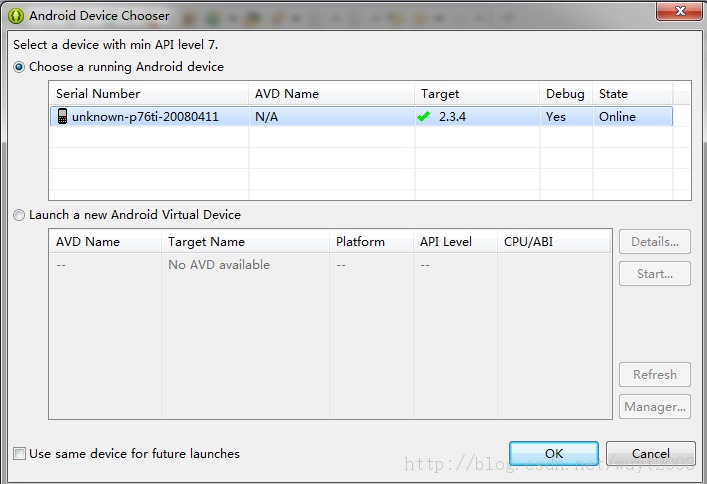
PhoneGap的官方方法不是这样的,是用命令行生成默认包的。但是要装好几个东西。具体可以看PhoneGap包里面的readme文档。
转:http://www.cnblogs.com/kingofpop/articles/3249845.html
Android + Eclipse + PhoneGap 2.9.0 安卓最新环境配置,部分资料整合网上资料,已成功安装.的更多相关文章
- Android + Eclipse + PhoneGap 3.4 安卓最新环境配置,部分资料整合网上资料,已成功安装.
前言:广州花都论坛,打算推出本地服务o2o应用.快速开发手机应用,phonegap 我的小站,http://www.w30.cn/ 如果有什么问题也可以到小组留言,可以的话,贡献一个ip:) phon ...
- Android + Eclipse + PhoneGap 环境配置
用了3天的时间,终于把环境搭建完毕,郁闷了N天,终于完成了.这里我只是讲述我安装的过程,仅供大家参考. 环境搭建首先要去下载一些安装包: (下载前注意一下,电脑是32位还是64位的请注意选择安装包) ...
- Android SDK 4.0.3 开发环境配置及运行
最近又装了一次最新版本的ADK环境 目前最新版是Android SDK 4.0.3 本文的插图和文本虽然是Android2.2的 步骤都是一样的,如果安装的过程中遇到什么问题,可以留言,我会尽快回复! ...
- 安卓开发环境配置之Windows+ADT+eclipse
安卓环境搭建之Windows+ADT+eclipse 要点: 1.安装JDK 2.安装Android SDK 3.安装eclipse 4.安装ADT 5.安装调试环境 正文: 1.安装JDK 1.1准 ...
- Android Studio1.4.x JNI开发基础-基本环境配置
从Eclipse时代到Android Studio普及,开发工具越来越好用.早些时候还需要安装Cygwin工具,从Android Studio1.3以后,在Android 环境开发JNI程序搭建开发环 ...
- windows eclipse直接访问远程linux hadoop开发环境配置(符合实际开发的做法)
CDH 5.x搭建请参考CentOS 7离线安装CDH 5.16.1完全指南(含各种错误处理). 如果使用的是cloudera quickstart vm,则只能在linux服务器中使用eclipse ...
- AMP+EPP3.0的开发环境配置
经过摸索,总结出下列Apache.MySQL.PHP.EPP.ZendDebugger的开发环境配置方法: 版本: Apache: Apache-httpd-2.2.25-win32-x86-no_s ...
- SpringBoot2.0之六 多环境配置
开发过程中面对不同的环境,例如数据库.redis服务器等的不同,可能会面临一直需要修改配置的麻烦中,在以前的项目中,曾通过Tomcat的配置来实现,有的项目甚至需要手动修改相关配置,这种方式费时费力, ...
- Appium安卓与环境配置
下载与安装: Appium-desktop项目地址:https://github.com/appium/appium-desktop 下载地址:https://github.com/appium/ap ...
随机推荐
- intellij idea svn 修改文件后,父文件夹也标注修改
svn文件修改后,默认只有当前文件更改而父文件没有标注,很不直观:查了一顿后,发现,可以设置: File—->settings—->version control—–>勾选show ...
- DDD领域模型AutoMapper实现DTO(七)
DTO的应用场景: 定义产品类: public class Product { public string ProductName { get; set; } public decimal Produ ...
- easyx的基础应用教程
引用 什么是 EasyX? 作者:EasyX EasyX 是针对 C++ 的图形库,可以帮助 C 语言初学者快速上手图形和游戏编程. 比如,可以用 VC + EasyX 很快的用几何图形画一个房子,或 ...
- django 2中的app_name和namespace
最近看<精通DJANGO>里遇到的疑惑. 简书URL如下: https://www.jianshu.com/p/404500a0408a 其中的官方解释: 应用命名空间 它表示正在部署的应 ...
- react-router4 + webpack Code Splitting
项目升级为react-router4后,就尝试着根据官方文档进行代码分割.https://reacttraining.com/react-router/web/guides/code-splittin ...
- Codeforces 643C Levels and Regions 斜率优化dp
Levels and Regions 把dp方程列出来, 把所有东西拆成前缀的形式, 就能看出可以斜率优化啦. #include<bits/stdc++.h> #define LL lon ...
- 【Java】 剑指offer(67) 把字符串转换成整数
本文参考自<剑指offer>一书,代码采用Java语言. 更多:<剑指Offer>Java实现合集 题目 请你写一个函数StrToInt,实现把字符串转换成整数这个功能 ...
- Selenium 获取文本信息方法+select(定位)
1.通过先定位到具体的元素然后通过text方法获取文本信息,如获取控件名称等 driver.find_element_by_xpath("//div[/h1").text 2.直接 ...
- 基于python的机器学习开发环境安装(最简单的初步开发环境)
一.安装Python 1.下载安装python3.6 https://www.python.org/getit/ 2.配置环境变量(2个) 略...... 二.安装Python算法库 安装顺序:Num ...
- Python 手动新建 Scrapy项目
# 创建项目 scrapy startproject 工程名 # 创建爬虫 scrapy genspider example example.com