
Using std::map with a custom class key
From: https://www.walletfox.com/course/mapwithcustomclasskey.php
If you have ever tried to use a custom class as a key of std::map, most probably you got a compilation error. This article explains why this happens and shows how to make custom classes work as keys of std::map by providing a sorting rule. The article demonstrates three different ways in which you can provide the sorting rule, namely via operator overloading, a comparator (C++98) or with help of a lambda expression (C++11 only).
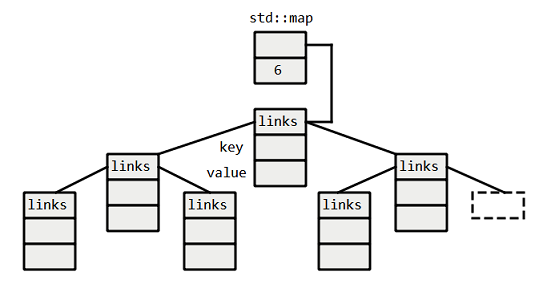
The reason why we have to provide a sorting rule for user-defined classes as keys is because std::map is a binary search tree data structure. This videoshows how binary search trees work in general . Binary search trees store their data in sorted order, thus we have to provide a sorting rule. Once we provided the sorting rule, the map can make use of binary search for all its operations. A binary tree structure for a map of size 6 can be seen below:
A basic example of a binary search can be a guessing game in which one of the players thinks of a number in a certain range (e.g. 0 - 24) and the other player tries to guess it. In binary search the second player always guesses the middle element (i.e. 12) and the first player informs him whether this is larger, smaller or equal to the value that he thought of. Every time, the player makes a guess, one half of the array gets eliminated. The search is repeated until the second player guesses the correct number. The number of times we need to do this is log2(N) because each comparison throws out half of the possibilities.
Problem definition
Imagine we have a class called Color represented by three private attributes red, green and blue and we would like to use this class as a key of std::map. The class can be seen below. Notice that I also overloaded operator<<, this has nothing to do with our problem, it is there just so that we can print the Color directly with std::cout.
class Color{

public:

    Color();

    Color(int r, int g, int b);

    int red() const {return m_red;}

    int green() const {return m_green;}

    int blue() const {return m_blue;}

    bool areValid() const;

private:

    int m_red;

    int m_green;

    int m_blue;

};

std::ostream& operator<<(std::ostream &output, const Color &c);
Let's look at the main.cpp below. We construct a map in which we use our class Color as a key and an int as a value. We insert a couple of pairs (Color, int) and try to print the elements of the map.
int main()

{

    std::map<Color, int> myMap;

    myMap[Color(0, 0, 0)] = 0;

    myMap[Color(230, 159, 0)] = 1;

    myMap[Color(86, 180, 233)] = 2;

    myMap[Color(128, 128, 0)] = 3;

    std::map<Color, int>::iterator it;

    for (it = myMap.begin(); it != myMap.end(); ++it)

        std::cout << it->first << " " << it->second << '\n';

    return 0;

}
If we try to compile the code above, it won't compile and produces the following error: no match for 'operator<' in '__x < __y'. This is because we did not provide a rule to sort the elements which are needed by the binary search tree. How do we solve this? The following lines show how to solve the problem.
Overloading the operator< (C++98)
The first possible solution to our problem is overloading operator<. This is highlighted in the code below. The overloaded operator< takes references to two color instances as arguments and returns true or false based on our sorting rule which will appear in the body of the method. Notice that the only thing we need to do is to provide a rule according to which to compare two color objects. This is sufficient for the std::map to achieve sorted order.
class Color{

public:

    Color();

    Color(int r, int g, int b);

    int red() const {return m_red;}

    int green() const {return m_green;}

    int blue() const {return m_blue;}

    bool areValid() const;

private:

    int m_red;

    int m_green;

    int m_blue;

};

std::ostream& operator<<(std::ostream &output, const Color &c);

bool operator<(const Color &c1, const Color &c2);
Now let's look at the body of the overloaded operator from color.cpp (the entire source files can be found above). How do we decide which color is "smaller"? This depends on our intentions. If we only require that our custom class works with std::map, we should provide something simple and logical. We might choose to sort colors according to their lightness which is in its simplest case an average of red, green and blue. Thus, the operator< will return true if the average of R,G and B of the left-hand color is smaller than the average of R, G and B of the right-hand color. This can be seen below
bool operator<(const Color &c1, const Color &c2){

    return c1.red() + c1.green() + c1.blue() <

                c2.red() + c2.green() + c2.blue();

}
Note: The basic formula for color lightness is an average of R, G and B, i.e. (R + G + B) / 3. Notice that we omitted the division by 3 in the code above, that is because when comparing two colors the division by 3 simply disappears from the equation.
Note: The code compiles and produces the following output: You can see that the colors are sorted in ascending order according to the sum of their R,G and B values.
(0, 0, 0) 0
(128, 128, 0) 3
(230, 159, 0) 1
(86, 180, 233) 2
Note: Notice that we could call
std::cout << it->first << " " << it->second << '\n';only because we also overloaded the output operator<<. The details of this can be found in the source files above.
User-defined comparator (C++98)
Another way of providing the sorting rule is with the help of a custom comparator. A custom comparator is a function object and a function object is simply a class that defines operator() and as a result can be called as if it was a function. You can see our version of the class below. Notice that the parameters, return type as well as the body of the function are the same as in the first solution.
class Color{

public:

    Color();

    Color(int r, int g, int b);

    int red() const {return m_red;}

    int green() const {return m_green;}

    int blue() const {return m_blue;}

    bool areValid() const;

private:

    int m_red;

    int m_green;

    int m_blue;

};

std::ostream& operator<<(std::ostream &output, const Color &c);

class Comparator {

public:

    bool operator()(const Color& c1, const Color& c2){

        return c1.red() + c1.green() + c1.blue() <

            c2.red() + c2.green() + c2.blue();

    }

};
To use the comparator, notice that we passed an extra argument to the map. The rest of the code remains the same.
int main()

{

    std::map<Color, int, Comparator> myMap;

    myMap[Color(0, 0, 0)] = 0;

    myMap[Color(230, 159, 0)] = 1;

    myMap[Color(86, 180, 233)] = 2;

    myMap[Color(128, 128, 0)] = 3;

    std::map<Color, int>::iterator it;

    for (it = myMap.begin(); it != myMap.end(); ++it)

        std::cout << it->first << " " << it->second << '\n';

    return 0;

}
Lambda expression (C++11)
C++11 provides another solution to the same problem, namely a lambda expression.
A lambda expression is a syntactic shortcut for a function object, i.e. an object that can be called as if it was a function. The basic syntax of the lambda expression can be seen below:
[captures] (parameter list) -> return-type

{

       lambda body;

}
The lambda expression for our problem can be seen below. Our lambda expression has no captures, takes two parameters and returns a bool. The body of the expression also remains the same as in the previous solutions.
auto comparator = [](const Color& c1, const Color& c2) -> bool

{

    return c1.red() + c1.green() + c1.blue() <

               c2.red() + c2.green() + c2.blue();

};
Notice that to use the lambda expression with our map we have to use decltype. The decltype() is here because we cannot use lambda in unevaluated context. We firstly have to define lambda with 'auto' elsewhere and then only use it in the map's parameters with decltype(). If we did not do this, we would get a compilation error that would look like this: type/value mismatch at argument 3 in template parameter list for 'template<class _Key, class _Tp, class _Compare, class _Alloc> class std::map'.
int main()

{

    auto comparator = [](const Color& c1, const Color& c2) -> bool

    {

        return c1.red() + c1.green() + c1.blue() <

                    c2.red() + c2.green() + c2.blue();

    };

    std::map<Color, int, decltype(comparator)> myMap(comparator);

    myMap = {

              {Color(0, 0, 0), 0},

              {Color(230, 159, 0), 1},

              {Color(86, 180, 233), 2},

              {Color(128, 128, 0), 3}

    };

    for (auto& it : myMap)

        std::cout << it.first << " " << it.second << '\n';

    return 0;

}
That's it. Now the std::map will work with our user-defined class.
Using std::map with a custom class key的更多相关文章
- std::map插入已存在的key时,key对应的内容不会被更新
std::map插入已存在的key时,key对应的内容不会被更新,如果不知道这一点,可能会造成运行结果与预期的不一致 “Because element keys in a map are unique ...
- c++ how to make your own class a valid key type for std::map?
In Java, if you want your own class to be a valid key type of the container, you just need to make i ...
- std::map自定义类型key
故事背景:最近的需求需要把一个结构体struct作为map的key,时间time作为value,定义:std::map<struct, time> _mapTest; 技术调研:众所周知, ...
- C++ std::map
std::map template < class Key, // map::key_type class T, // map::mapped_type class Compare = less ...
- std::map用法
STL是标准C++系统的一组模板类,使用STL模板类最大的好处就是在各种C++编译器上都通用. 在STL模板类中,用于线性数据存储管理的类主要有vector, list, map 等等.本文主要 ...
- C++ std::map::erase用法及其陷阱
1.引入: STL的map中有一个erase方法用来从一个map中删除制定的节点 eg: map<string,string> mapTest; typedef map<string ...
- std::map的操作:插入、修改、删除和遍历
using namespace std; std::map<int,int> m_map; 1.添加 for(int i=0;i<10;i++) { m_map.insert(mak ...
- map以自定义类型当Key
关于map的定义: template < class Key, class T, class Compare = less<Key>, class Allocator = alloc ...
- 对std::map进行排序
1.对Key排序. std::map的第三个参数即为对key进行排序的比较函数.默认为less,表示升序.如果要降序,可以改为greater. 2.对Value排序 不支持,因为map不是一个序列的容 ...
随机推荐
- 性能测试三十五:jvm垃圾回收-GC
垃圾回收-GC 三个问题 哪些内存需要回收? 什么时候回收? 如何回收? YoungGC和FullGC: 新生代引发的GC叫YoungGC 老年代引发的GC叫FullGC FullGC会引起整个Jvm ...
- IDA Pro的patch插件 KeyPatch
本来这个是没什么可写的,但是安这个插件的时候真是气到爆炸,安装文档写的不明不白,几万行的代码都写了就差那么点时间写个几十字的详细说明吗? 1.下载keypatch.py放到\IDA\plugins里 ...
- 《剑指offer》-孩子们的游戏(圆圈中最后剩下的数)
每年六一儿童节,牛客都会准备一些小礼物去看望孤儿院的小朋友,今年亦是如此.HF作为牛客的资深元老,自然也准备了一些小游戏.其中,有个游戏是这样的:首先,让小朋友们围成一个大圈.然后,他随机指定一个数m ...
- jQuery.TreeView插件实现树状导航(十三)
一:jQuery.TreeView插件简介 该插件的特点: 1.支持静态的树,即一次性将全部数据加载到客户端. 2.支持异步树,即一次只加载一级或若干级节点,子节点可以异步加载数据. 3.支持节点级联 ...
- pyinstaller将py文件转成exe格式
首先要注意一下:打包python文件成exe格式这个过程只能在windows环境下运行 1. 直接在命令行用pip安装 pyinstaller pip install pyinstaller 2. 下 ...
- 【spring基础】spring声明式事务详解
一.spring声明式事务 1.1 spring的事务管理器 spring没有直接管理事务,而是将管理事务的责任委托给JTA或相应的持久性机制所提供的某个特定平台的事务实现.spring容器负责事物的 ...
- python模块中sys.argv[]使用
一.sys 模块 sys是Python的一个「标准库」,也就是官方出的「模块」,是「System」的简写,封装了一些系统的信息和接口. 官方的文档参考:https://docs.python.org/ ...
- x,y
x,y在二维里,横纵坐标容易反,有关处理要小心.
- sql注入总结(二)--2018自我整理
0x00前言: 继上篇的内容,这章总结下二次注入,python脚本,bypass 上篇sql注入总结(一)--2018自我整理 0x01二次注入: 二次注入的原理是在把非法代码添加进数据库里面存储了, ...
- NMAP为什么扫描不到端口
NMAP为什么扫描不到端口 NMAP是知名的网络端口扫描工具.但很多新人发现,使用NMAP经常扫描不出来任何端口,尤其是手机之类.这实际存在一个理解上的误区.扫描端口是为了发现主机/设备上存在的对 ...