
Spring Boot + thymeleaf 后台与页面(二)
Spring Boot推荐使用thymeleaf模板完成与页面的交互(已不支持JSP某些特性,不推荐JSP)
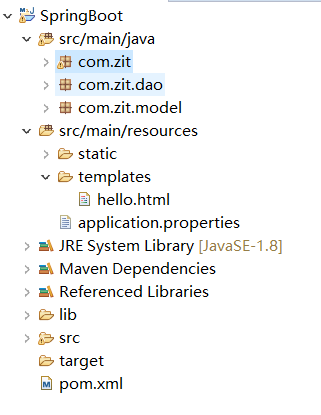
步骤
在一个Spring Boot Web项目基础上,也可以参考我前一篇文章建立的项目
1、pom.xml添加thymeleaf依赖
<project xmlns="http://maven.apache.org/POM/4.0.0" xmlns:xsi="http://www.w3.org/2001/XMLSchema-instance"
xsi:schemaLocation="http://maven.apache.org/POM/4.0.0 http://maven.apache.org/xsd/maven-4.0.0.xsd">
<modelVersion>4.0.0</modelVersion>
<groupId>com.zit</groupId>
<artifactId>SpringBoot</artifactId>
<version>0.0.1-SNAPSHOT</version>
<packaging>jar</packaging>
<properties>
<project.build.sourceEncoding>UTF-8</project.build.sourceEncoding>
</properties>
<parent>
<groupId>org.springframework.boot</groupId>
<artifactId>spring-boot-starter-parent</artifactId>
<version>2.0.1.BUILD-SNAPSHOT</version>
</parent>
<dependencies>
<dependency>
<groupId>org.springframework.boot</groupId>
<artifactId>spring-boot-starter-web</artifactId>
</dependency>
<!-- Spring data jpa -->
<dependency>
<groupId>org.springframework.boot</groupId>
<artifactId>spring-boot-starter-data-jpa</artifactId>
</dependency>
<!-- thymeleaf模板 -->
<dependency>
<groupId>org.springframework.boot</groupId>
<artifactId>spring-boot-starter-thymeleaf</artifactId>
</dependency>
</dependencies>
<repositories>
<repository>
<id>spring-snapshots</id>
<name>Spring Snapshots</name>
<url>https://repo.spring.io/libs-snapshot</url>
<snapshots>
<enabled>true</enabled>
</snapshots>
</repository>
</repositories>
</project>
2、src/main/resources是默认的静态资源目录,在他下面新建一个文件夹templates
他是Spring Boot约定默认的页面路径
在他下面创建hello.html页面
<!DOCTYPE html>

<html>

<head>

<meta charset="UTF-8">

<title>Insert title here</title>

</head>

<body>

你真好

<h1 th:text="${msg}"></h1>

</html>
3、application.properties
在其中关闭thymeleaf缓存
#DB Configuration:
spring.datasource.driverClassName = com.mysql.jdbc.Driver
spring.datasource.url = jdbc:mysql://localhost:3306/test?characterEncoding=utf-8
spring.datasource.username = root
spring.datasource.password =
#JPA Configuration:
spring.jpa.database=MySQL
spring.jpa.show-sql=true
spring.jpa.generate-ddl=true
spring.jpa.hibernate.ddl-auto=update
spring.jpa.hibernate.naming_strategy=org.hibernate.cfg.ImprovedNamingStrategy
#关闭thymeleaf缓存
spring.thymeleaf.cache=false
4、控制器Controller类中:
注意:与web页面交互,用@Controller
package com.zit;
import java.util.List;
import javax.annotation.Resource;
import org.springframework.boot.SpringApplication;
import org.springframework.boot.autoconfigure.EnableAutoConfiguration;
import org.springframework.boot.autoconfigure.SpringBootApplication;
import org.springframework.stereotype.Controller;
import org.springframework.ui.ModelMap;
import org.springframework.web.bind.annotation.RequestMapping;
import org.springframework.web.bind.annotation.RequestMethod;
import org.springframework.web.bind.annotation.ResponseBody;
import org.springframework.web.bind.annotation.RestController;
import com.zit.dao.UserLoginDao;
import com.zit.model.UserLogin;
@Controller
@SpringBootApplication
@EnableAutoConfiguration
public class UserLoginController {
@Resource
UserLoginDao userLoginDAO;
@RequestMapping("/list")
public List<UserLogin> list(){
return (List<UserLogin>) userLoginDAO.findAll();
}
@RequestMapping("/test")
public String index(ModelMap model){
model.addAttribute("msg","中华人民共和国");
return "hello";
}
public static void main(String[] args) {
SpringApplication.run(UserLoginController.class, args);
}
}
访问:http://localhost:8080/test
即可跳转到hello.html页面

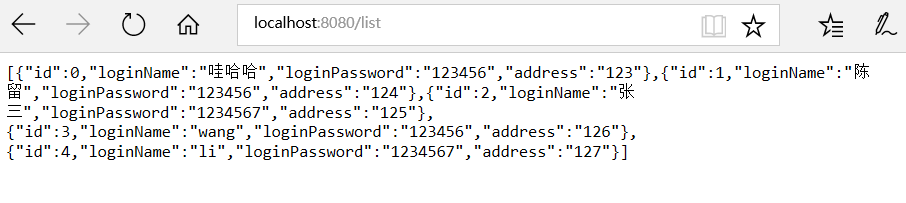
如果访问:http://localhost:8080/list/
它在页面上返回的是Json数据,Rest风格
所以在类上面的@Controller改为@RestController即可
Spring Boot + thymeleaf 后台与页面(二)的更多相关文章
- Spring boot+Thymeleaf+easyui集成:js创建组件页面报错
开发工具:Ideal 使用场景:Demo 前提: 环境:Spring boot +Thymeleaf+easyui 引入thymeleaf模板引擎 <html lang=" ...
- Spring Boot开发之流水无情(二)
http://my.oschina.net/u/1027043/blog/406558 上篇散仙写了一个很简单的入门级的Spring Boot的例子,没啥技术含量,不过,其实学任何东西只要找到第一个突 ...
- Spring Boot Thymeleaf 实现国际化
开发传统Java WEB工程时,我们可以使用JSP页面模板语言,但是在SpringBoot中已经不推荐使用了.SpringBoot支持如下页面模板语言 Thymeleaf FreeMarker Vel ...
- spring boot + thymeleaf 乱码问题
spring boot + thymeleaf 乱码问题 hellotrms 发布于 2017/01/17 15:27 阅读 1K+ 收藏 0 答案 1 开发四年只会写业务代码,分布式高并发都不会还做 ...
- spring boot + thymeleaf 3 国际化
在给spring boot 1.5.6 + thymeleaf 3进行国际化时,踩了一个坑(其实不止一个). 现象: 看到了吧, 就是取值的key, 后面被加了_en_US 或 _zh_CN, 以及前 ...
- spring boot + Thymeleaf开发web项目
"Spring boot非常适合Web应用程序开发.您可以轻松创建自包含的HTTP应用.web服务器采用嵌入式Tomcat,或者Jetty等.大多数情况下Web应用程序将使用 spring- ...
- Spring Boot 揭秘与实战(二) 数据缓存篇 - Redis Cache
文章目录 1. Redis Cache 集成 2. 源代码 本文,讲解 Spring Boot 如何集成 Redis Cache,实现缓存. 在阅读「Spring Boot 揭秘与实战(二) 数据缓存 ...
- Spring Boot 揭秘与实战(二) 数据缓存篇 - Guava Cache
文章目录 1. Guava Cache 集成 2. 个性化配置 3. 源代码 本文,讲解 Spring Boot 如何集成 Guava Cache,实现缓存. 在阅读「Spring Boot 揭秘与实 ...
- Spring Boot 揭秘与实战(二) 数据缓存篇 - EhCache
文章目录 1. EhCache 集成 2. 源代码 本文,讲解 Spring Boot 如何集成 EhCache,实现缓存. 在阅读「Spring Boot 揭秘与实战(二) 数据缓存篇 - 快速入门 ...
随机推荐
- MYSQL常用函数(类型转化函数)
为了进行数据类型转化,MySQL提供了CAST()函数,它可以把一个值转化为指定的数据类型.类型有:BINARY,CHAR,DATE,TIME,DATETIME,SIGNED,UNSIGNED 示例: ...
- learn python the hard way 习题6~10总结
习题6总结 定义字符串: 名字 = 值 其他 你也可以用 {types_of_people}的方式把它放在任何字符串中. 也就是说你可以在其他字符串中添加{},然后前面加一个 f,可用print()进 ...
- Python实现Plugin(插件化开发)
https://www.cnblogs.com/terencezhou/p/10276167.html
- English trip M1 - PC7 Can I Borrow Your Ping-Pong? Teacher:Patrick
In this lesson you will learn to desribe abilities. 这节课你将学习到描述你的能力 课上内容(Lesson) 三种常见情态动词 can aux. 能 ...
- linux之bash shell
GNU bash ======================================================== 通常计算机硬件是由运算器.控制器.存储器.输入/输出设备等等这些物理 ...
- vue.js用select实现省,市,提交后,默认显示省,市信息
<select v-model="citys" name="cityVal" @change="schoolName(citys)"& ...
- yii框架中使用gii的用法
首先在config文件中的 main-local.php中添加一句 'allowedIPs' => ['*'],如下图所示:
- SVN的安装
Svn服务器的安装和配置 注意,一定要切换到最高管理权限: su root 通过这个命令就可以完成! 1.安装svn服务器端软件从镜像服务器或者YUM源下载安装SVN服务器软件:yum insta ...
- SQL SERVER 字符合并多行为一列
[字符合并多行为一列] 思路1:行转列,在与字符拼接(适用每组列数名相同) 思路2:转xml,去掉多余字符(适用所有) 假设兴趣表Hobbys Name Hobby 小张 打篮球 小张 踢足球 Nam ...
- python记录_day04(补充)
列表删除 切片删除 del lis[1:3] # 删除索引是1,2的元素 修改 索引切片修改 # 修改 lst = ["太白", "太", "五&q ...