
你可能不知道的shell、bash二三事(Centos 7)
个人.bashrc:
~/.bashrc:
# .bashrc

# User specific aliases and functions

alias rm='rm -i'

alias cp='cp -i'

alias mv='mv -i'

# Source global definitions

if [ -f /etc/bashrc ]; then

        . /etc/bashrc

fi
全局bashrc:
/etc/bashrc:
# /etc/bashrc

# System wide functions and aliases

# Environment stuff goes in /etc/profile

# It's NOT a good idea to change this file unless you know what you

# are doing. It's much better to create a custom.sh shell script in

# /etc/profile.d/ to make custom changes to your environment, as this

# will prevent the need for merging in future updates.

# are we an interactive shell?

if [ "$PS1" ]; then

  if [ -z "$PROMPT_COMMAND" ]; then

    case $TERM in

    xterm*|vte*)

      if [ -e /etc/sysconfig/bash-prompt-xterm ]; then

          PROMPT_COMMAND=/etc/sysconfig/bash-prompt-xterm

      elif [ "${VTE_VERSION:-0}" -ge  ]; then

          PROMPT_COMMAND="__vte_prompt_command"

      else

          PROMPT_COMMAND='printf "\033]0;%s@%s:%s\007" "${USER}" "${HOSTNAME%%.*}" "${PWD/#$HOME/~}"'

      fi

      ;;

    screen*)

      if [ -e /etc/sysconfig/bash-prompt-screen ]; then

          PROMPT_COMMAND=/etc/sysconfig/bash-prompt-screen

      else

          PROMPT_COMMAND='printf "\033k%s@%s:%s\033\\" "${USER}" "${HOSTNAME%%.*}" "${PWD/#$HOME/~}"'

      fi

      ;;

    *)

      [ -e /etc/sysconfig/bash-prompt-default ] && PROMPT_COMMAND=/etc/sysconfig/bash-prompt-default

      ;;

    esac

  fi

  # Turn on parallel history

  shopt -s histappend

  history -a

  # Turn on checkwinsize

  shopt -s checkwinsize

  [ "$PS1" = "\\s-\\v\\\$ " ] && PS1="[\u@\h \W]\\$ "

  # You might want to have e.g. tty in prompt (e.g. more virtual machines)

  # and console windows

  # If you want to do so, just add e.g.

  # if [ "$PS1" ]; then

  #   PS1="[\u@\h:\l \W]\\$ "

  # fi

  # to your custom modification shell script in /etc/profile.d/ directory

fi

if ! shopt -q login_shell ; then # We're not a login shell

    # Need to redefine pathmunge, it get's undefined at the end of /etc/profile

    pathmunge () {

        case ":${PATH}:" in

            *:"$1":*)

                ;;

            *)

                if [ "$2" = "after" ] ; then

                    PATH=$PATH:$

                else

                    PATH=$:$PATH

                fi

        esac

    }

    # By default, we want umask to get set. This sets it for non-login shell.

    # Current threshold for system reserved uid/gids is

    # You could check uidgid reservation validity in

    # /usr/share/doc/setup-*/uidgid file

    if [ $UID -gt  ] && [ "`/usr/bin/id -gn`" = "`/usr/bin/id -un`" ]; then

       umask

    else

       umask

    fi

    SHELL=/bin/bash

    # Only display echos from profile.d scripts if we are no login shell

    # and interactive - otherwise just process them to set envvars

    for i in /etc/profile.d/*.sh; do

        if [ -r "$i" ]; then

            if [ "$PS1" ]; then

                . "$i"

            else

                . "$i" >/dev/null

            fi

        fi

    done

    unset i

    unset -f pathmunge

fi

# vim:ts=4:sw=4
用户的bashprofile:
~/.bash_profile
# .bash_profile

# Get the aliases and functions

if [ -f ~/.bashrc ]; then

        . ~/.bashrc

fi

# User specific environment and startup programs

PATH=$PATH:$HOME/bin

export PATH
[root@ckl1 bashtest]# echo $HOME

/root
全局profile:
"/etc/profile"
# /etc/profile

# System wide environment and startup programs, for login setup

# Functions and aliases go in /etc/bashrc

# It's NOT a good idea to change this file unless you know what you

# are doing. It's much better to create a custom.sh shell script in

# /etc/profile.d/ to make custom changes to your environment, as this

# will prevent the need for merging in future updates.

pathmunge () {

    case ":${PATH}:" in

        *:"$1":*)

            ;;

        *)

            if [ "$2" = "after" ] ; then

                PATH=$PATH:$

            else

                PATH=$:$PATH

            fi

    esac

}

if [ -x /usr/bin/id ]; then

    if [ -z "$EUID" ]; then

        # ksh workaround

        EUID=`/usr/bin/id -u`

        UID=`/usr/bin/id -ru`

    fi

    USER="`/usr/bin/id -un`"

    LOGNAME=$USER

    MAIL="/var/spool/mail/$USER"

fi

# Path manipulation

if [ "$EUID" = "" ]; then

    pathmunge /usr/sbin

    pathmunge /usr/local/sbin

else

    pathmunge /usr/local/sbin after

    pathmunge /usr/sbin after

fi

HOSTNAME=`/usr/bin/hostname >/dev/null`

HISTSIZE=

if [ "$HISTCONTROL" = "ignorespace" ] ; then

    export HISTCONTROL=ignoreboth

else

    export HISTCONTROL=ignoredups

fi

export PATH USER LOGNAME MAIL HOSTNAME HISTSIZE HISTCONTROL

# By default, we want umask to get set. This sets it for login shell

# Current threshold for system reserved uid/gids is

# You could check uidgid reservation validity in

# /usr/share/doc/setup-*/uidgid file

if [ $UID -gt  ] && [ "`/usr/bin/id -gn`" = "`/usr/bin/id -un`" ]; then

    umask

else

    umask

fi

for i in /etc/profile.d/*.sh ; do

    if [ -r "$i" ]; then

        if [ "${-#*i}" != "$-" ]; then

            . "$i"

        else

            . "$i" >/dev/null

        fi

    fi

done

unset i

unset -f pathmunge

#java environment

export JAVA_HOME=/usr/local/jdk1.8.0_161

export CLASSPATH=.:${JAVA_HOME}/jre/lib/rt.jar:${JAVA_HOME}/lib/dt.jar:${JAVA_HOME}/lib/tools.jar

export PATH=$PATH:${JAVA_HOME}/bin
关于别名:
别名,典型的如ll,是ls -l 的别名,那么这个别名定义在哪呢,其实是在/etc/profile.d/colorls.sh 中,也就是我在上面几个文件中,标红的部分。
colorls.sh:
# color-ls initialization

# Skip all for noninteractive shells.

[ ! -t  ] && return

#when USER_LS_COLORS defined do not override user LS_COLORS, but use them.

if [ -z "$USER_LS_COLORS" ]; then

  alias ll='ls -l' >/dev/null

  alias l.='ls -d .*' >/dev/null

  INCLUDE=

  COLORS=

  for colors in "$HOME/.dir_colors.$TERM" "$HOME/.dircolors.$TERM" \

      "$HOME/.dir_colors" "$HOME/.dircolors"; do

    [ -e "$colors" ] && COLORS="$colors" && \

    INCLUDE="`/usr/bin/cat "$COLORS" | /usr/bin/grep '^INCLUDE' | /usr/bin/cut -d ' ' -f2-`" && \

    break

  done

  [ -z "$COLORS" ] && [ -e "/etc/DIR_COLORS.$TERM" ] && \

  COLORS="/etc/DIR_COLORS.$TERM"

  [ -z "$COLORS" ] && [ -e "/etc/DIR_COLORS.256color" ] && \

  [ "x`/usr/bin/tty -s && /usr/bin/tput colors 2>/dev/null`" = "x256" ] && \

  COLORS="/etc/DIR_COLORS.256color"

  [ -z "$COLORS" ] && [ -e "/etc/DIR_COLORS" ] && \

  COLORS="/etc/DIR_COLORS"

  # Existence of $COLORS already checked above.

  [ -n "$COLORS" ] || return

  if [ -e "$INCLUDE" ];

  then

    TMP="`/usr/bin/mktemp .colorlsXXX -q --tmpdir=/tmp`"

    [ -z "$TMP" ] && return

    /usr/bin/cat "$INCLUDE" >> $TMP

    /usr/bin/grep -v '^INCLUDE' "$COLORS" >> $TMP

    eval "`/usr/bin/dircolors --sh $TMP 2>/dev/null`"

    /usr/bin/rm -f $TMP

  else

    eval "`/usr/bin/dircolors --sh $COLORS 2>/dev/null`"

  fi

  [ -z "$LS_COLORS" ] && return

  /usr/bin/grep -qi "^COLOR.*none" $COLORS >/dev/null >/dev/null && return

fi

unset TMP COLORS INCLUDE

alias ll='ls -l --color=auto' >/dev/null

alias l.='ls -d .* --color=auto' >/dev/null

alias ls='ls --color=auto' >/dev/null

(END)
所以,什么情况下可以执行别名呢:
1:执行了/etc/profile
2:执行了~/.bashrc,~/.bashrc中引用了 /etc/bashrc(在该文件中,执行了ll别名所在的colorls.sh文件)
3:执行了~/.bash_profile,因为该文件中判断是否存在~/.bashrc,存在的话,会去执行~/.bashrc;根据上一步的结论,自然也就可以执行别名。
ok。那么,进一步,什么情况会执行上述的两种情况:
第一种情况(/etc/profile):
查阅了man bash后,发现:
1.交互的登录shell,或者--login选项的非交互shell。
When bash is invoked as an interactive login shell, or as a non-interactive shell with the --login option, it first reads and executes
commands from the file /etc/profile, if that file exists. After reading that file, it looks for ~/.bash_profile, ~/.bash_login, and ~/.profile,
in that order, and reads and executes commands from the first one that exists and is readable.
The --noprofile option may be used when the shell is started to inhibit this behavior.
不过在我的centos7中,~/.profile不存在。
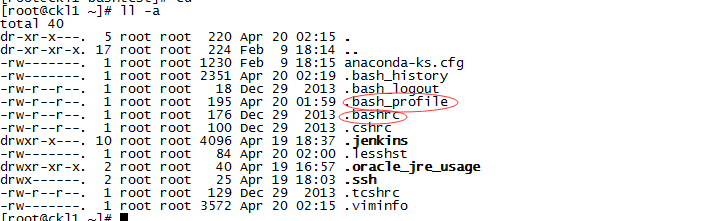
第二种情况(~/.bashrc):
1.交互的,但不是登录的shell。
When an interactive shell that is not a login shell is started, bash reads and executes commands from ~/.bashrc, if that file exists.
This may be inhibited by using the --norc option. The --rcfile file option will force bash to read and execute commands from file instead of ~/.bashrc.
第三种情况(~/.bash_profile):
同情况1。
Shell的几种类型:
ok。那么看了上面两种还是很蒙,那么我们再科普下什么是交互shell、非交互shell、登录shell和非登录shell。
我是参考了这里:https://blog.csdn.net/wisgood/article/details/52043522
我的理解:
登录shell:
ssh登录的,就是登录shell,登录shell要退出的话,是执行logout。比如我们用的putty、securtCRT。
非登录shell:
登录成功了之后,或者并没有进行远程登录,直接就在本机的(VMVARE的虚拟机中的shell都不能算,可采用下面的方法测试)ubuntu打开终端,这种,我理解的就是非登录shell。
我做了个小实验,我是secureCRT远程到该服务器的,在/home/upload/bashtest/a.sh中,我写了句logout:
[root@ckl1 bashtest]# less a.sh

#/bin/bash

logout
执行该脚本:
[root@ckl1 bashtest]# ./a.sh
结果:
./a.sh: line 3: logout: not login shell: use `exit'
区分登录与非登录shell的好办法:
(https://unix.stackexchange.com/questions/38175/difference-between-login-shell-and-non-login-shell)
1.通过echo $0,如果结果是-bash,那就是login shell。否则不是。

2.如果可以执行logout命令,那么就是login shell;否则不是。
交互shell:
就是我们不管是用SecurtCRT这样的工具进入远程服务器也好,或者本机打开终端也好,都可以执行各种命令

在执行这些命令时,shell是可以和我们互动的,比如要求我们输入东西,比如按Tab可以提示,等等。
非交互Shell:
shell脚本执行,一般来说就是非交互的,我们写好了脚本,只要交给shell执行就好,期间不需要和我们交互。命令输入错了,会直接提示并退出。
以上两种,其实是不同维度,可以两两组合
| 交互 | 非交互 | |
| 登录 | 远程登录ssh,调用的文件包括:/etc/profile,~/.bash_profile,~/.bash_login,~/.profile | 较少见,可能读/etc/profile , ~/.profile。也可能不读。依然请参考第一个答案:https://unix.stackexchange.com/questions/38175/difference-between-login-shell-and-non-login-shell |
| 非登录 | 本机打开终端,调用文件包括:~/.bashrc | 执行shell脚本,调用文件包括:BASH_ENV 指定的文件 |
非交互shell中,怎么才能使用别名:
参考:
https://stackoverflow.com/questions/1615877/why-aliases-in-a-non-interactive-bash-shell-do-not-work
方式1:
shopt -s expand_aliases
不过我的centos 7,未生效。
方式2:
source their .bashrc at the end of their profile。
也就是在~/.bash_profile中新增一行:source ~/.bashrc
但是我这边依然没生效。
方式3:
直接脚本中增加:source ~/.bashrc
#/bin/bash

ls -l

echo "ll "

source ~/.bashrc

ll
ok。可以正常工作。
ssh执行远程命令时,怎么才能使用别名:
1.
首先修改远程主机的~/.bashrc,新增一行:
shopt -s expand_aliasesssh -t @host ll
2.
ssh @host 'bash -ci ll'
参考:
https://stackoverflow.com/questions/1615877/why-aliases-in-a-non-interactive-bash-shell-do-not-work
你可能不知道的shell、bash二三事(Centos 7)的更多相关文章
- 你可能不知道的Shell
Shell也叫做命令行界面,它是*nix操作系统下用户和计算机的交互界面.Shell这个词是指操作系统中提供访问内核服务的程序. 这篇文章向大家介绍Shell一些非广为人知.但却实用有趣的知识,权当品 ...
- JavaScript中你所不知道的Object(二)--Function篇
上一篇(JavaScript中你所不知道的Object(一))说到,Object对象有大量的内部属性,而其中多数和外部属性的操作有关.最后留了个悬念,就是Boolean.Date.Number.Str ...
- 你能知道的或者不知道的shell变量都在这里
第2章 shell变量讲解 2.1 shell中的变量讲解 2.1.1 什么是shell变量 变量的本质就是内存中的一块区域 变量名 位置 变量是脚本中经常会使用的内容信息 变量可以在脚本中直接使用 ...
- 【转】你可能不知道的Shell
本文转自http://coolshell.cn/articles/8619.html,只摘取了其中的一部分. 再分享一些可能你不知道的shell用法和脚本,简单&强大! 在阅读以下部分前,强烈 ...
- 关于JavaScript对象,你所不知道的事(二)- 再说属性
说完了对象那些不常用的冷知识,是时候来看看JavaScript中对象属性有哪些有意思的东西了. 不出你所料,对象属性自然也有其相应的特征属性,但是这个话题有点复杂,让我们先从简单的说起,对象属性的分类 ...
- Spring中你可能不知道的事(二)
在上一节中,我介绍了Spring中极为重要的BeanPostProcessor BeanFactoryPostProcessor Import ImportSelector,还介绍了一些其他的零碎知识 ...
- 你需要知道的Nginx配置二三事
做服务端开发的,工作中难免会遇到处理Nginx配置相关问题.在配置Nginx时,我一直本着“照葫芦画瓢”的原则,复制已有的配置代码,自己修修改改然后完成配置需求,当有人问起Nginx相关问题时,其实仍 ...
- c++ --> 你可能不知道的c++
你可能不知道的c++ 你可能不知道的 C++(一) 你可能不知道的 C++(二)
- 你所不知道的linq(二)
上一篇说了from in select的本质,具体参见你所不知道的linq.本篇说下from...in... from... in... select 首先上一段代码,猜猜结果是什么? class P ...
随机推荐
- JSP内置对象—session
什么是session? session对象是用来在每个用户之间分别保存每个用户信息的对象,以便跟踪用户的操作状态.session的信息保存在server端,session的id保存在client的co ...
- sqlserver修改主机名
sqlserver迁移后,主机和原机器不符,将系统修改主机名后,数据库代理服务.邮件服务无法启动 执行下面语句,检查sqlserver中windows主机名 -- 检查SQL Server中的&quo ...
- 《构建高性能web站点》读书笔记:CPU/IO并发策略
服务器并发处理能力:单位时间内处理的请求数,吞吐率,reqs/s apache的mod_status,显示的 requests/sec,从启动开始的平均计算值.lighttpd的mod_status显 ...
- Android四大组件之——Activity的开启:StartActivity()和StartActivityForResult()(图文详解)
如需转载请在文章开头处注明本博客网址:http://www.cnblogs.com/JohnTsai 联系方式:JohnTsai.Work@gmail.com ...
- ubuntu:如何制作类似jeso的系统?
chroot 下载ubuntu的core包或base包 chroo后,先安装grub,再kernel,基本就ok了! 提示:mount --bind /proc newroot/proc 可能的问题 ...
- Android让文本输入框默认不获取焦点
项目中有个检索功能,页面上有个EditText输入框,打开页面后,焦点默认在EditText上,这样的话软键盘默认就会显示出来,占据大半个屏幕. 后来想办法将这个给去掉了,原先考虑着将焦点赋给页面上的 ...
- hive 表优化
一.外部表和内部表的区别 (1)创建表时指定external关键字,就是外部表,不指定external就是内部表 (2)内部表删除后把元数据和数据都删除了,外部表删除后只是删除了元数据,不会删除hdf ...
- windows下WAMP php5.x redis扩展
其解压到php的扩展目录ext下,在php.ini文件中扩展部分增加一行:extension=php_redis.dll 新增下载地下: php5.3 http://download.csdn.net ...
- linux中如何对一个文件的内容进行处理,文件中每行有多个字段的值,中间用空格分隔开?
需求描述: 今天在帮同事看个需求,将操作系统上的文件进行修改名字,改为特定的名字,所以呢,就先把这些原名字及对应的新名字关系放到了一个文本中,对于这个文本执行循环. 文件格式如下: .00000005 ...
- RESTEasy maven使用
添加依赖: <dependency> <groupId>org.jboss.resteasy</groupId> <artifactId>resteas ...