
python中url解析 or url的base64编码
目录
from urllib.parse import urlparse, quote, unquote, urlencode
1、解析url的组成成分:urlparse(url)
2、url的base64编解码:quote(url)、unquote(url)
3、字典变成一个字符串=&连接,并且被base64编码:urlencode(字典)
from urllib.parse import urlparse, quote, unquote, urlencode

print("======== 1 解析url的组成==========")

url='http://www.freebuf.com/articles/437.html'

url_parse = urlparse(url)

print(url_parse)

print(url_parse.netloc)

print("======== 2 对字符串进行base64编码和反编码==========")

url = 'http://www.example.com/api.php?text=中文在这里'

# 不带附加参数

print('不带附加参数:\n%s' % quote(url))

# 附带不转换字符参数

print('附加不转换字符参数:\n%s' % quote(url, safe='/:?='))

print(unquote("text%3D%E4%B8%AD%E6%96%87%E5%9C%A8%E8%BF%99%E9%87%8C"))

print("======== 3 对字典转换为=&连接的字符串,并且base64编码==========")

params = {

    "uid": "123",

    "type": "get",

    "nickname": "abc划水的鱼儿",

}

print(params)

data_str_base64 = urlencode(params)  # 字典转为字符串,并且base64编码

print(type(data_str_base64))

print(data_str_base64)

data_str_unbase64 = unquote(data_str_base64)  # 字符串中base64被反解码

print(data_str_unbase64)
输出结果:
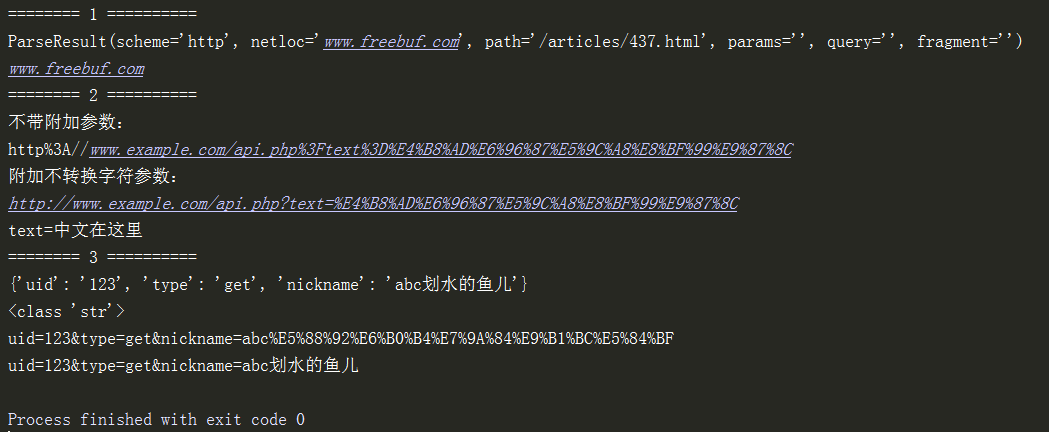
到此看懂了,后面就可以不用看了。
1、解析url的组成成分:urlparse(url)
提取域名domain
from urllib.parse import urlparse

url = 'http://www.freebuf.com/articles/437.html'

url_parse = urlparse(url)

print(url_parse)

print(url_parse.netloc)

print(url_parse.hostname)
输出:
ParseResult(scheme='http', netloc='www.freebuf.com', path='/articles/437.html', params='', query='', fragment='')
www.freebuf.com
www.freebuf.com
2、url的base64编解码:quote(url)、unquote(url)
url的base64编码 、解码
from urllib.parse import quote

url = 'http://www.example.com/api.php?text=中文在这里'

# 不带附加参数

print('\n不带附加参数:\n%s' % quote(url))

# 附带不转换字符参数

print('\n附加不转换字符参数:\n%s' % quote(url, safe='/:?='))
输出结果:

base64解码
print(unquote("text%3D%E4%B8%AD%E6%96%87%E5%9C%A8%E8%BF%99%E9%87%8C"))
(一)字符串转义为base64编码和解码(和上文重复,不用看)
import urllib.parse

url_han = 'https://www.baidu.com/s?wd=北京'

print(urllib.parse.quote(url_han)) # base64编码

# https%3A//www.baidu.com/s%3Fwd%3D%E5%8C%97%E4%BA%AC

url_base64 = 'https://www.baidu.com/s?wd=%E6%B7%B1%E5%9C%B3'

print(urllib.parse.unquote(url_base64)) # base64反编码

# https://www.baidu.com/s?wd=深圳
3、字典变成一个字符串=&连接,并且被base64编码
(二)字典转化为&连接的字符串
说明:字典转字符串后,发生了2件事
1、冒号变成等号;逗号变成&
2、汉字和特殊字符被base64编码
案例:
源代码:
import urllib.parse

params = {

    "uid": "123",

    "type": "get",

    "nickname": "abc划水的鱼儿",

}

print(params)

data_str_base64 = urllib.parse.urlencode(params)  # 字典转为字符串,并且base64编码

print(type(data_str_base64))

print(data_str_base64)

data_str_unbase64 = urllib.parse.unquote(data_str_base64)  # 字符串中base64被反解码

print(data_str_unbase64)
输出结果:
{'uid': '123', 'type': 'get', 'nickname': 'abc划水的鱼儿'}
<class 'str'>
uid=123&type=get&nickname=abc%E5%88%92%E6%B0%B4%E7%9A%84%E9%B1%BC%E5%84%BF
uid=123&type=get&nickname=abc划水的鱼儿
python中url解析 or url的base64编码的更多相关文章
- python中html解析-Beautiful Soup
1. Beautiful Soup的简介 简单来说,Beautiful Soup是python的一个库,最主要的功能是从网页抓取数据.官方解释如下: Beautiful Soup提供一些简单的.pyt ...
- python中unicode、utf8、gbk等编码问题
转自:http://luchanghong.com/python/2012/07/06/python-encoding-with-unicode-and-gbk-and-utf8.html 概要:编码 ...
- Python中xlwt解析
1.导入模块 import xlwt 2.构造excel表 workbook = xlwt.Workbook() #返回一个工作簿对象 3.构造sheet w ...
- python中html解析
import requestsfrom bs4 import BeautifulSoup url = "..." payload =...headers = None respon ...
- Python中配置文件解析模块-ConfigParser
Python中有ConfigParser类,可以很方便的从配置文件中读取数据(如DB的配置,路径的配置).配置文件的格式是: []包含的叫section, section 下有option=value ...
- Python中yield解析
小探yield 查看 python yield 文档 yield expressions: Using a yield expression in a function's body causes t ...
- Python中xlutils解析
1.导入模块 import xlrd import xlutils.copy 2.打开模块表 book = xlrd.open_workbook('test.xls', formatting_info ...
- Python中Json解析的坑
JSON虽好,一点点不对,能把人折腾死: 1.变量必须要用双引号 2.如果是字符串,必须要用引号包起来 Error:Expecting : delimiter: line 1 column 6 (ch ...
- python中xml解析
import xml.dom.minidom input_xml_string = '''<root><a>hello</a></root>'''#打开 ...
随机推荐
- C语言实现字符串IP与整数型IP的相互转换
#include <stdio.h> #include <stdlib.h> #include <string.h> #include <malloc.h&g ...
- Androd Toolbar 的简单使用(转)
14年Android开发者大会提出了Android5.0 系统以及 材料设置 Material Design.在 材料设计中推出了大量的UI效果,其中某些功能 已添加进 兼容包,所以可以在低版本中来实 ...
- wps 批量调整图片大小 宏
Sub 批量调整图片大小() ' ' 批量修改图片 Macro ' 宏由 zxz 录制,时间: 2014/10/29 '批量调整图片大小,避免图片太大显示不完全 '循环图片集合 For Each iS ...
- sencha touch list 选择插件,可记忆已选项,可分组全选
选择记忆功能参考:https://market.sencha.com/extensions/ext-plugin-rememberselection 插件代码: /* * 记住列表选择状态 * 如果分 ...
- JavaScript—倒计时
当前时间-倒计时下载 效果: 代码: <!doctype html> <html> <head> <meta http-equiv="Content ...
- Android图表开发——AChartEngine
Android图表控件的开发 曾经开发过一个小程序,在Android电视机上面开发一个APP,用于显示一些统计图表的信息.最后找来找去基于Android Native开发有AChartEngine现成 ...
- 静态时序分析基础STA
静态时序分析SAT 1. 背景 静态时序分析的前提就是设计者先提出要求,然后时序分析工具才会根据特定的时序模型进行分析,给出正确是时序报告. 进行静态时序分析,主要目的就是为了提高系统工作主频 ...
- ps软件使用的问题解决记录
1.PS的字体颜色改变不了的解决方法,添加字体的时颜色无论怎么选都只能有[黑.白.灰]三种颜色, 问题的原因:图像的模式选择了灰度(G) 解决方法:图像-->模式-->RG ...
- 【CF908G】New Year and Original Order 数位DP
[CF908G]New Year and Original Order 题意:令S(i)表示将i中所有数位上的数拿出来,从小到大排序后组成一个新的数的值.如S(50394)=3459.求$\sum\l ...
- Thinkphp框架下对某个字段查询数据的时候进行唯一过滤,返回唯一不同的值
方法一. DISTINCT 方法用于返回唯一不同的值 . *distinct方法的参数是一个布尔值. 用法: $data = $Model->Distinct(true)->field(' ...