
SpringMVC数据传递及乱码问题
基础环境搭建请参考SringMVC入门程序
一、SpringMVC数据处理
1:resful 路径传值
/*  http://localhost/get/1/2  */

/*路径传值 必须要用@PathVariable*/

@GetMapping("/get/{id1}/{id2}")

public String getValue(@PathVariable String id1, @PathVariable String id2, Model model){

    String msg = id1 + id2;

    model.addAttribute("msg",msg);

    return "hello";

}
2:参数传值:参数名一致
http://localhost/get2?id=applesnt
 @GetMapping("/get2")

 public String getValue2(String id,Model model){

     model.addAttribute("msg",id);

     return "hello";

 }
3:参数传值:参数名不一致
http://localhost/get3?username=134
 @GetMapping("/get3")

 public String getValue3(@RequestParam("username") String name, Model model){

     model.addAttribute("msg",name);

     return "hello";

 }
4:对象传值:UserVo
http://localhost/get4?id=111&name=zhangsan&age=12
@GetMapping("/get4")

public String getValue4(UserVo userVo, Model model){

    model.addAttribute("msg",userVo.toString());

    return "hello";

}
二、SpringMVC乱码处理
1:编写filter乱码过滤器
com\applesnt\filter\GenericEncodingFilter.java
package com.applesnt.filter;

import javax.servlet.*;

import javax.servlet.http.HttpServletRequest;

import javax.servlet.http.HttpServletRequestWrapper;

import javax.servlet.http.HttpServletResponse;

import java.io.IOException;

import java.io.UnsupportedEncodingException;

import java.util.Map;

public class GenericEncodingFilter implements Filter {

    public void init(FilterConfig filterConfig) throws ServletException {

    }

    public void doFilter(ServletRequest request, ServletResponse response, FilterChain chain) throws IOException, ServletException {

        //处理response的字符编码

        HttpServletResponse myResponse=(HttpServletResponse) response;

        myResponse.setContentType("text/html;charset=UTF-8");

        // 转型为与协议相关对象

        HttpServletRequest httpServletRequest = (HttpServletRequest) request;

        // 对request包装增强

        HttpServletRequest myrequest = new MyRequest(httpServletRequest);

        chain.doFilter(myrequest, response);

    }

    public void destroy() {

    }

    //自定义request对象,HttpServletRequest的包装类

    class MyRequest extends HttpServletRequestWrapper {

        private HttpServletRequest request;

        //是否编码的标记

        private boolean hasEncode;

        //定义一个可以传入HttpServletRequest对象的构造函数,以便对其进行装饰

        public MyRequest(HttpServletRequest request) {

            super(request);// super必须写

            this.request = request;

        }

        // 对需要增强方法 进行覆盖

        @Override

        public Map getParameterMap() {

            // 先获得请求方式

            String method = request.getMethod();

            if (method.equalsIgnoreCase("post")) {

                // post请求

                try {

                    // 处理post乱码

                    request.setCharacterEncoding("utf-8");

                    return request.getParameterMap();

                } catch (UnsupportedEncodingException e) {

                    e.printStackTrace();

                }

            } else if (method.equalsIgnoreCase("get")) {

                // get请求

                Map<String, String[]> parameterMap = request.getParameterMap();

                if (!hasEncode) { // 确保get手动编码逻辑只运行一次

                    for (String parameterName : parameterMap.keySet()) {

                        String[] values = parameterMap.get(parameterName);

                        if (values != null) {

                            for (int i = 0; i < values.length; i++) {

                                try {

                                    // 处理get乱码

                                    values[i] = new String(values[i]

                                            .getBytes("ISO-8859-1"), "utf-8");

                                } catch (UnsupportedEncodingException e) {

                                    e.printStackTrace();

                                }

                            }

                        }

                    }

                    hasEncode = true;

                }

                return parameterMap;

            }

            return super.getParameterMap();

        }

        //取一个值

        @Override

        public String getParameter(String name) {

            Map<String, String[]> parameterMap = getParameterMap();

            String[] values = parameterMap.get(name);

            if (values == null) {

                return null;

            }

            return values[0]; // 取回参数的第一个值

        }

        //取所有值

        @Override

        public String[] getParameterValues(String name) {

            Map<String, String[]> parameterMap = getParameterMap();

            String[] values = parameterMap.get(name);

            return values;

        }

    }

}
2:配置web.xml 注册filter
<?xml version="1.0" encoding="UTF-8"?>

<web-app xmlns="http://xmlns.jcp.org/xml/ns/javaee"

         xmlns:xsi="http://www.w3.org/2001/XMLSchema-instance"

         xsi:schemaLocation="http://xmlns.jcp.org/xml/ns/javaee http://xmlns.jcp.org/xml/ns/javaee/web-app_4_0.xsd"

         version="4.0">

    <!--注册乱码过滤器-->

    <filter>

        <filter-name>encoding</filter-name>

        <filter-class>com.applesnt.filter.GenericEncodingFilter</filter-class>

        <init-param>

            <param-name>encoding</param-name>

            <param-value>utf-8</param-value>

        </init-param>

    </filter>

    <filter-mapping>

        <filter-name>encoding</filter-name>

        <url-pattern>/*</url-pattern>

    </filter-mapping>

    <!--1.注册DispatcherServlet-->

    <servlet>

        <servlet-name>springmvc</servlet-name>

        <servlet-class>org.springframework.web.servlet.DispatcherServlet</servlet-class>

        <!--关联一个springmvc的配置文件:【servlet-name】-servlet.xml-->

        <init-param>

            <param-name>contextConfigLocation</param-name>

            <param-value>classpath:springmvc-servlet.xml</param-value>

        </init-param>

        <!--启动级别-1-->

        <load-on-startup>1</load-on-startup>

    </servlet>

    <!--/ 匹配所有的请求;(不包括.jsp)-->

    <!--/* 匹配所有的请求;(包括.jsp)-->

    <servlet-mapping>

        <servlet-name>springmvc</servlet-name>

        <url-pattern>/</url-pattern>

    </servlet-mapping>

</web-app>
3:springmvc-servlet.xml
<?xml version="1.0" encoding="UTF-8"?>

<beans xmlns="http://www.springframework.org/schema/beans"

       xmlns:xsi="http://www.w3.org/2001/XMLSchema-instance"

       xmlns:context="http://www.springframework.org/schema/context"

       xmlns:mvc="http://www.springframework.org/schema/mvc"

       xsi:schemaLocation="http://www.springframework.org/schema/beans

        https://www.springframework.org/schema/beans/spring-beans.xsd

        http://www.springframework.org/schema/context

        https://www.springframework.org/schema/context/spring-context.xsd

        http://www.springframework.org/schema/mvc

        https://www.springframework.org/schema/mvc/spring-mvc.xsd">

    <context:component-scan base-package="com.applesnt.controller"/>

    <!-- 让Spring MVC不处理静态资源 -->

    <mvc:default-servlet-handler />

    <!--annotation-driven配置帮助我们完成处理器映射器和处理器适配器-->

    <mvc:annotation-driven />

    <!--视图解析器:DispatcherServlet给他的ModelAndView-->

    <bean id="viewResolver" class="org.springframework.web.servlet.view.InternalResourceViewResolver">

        <property name="prefix" value="/WEB-INF/jsp/"/>

        <property name="suffix" value=".jsp"/>

    </bean>

</beans>
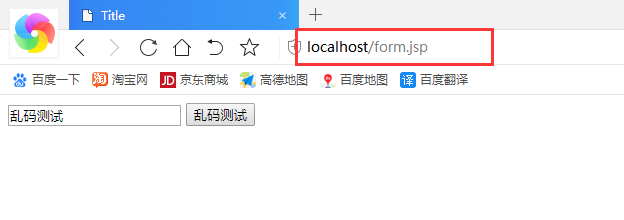
4:编写form表单提交测试乱码
web\form.jsp
<%@ page contentType="text/html;charset=UTF-8" language="java" %>

<html>

<head>

    <title>Title</title>

</head>

<body>

<form action="/getform" method="post">

    <input type="text" name="name">

    <input type="submit" value="乱码测试">

</form>

</body>

</html>
5:编写controller返回的视图页面
web\WEB-INF\jsp\hello.jsp
<%@ page contentType="text/html;charset=UTF-8" language="java" %>

<html>

<head>

    <title>Title</title>

</head>

<body>

${msg}

</body>

</html>
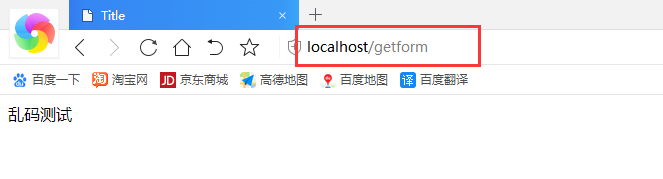
6:编写controller
com\applesnt\controller\HelloController3.java
package com.applesnt.controller;

import org.springframework.stereotype.Controller;

import org.springframework.ui.Model;

import org.springframework.web.bind.annotation.PostMapping;

@Controller

public class HelloController3 {

    @PostMapping("/getform")

    public String getForm(String name,Model model){

        model.addAttribute("msg",name);

        return "hello";

    }

}
7:测试
SpringMVC数据传递及乱码问题的更多相关文章
- 《Java从入门到放弃》入门篇:springMVC数据传递
springMVC中的数据传递方式与JSP和Struts2相比,更加的简单.具体有什么样的区别呢?我们通过下面这张图来对比就知道了. 随手画的,有些错别字,不用太在意..... 接下来,进入正题,sp ...
- SpringMVC保存数据到mysql乱码问题
SpringMVC保存数据到mysql乱码问题 乱码问题常见配置 一.web.xml配置过滤器 <filter> <filter-name>encoding-filter< ...
- SpringMVC -- 梗概--源码--壹--数据传递
附:实体类 Class : User package com.c61.entity; import java.text.SimpleDateFormat; import java.util.Date; ...
- Java 前台后台数据传递、中文乱码解决方法
1.向前台传递数据;2.向后台传递数据;3.ajax post 提交数据到服务端时中文乱码解决方法;4.数组类型参数传递; 1.向前台传递数据:1.1 字符串数据传递: 这种方式只是单一的向前台传递 ...
- SpringMVC之数据传递一
之前的博客中也说了,mvc中数据传递是最主要的一部分,从url到Controller.从view到Controller.Controller到view以及Controller之间的数据传递.今天主要学 ...
- springMVC:将controller中数据传递到jsp页面
1> 将方法的返回值该为ModelAndView在返回时,将数据存储在ModelAndView对象中如: newModelAndView("/WEBINF/jsp/showData.j ...
- 《Java从入门到放弃》入门篇:springMVC数据校验
昨天我们扯完了数据传递,今天我们来聊聊数据校验的问题.来,跟着我一起读:计一噢叫,一按艳. 在springMVC中校验数据也非常简单,spring3.0拥有自己独立的数据校验框架,同时支持JSR303 ...
- Jmeter接口测试实战-数据传递
Jmeter接口测试实战-数据传递 接口与接口之间没有关联的测试是缺乏意义和没有灵魂的,只有数据在不同接口之间传递才能勾画出业务场景重要的链路. 我们用较为通用的http/https协议,接口普遍返回 ...
- 《SpringMVC从入门到放肆》十三、SpringMVC数据校验
上一章,我们学习了SpringMVC的自定义类型转换器,但是如果转换后的数据传递到Controller的方法中,忽然发现有某些属性为Null了,这怎么办?我们需要一种有效的数据校验机制,来对数据进行有 ...
随机推荐
- JDK的sql设计不合理导致的驱动类初始化死锁问题
问题描述 当我们一个系统既需要mysql驱动,也需要oracle驱动的时候,在并发加载初始化这些驱动类的过程中产生死锁的可能性非常大,下面是一个模拟的例子,对于Thread2的实现其实是jdk里jav ...
- [noip模拟]数字对<RMQ&二分>
数字对 [题目描述] 小H是个善于思考的学生,现在她又在思考一个有关序列的问题. 她的面前浮现出一个长度为n的序列{ai},她想找出一段区间[L, R](1 <= L <= R <= ...
- qt creator源码全方面分析(3-8)
目录 项目文件工作流程 多层目录模式 依赖解析模式 包含,链接和输出 包含 链接 输出 构建目录架构 项目文件工作流程 我们在前面已经讨论了所有的项目文件, qtcreator.pro qtcreat ...
- Java合并png图片
package org.jimmy.autosearch2019.test; import java.awt.Graphics; import java.awt.image.BufferedImage ...
- vulnhub~incllusiveness
这个机子相对简单一点,但是也是从中发现了自己不少问题 技能一: nmap 扫描发现了21,22 ,80三个端口,并且ftp服务允许匿名登录,在pub目录下面有writeable权限,这就好办了.我以 ...
- Vertica的这些事(十二)——-vertica备份与恢复
最近在使用vertica,上网找了很多资料都没有,只有自己看官方文档动手搞一下了,今天搞了vertica的备份与恢复 以下是整理的过程,分享给大家,如有问题欢迎大家指正~ 可加QQ群交流:412191 ...
- 技术再深入一点又何妨?一脸懵B的聊Actor
记得上次深入 Resin 源码时,见到了Actor 字眼,当时主要从 Resin 中抽取关键架构,就屏蔽了 Actor 相关代码.未曾想这两天研究 flink 的运行架构以及源码,再次与 Actor ...
- Java哈希表入门
Java哈希表(Hash Table) 最近做题经常用到哈希表来进行快速查询,遂记录Java是如何实现哈希表的.这里只简单讲一下利用Map和HashMap实现哈希表. 首先,什么是Map和HashMa ...
- Linux基础:Day06
网路安全介绍背景: 早起的互联网 -- 1980年代 ,我们需要共享数据,传输数据:所传输或者共享的数据均为明文: 随着互连网发展,安全称为了国家的一种战略资源: 我们做的,比如编程,运维 -- 手工 ...
- 基于 Jepsen 来发现几个 Raft 实现中的一致性问题(2)
Nebula Graph 是一个高性能.高可用.强一致的分布式图数据库.由于 Nebula Graph 采用的是存储计算分离架构,在存储层实际只是暴露了简单的 kv 接口,采用 RocksDB 作为状 ...