
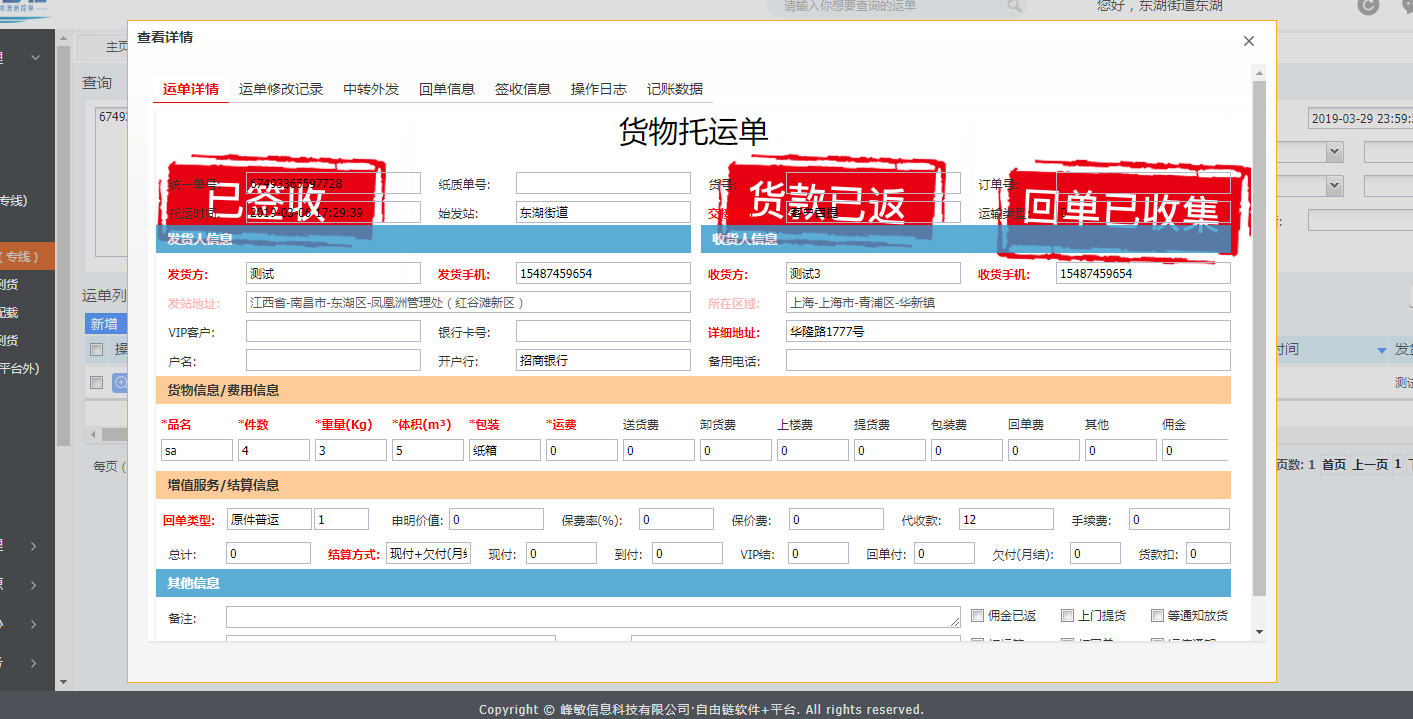
Ext.js给form加背景图片
{

                iconCls: 'zyl_icons_showdetail',

                tooltip: '查看',

                handler: function(gridView, rowIndex, colIndex) {

                    var rowInfo = gridView.up('grid').getStore().getAt(rowIndex);

                    if (Ext.isEmpty(rowInfo.get('adFlag'))) {

                        rowInfo.set('adFlag', 0);

                    }

                    var viewWindow = me.getOpBillLineInfoViewWindow(new Array());

                    var viewForm = viewWindow.getOpBillLineInfoViewTab().getOpBillLineInfoViewForm();

                    viewForm.setOperatorType(rowInfo.data);

                    viewWindow.showData = rowInfo.data;

                    viewWindow.show();

                    var imgSign='url(../../images/seal/unsign.png) 0px 0 no-repeat';

                    var imgReceipt='';

                    var imgSettle='';

                    var imgRefund='';

                    if(rowInfo.data.billState==4){

                        imgSign='url(../../images/seal/sign.png) 0px 0 no-repeat';

                    }

//----------------------------------------------回单信息-----------------------------------------------

//----------------------------------------------------------------------------------------------------

                    if(rowInfo.data.receiptMethodCode!=1){

                    //回单状态 0.未收回、1.已收回 、2.已寄出、3、已接收、4.已返客户

                    //回单图片 receiptCol已收集1 receiptMail 2已寄出 receiptRec 3已返发站 receiptRt 4已返客户

                    Ext.Ajax.request({

                        url: opHostName + '/op/receiptBillCollect.do' + urlToken,

                        params: {

                            'uniteBillCode': rowInfo.data.uniteBillCode

                        },

                        success: function (response) {

                            var respText = Ext.JSON.decode(response.responseText);

                            if (respText.data == null) {

                                return;

                            }

                            var receiptForm = Ext.getCmp('Op_OpBillLineInfo_ReceiptBillCollectForm_ID').getForm();

                            var receiptModel = Ext.create('Op.OpBillLineInfo.RecBillCollectModel', respText.data);

                            receiptForm.loadRecord(receiptModel);

                            if(respText.data.status==1){

                                imgReceipt=',url(../../images/seal/receiptCol.png) 840px 0px no-repeat';

                            }else if(respText.data.status==2){

                                imgReceipt=',url(../../images/seal/receiptMail.png) 840px 0px no-repeat';

                            }else if(respText.data.status==3){

                                imgReceipt=',url(../../images/seal/receiptRec.png) 840px 0px no-repeat';

                            }else if(respText.data.status==4){

                                imgReceipt=',url(../../images/seal/receiptRt.png) 840px 0px no-repeat';

                            }

                                viewForm.setBodyStyle('background: '+imgSign+imgReceipt+imgRefund+imgSettle);

                            if (respText.data.openBillTime != null) {

                                receiptForm.findField('openBillTime').setValue(Ext.Date.format(new Date(respText.data.openBillTime), 'Y-m-d H:i:s'))

                            }

                            if (respText.data.signTime != null) {

                                receiptForm.findField('signTime').setValue(Ext.Date.format(new Date(respText.data.signTime), 'Y-m-d H:i:s'))

                            }

                            if (respText.data.inventoryEnterTime != null) {

                                receiptForm.findField('inventoryEnterTime').setValue(Ext.Date.format(new Date(respText.data.inventoryEnterTime), 'Y-m-d H:i:s'))

                            }

                            if (respText.data.modifyTime != null) {

                                receiptForm.findField('modifyTime').setValue(Ext.Date.format(new Date(respText.data.modifyTime), 'Y-m-d H:i:s'))

                            }

                            if (respText.data.backTime != null) {

                                receiptForm.findField('backTime').setValue(Ext.Date.format(new Date(respText.data.backTime), 'Y-m-d H:i:s'))

                            }

                        },

                        failure: function (response) {

                            Ext.ux.Toast.msg('提示', response.responseText, 'error');

                        }

                    });

                    }

//----------------------------------------------记账信息-----------------------------------------------

//----------------------------------------------------------------------------------------------------

                   if(rowInfo.data.collectGoodsPrice!=0){

                    Ext.Ajax.request({

                        url: foHostName + '/fo/queryCashAccountList.do' + urlToken,

                        params: {

                            'uniteBillCode': rowInfo.data.uniteBillCode

                        },

                        success: function (response) {

                            var result = Ext.JSON.decode(response.responseText);

                            var grid = Ext.getCmp('Op_OpBillLineInfo_AccountGridPanel_ID').getStore();

                            if (!Ext.isEmpty(result.data)) {

                                grid.removeAll();

                                grid.add(result.data);

                                for(var j = 0,len = result.data.length; j < len; j++){

                                    if(result.data[j].status==1&&result.data[j].priceType==40){

                                       imgRefund=',url(../../images/seal/refund.png) 560px 0 no-repeat';

                                       break;

                                    }else{

                                       imgRefund=',url(../../images/seal/unrefund.png) 560px 0 no-repeat';

                                    }

                                    if(result.data[j].status==1&&(result.data[j].priceType==31||result.data[j].priceType==33||result.data[j].priceType==34||result.data[j].priceType==35||result.data[j].priceType==36)){

                                       imgSettle=',url(../../images/seal/tranceFeeSettle.png) 280px 0 no-repeat';

                                       break;

                                    }else if(result.data[j].priceType==31||result.data[j].priceType==33||result.data[j].priceType==34||result.data[j].priceType==35||result.data[j].priceType==36){

                                       imgSettle=',url(../../images/seal/tranceFeeUnSettle.png) 280px 0 no-repeat';

                                    }

                                }

                               viewForm.setBodyStyle('background: '+imgSign+imgReceipt+imgRefund+imgSettle);

                            }

                        },

                        failure: function (response) {

                            Ext.ux.Toast.msg('提示', response.responseText, 'error');

                        }

                    });

                        }

                        viewForm.setBodyStyle('background: '+imgSign+imgReceipt+imgRefund+imgSettle);

                }

            }
Ext.js给form加背景图片的更多相关文章
- Ext JS 如何动态加载JavaScript创建窗体
JavaScript不需要编译即可运行,这让JavaScript构建的应用程序可以变得很灵活.我们可以根据需要动态从服务器加载JavaScript脚本来创建和控制UI来与用户交互.下面结合Ext JS ...
- js 定时更改div背景图片
今天遇到一个业务场景,使用js将一个div标签的背景图片定时更换一下. 之前百度了几个,有css+js,也有css3的,不过css3的兼容有问题,之后同事提示,可以使用js直接来更换div的北京图片, ...
- js 动态设置 div 背景图片 并滚动显示
var imgs =["../img/index/bgstyle/style1/index_top_bg2.jpg", "../img/index/bgstyle/sty ...
- js根据ID修改背景图片
<SCRIPT language=javascript> function expand(el) { var childObj = document.getElementById(&quo ...
- js设置随机切换背景图片
<script> var imgs =["http://images.cnblogs.com/cnblogs_com/xiaobo-Linux/1112236/o_2.jpg&q ...
- 5UCMS判断当前栏目高亮(用于当前所在栏目加背景图片或颜色)
5UCMS判断当前栏目高亮标签 比较简单的是频道页(channel.html): 大类代码: <!--menu:{ $row=10 $table=channel }--> <li { ...
- iOS关于UILabel 基本属性 背景图片 背景色
[代码] iOS关于UILabel 基本属性 背景图片 背景色 ? 1 2 3 4 5 6 7 8 9 10 11 12 13 14 15 16 17 18 19 20 21 22 23 24 25 ...
- Ext JS 6开发实例(二) :使用CMD创建应用程序
由于Ext JS 6将原来的Ext JS和Sencha Touch合并为一个框架,因而在使用CMD来创建应用程序前,需要考虑清楚你是要创建一个通用应用程序,还是仅仅只是针对桌面或移动设备的应用程序. ...
- css网页中设置背景图片的方法详解
在css代码中设置背景图片的方法,包括背景图片.背景重复.背景固定.背景定位等 用css设置网页中的背景图片,主要有如下几个属性: 1,背景颜色 {">说明:参数取值和颜色属性一样 ...
随机推荐
- 洛谷 P1137 旅行计划
旅行计划 待证明这样dp的正确性. #include <iostream> #include <cstdio> #include <cstring> #includ ...
- hive中select中DISTINCT的技巧和使用
hive中select中DISTINCT的技巧和使用 单表的唯一查询用:distinct 多表的唯一查询用:group by 在使用MySQL时,有时需要查询出某个字段不重复的记录,虽然mysql提供 ...
- 【装载】删除Oracle11G
卸载Oracle步骤:1.停止所有与ORACLE相关的服务.2. 使用OUI(Oracle Universal Installer)卸载Oracle软件. “开始”->“程序”->“O ...
- github入门之更改提交操作--6
1.回溯历史版本 1.1.回溯到创建feature-A分支前 1.1.1.要让仓库的HEAD.暂存区.当前工作树回溯到指定状态,需要用到提供目标时间点的哈希值 1.1.2.回溯至未创建feature- ...
- 《spss统计分析与行业应用案例详解》:实例十二 卡方检验
卡方检验的功能与意义 SPSS的卡方检验是非参数检验方法的一种,其基本功能足通过样本的 频数分布来推断总体是否服从某种理论分布或某种假设分布,这种检验过程是通过分析实际的频数与理论的频数之间的差别或是 ...
- mysql+thinkphp +amcharts 完成图表统计功能
思路:从mysql数据库查询数据,经过thinkphp 后端控制器做逻辑处理,返回给前端,前端调用Amcharts 插件 1.数据查询: public function order($time='', ...
- Python列表解析与生成器表达式
Python列表解析 l = ["egg%s" %i for i in range(100) if i > 50] print(l) l= [1,2,3,4] s = 'he ...
- 53. Maximum Subarray@python
Given an integer array nums, find the contiguous subarray (containing at least one number) which has ...
- js中charAt()与charCodeAt()区别
1. str.charAt(index); 返回指定位置的字符 字符串中第一个字符的下标是 0.如果参数 index 不在 0 与 string.length 之间,该方法将返回一个空字符串. ind ...
- Codeforces 517 #B
http://codeforces.com/contest/1072/problem/B 开始想的只有搜索,时间复杂度$O(4^n)$,明显有问题. 想了半个小时没有思路,然后想到了正难则反,就开始步 ...