
IOS开发学习笔记043-QQ聊天界面实现
QQ聊天界面实现
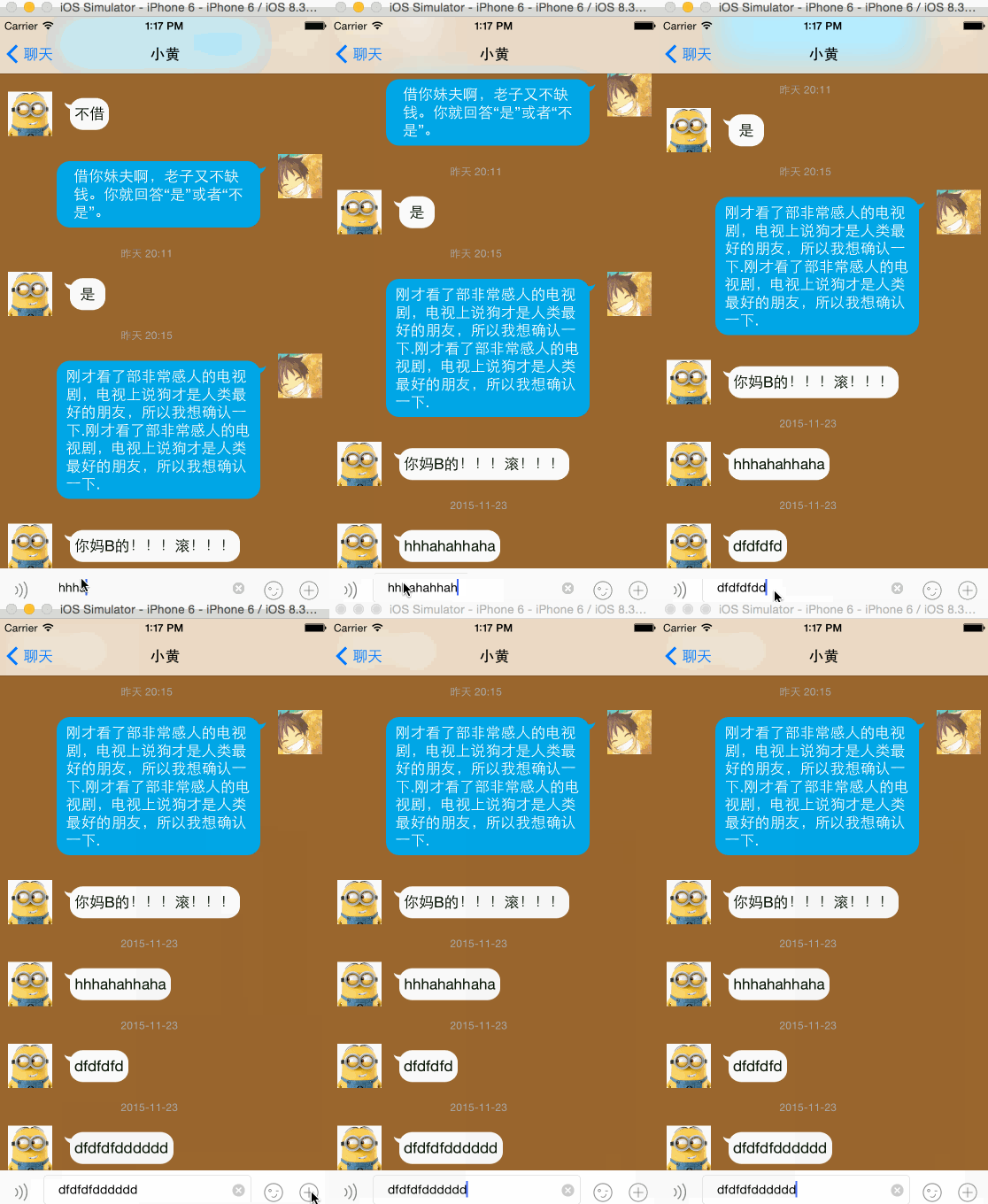
效果如下:

实现过程:
1、首先实现基本界面
头像使用 UIImageView :
文字消息使用 UIButton
标签使用 UILable :水平居中
所有元素在一个cell中,在加载cell时进行判断显示和隐藏。
合理设置各个控件之间的约束关系。主要是UIIimageVIew和UIButton顶部对齐,间距为10。UIButton的宽度设置一个约束范围,比如说 (>=60 && <=300);
底部添加一个UIView ,添加输入框等。

2、创建模型文件
所有元素在一个cell中,在加载cell时进行判断显示和隐藏。
按照message.plist文件内容添加需要的属性,然后添加一个cellHeight属性计算cell高度,和一个决定是否显示时间到cell得属性hideTime。
#import <UIKit/UIKit.h>
// 枚举类型,
typedefenum{
SLQMessageTypeMe = 0,
SLQMessageTypeOther = 1
}SLQMessageType;
@interface SLQMessage : NSObject
/*内容*/
@property (strong, nonatomic) NSString *text;
/*时间*/
@property (strong, nonatomic) NSString *time;
/*类型*/
@property (assign, nonatomic) SLQMessageType type;
/*cellHeight*/
@property (assign, nonatomic) CGFloat cellHeight;
/*是否隐藏时间*/
@property (assign, nonatomic,getter=isHideTime) BOOL hideTime;
+ (instancetype)MessageWithDict:(NSDictionary *)dict;
@end
实现文件
#import "SLQMessage.h"
@implementation SLQMessage
+(instancetype)MessageWithDict:(NSDictionary *)dict
{
SLQMessage *message = [[SLQMessage alloc] init];
[message setValuesForKeysWithDictionary:dict];
return message;
}
@end
这里需要注意的就是枚举类型的使用,如果在一个类中要定义枚举类型,那么命名规则就是:
以类名开头后面直接跟操作标识;如 SLQMessage + Type;
3、实现对cell操作的封装
#import <UIKit/UIKit.h>
@classSLQMessage;
@interface SLQMessageCell : UITableViewCell
/*模型对象*/
@property (strong, nonatomic) SLQMessage *message;
+ (instancetype)cellWithTableView:(UITableView *)tableView;
@end
对tableView的每一个控件拖线建立关联。然后重写setter方法,对控件进行赋值。
#import "SLQMessageCell.h"
#import "SLQMessage.h"
//define this constant if you want to use Masonry without the 'mas_' prefix
#define MAS_SHORTHAND
//define this constant if you want to enable auto-boxing for default syntax
#define MAS_SHORTHAND_GLOBALS
#import "Masonry.h"
@interfaceSLQMessageCell ()
@property (weak, nonatomic) IBOutletUILabel *timeLable;
@property (weak, nonatomic) IBOutletUIButton *meBtn;
@property (weak, nonatomic) IBOutletUIImageView *meImage;
@property (weak, nonatomic) IBOutletUIButton *otherBtn;
@property (weak, nonatomic) IBOutletUIImageView *otherImage;
@end
@implementation SLQMessageCell
// 重写setter方法
- (void)setMessage:(SLQMessage *)message
{
_message = message;
self.backgroundColor = [UIColorbrownColor];
if(message.isHideTime) // 隐藏时间
{
self.timeLable.hidden = YES;
[self.timeLableupdateConstraints:^(MASConstraintMaker *make) {
make.height.equalTo(0); // 高度为0
}];
}
else
{
self.timeLable.text = message.time;
self.timeLable.hidden = NO;
[self.timeLableupdateConstraints:^(MASConstraintMaker *make) {
make.height.equalTo(22);
}];
}
if (message.type == SLQMessageTypeMe)
{
[selfsetShowBtn:self.meBtnWithShowImage:self.meImageWithHideBtn:self.otherBtnWithHideImage:self.otherImage];
}
if (message.type == SLQMessageTypeOther)
{
[selfsetShowBtn:self.otherBtnWithShowImage:self.otherImageWithHideBtn:self.meBtnWithHideImage:self.meImage];
}
}
因为每次显示cell都要进行计算,将cell的显示封装到方法中。
// 显示隐藏控件并计算控件的高度
- (void)setShowBtn:(UIButton *)showBtn WithShowImage:(UIImageView *)showImage WithHideBtn:(UIButton *)hideBtn WithHideImage:(UIImageView *)hideImage
{
[showBtn setTitle:self.message.textforState:UIControlStateNormal];
// 隐藏其他
hideBtn.hidden = YES;
hideImage.hidden = YES;
// 显示自己
showBtn.hidden = NO;
showImage.hidden = NO;
// 强制更新
[selflayoutIfNeeded];
// 更新约束,设置按钮的高度就是textLable的高度
[showBtn updateConstraints:^(MASConstraintMaker *make) {
CGFloat buttonH = showBtn.titleLabel.frame.size.height;//
make.height.equalTo(buttonH);
}];
// 强制更新
[selflayoutIfNeeded];
CGFloat btnMaxY = CGRectGetMaxY(showBtn.frame);
CGFloat imageMaxY = CGRectGetMaxY(showImage.frame);
// 设置cell高度
self.message.cellHeight = MAX(btnMaxY, imageMaxY) + 10;
}
其他方法和以往一样
+ (instancetype)cellWithTableView:(UITableView *)tableView
{
SLQMessageCell *cell = [tableView dequeueReusableCellWithIdentifier:@"message"];
return cell;
}
- (void)awakeFromNib {
// Initialization code
// 多行显示
self.meBtn.titleLabel.numberOfLines=0;
self.otherBtn.titleLabel.numberOfLines=0;
}
4、接下来说说按钮背景的问题
按钮背景默认填充整个按钮,但是默认情况下的填充效果不是很好。
如下代码:
UIImageView *imageView = [[UIImageView alloc] init];
imageView.frame = CGRectMake(10, 10, 300, 200);
UIImage *image = [UIImage imageNamed:@"chat_send_nor"];
// 方法1 ,设置拉伸间距,默认拉伸中心1*1像素
//image = [image stretchableImageWithLeftCapWidth:image.size.width * 0.5 topCapHeight:image.size.height * 0.5];
// 方法2 设置边界
UIEdgeInsets edge = UIEdgeInsetsMake(50, 40, 40, 40);
//image = [image resizableImageWithCapInsets:edge ];
// UIImageResizingModeStretch 拉伸模式
// UIImageResizingModeTile 填充模式
image = [image resizableImageWithCapInsets:edge resizingMode:UIImageResizingModeStretch];
// 方法3
// 在images.xcassets中对图片进行设置
imageView.image = image;
[self.view addSubview:imageView];
// 对比图片
UIImageView *imageView1 = [[UIImageView alloc] init];
imageView1.frame = CGRectMake(10, 210, 300, 200);
UIImage *image1 = [UIImage imageNamed:@"chat_send_nor"];
imageView1.image = image1;
[self.view addSubview:imageView1];
会出现以下效果,默认是下边的图片,所以有必要对图片进行拉伸。

其中方法3的设置是将图片导入Image.xcassets中后选中图片设置。

可以通过代码设置按钮的内间距
// 可以这样设置内间距
, , , );
[showBtn setTitleEdgeInsets:edge];
或者直接在按钮的属性里设置

设置过间距后,就可以计算btn的高度时,因为textlable的高度不固定,所以让btn的高度等于textLable 的高度。但是又因为按钮背景图片的边缘有一部分是透明的,如下:红色是按钮,蓝色是图片。

所以显示文字高度会,这里对其按钮高度 + 30,而textLable默认会水平垂直居中。

5、在控制器中得实现方法和以往的一样
只需要在这里判断以下消息显示的时间是否一致,如果一致就隐藏。
- (NSMutableArray *)messages
{
if (_messages == nil)
{
NSArray *dictArray = [NSArrayarrayWithContentsOfFile:[[NSBundlemainBundle] pathForResource:@"messages.plist"ofType:nil]];
NSMutableArray *tempArray = [NSMutableArrayarray];
// 记录上一个message,判断是否显示时间
SLQMessage *lastMessage = nil;
for (NSDictionary *dict in dictArray)
{
SLQMessage *message = [SLQMessage MessageWithDict:dict];
message.hideTime = [message.time isEqualToString:lastMessage.time];
[tempArray addObject:message];
// 重新赋值
lastMessage = message;
}
_messages = tempArray;
}
return_messages;
}
- (void)viewDidLoad {
[superviewDidLoad];
}
/**
* tableView 行数
*/
- (NSInteger)tableView:(UITableView *)tableView numberOfRowsInSection:(NSInteger)section
{
//NSLog(@"%zd",self.messages.count);
returnself.messages.count;
}
/**
* 设置每一个cell
*/
- (UITableViewCell *)tableView:(UITableView *)tableView cellForRowAtIndexPath:(NSIndexPath *)indexPath
{
SLQMessageCell *cell = [SLQMessageCellcellWithTableView:tableView];
cell.message = self.messages[indexPath.row];
return cell;
}
/**
* 设置cell高度
*/
- (CGFloat)tableView:(UITableView *)tableView heightForRowAtIndexPath:(NSIndexPath *)indexPath
{
SLQMessage *message = self.messages[indexPath.row];
return message.cellHeight;
}
/**
* 给出预估高度
*/
- (CGFloat)tableView:(UITableView *)tableView estimatedHeightForRowAtIndexPath:(NSIndexPath *)indexPath
{
return 200;
}
@end
5、用两个cell实现界面

// 重写setter方法
- (void)setMessage:(SLQMessage *)message
{
_message = message;
self.backgroundColor = [UIColorbrownColor];
if(message.isHideTime) // 隐藏时间
{
self.timeLable.hidden = YES;
[self.timeLableupdateConstraints:^(MASConstraintMaker *make) {
make.height.equalTo(0);
}];
}
else
{
self.timeLable.text = message.time; // 显示时间
self.timeLable.hidden = NO;
[self.timeLableupdateConstraints:^(MASConstraintMaker *make) {
make.height.equalTo(22);
}];
}
//
[self.contentBtnsetTitle:message.textforState:UIControlStateNormal];
// 强制布局
[selflayoutIfNeeded];
// 添加约束
[self.contentBtnupdateConstraints:^(MASConstraintMaker *make) {
CGFloat textLableHeight = self.contentBtn.titleLabel.frame.size.height + 30;
make.height.equalTo(textLableHeight);
}];
[selflayoutIfNeeded];
CGFloat btnMaxY = CGRectGetMaxY(self.contentBtn.frame);
CGFloat iconMaxY = CGRectGetMaxY(self.iconImage.frame);
message.cellHeight = MAX(btnMaxY, iconMaxY);
}
/**
* 返回cell对象
*/
+ (instancetype)cellWithTableView:(UITableView *)tableView andMessage:(SLQMessage *)message
{
NSString *ID = (message.type == SLQMessageTypeMe)?@"me":@"other";
SLQMessageCell *cell = [tableView dequeueReusableCellWithIdentifier:ID];
return cell;
}
/**
* 设置每一个cell
*/
- (UITableViewCell *)tableView:(UITableView *)tableView cellForRowAtIndexPath:(NSIndexPath *)indexPath
{
// 获取一个cell,根据类型
SLQMessageCell *cell = [SLQMessageCell cellWithTableView:tableView andMessage:self.messages[indexPath.row]];
cell.message = self.messages[indexPath.row];
return cell;
}
更新: 滚动到最新的一行
/**
* 发送信息
*/
- (IBAction)sendMessage:(id)sender
{
// 获取文字内容
NSString *message = self.textField.text;
SLQMessageType type = (arc4random_uniform(2));
// 更新模型数据
SLQMessage *mess = [[SLQMessage alloc] init];
mess.time = @"2015-11-23";
mess.text = message;
mess.type = type;
// 设置模型数据,添加到数组
[self.messages addObject:mess];
// 刷新表格
[self.tableViewreloadData];
// 滚动到底部方法
[selfscrollToBottom];
}
// 滚动到底部
- (void)scrollToBottom
{
CGFloat yOffset = 0;
// 如果tableView的高度大于tableView的自有有高度,y轴偏移量就等于contentSize - bounds
if (self.tableView.contentSize.height > self.tableView.bounds.size.height) {
yOffset = self.tableView.contentSize.height - self.tableView.bounds.size.height;
}
// 设置偏移量为最底部
[self.tableViewsetContentOffset:CGPointMake(0, yOffset) animated:NO];
}
IOS开发学习笔记043-QQ聊天界面实现的更多相关文章
- Objective-c——UI基础开发第八天(QQ聊天界面)
一.知识点: QQ聊天界面 双模型的使用(dataModel和frameModel) UITextField的使用 通知的使用 拉伸图片的两种方法(slicing/image对象的resizeable ...
- iOS开发学习笔记:基础篇
iOS开发需要一台Mac电脑.Xcode以及iOS SDK.因为苹果设备都具有自己封闭的环境,所以iOS程序的开发必须在Mac设备上完成(当然,黑苹果应该也是可以的,但就需要花很多的精力去折腾基础环境 ...
- ios开发学习笔记(1)
objective-c基础总结 第一二章 1.application:didiFinishLauchingWithOptions:程序启动后立即执行 2.启动界面代码格式:self.window = ...
- iOS开发——UI_swift篇&TableView自定义聊天界面
TableView自定义聊天界面 1,下面是一个放微信聊天界面的消息展示列表,实现的功能有: (1)消息可以是文本消息也可以是图片消息 (2)消息背景为气泡状图片,同时消息气泡可根据内容自适应大小 ...
- IOS开发学习笔记031-代码实现微博界面
微博界面如下 1.准备资源文件 新建一个plist文件,添加条目,root类型是array,子类型是Dictionary 2.更改父类,实现代理方法 接下来得实现过程如上一篇文章,改变父类为UITab ...
- IOS开发学习笔记030-xib实现淘宝界面
使用xib文件实现界面,然后通过模型更新数据. 1.使得控制器继承自UITableViewController 2.创建xib文件,实现界面如下:一个UIImageView,两个lable 3.新建一 ...
- IOS开发学习笔记038-autolayout 自动布局 界面实现
在storyboard/xib文件中实现自动布局 autolayout 1.注意事项 autolayout和frame属性是有冲突的,所以如果准备使用autolayout,就不要再代码中对控件的fra ...
- ios开发学习笔记(这里一定有你想要的东西,全部免费)
1,Search Bar 怎样去掉背景的颜色(storyboard里只能设置background颜色,可是发现clear Color无法使用). 其实在代码里还是可以设置的,那就是删除背景view [ ...
- iOS开发学习笔记
1 常用的第三方工具 1.1 iPhone Simulator 测试程序需要模拟器iPhone Simulator 1.2 设计界面需要Interface Builder,Interface Buil ...
随机推荐
- [转]linux远程登入不需要密码
如何通过一台linux ssh远程其他linux服务器时,不要输入密码,可以自动登入.提高远程效率,不用记忆各台服务器的密码. 工具/原料 ssh,ssh-keygen,scp 方法/步骤 ...
- Eucalyptus4.0 管理页面介绍
桉树配置好之后,我们可以通过web方式登陆桉树管理页面,实现对实例的启动,新建.删除,以及相关的配置操作.这里我们使用的是内网地址:http://192.168.20.60:8888/, 用户名密码默 ...
- Mybatis-Spring整合Spring
因为 MyBatis 用 SqlSessionFactory 来创建 SqlSession ,SqlSessionFactoryBuilder 创建 SqlSessionFactory ,而在 Myb ...
- sql server 2012安装程序图
重点:下面的安装步骤都在断网环境下安装的 因为我想查看联网跟没有联网SQL2012会不会下载并安装.net2.0 和.net3.5和.net4和SP1补丁包 我的环境: 没有集成SP1补丁包的安装包大 ...
- c++ STL deque容器成员函数
deque是双向队列,即可以在头部插入删除,也可以在尾部插入删除.内部并不连续,这一点和vector并不一样.可能第1个元素和第2个元素的地址是不连在一起的.在使用时用it迭代器会安全一点. 这是c+ ...
- 详细讲解:使用tp3.2.3完成简单的注册登录功能
使用3.2.3进行了一个简单不过的注册登录功能,界面介绍: 1.注册: 2.登录: 3.登录成功后: 没错,就是简单的让你特别容易上手,上面运用到的知识有: (1)自动验证.自动完成 (2)sessi ...
- Copy Failed Error Access to fobidden
使用SVN的branch/tag命令来切包时,报出了一下错误提示 就这个错误,调了整整一天,如果你也遇到了类似问题,我真心希望下面解决问题的过程能帮助到你:D 解决过程: 1.网上查了很多帖子,发现跟 ...
- Sql Server 表的复制
声名:A,B ,都是表 --B表存在(两表结构一样)insert into B select * from A 若两表只是有部分(字段)相同,则 insert into B(col1,col2,col ...
- python_41_with语句
#为了避免打开文件后忘记关闭,可以通过管理上下文,即:with open('log','r') as f: # 如此方式,当with代码块执行完毕时,内部会自动关闭并释放文件资源. with open ...
- 解决mysql8小时无连接自动断掉机制
windows下打开my.ini,增加: interactive_timeout=28800000 wait_timeout=28800000 MySQL是一个小型关系型数据库管理系统,由于MySQL ...