
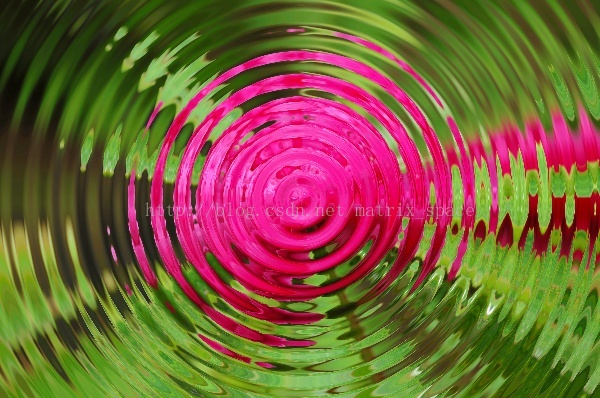
OpenCV——PS滤镜 水波效果
// define head function

#ifndef PS_ALGORITHM_H_INCLUDED

#define PS_ALGORITHM_H_INCLUDED

#include <iostream>

#include <string>

#include "cv.h"

#include "highgui.h"

#include "cxmat.hpp"

#include "cxcore.hpp"

#include "math.h"

using namespace std;

using namespace cv;

void Show_Image(Mat&, const string &);

#endif // PS_ALGORITHM_H_INCLUDED

#include "PS_Algorithm.h"

#include <time.h>

using namespace std;

using namespace cv;

#define pi 3.1415926

int main()

{

    string Img_name("4.jpg");

    Mat Img;

    Img=imread(Img_name);

    Mat Img_out(Img.size(), CV_8UC3);

    Img.copyTo(Img_out);

    int width=Img.cols;

    int height=Img.rows;

    float A,B;

    A=7;

    B=2.5;

    Point Center(width/2, height/2);

    float r0,r1,new_x,new_y;

    float p,q,x1,y1,x0,y0;

    float theta;

    for (int y=0; y<height; y++)

    {

        for (int x=0; x<width; x++)

        {

            y0=Center.y-y;

            x0=x-Center.x;

            theta=atan(y0/(x0+0.00001));

            if(x0<0) theta=theta+pi;

            r0=sqrt(x0*x0+y0*y0);

            r1=r0+A*width*0.01*sin(B*0.1*r0);

            new_x=r1*cos(theta);

            new_y=r1*sin(theta);

            new_x=Center.x+new_x;

            new_y=Center.y-new_y;

            if(new_x<0)         new_x=0;

            if(new_x>=width-1)  new_x=width-2;

            if(new_y<0)         new_y=0;

            if(new_y>=height-1) new_y=height-2;

            x1=(int)new_x;

            y1=(int)new_y;

            p=new_x-x1;

            q=new_y-y1;

            for (int k=0; k<3; k++)

            {

                Img_out.at<Vec3b>(y, x)[k]=(1-p)*(1-q)*Img.at<Vec3b>(y1, x1)[k]+

                                        (p)*(1-q)*Img.at<Vec3b>(y1,x1+1)[k]+

                                        (1-p)*(q)*Img.at<Vec3b>(y1+1,x1)[k]+

                                        (p)*(q)*Img.at<Vec3b>(y1+1,x1+1)[k];

            }

        }

    }

    Img_out=Img_out;

    Show_Image(Img_out, "out");

    imwrite("Out.jpg", Img_out);

    waitKey();

}

// define the show image

#include "PS_Algorithm.h"

#include <iostream>

#include <string>

using namespace std;

using namespace cv;

void Show_Image(Mat& Image, const string& str)

{

    namedWindow(str.c_str(),CV_WINDOW_AUTOSIZE);

    imshow(str.c_str(), Image);

}
原图

效果图
OpenCV——PS滤镜 水波效果的更多相关文章
- PS 滤镜— —水波效果
clc; clear all; close all; addpath('E:\PhotoShop Algortihm\Image Processing\PS Algorithm'); I=imread ...
- PS 滤镜——水波 water wave
%%%% Water wave %%%% 制作水波效果 clc; clear all; close all; addpath('E:\PhotoShop Algortihm\Image Process ...
- Python: PS 滤镜--水波特效
本文用 Python 实现 PS 滤镜中的 水波特效 import numpy as np from skimage import img_as_float import matplotlib.pyp ...
- OpenCV——PS 滤镜, 浮雕效果
具体的算法原理可以参考: PS 滤镜, 浮雕效果 // define head function #ifndef PS_ALGORITHM_H_INCLUDED #define PS_ALGORITH ...
- OpenCV——PS 滤镜, 曝光过度
算法原理可以参考: PS 滤镜,曝光过度 #ifndef PS_ALGORITHM_H_INCLUDED #define PS_ALGORITHM_H_INCLUDED #include <io ...
- OpenCV——PS滤镜之 波浪效果 wave
// define head function #ifndef PS_ALGORITHM_H_INCLUDED #define PS_ALGORITHM_H_INCLUDED #include < ...
- OpenCV——PS滤镜算法之 球面化 (凹陷效果)
// define head function #ifndef PS_ALGORITHM_H_INCLUDED #define PS_ALGORITHM_H_INCLUDED #include < ...
- OpenCV——PS滤镜算法之Spherize 球面化(凸出效果)
// define head function #ifndef PS_ALGORITHM_H_INCLUDED #define PS_ALGORITHM_H_INCLUDED #include < ...
- Python: PS 滤镜--万花筒效果
本文用 Python 实现 PS 的一种滤镜效果,称为万花筒.也是对图像做各种扭曲变换,最后图像呈现的效果就像从万花筒中看到的一样: 图像的效果可以参考之前的博客: http://blog.csdn. ...
随机推荐
- Oracle SOA Suite OverView
SOA是一场架构的变革,那既然是变革,那就一定是有内在的原因来推动这个架构的变革.在过去几十年的时间里面,应用程序架构已经经历了3次巨大的变革,从Terminal/主机--> Client/Se ...
- 【Tensorflow】tf.argmax函数
tf.argmax(input, axis=None, name=None, dimension=None) 此函数是对矩阵按行或列计算最大值 参数 input:输入Tensor axis:0表示 ...
- 11gR2 RAC 独占模式replace votedisk遭遇PROC-26,restore ocr遭遇CRS-4000、PROT-35
原文链接:http://blog.itpub.net/23135684/viewspace-748816/ 11gR2 RAC系统的存储数据全然丢失,全部节点的软件都安装在本地磁盘中.本地磁盘保留了O ...
- Direct2D教程(二)来看D2D世界中的Hello,World
引子 任何一门语言的第一个教程几乎都是Hello,world.我们也不例外,但是这里不是教大家打印Hello,world,而是编写一个简单的D2D绘制程序,让大家对Direct2D的程序结构及编程方法 ...
- DevExpress.XtraGrid 【转】
http://www.cnblogs.com/zeroone/p/4574539.html DevExpress.XtraGrid控件使用 该控件类是一个表格控件,但是其具有很多方便而使用的功能,例如 ...
- Odoo multiprocessing
Odoo 在 非 windows 系统下, 支持 并行处理,开启 workers 配置项 即可. odoo有以下配置项 跟 并行处理有关 配置项 帮助信息 解说 limit_memor ...
- 简化动态MERGE的SQL计算
MSSQL.ORACLE等数据库支持MERGE语句更新表.但表结构未知时,因为缺乏集合类数据.用存储过程获得表结构再动态拼出SQL很麻烦,代码会有几十行之多:相同原因,用Java等高级语言实现也不简单 ...
- Mina、Netty、Twisted一起学(七):公布/订阅(Publish/Subscribe)
消息传递有非常多种方式.请求/响应(Request/Reply)是最经常使用的.在前面的博文的样例中.非常多都是採用请求/响应的方式.当server接收到消息后,会马上write回写一条消息到clie ...
- EasyUI datagrid border处理,加边框,去边框,都可以,easyuidatagrid
下面是EasyUI 官网上处理datagrid border的demo: 主要是这句: $('#dg').datagrid('getPanel').removeClass('lines-both li ...
- mysql: expire_logs_days设置后无效问题
Sina blog - MySQL的 expire_logs_days 和 PURGE MASTER LOGS 无效问题