
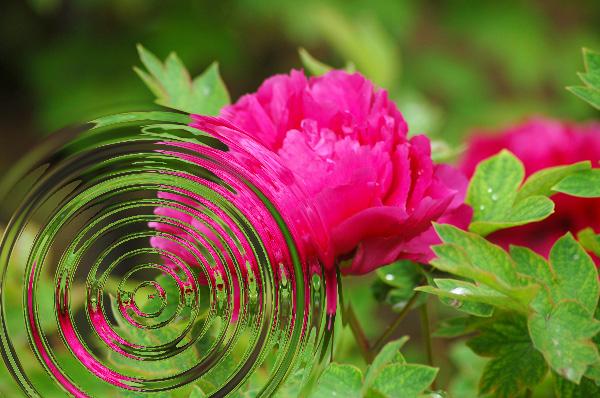
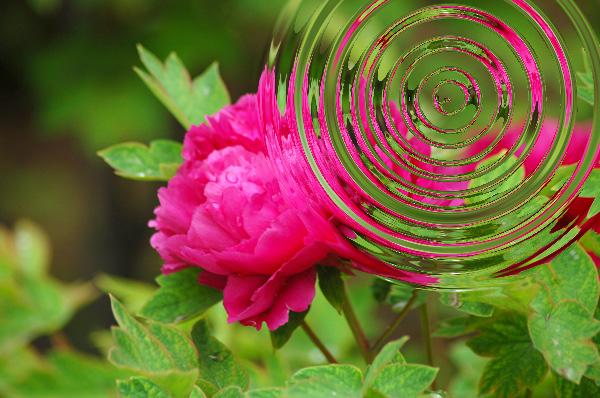
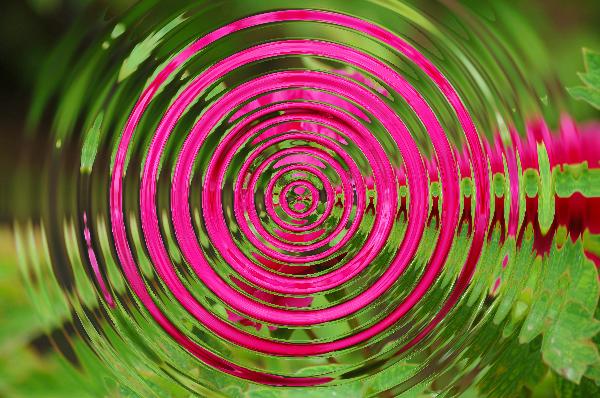
PS 滤镜— —水波效果
    clc;

    clear all;

    close all;

    addpath('E:\PhotoShop Algortihm\Image Processing\PS Algorithm');

    I=imread('4.jpg');

    I=double(I);

    Image=I/255;

    [height, width, depth]=size(Image);

    wavelength = 20;

    amplitude = 10;

    phase = 0;

    centreX = 0.5;

    centreY = 0.5;

    radius = 0;

    if (radius==0)

        radius=min(height, width)/2;

    end

    icentreX=width*centreX;

    icentreY=height*centreY;

    radius2=radius*radius;

    Image_new=Image;

     for ii=1:height

        for jj=1:width

             dx=jj-icentreX;

             dy=ii-icentreY;

             distance2=dx*dx+dy*dy;

             if (distance2>radius2)

                 x=jj;

                 y=ii;

             else

                 distance=sqrt(distance2);

                 amount=amplitude * sin(distance / wavelength * 2*pi - phase);

                 amount =amount* (radius-distance)/radius;

                 amount=amount*wavelength/(distance+0.0001);

                 x =jj + dx*amount;

                 y = ii + dy*amount;

             end

    % %         if (x<=1)     x=1;  end

    % %         if (x>=width)   x=width-1; end;

    % %         if (y>=height)  y=height-1; end;

    % %         if (y<1)  y=1;     end;

            if (x<=1)     continue;  end

            if (x>=width)   continue; end;

            if (y>=height)  continue; end;

            if (y<1)  continue;     end;

            x1=floor(x);

            y1=floor(y);

            p=x-x1;

            q=y-y1;

            Image_new(ii,jj,:)=(1-p)*(1-q)*Image(y1,x1,:)+p*(1-q)*Image(y1,x1+1,:)...

                +q*(1-p)*Image(y1+1,x1,:)+p*q*Image(y1+1,x1+1,:);

        end

     end

imshow(Image_new);参考来源:http://www.jhlabs.com/index.html
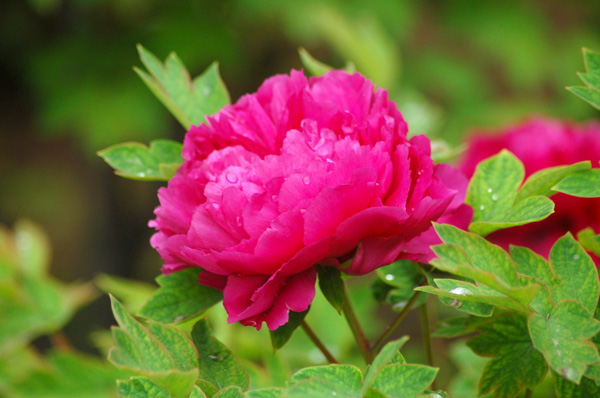
原图:
效果图:
PS 滤镜— —水波效果的更多相关文章
- OpenCV——PS滤镜 水波效果
// define head function #ifndef PS_ALGORITHM_H_INCLUDED #define PS_ALGORITHM_H_INCLUDED #include < ...
- PS 滤镜——水波 water wave
%%%% Water wave %%%% 制作水波效果 clc; clear all; close all; addpath('E:\PhotoShop Algortihm\Image Process ...
- Python: PS 滤镜--水波特效
本文用 Python 实现 PS 滤镜中的 水波特效 import numpy as np from skimage import img_as_float import matplotlib.pyp ...
- Python: PS 滤镜--万花筒效果
本文用 Python 实现 PS 的一种滤镜效果,称为万花筒.也是对图像做各种扭曲变换,最后图像呈现的效果就像从万花筒中看到的一样: 图像的效果可以参考之前的博客: http://blog.csdn. ...
- PS 滤镜— —挤压效果
clc; clear all; close all; addpath('E:\PhotoShop Algortihm\Image Processing\PS Algorithm'); I=imread ...
- PS 滤镜— —Marble 效果
clc; clear all; close all; addpath('E:\PhotoShop Algortihm\Image Processing\PS Algorithm'); I=imread ...
- PS 滤镜— — 万花筒效果
clc; clear all; close all; addpath('E:\PhotoShop Algortihm\Image Processing\PS Algorithm'); I=imread ...
- PS 滤镜— — sparkle 效果
clc; clear all; close all; addpath('E:\PhotoShop Algortihm\Image Processing\PS Algorithm'); I=imread ...
- PS 滤镜— —球面化效果
clc; clear all; close all; addpath('E:\PhotoShop Algortihm\Image Processing\PS Algorithm'); I=imread ...
随机推荐
- SQL系列函数--字符串函数
1.charindex函数用来寻找一个指定的字符(串)在另一个字符串中的起始位置,返回一个整数,没找到就返回0 select CHARINDEX('SQL','Microsoft SQL SERVER ...
- CSS解决无空格太长的字母,数字不会自己主动换行的问题
事实上非常easy,代码例如以下所看到的,注意 Style: <div class="detail_title" style="word-break: break- ...
- 【Sprint3冲刺之前】TD学生助手测试用例
项目名称 TDzhushou 项目承担部门 骐骥之队 完成日期 2014/5/29 历史版本: 版本/状态 作者 参与者 起止日期 备注 TDzhushou1.1 解凤娇 骐骥之队 5/3-5/7 2 ...
- mysql中的类型转换和精确位数
select round(123.5); 四舍五入 select floor(123.5);取整数部分 select ceil(123.5);四舍五入
- 还需要学习的十二种CSS选择器
在前面的文章中,我们在介绍了<五种你必须彻底了解的CSS选择器>,现在向大家介绍,还需要学习的另外十二种CSS选择器.如果你还没有用过,就好好学习一下,如果你已经熟知了就当是温习. 一.X ...
- Java 获取本地IP地址
private static String getIpAddress( ){ String ip = ""; Collection<InetAddress> colIn ...
- Android 开发小工具之:Tools 属性 (转)
Android 开发小工具之:Tools 属性 http://blog.chengyunfeng.com/?p=755#ixzz4apLZhfmi 今天来介绍一些 Android 开发过程中比较有用但 ...
- OpenCV 入门示例之五:一个复杂点的变换
前言 前文介绍了一个简单的变换.需要注意的是,很多时候,输出和输入图像的格式是不同的( 大小,深度,通道 ).在本文将展示的程序中,对图像进行了缩放( 使用cvPyrDown 函数 ),这种情况下需要 ...
- swift基础教程笔记
http://www.imooc.com/learn/127 <玩儿转swift> 慕课网教程笔记,自己根据2.1的语法做了更新. I. 1.通过playground来学习.熟悉swift ...
- iOS 应用发布
本文转载至 http://blog.csdn.net/ysy441088327/article/details/7833579 苹果为广大的开发者提供了一个很好的应用生态环境 参考资料: 1:如何向 ...