
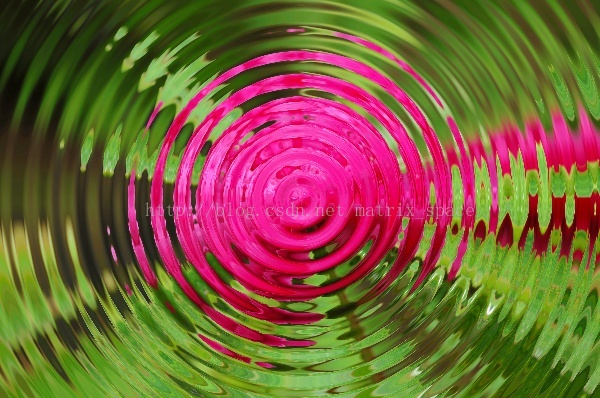
OpenCV——PS滤镜 水波效果
// define head function

#ifndef PS_ALGORITHM_H_INCLUDED

#define PS_ALGORITHM_H_INCLUDED

#include <iostream>

#include <string>

#include "cv.h"

#include "highgui.h"

#include "cxmat.hpp"

#include "cxcore.hpp"

#include "math.h"

using namespace std;

using namespace cv;

void Show_Image(Mat&, const string &);

#endif // PS_ALGORITHM_H_INCLUDED

#include "PS_Algorithm.h"

#include <time.h>

using namespace std;

using namespace cv;

#define pi 3.1415926

int main()

{

    string Img_name("4.jpg");

    Mat Img;

    Img=imread(Img_name);

    Mat Img_out(Img.size(), CV_8UC3);

    Img.copyTo(Img_out);

    int width=Img.cols;

    int height=Img.rows;

    float A,B;

    A=7;

    B=2.5;

    Point Center(width/2, height/2);

    float r0,r1,new_x,new_y;

    float p,q,x1,y1,x0,y0;

    float theta;

    for (int y=0; y<height; y++)

    {

        for (int x=0; x<width; x++)

        {

            y0=Center.y-y;

            x0=x-Center.x;

            theta=atan(y0/(x0+0.00001));

            if(x0<0) theta=theta+pi;

            r0=sqrt(x0*x0+y0*y0);

            r1=r0+A*width*0.01*sin(B*0.1*r0);

            new_x=r1*cos(theta);

            new_y=r1*sin(theta);

            new_x=Center.x+new_x;

            new_y=Center.y-new_y;

            if(new_x<0)         new_x=0;

            if(new_x>=width-1)  new_x=width-2;

            if(new_y<0)         new_y=0;

            if(new_y>=height-1) new_y=height-2;

            x1=(int)new_x;

            y1=(int)new_y;

            p=new_x-x1;

            q=new_y-y1;

            for (int k=0; k<3; k++)

            {

                Img_out.at<Vec3b>(y, x)[k]=(1-p)*(1-q)*Img.at<Vec3b>(y1, x1)[k]+

                                        (p)*(1-q)*Img.at<Vec3b>(y1,x1+1)[k]+

                                        (1-p)*(q)*Img.at<Vec3b>(y1+1,x1)[k]+

                                        (p)*(q)*Img.at<Vec3b>(y1+1,x1+1)[k];

            }

        }

    }

    Img_out=Img_out;

    Show_Image(Img_out, "out");

    imwrite("Out.jpg", Img_out);

    waitKey();

}

// define the show image

#include "PS_Algorithm.h"

#include <iostream>

#include <string>

using namespace std;

using namespace cv;

void Show_Image(Mat& Image, const string& str)

{

    namedWindow(str.c_str(),CV_WINDOW_AUTOSIZE);

    imshow(str.c_str(), Image);

}
原图

效果图
OpenCV——PS滤镜 水波效果的更多相关文章
- PS 滤镜— —水波效果
clc; clear all; close all; addpath('E:\PhotoShop Algortihm\Image Processing\PS Algorithm'); I=imread ...
- PS 滤镜——水波 water wave
%%%% Water wave %%%% 制作水波效果 clc; clear all; close all; addpath('E:\PhotoShop Algortihm\Image Process ...
- Python: PS 滤镜--水波特效
本文用 Python 实现 PS 滤镜中的 水波特效 import numpy as np from skimage import img_as_float import matplotlib.pyp ...
- OpenCV——PS 滤镜, 浮雕效果
具体的算法原理可以参考: PS 滤镜, 浮雕效果 // define head function #ifndef PS_ALGORITHM_H_INCLUDED #define PS_ALGORITH ...
- OpenCV——PS 滤镜, 曝光过度
算法原理可以参考: PS 滤镜,曝光过度 #ifndef PS_ALGORITHM_H_INCLUDED #define PS_ALGORITHM_H_INCLUDED #include <io ...
- OpenCV——PS滤镜之 波浪效果 wave
// define head function #ifndef PS_ALGORITHM_H_INCLUDED #define PS_ALGORITHM_H_INCLUDED #include < ...
- OpenCV——PS滤镜算法之 球面化 (凹陷效果)
// define head function #ifndef PS_ALGORITHM_H_INCLUDED #define PS_ALGORITHM_H_INCLUDED #include < ...
- OpenCV——PS滤镜算法之Spherize 球面化(凸出效果)
// define head function #ifndef PS_ALGORITHM_H_INCLUDED #define PS_ALGORITHM_H_INCLUDED #include < ...
- Python: PS 滤镜--万花筒效果
本文用 Python 实现 PS 的一种滤镜效果,称为万花筒.也是对图像做各种扭曲变换,最后图像呈现的效果就像从万花筒中看到的一样: 图像的效果可以参考之前的博客: http://blog.csdn. ...
随机推荐
- 使用find命令查找Linux中的隐藏文件的方法
我们可以在Linux 或者 Unix 系统上使用 find 命令去查询所有(全部)隐藏文件 基本语法如下: 复制代码 代码如下: [root@dabu.info ~]#find /要查找的文/件/夹/ ...
- alibaba fastjson常见问题FAQ
English | 中文 1. 怎么获得fastjson? 你可以通过如下地方下载fastjson: maven中央仓库: http://central.maven.org/maven2/com/al ...
- DICOM:DICOM万能编辑工具之Sante DICOM Editor
版权声明:本文为zssure原创文章,转载请注明出处,未经允许不得转载. 目录(?)[-] 背景 DICOM Service的配置 Sante DICOM Editor自启动的服务 PACS查询下 ...
- c#中开发ActiveX的学习笔记【转】
http://www.cnblogs.com/yjmyzz/archive/2009/12/14/1623396.html 1.为什么要用ActiveX? 网页本身的功能是有限的,要想实现一些网页本身 ...
- 只列出所有监听 UNIX 端口 netstat -lx
只列出所有监听 UNIX 端口 netstat -lx
- Android Camera探究之路——起步
Android Camera探究之路--起步 Camera在手机中有着举足轻重的地位,无论是二维码还是照片.识别.都离不开摄像头,本文将对Android中的Camera进行全面解析. 权限镇楼: &l ...
- SpringMVC:文件上传
MultipartFile attach HttpServletRequest re commons-io-2.0.jar (一定要用2.0以上的版本,否则没有copyInputStreamToFil ...
- mysql 查看当前连接数
http://www.cnblogs.com/pcdelphi/archive/2009/10/31/2017990.html 实战经验: >登录到mysql数据库的终端 >show ...
- leetCode(40):Path Sum
Given a binary tree and a sum, determine if the tree has a root-to-leaf path such that adding up all ...
- hdparm - get/set SATA/IDE device parameters
hdparm(8) - Linux man page Name hdparm - get/set SATA/IDE device parameters Synopsis hdparm [ flags ...