
Springcloud/Springboot项目绑定域名,使用Nginx配置Https
https://blog.csdn.net/a_squirrel/article/details/79729690
一、Https 简介(百度百科)
HTTPS(全称:Hyper Text Transfer Protocol over Secure Socket Layer),是以安全为目标的HTTP通道,简单讲是HTTP的安全版。即HTTP下加入SSL层,HTTPS的安全基础是SSL,因此加密的详细内容就需要SSL。 它是一个URI scheme(抽象标识符体系),句法类同http:体系。用于安全的HTTP数据传输。https:URL表明它使用了HTTP,但HTTPS存在不同于HTTP的默认端口及一个加密/身份验证层(在HTTP与TCP之间)。这个系统的最初研发由网景公司(Netscape)进行,并内置于其浏览器Netscape Navigator中,提供了身份验证与加密通讯方法。现在它被广泛用于万维网上安全敏感的通讯,例如交易支付方面。
二、Springcloud添加 https
直接配置(无Nginx):
1. 首先需要SSL证书,可以自己生成(浏览器不认可),也可购买。
2. 自己生成方法(不推荐):https://www.cnblogs.com/zhangzb/p/5200418.html
3. 免费一年证书(推荐):https://buy.cloud.tencent.com/ssl?fromSource=ssl
4. 下载完成后解压目录如下:
springcloud(springboot)一般默认嵌入tomcat中间件(服务器),如果有其他中间件选择对应文件夹下就好。
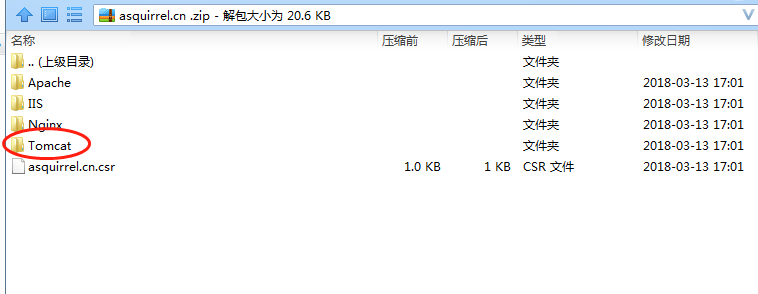
tomcat打开如下:.jks证书文件, keystorePass.txt 为证书秘钥
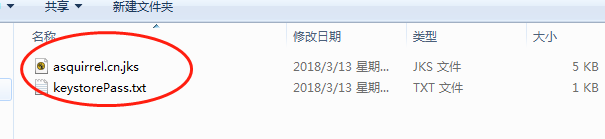
5. 将证书文件放入要添加https服务的resources下,一般为web层服务,然后打开springcloud(springboot)配置文件application/bootstarp.yml(properties)
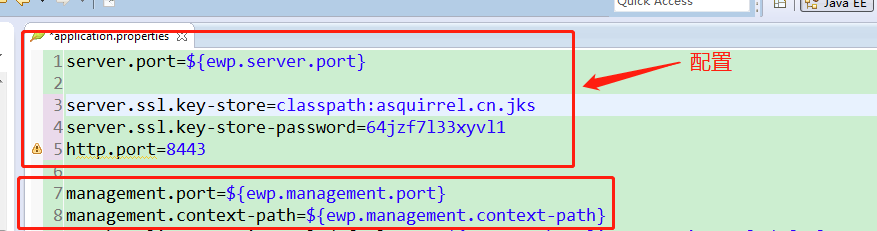
server.port 注册服务端口也是项目访问端口 server.ssl.key-store 证书路径 server.ssl.key-store-password 秘钥(.txt中内容) http.port 做转发的端口,如果不做端口转发可以不用配置,名字可以随便起 ,端口号也可自定义(不要冲突就好)。接下来直接启动服务即可,然后即可用https://+项目路径,进行访问。
6. https配置类编写(不做端口转发可以不写)
注意:如果项目配置文件中同时有management.port,需要将其注释掉,不然无法启动服务。
/**

* @Title: HttpsPort.java

* @Description: 添加https

* @author zxj

* @version V1.0

*/

package com.ewp.data.config;

import org.apache.catalina.Context;

import org.apache.catalina.connector.Connector;

import org.apache.tomcat.util.descriptor.web.SecurityCollection;

import org.apache.tomcat.util.descriptor.web.SecurityConstraint;

import org.springframework.beans.factory.annotation.Value;

import org.springframework.boot.context.embedded.EmbeddedServletContainerFactory;

import org.springframework.boot.context.embedded.tomcat.TomcatEmbeddedServletContainerFactory;

import org.springframework.context.annotation.Bean;

import org.springframework.stereotype.Component;

/**

 * @ClassName: HttpsPort

 * @Description: 添加https

 * @date 2018年3月14日

 *

 */

@Configuration

public class HttpsPort {

	@Value("${server.port}")

	private  int sPort;

	@Value("${http.port}")

	private  int hPort;

	private static class Tomcat extends TomcatEmbeddedServletContainerFactory{// 静态内部类

		@Override

	    protected void postProcessContext(Context context) {

	        SecurityConstraint constraint = new SecurityConstraint();

	        constraint.setUserConstraint("CONFIDENTIAL");

	        SecurityCollection collection = new SecurityCollection();

	        collection.addPattern("/*");

	        constraint.addCollection(collection);

	        context.addConstraint(constraint);

	    }

	}

	@Bean

    public EmbeddedServletContainerFactory servletContainer() {// 创建新的tomcat示例,指向定义的http连接

		Tomcat tomcat = new Tomcat();

        tomcat.addAdditionalTomcatConnectors(httpConnector());

        return tomcat;

	}

	@Bean

    public Connector httpConnector() {

        Connector connector = new Connector("org.apache.coyote.http11.Http11NioProtocol");

        connector.setScheme("http");

        connector.setPort(hPort);

        connector.setSecure(false);

        connector.setRedirectPort(sPort);

        return connector;

    }

}
有Nginx配置:
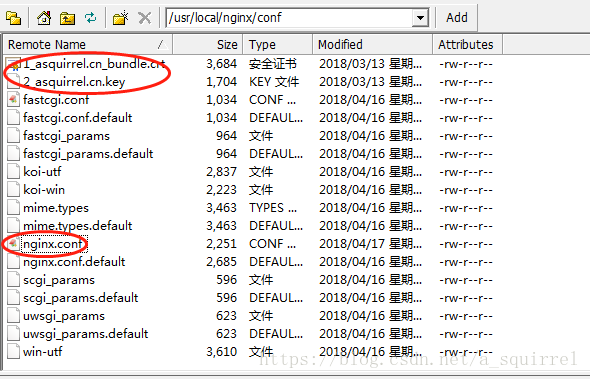
1.打开linux下Nginx安装目录找到配置文件nginx.conf(一般路径为:/usr/local/nginx/conf)进行如下配置
# HTTPS server

    server {

        listen       443 ssl;#网页浏览端口,主要是用于HTTPS服务

        server_name  www.asquirrel.cn asquirrel.cn;#顶级域名,二级域名

	ssl on;

        ssl_certificate 1_asquirrel.cn_bundle.crt;#证书路径

        ssl_certificate_key 2_asquirrel.cn.key;#证书秘钥路径

        ssl_session_timeout  5m;

	fastcgi_param   HTTPS               on;

	fastcgi_param   HTTP_SCHEME         https;

        location / {

	    proxy_pass https://ewp_web_contract; #代理转发的路径

	    proxy_redirect default;

	    proxy_set_header Host $host;

	    proxy_set_header X-Real-IP $remote_addr;

	    proxy_set_header X-Forwarded-for $proxy_add_x_forwarded_for;

	    proxy_set_header X-Forwarded-Proto https;

	    error_page 502 = /500.html;

        }

    }
2.将下载好的证书放在与nginx.conf同级目录下,可新建文件夹,也可不建
证书用Nignx文件夹下的,不要用其他文件夹下的
3.监听80端口,转发请求
server {

        listen       80;

        server_name  asquirrel.cn;#访问的路径

	if ($host != 'www.asquirrel.cn') {

		rewrite ^/(.*)$ https://www.asquirrel.cn/$1 permanent;#转发的路径

	}

    }
4.项目web模块需做如下配置(主要作用于项目内部进行https交互)
第一:添加tomcat文件夹下的证书
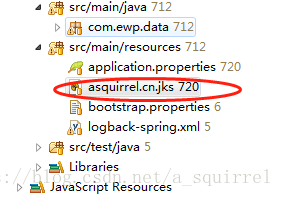
第二:配置application.properties
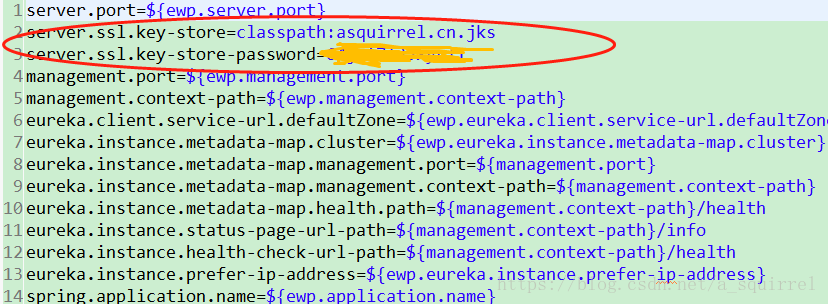
五:重启项目web层服务和Nignx,访问域名就可以看到浏览器显示安全标志
GitHub:https://github.com/acutesquirrel/spring-cloud/tree/master/add-https
Springcloud/Springboot项目绑定域名,使用Nginx配置Https的更多相关文章
- ******可用 SpringBoot 项目打包分开lib,配置和资源文件
spring-boot多模块打包后,无法找到其他模块中的类https://blog.csdn.net/Can96/article/details/96172172 关于SpringBoot项目打包没有 ...
- Nginx 配置 HTTPS(多域名)
平常开发要求比较低, 依然在用 HTTP, 但到了微信小程序就不行了, 腾讯和苹果都对 API 提出了 HTTPS 的要求. 尤其是苹果, 不仅要求 HTTPS, 还要求 TLS 协议版本要在 1.2 ...
- windwos下nginx 配置https并http强制跳转https
windwos下nginx 配置https并http强制跳转https 一.首先配置证书文件 申请证书文件,这里就不做详细过程了,直接看证书文件结果. 这是两个证书的关键文件 打开ngxin下con ...
- Nginx配置Https(详细、完整)
Nginx配置Https(详细.完整) 原文链接:请支持原创 前置条件: 在配置https之前请确保下面的步骤已经完成 服务器已经安装nginx并且通过http可以正常访问 不会安装nginx的可以参 ...
- 【Nginx(五)】Nginx配置Https证书
大致的流程如下 1.申请Https证书,绑定域名信息; 由于自己的服务器是腾讯云服务器, 这里就在腾讯云上申请SSL证书, 申请地址: https://console.cloud.tencent.co ...
- Nginx配置Https
1.申请证书: https://console.qcloud.com/ssl?utm_source=yingyongbao&utm_medium=ssl&utm_campaign=qc ...
- 【转】Linux下nginx配置https协议访问的方法
一.配置nginx支持https协议访问,需要在编译安装nginx的时候添加相应的模块--with-http_ssl_module 查看nginx编译参数:/usr/local/nginx/sbin/ ...
- nginx配置https双向验证(ca机构证书+自签证书)
nginx配置https双向验证 服务端验证(ca机构证书) 客户端验证(服务器自签证书) 本文用的阿里云签发的免费证书实验,下载nginx安装ssl,文件夹有两个文件 这两个文件用于做服务器http ...
- Nginx 配置https 服务
一.HTTPS 服务 为什么需要HTTPS? 原因:HTTP不安全 1.传输数据被中间人盗用.信息泄露 2.数据内容劫持.篡改 HTTPS协议的实现 对传输内容进行加密以及身份验证 HTTPS加密校验 ...
随机推荐
- HDFS基本命令行操作及上传文件的简单API
一.HDFS基本命令行操作: 1.HDFS集群修改SecondaryNameNode位置到hd09-2 (1)修改hdfs-site.xml <configuration> //配置元数据 ...
- MFC Spin 控件
一般应用: 设置属性: Auto Buddy(自动取关联控件为TAB顺序前一个)Set Buddy Interger(使控件设置关联控件数值,这个值可以是十进制或十六进制)Wrap(数值超过范围时循环 ...
- C++ 带有通配符*与?的字符串匹配
题目:两个字符串,一个是普通字符串,另一个含有*和?通配符,*代表零个到多个任意字符,?代表一个任意字符,通配符可能多次出现.写一个算法,比较两个字符串是否相等. 发现许多公司笔试面试都有这道题目,于 ...
- windows脚本-CMD和Batch
一.DOS,CMD和batch DOS是磁盘操作系统(英文:Disk Operating System)的缩写,是个人计算机上的一类操作系统.从1981年直到1995年的15年间,DOS在IBM PC ...
- SSH secure shell 原理与运用
转: http://www.ruanyifeng.com/blog/2011/12/ssh_remote_login.html 作者: 阮一峰 日期: 2011年12月21日 SSH是每一台Linux ...
- Yii2 教程 - yii2-redis 扩展详解
该教程已被合并到<Yii2 权威指南中文版>中!Yiichina 教程地址为<yii2-redis 扩展详解>! 一.简介 yii2-redis 扩展为 Yii2 框架提供了 ...
- opencart 单入口文件简单分析
opencart 单入口文件简单分析 opencart是基于mvcl的商城系统,据说是一个外国有人单独开发.比较牛叉.但是又不大符合国人习惯,目前国内opencart社区也是不少. 简单分析了下单 ...
- [React-Native]入门(Hello World)
(1)需要一台Mac(OSX),这个是前提,建议还是入手一本啦. (2)在Mac上安装Xcode,建议Xcode 6.3以上版本 (3)安装node.js:https://nodejs.org/dow ...
- SQL Server 使用触发器(trigger)发送电子邮件
sql 使用系统存储过程 sp_send_dbmail 发送电子邮件语法: sp_send_dbmail [ [ @profile_name = ] 'profile_name' ] [ , [ @r ...
- PL/SQL Developer 登录 Oracle 12c和Win10下安装Oracle 11g
安装了Oracle 12c 后使用PL/SQL Developer怎么也不能连接到Oracle 12c.网上找一下,按照fcflying所说的操作成功了,所以做个笔记: 1)安装Oracle 12c ...