
Code a simple telnet client using sockets in python
测试端口是否开放的python脚本
原文: https://www.binarytides.com/code-telnet-client-sockets-python/
配置: 120.79.14.81:81/test.php 下面会返回数据。
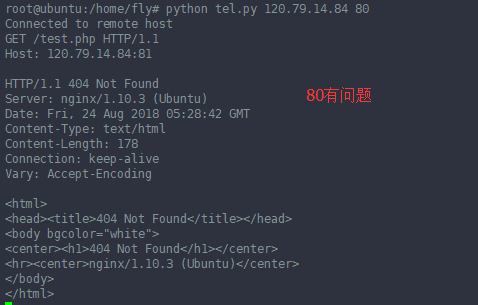
telnet 80 不能获取到81端口下的web服务的数据。
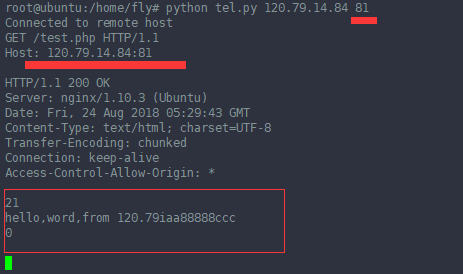
telnet 81 就可以发送数据了,
nginx 的access.log的日志:

--------------------------------------------------------------------
The telnet client is a simple commandline utility that is used to connect to socket servers and exchange text messages. Here is an example of how to use telnet to connect to google.com and fetch the homepage.
$ telnet google.com 80
The above command will connect to google.com on port 80.
$ telnet google.com 80

Trying 74.125.236.69...

Connected to google.com.

Escape character is '^]'.
Now that it is connected, the telnet command can take user input and send to the server, and whatever the server replies with, will be displayed on the terminal. For example send the http GET command and hit enter twice.
GET / HTTP/1.1
Sending the above will generate some response from the server. Now we are going to make a similar telnet program in python. The program is short and simple. To implement a program that takes user input and fetches results from the remote server at the same, requires somekind of parallel processing. Now the obvious solution to this is to use threads. One thread to keep receiving message from server and another to keep taking in user input. But there is another way to do this apart from threads. And that is select function. Select function allows to monitor multiple sockets/streams for readability and will generate an even if any of the sockets is ready.
Lets take a look at the full code. Its less than 50 lines including comments.
|
1
2
3
4
5
6
7
8
9
10
11
12
13
14
15
16
17
18
19
20
21
22
23
24
25
26
27
28
29
30
31
32
33
34
35
36
37
38
39
40
41
42
43
44
45
46
47
|
# telnet program exampleimport socket, select, string, sys#main functionif __name__ == "__main__": if(len(sys.argv) < 3) : print 'Usage : python telnet.py hostname port' sys.exit() host = sys.argv[1] port = int(sys.argv[2]) s = socket.socket(socket.AF_INET, socket.SOCK_STREAM) s.settimeout(2) # connect to remote host try : s.connect((host, port)) except : print 'Unable to connect' sys.exit() print 'Connected to remote host' while 1: socket_list = [sys.stdin, s] # Get the list sockets which are readable read_sockets, write_sockets, error_sockets = select.select(socket_list , [], []) for sock in read_sockets: #incoming message from remote server if sock == s: data = sock.recv(4096) if not data : print 'Connection closed' sys.exit() else : #print data sys.stdout.write(data) #user entered a message else : msg = sys.stdin.readline() s.send(msg) |
Small program! Just run it in a terminal like this
$ python telnet.py google.com 80

Connected to remote host
Once connected it shows the connected message. Once the message pops up, its time to type in some message to send to the remote server. Type the same GET message and send by hitting enter twice. Some response should be generated.
The above program does the task of listening for message from remote server and listening for user input at the same time, and without threads.
|
1
2
3
4
|
socket_list = [sys.stdin, s] # Get the list sockets which are readableread_sockets, write_sockets, error_sockets = select.select(socket_list , [], []) |
The socket list contains 2 sockets. First is the sys.stdin which is stream for standard input or the user input at the command line. The other one is the socket that is connected to remote server. The select function keeps listening on both of them. It is a blocking function and returns if either of the 2 things happens
1. Server sends a message

2. User hits enter after typing in a message
If the server socket is ready to be read, then just call recv function on it. If the user input is ready to be read then call sys.stdin.readline() function get the user message. Thats all about it.
The telnet client shown above is a minimal one. The actual telnet client has lots of other features which you can try to implement. The above telnet client can be used as a terminal chat client as well with little modifications. Just have to write a chat server. Will come up with a post on that soon.
Note
The above shown program will work only on linux and not on windows. The program uses the select function read the command line input (stdin). On windows the select function cannot read file descriptors. It can only read sockets created inside winsock. The python documentation on selectfunction mentions this
File objects on Windows are not acceptable, but sockets are. On Windows, the underlying select() function is provided by the WinSock library, and does not handle file descriptors that don’t originate from WinSock.
Code a simple telnet client using sockets in python的更多相关文章
- A Telnet Client Using Expect
The following expect script achieves a simple telnet client: login -> send command -> exit. Th ...
- 转载:Character data is represented incorrectly when the code page of the client computer differs from the code page of the database in SQL Server 2005
https://support.microsoft.com/en-us/kb/904803 Character data is represented incorrectly when the cod ...
- A simple Test Client built on top of ASP.NET Web API Help Page
Step 1: Install the Test Client package Install the WebApiTestClient package from the NuGet Package ...
- Python CODE——Nonblocking I/O client AND Delaying Server
#!Nonblocking I/O - Chapter 5 -pollclient.py import socket,sys,select port=51423 host='localhost' sp ...
- [文摘]Quick Start to Client side COM and Python
摘自:PyWin32.chm Introduction This documents how to quickly start using COM from Python. It is not a t ...
- Segger RTT : Real Time Terminal SRAM 调试解决方法
http://segger.com/jlink-real-time-terminal.html Real Time Terminal SEGGER's Real Time Terminal (RTT) ...
- OData Client Code Generator
转发. [Tutorial & Sample] How to use OData Client Code Generator to generate client-side proxy cla ...
- 【RL-TCPnet网络教程】第32章 RL-TCPnet之Telnet服务器
第32章 RL-TCPnet之Telnet服务器 本章节为大家讲解RL-TCPnet的Telnet应用,学习本章节前,务必要优先学习第31章的Telnet基础知识.有了这些基础知识之后,再搞 ...
- Code Project精彩系列(转)
Code Project精彩系列(转) Code Project精彩系列(转) Applications Crafting a C# forms Editor From scratch htt ...
随机推荐
- 微信开发(一)SAE环境搭建
登录新浪sae平台,点击sae 点击创建新应用->继续创建 环境选择: 填好后点击创建应用 点击创建版本 点击链接可以访问,点击编辑代码可以在线编辑,代码上传可以是svn,git,可以在线上传 ...
- 八皇后--python代码
迭代和递归方法的运用 import random def prettyprint(solution): #图形化处理数据 def line(pos,length=len(solution)): #单行 ...
- Linux中用户与组相关配置文件(整理)
用户与组信息存放位置 说明 注释 /etc/passwd 存放用户基本信息 记录了每个用户的一些基本属性,并对所有用户可读,每一行记录对应一个用户,属性之间通过冒号分隔. 每一个行6个冒号,7个属性. ...
- PIPESTATUS(bash) + pipefail(ksh)
I have two processes foo and bar, connected with a pipe: $ foo | bar bar always exits 0; I'm interes ...
- 6大原则java
1.开闭原则(Open Close Principle)定义:一个软件实体如类.模块和函数应该对扩展开放,对修改关闭. 开放-封闭原则的意思就是说,你设计的时候,时刻要考虑,尽量让这个类是足够好 ...
- 创建操作表(UIActionSheet)
UIActionSheet用来创建一个操作表,它的初始化代码如下: - (IBAction)testActionSheet:(id)sender { UIActionSheet *actionShee ...
- Hibernate 悲观锁(Pessimistic Locking)
在日常开发中并发应该是比较常遇到的业务场景,Hibernate给我们提供了并发操作,接下来简单介绍一下Hibernate悲观控制. 悲观锁:用户其实并不需要花很多精力去担心锁定策略的问题,通常情况下, ...
- HDU 5671 Matrix 水题
Matrix 题目连接: http://acm.hdu.edu.cn/showproblem.php?pid=5671 Description There is a matrix M that has ...
- Educational Codeforces Round 12 E. Beautiful Subarrays 字典树
E. Beautiful Subarrays 题目连接: http://www.codeforces.com/contest/665/problem/E Description One day, ZS ...
- April Fools Day Contest 2016 C. Without Text 信号与系统
C. Without Text 题目连接: http://www.codeforces.com/contest/656/problem/C Description You can preview th ...