
微信小程序之tabbar切卡
最近在研究小程序的时候,遇到了一个问题,就是tabbar切卡,在android上有fragment,在RN上也有提供一个第三方的组件来用,微信小程序,好像没有专门的一个组件来实现这个功能,度娘了大半天,虽然也有好多人实现过这样的功能,但是我发现要么是不符合我的需求,那么就是实现起来过于繁琐。于是我参考多个高手写的博客,实现出了一个符合自己需求的。先上代码。
先看js文件:
 const util = require('../../utils/util.js');

 Page({

     data: {

         navTab:["投资","理财"],

         /**

          * 页面配置

          */

         winWidth: 0,

         winHeight: 0,

         // tab切换

         currentTab: 0,

         arrayList:[1,2,3,4,5,6,6,7,6,3,2,1,8,9,6,0,4],

         modalHidden:true,

         content:"这是一个表情",

         imagesHeightList:[],

         imageList:[

             "../../images/image1.jpg",

             "../../images/image2.jpg",

             "../../images/image3.jpg",

         ],

         datalist:[

             "../../images/image1.jpg",

             "../../images/image2.jpg",

             "../../images/image3.jpg",

         ],

     },

     /**

      * 页面初始化

      * options 为页面跳转所带来的参数

      */

     onLoad: function (options) {

         var that = this;

         /**

          * 获取系统信息

          */

         wx.getSystemInfo({

             success: function (res) {

                 that.setData({

                     winWidth: res.windowWidth,

                     winHeight: res.windowHeight

                 });

             }

         });

     },

     onReady: function () {

     },

 /**

  * 显示弹窗

  */

     modalShow:function(){

         var that = this;

         that.setData({

             modalHidden:false,

         });

     },

 /**

  * 点击取消,确认按钮

  */

 modalChange:function(){

     var that = this;

         that.setData({

             modalHidden:true,

         });

 },

     /**

      * 滑动切换tab

      */

     bindChange: function (e) {

         var that = this;

         that.setData({

              currentTab: e.detail.current

              });

     },

     /**

      * 点击tab切换

      */

     swichNav: function (e) {

 console.log("--------");

         var that = this;

         if (that.data.currentTab === e.target.dataset.idx) {

             return false;

         } else {

             that.setData({

                 currentTab: e.target.dataset.idx

             })

         }

     },

 })
css代码
 /**index.wxss**/

 .swiper-tab{

     width: 100%;

     border-bottom: 0.5rpx solid #cccccc;

     text-align: center;

     line-height: 80rpx;}

 .top-tab{

   width: 750rpx;

   height: 100rpx;

   background: #fff;

   color: #000;

   font-size: 28rpx;

   font-weight: bold;

   line-height: 100rpx;

   border-bottom: 4rpx solid #eee;

   margin: 0 20rpx 8rpx 0rpx;

   position: fixed;

   top: 0;

   z-index: 9999;

 }

 .shift{

   position:absolute;

   bottom: 1px;

   height: 3px;

   width: 20%;

   background: red;

 }

 .on{

     color: red;

     border-bottom: 2rpx solid red ;

     }

 .swiper-box{

     display: block;

     height: 100%;

     width: 100%;

     overflow: hidden;

     }

 .swiper-box view{

     text-align: center;

 }

 .swiper-tab{

     height: 30px;

     line-height: 30px;

     background: #FFF;

     display: flex;

     position: relative;

     z-index: 2;

     border-bottom: 1px solid #F4F4F4;

     flex-direction:row;

     justify-content:center;

     align-items:center;

     }

 .swiper-tab-list{

     margin: 0 20px;

     padding: 0 4px;

     font-size: 28rpx;

     font-family: Helvetica, Arial, "Hiragino Sans GB", "Source Han Sans CN", "PingFang SC", Roboto, "微软雅黑", "Heiti SC", "Microsoft Yahei", sans-serif }

 .on{ border-bottom: 1px solid #48C23D; color: #48C23D; }

 .swiper-box{

      display: block;

      height: 100%;

      width: 100%;

      overflow: hidden;

      }

 .hot-box{ display: block; height: 100%; font-family: Helvetica, Arial, "Hiragino Sans GB", "Source Han Sans CN", "PingFang SC", Roboto, "微软雅黑", "Heiti SC", "Microsoft Yahei", sans-serif }

 .hot-box-main{ display: block; overflow: hidden; margin-bottom: 20px; background: #FFF; }

 .hot-main{ height: 50px; background: url("../../static/001.jpg") #FFF no-repeat 0 50%; background-size: cover; padding: 30px 20px; position: relative; z-index: 1; }

 .hot-main::before{ position: absolute; top: 0; bottom: 0; left: 0; right: 0; content: ''; background-image: linear-gradient(180deg, rgba(0,0,0,0.05) 5%,rgba(0,0,0,0.85) 100%); }

 .hot-main-box{ position: relative; z-index: 2; }

 .hot-main-title{ color: #FFF; font-size: 34rpx;  }

 .list-box{ padding: 20px 20px 20px 40px; display: block; font-size: 30rpx; border-bottom: 1px solid #F6F6F6; position: relative;}

 .list-box::after{ display: block; content: ""; position: absolute; width: 6px; height: 6px; background: #ff6511; border-radius: 50%; top: 25px; left: 20px; }

 .list-box-title{ font-weight: 400; line-height: 42rpx; }

 .list-box-sub{ font-size: 24rpx; color: #666; padding-top: 6px; }

 .hot-box-more{ text-align: center; font-size: 22rpx; color: #999; margin-bottom: 30px; }

 .hot-box-more image{ width: 80px; height: 16px; display: block; margin: 0 auto;}

 .swiper-boxs { height: 200px;

 background: #F2F2F2;

 }

 .swiper-boxs-img {

     display: block;

     width: 100%;

     height: 200px;

     position: relative;

     }

 .swiper-boxs-img::before{

     position: absolute;

     top: 0;

     bottom: 0;

     left: 0;

     right: 0;

     content: '';

      background-image: linear-gradient(180deg, rgba(0,0,0,0.05) 5%,rgba(0,0,0,0.5) 100%);

      }

 /*理财 */

 .themes-box{

     display: block;

     }

 .themes-box-top{

     text-align: center;

     padding-bottom: 16px;

     padding-top: 16px;

     background: #F9F9F9; }

 .themes-box-title{

     font-size: 16px;

     font-weight: 500;

     display: block; }

 .themes-box-subtitle{

     font-size: 12px;

     color: #666;

     display: block;

     margin-top: 4px;

     }

 /* 投资列表 */

 .themes-list{

     background: #FFF;

     display: block;

     margin-bottom: 20px;

     }

 .themes-list-box{

     display: block;

     position: relative;

     padding: 16px 20px;

     border-bottom: 1px solid #F2F2F2;

      }

 .themes-list-thumbnail{

     position: absolute;

     left: 20px;

     top: 16px;

     height: 40px;

     width: 40px;

      }

 .themes-list-img{

     width: 40px;

      height: 40px;

       border-radius: 4px;

        border: 1px solid #F2F2F2;

        }

 .themes-list-main{

      margin-left: 50px;

       }

 .themes-list-name{

      font-size: 14px;

      color: #444;

      height: 20px;

      line-height: 20px;

      overflow: hidden;

      }

 .themes-list-description{

     font-size: 12px;

     color: #999;

     height: 20px;

     line-height: 20px;

     overflow: hidden;

      }

      /*理财系列*/

 .WxMasonryView{

   column-count:2;

   column-gap: 2px;

   width: 100%;

 }

 .WxMasonry{

   width: 95%;

   background: #fefefe;

   border: 2px solid #fcfcfc;

   box-shadow: 0px 2px 2px rgba(34, 25, 25, 0.4);

   margin: 5px 2px 2px 2px;

   padding: 1px;

   padding-bottom: 5px;

   transition: opacity .4s ease-in-out;

   display: inline-block;

 }

 .WxMasonryImage{

   width: 100% !important;

   display: inline-block;

 }

 .swiper-box{

     display: block;

     height: 100%;

     width: 100%;

     overflow: hidden;

     }

 .hot-box{

     display: block;

     height: 100%;

      font-family: Helvetica, Arial, "Hiragino Sans GB", "Source Han Sans CN", "PingFang SC", Roboto, "微软雅黑", "Heiti SC", "Microsoft Yahei", sans-serif

       }

 .hot-box-main{

     display: block;

      overflow: hidden;

       margin-bottom: 20px;

        background: #FFF;

        }

 .hot-main::before{ position: absolute; top: 0; bottom: 0; left: 0; right: 0; content: ''; background-image: linear-gradient(180deg, rgba(0,0,0,0.05) 5%,rgba(0,0,0,0.85) 100%); }

 .hot-box-top{ padding: 20px; border-bottom: 1px solid #F6F6F6; text-align: center; }

 .hot-box-title{ font-size: 32rpx; height: 30px; line-height: 32px; font-weight: 400; color: #444; padding: 5px 10px; border: 1px solid #444; }

 .list-box{

   padding: 0;

   display: inline-block;

   font-size: 30rpx;

   border-bottom: 1px solid #F6F6F6;

 }

 .list-box-title{ font-weight: 300; line-height: 42rpx; }
在看看html上面的代码
 <view class="swiper-tab">

 <view class="swiper-tab-list flex-item {{currentTab==idx ? 'on' : ''}}" wx:for="{{navTab}}" wx:for-index="idx" wx:for-item="itemName" data-idx="{{idx}}" bindtap="swichNav">

     {{itemName}}

   </view>

 </view>

 <swiper current="{{currentTab}}" class="swiper-box" duration="300" style="height:{{winHeight - 31}}px" bindchange="bindChange">

     <!-- 投资页面 -->

     <swiper-item>

         <scroll-view class="hot-box" scroll-y="true"                         upper-threshold="50"

                     lower-threshold="100"

                     bindscrolltolower="scrolltolower">

 <view class="themes-list">

                 <view class="themes-list-box" wx:for="{{arrayList}}">

                     <!--<navigator url="../themes/themes?id={{item.id}}">-->

                         <view class="themes-list-thumbnail">

                             <!--<image class="themes-list-img" src="{{item.thumbnail}}" />-->

                         </view>

                         <view class="themes-list-main" bindtap="modalShow">

                             <view class="themes-list-name">

                             <text>皇家林</text>

                             </view>

                             <view class="themes-list-description">

                             <text>是帅哥</text>

                             </view>

                         </view>

                     <!--</navigator>-->

                     <modal title="标题" confirm-text="确认" cancel-text="取消" hidden="{{modalHidden}}" bindconfirm="modalChange" bindcancel="modalChange">

     确定要进入详情页面吗。

 </modal>

                 </view>

             </view>

         </scroll-view>

 </swiper-item>

     <!-- 理财页面 -->

     <swiper-item>

         <scroll-view class="hot-box" scroll-y="true" upper-threshold="50"

                     lower-threshold="100" bindscrolltolower="scrolltolower">

 <text>理财页面</text>

 <swiper class="swiper-box" duration="300" style="height:{{winHeight - 31}}px" bindchange="bindChange">

     <swiper-item>

         <scroll-view class="hot-box" scroll-y="true" upper-threshold="50"

                     lower-threshold="100" bindscrolltolower="scrolltolower">

             <view class="hot-box-main WxMasonryView" >

                 <block wx:for="{{datalist}}" wx:for-item="item" wx:for-index="i" wx:key="">

                     <view class="WxMasonry" wx:for="{{imageList}}" wx:for-index="j" wx:for-item="items" wx:key="">

                             <image class="WxMasonryImage" id="{{i*10+j}}" style="width:{{imagesHeightList[i*10+j].width}}px;height:{{imagesHeightList[i*10+j].height}}px"  bindload="WxMasonryImageLoad" src="../../images/imagebiaoqing.jpg"/>

                             <view class="list-box-title">

                            <text>{{content}}</text>

                             </view>

                     </view>

                 </block>

             </view>

         </scroll-view>

     </swiper-item>

 </swiper>

         </scroll-view>

     </swiper-item>

 </swiper>
最后我们看看效果图
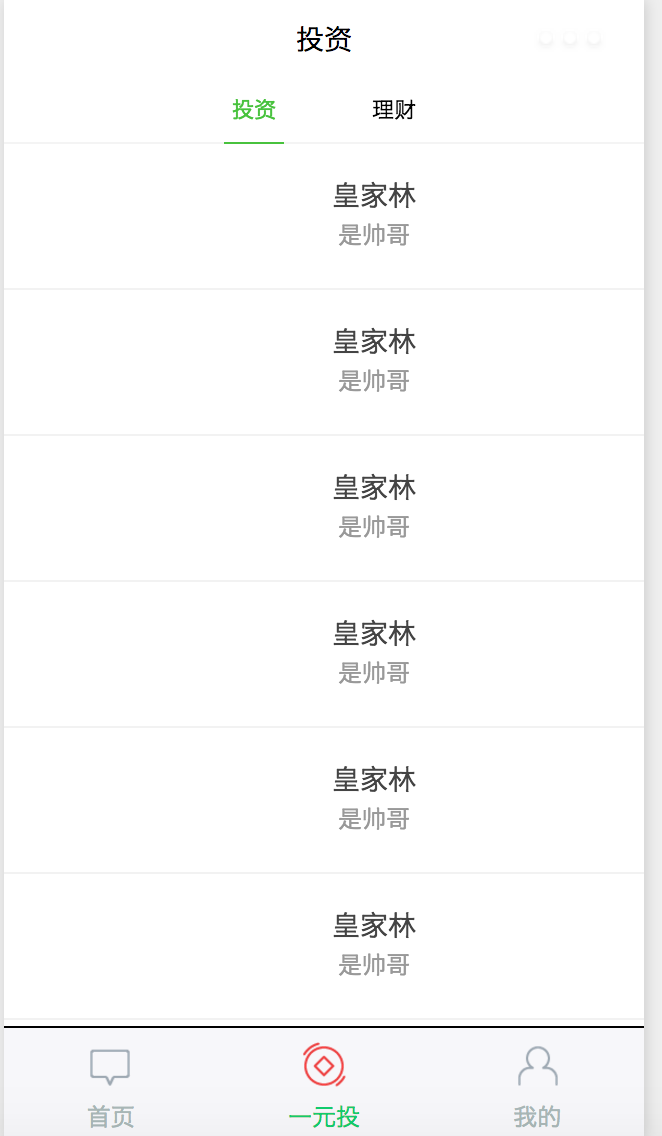
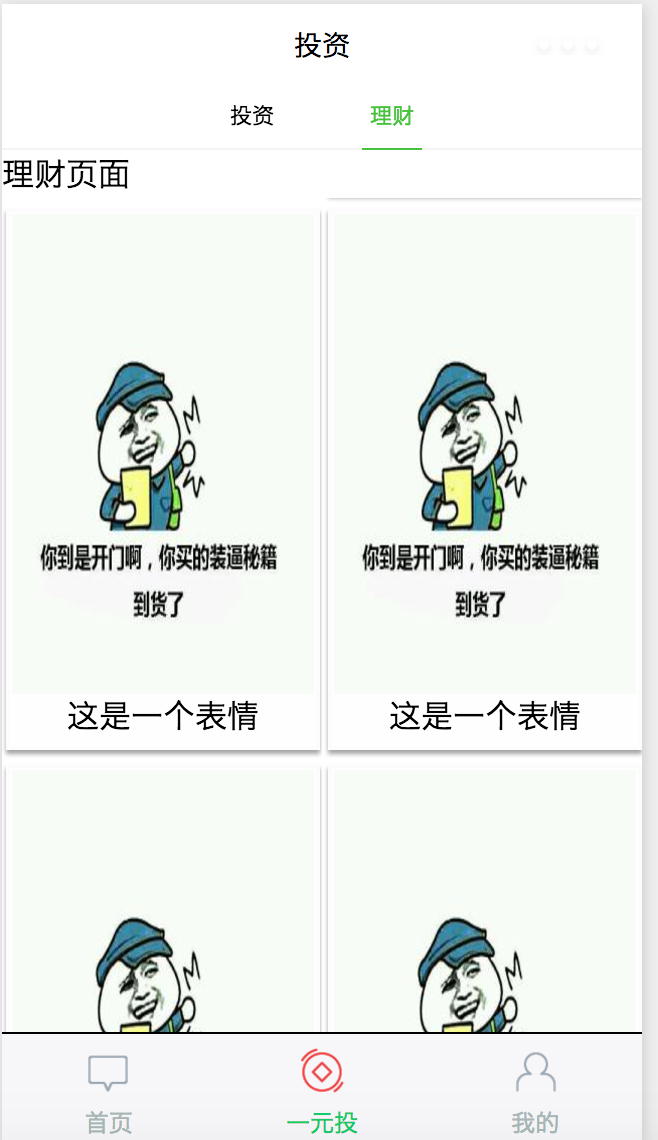
这里如果全部代码复制,会发现往左边滑动的时候滑动不了,不要奇怪,那是因为在理财页面我想实现一个瀑布流,是一个半成品,存在bug,大家去掉那一部分就会正常了。
微信小程序之tabbar切卡的更多相关文章
- 微信小程序消息通知-打卡考勤
微信小程序消息通知-打卡考勤 效果: 稍微改一下js就行,有不必要的错误,我就不改了,哈哈! index.js //index.js const app = getApp() // 填写微信小程序ap ...
- 微信小程序自定义 tabbar
一定的需求情况下,无法使用小程序原生的 tabbar 的时候,需要自行实现一个和 tabbar 功能一模一样的自制组件. 查阅了海量的博客和文档之后,亲自踩坑.总结了三种在不使用微信小程序原生 tab ...
- 微信小程序自定义tabbar的实现
微信小程序自定义tabbar的实现 目的:当采用微信的自定义tabbar组件的时候,切换的时候会出现闪屏的效果:当使用微信默认的tabbar的时候,限制了tabbar的数量以及灵活配置. 方案:自己动 ...
- 图解微信小程序---添加tabBar底部菜单,添加已做好轮播图操作
图解微信小程序---添加tabBar底部菜单,添加已做好轮播图操作 什么是tabBar? 顶部或者底部tab栏如果小程序是一个多 tab 应用(客户端窗口的底部或顶部有 tab 栏可以切换页面),可以 ...
- 微信小程序关于tabbar点击切换数据不刷新问题
微信小程序中经常遇到的需求就是我提交了一个表单或者进行了一个操作,需要在我的个人中心页面中实时显示出来,但是小程序中的tabbar切换类似于tab切换 并不会进行页面刷新请求 所以总是会造成一些数据更 ...
- 解决微信小程序ios端滚动卡顿的问题
方案1:直接使用微信小程序提供的 “scroll-view " 组件. <scroll-view scroll-y style="height: 100%;"> ...
- 微信小程序自定义TabBar
项目中需要根据用户角色控制TabBar中各Item的显示和隐藏,然而小程序自带TabBar没有提供隐藏某个item的功能,只好自己动手写了一个. 1.wxml文件 <view class=&qu ...
- 【微信小程序】tabBar的显示问题
tabBar不显示 在app.json中配置了4个页面,在tabBar的list中随意写了两个页面,编译后发现不能显示tabBar. { "pages": [ "page ...
- 微信小程序自定义tabbar的问题
个人感觉小程序的tab样式自定义的能力有所欠缺,不够美观,于是今天自己diy了一个tab 测试的时候发现,无论是使用navigator跳转(会出现点击的效果)还是用bindtap(触摸),因为没有定义 ...
随机推荐
- js原型和原型链[转]
附上原文出处:http://hzjavaeyer.group.iteye.com/group/wiki/3086-JavaScript-core-concepts 一.概念: 原型对象:JavaScr ...
- HttpClient由Client客户端上传File文件流至Server服务端
客户端方法 public static void main(String[] args) { File file=new File("E:\\lucene\\rev\\全年平台受理量.doc ...
- 86. Partition List (List)
Given a linked list and a value x, partition it such that all nodes less than x come before nodes gr ...
- 钉钉开发笔记(六)使用Google浏览器做真机页面调试
注: 参考文献:https://developers.google.com/web/ 部分字段为翻译文献,水平有限,如有错误敬请指正 步骤1: 从Windows,Mac或Linux计算机远程调试And ...
- Python3 模块与包
一.模块介绍 什么是模块? 常见的场景:一个模块就是一个包含了一组功能的Python文件,比如spam.py,模块名为spam,可以通过import spam使用. 在Python中,模块的使用方式都 ...
- Auto Control 002 自动控制的数学模型
2016-9-27 20:20:08 还需要进行修改和完善.先这种理论性的博客不太好写,请大家见谅. 在上一篇博客中,我们重点了解了关于自动控制原理的一些基本概念 以及一些相关的术语,以及能够分析控制 ...
- asp.net 母版页使用详解
母版页是VS2005中新引入的一个概念,它很好地实现界面设计的模块化,并且实现实现了代码的重用.它就像婚纱影楼中的婚纱模板,同一个婚纱模板可以给不同的新人用,只要把他们的照片贴在已有的婚纱模板就可以形 ...
- Python 中 "is" 与 "==" 操作有什么区别?
转自:https://foofish.net/what-is-difference-between-is-and-euqals.html 在 Python 中,比较两个对象(变量)是否相等,可以用 & ...
- 前台的json数组转化为List<T>集合
using System;using System.Collections.Generic;using System.Linq;using System.Runtime.Serialization;u ...
- Windows7 64位 安装mysql
Windows上安装MySQL还是比较方便的,之前做过一个Windows10上面的安装方法,但是一个同学说自己的电脑是Windows7的,所以我写一个Windows7上的MySQL安装方法. MySQ ...