
使用Pillow库 创建简单验证码
使用Pillow生成简单的验证码
本想做成字体各自按随机角度倾斜, 但没有在Pillow中找到相关的方法
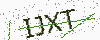
import random
from PIL import Image, ImageDraw, ImageFont
import time
import os
import string

class GetCaptcha:
    size = (100, 40)
    source = tuple(string.digits + string.ascii_letters)
    number = 4
    background_color = (250, 250, 250)
    fontsize = 25
    font_path = os.path.join(os.path.dirname(__file__), 'verdana.ttf')
    random.seed(time.time())
    fontcolor = (random.randint(0, 80), random.randint(0, 80), random.randint(0, 80))
    draw_line = True
    line_number = 3
    line_color = (random.randint(0, 250), random.randint(0, 255), random.randint(0, 250))
    draw_point = True
    rotate = True

    @classmethod
    def image_rotate(cls, original_image):
        image = original_image.rotate(random.randint(-15, 15), expand=0)
        back_ground = Image.new('RGBA', cls.size,cls.background_color)
        return Image.composite(image, back_ground, image)

    @classmethod
    def draw_text(cls):
        """return a captcha include digit and letter"""
        return ''.join(random.sample(cls.source, cls.number))

    @classmethod
    def __draw_line(cls, draw, width, height):
        begin = (random.randint(0, width), random.randint(0, height))
        end = (random.randint(0, width), random.randint(0, height))
        draw.line([begin, end], fill=cls.line_color)

    @classmethod
    def __draw_point(cls, draw, point_size, width, height):
        size = min(100, max(0, int(point_size)))
        for w in range(width):
            for h in range(height):
                tmp = random.randint(0, 100)
                if tmp > 100 - size:        # make sure would not point too much
                    draw.point((w, h), fill=(150, 150, 150))

    @classmethod
    def draw_captcha(cls):
        width, height = cls.size
        image = Image.new('RGBA', (width, height), cls.background_color)
        font = ImageFont.truetype(cls.font_path, cls.fontsize)
        draw = ImageDraw.Draw(image)
        text = cls.draw_text()
        font_width, font_height = font.getsize(text)
        draw.text(((width - font_width) / 2, (height - font_height) / 2), text, font=font, fill=cls.fontcolor)

        if cls.draw_line:
            for x in range(0, cls.line_number):
                cls.__draw_line(draw, width, height)

        if cls.draw_point:
            cls.__draw_point(draw, 5, width, height)

        return (text, cls.image_rotate(image))

if __name__ == "__main__":
    captcha = GetCaptcha()
    text, image = captcha.draw_captcha()
    image.save('code.png', "PNG")
在Django的视图中返回
def captcha_view(request):
    text, image = GetCaptcha.draw_captcha()
    output = BytesIO()
    image.save(output,'png')
    output.seek(0)
    response = HttpResponse()
    response['content/type'] = "image/png"
    response.write(output.read())
    return response
使用Pillow库 创建简单验证码的更多相关文章
- php笔记之GD库图片创建/简单验证码
燕十八 公益PHP培训 课堂地址:YY频道88354001 学习社区:www.zixue.it php画图:比如说验证码,缩略图,加水印都要用到GD库,所以要开启gd2库,才能用 首先找到php.in ...
- php中运用GD库实现简单验证码
昨天学习了运用php的GD库进行验证码的实现. 首先可以用phpinfo()函数看一下GD库有没有安装,我用的wampserver是自动给安装的. 主要的步骤是: 1.生成验证码图片 2.随机生成字符 ...
- PHP 用session与gd库实现简单验证码生成与验证的类
验证码是为了防止机器灌水给网站带来污染以及增加服务器负担而出现的.目前大大小小的网站都有验证码.今天自己实现了一个简单的验证码类.说简单是因为没有加一些干扰的弧线等等,只是将文字旋转了一下.当然,因为 ...
- 基于Python Pillow库生成随机验证码
from PIL import Image from PIL import ImageDraw from PIL import ImageFont import random class ValidC ...
- python基于pillow库的简单图像处理
from PIL import Image from PIL import ImageFilter from PIL import ImageEnhance import matplotlib.pyp ...
- php中GD库的简单使用
在php中需要图像处理的地方GD库会发挥重要的作用,php可以创建并处理包括GIF,PNG,JPEG,WBMP以及XPM在内的多种图像格式,简单的举几个例子: 1.用GD库会创建一块空白图片,然后绘制 ...
- 用imagemagick和tesseract-ocr破解简单验证码
用imagemagick和tesseract-ocr破解简单验证码 Tesseract-ocr据说辨识程度是世界排名第三,可谓神器啊. 准备工作: 1.安装tesseract-ocr sudo apt ...
- 基于TensorFlow的简单验证码识别
TensorFlow 可以用来实现验证码识别的过程,这里识别的验证码是图形验证码,首先用标注好的数据来训练一个模型,然后再用模型来实现这个验证码的识别. 生成验证码 首先生成验证码,这里使用 Pyth ...
- php生成动态验证码 加减算法验证码 简单验证码
预览效果: <?php /** *ImageCode 生成包含验证码的GIF图片的函数 *@param $string 字符串 *@param $width 宽度 *@param $height ...
随机推荐
- kubernetes1.13.5安装部署
Kubernetes 一. Kubernetes介绍 各节点所需组件 Master:docker,kubeadm,kubelet, 组件 版本 备注 Kubelet 1.13.5 组件 Kube ...
- MySQL 存储过程的变量
MySQL 存储过程的变量 变量是一个命名数据对象,变量的值可以在存储过程执行期间更改.我们通常使用存储过程中的变量来保存直接/间接结果. 这些变量是存储过程的本地变量. 注意:变量必须先声明后,才 ...
- spring boot2.0(二 ) lettcute访问redis
前言 此处已经省略redis的安装,请自行百度查找redis的服务端安装过程. 1.pom文件配置: <project xmlns="http://maven.apache.org/P ...
- 双重ScrollView,RecyclerView联动实例
最近收到一个需求,如图,大家一看,不就是一个简单的表格吗,RecyclerView就搞定了 我一开始也是这么想的,但是当我继续听下去 需求是左边党支部栏目只能上下滑动,之后联动右边下方表格一起上下滑动 ...
- DTW动态时间规整算法
目录 1.基本介绍 2.算法原理(理论原理) 2.1 主要术语 2.2 算法由来和改进过程 2.3 DTW算法流程 3.算法DTW和算法HMM的比较 1.基本介绍 DTW:Dynamic Time W ...
- python爬虫-入门-了解爬虫
作为一个爬虫新手,我觉得首先要了解爬虫是的作用以及应用. 作用:通过爬虫获取网页内的信息.包括:标题(title)图片(image)链接(url)等等 应用:抽取所需信息,进行数据汇总及分析(从事网页 ...
- 【js】【图片显示】js控制html页面显示图片方式
js控制html页面显示图片方式,只需要引入“jquery-1.11.2.min.js” js: /* 引用 <script src="jquery-1.11.2.min.js&quo ...
- Vue打包npm run build 打包后空白怎么解决?
问题一:路径报错并且页面空白 解决:buld/index.js assetsPublicPath: '/'修改为 assetsPublicPath: './' 问题二:没报错页面空白 ro ...
- Java容器——List接口
1. 定义 List是Collection的子接口,元素有序并且可以重复,表示线性表. 2. 常用实现类 ArrayList:它为元素提供了下标,可以看作长度可变的数组,为顺序线性表. LinkedL ...
- QT中添加工具条QToolBar
项目用的QT5.3,设计师中没有直接拖工具条的控件,那要怎么加工具条呢? 其实.ui文件是xml类型的文本文件,用uedit或记事本打开,找到之前有的工具条段落,复制粘贴一个,保存,再在vs中用设计师 ...