
奖品列表组件【仿swiper】
最近lz在做项目的一些优化,发现我的项目里有个奖品列表的功能;我们之前是引入swiper这个库去做的;swiper库的滑动效果确实比较好看,但是js文件以及css文件相对是比较大的;考虑到这个小小的需求而去引入如此大的库,感觉太不值得了;所以自己去封装了一下;
项目原需求如下图:
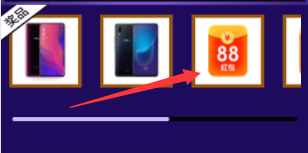
封装思路:
1.我想的是swiper在布局是不是隐藏掉了滚动条?因为在进行左右滑动时候首先想到的是css属性“overflow-x:scroll或者overflow-x:auto”;但是我审查了下元素发现swiper并没有使用这个css属性;经过查看原来使用了translate3d去让其滑动的;于是解决了滑动问题;
2.思考可视展示问题;我的做法是将整个大的容器除以页面可视容器所要展示的个数得到每个子元素的宽度;然后进行排列;这样布局问题就搞定了;
3.就是滑动问题,监听容器的touchStart、touchMove、touchEnd事件;先要计算出两边的临界值;左边很好理解就是0,右边稍微计算下把整个子容器宽度和-父级容器宽度=最大滑动距离;这样再做下滑动临界值的处理就好了;
4.联动问题,滚动条的滑动跟容器内容滑动原理是一样的,稍微动脑下的是联动的一个逻辑。这里有个等式就是容器滑动距离/容器最大滑动距离 = 滚动条滑动距离/滚动条最大滑动距离;这样就能做好相应的联动效果;对于边界值,我们再稍微的优化下;整个功能就差不多实现了;
封装代码如下:
/**

 * 我们在各个活动工具中要用到swiper去做奖品列表的渲染,由于swiper.js和swiper.css文件较大;所以仿照swiper封装了此组件

 * @param {Object} config

 * @param {String} containerId:选择器

 * @param {Number} slidesPerView:一屏要展示数

 * @param {Number} spaceBetween:奖品间距

 * @param {Boolean} scrollbarHide:是否显示滚动条

 */

import './index.scss';

    class CSlide {

        init(config) {

            let { containerId, slidesPerView, spaceBetween = 20, scrollbarHide } = config;

            this.container = document.querySelector(containerId);

            this.wrapper = this.container.children[0];

            this.store = {

                containerId,

                containerWidth: this.wrapper.offsetWidth,

                children: this.wrapper.children,

                slidesPerView,

                spaceBetween,

                calculateSlideX: 0,

                scrollbarHide

            };

            this.state = {

                startX: 0,

                diffX: 0,

                touchStart: false,

                touchEnd: false,

                touchMove: false,

                translateX: 0,

                transitionDuring: 300,

                ifanimateEnd: false

            };

            this.buildSwiper();

        }

        bind() {

            let events = ['touchstart', 'touchmove', 'touchend'];

            this.addEvent(this.container, events[0], this.touchStart);

            this.addEvent(this.container, events[1], this.touchMove);

            this.addEvent(this.container, events[2], this.touchEnd);

        }

        //初始化内容

        buildSwiper() {

            let {

                containerWidth,

                children,

                slidesPerView,

                spaceBetween

            } = this.store;

            let slideWidth = Math.round(containerWidth / slidesPerView);

            for (let i = 0; i < children.length; i++) {

                children[i].style.width = slideWidth + 'px';

                children[i].style.marginRight = spaceBetween + 'px';

            }

            //是否有滚动条

            if (this.store.scrollbarHide) {

                $(this.store.containerId).append(` <div class="swiper-scrollbar">

                <div class="swiper-scrollbar-drag"></div>

            </div>`);

                this.srollbarContainer = document.querySelector('.swiper-scrollbar-drag');

                this.scrollbar = document.querySelector('.swiper-scrollbar');

                this.store.scrollbarWidth = this.scrollbar.offsetWidth;

                this.store.scrollbarDragWidth = this.srollbarContainer.offsetWidth;

                setTimeout(() => {

                    this.store.ableslideX = Number(this.scrollbar.offsetWidth - this.srollbarContainer.offsetWidth);

                }, 10);

            }

            this.bind();

        }

        //监听touchStart事件

        touchStart(e, that) {

            if (that.state.touchStart) return;

            that.state.startX = e.type === 'touchstart' ? e.targetTouches[0].pageX : e.pageX;

            that.state.touchEnd = that.state.touchMove = false;

            that.state.touchStart = true;

            that.state.diffX = 0;

        }

        //监听touchMove事件

        touchMove(e, that) {

            let { startX } = that.state;

            if (!that.state.touchStart) return;

            that.state.touchMove = true;

            let currentX = e.type === 'touchmove' ? e.targetTouches[0].pageX : e.pageX;

            if (!that.state.ifanimateEnd) {

                that.state.diffX = Math.round(currentX - startX);

                that.targetMaxmove();

                if(that.store.scrollbarHide){

                    that.scrollbarMove();

                }

            }

        }

        //监听touchEnd事件

        touchEnd(e, that) {

            let {

                touchStart,

                touchMove,

                touchEnd,

            } = that.state;

            if (!touchStart || !touchMove || touchEnd) return;

            that.state.touchEnd = true;

            that.state.touchStart = false;

            that.state.ifanimateEnd = false;

            that.ifdeadLine();

            if(that.store.scrollbarHide){

                that.scrollbarInit();

            }

            setTimeout(() => {

                that.transitionDurationEndFn();

            }, that.state.transitionDuring);

        }

        //返回滑动区域的最大值

        calculateSlide() {

            let {

                children,

                spaceBetween,

                containerWidth

            } = this.store;

            let slide_max = 0,

                totalWidth = 0;

            for (let i = 0; i < children.length; i++) {

                totalWidth += children[0].offsetWidth + spaceBetween;

            }

            slide_max = containerWidth + spaceBetween - totalWidth;

            return slide_max;

        }

        //滑动的临界值判断

        targetMaxmove() {

            let {

                diffX

            } = this.state;

            let currentSlide = this.state.diffX + this.getTranslate(this.wrapper).x;

            let rightLine = this.calculateSlide();

            if (diffX > 0 && currentSlide > this.store.containerWidth / 2) {

                this.state.ifanimateEnd = true;

                this.state.translateX = this.store.containerWidth / 2;

            } else if (diffX < 0 && currentSlide <= rightLine - this.store.containerWidth / 2) {

                this.state.ifanimateEnd = true;

                this.state.translateX = rightLine - this.store.containerWidth / 2;

            } else {

                this.state.translateX = currentSlide;

            }

            this.recover(this.wrapper, Number(this.state.translateX), 0, 0);

        }

        //结束时临界值处理

        ifdeadLine() {

            let {

                diffX,

                translateX

            } = this.state;

            let rightLine = this.calculateSlide();

            if (diffX > 0) {

                this.recover(this.wrapper, 0, 0, 0);

            }

            if (diffX < 0 && translateX <= rightLine) {

                this.recover(this.wrapper, rightLine, 0, 0);

            }

        }

        //滚动条滑动处理

        scrollbarMove() {

            let { diffX } = this.state;

            let { ableslideX } = this.store;

            let rightLine = this.calculateSlide();

            let radio = Math.abs(diffX) / Math.abs(rightLine);

            let scrollX = diffX > 0 ? -radio * ableslideX : radio * ableslideX;

            scrollX += this.getTranslate(this.srollbarContainer).x;

            this.recover(this.srollbarContainer, scrollX, 0, 0);

        }

        //结束滚动条处理

        scrollbarInit() {

            let { ableslideX } = this.store;

            let { diffX } = this.state;

            let scrollX = this.getTranslate(this.srollbarContainer).x;

            if (diffX > 0) {

                this.recover(this.srollbarContainer, 0, 0, 0);

            }

            if (diffX < 0 && scrollX > ableslideX) {

                this.recover(this.srollbarContainer, ableslideX, 0, 0);

            }

        }

        recover(container, x, y, z) {

            this.transitionDuration(container, this.state.transitionDuring);

            this.translate(container, x, y, z);

        }

        translate(ele, x, y, z) {

            this.transform(ele, 'translate3d(' + x + 'px, ' + y + 'px, ' + z + 'px)');

        }

        transform(ele, transform) {

            let elStyle = ele.style;

            elStyle.webkitTransform = elStyle.MsTransform = elStyle.msTransform = elStyle.MozTransform = elStyle.OTransform = elStyle.transform = transform;

        }

        transitionDuration(ele, time) {

            let elStyle = ele.style;

            elStyle.webkitTransitionDuration = elStyle.MsTransitionDuration = elStyle.msTransitionDuration = elStyle.MozTransitionDuration = elStyle.OTransitionDuration = elStyle.transitionDuration = time + 'ms';

        }

        transitionDurationEndFn() {

            this.transitionDuration(this.wrapper, 0);

        }

        getTranslate(el) {

            let curStyle = window.getComputedStyle(el);

            let curTransform = curStyle.transform || curStyle.webkitTransform;

            let x, y;

            x = y = 0;

            curTransform = curTransform.split(', ');

            if (curTransform.length === 6) {

                x = parseInt(curTransform[4], 10);

                y = parseInt(curTransform[5], 10);

            }

            return {

                x,

                y

            };

        }

        addEvent(target, type, fn) {

            $(document).on(type, target, event => {

                if (typeof fn !== 'function') return;

                fn(event, this);

            }).bind(this);

        }

    };
css代码如下:
.bxm-container {

    width: 100%;

    height: auto;

    position: relative;

    overflow: hidden;

    list-style: none;

    padding:;

    .bxm-wrapper {

        position: relative;

        width: 100%;

        height: 100%;

        z-index:;

        display: flex;

        transition-property: transform;

        box-sizing: content-box;

        .bxm-slide {

            text-align: center;

            font-size: 18px;

            background: #fff;

            display: flex;

            justify-content: center;

            align-items: center;

            flex-shrink:;

            width: 100%;

            height: 100%;

            box-sizing: border-box;

            transition-property: transform;

            -webkit-flex-shrink:;

            -ms-flex-negative:;

            flex-shrink:;

        }

    }

    .swiper-scrollbar {

        position: relative;

        left: 1%;

        bottom: 0px;

        z-index:;

        height: 5px;

        width: 98%;

        border-radius: 10px;

        -ms-touch-action: none;

        background: rgba(0, 0, 0, .1);

        margin-top: 10px;

        overflow: hidden;

        .swiper-scrollbar-drag {

            height: 100%;

            width: 60%;

            position: relative;

            background: rgba(0, 0, 0, .5);

            border-radius: 10px;

            left:;

            top: 0

        }

    }

}
具体调用该组件类似于
<div class="bxm-container">

    <div class="bxm-wrapper">

        <div class="bxm-slide">

            <div class="awardImg"><img src="https://buyimg.bianxianmao.com/dist/ACTIVITY/certificate/2018/10/24/04c32df6-13f2-464d-b298-b712e14daa2e"

                    alt=""></div>

        </div>

        <div class="bxm-slide">

            <div class="awardImg"><img src="https://buyimg.bianxianmao.com/dist/ACTIVITY/certificate/2018/10/24/04c32df6-13f2-464d-b298-b712e14daa2e"

                    alt=""></div>

        </div>

        <div class="bxm-slide">

            <div class="awardImg"><img src="https://buyimg.bianxianmao.com/dist/ACTIVITY/certificate/2018/10/24/04c32df6-13f2-464d-b298-b712e14daa2e"

                    alt=""></div>

        </div>

        <div class="bxm-slide">

            <div class="awardImg"><img src="https://buyimg.bianxianmao.com/dist/ACTIVITY/certificate/2018/10/24/04c32df6-13f2-464d-b298-b712e14daa2e"

                    alt=""></div>

        </div>

        <div class="bxm-slide">

            <div class="awardImg"><img src="https://buyimg.bianxianmao.com/dist/ACTIVITY/certificate/2018/10/24/04c32df6-13f2-464d-b298-b712e14daa2e"

                    alt=""></div>

        </div>

        <div class="bxm-slide">

            <div class="awardImg"><img src="https://buyimg.bianxianmao.com/dist/ACTIVITY/certificate/2018/10/24/04c32df6-13f2-464d-b298-b712e14daa2e"

                    alt=""></div>

        </div>

    </div>
<script>
var config = {
containerId: '.bxm-container',
slidesPerView: 2.4,
spaceBetween: 20,
scrollbarHide: true,
};
  new CSlide().init(config, temp);
</script>
LZ刚写到快结尾时候被叫到公司去做一个紧急需求,心里一万匹草泥马在奔腾。
如有不妥,请大佬指正;
奖品列表组件【仿swiper】的更多相关文章
- JS列表的下拉菜单组件(仿美化控件select)
JS列表的下拉菜单组件(仿美化控件select) 2014-01-23 23:51 by 龙恩0707, 1101 阅读, 6 评论, 收藏, 编辑 今天是农历23 也是小年,在这祝福大家新年快乐!今 ...
- 列表组件抽象(2)-listViewBase说明
这是我写的关于列表组件的第2篇博客.前面的相关文章有: 1. 列表组件抽象(1)-概述 listViewBase是列表组件所有文件中最核心的一个,它抽象了所有列表的公共逻辑,将来如果有必要添加其它公共 ...
- winform快速开发平台 -> 工作流组件(仿GooFlow)
对于web方向的工作流,一直在用gooflow对于目前我的winform开发平台却没有较好的工作流组件. 针对目前的项目经验告诉我们.一个工作流控件是很必要的. 当然在winform方面的工作流第三 ...
- 可展开的列表组件——ExpandableListView深入解析
可展开的列表组件--ExpandableListView深入解析 一.知识点 1.ExpandableListView常用XML属性 2.ExpandableListView继承BaseExpanda ...
- Bootstrap学习之路(3)---列表组件
列表是几乎所有网站都会用到的一个组件,正好bootstrap也给我们提供了这个组件的样式,下面我给大家简单介绍一下bootstrap中的列表组件的用法! 首先,重提一下引用bootstrap的核心文件 ...
- Android(java)学习笔记186:对ListView等列表组件中数据进行增、删、改操作
1.ListView介绍 解决大量的相似的数据显示问题 采用了MVC模式: M: model (数据模型) V: view (显示的视图) C: controller 控制器 入门案例: acit ...
- bootstrap 之 列表组件使用
列表是几乎所有网站都会用到的一个组件,正好bootstrap也给我们提供了这个组件的样式,下面我给大家简单介绍一下bootstrap中的列表组件的用法! 首先,重提一下引用bootstrap的核心文件 ...
- reactjs-swiper react轮播图组件基于swiper
react轮播图组件基于swiper demo地址:http://reactjs-ui.github.io/reactjs-swiper/simple.html 1. 下载安装 npm install ...
- React-Native新列表组件FlatList和SectionList学习 | | 联动列表实现
React-Native在0.43推出了两款新的列表组件:FlatList(高性能的简单列表组件)和SectionList(高性能的分组列表组件). 从官方上它们都支持常用的以下功能: 完全跨平台. ...
随机推荐
- LabView ModBus安装
好久没写东西了(好菜哦...) 最近搞一个项目,开始入门LabVIEW,感觉类似于MATLAB里面的simulink 我使用LabVIEW是想用来和PLC通信的.因为PLC里面可以做ModBus,所以 ...
- NPOI读取excel表,如果有公式取出的是公式,想要取数字怎么办?
public static DataTable Import(string strFileName) { DataTable dt = new DataTable(); HSSFWorkbook hs ...
- Arduino-函数库和程序架构介绍
(1)声明变量及接口的名称 (2)setup().在程序运行时首先要调用setup()函数[初始化函数],用于初始化变量.设置针脚的输出/输入类型.配置串口.引入类库文件等等.每次Arduino上电或 ...
- jQuery禁用、开启鼠标滚轮事件
1.禁用鼠标滚轮事件 $(document).bind('mousewheel', function(event, delta) {return false;}); 2.开启鼠标滚轮事件,直接解绑事件 ...
- Now you can provide attr "wx:key" for a "wx:for" to improve performance. 微信小程序警告
Now you can provide attr "wx:key" for a "wx:for" to improve performance为警告,不处理不影 ...
- SQL - for xml path('') 实现多行合并到一行, 并带有分隔符
docs.microsoft.com 链接: SQL一个应用场景与FOR XML PATH应用 首先呢!我们在增加一张学生表,列分别为(stuID,sName,hobby),stuID代表学生编号, ...
- Q - N! HDU - 1042
使用java还不熟练,错误在于读入.应用in.hasNext() 代码 import java.text.ParseException; import java.text.SimpleDateForm ...
- P5304 [GXOI/GZOI2019]旅行者
题目地址:P5304 [GXOI/GZOI2019]旅行者 这里是官方题解 一个图 \(n\) 点 \(m\) 条边,里面有 \(k\) 个特殊点,问这 \(k\) 个点之间两两最短路的最小值是多少? ...
- Spring Cloud 2-RabbitMQ 集成(八)
Spring Cloud RabbitMQ pom.xml application.yml 提供者 消费者 队列配置 单元测试 通过消息队列MQ做为通信中心,这里采用RabbitMQ.安装方参考: ...
- python 列表中[ ]中冒号‘:’的作用
中括号[ ]:用于定义列表或引用列表.数组.字符串及元组中元素位置 list1 = [, ] list2 = [, , , , , , ] print ] print :] 冒号: 用于定义分片. ...