
Linux平台 Oracle 12cR2 RAC安装Part2:GI配置
Linux平台 Oracle 12cR2 RAC安装Part2:GI配置
三、GI(Grid Infrastructure)安装
- 3.1 解压GI的安装包
- 3.2 安装配置Xmanager软件
- 3.3 共享存储LUN的赋权
- 3.4 使用Xmanager图形化界面配置GI
- 3.5 验证crsctl的状态
- 3.6 测试集群的FAILED OVER功能
Linux平台 Oracle 12cR2 RAC安装指导:
Part1:Linux平台 Oracle 12cR2 RAC安装Part1:准备工作
Part2:Linux平台 Oracle 12cR2 RAC安装Part2:GI配置
Part3:Linux平台 Oracle 12cR2 RAC安装Part3:DB安装
本文安装环境:RHEL 6.5 + Oracle 12.2.0.1 GI & RAC
三、GI(Grid Infrastructure)安装
3.1 解压GI的安装包
su - grid
解压 GRID 到 GRID用户的$ORACLE_HOME下
[grid@jydb1 grid]$ pwd

/u01/app/12.2.0/grid

[grid@jydb1 grid]$ unzip /u01/media/linuxx64_12201_grid_home.zip
3.2 安装配置Xmanager软件
在自己的Windows系统上成功安装Xmanager Enterprise之后,运行Xstart.exe可执行程序,
配置如下
Session:jydb1
Host:192.168.1.90
Protocol:SSH
User Name:grid
Execution Command:/usr/bin/xterm -ls -display $DISPLAY
点击RUN,输入grid用户的密码可以正常弹出命令窗口界面,即配置成功。
3.3 共享存储LUN的赋权
vi /etc/udev/rules.d/12-dm-permissions.rules
# MULTIPATH DEVICES

#

# Set permissions for all multipath devices

ENV{DM_UUID}=="mpath-?*", OWNER:="grid", GROUP:="asmadmin", MODE:="660"
配置生效:
udevadm trigger
3.4 使用Xmanager图形化界面配置GI
Xmanager通过grid用户登录,进入$ORACLE_HOME目录,运行gridSetup配置GI
$ cd $ORACLE_HOME

$ ./gridSetup.sh
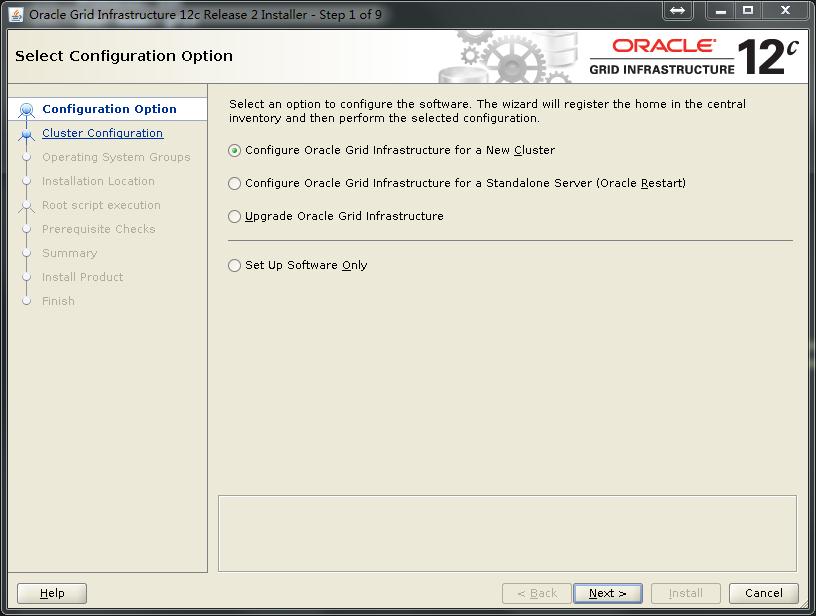
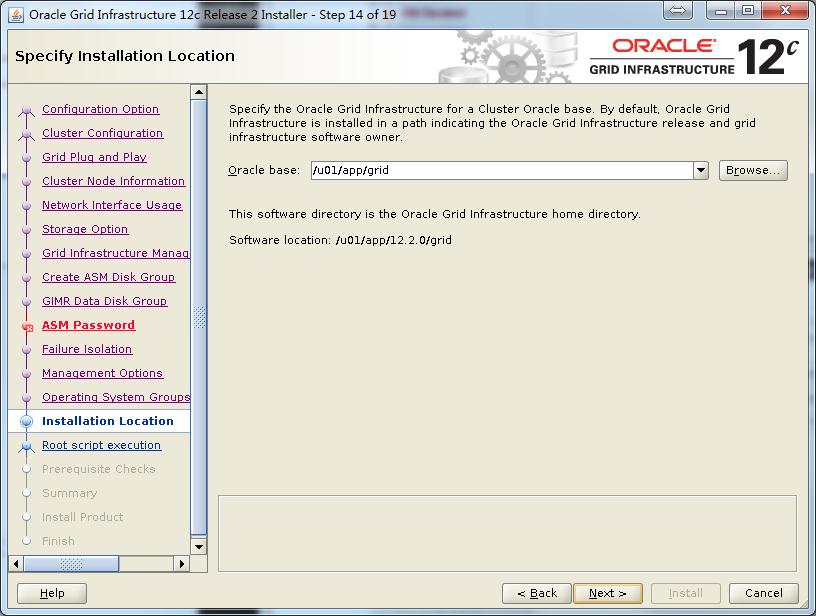
12cGI的配置跟之前有一些变化,下面来看下GI配置的整个图形化安装的过程截图:

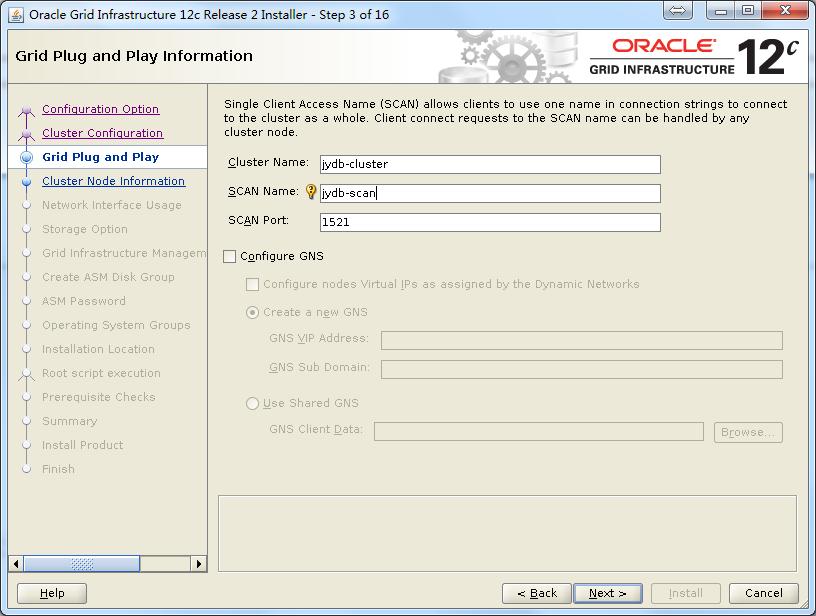


注:这里public网卡暂时用的eth0,暂没有和eth1做bonding,是为了后续做后续的网卡绑定实验做准备。如果是生产新的安装,建议直接在安装前绑定好,免去后续修改的麻烦。另外可以看到12c多了一个ASM的网络,可以和私有网络共用一个地址。


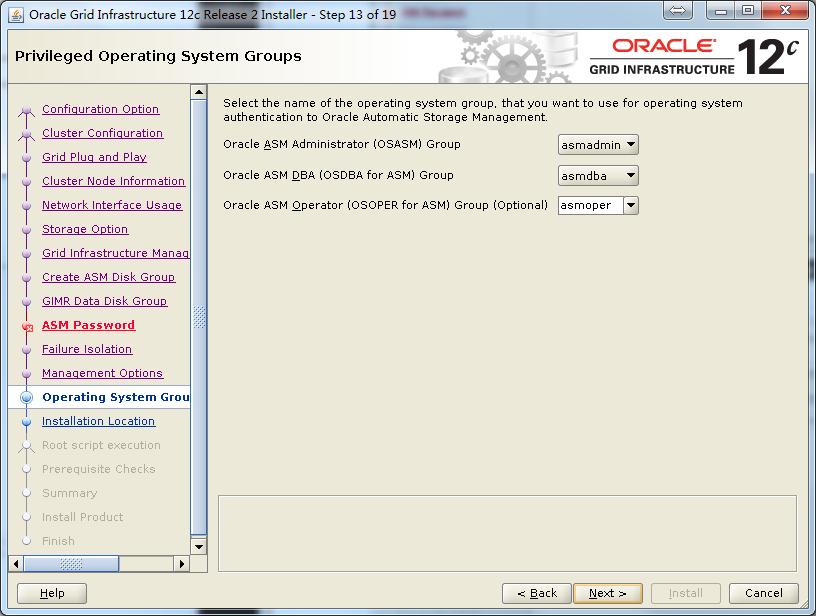
注:这里跟之前区别不大,我依然是选择3块1G的盘,Normal冗余作为OCR和voting disk。

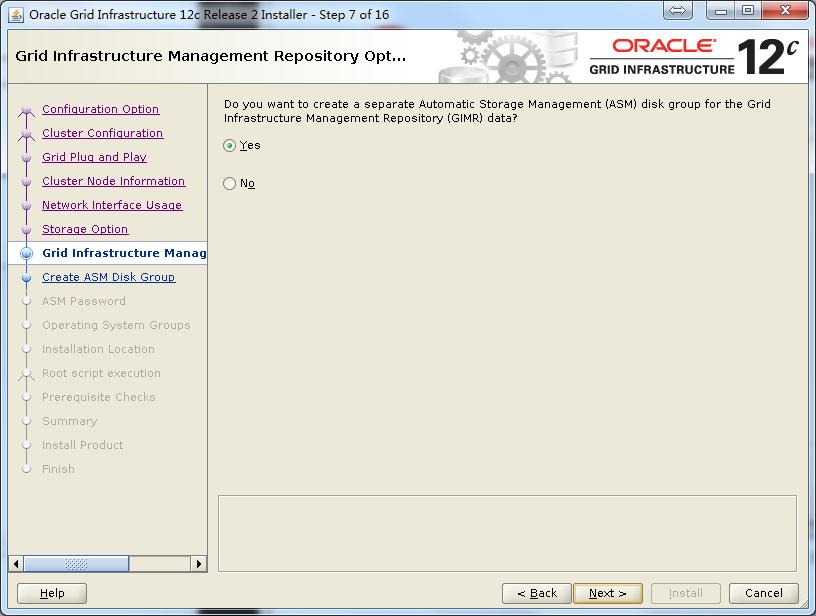
注:这里有一个新的存储GIMR的,我这里选择是外部冗余的一个40G大小的盘,这是12c新引入的概念。




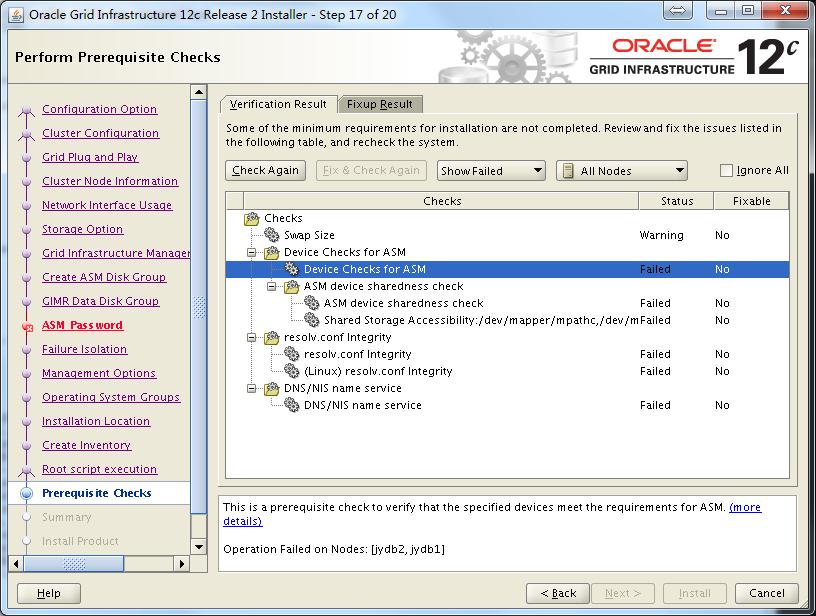
注:这里检查出来的问题都需要认真核对,确认确实可以忽略才可以点击“Ignore All”,如果这里检测出缺少某些RPM包,需要使用yum安装好,假设检测到缺少gcc-c++的包,那么修正:需要使用yum安装:
yum install gcc-c++
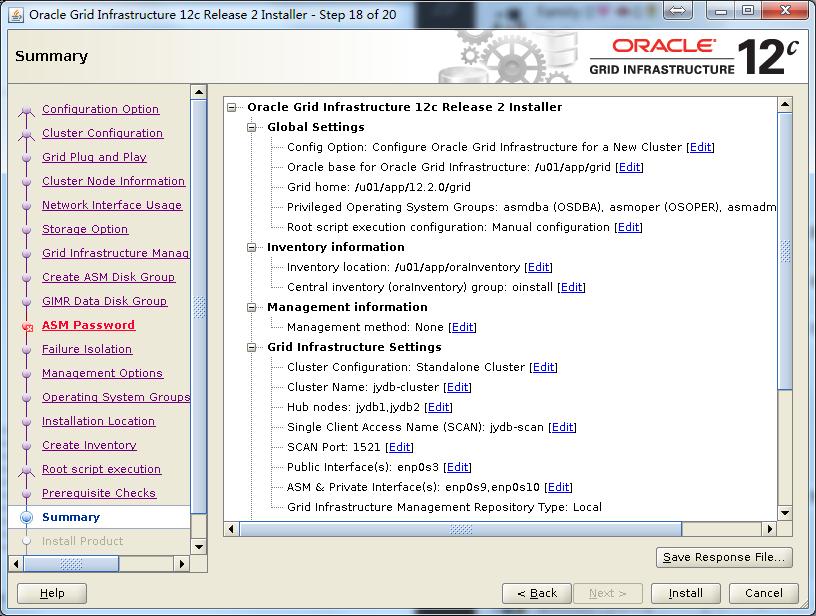
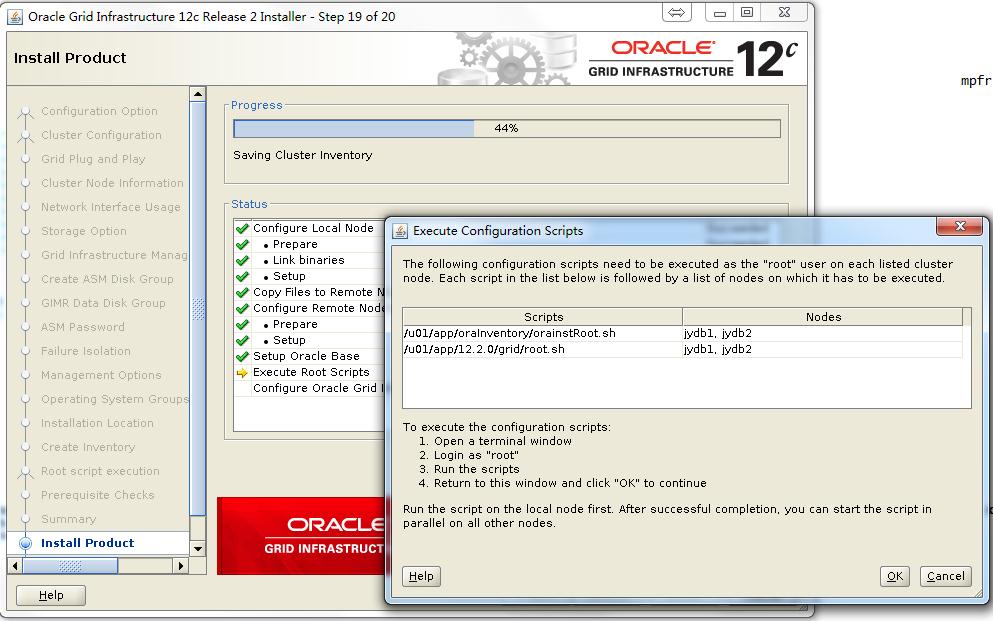
注:执行root脚本,确保先在一节点执行完毕后,再在其他节点执行。
第一个节点root执行脚本:
[root@jydb1 tmp]# /u01/app/oraInventory/orainstRoot.sh

Changing permissions of /u01/app/oraInventory.

Adding read,write permissions for group.

Removing read,write,execute permissions for world.

Changing groupname of /u01/app/oraInventory to oinstall.

The execution of the script is complete.

[root@jydb1 tmp]# /u01/app/12.2.0/grid/root.sh

Performing root user operation.

The following environment variables are set as:

    ORACLE_OWNER= grid

    ORACLE_HOME=  /u01/app/12.2.0/grid

Enter the full pathname of the local bin directory: [/usr/local/bin]:

   Copying dbhome to /usr/local/bin ...

   Copying oraenv to /usr/local/bin ...

   Copying coraenv to /usr/local/bin ...

Creating /etc/oratab file...

Entries will be added to the /etc/oratab file as needed by

Database Configuration Assistant when a database is created

Finished running generic part of root script.

Now product-specific root actions will be performed.

Relinking oracle with rac_on option

Using configuration parameter file: /u01/app/12.2.0/grid/crs/install/crsconfig_params

The log of current session can be found at:

  /u01/app/grid/crsdata/jydb1/crsconfig/rootcrs_jydb1_2017-09-08_03-13-19PM.log

2017/09/08 15:13:35 CLSRSC-594: Executing installation step 1 of 19: 'SetupTFA'.

2017/09/08 15:13:35 CLSRSC-4001: Installing Oracle Trace File Analyzer (TFA) Collector.

2017/09/08 15:14:05 CLSRSC-4002: Successfully installed Oracle Trace File Analyzer (TFA) Collector.

2017/09/08 15:14:05 CLSRSC-594: Executing installation step 2 of 19: 'ValidateEnv'.

2017/09/08 15:14:11 CLSRSC-363: User ignored prerequisites during installation

2017/09/08 15:14:11 CLSRSC-594: Executing installation step 3 of 19: 'CheckFirstNode'.

2017/09/08 15:14:14 CLSRSC-594: Executing installation step 4 of 19: 'GenSiteGUIDs'.

2017/09/08 15:14:15 CLSRSC-594: Executing installation step 5 of 19: 'SaveParamFile'.

2017/09/08 15:14:22 CLSRSC-594: Executing installation step 6 of 19: 'SetupOSD'.

2017/09/08 15:14:23 CLSRSC-594: Executing installation step 7 of 19: 'CheckCRSConfig'.

2017/09/08 15:14:24 CLSRSC-594: Executing installation step 8 of 19: 'SetupLocalGPNP'.

2017/09/08 15:14:55 CLSRSC-594: Executing installation step 9 of 19: 'ConfigOLR'.

2017/09/08 15:15:04 CLSRSC-594: Executing installation step 10 of 19: 'ConfigCHMOS'.

2017/09/08 15:15:05 CLSRSC-594: Executing installation step 11 of 19: 'CreateOHASD'.

2017/09/08 15:15:10 CLSRSC-594: Executing installation step 12 of 19: 'ConfigOHASD'.

2017/09/08 15:15:26 CLSRSC-330: Adding Clusterware entries to file 'oracle-ohasd.conf'

2017/09/08 15:15:59 CLSRSC-594: Executing installation step 13 of 19: 'InstallAFD'.

2017/09/08 15:16:43 CLSRSC-594: Executing installation step 14 of 19: 'InstallACFS'.

CRS-2791: Starting shutdown of Oracle High Availability Services-managed resources on 'jydb1'

CRS-2793: Shutdown of Oracle High Availability Services-managed resources on 'jydb1' has completed

CRS-4133: Oracle High Availability Services has been stopped.

CRS-4123: Oracle High Availability Services has been started.

2017/09/08 15:17:15 CLSRSC-594: Executing installation step 15 of 19: 'InstallKA'.

2017/09/08 15:17:21 CLSRSC-594: Executing installation step 16 of 19: 'InitConfig'.

CRS-2791: Starting shutdown of Oracle High Availability Services-managed resources on 'jydb1'

CRS-2793: Shutdown of Oracle High Availability Services-managed resources on 'jydb1' has completed

CRS-4133: Oracle High Availability Services has been stopped.

CRS-4123: Oracle High Availability Services has been started.

CRS-2672: Attempting to start 'ora.driver.afd' on 'jydb1'

CRS-2672: Attempting to start 'ora.evmd' on 'jydb1'

CRS-2672: Attempting to start 'ora.mdnsd' on 'jydb1'

CRS-2676: Start of 'ora.driver.afd' on 'jydb1' succeeded

CRS-2672: Attempting to start 'ora.cssdmonitor' on 'jydb1'

CRS-2676: Start of 'ora.cssdmonitor' on 'jydb1' succeeded

CRS-2676: Start of 'ora.evmd' on 'jydb1' succeeded

CRS-2676: Start of 'ora.mdnsd' on 'jydb1' succeeded

CRS-2672: Attempting to start 'ora.gpnpd' on 'jydb1'

CRS-2676: Start of 'ora.gpnpd' on 'jydb1' succeeded

CRS-2672: Attempting to start 'ora.gipcd' on 'jydb1'

CRS-2676: Start of 'ora.gipcd' on 'jydb1' succeeded

CRS-2672: Attempting to start 'ora.cssd' on 'jydb1'

CRS-2672: Attempting to start 'ora.diskmon' on 'jydb1'

CRS-2676: Start of 'ora.diskmon' on 'jydb1' succeeded

CRS-2676: Start of 'ora.cssd' on 'jydb1' succeeded

Disk label(s) created successfully. Check /u01/app/grid/cfgtoollogs/asmca/asmca-170908PM031804.log for details.

Disk groups created successfully. Check /u01/app/grid/cfgtoollogs/asmca/asmca-170908PM031804.log for details.

2017/09/08 15:19:33 CLSRSC-482: Running command: '/u01/app/12.2.0/grid/bin/ocrconfig -upgrade grid oinstall'

CRS-2672: Attempting to start 'ora.crf' on 'jydb1'

CRS-2672: Attempting to start 'ora.storage' on 'jydb1'

CRS-2676: Start of 'ora.storage' on 'jydb1' succeeded

CRS-2676: Start of 'ora.crf' on 'jydb1' succeeded

CRS-2672: Attempting to start 'ora.crsd' on 'jydb1'

CRS-2676: Start of 'ora.crsd' on 'jydb1' succeeded

CRS-4256: Updating the profile

Successful addition of voting disk e78463b659004fbbbfb3cdc4ee62fced.

Successful addition of voting disk 4375f93825644f62bf1c1a3eedc539b5.

Successful addition of voting disk 3b2ec2e16ccf4f05bf433fe83b30d6a6.

Successfully replaced voting disk group with +OCR.

CRS-4256: Updating the profile

CRS-4266: Voting file(s) successfully replaced

##  STATE    File Universal Id                File Name Disk group

--  -----    -----------------                --------- ---------

 1. ONLINE   e78463b659004fbbbfb3cdc4ee62fced (AFD:OCR1) [OCR]

 2. ONLINE   4375f93825644f62bf1c1a3eedc539b5 (AFD:OCR2) [OCR]

 3. ONLINE   3b2ec2e16ccf4f05bf433fe83b30d6a6 (AFD:OCR3) [OCR]

Located 3 voting disk(s).

CRS-2791: Starting shutdown of Oracle High Availability Services-managed resources on 'jydb1'

CRS-2673: Attempting to stop 'ora.crsd' on 'jydb1'

CRS-2677: Stop of 'ora.crsd' on 'jydb1' succeeded

CRS-2673: Attempting to stop 'ora.storage' on 'jydb1'

CRS-2673: Attempting to stop 'ora.crf' on 'jydb1'

CRS-2673: Attempting to stop 'ora.drivers.acfs' on 'jydb1'

CRS-2673: Attempting to stop 'ora.gpnpd' on 'jydb1'

CRS-2673: Attempting to stop 'ora.mdnsd' on 'jydb1'

CRS-2677: Stop of 'ora.drivers.acfs' on 'jydb1' succeeded

CRS-2677: Stop of 'ora.gpnpd' on 'jydb1' succeeded

CRS-2677: Stop of 'ora.crf' on 'jydb1' succeeded

CRS-2677: Stop of 'ora.storage' on 'jydb1' succeeded

CRS-2673: Attempting to stop 'ora.asm' on 'jydb1'

CRS-2677: Stop of 'ora.mdnsd' on 'jydb1' succeeded

CRS-2677: Stop of 'ora.asm' on 'jydb1' succeeded

CRS-2673: Attempting to stop 'ora.cluster_interconnect.haip' on 'jydb1'

CRS-2677: Stop of 'ora.cluster_interconnect.haip' on 'jydb1' succeeded

CRS-2673: Attempting to stop 'ora.ctssd' on 'jydb1'

CRS-2673: Attempting to stop 'ora.evmd' on 'jydb1'

CRS-2677: Stop of 'ora.ctssd' on 'jydb1' succeeded

CRS-2677: Stop of 'ora.evmd' on 'jydb1' succeeded

CRS-2673: Attempting to stop 'ora.cssd' on 'jydb1'

CRS-2677: Stop of 'ora.cssd' on 'jydb1' succeeded

CRS-2673: Attempting to stop 'ora.driver.afd' on 'jydb1'

CRS-2673: Attempting to stop 'ora.gipcd' on 'jydb1'

CRS-2677: Stop of 'ora.driver.afd' on 'jydb1' succeeded

CRS-2677: Stop of 'ora.gipcd' on 'jydb1' succeeded

CRS-2793: Shutdown of Oracle High Availability Services-managed resources on 'jydb1' has completed

CRS-4133: Oracle High Availability Services has been stopped.

2017/09/08 15:20:55 CLSRSC-594: Executing installation step 17 of 19: 'StartCluster'.

CRS-4123: Starting Oracle High Availability Services-managed resources

CRS-2672: Attempting to start 'ora.mdnsd' on 'jydb1'

CRS-2672: Attempting to start 'ora.evmd' on 'jydb1'

CRS-2676: Start of 'ora.evmd' on 'jydb1' succeeded

CRS-2676: Start of 'ora.mdnsd' on 'jydb1' succeeded

CRS-2672: Attempting to start 'ora.gpnpd' on 'jydb1'

CRS-2676: Start of 'ora.gpnpd' on 'jydb1' succeeded

CRS-2672: Attempting to start 'ora.gipcd' on 'jydb1'

CRS-2676: Start of 'ora.gipcd' on 'jydb1' succeeded

CRS-2672: Attempting to start 'ora.cssdmonitor' on 'jydb1'

CRS-2676: Start of 'ora.cssdmonitor' on 'jydb1' succeeded

CRS-2672: Attempting to start 'ora.cssd' on 'jydb1'

CRS-2672: Attempting to start 'ora.diskmon' on 'jydb1'

CRS-2676: Start of 'ora.diskmon' on 'jydb1' succeeded

CRS-2676: Start of 'ora.cssd' on 'jydb1' succeeded

CRS-2672: Attempting to start 'ora.cluster_interconnect.haip' on 'jydb1'

CRS-2672: Attempting to start 'ora.ctssd' on 'jydb1'

CRS-2676: Start of 'ora.ctssd' on 'jydb1' succeeded

CRS-2676: Start of 'ora.cluster_interconnect.haip' on 'jydb1' succeeded

CRS-2672: Attempting to start 'ora.asm' on 'jydb1'

CRS-2676: Start of 'ora.asm' on 'jydb1' succeeded

CRS-2672: Attempting to start 'ora.storage' on 'jydb1'

CRS-2676: Start of 'ora.storage' on 'jydb1' succeeded

CRS-2672: Attempting to start 'ora.crf' on 'jydb1'

CRS-2676: Start of 'ora.crf' on 'jydb1' succeeded

CRS-2672: Attempting to start 'ora.crsd' on 'jydb1'

CRS-2676: Start of 'ora.crsd' on 'jydb1' succeeded

CRS-6023: Starting Oracle Cluster Ready Services-managed resources

CRS-6017: Processing resource auto-start for servers: jydb1

CRS-6016: Resource auto-start has completed for server jydb1

CRS-6024: Completed start of Oracle Cluster Ready Services-managed resources

CRS-4123: Oracle High Availability Services has been started.

2017/09/08 15:23:51 CLSRSC-343: Successfully started Oracle Clusterware stack

2017/09/08 15:23:51 CLSRSC-594: Executing installation step 18 of 19: 'ConfigNode'.

CRS-2672: Attempting to start 'ora.ASMNET1LSNR_ASM.lsnr' on 'jydb1'

CRS-2676: Start of 'ora.ASMNET1LSNR_ASM.lsnr' on 'jydb1' succeeded

CRS-2672: Attempting to start 'ora.asm' on 'jydb1'

CRS-2676: Start of 'ora.asm' on 'jydb1' succeeded

CRS-2672: Attempting to start 'ora.OCR.dg' on 'jydb1'

CRS-2676: Start of 'ora.OCR.dg' on 'jydb1' succeeded

2017/09/08 15:26:20 CLSRSC-594: Executing installation step 19 of 19: 'PostConfig'.

Disk label(s) created successfully. Check /u01/app/grid/cfgtoollogs/asmca/asmca-170908PM032630.log for details.

2017/09/08 15:27:38 CLSRSC-325: Configure Oracle Grid Infrastructure for a Cluster ... succeeded

[root@jydb1 tmp]#
执行成功后,在第二个节点root执行脚本:
[root@jydb2 ~]# /u01/app/oraInventory/orainstRoot.sh

Changing permissions of /u01/app/oraInventory.

Adding read,write permissions for group.

Removing read,write,execute permissions for world.

Changing groupname of /u01/app/oraInventory to oinstall.

The execution of the script is complete.

[root@jydb2 ~]# /u01/app/12.2.0/grid/root.sh

Performing root user operation.

The following environment variables are set as:

    ORACLE_OWNER= grid

    ORACLE_HOME=  /u01/app/12.2.0/grid

Enter the full pathname of the local bin directory: [/usr/local/bin]:

   Copying dbhome to /usr/local/bin ...

   Copying oraenv to /usr/local/bin ...

   Copying coraenv to /usr/local/bin ...

Creating /etc/oratab file...

Entries will be added to the /etc/oratab file as needed by

Database Configuration Assistant when a database is created

Finished running generic part of root script.

Now product-specific root actions will be performed.

Relinking oracle with rac_on option

Using configuration parameter file: /u01/app/12.2.0/grid/crs/install/crsconfig_params

The log of current session can be found at:

  /u01/app/grid/crsdata/jydb2/crsconfig/rootcrs_jydb2_2017-09-08_04-06-21PM.log

2017/09/08 16:06:37 CLSRSC-594: Executing installation step 1 of 19: 'SetupTFA'.

2017/09/08 16:06:37 CLSRSC-4001: Installing Oracle Trace File Analyzer (TFA) Collector.

2017/09/08 16:07:14 CLSRSC-4002: Successfully installed Oracle Trace File Analyzer (TFA) Collector.

2017/09/08 16:07:14 CLSRSC-594: Executing installation step 2 of 19: 'ValidateEnv'.

2017/09/08 16:07:15 CLSRSC-363: User ignored prerequisites during installation

2017/09/08 16:07:15 CLSRSC-594: Executing installation step 3 of 19: 'CheckFirstNode'.

2017/09/08 16:07:17 CLSRSC-594: Executing installation step 4 of 19: 'GenSiteGUIDs'.

2017/09/08 16:07:17 CLSRSC-594: Executing installation step 5 of 19: 'SaveParamFile'.

2017/09/08 16:07:21 CLSRSC-594: Executing installation step 6 of 19: 'SetupOSD'.

2017/09/08 16:07:22 CLSRSC-594: Executing installation step 7 of 19: 'CheckCRSConfig'.

2017/09/08 16:07:22 CLSRSC-594: Executing installation step 8 of 19: 'SetupLocalGPNP'.

2017/09/08 16:07:25 CLSRSC-594: Executing installation step 9 of 19: 'ConfigOLR'.

2017/09/08 16:07:28 CLSRSC-594: Executing installation step 10 of 19: 'ConfigCHMOS'.

2017/09/08 16:07:28 CLSRSC-594: Executing installation step 11 of 19: 'CreateOHASD'.

2017/09/08 16:07:30 CLSRSC-594: Executing installation step 12 of 19: 'ConfigOHASD'.

2017/09/08 16:07:45 CLSRSC-330: Adding Clusterware entries to file 'oracle-ohasd.conf'

2017/09/08 16:08:15 CLSRSC-594: Executing installation step 13 of 19: 'InstallAFD'.

2017/09/08 16:08:54 CLSRSC-594: Executing installation step 14 of 19: 'InstallACFS'.

CRS-2791: Starting shutdown of Oracle High Availability Services-managed resources on 'jydb2'

CRS-2793: Shutdown of Oracle High Availability Services-managed resources on 'jydb2' has completed

CRS-4133: Oracle High Availability Services has been stopped.

CRS-4123: Oracle High Availability Services has been started.

2017/09/08 16:09:33 CLSRSC-594: Executing installation step 15 of 19: 'InstallKA'.

2017/09/08 16:09:34 CLSRSC-594: Executing installation step 16 of 19: 'InitConfig'.

CRS-2791: Starting shutdown of Oracle High Availability Services-managed resources on 'jydb2'

CRS-2793: Shutdown of Oracle High Availability Services-managed resources on 'jydb2' has completed

CRS-4133: Oracle High Availability Services has been stopped.

CRS-4123: Oracle High Availability Services has been started.

CRS-2791: Starting shutdown of Oracle High Availability Services-managed resources on 'jydb2'

CRS-2673: Attempting to stop 'ora.drivers.acfs' on 'jydb2'

CRS-2677: Stop of 'ora.drivers.acfs' on 'jydb2' succeeded

CRS-2793: Shutdown of Oracle High Availability Services-managed resources on 'jydb2' has completed

CRS-4133: Oracle High Availability Services has been stopped.

2017/09/08 16:09:50 CLSRSC-594: Executing installation step 17 of 19: 'StartCluster'.

CRS-4123: Starting Oracle High Availability Services-managed resources

CRS-2672: Attempting to start 'ora.mdnsd' on 'jydb2'

CRS-2672: Attempting to start 'ora.evmd' on 'jydb2'

CRS-2676: Start of 'ora.mdnsd' on 'jydb2' succeeded

CRS-2676: Start of 'ora.evmd' on 'jydb2' succeeded

CRS-2672: Attempting to start 'ora.gpnpd' on 'jydb2'

CRS-2676: Start of 'ora.gpnpd' on 'jydb2' succeeded

CRS-2672: Attempting to start 'ora.gipcd' on 'jydb2'

CRS-2676: Start of 'ora.gipcd' on 'jydb2' succeeded

CRS-2672: Attempting to start 'ora.cssdmonitor' on 'jydb2'

CRS-2676: Start of 'ora.cssdmonitor' on 'jydb2' succeeded

CRS-2672: Attempting to start 'ora.cssd' on 'jydb2'

CRS-2672: Attempting to start 'ora.diskmon' on 'jydb2'

CRS-2676: Start of 'ora.diskmon' on 'jydb2' succeeded

CRS-2676: Start of 'ora.cssd' on 'jydb2' succeeded

CRS-2672: Attempting to start 'ora.cluster_interconnect.haip' on 'jydb2'

CRS-2672: Attempting to start 'ora.ctssd' on 'jydb2'

CRS-2676: Start of 'ora.ctssd' on 'jydb2' succeeded

CRS-2672: Attempting to start 'ora.crf' on 'jydb2'

CRS-2676: Start of 'ora.crf' on 'jydb2' succeeded

CRS-2672: Attempting to start 'ora.crsd' on 'jydb2'

CRS-2676: Start of 'ora.crsd' on 'jydb2' succeeded

CRS-2676: Start of 'ora.cluster_interconnect.haip' on 'jydb2' succeeded

CRS-2672: Attempting to start 'ora.asm' on 'jydb2'

CRS-2676: Start of 'ora.asm' on 'jydb2' succeeded

CRS-6017: Processing resource auto-start for servers: jydb2

CRS-2672: Attempting to start 'ora.ASMNET1LSNR_ASM.lsnr' on 'jydb2'

CRS-2672: Attempting to start 'ora.net1.network' on 'jydb2'

CRS-2676: Start of 'ora.net1.network' on 'jydb2' succeeded

CRS-2672: Attempting to start 'ora.ons' on 'jydb2'

CRS-2676: Start of 'ora.ons' on 'jydb2' succeeded

CRS-2676: Start of 'ora.ASMNET1LSNR_ASM.lsnr' on 'jydb2' succeeded

CRS-2672: Attempting to start 'ora.asm' on 'jydb2'

CRS-2676: Start of 'ora.asm' on 'jydb2' succeeded

CRS-6016: Resource auto-start has completed for server jydb2

CRS-6024: Completed start of Oracle Cluster Ready Services-managed resources

CRS-4123: Oracle High Availability Services has been started.

2017/09/08 16:13:34 CLSRSC-343: Successfully started Oracle Clusterware stack

2017/09/08 16:13:34 CLSRSC-594: Executing installation step 18 of 19: 'ConfigNode'.

2017/09/08 16:13:55 CLSRSC-594: Executing installation step 19 of 19: 'PostConfig'.

2017/09/08 16:14:22 CLSRSC-325: Configure Oracle Grid Infrastructure for a Cluster ... succeeded

[root@jydb2 ~]#
继续安装,这段时间也很长,我这里测试环境大概要半个小时+,

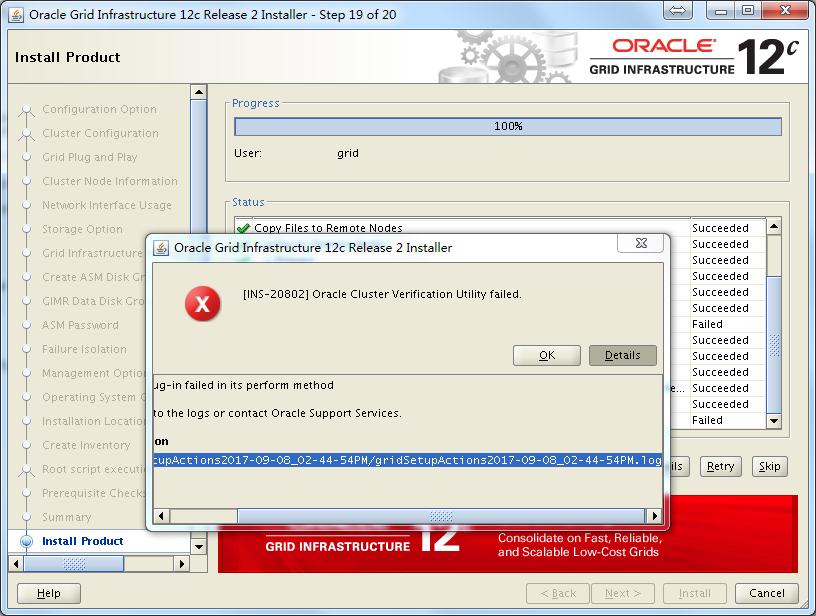
注:最后这个报错提示,查看日志发现是因为使用了一个scan ip的提示,可以忽略。
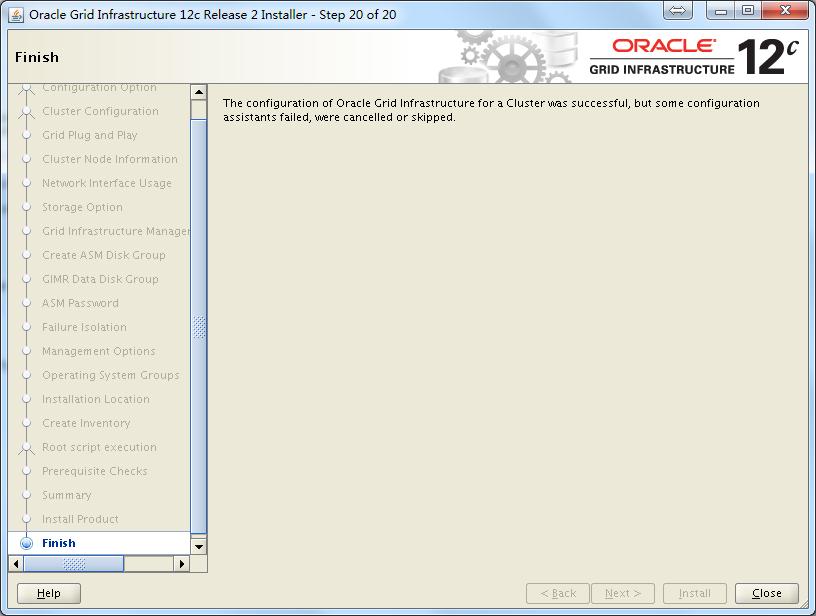
至此GI配置完成。
3.5 验证crsctl的状态
crsctl stat res -t
[grid@jydb1 ~]$ crsctl stat res -t

--------------------------------------------------------------------------------

Name           Target  State        Server                   State details

--------------------------------------------------------------------------------

Local Resources

--------------------------------------------------------------------------------

ora.ASMNET1LSNR_ASM.lsnr

               ONLINE  ONLINE       jydb1                    STABLE

               ONLINE  ONLINE       jydb2                    STABLE

ora.LISTENER.lsnr

               ONLINE  ONLINE       jydb1                    STABLE

               ONLINE  ONLINE       jydb2                    STABLE

ora.MGMT.dg

               ONLINE  ONLINE       jydb1                    STABLE

               ONLINE  ONLINE       jydb2                    STABLE

ora.OCR.dg

               ONLINE  ONLINE       jydb1                    STABLE

               ONLINE  ONLINE       jydb2                    STABLE

ora.chad

               ONLINE  ONLINE       jydb1                    STABLE

               ONLINE  ONLINE       jydb2                    STABLE

ora.net1.network

               ONLINE  ONLINE       jydb1                    STABLE

               ONLINE  ONLINE       jydb2                    STABLE

ora.ons

               ONLINE  ONLINE       jydb1                    STABLE

               ONLINE  ONLINE       jydb2                    STABLE

ora.proxy_advm

               OFFLINE OFFLINE      jydb1                    STABLE

               OFFLINE OFFLINE      jydb2                    STABLE

--------------------------------------------------------------------------------

Cluster Resources

--------------------------------------------------------------------------------

ora.LISTENER_SCAN1.lsnr

      1        ONLINE  ONLINE       jydb1                    STABLE

ora.MGMTLSNR

      1        ONLINE  ONLINE       jydb1                    169.254.105.255 10.1

                                                             0.1.90 10.10.2.90,ST

                                                             ABLE

ora.asm

      1        ONLINE  ONLINE       jydb1                    Started,STABLE

      2        ONLINE  ONLINE       jydb2                    Started,STABLE

      3        OFFLINE OFFLINE                               STABLE

ora.cvu

      1        ONLINE  ONLINE       jydb1                    STABLE

ora.jydb1.vip

      1        ONLINE  ONLINE       jydb1                    STABLE

ora.jydb2.vip

      1        ONLINE  ONLINE       jydb2                    STABLE

ora.mgmtdb

      1        ONLINE  ONLINE       jydb1                    Open,STABLE

ora.qosmserver

      1        ONLINE  ONLINE       jydb1                    STABLE

ora.scan1.vip

      1        ONLINE  ONLINE       jydb1                    STABLE

--------------------------------------------------------------------------------
crsctl stat res -t -init
[grid@jydb1 ~]$ crsctl stat res -t -init

--------------------------------------------------------------------------------

Name           Target  State        Server                   State details

--------------------------------------------------------------------------------

Cluster Resources

--------------------------------------------------------------------------------

ora.asm

      1        ONLINE  ONLINE       jydb1                    Started,STABLE

ora.cluster_interconnect.haip

      1        ONLINE  ONLINE       jydb1                    STABLE

ora.crf

      1        ONLINE  ONLINE       jydb1                    STABLE

ora.crsd

      1        ONLINE  ONLINE       jydb1                    STABLE

ora.cssd

      1        ONLINE  ONLINE       jydb1                    STABLE

ora.cssdmonitor

      1        ONLINE  ONLINE       jydb1                    STABLE

ora.ctssd

      1        ONLINE  ONLINE       jydb1                    ACTIVE:0,STABLE

ora.diskmon

      1        OFFLINE OFFLINE                               STABLE

ora.driver.afd

      1        ONLINE  ONLINE       jydb1                    STABLE

ora.drivers.acfs

      1        ONLINE  ONLINE       jydb1                    STABLE

ora.evmd

      1        ONLINE  ONLINE       jydb1                    STABLE

ora.gipcd

      1        ONLINE  ONLINE       jydb1                    STABLE

ora.gpnpd

      1        ONLINE  ONLINE       jydb1                    STABLE

ora.mdnsd

      1        ONLINE  ONLINE       jydb1                    STABLE

ora.storage

      1        ONLINE  ONLINE       jydb1                    STABLE

--------------------------------------------------------------------------------

[grid@jydb1 ~]$
3.6 测试集群的FAILED OVER功能
节点2被重启,查看节点1状态:
[grid@jydb1 ~]$ crsctl stat res -t

--------------------------------------------------------------------------------

Name           Target  State        Server                   State details

--------------------------------------------------------------------------------

Local Resources

--------------------------------------------------------------------------------

ora.ASMNET1LSNR_ASM.lsnr

               ONLINE  ONLINE       jydb1                    STABLE

ora.LISTENER.lsnr

               ONLINE  ONLINE       jydb1                    STABLE

ora.MGMT.dg

               ONLINE  ONLINE       jydb1                    STABLE

ora.OCR.dg

               ONLINE  ONLINE       jydb1                    STABLE

ora.chad

               ONLINE  ONLINE       jydb1                    STABLE

ora.net1.network

               ONLINE  ONLINE       jydb1                    STABLE

ora.ons

               ONLINE  ONLINE       jydb1                    STABLE

ora.proxy_advm

               OFFLINE OFFLINE      jydb1                    STABLE

--------------------------------------------------------------------------------

Cluster Resources

--------------------------------------------------------------------------------

ora.LISTENER_SCAN1.lsnr

      1        ONLINE  ONLINE       jydb1                    STABLE

ora.MGMTLSNR

      1        ONLINE  ONLINE       jydb1                    169.254.105.255 10.1

                                                             0.1.90 10.10.2.90,ST

                                                             ABLE

ora.asm

      1        ONLINE  ONLINE       jydb1                    Started,STABLE

      2        ONLINE  OFFLINE                               STABLE

      3        OFFLINE OFFLINE                               STABLE

ora.cvu

      1        ONLINE  ONLINE       jydb1                    STABLE

ora.jydb1.vip

      1        ONLINE  ONLINE       jydb1                    STABLE

ora.jydb2.vip

      1        ONLINE  INTERMEDIATE jydb1                    FAILED OVER,STABLE

ora.mgmtdb

      1        ONLINE  ONLINE       jydb1                    Open,STABLE

ora.qosmserver

      1        ONLINE  ONLINE       jydb1                    STABLE

ora.scan1.vip

      1        ONLINE  ONLINE       jydb1                    STABLE

--------------------------------------------------------------------------------
节点1被重启,查看节点2状态:
[grid@jydb2 ~]$ crsctl stat res -t

--------------------------------------------------------------------------------

Name           Target  State        Server                   State details

--------------------------------------------------------------------------------

Local Resources

--------------------------------------------------------------------------------

ora.ASMNET1LSNR_ASM.lsnr

               ONLINE  ONLINE       jydb2                    STABLE

ora.LISTENER.lsnr

               ONLINE  ONLINE       jydb2                    STABLE

ora.MGMT.dg

               ONLINE  ONLINE       jydb2                    STABLE

ora.OCR.dg

               ONLINE  ONLINE       jydb2                    STABLE

ora.chad

               ONLINE  ONLINE       jydb2                    STABLE

ora.net1.network

               ONLINE  ONLINE       jydb2                    STABLE

ora.ons

               ONLINE  ONLINE       jydb2                    STABLE

ora.proxy_advm

               OFFLINE OFFLINE      jydb2                    STABLE

--------------------------------------------------------------------------------

Cluster Resources

--------------------------------------------------------------------------------

ora.LISTENER_SCAN1.lsnr

      1        ONLINE  ONLINE       jydb2                    STABLE

ora.MGMTLSNR

      1        ONLINE  ONLINE       jydb2                    169.254.94.238 10.10

                                                             .1.92 10.10.2.92,STA

                                                             BLE

ora.asm

      1        ONLINE  OFFLINE                               STABLE

      2        ONLINE  ONLINE       jydb2                    Started,STABLE

      3        OFFLINE OFFLINE                               STABLE

ora.cvu

      1        ONLINE  ONLINE       jydb2                    STABLE

ora.jydb1.vip

      1        ONLINE  INTERMEDIATE jydb2                    FAILED OVER,STABLE

ora.jydb2.vip

      1        ONLINE  ONLINE       jydb2                    STABLE

ora.mgmtdb

      1        ONLINE  ONLINE       jydb2                    Open,STABLE

ora.qosmserver

      1        ONLINE  ONLINE       jydb2                    STABLE

ora.scan1.vip

      1        ONLINE  ONLINE       jydb2                    STABLE

--------------------------------------------------------------------------------
至此,12cR2的GI配置已全部完成。
Linux平台 Oracle 12cR2 RAC安装Part2:GI配置的更多相关文章
- Linux平台 Oracle 12cR2 RAC安装Part1:准备工作
Linux平台 Oracle 12cR2 RAC安装Part1:准备工作 一.实施前期准备工作 1.1 服务器安装操作系统 1.2 Oracle安装介质 1.3 共享存储规划 1.4 网络规范分配 二 ...
- Linux平台 Oracle 12cR2 RAC安装Part3:DB安装
Linux平台 Oracle 12cR2 RAC安装Part3:DB安装 四.DB(Database)安装 4.1 解压DB的安装包 4.2 DB软件安装 4.3 ASMCA创建磁盘组 4.4 DBC ...
- Linux平台 Oracle 18c RAC安装Part2:GI配置
三.GI(Grid Infrastructure)安装 3.1 解压GI的安装包 3.2 安装配置Xmanager软件 3.3 共享存储LUN的赋权 3.4 使用Xmanager图形化界面配置GI 3 ...
- Linux平台 Oracle 19c RAC安装Part2:GI配置
三.GI(Grid Infrastructure)安装 3.1 解压GI的安装包 3.2 安装配置Xmanager软件 3.3 共享存储LUN的赋权 3.4 使用Xmanager图形化界面配置GI 3 ...
- Linux平台 Oracle 11gR2 RAC安装Part2:GI安装
三.GI(Grid Infrastructure)安装 3.1 解压GI的安装包 3.2 安装配置Xmanager软件 3.3 共享存储LUN的赋权 3.4 使用Xmanager图形化界面安装GI 3 ...
- Linux平台 Oracle 18c RAC安装
Linux平台 Oracle 18c RAC安装Part1:准备工作 2018-08-04 22:20 by AlfredZhao, 1065 阅读, 0 评论, 收藏, 编辑 一.实施前期准备工作 ...
- Linux平台 Oracle 11gR2 RAC安装Part1:准备工作
一.实施前期准备工作 1.1 服务器安装操作系统 1.2 Oracle安装介质 1.3 共享存储规划 1.4 网络规范分配 二.安装前期准备工作 2.1 各节点系统时间校对 2.2 各节点关闭防火墙和 ...
- Linux平台 Oracle 11gR2 RAC安装Part3:DB安装
四.DB(Database)安装 4.1 解压DB的安装包 4.2 DB软件安装 4.3 ASMCA创建磁盘组 4.4 DBCA建库 4.5 验证crsctl的状态 Linux平台 Oracle 11 ...
- Linux平台 Oracle 18c RAC安装Part1:准备工作
一.实施前期准备工作 1.1 服务器安装操作系统 1.2 Oracle安装介质 1.3 共享存储规划 1.4 网络规范分配 二.安装前期准备工作 2.1 各节点系统时间校对 2.2 各节点关闭防火墙和 ...
随机推荐
- 有关java调用批处理文件
1 例子 java调用批处理文件 public class RunJarBat { public static void runJarBat() { // 调用控制台 Runtime rt = Run ...
- python自动化运维:系统基础信息模块
p { margin-bottom: 0.25cm; line-height: 120% } a:link { } 第一章: 首先介绍下系统性能信息模块:psutil psutil能够轻松实现获取系统 ...
- Java大数据人才应用领域广,就业薪酬高
互联网创造了大数据应用的规模化环境,大数据应用成功的案例大都是在互联网上发生的, 互联网业务提供了数据,互联网企业开发了处理软件,互联网企业的创新带来了大数据应用 的活跃,没有互联网便没有今天的大数据 ...
- Ubuntu超好用软件:markdown编辑器
Ubuntu上好用的markdown编辑器:typora 安装教程: sudo add-apt-repository ppa:hzwhuang/ss-qt5 sudo apt-get update s ...
- Protocol Buffers与FlatBuffers效率对比
Protocol Buffers是Google跨语言.跨平台的通用序列化库.FlatBuffers同样出自Google,而且也跨语言跨平台,但更强调效率,专门为游戏开发打造.在游戏界混了几年,各种各样 ...
- java_弹球小游戏
弹球游戏实现原理: 隔一定时间(小于1秒)重新绘制图像,因为Graphics类是一个抽象类,创建子类的时候需要把所有涉及的方法都得重写,所以这里使用的是创建Canvas的子类,只需要重写它的paint ...
- swift 获取文件大小
//获取文件大小 func getSize(url: URL)->UInt64 { var fileSize : UInt64 = 0 do { let attr = try FileManag ...
- macOS Sierra Version 10.12.6 环境下Tomcat的下载与安装以及InterlliJ IDEA 2017.2 环境下配置Tomcat 与创建Web项目
一.Tomcat的下载与安装 1.官网(http://tomcat.apache.org/)下载Tomcat 9.0 Core:zip包: 2.解压到指定的文件夹即可安装完成: 3.测试是否安装成功 ...
- CSS学习笔记!
一.关于图像RGB值和像素值的确定! 腾讯QQ截图软件Ctrl+Alt+A进入截图界面,鼠标变成彩色,便会拾取鼠标当前颜色,再按住Ctrl切换到十六进制格式#******.图像的像素值也在截取框内显示 ...
- How to sort the dictionary by the value field
// Sort dictionary by the value field List<KeyValuePair<int, int>> redBallsList = redBal ...