
Spring Boot Maven Plugin(二):run目标
简介
Spring Boot Maven Plugin插件提供spring boot在maven中的支持。允许你打包可运行的jar包或war包。
插件提供了几个maven目标和Spring Boot 应用一起工作。总的有:
- spring-boot:repackage 请阅读:Spring cloud的Maven插件(一):repackage目标
- spring-boot:run 请阅读: Spring cloud的Maven插件(二):run目标
- spring-boot:start and spring-boot:stop
- spring-boot:build-info
run: 这个目标和直接java -jar 来启动基本相同,唯一不同的是java -jar需要打包后才能跑,而run目标不需要。这个当程序编译打包需要比较长时间时,用run目标来跑可以节约时间。
一、简单使用
Spring Boot Maven Plugin 包括一个 run 目标,该目标被用于从命令行启动你的应用程序。比如:
mvn spring-boot:run
eclipse用法如下:
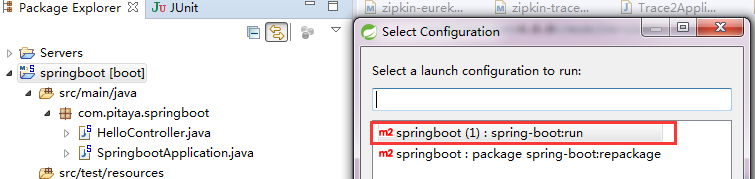
启动后的日志:
 [INFO] Scanning for projects...

 [INFO]

 [INFO] ------------------------------------------------------------------------

 [INFO] Building springboot 0.0.1-SNAPSHOT

 [INFO] ------------------------------------------------------------------------

 [INFO]

 [INFO] >>> spring-boot-maven-plugin:1.5.6.RELEASE:run (default-cli) > test-compile @ springboot >>>

 [INFO]

 [INFO] --- maven-resources-plugin:2.6:resources (default-resources) @ springboot ---

 [INFO] Using 'UTF-8' encoding to copy filtered resources.

 [INFO] Copying 1 resource

 [INFO] Copying 0 resource

 [INFO]

 [INFO] --- maven-compiler-plugin:3.1:compile (default-compile) @ springboot ---

 [INFO] Nothing to compile - all classes are up to date

 [INFO]

 [INFO] --- maven-resources-plugin:2.6:testResources (default-testResources) @ springboot ---

 [INFO] Using 'UTF-8' encoding to copy filtered resources.

 [INFO] Copying 0 resource

 [INFO]

 [INFO] --- maven-compiler-plugin:3.1:testCompile (default-testCompile) @ springboot ---

 [INFO] Nothing to compile - all classes are up to date

 [INFO]

 [INFO] <<< spring-boot-maven-plugin:1.5.6.RELEASE:run (default-cli) < test-compile @ springboot <<<

 [INFO]

 [INFO]

 [INFO] --- spring-boot-maven-plugin:1.5.6.RELEASE:run (default-cli) @ springboot ---

 [INFO] Downloading: http://maven.aliyun.com/nexus/content/groups/public/org/springframework/boot/spring-boot-loader-tools/1.5.6.RELEASE/spring-boot-loader-tools-1.5.6.RELEASE.pom

 [INFO] Downloaded: http://maven.aliyun.com/nexus/content/groups/public/org/springframework/boot/spring-boot-loader-tools/1.5.6.RELEASE/spring-boot-loader-tools-1.5.6.RELEASE.pom (3.8 kB at 5.0 kB/s)

 [INFO] Downloading: http://maven.aliyun.com/nexus/content/groups/public/org/springframework/boot/spring-boot-loader-tools/1.5.6.RELEASE/spring-boot-loader-tools-1.5.6.RELEASE.jar

 [INFO] Downloaded: http://maven.aliyun.com/nexus/content/groups/public/org/springframework/boot/spring-boot-loader-tools/1.5.6.RELEASE/spring-boot-loader-tools-1.5.6.RELEASE.jar (151 kB at 107 kB/s)

   .   ____          _            __ _ _

  /\\ / ___'_ __ _ _(_)_ __  __ _ \ \ \ \

 ( ( )\___ | '_ | '_| | '_ \/ _` | \ \ \ \

  \\/  ___)| |_)| | | | | || (_| |  ) ) ) )

   '  |____| .__|_| |_|_| |_\__, | / / / /

  =========|_|==============|___/=/_/_/_/

  :: Spring Boot ::        (v1.5.6.RELEASE)

 2017-09-16 16:15:53.173  INFO 6900 --- [           main] c.p.springboot.SpringbootApplication     : Starting SpringbootApplication on pc-PC with PID 6900 (D:\qinxiong\workspaceSpring\springboot\target\classes started by Administrator in D:\qinxiong\workspaceSpring\springboot)

 2017-09-16 16:15:53.173  INFO 6900 --- [           main] c.p.springboot.SpringbootApplication     : No active profile set, falling back to default profiles: default

 2017-09-16 16:15:53.204  INFO 6900 --- [           main] ationConfigEmbeddedWebApplicationContext : Refreshing org.springframework.boot.context.embedded.AnnotationConfigEmbeddedWebApplicationContext@2689929b: startup date [Sat Sep 16 16:15:53 CST 2017]; root of context hierarchy

 2017-09-16 16:15:54.668  INFO 6900 --- [           main] s.b.c.e.t.TomcatEmbeddedServletContainer : Tomcat initialized with port(s): 8080 (http)

 2017-09-16 16:15:54.683  INFO 6900 --- [           main] o.apache.catalina.core.StandardService   : Starting service [Tomcat]

 2017-09-16 16:15:54.683  INFO 6900 --- [           main] org.apache.catalina.core.StandardEngine  : Starting Servlet Engine: Apache Tomcat/8.5.16

 2017-09-16 16:15:54.762  INFO 6900 --- [ost-startStop-1] o.a.c.c.C.[Tomcat].[localhost].[/]       : Initializing Spring embedded WebApplicationContext

 2017-09-16 16:15:54.762  INFO 6900 --- [ost-startStop-1] o.s.web.context.ContextLoader            : Root WebApplicationContext: initialization completed in 1558 ms

 2017-09-16 16:15:54.918  INFO 6900 --- [ost-startStop-1] o.s.b.w.servlet.ServletRegistrationBean  : Mapping servlet: 'dispatcherServlet' to [/]

 2017-09-16 16:15:54.918  INFO 6900 --- [ost-startStop-1] o.s.b.w.servlet.FilterRegistrationBean   : Mapping filter: 'characterEncodingFilter' to: [/*]

 2017-09-16 16:15:54.918  INFO 6900 --- [ost-startStop-1] o.s.b.w.servlet.FilterRegistrationBean   : Mapping filter: 'hiddenHttpMethodFilter' to: [/*]

 2017-09-16 16:15:54.918  INFO 6900 --- [ost-startStop-1] o.s.b.w.servlet.FilterRegistrationBean   : Mapping filter: 'httpPutFormContentFilter' to: [/*]

 2017-09-16 16:15:54.918  INFO 6900 --- [ost-startStop-1] o.s.b.w.servlet.FilterRegistrationBean   : Mapping filter: 'requestContextFilter' to: [/*]

 2017-09-16 16:15:55.168  INFO 6900 --- [           main] s.w.s.m.m.a.RequestMappingHandlerAdapter : Looking for @ControllerAdvice: org.springframework.boot.context.embedded.AnnotationConfigEmbeddedWebApplicationContext@2689929b: startup date [Sat Sep 16 16:15:53 CST 2017]; root of context hierarchy

 2017-09-16 16:15:55.230  INFO 6900 --- [           main] s.w.s.m.m.a.RequestMappingHandlerMapping : Mapped "{[/hello]}" onto public java.lang.String com.pitaya.springboot.HelloController.index()

 2017-09-16 16:15:55.230  INFO 6900 --- [           main] s.w.s.m.m.a.RequestMappingHandlerMapping : Mapped "{[/error]}" onto public org.springframework.http.ResponseEntity<java.util.Map<java.lang.String, java.lang.Object>> org.springframework.boot.autoconfigure.web.BasicErrorController.error(javax.servlet.http.HttpServletRequest)

 2017-09-16 16:15:55.230  INFO 6900 --- [           main] s.w.s.m.m.a.RequestMappingHandlerMapping : Mapped "{[/error],produces=[text/html]}" onto public org.springframework.web.servlet.ModelAndView org.springframework.boot.autoconfigure.web.BasicErrorController.errorHtml(javax.servlet.http.HttpServletRequest,javax.servlet.http.HttpServletResponse)

 2017-09-16 16:15:55.246  INFO 6900 --- [           main] o.s.w.s.handler.SimpleUrlHandlerMapping  : Mapped URL path [/webjars/**] onto handler of type [class org.springframework.web.servlet.resource.ResourceHttpRequestHandler]

 2017-09-16 16:15:55.246  INFO 6900 --- [           main] o.s.w.s.handler.SimpleUrlHandlerMapping  : Mapped URL path [/**] onto handler of type [class org.springframework.web.servlet.resource.ResourceHttpRequestHandler]

 2017-09-16 16:15:55.293  INFO 6900 --- [           main] o.s.w.s.handler.SimpleUrlHandlerMapping  : Mapped URL path [/**/favicon.ico] onto handler of type [class org.springframework.web.servlet.resource.ResourceHttpRequestHandler]

 2017-09-16 16:15:55.404  INFO 6900 --- [           main] o.s.j.e.a.AnnotationMBeanExporter        : Registering beans for JMX exposure on startup

 2017-09-16 16:15:55.466  INFO 6900 --- [           main] s.b.c.e.t.TomcatEmbeddedServletContainer : Tomcat started on port(s): 8080 (http)

 2017-09-16 16:15:55.466  INFO 6900 --- [           main] c.p.springboot.SpringbootApplication     : Started SpringbootApplication in 2.637 seconds (JVM running for 8.001)
run目标的日志
二、实战
默认情况下,应用程序直接从Maven JVM执行。 如果您需要在分叉进程(maven进程fork出来的子进程)中运行,可以使用'fork'选项。 如果指定了'jvmArguments'或'agent'选项,或者如果存在devtools,应用程序也会在分叉进程执行。
如果需要指定一些JVM参数(即用于调试目的),可以使用jvmArguments参数,请看下面实例:
 <project>

   ...

   <build>

     ...

     <plugins>

       ...

       <plugin>

         <groupId>org.springframework.boot</groupId>

         <artifactId>spring-boot-maven-plugin</artifactId>

         <version>1.5.7.RELEASE</version>

         <configuration>

           <jvmArguments>

             -Xdebug -Xrunjdwp:transport=dt_socket,server=y,suspend=y,address=5005

           </jvmArguments>

         </configuration>

         ...

       </plugin>

       ...

     </plugins>

     ...

   </build>

   ...

 </project>
插件使用jvmArguments
请注意,由于您指定了一些JVM参数,所以该应用是自动在分叉进程中运行。这些参数也可以在命令行中指定,具体如下:
mvn spring-boot:run -Drun.jvmArguments="-Xdebug -Xrunjdwp:transport=dt_socket,server=y,suspend=y,address=5005"
命令行指定jvm参数
当我们程序中设置了多个profile的yml文件,比如application.yml,application-dev.yml,application-test.yml,application-prd.yml。我们可以通过设置profiles参数来指定应用程序的active的profile。下面的例子演示指定要application.yml和application-test.yml两个文件。具体如下:
<project>

  ...

  <build>

    ...

    <plugins>

      ...

      <plugin>

        <groupId>org.springframework.boot</groupId>

        <artifactId>spring-boot-maven-plugin</artifactId>

        <version>1.5.7.RELEASE</version>

        <configuration>

          <profiles>

            <profile>test</profile>

          </profiles>

        </configuration>

        ...

      </plugin>

      ...

    </plugins>

    ...

  </build>

  ...

</project>
插件使用profile
如果要多加一个profile,只要多添加<profile>prd</profile>即可。
同样的,要启动的profiles也可以通过命令行来指定,需要使用多个profile时,用逗号隔开,具体如下:
mvn spring-boot:run -Drun.profiles=test,prd
命令行指定profile
喜欢请微信扫描下面二维码,关注我公众号--“精修Java”,做一些实战项目中的问题和解决方案分享。

Spring Boot Maven Plugin(二):run目标的更多相关文章
- Spring Boot Maven Plugin(一):repackage目标
简介 Spring Boot Maven Plugin插件提供spring boot在maven中的支持.允许你打包可运行的jar包或war包. 插件提供了几个maven目标和Spring Boot ...
- Spring Boot Maven Plugin打包异常及三种解决方法:Unable to find main class
[背景]spring-boot项目,打包成可执行jar,项目内有两个带有main方法的类并且都使用了@SpringBootApplication注解(或者另一种情形:你有两个main方法并且所在类都没 ...
- Spring Boot的Maven插件Spring Boot Maven plugin详解
Spring Boot的Maven插件(Spring Boot Maven plugin)能够以Maven的方式为应用提供Spring Boot的支持,即为Spring Boot应用提供了执行Mave ...
- spring boot高性能实现二维码扫码登录(上)——单服务器版
前言 目前网页的主流登录方式是通过手机扫码二维码登录.我看了网上很多关于扫码登录博客后,发现基本思路大致是:打开网页,生成uuid,然后长连接请求后端并等待登录认证相应结果,而后端每个几百毫秒会循环查 ...
- spring boot高性能实现二维码扫码登录(中)——Redis版
前言 本打算用CountDownLatch来实现,但有个问题我没有考虑,就是当用户APP没有扫二维码的时候,线程会阻塞5分钟,这反而造成性能的下降.好吧,现在回归传统方式:前端ajax每隔1秒或2秒发 ...
- spring boot高性能实现二维码扫码登录(下)——订阅与发布机制版
前言 基于之前两篇(<spring boot高性能实现二维码扫码登录(上)——单服务器版>和<spring boot高性能实现二维码扫码登录(中)——Redis版>)的基础, ...
- 微服务下 Spring Boot Maven 工程依赖关系管理
单体 Spring Boot Maven 工程 最基本的 pom.xml 包含工程信息.Spring Boot 父工程.属性配置.依赖包.构建插件 <?xml version="1.0 ...
- Spring Boot 2.X(二):集成 MyBatis 数据层开发
MyBatis 简介 概述 MyBatis 是一款优秀的持久层框架,支持定制化 SQL.存储过程以及高级映射.它采用面向对象编程的方式对数据库进行 CRUD 的操作,使程序中对关系数据库的操作更方便简 ...
- Spring Boot学习记录(二)--thymeleaf模板 - CSDN博客
==他的博客应该不错,没有细看 Spring Boot学习记录(二)--thymeleaf模板 - CSDN博客 http://blog.csdn.net/u012706811/article/det ...
随机推荐
- 玩转JS系列之代码加载篇
从前我们这样写js <script type="text/javascript"> function a(){ console.log('a init');}funct ...
- Redis的部署及使用
Redis Memcached与Redis的对比 Memcached: 优点: 1. 纯set get性能好 2. 开发都会用,易用简单 4. 可用于存放session 缺点: 1. 不支持持久化 2 ...
- JVM 调优总结
避免FullGC: 1.通过调整堆中新生代和幸存代大小,避免因为幸存代不足而让Minor GC后的对象进入老年代.每次Minor GC都有对象进入老年代会造成数次MinorGC后FullGC. 2.减 ...
- 解说asp.net core MVC 过滤器的执行顺序
asp.net core MVC 过滤器会在请求管道的各个阶段触发.同一阶段又可以注册多个范围的过滤器,例如Global范围,controller范围等.以ActionFilter为例,我们来看看过滤 ...
- 使用SAS和JavaScript前端上传Azure Bolb大文件
问题描述: Azure Storage Rest API提供了对于大文件分块上传方法,分别使用Put Block和Put Block List实现相关功能 参考链接: Uploading Large ...
- Java架构师系统培训高并发分布式电商实战activemq,netty,nginx,redis dubbo shiro jvm虚拟机视频教程下载
15套java架构师.集群.高可用.高可扩 展.高性能.高并发.性能优化.Spring boot.Redis.ActiveMQ.Nginx.Mycat.Netty.Jvm大型分布 式项目实战视频教程 ...
- 大数据平台搭建-spark集群安装
版本要求 java 版本:1.8.*(1.8.0_60) 下载地址:http://www.oracle.com/technetwork/java/javase/downloads/jdk8-downl ...
- 两台主机之间单向Ping不通的问题
p.p1 { margin: 0.0px 0.0px 0.0px 0.0px; font: 12.0px ".PingFang SC"; color: #454545 } p.p2 ...
- Android studio 1.x 安装完毕后无法打开问题解决方案
Android Studio 1.0正式发布,给Android开发者带来了不小的惊喜,再也不用为繁琐的环境配置而烦恼,从某一层面上说这降低了android开发门槛. 不过貌似只能开心一会儿,因为and ...
- httpd常用配置
author:JevonWei 版权声明:原创作品 检查配置文件时,如下提示,则因为没有server的服务名称导致,故设置网站的服务server名称,若没有设置web服务名,主默认解析系统主机名(添加 ...