
Spring Boot Maven Plugin打包异常及三种解决方法:Unable to find main class
【背景】spring-boot项目,打包成可执行jar,项目内有两个带有main方法的类并且都使用了@SpringBootApplication注解(或者另一种情形:你有两个main方法并且所在类都没有使用@SpringBootApplication注解),pom.xml如下

<plugin>

    <groupId>org.springframework.boot</groupId>

    <artifactId>spring-boot-maven-plugin</artifactId>

    <version>1.5.3.RELEASE</version>

    <executions>

        <execution>

            <goals>

                <goal>repackage</goal>

            </goals>

        </execution>

    </executions>

</plugin>
【问题】
- 执行mvn clean package,报错如下(说点不相关的,使用install同理。因为spring-boot:repackage目标(goal)(下文会说)被绑定在package构建阶段(phases),而package阶段在install阶段之前,指定构建阶段之前的阶段都会执行。详细参见:Introduction to the Build Lifecycle)
[ERROR] Failed to execute goal org.springframework.boot:spring-boot-maven-plugin:1.5.3.RELEASE:repackage (default) on project webapps-api-bid: Execution default of goal org.springframework.boot:spring-boot-maven-plugin:1.5.3.RELEASE:repackage failed: Unable to find a single main class from the following candidates [com.xx.api.main.ApiBidMain, com.xx.webapps.api.main.WebappsApiBidMain]
- 执行mvn clean package spring-boot:repackage,报错如下,不如上面日志详细
[ERROR] Failed to execute goal org.springframework.boot:spring-boot-maven-plugin:1.5.3.RELEASE:repackage (default) on project webapps-api-bid: Execution default of goal org.springframework.boot:spring-boot-maven-plugin:1.5.3.RELEASE:repackage failed: Unable to find main class
【解决】
Note:参考官网描述,没有指定<mainClass>或者继承了spring-boot-starter-parent并且<start-class>属性未配置时,会自动寻找签名是public static void main(String[] args)的方法... 所以插件懵逼了,两个妹子和谁在一起呢...
- [推荐] 通用解决方法:<configuration>下配置mainClass,指定程序入口。
<plugin>

    <groupId>org.springframework.boot</groupId>

    <artifactId>spring-boot-maven-plugin</artifactId>

    <version>1.5.3.RELEASE</version>

    <configuration>

        <mainClass>com.xx.webapps.api.main.WebappsApiBidMain</mainClass>

    </configuration>

    <executions>

        <execution>

            <goals>

                <goal>repackage</goal>

            </goals>

        </execution>

    </executions>

</plugin>
Spring Boot Maven Plugin提供了几个目标(goal),我们在<executions>标签里配置的<goal>repackage</goal>对应spring-boot:repackage这个目标。
- repackage: create a jar or war file that is auto-executable. It can replace the regular artifact or can be attached to the build lifecyle with a separate classifier.
- run: run your Spring Boot application with several options to pass parameters to it.
- start and stop: integrate your Spring Boot application to the integration-test phase so that the application starts before it.
The plugin rewrites your manifest, and in particular it manages the Main-Class and Start-Classentries, so if the defaults don't work you have to configure those there (not in the jar plugin). The Main-Class in the manifest is actually controlled by the layout property of the boot plugin
[译] 该插件重写了清单文件(MANIFEST.MF,也就是jar里面的清单文件),此文件管理着主类(Main-Class)和开始类(Start-Class)入口。清单文件中的Main-Class由layout控制
这里的Start-Class就是我们配置的<mainClass>,而Main-Class受layout属性的控制,别被名字搞乱了(是不是很诡异?看看解决方法二就明白为啥如此诡异了).... 来张图直观的感受下,对应使用上面xml配置打包后的清单文件(MANIFEST.MF):
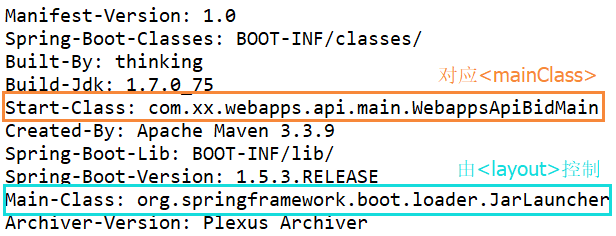
layout属性默认不需要配置,插件会自动推断。不同的layout属性清单文件里面的Main-Class也会相应的不同。比如layout不配置或者配置为JAR对应的Main-Class是JarLauncher,layout配置为WAR对应的Main-Class是WarLauncher。
- [有限制条件] 解决方法二:如果你的pom继承自spring-boot-starter-parent(注意此前提),也可以直接在<properties>配置<start-class>(其实这里的start-class直接对应清单文件里的Start-Class):
<properties>

    <start-class>com.xx.webapps.api.main.WebappsApiBidMain</start-class>
</properties>
- 解决方法三:打包的的时候注释掉其他的@SpringBootApplication... 或者你有两处main方法并且都没有使用@SpringBootApplication注解,注释掉一个main方法..... 这就是第三种解决方法233333
【随便说说】
说说spring-boot:repackage这个目标。Spring Boot Maven Plugin这个插件包含一系列目标(goal),我们在<executions>标签里配置的<goal>repackage</goal>对应spring-boot:repackage这个目标,看下官方介绍:
spring-boot:repackage repackages your jar/war to be executable.
Repackages existing JAR and WAR archives so that they can be executed from the command line using java -jar. With layout=NONE can also be used simply to package a JAR with nested dependencies (and no main class, so not executable).
简单点说,这货重新打包个可执行的jar/war,可以在命令行使用-jar执行。如果指定layout为NONE那就没有主类只是打个普通的jar(不可执行),一般不会这么做。
一般情况,这个目标会打一个新的jar/war,并把maven默认打的jar/war添加.original后缀,在target目录下可以看到:

【参考】
2.https://docs.spring.io/spring-boot/docs/2.0.0.BUILD-SNAPSHOT/maven-plugin//repackage-mojo.html
Spring Boot Maven Plugin打包异常及三种解决方法:Unable to find main class的更多相关文章
- Spring Boot Maven Plugin(一):repackage目标
简介 Spring Boot Maven Plugin插件提供spring boot在maven中的支持.允许你打包可运行的jar包或war包. 插件提供了几个maven目标和Spring Boot ...
- Spring Boot Maven Plugin(二):run目标
简介 Spring Boot Maven Plugin插件提供spring boot在maven中的支持.允许你打包可运行的jar包或war包. 插件提供了几个maven目标和Spring Boot ...
- Spring Boot的Maven插件Spring Boot Maven plugin详解
Spring Boot的Maven插件(Spring Boot Maven plugin)能够以Maven的方式为应用提供Spring Boot的支持,即为Spring Boot应用提供了执行Mave ...
- uni-app开发经验分享一: 多页面传值的三种解决方法
开发了一年的uni-app,在这里总结一些uni-app开发中的问题,提供几个解决方法,分享给大家: 问题描述:一个主页面,需要联通一到两个子页面,子页面传值到主页面,主页面更新 问题难点: 首先我们 ...
- spring boot 开始部署报Whitelabel Error Page错解决方法
因为时刚刚才学spring boot ,第一次碰到的问题,花了半个小时终于明白了,SpringBoot 的application类会自动扫描子包类下的mapping方法,因此application类不 ...
- MapperException: 无法获取实体类xxxxx对应的表名! 三种解决方法,总有一款适合你。
先把自动重启关一下 devtools: restart: #热部署生效 enabled: false 把devtools给删除了,说是这个jar包导致 ApplyApplication里面的@Mapp ...
- php删除html标签的三种解决方法
分享下PHP删除HTMl标签的三种方法. 方法1:直接取出想要取出的标记 <?php //取出br标记 function strip($str) { $str=str_replace(" ...
- fluent中UDF环境变量问题的三种解决方法
方法一: 这种方式最简便,首选这种,但是有时会因为不明原因而不好使,我自己电脑刚开始用这种方式是行得通的,但是后来中途装过很多乱七八糟的软件,估计环境变量改乱了,这时候只能用第二种或者第三种方法.先说 ...
- JMeter接口响应数据出现乱码的三种解决方法
第一种方法: Content encoding设置为utf-8,若仍为乱码,请用方法2 图1 第二种方法: 修改bin文件夹下的jmeter.properties文件 搜索ISO,把“#sampler ...
随机推荐
- BZOJ4556 HEOI2016字符串
没错,又是这题,使用后缀自动机,反向建树,主席树维护right集合. By:大奕哥 #include<bits/stdc++.h> using namespace std; ; ]; ch ...
- CF1065E Side Transmutations
link 题意: 给你一个长为m的序列$b_i$,定义两个字符串a,b相同当前仅当a执行以下操作后能变成b:($\rm{prefix}(x,y)$及$\rm{suffix}(x,y)$定义为串x的前/ ...
- Codeforces Round #396 (Div. 2) D. Mahmoud and a Dictionary 并查集
D. Mahmoud and a Dictionary 题目连接: http://codeforces.com/contest/766/problem/D Description Mahmoud wa ...
- 《Go语言实战》摘录:7.3 并发模式 - work
7.3 并发模式 - work
- Revit Family API 创建参考平面
使用API来编辑族时,使用doc.FamilyCreate.NewReferencePlane();创建参考平面. ) { ]; } // canno ...
- GetKeyState(vk_control)
GetKeyState(vk_control) 返回负数 , 说明按键被按下了
- Win10年度更新开发必备:VS2015 Update 1正式版下载汇总
微软在12月1日发布了Visual Studio 2015 Update 1 .在MSDN中微软也提供下载,而且MSDN的Visual Studio 2015 Update 1与官方免费下载的文件是一 ...
- 统计代码执行时间,使用Stopwatch和UserProcessorTime的区别
当我们需要统计一段代码的执行时间,首先想到的可能是Stopwatch类.在这里,先暂不使用Stopwatch,自定义一个统计代码执行时间的类,大致需要考虑到: 1.确保统计的是当前进程.当前线程中代码 ...
- rTorrent + ruTorrent 安装和配置
原文地址:http://wangyan.org/blog/rtorrent-and-rutorrent-tutorial.html rTorrent 是一款非常简洁优秀的BT客户端,它完全基于文本并可 ...
- iphone6/6+ 适配心得
1. 文档综述 自iphone6/6+发布,ios屏幕分辨率的种类一下从2种变成了四种.对于以前很多手写UI,并且使用绝对坐标的UI,可能会发生异变,本文主要介绍在纯手写UI条件下,ios应用 ...