
[C#]使用Gembox.SpreadSheet向Excel写入数据及图表
本文为原创文章、源代码为原创代码,如转载/复制,请在网页/代码处明显位置标明原文名称、作者及网址,谢谢!
开发工具:VS2017
语言:C#
DotNet版本:.Net FrameWork 4.0及以上
使用的DLL工具名称:GemBox.Spreadsheet.dll (版本:37.3.30.1185)
一、GemBox.Spreadsheet工具:
该DLL是由GemBox公司开发的基于Excel功能的开发工具,该DLL很轻量,且使用起来很方便,在这里推荐下来来使用。
下载地址:
https://pan.baidu.com/s/1slcBUqh
本文就是使用该工具进行Excel的写入操作。
二、创建Excel
为了能使用该DLL,必须在调用前写入以下代码:
SpreadsheetInfo.SetLicense("FREE-LIMITED-KEY");
创建Excel文件如下:
ExcelFile excel = new ExcelFile();
这里仅仅只是创建一个excel,代表的是excel整个文件,而保存该文件的代码如下:
excel.Save("文件路径");
三、给Excel添加一些属性
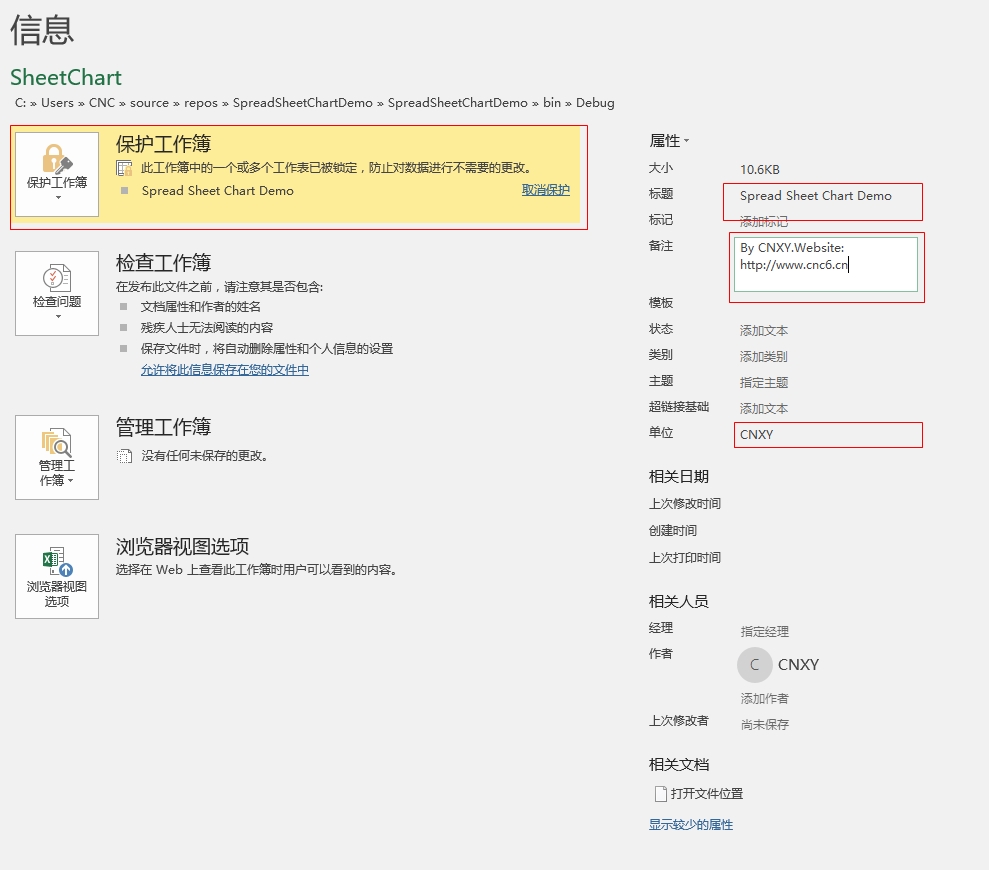
我们可以给excel添加一些诸如文档标题、作者、公司及备注等内容,实现这些内容的代码如下:
excel.DocumentProperties.BuiltIn.Add(new KeyValuePair<BuiltInDocumentProperties, string>(BuiltInDocumentProperties.Title, TITLE));

excel.DocumentProperties.BuiltIn.Add(new KeyValuePair<BuiltInDocumentProperties, string>(BuiltInDocumentProperties.Author, "CNXY"));

excel.DocumentProperties.BuiltIn.Add(new KeyValuePair<BuiltInDocumentProperties, string>(BuiltInDocumentProperties.Company, "CNXY"));

excel.DocumentProperties.BuiltIn.Add(new KeyValuePair<BuiltInDocumentProperties, string>(BuiltInDocumentProperties.Comments, "By CNXY.Website: http://www.cnc6.cn"));
四、给excel默认字体
这是给整个Excel设置统一的字体,具体代码如下:
excel.DefaultFontName = "Times New Roman";
五、添加一个Sheet表格
要知道,Excel是由Sheet表格构成的,因此添加Sheet表格的代码如下:
ExcelWorksheet sheet = excel.Worksheets.Add("表格名称");
以上,已经在excel上添加了一个名为“表格名称”的数据表格。
六、给Sheet添加密码保护
有时候,为了保护自己的Excel不被篡改,需要设置一下Sheet的密码,具体代码如下:
sheet.ProtectionSettings.SetPassword("cnxy");

sheet.Protected = true;
七、让网格线不可见
默认情况下,Sheet的网格线是可见的,有时候,我们可以设置网格线不可见,具体代码如下:
sheet.ViewOptions.ShowGridLines = false;
八、写入单元格
访问单元格的方式有三种,三种分别如下:
sheet.Cells["A1"]

sheet.Cells[,]

sheet.Rows[].Cells[]
以上三种方法都可以访问单元格,但如下写入单元格呢,其实方法很简单,如下:
sheet.Cells["A1"].Value= 内容
以上没有加双引号的原因是:内容不一定是字符串,有可能是数字、日期等。
九、单元格样式设置
单元格设置需要使用CellStyle对象,其代码如下:
CellStyle style = new CellStyle();

//设置水平对齐模式

style.HorizontalAlignment = HorizontalAlignmentStyle.Center;

//设置垂直对齐模式

style.VerticalAlignment = VerticalAlignmentStyle.Center;

//设置字体

style.Font.Size =  * PT; //PT=20

style.Font.Weight = ExcelFont.BoldWeight;

style.Font.Color = Color.Blue;

sheet.Cells["A1"].Style = style;
填充方式如下:
sheet.Cells[,].Style.FillPattern.PatternStyle = FillPatternStyle.Solid;
sheet.Rows[].Cells[].Style.FillPattern.PatternForegroundColor = Color.Gainsboro;
设置边框如下:
style.Borders.SetBorders(MultipleBorders.Outside, Color.Black, LineStyle.Thin);
十、合并单元格
合并单元格需使用CellRange对象,我们可以从sheet.Cells.GetSubrange或GetSubrangeAbsolute获得,代码如下:
CellRange range = sheet.Cells.GetSubrange("B2", "J3");

range.Value = "Chart";

range.Merged = true;
sheet.Cells.GetSubrangeAbsolute(, , , ).Merged = true;
十一、创建Chart图表对象
使用的是LineChart对象,代码如下:
LineChart chart =(LineChart)sheet.Charts.Add(ChartType.Line,"B4","J22");
以上意思是从B4到J22创建一个LineChart对象。
设置图表标题不可见,代码如下:
chart.Title.IsVisible = false;
设置X轴与Y轴的标题可见,代码如下:
chart.Axes.Horizontal.Title.Text = "Time";

chart.Axes.Vertical.Title.Text = "Voltage";
十二、给Y轴设置属性
主要使用了chart.Axes.VerticalValue返回的ValueAxis对象,代码如下:
ValueAxis axisY =  chart.Axes.VerticalValue;

//Y轴最大刻度与最小刻度

axisY.Minimum = -;

axisY.Maximum = ;

//Y轴主要与次要单位大小

axisY.MajorUnit = ;

axisY.MinorUnit = ;

//Y轴主要与次要网格是否可见

axisY.MajorGridlines.IsVisible = true;

axisY.MinorGridlines.IsVisible = true;

//Y轴刻度线类型

axisY.MajorTickMarkType = TickMarkType.Cross;

axisY.MinorTickMarkType = TickMarkType.Inside;
十三、附上完整的源代码
using GemBox.Spreadsheet;

using GemBox.Spreadsheet.Charts;

using System;

using System.Collections.Generic;

using System.Diagnostics;

using System.Drawing;

namespace SpreadSheetChartDemo

{

    class Program

    {

        const int PT = ;

        const int LENGTH = ;

        const string TIMESNEWROMAN = "Times New Roman";

        const string TITLE = "Spread Sheet Chart Demo";

        static void Main(string[] args)

        {

            SpreadsheetInfo.SetLicense("FREE-LIMITED-KEY");

            ExcelFile excel = new ExcelFile();

            //Excel默认字体

            excel.DefaultFontName = TIMESNEWROMAN;

            //Excel文档属性设置

            excel.DocumentProperties.BuiltIn.Add(new KeyValuePair<BuiltInDocumentProperties, string>(BuiltInDocumentProperties.Title, TITLE));

            excel.DocumentProperties.BuiltIn.Add(new KeyValuePair<BuiltInDocumentProperties, string>(BuiltInDocumentProperties.Author, "CNXY"));

            excel.DocumentProperties.BuiltIn.Add(new KeyValuePair<BuiltInDocumentProperties, string>(BuiltInDocumentProperties.Company, "CNXY"));

            excel.DocumentProperties.BuiltIn.Add(new KeyValuePair<BuiltInDocumentProperties, string>(BuiltInDocumentProperties.Comments, "By CNXY.Website: http://www.cnc6.cn"));

            //新建一个Sheet表格

            ExcelWorksheet sheet = excel.Worksheets.Add(TITLE);

            //设置表格保护

            sheet.ProtectionSettings.SetPassword("cnxy");

            sheet.Protected = true;

            //设置网格线不可见

            sheet.ViewOptions.ShowGridLines = false;

            //定义一个B2-G3的单元格范围

            CellRange range = sheet.Cells.GetSubrange("B2", "J3");

            range.Value = "Chart";

            range.Merged = true;

            //定义一个单元格样式

            CellStyle style = new CellStyle();

            //设置边框

            style.Borders.SetBorders(MultipleBorders.Outside, Color.Black, LineStyle.Thin);

            //设置水平对齐模式

            style.HorizontalAlignment = HorizontalAlignmentStyle.Center;

            //设置垂直对齐模式

            style.VerticalAlignment = VerticalAlignmentStyle.Center;

            //设置字体

            style.Font.Size =  * PT;

            style.Font.Weight = ExcelFont.BoldWeight;

            style.Font.Color = Color.Blue;

            range.Style = style;

            //增加Chart

            LineChart chart = (LineChart)sheet.Charts.Add(ChartType.Line,"B4","J22");

            chart.Title.IsVisible = false;

            chart.Axes.Horizontal.Title.Text = "Time";

            chart.Axes.Vertical.Title.Text = "Voltage";

            ValueAxis axisY =  chart.Axes.VerticalValue;

            //Y轴最大刻度与最小刻度

            axisY.Minimum = -;

            axisY.Maximum = ;

            //Y轴主要与次要单位大小

            axisY.MajorUnit = ;

            axisY.MinorUnit = ;

            //Y轴主要与次要网格是否可见

            axisY.MajorGridlines.IsVisible = true;

            axisY.MinorGridlines.IsVisible = true;

            //Y轴刻度线类型

            axisY.MajorTickMarkType = TickMarkType.Cross;

            axisY.MinorTickMarkType = TickMarkType.Inside;

            Random random = new Random();

            double[] data = new double[LENGTH];

            for (int i=;i< LENGTH; i++)

            {

               if( random.Next(,) > )

                    data[i] = random.NextDouble() * ;

               else

                    data[i] = -random.NextDouble() * ;

            }

            chart.Series.Add("Random", data);

            //尾部信息

            range = sheet.Cells.GetSubrange("B23", "J24");

            range.Value = $"Write Time:{DateTime.Now:yyyy-MM-dd HH:mm:ss} By CNXY";

            range.Merged = true;

            //B25(三种单元格模式)

            sheet.Cells["B25"].Value = "http://www.cnc6.cn";

            sheet.Cells[,].Style.FillPattern.PatternStyle = FillPatternStyle.Solid;

            sheet.Rows[].Cells[].Style.FillPattern.PatternForegroundColor = Color.Gainsboro;

            //B25,J25

            sheet.Cells.GetSubrangeAbsolute(, , , ).Merged = true;

            string filePath = $@"{Environment.CurrentDirectory}\SheetChart.xlsx";

            try

            {

                excel.Save(filePath);

                Process.Start(filePath);

                Console.WriteLine("Write successfully");

            }

            catch(Exception ex)

            {

                Console.WriteLine(ex);

            }

            Console.Write("Press any key to continue.");

            Console.ReadKey();

        }

    }

}
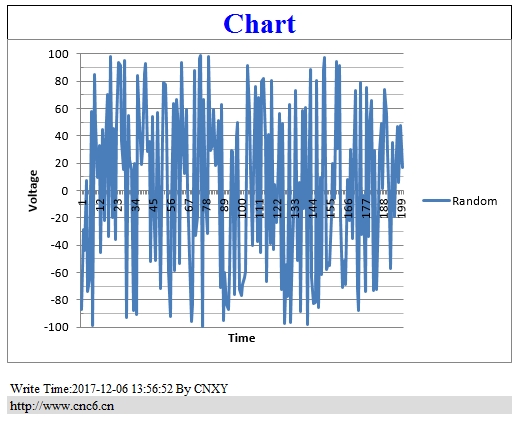
十四、生成的Excel
演示的Excel下载地址:
https://pan.baidu.com/s/1slDPAED
十五、生成的exe
下载地址如下:
https://pan.baidu.com/s/1nvefYvJ
运行结果如下:

[C#]使用Gembox.SpreadSheet向Excel写入数据及图表的更多相关文章
- C# Excel写入数据及图表
开发工具:VS2017 语言:C DotNet版本:.Net FrameWork 4.0及以上 使用的DLL工具名称:GemBox.Spreadsheet.dll (版本:37.3.30.1185) ...
- jxl操作excel写入数据不覆盖原有数据示例
public void readTO() { Workbook wb = null; WritableWorkbook wwb = null; try { ...
- Python学习笔记_Python向Excel写入数据
实验环境 1.OS:Win 10 64位 2.Python 3.7 3.如果没有安装xlwt库,则安装:pip install xlwt 下面是从网上找到的一段代码,网上这段代码,看首行注释行,是在L ...
- python3.4对已经存在的excel写入数据
#!/usr/bin/env python # -*- coding:utf-8 -*- # __author__ = "blzhu" """ pyt ...
- java poi 从服务器下载模板写入数据再导出
最近写了一个,Excel 的 写入和导出. 需求是这样的. 在新建合同的时候,会有导出合同的数据, 导出的模板是固定的,,需要在模板里面写入合同的信息. first : 下载模板 ...
- Excel数据可视化图表设计需要注意的几个问题
大数据发展迅速的时代,数据分析驱动商业决策.对于庞大.无序.复杂的数据要是没经过合适的处理,价值就无法体现. 可以想象一本没有图片的教科书.没有图表.图形或是带有箭头和标签的插图或流程图,那么这门学 ...
- java向Excel文件写入数据
/*使用之前要记得导入第三的jar包这个是我之前使用的时候那别人的东西自己修改了一下 还没来得及好好地封装一下还望见谅,注释我感觉写的挺清楚的就在不进行解释代码了*/package com.zzp.E ...
- NPOI操作excel之写入数据到excel表
在上一篇<NPOI操作excel之读取excel数据>我们把excel数据写入了datatable中,本篇就讲如何把datatable数据写入excel中. using System; u ...
- Python中,添加写入数据到已经存在的Excel的xls文件,即打开excel文件,写入新数据
背景 Python中,想要打开已经存在的excel的xls文件,然后在最后新的一行的数据. 折腾过程 1.找到了参考资料: writing to existing workbook using xlw ...
随机推荐
- HiveQL简单操作DDL
hive-2.1.1 DDL操作 Create/Drop/Alter/Use Database 创建数据库 //官方指导 CREATE (DATABASE|SCHEMA) [IF NOT EXISTS ...
- LINUX 笔记-free命令
free命令可以显示Linux系统中空闲的.已用的物理内存及swap内存,及被内核使用的buffer. focus@ubuntu:~$ free -h total used free shared b ...
- 顺序栈--Java实现
/*栈和队列:逻辑结构属于操作受限的线性表 *栈:特点先进后出,只允许在栈顶操作 *栈的实现方式:顺序栈和链栈 *常见的操作:进栈,出栈,获取栈顶,判空,判满,栈的容量 *栈的应用 *1.逆序相关操作 ...
- 启动关闭zookeeper集群的脚本
启动hadoop Ha集群是,每次都要手动启动每个zk节点,实在是太麻烦了.于是乎自己写了个脚本startAllZK.sh: 需要启动的节点,先在 NODENAME_ARR 数组中配置好,zkServ ...
- 改变 font Awesome、Ionic 图标属性
可使用 -webkit-text-stroke属性. 例如: -webkit-text-stroke:1px red 使用color属性,可改变 图标颜色: 例如: color: red: 使用fon ...
- 【经验分享】Trachtenberg system(特拉亨伯格速算系统)
二战期间,俄国的数学家Jakow Trachtenberg(1888-1953)被关进纳粹集中营,在狱中,他开发出了一套心算算法,这套算法后来被命名为Trachtenberg(特拉亨伯格)速算系统. ...
- Java面试题-2
程序员面试之九阴真经 谈谈final, finally, finalize的区别: final:::修饰符(关键字)如果一个类被声明为final,意味着它不能再派生出新的子类,不能作为父类被继承.因此 ...
- 一起写框架-Ioc内核容器的实现-基础功能-getBean(五)
实现的功能 1. 启动程序时,将@ComponentScan加载的类,创建对象并放在容器里面.(查看上一篇文) 2. 通过ApplicatoinContext的getBean()方法获得容器里面的对象 ...
- Scrum Meeting Alpha - 5
Scrum Meeting Alpha - 5 NewTeam 2017/10/20 地点:主楼与4号楼之间的走廊2楼 任务反馈 团队成员 完成任务 计划任务 安万贺 完成了对班级作业部分的API的包 ...
- main之前初始化流程
main之前初始化流程 本文分别介绍Keil调用的ARMCC以及ARM-NONE-EABI-GCC两个编译器在main之前的操作: Keil MDK启动文件 总结一下MDK的启动流程: 1.系统初始化 ...