
ASP.NET + MVC5 入门完整教程四---MVC 中使用扩展方法
https://blog.csdn.net/qq_21419015/article/details/80433640
1、示例项目准备
1)项目创建
新建一个项目,命名为LanguageFeatures ,选择 Empty (空白模板),选中 MVC 选项。在“Controllers”文件夹下创建 HomeController.cs 文件,修改默认Index 如下:
public string Index()
{
return "Navigate to a URL to show an example";
}
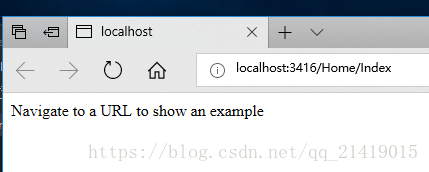
在Index上右键添加视图,在Views\Home\ 下出现Index.cshtml ,右键,在浏览器查看,效果如下:
2)添加引用
添加 System.Net.Http 程序集,该程序集默认不会添加到MVC项目中。在VS中的“Project(项目)”菜单选择“Add Reference(添加引用)”,打开“Reference Manager(引用管理器)”窗口,选择“Assemblies(程序集)”,选中“System.Net.Http”选项,如下所示:

2、使用自动实现的属性
常规的C#上属性可以暴露类的数据片段,这种数据片段与设置和接收数据采用了一种松耦合的方式。在 "Models"文件夹下新建一个 Product.cs 类:
namespace LanguageFeatures.Models

{

  public class Product

  {

    //字段

    private string name;

    //属性

    //自动实现属性{ get; set; }

    public int ProductID { get; set; }

    public string Description { get; set; }

    public decimal Price { get; set; }

    public string Category { get; set; }

    //实现自定义get,若需要set,则同时实现set;不可以自动实现set

    public string Name

    {

      get { return ProductID + name; }

      set { name = value; }

    }

  }

}
ps:字段与属性的区分,属性一般是带有get和/或set块的成员
在HomeController.cs 中如下设置:添加一个方法
public ViewResult AutoProperty()

{

  //创建一个新的Product对象

  Product myProduct = new Product();

  //设置属性

  myProduct.Name = "KaKa";

  //读取属性

  string productName = myProduct.Name;

  //生成视图

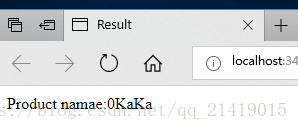
  return View("Result", (object)String.Format("Product namae:{0}", productName));

}
在空白处右键,弹出菜单选择添加视图,命名Result ,内容如下:
@model String
@{
Layout = null;
}
<!DOCTYPE html>
<html>
<head>
<meta name="viewport" content="width=device-width" />
<title>CreateProduct</title>
</head>
<body>
<div>
@Model
</div>
</body>
</html>
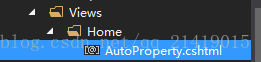
再在 AutoProperty 上右键添加视图,在\Home\AutoProperty.cshtml 右键,在浏览器中查看:

3、使用扩展方法
扩展方法(Extension Method)是给那些不是你拥有、不能直接修改代码的类添加方法的一种方便的办法。
在Models 文件夹中新建 ShoppingCart.cs 文件,他表示 Products 对象集合。
using System;
using System.Collections;//实现接口
using System.Collections.Generic;
using System.Linq;
using System.Web;
namespace LanguageFeatures.Models
{
public class ShoppingCart
{
//封装Product类
public List<Product> Products { get; set; }
}
}
一个简单的类,作用就是封装一个Products对象的列表。现在,假设我们需要确定ShoppingCart 类中的 Product对象总值,但是不能够修改这个类(已经假设这个类来自第三方,没有源代码,只有一个ShoppingCart,我们没办法操作ShoppingCart类内Product对象的值),这时候可以运用扩展方法来实现我们的功能。在Models下新建 MyExtensionMethod.cs 类。
public static class MyExtensionMethod
{
public static decimal TotalPrices(this ShoppingCart cartParam)
{
decimal total = 0;
foreach (Product pro in cartParam.Products)
{
total += pro.Price;
}
return total;
}
}
第一个参数前的this 关键字把 TotalPrices标记为一个扩展方法,第一个参数告诉 .NET,这个扩展方法运用那个类----此例指ShoppingCart,cartParam来引用ShoppingCart 类的实例。这个扩展方法枚举了 ShoppingCart 下所有的 Product 并返回Products.Price属性总和,下面在Home控制器中如何应用。新建一个名为UseExtension的动作方法
public ViewResult UseExtension()
{
//创建并填充ShoppingCart
ShoppingCart cart = new ShoppingCart
{
Products = new List<Product>
{
new Product {Name="Kaka",Price=275M },
new Product {Name="wangKa",Price=48.25M },
new Product {Name="wangKaka",Price=18.95M },
new Product {Name="KawangKa",Price=34.25M }
}
};
decimal cartTotal = cart.TotalPrices();
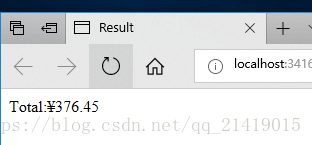
return View("Result", (object)String.Format("Total:{0:c}", cartTotal));
}
新建UseExtension视图,右键浏览器查看;

4、对接口运用扩展方法
扩展方法也可以运用在一个接口的扩展方法,并允许实现这个接口的所有类上调用这个扩展方法。同样在ShoppingCart类中实现 IEnumerable<Product> 接口的ShoppingCart类:
using System;
using System.Collections;//实现接口
using System.Collections.Generic;
using System.Linq;
using System.Web;
namespace LanguageFeatures.Models
{
public class ShoppingCart : IEnumerable<Product>{
//封装Product类
public List<Product> Products { get; set; }
public IEnumerator<Product> GetEnumerator()
{
return Products.GetEnumerator();
}
IEnumerator IEnumerable.GetEnumerator()
{
return GetEnumerator();
}
}
}
在Models文件夹下MyExtensionMethod.cs 继续实现接口扩展方法
using System;
using System.Collections.Generic;
using System.Linq;
using System.Web;
namespace LanguageFeatures.Models
{
public static class MyExtensionMethod
{
//扩展方法
public static decimal TotalPrices(this ShoppingCart cartParam)
{
decimal total = 0;
foreach (Product pro in cartParam.Products)
{
total += pro.Price;
}
return total;
}
//接口扩展方法
public static decimal ITotalPrices(this IEnumerable<Product> productEnum)
{
decimal total = 0;
foreach (Product pro in productEnum)
{
total += pro.Price;
}
return total;
}
}
}
在Home控制器中如何应用。新建一个名为 UseExtensionEnumerable 的动作方法
public ViewResult UseExtensionEnumerable()
{
IEnumerable<Product> products = new ShoppingCart
{
Products = new List<Product>
{
new Product {Name="Kaka",Price=275M },
new Product {Name="wangKa",Price=48.95M },
new Product {Name="wangKaka",Price=19.50M },
new Product {Name="KawangKa",Price=39.25M }
}
};
//创建并填充ShoppingCart
Product[] productArrary =
{
new Product {Name="Kaka",Price=375M },
new Product {Name="wangKa",Price=48.95M },
new Product {Name="wangKaka",Price=19.50M },
new Product {Name="KawangKa",Price=34.95M }
};
//获取购物车中的产品总价
decimal cartTotal = products.ITotalPrices();
//获取数组中产品的总价
decimal arrayTotal = productArrary.ITotalPrices();
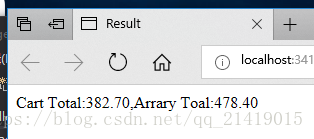
return View("Result", (object)String.Format("Cart Total:{0},Arrary Toal:{1}", cartTotal, arrayTotal));
}
添加UseExtensionEnumerable 视图,右键在浏览器中查看:
5、使用过滤扩展方法
最后演示的一种扩展方法可以对对象集合进行过滤,这是一种对 IEnumerable<T>进行操作,并且返回一个 IEnumerable<T> 结果,可以用 yield 关键字把选择条件运用于源数据。在Models文件夹下MyExtensionMethod.cs 继续实现过滤扩展方法:
using System;
using System.Collections.Generic;
using System.Linq;
using System.Web;
namespace LanguageFeatures.Models
{
public static class MyExtensionMethod
{
//扩展方法
public static decimal TotalPrices(this ShoppingCart cartParam)
{
decimal total = 0;
foreach (Product pro in cartParam.Products)
{
total += pro.Price;
}
return total;
}
//接口扩展方法
public static decimal ITotalPrices(this IEnumerable<Product> productEnum)
{
decimal total = 0;
foreach (Product pro in productEnum)
{
total += pro.Price;
}
return total;
}
//过滤扩展方法
public static IEnumerable<Product> FilterByCategory(this IEnumerable<Product> productEnum,string categortyParam)
{
foreach (Product pro in productEnum)
{
if(pro.Category== categortyParam)
{
yield return pro;
}
}
}
}
}
FilterByCategory 扩展方法采用一个附加参数,允许在调用该方法时加入一个过滤条件,利用 Category 属性来过滤 Product 对象,不匹配的被丢弃。在HomeController.cs 中运用:
public ViewResult UseFilterExtensionEnumerable()
{
IEnumerable<Product> products = new ShoppingCart
{
Products = new List<Product>
{
new Product {Name="Kaka",Category="Watersports",Price=275M },
new Product {Name="wangKa",Category="Soccer",Price=48.95M },
new Product {Name="wangKaka",Category="Watersports",Price=19.50M },
new Product {Name="KawangKa",Category="Soccer",Price=39.25M }
}
};
decimal cartTotal = 0;
foreach (Product pro in products.FilterByCategory("Soccer"))
{
cartTotal += pro.Price;
}
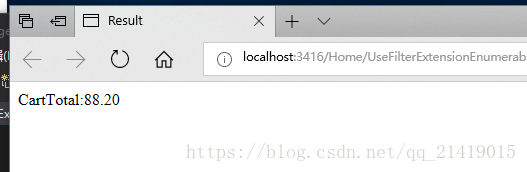
return View("Result", (object)String.Format("CartTotal:{0}", cartTotal));
}
添加 UseFilterExtensionEnumerable 视图,右键在浏览器中查看:
资源下载:https://download.csdn.net/download/qq_21419015/10435081
ASP.NET + MVC5 入门完整教程四---MVC 中使用扩展方法的更多相关文章
- ASP.NET + MVC5 入门完整教程七 -—-- MVC基本工具(上)
https://blog.csdn.net/qq_21419015/article/details/80474956 这里主要介绍三类工具之一的 依赖项注入(DI)容器,其他两类 单元测试框架和模仿工 ...
- ASP.NET + MVC5 入门完整教程七 -—-- MVC基本工具(下)
https://blog.csdn.net/qq_21419015/article/details/80493633 Visual Stdio 的单元测试
- ASP.NET + MVC5 入门完整教程三 (下) ---MVC 松耦合
建立松耦合组件 MVC 模式最重要的特性之一视他支持关注分离,希望应用程序中的组件尽可能独立,只有很少的几个可控依赖项.在理想的情况下,每个组件都不了解其他组件,而只是通过抽象接口来处理应用程序的其他 ...
- ASP.NET + MVC5 入门完整教程八 -—-- 一个完整的应用程序(上)
https://blog.csdn.net/qq_21419015/article/details/80509513 SportsStore 1.开始创建Visual Studio 解决方案和项目这里 ...
- ASP.NET + MVC5 入门完整教程八 -—-- 一个完整的应用程序(下)
https://blog.csdn.net/qq_21419015/article/details/80802931 SportsStore 1.导航 添加导航控件 如果客户能够通过产品列表进行分类导 ...
- ASP.NET + MVC5 入门完整教程三 (上) ---第一个MVC项目
https://blog.csdn.net/qq_21419015/article/details/80420815 第一个MVC应用程序 1创建MVC项目 打开VS ,File--新建--项目,选择 ...
- ASP.NET + MVC5 入门完整教程五 --- Razor (模型与布局)
https://blog.csdn.net/qq_21419015/article/details/80451895 1.准备示例项目 为了演示Razor,使用VS创建一个名称为“Razor”的新项目 ...
- ASP.NET + MVC5 入门完整教程二
原文链接:https://blog.csdn.net/qq_21419015/article/details/80318046 从前端UI开始 MVC分离的比较好,开发顺序没有特别要求,先开发哪一部分 ...
- asp.net + MVC5 入门完整教程一
原文链接:https://blog.csdn.net/qq_21419015/article/details/80311918原创凌霜残雪 最后发布于2018-05-14 17:26:30 阅读数 3 ...
随机推荐
- Windows下Anaconda安装、换源与更新
Anaconda指的是一个开源的Python发行版本,其包含了conda.Python等180多个科学包及其依赖项.当你尝试pip install xxx时出现各种意外和依赖问题,那么conda就是一 ...
- 0014 基于DRF框架开发(02 基类视图 GenericAPIView)
前端于对数据操作的请求基本上就分为四类:增删改查,即增加.删除.修改.查询. 而DRF把前端请求分为两个大类:带ID参数请求和不带ID参数请求. 不带ID参数请求包括:增加.分布多条查询 带ID参数请 ...
- 0009 基于DRF框架开发(02 创建模型)
上一节介绍了DRF开发的基本流程,共五个步骤: 1 创建模型 2 创建序列化器 3 编写视图 4 配置URL 5 运行测试 本节主要讲解创建模型. 构建学校,教师,学生三个模型,这三个模型之间的关系是 ...
- codechef Chef and The Colored Grid
难度 \(hard\) 题意 \(3\times n\)的方格,前两行已分别填入\(n-\)排列,要求求第三行填入\(n-\)排列,使得每行每列数不重复的方案数(数据保证前两行合法)\(n\le 10 ...
- Navicat 安装+连接
Navicat安装包: 链接:https://pan.baidu.com/s/1bvKagRJ0w_7LH0t4597ycA 提取码:yftv 如MySQL 8.0+ 安装成功后,教程见本博 可用Na ...
- 使用vue/cli 创建一个简单的项目
首先,电脑安装了node.js官方要求8.9 或更高版本 (推荐 8.11.0+) npm install -g @vue/cli # OR yarn global add @vue/cli 全局安装 ...
- HBase Hive
Hbase数据管理 Hbase就是Hadoop database Hbase是列式数据库 因此Hbase特别适合寻找按照时间排序寻找Top n的场景 Hive数据管理 基于 Hadoop 文件系统的数 ...
- k8s service的四种类型
ClusterIp 默认类型,每个Node分配一个集群内部的Ip,内部可以互相访问,外部无法访问集群内部. NodePort 基于ClusterIp,另外在每个Node上开放一个端口,可以从所有的位置 ...
- Linux虚拟化 xen的工具栈介绍
试验环境centos6.10 xen的工具栈介绍: 查看xl目录的帮助:xl help 查看xen下安装了哪些虚拟机:xl list # xl list Domain-0 Name ID Mem VC ...
- 849. Dijkstra求最短路 I(模板)
给定一个n个点m条边的有向图,图中可能存在重边和自环,所有边权均为正值. 请你求出1号点到n号点的最短距离,如果无法从1号点走到n号点,则输出-1. 输入格式 第一行包含整数n和m. 接下来m行每行包 ...