
React的React.createContext()源码解析(四)
一.产生context原因
二.context的两种实现方式
1.老版本(React16.x前)
//根组件

class MessageList extends React.Component {

  //getChildContext函数,返回一个context对象

  getChildContext() {

    return { color: 'purple', text: 'item text' }

  }

  render() {

    return (

      <div>

        <Message text="this is MessageList" />

      </div>

    )

  }

}

//指定context结构类型 如果不写 产生错误

//import T from 'prop-types';

MessageList.childContextTypes = {

  color: T.string,

  text: T.string,

}

//中间组件

class Message extends React.Component {

  render() {

    return (

      <div>

        <MessageItem />

      </div>

    )

  }

}

//孙子组件(接收组件)

class MessageItem extends React.Component {

  render() {

    //this.context获取上下文

    return (

      <div>

        {this.context.text}

      </div>

    )

  }

}

//孙子组件声明 接收context结构类型  如果contextTypes没有定义 context将是一个空对象

MessageItem.contextTypes = {

  text: T.string

}
为什么会被摒弃?
2.新版本(React16.x后)
//创建两个组件 Provider,Consumer

//let {Provider,Consumer}=React.createContext(defaultValue); //defaultValue可以设置共享的默认数据 当Provider不存在的时候 defaultValue生效

const { Provider, Consumer } = React.createContext({ theme: "green" }) // 这里MessageList  render(){<Content />}

class MessageList extends React.Component {

  render() {

    //Procider组件遍历子组件,并且有一个属性value,且value相当于旧版本的getChildContext()的返回的context对象 用来提供数据

    return (

      <Provider value={{ theme: "pink" }}>

        <Content />

      </Provider>

    )

  }

}

//中间组件

function Content() {

  return (

    <div>

      <Button />

    </div>

  )

}

//接收组件,如果子组件是Consumer的话,将value作为参数值,传递给新创建的Consumer,渲染一个函数组件

function Button() {

  return (

    <Consumer>

      {({ theme }) => (

        <button

          style={{ backgroundColor: theme }}>

          Toggle Theme

        </button>

      )}

    </Consumer>

  )

}
注意:将undefined传递给<Provider>的value时,createContext中的defaultValue不会生效,Consumer的value显示空值
三,React.createContext()源码解析
    //calculateChangedBits方法,使用Object.is()计算新老context的一个变化

    function createContext(defaultValue, calculateChangedBits) {

      if (calculateChangedBits === undefined) {

        calculateChangedBits = null;

      } else {

        {

          !(calculateChangedBits === null || typeof calculateChangedBits === 'function') ? warningWithoutStack$1(false, 'createContext: Expected the optional second argument to be a ' + 'function. Instead received: %s', calculateChangedBits) : void 0;

        }

      }

      var context = {

        //context的$$typeof在createElement中的type对象中存储的

        $$typeof: REACT_CONTEXT_TYPE,

        //作为支持多个并发渲染器的解决方法 我们将一些渲染器作为主要渲染器 其他渲染器为辅助渲染器

        _calculateChangedBits: calculateChangedBits,

        //我们希望有两个并发渲染器:主要和次要

        //辅助渲染器将自己的context的value存储在单独的字段里

        //_currentValue和_currentValue2作用一样,只是作用平台不同

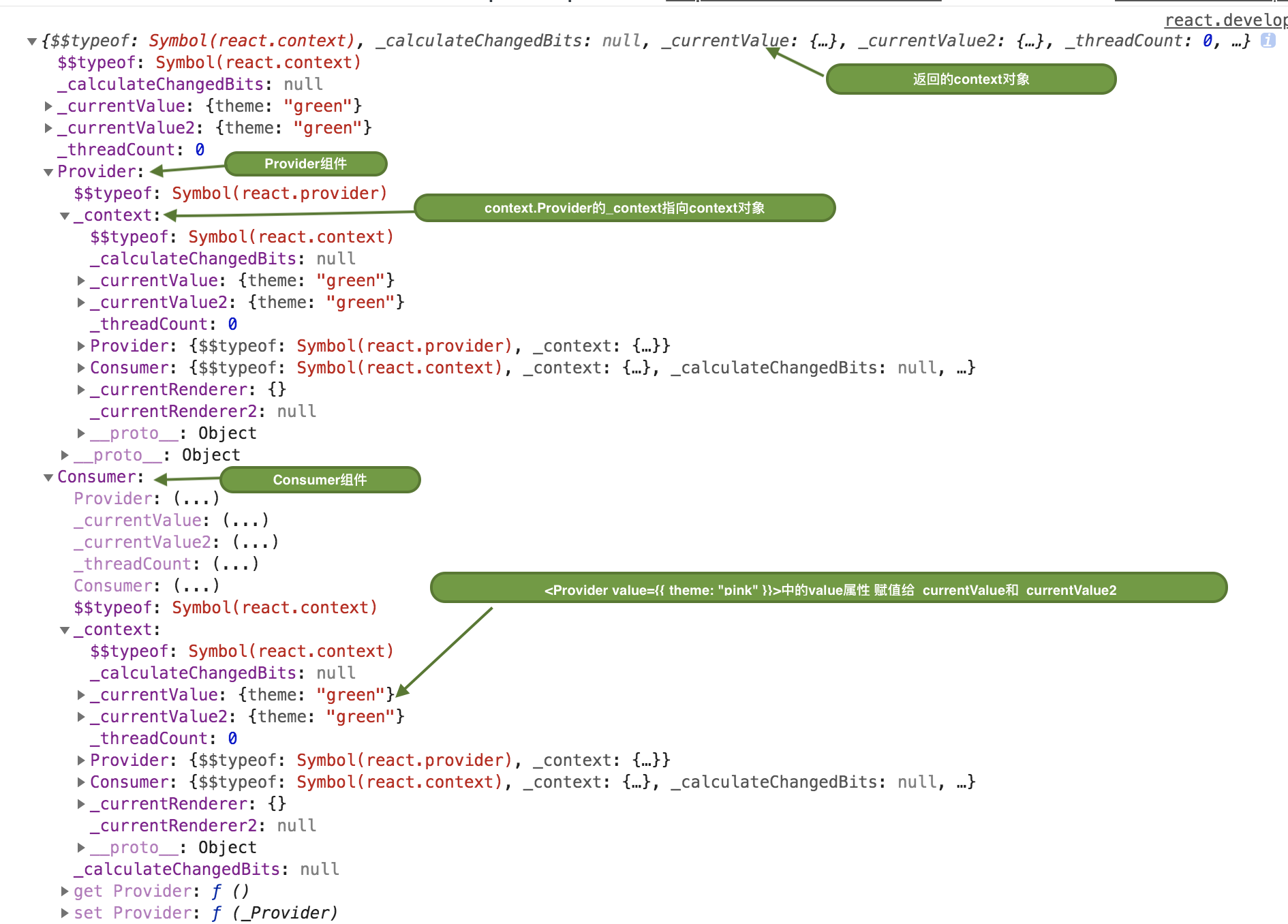
        _currentValue: defaultValue, //Provider的value属性

        _currentValue2: defaultValue,

        //用来追踪context的并发渲染器的数量

        _threadCount: 0,

        // These are circular

        Provider: null,

        Consumer: null

      };

      //context.Provider的_context指向context对象

      context.Provider = {

        $$typeof: REACT_PROVIDER_TYPE,

        _context: context

      };

      var hasWarnedAboutUsingNestedContextConsumers = false;

      var hasWarnedAboutUsingConsumerProvider = false;

      {

        // A separate object, but proxies back to the original context object for

        // backwards compatibility. It has a different $$typeof, so we can properly

        // warn for the incorrect usage of Context as a Consumer.

        var Consumer = {

          $$typeof: REACT_CONTEXT_TYPE,

          _context: context,

          _calculateChangedBits: context._calculateChangedBits

        }; // $FlowFixMe: Flow complains about not setting a value, which is intentional here

        Object.defineProperties(Consumer, {

          Provider: {

            get: function () {

              if (!hasWarnedAboutUsingConsumerProvider) {

                hasWarnedAboutUsingConsumerProvider = true;

                warning$1(false, 'Rendering <Context.Consumer.Provider> is not supported and will be removed in ' + 'a future major release. Did you mean to render <Context.Provider> instead?');

              }

              return context.Provider;

            },

            set: function (_Provider) {

              context.Provider = _Provider;

            }

          },

          _currentValue: {

            get: function () {

              return context._currentValue;

            },

            set: function (_currentValue) {

              context._currentValue = _currentValue;

            }

          },

          _currentValue2: {

            get: function () {

              return context._currentValue2;

            },

            set: function (_currentValue2) {

              context._currentValue2 = _currentValue2;

            }

          },

          _threadCount: {

            get: function () {

              return context._threadCount;

            },

            set: function (_threadCount) {

              context._threadCount = _threadCount;

            }

          },

          Consumer: {

            get: function () {

              if (!hasWarnedAboutUsingNestedContextConsumers) {

                hasWarnedAboutUsingNestedContextConsumers = true;

                warning$1(false, 'Rendering <Context.Consumer.Consumer> is not supported and will be removed in ' + 'a future major release. Did you mean to render <Context.Consumer> instead?');

              }

              return context.Consumer;

            }

          }

        }); // $FlowFixMe: Flow complains about missing properties because it doesn't understand defineProperty

        context.Consumer = Consumer;

      }

      {

        context._currentRenderer = null;

        context._currentRenderer2 = null;

      }

      //返回一个context对象

      return context;

    }
返回的context内容:
React的React.createContext()源码解析(四)的更多相关文章
- Mybatis源码解析(四) —— SqlSession是如何实现数据库操作的?
Mybatis源码解析(四) -- SqlSession是如何实现数据库操作的? 如果拿一次数据库请求操作做比喻,那么前面3篇文章就是在做请求准备,真正执行操作的是本篇文章要讲述的内容.正如标题一 ...
- Sentinel源码解析四(流控策略和流控效果)
引言 在分析Sentinel的上一篇文章中,我们知道了它是基于滑动窗口做的流量统计,那么在当我们能够根据流量统计算法拿到流量的实时数据后,下一步要做的事情自然就是基于这些数据做流控.在介绍Sentin ...
- React的Component,PureComponent源码解析(二)
1.什么是Component,PureComponent? 都是class方式定义的基类,两者没有什么大的区别,只是PureComponent内部使用shouldComponentUpdate(nex ...
- Dubbo 源码解析四 —— 负载均衡LoadBalance
欢迎来我的 Star Followers 后期后继续更新Dubbo别的文章 Dubbo 源码分析系列之一环境搭建 Dubbo 入门之二 --- 项目结构解析 Dubbo 源码分析系列之三 -- 架构原 ...
- iOS即时通讯之CocoaAsyncSocket源码解析四
原文 前言: 本文为CocoaAsyncSocket源码系列中第二篇:Read篇,将重点涉及该框架是如何利用缓冲区对数据进行读取.以及各种情况下的数据包处理,其中还包括普通的.和基于TLS的不同读取操 ...
- AFNetworking2.0源码解析<四>
结构 AFURLResponseSerialization负责解析网络返回数据,检查数据是否合法,把NSData数据转成相应的对象,内置的转换器有json,xml,plist,image,用户可以很方 ...
- Celery 源码解析四: 定时任务的实现
在系列中的第二篇我们已经看过了 Celery 中的执行引擎是如何执行任务的,并且在第三篇中也介绍了任务的对象,但是,目前我们看到的都是被动的任务执行,也就是说目前执行的任务都是第三方调用发送过来的.可 ...
- vuex 源码解析(四) mutation 详解
mutation是更改Vuex的store中的状态的唯一方法,mutation类似于事件注册,每个mutation都可以带两个参数,如下: state ;当前命名空间对应的state payload ...
- MyBatis 3源码解析(四)
四.MyBatis 查询实现 Employee empById = mapper.getEmpById(1); 首先会调用MapperProxy的invoke方法 @Override public O ...
随机推荐
- eclipse新建web项目,并将其部署到tomcat
参考链接:https://blog.csdn.net/smilehhq/article/details/78414672
- Git 版本回退的几种操作方法
1, 结合使用 git reset --hard <commit id> , git reset --hard HEAD^, git reflog , git log 1) 使用 git ...
- 主从分离之SSM与Mysql
大型网站为了软解大量的并发访问,除了在网站实现分布式负载均衡,远远不够.到了数据业务层.数据访问层,如果还是传统的数据结构,或者只是单单靠一台服务器扛,如此多的数据库连接操作,数据库必然会崩溃,数据丢 ...
- Django学习笔记3
From the last two parts, we know, by using the HttpResponse we can return text to the web page, and ...
- HTML下拉请求列表标签
select下拉请求列表 option选择项(内容) selected默认值
- [USACO19OPEN]I Would Walk 500 Miles 贪心
题目 洛谷P5425(点击可跳转) 题目描述 Farmer John想要将他的编号为 \(1 \ldots N\)的 N N 头奶牛( \(N \leq 7500\) )分为非空的 \(K\) 组( ...
- lvm磁盘扩容
LVM实现新挂载磁盘扩容到原有目录 #查看磁盘 fdisk -l #创建pv pvcreate /dev/sdb [root@VM-67-49 ~]# pvcreate /dev/sdb Physic ...
- js面向对象的程序设计 --- 中篇(创建对象) 之 工厂模式和 构造函数模式
创建对象 虽然Object构造函数或对象字面量都可以用来创建单个对象,但这些方式有个明显的缺点:使用同一个接口创建很多对象,会产生大量重复代码. ·工厂模式 工厂模式是一种广为人知的设计模式,这种模式 ...
- es2.0的语法学习
确定文档和查询有多么相关的过程被称为打分(scoring):将查询作为输入,使用不同的手段来确定每一篇文档的得分,将每一个因素最后通过公式综合起来,返回该文档的最终得分.这个综合考量的过程,就是我们希 ...
- JS中使用lambda筛选list
LevelEnum.filter(x=>x.Category=="水利工程")