
Linux磁盘管理之LVM
一、LVM介绍
在我们管理Linux磁盘的时候,通常会遇到这么一种情况。在最初规划Linux的磁盘的时候,我们给某个分区划分了一定量的磁盘空间,使用一段时间后,发现我们规划的磁盘空间不足了,这个时候怎么办?我们肯定要想办法给扩容呀,找一块磁盘分区,格式化,然后挂载,然后把数据拷贝到新加的磁盘上,然后把原有的磁盘卸载掉,通常我们是这样做的。这样一来虽然达到了扩容的目的,但是费时费力;如果第二次扩容,空间还是不够,我们又要重复上面的步骤;如果分配的磁盘空间过大,使用了很久才发现它根本用不到那么多空间,这个时候是不是又要调整呀,听着就感觉很繁琐。这时候你肯定要想有没有那种可挂载上一块盘,我们利用某种管理手段,可以在线的调整磁盘的空间,这样有节约了时间,也可实现弹性管理磁盘。对,lvm就有这样的功能。
LVM(logical volume manager)逻辑卷管理,它可以弹性的管理文件系统的容量,LVM的工作原理是将一个或多个底层块设备组织成一个逻辑设备,这个逻辑设备可以在未来新增或移除其他的分区到这个逻辑设备中,从而实现了弹性管理磁盘。
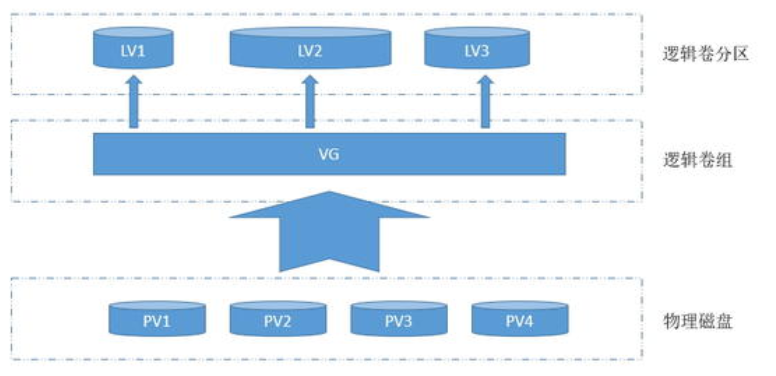
PV:物理卷(physical volume);物理卷就是指硬盘分区或从逻辑上与磁盘分区具有同样功能的设备(如raid),是LVM的基本储存逻辑块,但和基本的物理存储介质(如分区,磁盘等)比较,却包含有与LVM相关的管理参数
VG:卷组(volume group)LVM卷组类似于非LVM系统中的物理硬盘,尤其物理卷组成,可以在卷组上创建一个或多个LVM分区(逻辑卷),LVM卷组由一个或多个物理卷组成
LV:逻辑卷(logical volume)LVM的逻辑卷类似非LVM系统中的硬盘分区,在逻辑卷之上可以创建文件系统。
LVM就是将一些零碎的磁盘分区(PV)合并成一个较大的磁盘(VG),然后在根据需要对这个较大的磁盘(VG)进行划分成不同的大小分区(LV),这些小的分区(LV)是可以动态的扩展和缩小的,这就是LVM的逻辑卷管理过程。所谓LVM的大磁盘就是将许多PV整合成的VG,那么这个大磁盘最大可达到多少容量呢?我们知道在文件系统里面数据存储的最小单位是块(block),不过在LVM当中数据储存的最小单位是PE,PE的的作用同block的作用一样,需要注意到是LVM默认使用的PE大小是4M,而LVM的VG最多能包含65534个PE,也就是说默认LVM的VG会有4×65534M/1024M=256G,所以PE的大小决定了VG的最大容量,当然我们在创建VG的时候可指定PE大小,从而来决定VG的大小。
二、LVM实现
1)前期准备几块硬盘或者分区来模拟PV
[root@test-centos7-node1 ~]# lsblk

NAME   MAJ:MIN RM  SIZE RO TYPE MOUNTPOINT

sda      8:0    0   50G  0 disk

├─sda1   8:1    0    2G  0 part /boot

├─sda2   8:2    0    2G  0 part [SWAP]

└─sda3   8:3    0   46G  0 part /

sdb      8:16   0   50G  0 disk

sr0     11:0    1  792M  0 rom

[root@test-centos7-node1 ~]# fdisk /dev/sdb

Welcome to fdisk (util-linux 2.23.2).

Changes will remain in memory only, until you decide to write them.

Be careful before using the write command.

Device does not contain a recognized partition table

Building a new DOS disklabel with disk identifier 0x6180123f.

Command (m for help): p

Disk /dev/sdb: 53.7 GB, 53687091200 bytes, 104857600 sectors

Units = sectors of 1 * 512 = 512 bytes

Sector size (logical/physical): 512 bytes / 512 bytes

I/O size (minimum/optimal): 512 bytes / 512 bytes

Disk label type: dos

Disk identifier: 0x6180123f

   Device Boot      Start         End      Blocks   Id  System

Command (m for help): n

Partition type:

   p   primary (0 primary, 0 extended, 4 free)

   e   extended

Select (default p): p

Partition number (1-4, default 1):

First sector (2048-104857599, default 2048):

Using default value 2048

Last sector, +sectors or +size{K,M,G} (2048-104857599, default 104857599): +10G

Partition 1 of type Linux and of size 10 GiB is set

Command (m for help): p

Disk /dev/sdb: 53.7 GB, 53687091200 bytes, 104857600 sectors

Units = sectors of 1 * 512 = 512 bytes

Sector size (logical/physical): 512 bytes / 512 bytes

I/O size (minimum/optimal): 512 bytes / 512 bytes

Disk label type: dos

Disk identifier: 0x6180123f

   Device Boot      Start         End      Blocks   Id  System

/dev/sdb1            2048    20973567    10485760   83  Linux

Command (m for help): t

Selected partition 1

Hex code (type L to list all codes): 8e

Changed type of partition 'Linux' to 'Linux LVM'

Command (m for help): n

Partition type:

   p   primary (1 primary, 0 extended, 3 free)

   e   extended

Select (default p): p

Partition number (2-4, default 2):

First sector (20973568-104857599, default 20973568):

Using default value 20973568

Last sector, +sectors or +size{K,M,G} (20973568-104857599, default 104857599): +10G

Partition 2 of type Linux and of size 10 GiB is set

Command (m for help): t

Partition number (1,2, default 2):

Hex code (type L to list all codes): 8e

Changed type of partition 'Linux' to 'Linux LVM'

Command (m for help): n

Partition type:

   p   primary (2 primary, 0 extended, 2 free)

   e   extended

Select (default p): p

Partition number (3,4, default 3):

First sector (41945088-104857599, default 41945088):

Using default value 41945088

Last sector, +sectors or +size{K,M,G} (41945088-104857599, default 104857599): +10G

Partition 3 of type Linux and of size 10 GiB is set

Command (m for help): t

Partition number (1-3, default 3):

Hex code (type L to list all codes): 8e

Changed type of partition 'Linux' to 'Linux LVM'

Command (m for help): p

Disk /dev/sdb: 53.7 GB, 53687091200 bytes, 104857600 sectors

Units = sectors of 1 * 512 = 512 bytes

Sector size (logical/physical): 512 bytes / 512 bytes

I/O size (minimum/optimal): 512 bytes / 512 bytes

Disk label type: dos

Disk identifier: 0x6180123f

   Device Boot      Start         End      Blocks   Id  System

/dev/sdb1            2048    20973567    10485760   8e  Linux LVM

/dev/sdb2        20973568    41945087    10485760   8e  Linux LVM

/dev/sdb3        41945088    62916607    10485760   8e  Linux LVM

Command (m for help): w

The partition table has been altered!

Calling ioctl() to re-read partition table.

Syncing disks.

[root@test-centos7-node1 ~]# lsblk

NAME   MAJ:MIN RM  SIZE RO TYPE MOUNTPOINT

sda      8:0    0   50G  0 disk

├─sda1   8:1    0    2G  0 part /boot

├─sda2   8:2    0    2G  0 part [SWAP]

└─sda3   8:3    0   46G  0 part /

sdb      8:16   0   50G  0 disk

├─sdb1   8:17   0   10G  0 part

├─sdb2   8:18   0   10G  0 part

└─sdb3   8:19   0   10G  0 part

sr0     11:0    1  792M  0 rom

[root@test-centos7-node1 ~]#
说明:这里是用的分区来模拟硬盘当作PV,这里需要注意一点,就是我们分区完保存后,可能存在分区信息不同步的问题,就是我们分区完用lsblk命令看不到新加的分区,centos7上可用 partprobe来同步分区信息。centos6 使用partx -a /dev/sdb来增加分区同步到内存,如果是删除某个分区,就需要执行partx -d -nr # /dev/sdb 此命令表示从/dev/sdb的分区信息中删除sdb#分区信息,并同步到内存中。这里还需要注意一点的是我们分区的类型要选8e 表示Linux LVM类型
2)装lvm2这个包
[root@test-centos7-node1 ~]# lvs

-bash: lvs: command not found

[root@test-centos7-node1 ~]# yum info  lvm2

Loaded plugins: fastestmirror

Loading mirror speeds from cached hostfile

 * base: mirrors.aliyun.com

 * extras: mirrors.aliyun.com

 * updates: mirrors.aliyun.com

Available Packages

Name        : lvm2

Arch        : x86_64

Epoch       : 7

Version     : 2.02.185

Release     : 2.el7_7.2

Size        : 1.3 M

Repo        : updates/7/x86_64

Summary     : Userland logical volume management tools

URL         : http://sources.redhat.com/lvm2

License     : GPLv2

Description : LVM2 includes all of the support for handling read/write operations on

            : physical volumes (hard disks, RAID-Systems, magneto optical, etc.,

            : multiple devices (MD), see mdadm(8) or even loop devices, see

            : losetup(8)), creating volume groups (kind of virtual disks) from one

            : or more physical volumes and creating one or more logical volumes

            : (kind of logical partitions) in volume groups.

[root@test-centos7-node1 ~]# yum install lvm2 -y

Loaded plugins: fastestmirror

Loading mirror speeds from cached hostfile

 * base: mirrors.aliyun.com

 * extras: mirrors.aliyun.com

 * updates: mirrors.aliyun.com

Resolving Dependencies

--> Running transaction check

---> Package lvm2.x86_64 7:2.02.185-2.el7_7.2 will be installed

--> Processing Dependency: lvm2-libs = 7:2.02.185-2.el7_7.2 for package: 7:lvm2-2.02.185-2.el7_7.2.x86_64

--> Processing Dependency: device-mapper-persistent-data >= 0.7.0-0.1.rc6 for package: 7:lvm2-2.02.185-2.el7_7.2.x86_64

--> Processing Dependency: liblvm2app.so.2.2(Base)(64bit) for package: 7:lvm2-2.02.185-2.el7_7.2.x86_64

--> Processing Dependency: libdevmapper.so.1.02(DM_1_02_141)(64bit) for package: 7:lvm2-2.02.185-2.el7_7.2.x86_64

--> Processing Dependency: libdevmapper-event.so.1.02(Base)(64bit) for package: 7:lvm2-2.02.185-2.el7_7.2.x86_64

--> Processing Dependency: liblvm2app.so.2.2()(64bit) for package: 7:lvm2-2.02.185-2.el7_7.2.x86_64

--> Processing Dependency: libdevmapper-event.so.1.02()(64bit) for package: 7:lvm2-2.02.185-2.el7_7.2.x86_64

--> Running transaction check

---> Package device-mapper-event-libs.x86_64 7:1.02.158-2.el7_7.2 will be installed

---> Package device-mapper-libs.x86_64 7:1.02.140-8.el7 will be updated

--> Processing Dependency: device-mapper-libs = 7:1.02.140-8.el7 for package: 7:device-mapper-1.02.140-8.el7.x86_64

---> Package device-mapper-libs.x86_64 7:1.02.158-2.el7_7.2 will be an update

---> Package device-mapper-persistent-data.x86_64 0:0.8.5-1.el7 will be installed

---> Package lvm2-libs.x86_64 7:2.02.185-2.el7_7.2 will be installed

--> Processing Dependency: device-mapper-event = 7:1.02.158-2.el7_7.2 for package: 7:lvm2-libs-2.02.185-2.el7_7.2.x86_64

--> Running transaction check

---> Package device-mapper.x86_64 7:1.02.140-8.el7 will be updated

---> Package device-mapper.x86_64 7:1.02.158-2.el7_7.2 will be an update

---> Package device-mapper-event.x86_64 7:1.02.158-2.el7_7.2 will be installed

--> Finished Dependency Resolution

Dependencies Resolved

============================================================================================================================

 Package                                   Arch               Version                             Repository           Size

============================================================================================================================

Installing:

 lvm2                                      x86_64             7:2.02.185-2.el7_7.2                updates             1.3 M

Installing for dependencies:

 device-mapper-event                       x86_64             7:1.02.158-2.el7_7.2                updates             190 k

 device-mapper-event-libs                  x86_64             7:1.02.158-2.el7_7.2                updates             189 k

 device-mapper-persistent-data             x86_64             0.8.5-1.el7                         base                423 k

 lvm2-libs                                 x86_64             7:2.02.185-2.el7_7.2                updates             1.1 M

Updating for dependencies:

 device-mapper                             x86_64             7:1.02.158-2.el7_7.2                updates             294 k

 device-mapper-libs                        x86_64             7:1.02.158-2.el7_7.2                updates             322 k

Transaction Summary

============================================================================================================================

Install  1 Package  (+4 Dependent packages)

Upgrade             ( 2 Dependent packages)

Total download size: 3.8 M

Downloading packages:

Delta RPMs disabled because /usr/bin/applydeltarpm not installed.

(1/7): device-mapper-event-1.02.158-2.el7_7.2.x86_64.rpm                                             | 190 kB  00:00:00

(2/7): device-mapper-event-libs-1.02.158-2.el7_7.2.x86_64.rpm                                        | 189 kB  00:00:00

(3/7): device-mapper-libs-1.02.158-2.el7_7.2.x86_64.rpm                                              | 322 kB  00:00:00

(4/7): lvm2-2.02.185-2.el7_7.2.x86_64.rpm                                                            | 1.3 MB  00:00:00

(5/7): device-mapper-1.02.158-2.el7_7.2.x86_64.rpm                                                   | 294 kB  00:00:00

(6/7): lvm2-libs-2.02.185-2.el7_7.2.x86_64.rpm                                                       | 1.1 MB  00:00:00

(7/7): device-mapper-persistent-data-0.8.5-1.el7.x86_64.rpm                                          | 423 kB  00:00:00

----------------------------------------------------------------------------------------------------------------------------

Total                                                                                       4.3 MB/s | 3.8 MB  00:00:00

Running transaction check

Running transaction test

Transaction test succeeded

Running transaction

  Updating   : 7:device-mapper-1.02.158-2.el7_7.2.x86_64                                                                1/9

  Updating   : 7:device-mapper-libs-1.02.158-2.el7_7.2.x86_64                                                           2/9

  Installing : 7:device-mapper-event-libs-1.02.158-2.el7_7.2.x86_64                                                     3/9

  Installing : 7:device-mapper-event-1.02.158-2.el7_7.2.x86_64                                                          4/9

  Installing : 7:lvm2-libs-2.02.185-2.el7_7.2.x86_64                                                                    5/9

  Installing : device-mapper-persistent-data-0.8.5-1.el7.x86_64                                                         6/9

  Installing : 7:lvm2-2.02.185-2.el7_7.2.x86_64                                                                         7/9

Created symlink from /etc/systemd/system/sysinit.target.wants/lvm2-lvmpolld.socket to /usr/lib/systemd/system/lvm2-lvmpolld.socket.

  Cleanup    : 7:device-mapper-1.02.140-8.el7.x86_64                                                                    8/9

  Cleanup    : 7:device-mapper-libs-1.02.140-8.el7.x86_64                                                               9/9

  Verifying  : 7:device-mapper-libs-1.02.158-2.el7_7.2.x86_64                                                           1/9

  Verifying  : 7:device-mapper-1.02.158-2.el7_7.2.x86_64                                                                2/9

  Verifying  : device-mapper-persistent-data-0.8.5-1.el7.x86_64                                                         3/9

  Verifying  : 7:lvm2-2.02.185-2.el7_7.2.x86_64                                                                         4/9

  Verifying  : 7:lvm2-libs-2.02.185-2.el7_7.2.x86_64                                                                    5/9

  Verifying  : 7:device-mapper-event-1.02.158-2.el7_7.2.x86_64                                                          6/9

  Verifying  : 7:device-mapper-event-libs-1.02.158-2.el7_7.2.x86_64                                                     7/9

  Verifying  : 7:device-mapper-1.02.140-8.el7.x86_64                                                                    8/9

  Verifying  : 7:device-mapper-libs-1.02.140-8.el7.x86_64                                                               9/9

Installed:

  lvm2.x86_64 7:2.02.185-2.el7_7.2

Dependency Installed:

  device-mapper-event.x86_64 7:1.02.158-2.el7_7.2             device-mapper-event-libs.x86_64 7:1.02.158-2.el7_7.2

  device-mapper-persistent-data.x86_64 0:0.8.5-1.el7          lvm2-libs.x86_64 7:2.02.185-2.el7_7.2

Dependency Updated:

  device-mapper.x86_64 7:1.02.158-2.el7_7.2                  device-mapper-libs.x86_64 7:1.02.158-2.el7_7.2

Complete!

[root@test-centos7-node1 ~]#
说明:最小化安装系统默认系统上没有安装这个包的,所以我们需要把这个包装上才可创建LVM
3)创建PV
[root@test-centos7-node1 ~]# pvcreate /dev/sdb{1,2,3}

  Physical volume "/dev/sdb1" successfully created.

  Physical volume "/dev/sdb2" successfully created.

  Physical volume "/dev/sdb3" successfully created.

[root@test-centos7-node1 ~]# pvscan

  PV /dev/sdb1                      lvm2 [10.00 GiB]

  PV /dev/sdb3                      lvm2 [10.00 GiB]

  PV /dev/sdb2                      lvm2 [10.00 GiB]

  Total: 3 [30.00 GiB] / in use: 0 [0   ] / in no VG: 3 [30.00 GiB]

[root@test-centos7-node1 ~]# pvs

  PV         VG Fmt  Attr PSize  PFree

  /dev/sdb1     lvm2 ---  10.00g 10.00g

  /dev/sdb2     lvm2 ---  10.00g 10.00g

  /dev/sdb3     lvm2 ---  10.00g 10.00g

[root@test-centos7-node1 ~]# pvdisplay

  "/dev/sdb1" is a new physical volume of "10.00 GiB"

  --- NEW Physical volume ---

  PV Name               /dev/sdb1

  VG Name

  PV Size               10.00 GiB

  Allocatable           NO

  PE Size               0

  Total PE              0

  Free PE               0

  Allocated PE          0

  PV UUID               MsszES-YPdm-YGQl-7rgg-B6gX-Q4xu-T8m1gz

  "/dev/sdb3" is a new physical volume of "10.00 GiB"

  --- NEW Physical volume ---

  PV Name               /dev/sdb3

  VG Name

  PV Size               10.00 GiB

  Allocatable           NO

  PE Size               0

  Total PE              0

  Free PE               0

  Allocated PE          0

  PV UUID               BMMx8p-zu9O-ns61-G9DU-iKMR-NmZO-crCjlR

  "/dev/sdb2" is a new physical volume of "10.00 GiB"

  --- NEW Physical volume ---

  PV Name               /dev/sdb2

  VG Name

  PV Size               10.00 GiB

  Allocatable           NO

  PE Size               0

  Total PE              0

  Free PE               0

  Allocated PE          0

  PV UUID               LPynpW-twlu-fxwg-OlCT-jA2A-R5UI-fvqWLj

[root@test-centos7-node1 ~]#
说明:pvcreate 命令表示创建PV 后面跟硬盘或分区对应的设备文件,pvscan 命令作用是搜索系统里面任何具有PV属性的磁碟,PV属性就是通过pvcreate创建过的磁碟,pvs是查看pv简要情况,pvdisplay 查看pv的详细信息。当然我们要移除某块盘,让其不具备PV属性,可以用pvremove + 磁盘的设备文件路径
[root@test-centos7-node1 ~]# pvremove /dev/sdb3

  Labels on physical volume "/dev/sdb3" successfully wiped.

[root@test-centos7-node1 ~]# pvs

  PV         VG Fmt  Attr PSize  PFree

  /dev/sdb1     lvm2 ---  10.00g 10.00g

  /dev/sdb2     lvm2 ---  10.00g 10.00g

[root@test-centos7-node1 ~]#
说明:移除pv的前提是它没有在任何VG里面才可做移除,否则移除不了
4)创建VG
[root@test-centos7-node1 ~]# pvs

  PV         VG Fmt  Attr PSize  PFree

  /dev/sdb1     lvm2 ---  10.00g 10.00g

  /dev/sdb2     lvm2 ---  10.00g 10.00g

[root@test-centos7-node1 ~]# pvcreate /dev/sdb3

  Physical volume "/dev/sdb3" successfully created.

[root@test-centos7-node1 ~]# pvs

  PV         VG Fmt  Attr PSize  PFree

  /dev/sdb1     lvm2 ---  10.00g 10.00g

  /dev/sdb2     lvm2 ---  10.00g 10.00g

  /dev/sdb3     lvm2 ---  10.00g 10.00g

[root@test-centos7-node1 ~]# vgcreate test -s 8M /dev/sdb{1,2,3}

  Volume group "test" successfully created

[root@test-centos7-node1 ~]# vgs

  VG   #PV #LV #SN Attr   VSize   VFree

  test   3   0   0 wz--n- <29.98g <29.98g

[root@test-centos7-node1 ~]# vgscan

  Reading volume groups from cache.

  Found volume group "test" using metadata type lvm2

[root@test-centos7-node1 ~]# vgdisplay

  --- Volume group ---

  VG Name               test

  System ID

  Format                lvm2

  Metadata Areas        3

  Metadata Sequence No  1

  VG Access             read/write

  VG Status             resizable

  MAX LV                0

  Cur LV                0

  Open LV               0

  Max PV                0

  Cur PV                3

  Act PV                3

  VG Size               <29.98 GiB

  PE Size               8.00 MiB

  Total PE              3837

  Alloc PE / Size       0 / 0

  Free  PE / Size       3837 / <29.98 GiB

  VG UUID               31vxAP-L5jb-8Yxm-25m2-LdD0-ee8R-sdTjum

[root@test-centos7-node1 ~]# vgreduce test /dev/sdb3

  Removed "/dev/sdb3" from volume group "test"

[root@test-centos7-node1 ~]# vgs

  VG   #PV #LV #SN Attr   VSize  VFree

  test   2   0   0 wz--n- 19.98g 19.98g

[root@test-centos7-node1 ~]# vgcreate test2 /dev/sdb3

  Volume group "test2" successfully created

[root@test-centos7-node1 ~]# vgs

  VG    #PV #LV #SN Attr   VSize   VFree

  test    2   0   0 wz--n-  19.98g  19.98g

  test2   1   0   0 wz--n- <10.00g <10.00g

[root@test-centos7-node1 ~]# vgdisplay test2

  --- Volume group ---

  VG Name               test2

  System ID

  Format                lvm2

  Metadata Areas        1

  Metadata Sequence No  1

  VG Access             read/write

  VG Status             resizable

  MAX LV                0

  Cur LV                0

  Open LV               0

  Max PV                0

  Cur PV                1

  Act PV                1

  VG Size               <10.00 GiB

  PE Size               4.00 MiB

  Total PE              2559

  Alloc PE / Size       0 / 0

  Free  PE / Size       2559 / <10.00 GiB

  VG UUID               rc94SP-JAlk-63Rw-n5xz-qB0d-grnT-ItrMvT

[root@test-centos7-node1 ~]# vgremove test2

  Volume group "test2" successfully removed

[root@test-centos7-node1 ~]# vgs

  VG   #PV #LV #SN Attr   VSize  VFree

  test   2   0   0 wz--n- 19.98g 19.98g

[root@test-centos7-node1 ~]#
说明:同样的vgcreate 表示创建VG 其用法格式是vgcreate VGNAME [option] 储存设备路径 其中-s表示指定PE的大小,VGNAME表示VG的名称,需要说明的是,指定名称不能和系统现有的VG名称相同;vgs查看系统上所有VG的简要信息,vgscan搜寻系统上面是否有VG,vgdisplay查看所有VG的详细信息,当然此例中只有一个,我们也可在后面指定查看某个VG的详细信息,只需要指定其VG名称即可;有关vg的命令有很多其中vgreduce的作用是在VG内移除PV,vgremove的作用是删除一个VG,这两个命令都需要在其后指定要操作的VG名称
5)创建LV
[root@test-centos7-node1 ~]# lvs

[root@test-centos7-node1 ~]# lvcreate -L 2G -n aaa test

  Logical volume "aaa" created.

[root@test-centos7-node1 ~]# lvcreate -L 3G -n bbb test

  Logical volume "bbb" created.

[root@test-centos7-node1 ~]# lvs

  LV   VG   Attr       LSize Pool Origin Data%  Meta%  Move Log Cpy%Sync Convert

  aaa  test -wi-a----- 2.00g

  bbb  test -wi-a----- 3.00g

[root@test-centos7-node1 ~]# lvscan

  ACTIVE            '/dev/test/aaa' [2.00 GiB] inherit

  ACTIVE            '/dev/test/bbb' [3.00 GiB] inherit

[root@test-centos7-node1 ~]# lvdisplay

  --- Logical volume ---

  LV Path                /dev/test/aaa

  LV Name                aaa

  VG Name                test

  LV UUID                R9weh0-D85B-rMcW-oYSM-dAQb-gIQh-RXxITP

  LV Write Access        read/write

  LV Creation host, time test-centos7-node1, 2020-01-06 09:05:23 -0500

  LV Status              available

  # open                 0

  LV Size                2.00 GiB

  Current LE             256

  Segments               1

  Allocation             inherit

  Read ahead sectors     auto

  - currently set to     8192

  Block device           253:0

  --- Logical volume ---

  LV Path                /dev/test/bbb

  LV Name                bbb

  VG Name                test

  LV UUID                LYwvZj-ogpf-nwtF-mja6-xwwl-A24W-BslJOu

  LV Write Access        read/write

  LV Creation host, time test-centos7-node1, 2020-01-06 09:05:34 -0500

  LV Status              available

  # open                 0

  LV Size                3.00 GiB

  Current LE             384

  Segments               1

  Allocation             inherit

  Read ahead sectors     auto

  - currently set to     8192

  Block device           253:1

[root@test-centos7-node1 ~]# lvresize -L +4G /dev/test/aaa

  Size of logical volume test/aaa changed from 2.00 GiB (256 extents) to 6.00 GiB (768 extents).

  Logical volume test/aaa successfully resized.

[root@test-centos7-node1 ~]# lvs

  LV   VG   Attr       LSize Pool Origin Data%  Meta%  Move Log Cpy%Sync Convert

  aaa  test -wi-a----- 6.00g

  bbb  test -wi-a----- 3.00g

[root@test-centos7-node1 ~]# lvresize -L -1G /dev/test/bbb

  WARNING: Reducing active logical volume to 2.00 GiB.

  THIS MAY DESTROY YOUR DATA (filesystem etc.)

Do you really want to reduce test/bbb? [y/n]: y

  Size of logical volume test/bbb changed from 3.00 GiB (384 extents) to 2.00 GiB (256 extents).

  Logical volume test/bbb successfully resized.

[root@test-centos7-node1 ~]# lvs

  LV   VG   Attr       LSize Pool Origin Data%  Meta%  Move Log Cpy%Sync Convert

  aaa  test -wi-a----- 6.00g

  bbb  test -wi-a----- 2.00g

[root@test-centos7-node1 ~]# lvreduce -L 3G /dev/test/aaa

  WARNING: Reducing active logical volume to 3.00 GiB.

  THIS MAY DESTROY YOUR DATA (filesystem etc.)

Do you really want to reduce test/aaa? [y/n]: y

  Size of logical volume test/aaa changed from 6.00 GiB (768 extents) to 3.00 GiB (384 extents).

  Logical volume test/aaa successfully resized.

[root@test-centos7-node1 ~]# lvs

  LV   VG   Attr       LSize Pool Origin Data%  Meta%  Move Log Cpy%Sync Convert

  aaa  test -wi-a----- 3.00g

  bbb  test -wi-a----- 2.00g

[root@test-centos7-node1 ~]# lvreduce -L -1G /dev/test/aaa

  WARNING: Reducing active logical volume to 2.00 GiB.

  THIS MAY DESTROY YOUR DATA (filesystem etc.)

Do you really want to reduce test/aaa? [y/n]: y

  Size of logical volume test/aaa changed from 3.00 GiB (384 extents) to 2.00 GiB (256 extents).

  Logical volume test/aaa successfully resized.

[root@test-centos7-node1 ~]# lvs

  LV   VG   Attr       LSize Pool Origin Data%  Meta%  Move Log Cpy%Sync Convert

  aaa  test -wi-a----- 2.00g

  bbb  test -wi-a----- 2.00g

[root@test-centos7-node1 ~]# lvremove /dev/test/bbb

Do you really want to remove active logical volume test/bbb? [y/n]: y

  Logical volume "bbb" successfully removed

[root@test-centos7-node1 ~]# lvs

  LV   VG   Attr       LSize Pool Origin Data%  Meta%  Move Log Cpy%Sync Convert

  aaa  test -wi-a----- 2.00g

[root@test-centos7-node1 ~]#
说明:lvcreate 命令作用是创建LV 其中-L表示指定LV的大小,-n表示lv的名称 最后跟VG的名称,表示从那个VG上创建LV;lvs 命令作用是查看系统所有的lv简要信息 ;lvdisplay 查看LV的详细信息,后面可以跟VG的名称表示查看指定VG上的所有LV的详细信息;lvreduce 命令作用是缩减指定LV里的空间,如果指定的大小是负数如-3M 表示缩减3M 如果指定的是 3M 则表示缩减至3M ,这个需要注意,还有这个命令指定大小不能以类似+4M来指定;lvresize此命令的作用是调整LV的容量大小,这个命令指定调整大小+表示增加多少,-表示减少多少,若没有+/-表示调整到指定大小,lvresize和lvreduce这两个命令后面都是跟的lv对应设备的路径(其实不是真的设备路径,是设备的软连接路径),不能指定其名称;lvremove命令作用是删除指定的LV,若指定的是vg名,表示删除该VG上的所有LV,若需要删除某个LV 需要指定其对应设备路径。
到此lvm就已经实现,后续就可以直接格式化,然后挂载使用了
[root@test-centos7-node1 ~]# vgs

  VG   #PV #LV #SN Attr   VSize  VFree

  test   2   0   0 wz--n- 19.98g 19.98g

[root@test-centos7-node1 ~]# lvcreate -l 100%FREE -n xxx test

WARNING: xfs signature detected on /dev/test/xxx at offset 0. Wipe it? [y/n]: y

  Wiping xfs signature on /dev/test/xxx.

  Logical volume "xxx" created.

[root@test-centos7-node1 ~]# lvs

  LV   VG   Attr       LSize  Pool Origin Data%  Meta%  Move Log Cpy%Sync Convert

  xxx  test -wi-a----- 19.98g

[root@test-centos7-node1 ~]# mkfs.xfs -f /dev/test/xxx

meta-data=/dev/test/xxx          isize=512    agcount=4, agsize=1309696 blks

         =                       sectsz=512   attr=2, projid32bit=1

         =                       crc=1        finobt=0, sparse=0

data     =                       bsize=4096   blocks=5238784, imaxpct=25

         =                       sunit=0      swidth=0 blks

naming   =version 2              bsize=4096   ascii-ci=0 ftype=1

log      =internal log           bsize=4096   blocks=2560, version=2

         =                       sectsz=512   sunit=0 blks, lazy-count=1

realtime =none                   extsz=4096   blocks=0, rtextents=0

[root@test-centos7-node1 ~]# lsblk

NAME         MAJ:MIN RM  SIZE RO TYPE MOUNTPOINT

sda            8:0    0   50G  0 disk

├─sda1         8:1    0    2G  0 part /boot

├─sda2         8:2    0    2G  0 part [SWAP]

└─sda3         8:3    0   46G  0 part /

sdb            8:16   0   50G  0 disk

├─sdb1         8:17   0   10G  0 part

│ └─test-xxx 253:0    0   20G  0 lvm

├─sdb2         8:18   0   10G  0 part

│ └─test-xxx 253:0    0   20G  0 lvm

└─sdb3         8:19   0   10G  0 part

sr0           11:0    1  792M  0 rom

[root@test-centos7-node1 ~]# mount /dev/test/xxx /mnt

[root@test-centos7-node1 ~]# df -h

Filesystem            Size  Used Avail Use% Mounted on

/dev/sda3              46G  1.6G   45G   4% /

devtmpfs              1.9G     0  1.9G   0% /dev

tmpfs                 1.9G     0  1.9G   0% /dev/shm

tmpfs                 1.9G  8.6M  1.9G   1% /run

tmpfs                 1.9G     0  1.9G   0% /sys/fs/cgroup

/dev/sda1             2.0G  135M  1.9G   7% /boot

tmpfs                 378M     0  378M   0% /run/user/0

/dev/mapper/test-xxx   20G   33M   20G   1% /mnt

[root@test-centos7-node1 ~]#
三、扩容LV
1)创建PV,并将其加入到VG中
[root@test-centos7-node1 ~]# pvs

  PV         VG   Fmt  Attr PSize PFree

  /dev/sdb1  test lvm2 a--  9.99g    0

  /dev/sdb2  test lvm2 a--  9.99g    0

[root@test-centos7-node1 ~]# vgdisplay

  --- Volume group ---

  VG Name               test

  System ID

  Format                lvm2

  Metadata Areas        2

  Metadata Sequence No  28

  VG Access             read/write

  VG Status             resizable

  MAX LV                0

  Cur LV                1

  Open LV               1

  Max PV                0

  Cur PV                2

  Act PV                2

  VG Size               19.98 GiB

  PE Size               8.00 MiB

  Total PE              2558

  Alloc PE / Size       2558 / 19.98 GiB

  Free  PE / Size       0 / 0

  VG UUID               31vxAP-L5jb-8Yxm-25m2-LdD0-ee8R-sdTjum

[root@test-centos7-node1 ~]#
说明:从上面的信息可以看到VG的大小是19.98G 也就是两块PV的大小。现在我们新创建一个pv,然后加到vg里
[root@test-centos7-node1 ~]# pvs

  PV         VG   Fmt  Attr PSize PFree

  /dev/sdb1  test lvm2 a--  9.99g    0

  /dev/sdb2  test lvm2 a--  9.99g    0

[root@test-centos7-node1 ~]# pvcreate  /dev/sdb3

  Physical volume "/dev/sdb3" successfully created.

[root@test-centos7-node1 ~]# pvs

  PV         VG   Fmt  Attr PSize  PFree

  /dev/sdb1  test lvm2 a--   9.99g     0

  /dev/sdb2  test lvm2 a--   9.99g     0

  /dev/sdb3       lvm2 ---  10.00g 10.00g

[root@test-centos7-node1 ~]# vgs

  VG   #PV #LV #SN Attr   VSize  VFree

  test   2   1   0 wz--n- 19.98g    0

[root@test-centos7-node1 ~]# vgextend test /dev/sdb3

  Volume group "test" successfully extended

[root@test-centos7-node1 ~]# vgs

  VG   #PV #LV #SN Attr   VSize   VFree

  test   3   1   0 wz--n- <29.98g 9.99g

[root@test-centos7-node1 ~]# vgdisplay

  --- Volume group ---

  VG Name               test

  System ID

  Format                lvm2

  Metadata Areas        3

  Metadata Sequence No  31

  VG Access             read/write

  VG Status             resizable

  MAX LV                0

  Cur LV                1

  Open LV               1

  Max PV                0

  Cur PV                3

  Act PV                3

  VG Size               <29.98 GiB

  PE Size               8.00 MiB

  Total PE              3837

  Alloc PE / Size       2558 / 19.98 GiB

  Free  PE / Size       1279 / 9.99 GiB

  VG UUID               31vxAP-L5jb-8Yxm-25m2-LdD0-ee8R-sdTjum

[root@test-centos7-node1 ~]#
说明:vgextend命令作用是将指定pv加入到指定VG中,VG指定其名称即可,pv需指定其设备路径
2)将新加的VG的PE加入到xxx LV里
[root@test-centos7-node1 ~]# vgs

  VG   #PV #LV #SN Attr   VSize   VFree

  test   3   1   0 wz--n- <29.98g 9.99g

[root@test-centos7-node1 ~]# lvs

  LV   VG   Attr       LSize  Pool Origin Data%  Meta%  Move Log Cpy%Sync Convert

  xxx  test -wi-ao---- 19.98g

[root@test-centos7-node1 ~]# lvdisplay

  --- Logical volume ---

  LV Path                /dev/test/xxx

  LV Name                xxx

  VG Name                test

  LV UUID                ihOo41-gh1L-eSHK-iLXY-UGfF-J6uI-UmVWhF

  LV Write Access        read/write

  LV Creation host, time test-centos7-node1, 2020-01-06 10:00:08 -0500

  LV Status              available

  # open                 1

  LV Size                19.98 GiB

  Current LE             2558

  Segments               2

  Allocation             inherit

  Read ahead sectors     auto

  - currently set to     8192

  Block device           253:0

[root@test-centos7-node1 ~]# lvextend -l +100%FREE /dev/test/xxx

  Size of logical volume test/xxx changed from 19.98 GiB (2558 extents) to <29.98 GiB (3837 extents).

  Logical volume test/xxx successfully resized.

[root@test-centos7-node1 ~]# lvs

  LV   VG   Attr       LSize   Pool Origin Data%  Meta%  Move Log Cpy%Sync Convert

  xxx  test -wi-ao---- <29.98g

[root@test-centos7-node1 ~]# lvdisplay

  --- Logical volume ---

  LV Path                /dev/test/xxx

  LV Name                xxx

  VG Name                test

  LV UUID                ihOo41-gh1L-eSHK-iLXY-UGfF-J6uI-UmVWhF

  LV Write Access        read/write

  LV Creation host, time test-centos7-node1, 2020-01-06 10:00:08 -0500

  LV Status              available

  # open                 1

  LV Size                <29.98 GiB

  Current LE             3837

  Segments               3

  Allocation             inherit

  Read ahead sectors     auto

  - currently set to     8192

  Block device           253:0

[root@test-centos7-node1 ~]# vgs

  VG   #PV #LV #SN Attr   VSize   VFree

  test   3   1   0 wz--n- <29.98g    0

[root@test-centos7-node1 ~]# lsblk

NAME         MAJ:MIN RM  SIZE RO TYPE MOUNTPOINT

sda            8:0    0   50G  0 disk

├─sda1         8:1    0    2G  0 part /boot

├─sda2         8:2    0    2G  0 part [SWAP]

└─sda3         8:3    0   46G  0 part /

sdb            8:16   0   50G  0 disk

├─sdb1         8:17   0   10G  0 part

│ └─test-xxx 253:0    0   30G  0 lvm  /mnt

├─sdb2         8:18   0   10G  0 part

│ └─test-xxx 253:0    0   30G  0 lvm  /mnt

└─sdb3         8:19   0   10G  0 part

  └─test-xxx 253:0    0   30G  0 lvm  /mnt

sr0           11:0    1  792M  0 rom

[root@test-centos7-node1 ~]# df -h

Filesystem            Size  Used Avail Use% Mounted on

/dev/sda3              46G  1.6G   45G   4% /

devtmpfs              1.9G     0  1.9G   0% /dev

tmpfs                 1.9G     0  1.9G   0% /dev/shm

tmpfs                 1.9G  8.6M  1.9G   1% /run

tmpfs                 1.9G     0  1.9G   0% /sys/fs/cgroup

/dev/sda1             2.0G  135M  1.9G   7% /boot

tmpfs                 378M     0  378M   0% /run/user/0

/dev/mapper/test-xxx   20G   33M   20G   1% /mnt

[root@test-centos7-node1 ~]#
说明:可看到lvs里的空间已经加上去,lvextend命令作用是将指定VG里的空间添加到指定的lv中,上面的例子是把VG里的所有空闲空间添加到/dev/test/xxx里,当然还有一种情况在VG还有空余的空间,我们可以用lvresize 来调整lv的大小;从上面的信息可以看到我们把新的空间加入到VG和Lv中后,df 看挂载点空间却没有增加,接下来我们通过resize2fs将文件系统同步到增大的空间。
[root@test-centos7-node1 ~]# resize2fs /dev/test/xxx

resize2fs 1.42.9 (28-Dec-2013)

resize2fs: Bad magic number in super-block while trying to open /dev/test/xxx

Couldn't find valid filesystem superblock.

[root@test-centos7-node1 ~]# df -h

Filesystem            Size  Used Avail Use% Mounted on

/dev/sda3              46G  1.6G   45G   4% /

devtmpfs              1.9G     0  1.9G   0% /dev

tmpfs                 1.9G     0  1.9G   0% /dev/shm

tmpfs                 1.9G  8.6M  1.9G   1% /run

tmpfs                 1.9G     0  1.9G   0% /sys/fs/cgroup

/dev/sda1             2.0G  135M  1.9G   7% /boot

tmpfs                 378M     0  378M   0% /run/user/0

/dev/mapper/test-xxx   20G   33M   20G   1% /mnt

[root@test-centos7-node1 ~]#
说明:看来用此命令不行,因为resize2fs这个命令针对ext系列的文件系统,xfs需要用 xfs_growfs来调整
[root@test-centos7-node1 ~]# xfs_growfs /dev/test/xxx

meta-data=/dev/mapper/test-xxx   isize=512    agcount=4, agsize=1309696 blks

         =                       sectsz=512   attr=2, projid32bit=1

         =                       crc=1        finobt=0 spinodes=0

data     =                       bsize=4096   blocks=5238784, imaxpct=25

         =                       sunit=0      swidth=0 blks

naming   =version 2              bsize=4096   ascii-ci=0 ftype=1

log      =internal               bsize=4096   blocks=2560, version=2

         =                       sectsz=512   sunit=0 blks, lazy-count=1

realtime =none                   extsz=4096   blocks=0, rtextents=0

data blocks changed from 5238784 to 7858176

[root@test-centos7-node1 ~]# df -h

Filesystem            Size  Used Avail Use% Mounted on

/dev/sda3              46G  1.6G   45G   4% /

devtmpfs              1.9G     0  1.9G   0% /dev

tmpfs                 1.9G     0  1.9G   0% /dev/shm

tmpfs                 1.9G  8.6M  1.9G   1% /run

tmpfs                 1.9G     0  1.9G   0% /sys/fs/cgroup

/dev/sda1             2.0G  135M  1.9G   7% /boot

tmpfs                 378M     0  378M   0% /run/user/0

/dev/mapper/test-xxx   30G   33M   30G   1% /mnt

[root@test-centos7-node1 ~]#
四、缩减LV(xfs文件系统)
1)卸载已经挂好的LV
[root@test-centos7-node1 ~]# df -h

Filesystem            Size  Used Avail Use% Mounted on

/dev/sda3              46G  1.6G   45G   4% /

devtmpfs              1.9G     0  1.9G   0% /dev

tmpfs                 1.9G     0  1.9G   0% /dev/shm

tmpfs                 1.9G  8.6M  1.9G   1% /run

tmpfs                 1.9G     0  1.9G   0% /sys/fs/cgroup

/dev/sda1             2.0G  135M  1.9G   7% /boot

tmpfs                 378M     0  378M   0% /run/user/0

/dev/mapper/test-xxx   30G   33M   30G   1% /mnt

[root@test-centos7-node1 ~]# umount /mnt

[root@test-centos7-node1 ~]# df -h

Filesystem      Size  Used Avail Use% Mounted on

/dev/sda3        46G  1.6G   45G   4% /

devtmpfs        1.9G     0  1.9G   0% /dev

tmpfs           1.9G     0  1.9G   0% /dev/shm

tmpfs           1.9G  8.6M  1.9G   1% /run

tmpfs           1.9G     0  1.9G   0% /sys/fs/cgroup

/dev/sda1       2.0G  135M  1.9G   7% /boot

tmpfs           378M     0  378M   0% /run/user/0

[root@test-centos7-node1 ~]#
2)强制进行磁盘检测
[root@test-centos7-node1 ~]# xfs_repair -n /dev/test/xxx

Phase 1 - find and verify superblock...

Phase 2 - using internal log

        - zero log...

        - scan filesystem freespace and inode maps...

        - found root inode chunk

Phase 3 - for each AG...

        - scan (but don't clear) agi unlinked lists...

        - process known inodes and perform inode discovery...

        - agno = 0

        - agno = 1

        - agno = 2

        - agno = 3

        - process newly discovered inodes...

Phase 4 - check for duplicate blocks...

        - setting up duplicate extent list...

        - check for inodes claiming duplicate blocks...

        - agno = 0

        - agno = 1

        - agno = 2

        - agno = 3

No modify flag set, skipping phase 5

Phase 6 - check inode connectivity...

        - traversing filesystem ...

        - traversal finished ...

        - moving disconnected inodes to lost+found ...

Phase 7 - verify link counts...

No modify flag set, skipping filesystem flush and exiting.

[root@test-centos7-node1 ~]#
说明:ext系列文件系统可e2fsck命令检查
3)调整lv大小
[root@test-centos7-node1 ~]# lvreduce -L -10G /dev/test/xxx

  WARNING: Reducing active logical volume to <19.98 GiB.

  THIS MAY DESTROY YOUR DATA (filesystem etc.)

Do you really want to reduce test/xxx? [y/n]: y

  Size of logical volume test/xxx changed from <29.98 GiB (3837 extents) to <19.98 GiB (2557 extents).

  Logical volume test/xxx successfully resized.

[root@test-centos7-node1 ~]# lvs

  LV   VG   Attr       LSize   Pool Origin Data%  Meta%  Move Log Cpy%Sync Convert

  xxx  test -wi-a----- <19.98g

[root@test-centos7-node1 ~]# lvdisplay

  --- Logical volume ---

  LV Path                /dev/test/xxx

  LV Name                xxx

  VG Name                test

  LV UUID                uhZZaz-Odd9-ibwY-2Z1Z-ZmNY-eZF7-0lXERT

  LV Write Access        read/write

  LV Creation host, time test-centos7-node1, 2020-01-06 10:32:42 -0500

  LV Status              available

  # open                 0

  LV Size                <19.98 GiB

  Current LE             2557

  Segments               2

  Allocation             inherit

  Read ahead sectors     auto

  - currently set to     8192

  Block device           253:0

[root@test-centos7-node1 ~]#
4)挂载
[root@test-centos7-node1 ~]# mount /dev/test/xxx /mnt

mount: /dev/mapper/test-xxx: can't read superblock

[root@test-centos7-node1 ~]#
说明:做到这里发现一个问题,xfs文件系统是不支持逻辑卷缩减的,为什么呢?xfs的文件系统调整命令是xfs_growfs 这个命令只支持增大的操作。我们在调整lv大小的时候实际上是把文件系统给破坏了,要想缩减空间,就必须重新格式化后在挂载,这样一来如果原有的盘里有数据就丢了。所以xfs上做LV的缩减没有意义
[root@test-centos7-node1 ~]# mkfs.xfs /dev/test/xxx -f

meta-data=/dev/test/xxx          isize=512    agcount=4, agsize=1309184 blks

         =                       sectsz=512   attr=2, projid32bit=1

         =                       crc=1        finobt=0, sparse=0

data     =                       bsize=4096   blocks=5236736, imaxpct=25

         =                       sunit=0      swidth=0 blks

naming   =version 2              bsize=4096   ascii-ci=0 ftype=1

log      =internal log           bsize=4096   blocks=2560, version=2

         =                       sectsz=512   sunit=0 blks, lazy-count=1

realtime =none                   extsz=4096   blocks=0, rtextents=0

[root@test-centos7-node1 ~]# mount  /dev/test/xxx  /mnt

[root@test-centos7-node1 ~]# df -h

Filesystem            Size  Used Avail Use% Mounted on

/dev/sda3              46G  1.6G   45G   4% /

devtmpfs              1.9G     0  1.9G   0% /dev

tmpfs                 1.9G     0  1.9G   0% /dev/shm

tmpfs                 1.9G  8.6M  1.9G   1% /run

tmpfs                 1.9G     0  1.9G   0% /sys/fs/cgroup

/dev/sda1             2.0G  135M  1.9G   7% /boot

tmpfs                 378M     0  378M   0% /run/user/0

/dev/mapper/test-xxx   20G   33M   20G   1% /mnt

[root@test-centos7-node1 ~]
五、缩减LV(ext系列文件系统)
1)卸载已挂载的LV
[root@test-centos7-node1 ~]# df -Th

Filesystem           Type      Size  Used Avail Use% Mounted on

/dev/sda3            xfs        46G  1.6G   45G   4% /

devtmpfs             devtmpfs  1.9G     0  1.9G   0% /dev

tmpfs                tmpfs     1.9G     0  1.9G   0% /dev/shm

tmpfs                tmpfs     1.9G  8.6M  1.9G   1% /run

tmpfs                tmpfs     1.9G     0  1.9G   0% /sys/fs/cgroup

/dev/sda1            xfs       2.0G  135M  1.9G   7% /boot

tmpfs                tmpfs     378M     0  378M   0% /run/user/0

/dev/mapper/test-xxx ext4       20G   45M   19G   1% /mnt

[root@test-centos7-node1 ~]# umount /mnt

[root@test-centos7-node1 ~]# df -Th

Filesystem     Type      Size  Used Avail Use% Mounted on

/dev/sda3      xfs        46G  1.6G   45G   4% /

devtmpfs       devtmpfs  1.9G     0  1.9G   0% /dev

tmpfs          tmpfs     1.9G     0  1.9G   0% /dev/shm

tmpfs          tmpfs     1.9G  8.6M  1.9G   1% /run

tmpfs          tmpfs     1.9G     0  1.9G   0% /sys/fs/cgroup

/dev/sda1      xfs       2.0G  135M  1.9G   7% /boot

tmpfs          tmpfs     378M     0  378M   0% /run/user/0

[root@test-centos7-node1 ~]#
2)强制执行磁盘检测
[root@test-centos7-node1 ~]# e2fsck -f /dev/test/xxx

e2fsck 1.42.9 (28-Dec-2013)

Pass 1: Checking inodes, blocks, and sizes

Pass 2: Checking directory structure

Pass 3: Checking directory connectivity

Pass 4: Checking reference counts

Pass 5: Checking group summary information

/dev/test/xxx: 11/1310720 files (0.0% non-contiguous), 126322/5236736 blocks

[root@test-centos7-node1 ~]#
说明:这一步我们在不执行的话,直接下一步它也会提示我们先做磁盘检测
3)调整文件系统大小
[root@test-centos7-node1 ~]# resize2fs /dev/test/xxx 12G

resize2fs 1.42.9 (28-Dec-2013)

Resizing the filesystem on /dev/test/xxx to 3145728 (4k) blocks.

The filesystem on /dev/test/xxx is now 3145728 blocks long.

[root@test-centos7-node1 ~]#
4)调整LV的大小
[root@test-centos7-node1 ~]# lvreduce -L 12G /dev/test/xxx

  WARNING: Reducing active logical volume to 12.00 GiB.

  THIS MAY DESTROY YOUR DATA (filesystem etc.)

Do you really want to reduce test/xxx? [y/n]: y

  Size of logical volume test/xxx changed from <19.98 GiB (2557 extents) to 12.00 GiB (1536 extents).

  Logical volume test/xxx successfully resized.

[root@test-centos7-node1 ~]# lvs

  LV   VG   Attr       LSize  Pool Origin Data%  Meta%  Move Log Cpy%Sync Convert

  xxx  test -wi-a----- 12.00g

[root@test-centos7-node1 ~]#
说明:这里缩减到的空间需同文件系统的大小一致或者缩减后的空间比文件系统调整的空间要大才行,这样才不能损坏文件系统,切记不能比文件系统调整的空间还小,小了,在缩减空间的时候就破坏了文件系统,会导致后续的挂载无法进行。
5)挂载
[root@test-centos7-node1 ~]# mount /dev/test/xxx /mnt

[root@test-centos7-node1 ~]# df -h

Filesystem            Size  Used Avail Use% Mounted on

/dev/sda3              46G  1.6G   45G   4% /

devtmpfs              1.9G     0  1.9G   0% /dev

tmpfs                 1.9G     0  1.9G   0% /dev/shm

tmpfs                 1.9G  8.6M  1.9G   1% /run

tmpfs                 1.9G     0  1.9G   0% /sys/fs/cgroup

/dev/sda1             2.0G  135M  1.9G   7% /boot

tmpfs                 378M     0  378M   0% /run/user/0

/dev/mapper/test-xxx   12G   41M   12G   1% /mnt

[root@test-centos7-node1 ~]#
Linux磁盘管理之LVM的更多相关文章
- 【转载】Linux磁盘管理:LVM逻辑卷管理
Linux学习之CentOS(二十五)--Linux磁盘管理:LVM逻辑卷基本概念及LVM的工作原理 这篇随笔将详细讲解Linux磁盘管理机制中的LVM逻辑卷的基本概念以及LVM的工作原理!!! 一. ...
- Linux学习之CentOS(二十六)--Linux磁盘管理:LVM逻辑卷的创建及使用
在上一篇随笔里面 Linux学习之CentOS(二十五)--Linux磁盘管理:LVM逻辑卷基本概念及LVM的工作原理,详细的讲解了Linux的动态磁盘管理LVM逻辑卷的基本概念以及LVM的工作原理, ...
- linux磁盘管理系列-LVM的使用
LVM是什么 LVM是Linux操作系统的逻辑卷管理器. 现在有两个Linux版本的LVM,分别是 LVM1,LVM2.LVM1是一种已经被认为稳定了几年的成熟产品,LVM2 是最新最好的LVM版本. ...
- Linux磁盘管理:LVM逻辑卷基本概念及LVM的工作原理
一.传统的磁盘管理 其实在Linux操作系统中,我们的磁盘管理机制和windows上的差不多,绝大多数都是使用MBR(Master Boot Recorder)都是通过先对一个硬盘进行分区,然后再将该 ...
- Linux磁盘管理及LVM讲解
硬盘接口 硬盘接口分为IDE.SATA.SCSI和SAS四种, IDE接口硬盘多用于家用产品中,也部分应用于服务器.不支持热添加,比较老. SCSI接口的硬盘则主要应用于服务器市场.linux. 而S ...
- Linux磁盘管理及LVM讲解(week2_day2)--技术流ken
硬盘接口 从整体的角度上,硬盘接口分为IDE.SATA.SCSI和SAS四种,IDE接口硬盘多用于家用产品中,也部分应用于服务器,SCSI接口的硬盘则主要应用于服务器市场,而SAS只在高端服务器上,价 ...
- Linux磁盘管理及Lvm
1. 硬盘接口 IDE: SATA:常用: SCSI:主要用于高端服务器,linux默认: SAS 2. 硬盘种类 SATA硬盘:串口硬盘,有较强的纠错能力: SCSI 硬盘:默认硬盘: SAS 硬盘 ...
- 七、Linux磁盘管理及LVM讲解
1.硬盘接口 IDE:家用产品,也部分应用于服务器 SATA:一般使用 SCSI:服务器市场 SAS:高端服务器上,价格昂贵 2.硬盘种类 SATA硬盘: SCSI硬盘: SAS硬盘: 3.分区 ...
- Linux磁盘管理系列 — LVM和RAID
一.逻辑卷管理器(LVM) 1.什么是逻辑卷管理器(LVM) LVM是逻辑盘卷管理(Logical Volume Manager)的简称,它是Linux环境下对卷进行操作的抽象层. LVM是建立在硬盘 ...
随机推荐
- oracle 使用显式的游标(CURSORs)
使用隐式的游标,将会执行两次操作. 第一次检索记录, 第二次检查TOO MANY ROWS 这个exception . 而显式游标不执行第二次操作.
- kwargs.pop是什么意思
pop()函数一般用来删除list列表的末尾元素,同样,kwargs.pop()用来删除关键字参数中的末尾元素,比如:kwargs = {'Michael': 95, 'Bob': 75, 'Trac ...
- jq杂项方法/工具方法----trim() html() val() text() attr()
https://www.cnblogs.com/sandraryan/ $.trim() 函数用于去除字符串两端的空白字符.在中间的时候不会去掉. var str = ' 去除字符串左右两端的空格,换 ...
- lua在C/C++中使用table生成对应键及值
int nTop = lua_gettop(L); // 栈内初始数,假设当前为0 lua_newtable(L); // push table lua_pushstring(L,"Line ...
- Java开发中RMI和webservice区别和应用领域
Java开发中RMI和webservice区别和应用领域 一.RMI和webservice区别和联系 0. 首先,都是远程调用技术. 1. RMI是在TCP协议上传递可序列化的java对象(使用Str ...
- POJ 2488 深搜dfs、
题意:模拟国际象棋中马的走棋方式,其实和中国象棋的马走的方式其实是一样的,马可以从给定的方格棋盘中任意点开始,问是否能遍历全部格子,能的话输出字典序最小的走棋方式,否则输出impossible 思路: ...
- 如何查看python的当前版本号
每次打开python顶端会显示版本号 在程序中判断版本号可以通过import sys sys.version 在dos下可以通过python -V查看
- H3C 显示OSPF邻居信息
- vue项目多列导入
用axios.post传一个数组参数使用:JSON.stringify(this.params) <form> <span class="upimg">&l ...
- Vue生命周期学习总结
官方文档上关于Vue生命周期的图片大家一定很熟悉: 1.beforeCreate 实例.组件通过new Vue() 创建出来之后会初始化事件和生命周期,然后就会执行beforeCreate钩子函数,这 ...