
跟我一起使用create-react-app脚手架搭建vw-layout解决方案
之前也是看过大漠的vw适配Vue-cli,我自己写H5,还有使用vue做项目的时候,会搭建大漠博客中的那一套。
现在在github上面,看见了一位博主使用create-react-app也是用vw适配,非常开心,现在我们一起使用vw给react适配移动端项目吧~
先放上博主大大的开源地址:https://github.com/gaohan1994/react-vw-layout
给各位无私开源的程序员们点赞,你们是最可爱的人儿。
1.创建项目
cnpm install -g create-react-app

create-react-app react-vw-layout

cd react-vw-layout

npm start
2..打开配置选项
由于react默认隐藏webpack配置需要手动显示。
eject完的项目如下

第二步收工,第三部开始配置各种插件。
3.增加配置
安装postCss插件
cnpm i --save postcss-aspect-ratio-mini postcss-px-to-viewport postcss-write-svg postcss-cssnext postcss-viewport-units cssnano
在config/webpack.confi.js文件中进行如下修改
1.引入postCss插件
const postcssAspectRatioMini = require('postcss-aspect-ratio-mini');

const postcssPxToViewport = require('postcss-px-to-viewport');

const postcssWriteSvg = require('postcss-write-svg');

const postcssCssnext = require('postcss-cssnext');

const postcssViewportUnits = require('postcss-viewport-units');

const cssnano = require('cssnano');
2.加入postCss配置
加入配置代码位置如下
  {

        // Options for PostCSS as we reference these options twice

        // Adds vendor prefixing based on your specified browser support in

        // package.json

        loader: require.resolve('postcss-loader'),

        options: {

          // Necessary for external CSS imports to work

          // https://github.com/facebook/create-react-app/issues/2677

          ident: 'postcss',

          plugins: () => [

            require('postcss-flexbugs-fixes'),

            require('postcss-preset-env')({

              autoprefixer: {

                flexbox: 'no-2009',

              },

              stage: 3,

            }),

            // Adds PostCSS Normalize as the reset css with default options,

            // so that it honors browserslist config in package.json

            // which in turn let's users customize the target behavior as per their needs.

            // postcssNormalize()

            // 加入地点

            // 加入地点

          ],

          sourceMap: isEnvProduction && shouldUseSourceMap,

        },

      },
需要加入的代码如下
postcssAspectRatioMini({}),

postcssPxToViewport({

  viewportWidth: 750, // (Number) The width of the viewport.

  viewportHeight: 1334, // (Number) The height of the viewport.

  unitPrecision: 3, // (Number) The decimal numbers to allow the REM units to grow to.

  viewportUnit: 'vw', // (String) Expected units.

  selectorBlackList: ['.ignore', '.hairlines'], // (Array) The selectors to ignore and leave as px.

  minPixelValue: 1, // (Number) Set the minimum pixel value to replace.

  mediaQuery: false // (Boolean) Allow px to be converted in media queries.

}),

postcssWriteSvg({

  utf8: false

}),

postcssCssnext({}),

postcssViewportUnits({}),

cssnano({

  preset: "advanced",

  autoprefixer: false,

  "postcss-zindex": false

})
4.测试
修改App.js
import React, { Component } from 'react';

import './App.css';

class App extends Component {

  render() {

    return (

      <div className="App">

        hello vw-layout

      </div>

    );

  }

}

export default App;
修改App.css
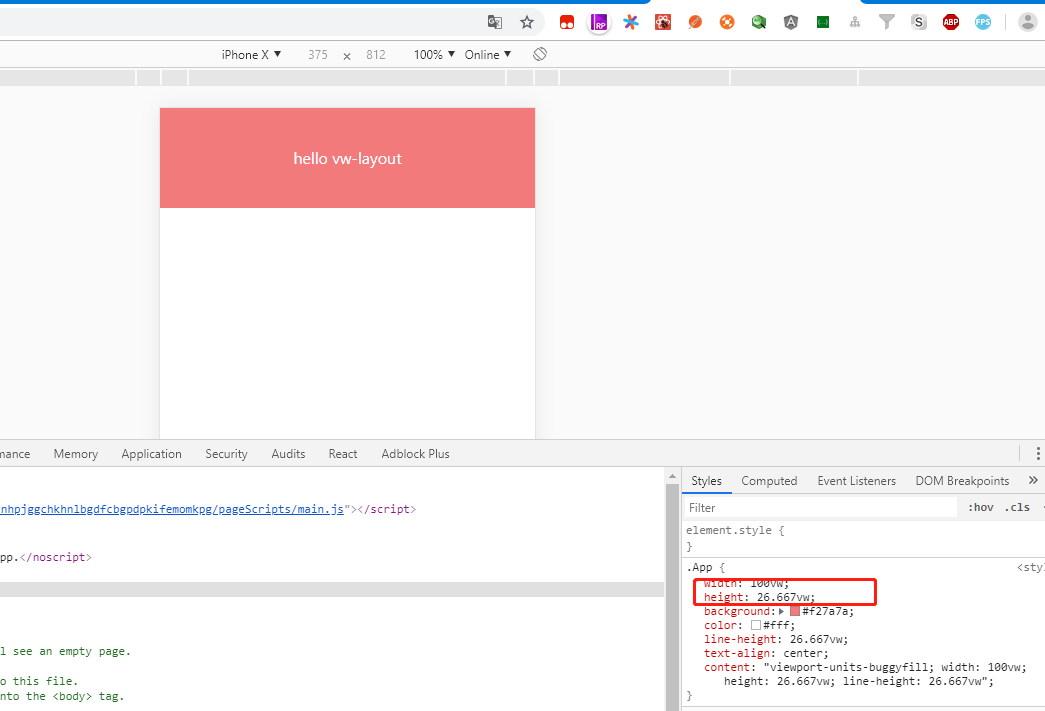
.App {

  width: 750px;

  height: 200px;

  background: #f27a7a;

  color: #ffffff;

  line-height: 200px;

  text-align: center;

}
接下来运行项目,运行项目会报错
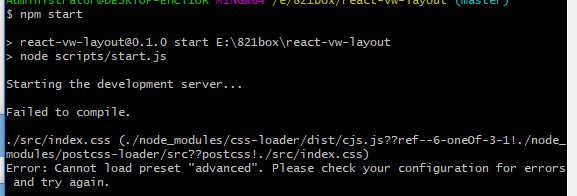
解决办法为:
cnpm i cssnano-preset-advanced --save-dev
运行项目
5.生产环境打包项目
使用npm run build报错
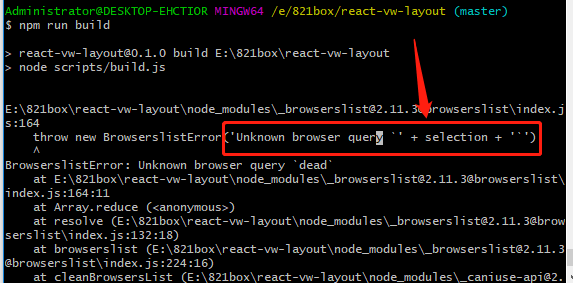
解决办法为修改package.json文件
 [

    "last 2 versions",

    "android 4",

    "opera 12"

  ],
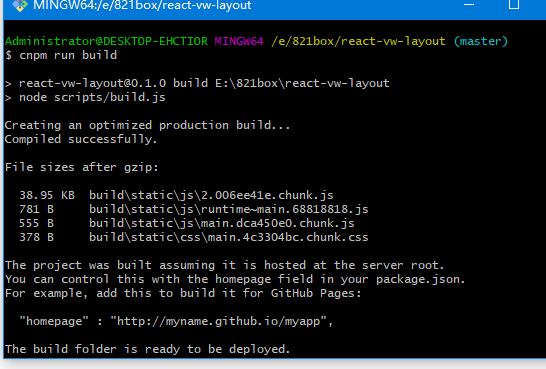
接下来打包项目成功
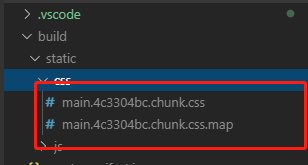
打开static/css/main.********.css
6.加入viewport-units-buggyfill配置
打开public/index.html
首先在中引入阿里cdn
<script src="//g.alicdn.com/fdilab/lib3rd/viewport-units-buggyfill/0.6.2/??viewport-units-buggyfill.hacks.min.js,viewport-units-buggyfill.min.js"></script>
在body中,加入如下js代码:
<script>

  window.onload = function () {

    window.viewportUnitsBuggyfill.init({

      hacks: window.viewportUnitsBuggyfillHacks

    });

  }

</script>
最终index.html如下
//index.html

<!DOCTYPE html>

<html lang="en">

  <head>

    <meta charset="utf-8" />

    <link rel="shortcut icon" href="%PUBLIC_URL%/favicon.ico" />

    <meta name="viewport" content="width=device-width, initial-scale=1" />

    <meta name="theme-color" content="#000000" />

    <meta

      name="description"

      content="Web site created using create-react-app"

    />

    <link rel="apple-touch-icon" href="logo192.png" />

    <!--

      manifest.json provides metadata used when your web app is installed on a

      user's mobile device or desktop. See https://developers.google.com/web/fundamentals/web-app-manifest/

    -->

    <link rel="manifest" href="%PUBLIC_URL%/manifest.json" />

    <!--

      Notice the use of %PUBLIC_URL% in the tags above.

      It will be replaced with the URL of the `public` folder during the build.

      Only files inside the `public` folder can be referenced from the HTML.

      Unlike "/favicon.ico" or "favicon.ico", "%PUBLIC_URL%/favicon.ico" will

      work correctly both with client-side routing and a non-root public URL.

      Learn how to configure a non-root public URL by running `npm run build`.

    -->

    <title>React App</title>

    <script src="//g.alicdn.com/fdilab/lib3rd/viewport-units-buggyfill/0.6.2/??viewport-units-buggyfill.hacks.min.js,viewport-units-buggyfill.min.js"></script>

  </head>

  <body>

    <noscript>You need to enable JavaScript to run this app.</noscript>

    <div id="root"></div>

    <script>

      window.onload = function () {

        window.viewportUnitsBuggyfill.init({

          hacks: window.viewportUnitsBuggyfillHacks

        });

      }

    </script>

    <!--

      This HTML file is a template.

      If you open it directly in the browser, you will see an empty page.

      You can add webfonts, meta tags, or analytics to this file.

      The build step will place the bundled scripts into the <body> tag.

      To begin the development, run `npm start` or `yarn start`.

      To create a production bundle, use `npm run build` or `yarn build`.

    -->

  </body>

</html>
重新执行npm start打开页面发现:
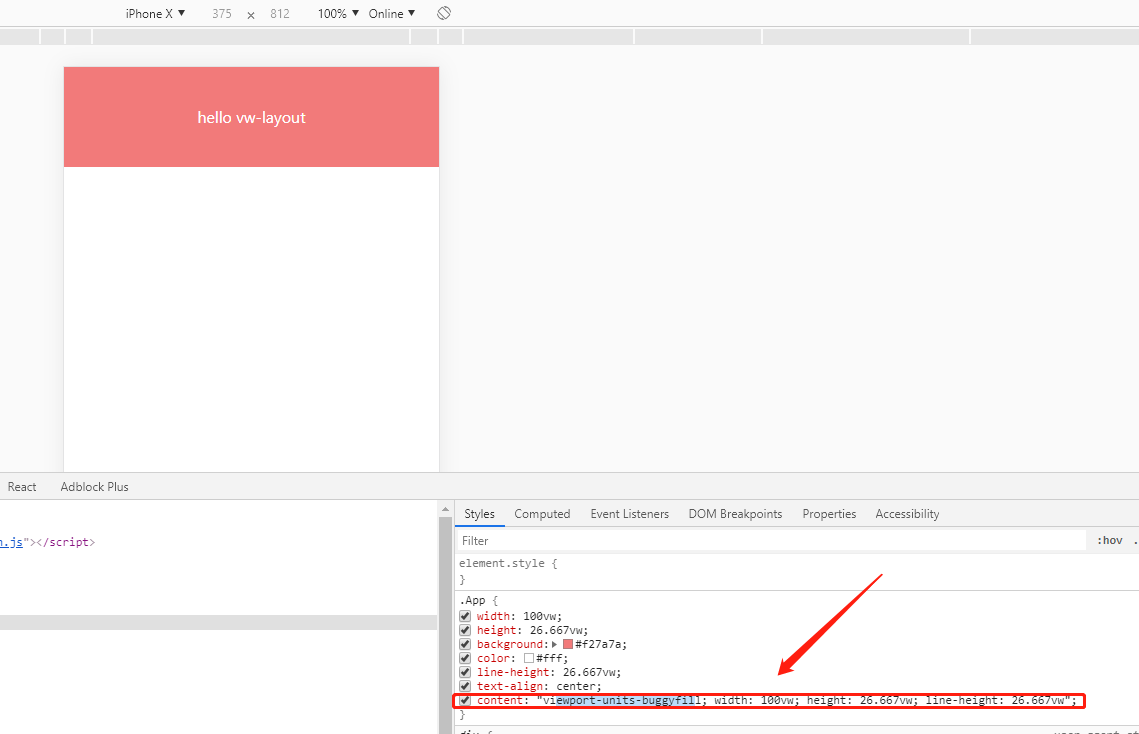
如果遇到img无法显示,则添加全局css
img {

    content: normal !important;

}
这样就适配了低版本安卓机型
7.加入css-modules配置
一般的小项目不使用css-modules已经可以hold住了,但是页面多起来还是建议使用css-modules,下面介绍一下用法:
npm i --save react-css-modules
在App.js文件中引入插件 import CSSModules from 'react-css-modules';
修改css文件的引入方式 从import './App.css';修改为import styles from './App.css';
修改引用Css方式 className=>styleName
修改导出方式 export default App=>export default CSSModules(App, styles);
保存,从新执行npm start查看页面发现失败
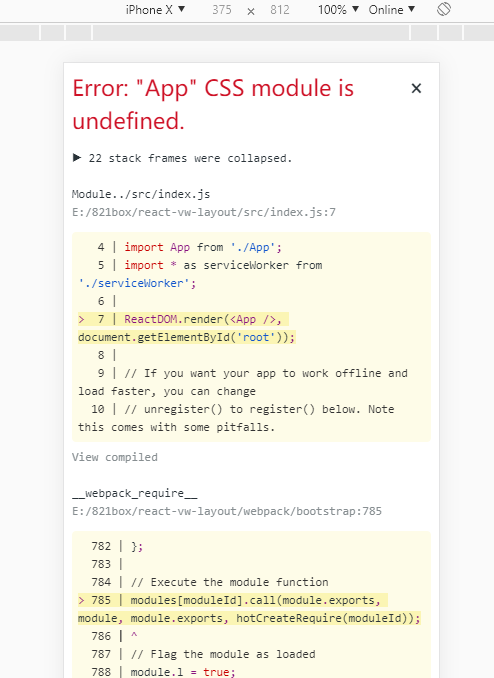
原因是未打开css import配置,此时import styles from './App.css';该语句并未成功引入css文件。
打开webpack.config.js加入modules: true 找到如下位置
  {

        loader: require.resolve('css-loader'),

        // options: cssOptions,

        // 代码看这里看这里

        options:{

          //添加添加添加

          modules:true,

          importLoaders:1,

        }

      },
保存,再次执行npm start查看页面

是这个class名太过乱码不适于调试,再次打开webpack.config.dev.js 找到如下位置加入语句localIdentName:'[name][local][hash:base64:5]'
 {

        loader: require.resolve('css-loader'),

        // options: cssOptions,

        // 代码看这里看这里

        options:{

          //添加添加添加

          modules:true,

          importLoaders:1,

          localIdentName: '[name]_[local]_[hash:base64:5]'

        }

      }
再次运行项目

我们可以看到对应的class,方便我们在项目中的调试
最后我们执行npm run build 查看打包文件
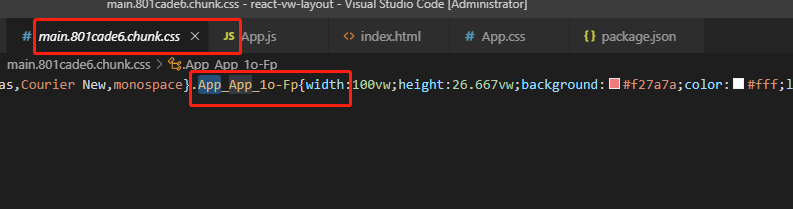
嗯,已经大功告成啦啦啦啦啦啦啦
开心,再次感谢作者大大无私的分享经验
跟我一起使用create-react-app脚手架搭建vw-layout解决方案的更多相关文章
- tap news:week5 0.0 create react app
参考https://blog.csdn.net/qtfying/article/details/78665664 先创建文件夹 安装create react app 这个脚手架(facebook官方提 ...
- 如何扩展 Create React App 的 Webpack 配置
如何扩展 Create React App 的 Webpack 配置 原文地址https://zhaozhiming.github.io/blog/2018/01/08/create-react-a ...
- 在 .NET Core 5 中集成 Create React app
翻译自 Camilo Reyes 2021年2月22日的文章 <Integrate Create React app with .NET Core 5> [1] Camilo Reyes ...
- 使用create react app教程
This project was bootstrapped with Create React App. Below you will find some information on how to ...
- 深入 Create React App 核心概念
本文差点难产而死.因为总结的过程中,多次怀疑本文是对官方文档的直接翻译和简单诺列:同时官方文档很全面,全范围的介绍无疑加深了写作的心智负担.但在最终的梳理中,发现走出了一条与众不同的路,于是坚持分享出 ...
- Create React App
Facebook开源了React前端框架(MIT Licence),也同时提供了React脚手架 - create-react-app. create-react-app遵循约定优于配置(Coc)的原 ...
- Create React App 安装less 报错
执行npm run eject 暴露模块 安装 npm i less less-loader -D 1.打开 react app 的 webpack.config.js const sassRege ...
- [React] Use the Fragment Short Syntax in Create React App 2.0
create-react-app version 2.0 added a lot of new features. One of the new features is upgrading to Ba ...
- [React] {svg, css module, sass} support in Create React App 2.0
create-react-app version 2.0 added a lot of new features. One of the new features is added the svgr ...
- create react app 项目部署在Spring(Tomcat)项目中
网上看了许多,大多数都是nginx做成静态项目,但是这样局限性太多,与Web项目相比许多服务端想做的验证都很麻烦,于是开始了艰难的探索之路,终于在不经意间试出来了,一把辛酸... 正常的打包就不说了. ...
随机推荐
- 秒懂神经网络---BP神经网络具体应用不能说的秘密.
秒懂神经网络---BP神经网络具体应用不能说的秘密 一.总结 一句话总结: 还是要上课和自己找书找博客学习相结合,这样学习效果才好,不能单视频,也不能单书 BP神经网络就是反向传播神经网络 1.BP神 ...
- ionic-CSS:ionic 单选框
ylbtech-ionic-CSS:ionic 单选框 1.返回顶部 1. ionic 单选框 ionic 单选按钮与标准 type="radio" 的 input元素类似.以下展 ...
- iOS开发UIResponder简介API
#import <Foundation/Foundation.h> #import <UIKit/UIKitDefines.h> #import <UIKit/UIEve ...
- hexo next主题深度优化(十一),next主题中加入scrollReveal.js,让文章随着鼠标的滚动,出现点小动作。
文章目录 效果 scrollReveal简单介绍以及简单操作 参考文档: next主题中加入scrollReveal 给article标签添加属性 给底部的不蒜子添加属性 本地引入依赖并且编写启动函数 ...
- 2. Vim 概念扫盲
Frm: http://www.linuxidc.com/Linux/2013-05/84031p2.htm 了解Vim的三个基本模式 当我们安装完一个编辑器后,肯定会打开它,然后在里面输入点什么东西 ...
- idea中选中了一个变量名,会高亮显示位于别的地方的这个变量名,那么怎么修改其他地方的高亮颜色
- IOS中input光标跑偏问题的解决方法
ios端兼容input光标高度处理 在最近的项目中遇到一个问题,input输入框光标,在安卓手机上显示没有问题,但是在苹果手机上 当点击输入的时候,光标的高度和父盒子的高度一样.造成的原因就是给父盒子 ...
- idea引入项目下所有文件(ps:包括静态文件夹)
打开项目的目录结构 点击finish 最后删除目录下多余的src就可以了
- 网页设计师神器,快速生成网站配色、字型等风格的工具——Stylify Me
在设计网页时,最重要的一项便是网页的配色,颜色的使用在网页制作中起着非常关键的作用,不同的网站有着自己不同的风格,也有着自己不同的颜色.今天给大家介绍一个在线生成网站配色的工具——Stylify Me ...
- PyQt5 安装及简单实例 -- 标签设置
- 1 - PyQt5安装,鉴于pip工具,安装其实很简单, 如下:(最好将pip索引配置成国内镜像,速度比默认的快得多) pip3 isntall PyQt5 - 2 - 利用Pycha ...