
springboot整合fastdfs
首先pom.xml
<?xml version="1.0" encoding="UTF-8"?>

<project xmlns="http://maven.apache.org/POM/4.0.0" xmlns:xsi="http://www.w3.org/2001/XMLSchema-instance"

    xsi:schemaLocation="http://maven.apache.org/POM/4.0.0 http://maven.apache.org/xsd/maven-4.0.0.xsd">

    <modelVersion>4.0.</modelVersion>

    <parent>

        <groupId>org.springframework.boot</groupId>

        <artifactId>spring-boot-starter-parent</artifactId>

        <version>2.0..RELEASE</version>

        <relativePath/> <!-- lookup parent from repository -->

    </parent>

    <groupId>com.cxy</groupId>

    <artifactId>fastdfs</artifactId>

    <version>0.0.-SNAPSHOT</version>

    <name>fastdfs</name>

    <description>Demo project for Spring Boot</description>

    <properties>

        <java.version>1.8</java.version>

    </properties>

    <dependencies>

        <dependency>

            <groupId>org.springframework.boot</groupId>

            <artifactId>spring-boot-starter</artifactId>

        </dependency>

        <dependency>

            <groupId>com.github.tobato</groupId>

            <artifactId>fastdfs-client</artifactId>

            <version>1.26.</version>

        </dependency>

        <dependency>

            <groupId>org.springframework.boot</groupId>

            <artifactId>spring-boot-starter-test</artifactId>

            <scope>test</scope>

        </dependency>

        <dependency>

            <groupId>com.alibaba</groupId>

            <artifactId>fastjson</artifactId>

            <version>1.2.</version>

        </dependency>

        <dependency>

            <groupId>org.springframework.boot</groupId>

            <artifactId>spring-boot-starter-web</artifactId>

        </dependency>

    </dependencies>

    <build>

        <plugins>

            <plugin>

                <groupId>org.springframework.boot</groupId>

                <artifactId>spring-boot-maven-plugin</artifactId>

            </plugin>

        </plugins>

    </build>

</project>
yml
# 分布式文件系统FDFS配置

fdfs:

  soTimeout:  #socket连接超时时长

  connectTimeout:  #连接tracker服务器超时时长

  resHost: 192.168.25.133

  storagePort:

  thumbImage: #缩略图生成参数,可选

      width:

      height:

  trackerList: #TrackerList参数,支持多个,我这里只有一个,如果有多个在下方加- x.x.x.x:port

    - 192.168.25.133:

spring:

  http:

    multipart:

      max-file-size: 100MB # 最大支持文件大小

      max-request-size: 100MB # 最大支持请求大小
启动类:
package com.cxy;

import org.springframework.boot.SpringApplication;

import org.springframework.boot.autoconfigure.SpringBootApplication;

@SpringBootApplication

public class FastdfsApplication {

    public static void main(String[] args) {

        SpringApplication.run(FastdfsApplication.class, args);

    }

}
结果类:
package com.cxy.bean;

public class Result<T> {

    public Result(){} ;

    public static <T> Result<T> createResult(){

        return new Result<T>() ;

    }

    private T content;

    private int code;

    private String message ;

    public T getContent() {

        return content;

    }

    public Result<T> setContent(T content) {

        this.content = content;

        return this ;

    }

    public int getCode() {

        return code;

    }

    public Result<T> setCode(int code) {

        this.code = code;

        return this ;

    }

    public String getMessage() {

        return message;

    }

    public Result<T> setMessage(String message) {

        this.message = message;

        return this ;

    }

}
上传类:
package com.cxy.bean;

import java.io.ByteArrayInputStream;

import java.io.IOException;

import java.nio.charset.Charset;

import org.apache.commons.io.FilenameUtils;

import org.apache.commons.lang3.StringUtils;

import org.hibernate.validator.internal.util.logging.LoggerFactory;

import org.springframework.beans.factory.annotation.Autowired;

import org.springframework.stereotype.Component;

import org.springframework.web.multipart.MultipartFile;

import com.github.tobato.fastdfs.domain.fdfs.StorePath;

import com.github.tobato.fastdfs.exception.FdfsUnsupportStorePathException;

import com.github.tobato.fastdfs.service.FastFileStorageClient;

@Component

public class FastDFSClientWrapper {

    @Autowired

    private FastFileStorageClient storageClient;

    /**

     * 上传文件

     *

     * @param file

     *            文件对象

     * @return 文件访问地址

     * @throws IOException

     */

    public String uploadFile(MultipartFile file) throws IOException {

        StorePath storePath = storageClient.uploadFile(file.getInputStream(), file.getSize(),

                FilenameUtils.getExtension(file.getOriginalFilename()), null);

        return getResAccessUrl(storePath);

    }

    /**

     * 将一段字符串生成一个文件上传

     *

     * @param content

     *            文件内容

     * @param fileExtension

     * @return

     */

    public String uploadFile(String content, String fileExtension) {

        byte[] buff = content.getBytes(Charset.forName("UTF-8"));

        ByteArrayInputStream stream = new ByteArrayInputStream(buff);

        StorePath storePath = storageClient.uploadFile(stream, buff.length, fileExtension, null);

        return getResAccessUrl(storePath);

    }

    // 封装图片完整URL地址

    private String getResAccessUrl(StorePath storePath) {

        String fileUrl = storePath.getFullPath();

        return fileUrl;

    }

    /**

     * 传图片并同时生成一个缩略图 "JPG", "JPEG", "PNG", "GIF", "BMP", "WBMP"

     *

     * @param file

     *            文件对象

     * @return 文件访问地址

     * @throws IOException

     */

    public String uploadImageAndCrtThumbImage(MultipartFile file) throws IOException {

        StorePath storePath = storageClient.uploadImageAndCrtThumbImage(file.getInputStream(), file.getSize(),

                FilenameUtils.getExtension(file.getOriginalFilename()), null);

        return getResAccessUrl(storePath);

    }

    /**

     * 删除文件

     *

     * @param fileUrl

     *            文件访问地址

     * @return

     */

    public void deleteFile(String fileUrl) {

        if (StringUtils.isEmpty(fileUrl)) {

            return;

        }

        try {

            StorePath storePath = StorePath.parseFromUrl(fileUrl);

            storageClient.deleteFile(storePath.getGroup(), storePath.getPath());

        } catch (FdfsUnsupportStorePathException e) {

        }

    }

}
api测试类:
package com.cxy.bean;

import java.util.HashMap;

import java.util.Map;

import javax.annotation.Resource;

import org.springframework.web.bind.annotation.PostMapping;

import org.springframework.web.bind.annotation.RequestParam;

import org.springframework.web.bind.annotation.ResponseBody;

import org.springframework.web.bind.annotation.RestController;

import org.springframework.web.multipart.MultipartFile;

import com.alibaba.fastjson.JSONObject;

import com.alibaba.fastjson.serializer.SerializerFeature;

@RestController

public class TestApi {

    @Resource

    private FastDFSClientWrapper fwc;

    /**

     * 图片上传

     * @param file

     * @return

     *

     * @author ZHANGJL

     * @dateTime 2018-02-24 15:49:48

     */

    @PostMapping("/uploadPic")

    public @ResponseBody String uploadPic(@RequestParam("file")MultipartFile file){

        Result<Map<String, String>> result = new Result<Map<String,String>>();

        try {

            Map<String, String> map = new HashMap<String, String>();

            //返回FastDFS配置好的图片路径

            String url = fwc.uploadFile(file);//正常上传

            String url1 = fwc.uploadImageAndCrtThumbImage(file);//小图

            map.put("max", url);

            map.put("min", url1);

            result.setCode();

            result.setContent(map);

        } catch (Exception e) {

            // TODO: handle exception

            result.setCode();

        }

        return JSONObject.toJSONString(result, SerializerFeature.WriteMapNullValue);

    }

}
postman测试:
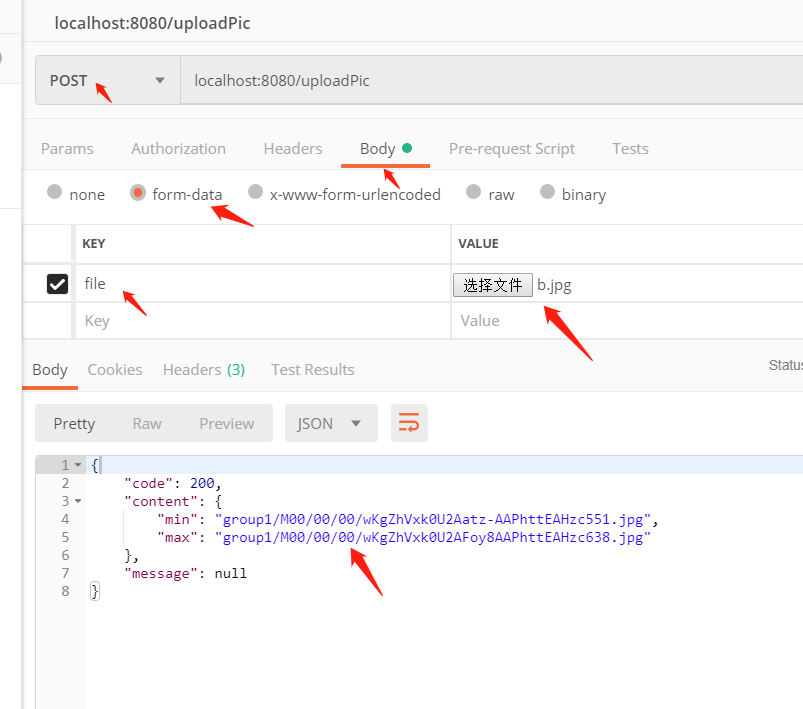
将地址拼接:

就可以看如下结果.,
这个也可以为单独的文件上传服务,
springboot整合fastdfs的更多相关文章
- springboot整合fastdfs实现上传和下载
FastDFS_Client源码 https://github.com/tobato/FastDFS_Client 友情提示:由于FastDFS_Client这个源码不是很多,并且目前没有找到相关文档 ...
- 第2-1-4章 SpringBoot整合FastDFS文件存储服务
目录 5 SpringBoot整合 5.1 操作步骤 5.2 项目依赖 5.3 客户端开发 5.3.1 FastDFS配置 5.3.2 FastDFS配置类 5.3.3 文件工具类 5.3.4 文件上 ...
- SpringBoot整合Fastdfs,实现图片上传(IDEA)
我们部署Fastdfs,就是为了实现文件的上传. 现在使用idea整合Fastdfs,实现图片上传 部署环境:Centos7部署分布式文件存储(Fastdfs) 利用Java客户端调用FastDFS ...
- 【FastDFS】SpringBoot整合FastDFS实战,我只看这一篇!!
写在前面 在<[FastDFS]小伙伴们说在CentOS 8服务器上搭建FastDFS环境总报错?>和<[FastDFS]面试官:如何实现文件的大规模分布式存储?(全程实战)> ...
- SpringBoot整合FastDFS实现图片的上传
文件的上传和预览在web开发领域是随处可见,存储的方式有很多,本文采用阿里巴巴余庆大神开发的FastDFS进行文件的存储,FastDFS是一个分布式文件存储系统,可以看我上一篇博文,有安装和配置教程 ...
- (十一)整合 FastDFS 中间件,实现文件分布式管理
整合 FastDFS 中间件,实现文件分布式管理 1.FastDFS简介 1.1 核心角色 1.2 运转流程 2.SpringBoot整合FastDFS 2.1 核心步骤 2.2 核心依赖 2.3 配 ...
- 分布式文件系统FastDFS简介、搭建、与SpringBoot整合实现图片上传
之前大学时搭建过一个FastDFS的图片服务器,当时只是抱着好奇的态度搭着玩一下,当时搭建采用了一台虚拟机,tracker和storage服务在一台机器上放着,最近翻之前的博客突然想着在两台机器上搭建 ...
- 百度富文本编辑器整合fastdfs文件服务器上传
技术:springboot+maven+ueditor 概述 百度富文本整合fastdfs文件服务器上传 详细 代码下载:http://www.demodashi.com/demo/15008.h ...
- 很详细的SpringBoot整合UEditor教程
很详细的SpringBoot整合UEditor教程 2017年04月10日 20:27:21 小宝2333 阅读数:21529 版权声明:本文为博主原创文章,未经博主允许不得转载. https: ...
随机推荐
- 2016.8.11 DataTable合并及排除重复方法
合并: DataTable pros=xxx; DataTable pstar=yyy; //将两张DataTable合成一张 foreach (DataRow dr in pstar.Rows) { ...
- 12-19Windows窗体应用程序之记事本(2)
之前记事本的功能实现了“文件”和“编辑”中的功能操作,现在再继续下面的功能介绍: 3) <1>字体设置 [查看代码] [效果图] <2>字体颜色的设置 [查看代码] [效果图] ...
- 11-16网页基础--HTML
网页制作部分主要讲解三大部分: 1.HTML 超文本标记语言( 全称:Hyper Text Markup Language) 专门编辑静态网页 2.CSS 网页美化:是HTML控制的 ...
- CentOS6.5安装完没有网络的解决办法
昨天下了个CentOS 6.5 Minimal 版,在VMware 10下安装好了之后,发现上不了网,PING外网也PING不通. 在网上搜了一下,发现Linux安装好了之后,网卡默认是没有启动的,下 ...
- Yii::app()
Yii::app()返回的是你在index.php里创建的CWebApplication实例. 在一次请求处理过程中,这是个唯一的实例. Yii::app()主要负责一些全局性的功能模块,比如Yii: ...
- css知多少(5)——选择器(转)
css知多少(5)——选择器 1. 引言 从本节开始,就进入本系列的第二个部分——css和html的结合——说白了就是选择器. CSS中定义了样式,如何将这些样式设置到相应的html节点上?就不得 ...
- Python-黑客-004 用Python构建一个SSH僵尸网络-02 手动与SSH交互
用Python构建一个SSH僵尸网络-02 手动与SSH交互 - 登录SSH服务器端的 root 用户 我的电脑(攻击者)的系统:Ubuntu14.04 : 用户名: aobosir@ubuntu:~ ...
- Entity Framework Tutorial Basics(3):Entity Framework Architecture
Entity Framework Architecture The following figure shows the overall architecture of the Entity Fram ...
- PersonDto中@ResourceAccess(readOnly = true)以及swagger的理解-----似懂非懂,日后消化
@JsonApiResource(type = PersonDto.RESOURCE_TYPE) @EntityMapping(entityClass = Person.class) //@Resou ...
- xml元素类型PCDATA和CDATA的区别(DTD中)
PCDATAPCDATA 的意思是被解析的字符数据(parsed character data).可把字符数据想象为 XML 元素的开始标签与结束标签之间的文本.PCDATA 是会被解析器解析的文 ...