
ASP.NET Core3.1使用Identity Server4建立Authorization Server-2
前言
建立Web Api项目
在同一个解决方案下建立一个Web Api项目IdentityServer4.WebApi,然后修改Web Api的launchSettings.json。参考第一节,当然可以不修改的,端口号为5001。
{

  "profiles": {

    "IdentityServer4.WebApi": {

      "commandName": "Project",

      "launchBrowser": true,

      "launchUrl": "weatherforecast",

      "applicationUrl": "http://localhost:5001",

      "environmentVariables": {

        "ASPNETCORE_ENVIRONMENT": "Development"

      }

    }

  }

}
添加Swagger帮助页面
在Startup.ConfigureServices方法中将Swagger生成器添加到服务集合:
        public void ConfigureServices(IServiceCollection services)

        {

            services.AddControllers();

            // Register the Swagger generator, defining one or more Swagger documents

            services.AddSwaggerGen(c =>

            {

                c.SwaggerDoc("v1", new OpenApiInfo { Title = "My API", Version = "v1" });

            });

        }
OpenApiInfo需要using Microsoft.OpenApi.Models;
在该Startup.Configure方法中,启用用于提供生成的JSON文档和Swagger UI的中间件:
        public void Configure(IApplicationBuilder app, IWebHostEnvironment env)

        {

            if (env.IsDevelopment())

            {

                app.UseDeveloperExceptionPage();

            }

            // Enable middleware to serve generated Swagger as a JSON endpoint.

            app.UseSwagger();

            // Enable middleware to serve swagger-ui (HTML, JS, CSS, etc.),

            // specifying the Swagger JSON endpoint.

            app.UseSwaggerUI(c =>

            {

                c.SwaggerEndpoint("/swagger/v1/swagger.json", "My API V1");

            });

            app.UseRouting();

            app.UseAuthorization();

            app.UseEndpoints(endpoints =>

            {

                endpoints.MapControllers();

            });

        }
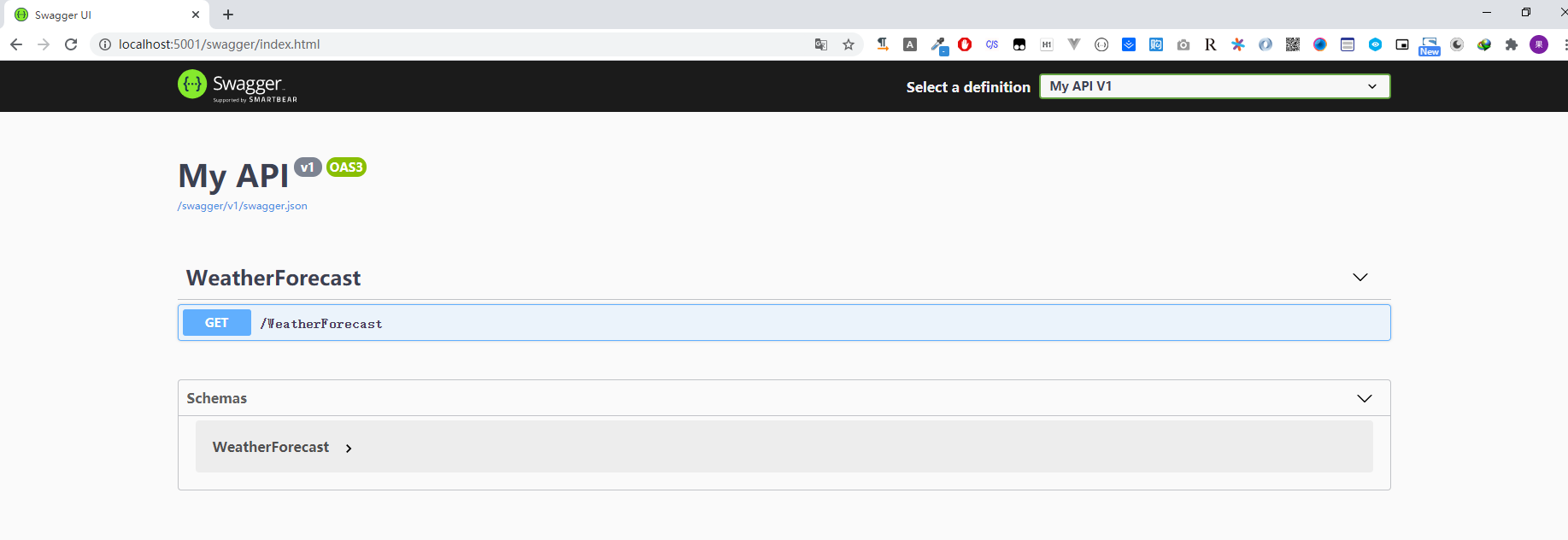
把Web Api设为启动项目,打开:http://localhost:5001/swagger/index.html访问Swagger帮助页面:
如果要在应用程序的根目录(
http://localhost:<port>/)提供Swagger UI ,请将RoutePrefix属性设置为空字符串:app.UseSwaggerUI(c =>
{
c.SwaggerEndpoint("/swagger/v1/swagger.json", "My API V1");
c.RoutePrefix = string.Empty;
});
顺便我们把
launchSettings.json的"launchUrl": "weatherforecast",删掉,这个是在浏览器中启动的默认URL。然后我们再次启动,就可以直接看到Swagger的帮助页面了。
添加库IdentityServer4.AccessTokenValidation
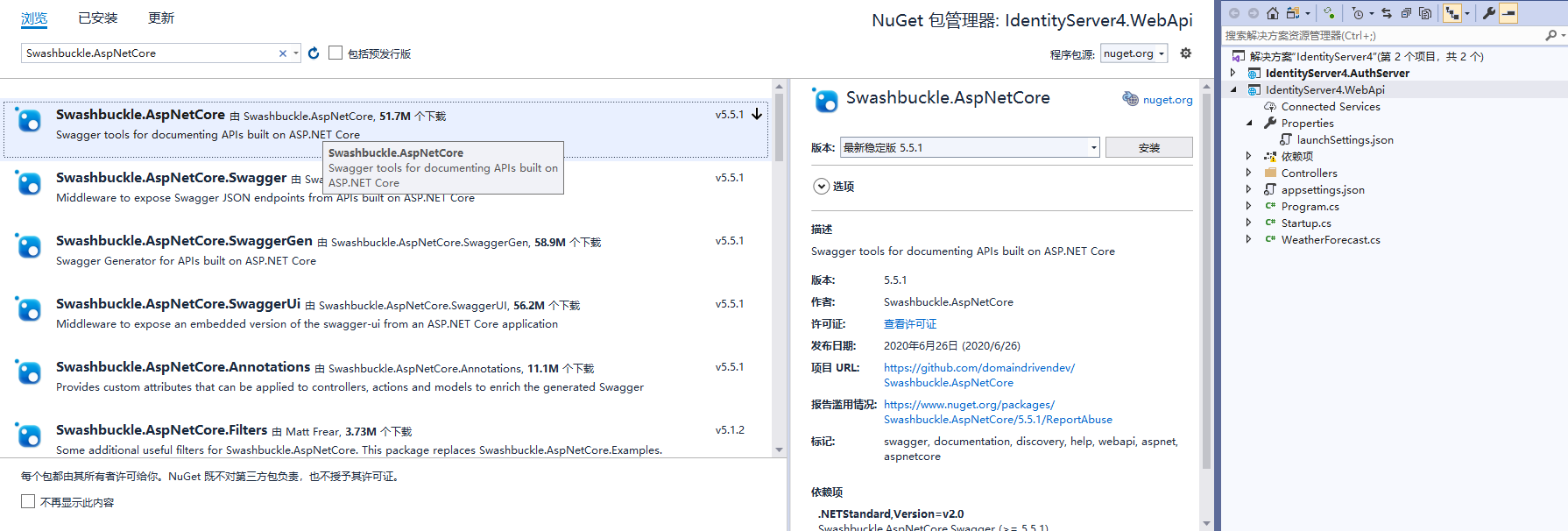
Web Api配置Identity Server就需要对token进行验证, 这个库就是对access token进行验证的. 通过NuGet安装:

在Startup的ConfigureServices里面注册配置:
官方文档的配置:
public void ConfigureServices(IServiceCollection services)
{
services.AddControllers();
services.AddAuthentication("Bearer")
.AddJwtBearer("Bearer", options =>
{
options.Authority = "https://localhost:5001";
options.TokenValidationParameters = new TokenValidationParameters
{
ValidateAudience = false
};
});
}
官方文档的这个配置是不进行验证Api的Scope和其他一些配置的,也就是只要我拿到Access Token就可以访问了。但实际情况应该是我们可能存在多个api项目,有些只能访问api1、有些只能访问api2。
我们的配置,完整的Web Api Startup.cs
using Microsoft.AspNetCore.Authentication.JwtBearer;
using Microsoft.AspNetCore.Builder;
using Microsoft.AspNetCore.Hosting;
using Microsoft.Extensions.Configuration;
using Microsoft.Extensions.DependencyInjection;
using Microsoft.Extensions.Hosting;
using Microsoft.OpenApi.Models;
namespace IdentityServer4.WebApi
{
public class Startup
{
public Startup(IConfiguration configuration)
{
Configuration = configuration;
}
public IConfiguration Configuration { get; }
// This method gets called by the runtime. Use this method to add services to the container.
public void ConfigureServices(IServiceCollection services)
{
services.AddControllers();
services.AddAuthentication(JwtBearerDefaults.AuthenticationScheme)
.AddJwtBearer(options =>
{
options.RequireHttpsMetadata = false;
options.Authority = "http://localhost:5000";
options.Audience = "api1";
});
// Register the Swagger generator, defining one or more Swagger documents
services.AddSwaggerGen(c =>
{
c.SwaggerDoc("v1", new OpenApiInfo { Title = "My API", Version = "v1" });
});
}
// This method gets called by the runtime. Use this method to configure the HTTP request pipeline.
public void Configure(IApplicationBuilder app, IWebHostEnvironment env)
{
if (env.IsDevelopment())
{
app.UseDeveloperExceptionPage();
}
//身份验证
app.UseAuthentication();
// Enable middleware to serve generated Swagger as a JSON endpoint.
app.UseSwagger();
// Enable middleware to serve swagger-ui (HTML, JS, CSS, etc.),
// specifying the Swagger JSON endpoint.
app.UseSwaggerUI(c =>

{

 c.SwaggerEndpoint("/swagger/v1/swagger.json", "My API V1");

 c.RoutePrefix = string.Empty;

});
app.UseRouting();
//授权
app.UseAuthorization();
app.UseEndpoints(endpoints =>
{
endpoints.MapControllers();
});
}
}
}
AddAuthentication:将身份验证服务添加到DI并配置Bearer为默认方案。
UseAuthentication将身份验证中间件添加到管道中,以便对主机的每次调用都将自动执行身份验证。
UseAuthorization添加了授权中间件,以确保匿名客户端无法访问我们的API端点。
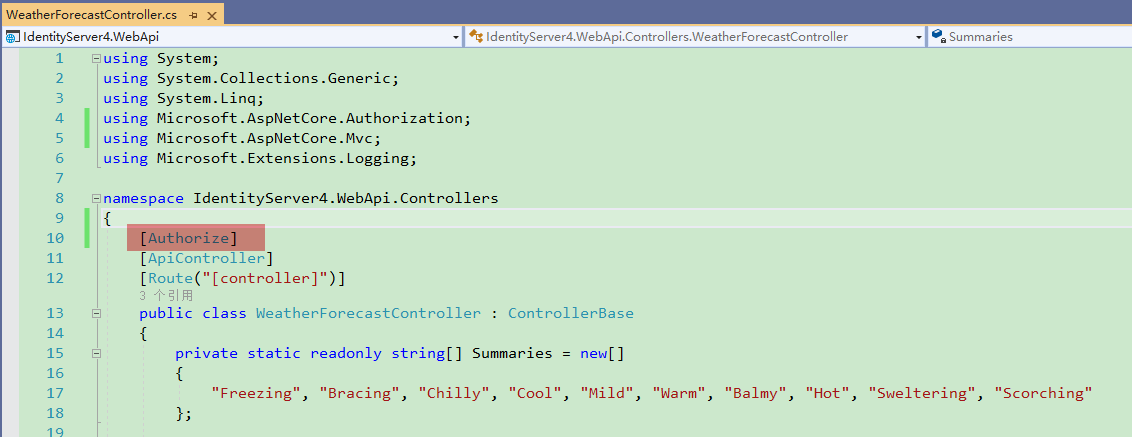
添加[Authorize]属性:
打开WeatherForecastController, 在Controller上面添加这个属性:
然后我们打开:http://localhost:5001/weatherforecast
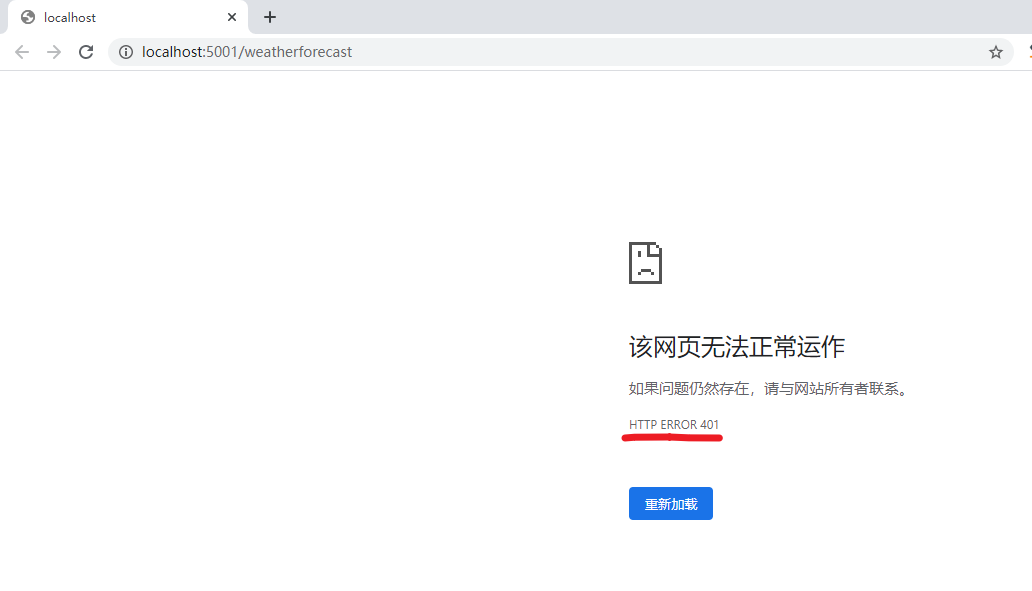
401意思是未授权
所以我们首先需要获取到一个token。那就需要把上一节的Authorization Server也跑起来。解决方案右键,启动项目设置为多个启动项目,AuthServer项目放前面。
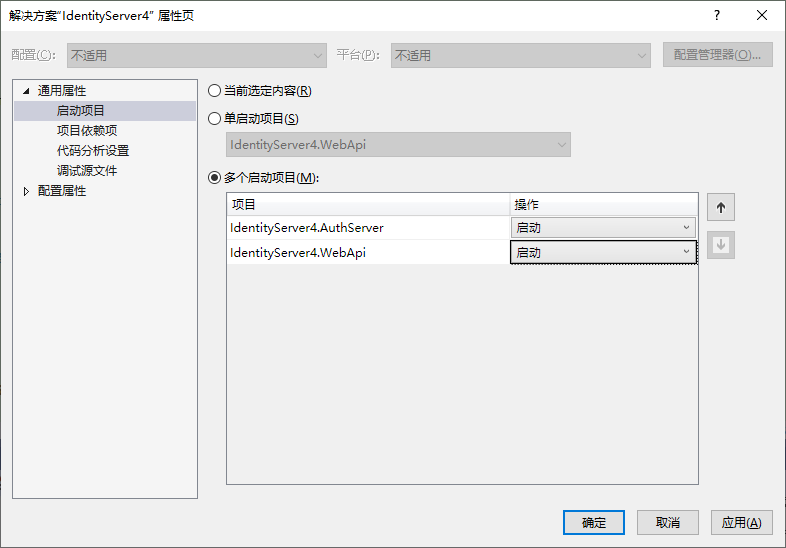
然后运行, 使用Postman先获取token:
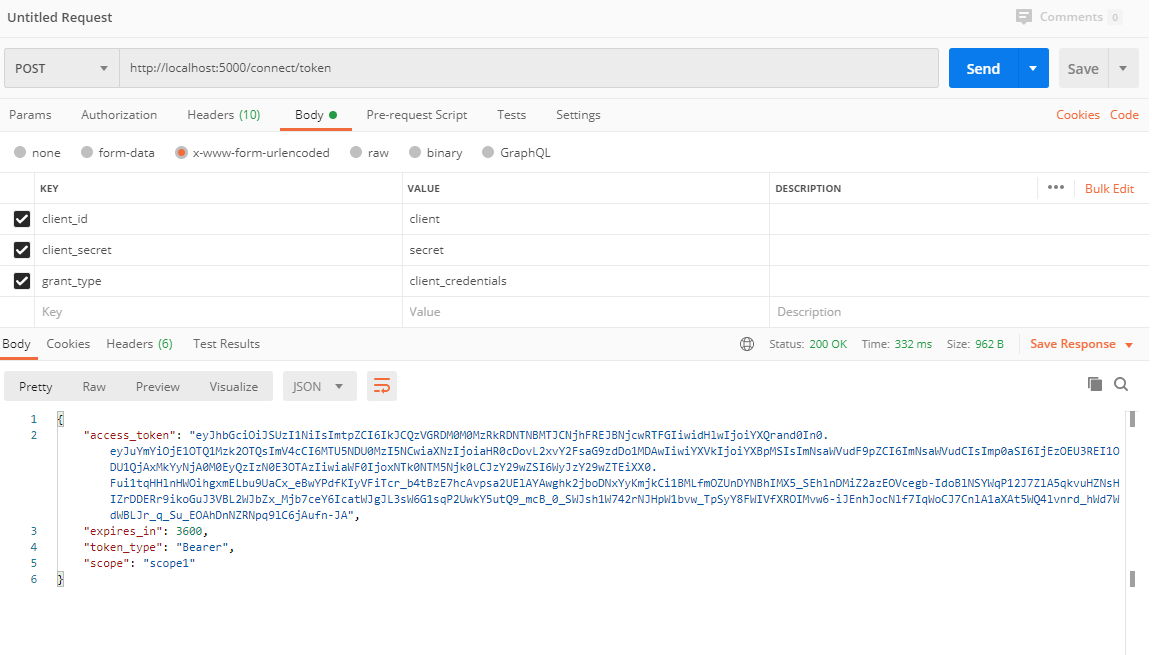
然后复制一下 access_token的值。新建一个Web Api项目的请求, 把access_token贴到Authorization选择TYPE为Bearer Token的Token里去。

然后,我们就看到请求成功啦~。
验证下范围
还记得我们Web Api的Startup.cs中配置的当前Api为api1,他是和我们AuthServer项目的配置统一的,现在我们改为api2试一下,找一个不存在的,验证下是否还能访问Api接口。
services.AddAuthentication(JwtBearerDefaults.AuthenticationScheme)

            .AddJwtBearer(options =>

            {

                options.RequireHttpsMetadata = false;

                options.Authority = "http://localhost:5000";

                options.Audience = "api2";

            });
重新运行项目,获取token,访问api
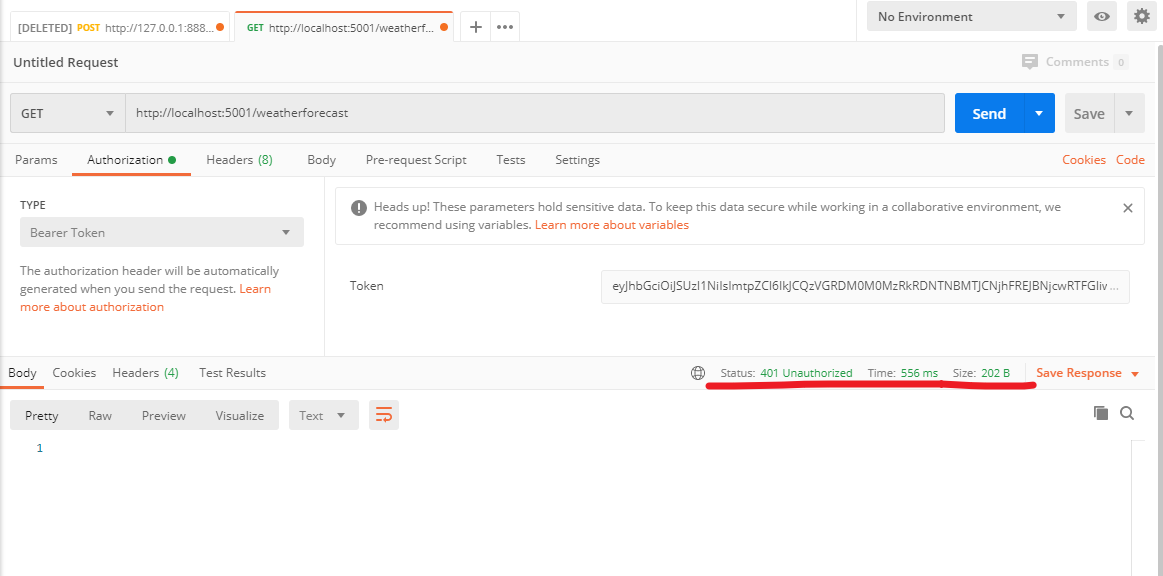
可以看到,token是可以正常获取的,但是我们不能访问api了。
分析一下Token
去https://jwt.io/ 可以分析一下这个token,感兴趣的可以自己了解下,这块资料很多的还是。
End
虽然系列内容基本是参考杨旭老师的,但是真的写起来还是满费力气的,在这里谢谢杨老师,另外B站有杨老师完整版的Identity Server4视频,大家可以去看下哦~
推广下自己的公众号一个逗逼的程序员,主要记录自己工作中解决问题的思路分享及学习过程中的笔记。绝对不会程序员贩卖程序员的焦虑来割韭菜。

ASP.NET Core3.1使用Identity Server4建立Authorization Server-2的更多相关文章
- ASP.NET Core3.1使用Identity Server4建立Authorization Server
前言 网上关于Identity Server4的资料有挺多的,之前是一直看杨旭老师的,最近项目中有使用到,在使用.NET Core3.1的时候有一些不同.所以在此记录一下. 预备知识: https:/ ...
- 从头编写asp.net core 2.0 web api 基础框架 (5) + 使用Identity Server 4建立Authorization Server (7) 可运行前后台源码
前台使用angular 5, 后台是asp.net core 2.0 web api + identity server 4. 从头编写asp.net core 2.0 web api 基础框架: 第 ...
- 使用Identity Server 4建立Authorization Server (1)
预备知识: http://www.cnblogs.com/cgzl/p/7746496.html 本文内容基本完全来自于Identity Server 4官方文档: https://identitys ...
- 使用Identity Server 4建立Authorization Server
使用Identity Server 4建立Authorization Server (6) - js(angular5) 客户端 摘要: 预备知识: http://www.cnblogs.com/cg ...
- 三、IDS4建立authorization server
建立authorization server 一.环境搭建 1.创建项目 2.引用NuGet的identityserver4 3.配置asp.net core 管道 打开Startup.cs, 编辑C ...
- 使用Identity Server 4建立Authorization Server (3)
预备知识: http://www.cnblogs.com/cgzl/p/7746496.html 第一部分: http://www.cnblogs.com/cgzl/p/7780559.html 第二 ...
- 使用Identity Server 4建立Authorization Server (5)
预备知识: http://www.cnblogs.com/cgzl/p/7746496.html 第一部分: http://www.cnblogs.com/cgzl/p/7780559.html 第二 ...
- 使用Identity Server 4建立Authorization Server (6) - js(angular5) 客户端
预备知识: http://www.cnblogs.com/cgzl/p/7746496.html 第一部分: http://www.cnblogs.com/cgzl/p/7780559.html 第二 ...
- 使用Identity Server 4建立Authorization Server (2)
第一部分: http://www.cnblogs.com/cgzl/p/7780559.html 第一部分主要是建立了一个简单的Identity Server. 接下来继续: 建立Web Api项目 ...
随机推荐
- DS-4-单链表的各种插入与删除的实现
typedef struct LNode { int data; struct LNode *next; }LNode, *LinkList; 带头结点的按位序插入: //在第i个位置插入元素e bo ...
- wget介绍和命令总结
参考资料: https://www.cnblogs.com/ftl1012/p/9265699.html https://www.cnblogs.com/lsdb/p/7171779.html cur ...
- css3动画的实例讲解
<!DOCTYPE html> <html> <head> <meta charset="UTF-8"> <title> ...
- cc30a_demo-CppPrimer_友元与继承-txwtech友元关系不能继承-要明确授予友元
//友元可以访问类的private与protected成员//友元关系不能继承-要明确授予友元 #include <iostream>//CppPrimer_友元与继承-txwtech-- ...
- 剑指 Offer 09. 用两个栈实现队列
剑指 Offer 09. 用两个栈实现队列 用两个栈实现一个队列.队列的声明如下,请实现它的两个函数 appendTail 和 deleteHead ,分别完成在队列尾部插入整数和在队列头部删除整数的 ...
- kill杀死进程
[root@queen ~]# kill 选项 %进程号 选项与参数: -l :这个是L 的小写,列出kill 能够使用的signal - :重新读取一次参数的设定档(类似reload) - :代表与 ...
- JS中函数执行顺序的问题?
作者:知乎用户链接:https://www.zhihu.com/question/23564807/answer/82996422来源:知乎著作权归作者所有.商业转载请联系作者获得授权,非商业转载请注 ...
- activity的四种启动模式详细分析
1.android中通过任务队列来管理activity 采用栈的结构就是后进先出 手机里面如果启动多个应用就会启动多个任务栈来管理对应的activity. 主要解决下面的问题:对应的四种启动模式: 1 ...
- RabbitMQ:五、高阶
存储机制 持久化的消息和非持久化的消息都可以被写入到磁盘. 持久化的消息一开始就会写入磁盘,如果可以,也会在内存中保存一部分以提高性能,当内存吃紧时会从内存中清楚. 非持久化的消息一般存储在内存中,内 ...
- 使用word2016发有代码高亮的博客
复制使用notepad++,eclipse这类有高亮的编辑器编写的代码到word中是默认有高亮的. 测试有没有代码高亮(eclipse代码): package p_day1; public class ...