
Spring Boot 所有相关的配置信息
加载顺序
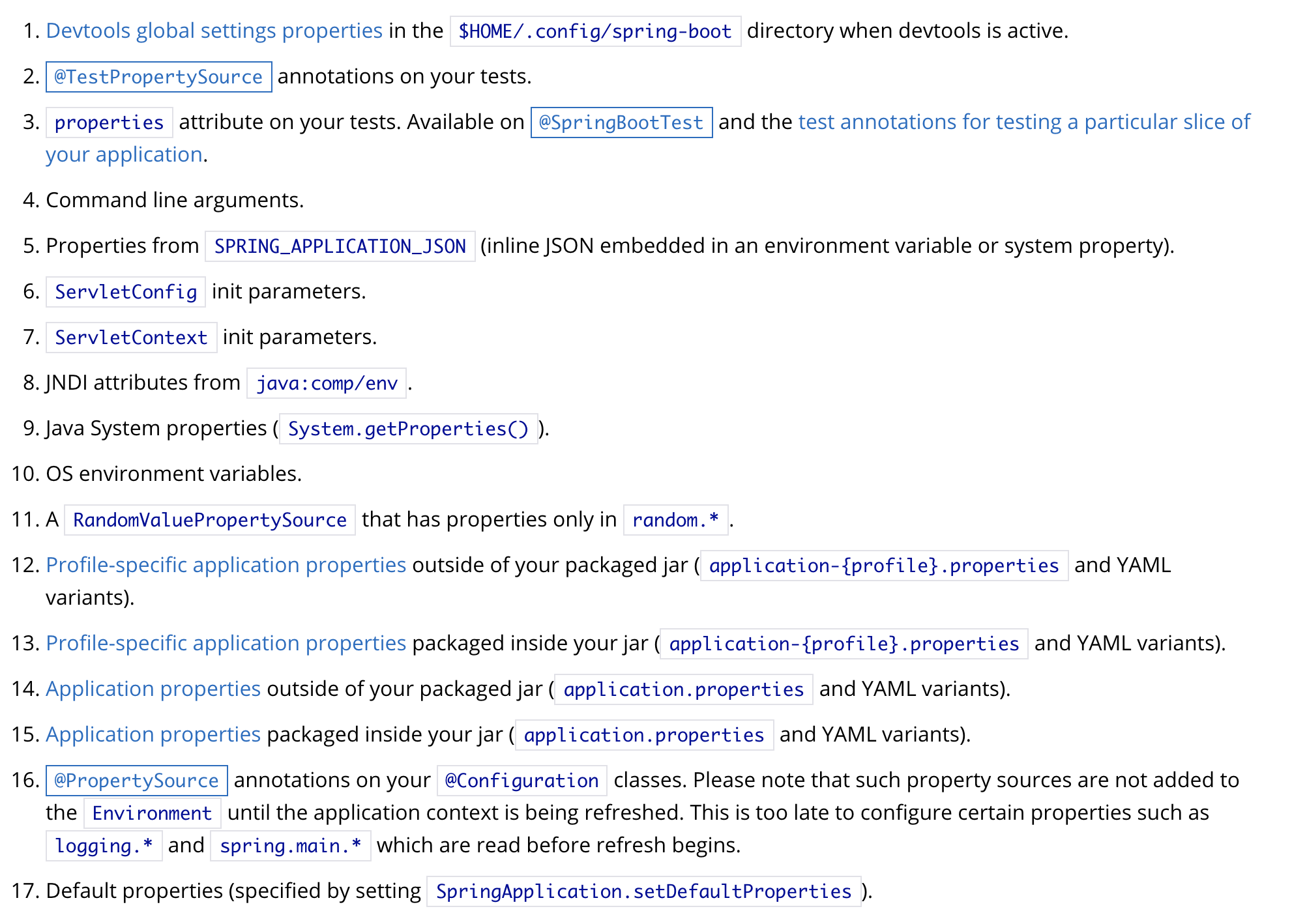
如上图所示,图片是从官网上截取的,这些配置信息都会加载,只不过顺序在前的会覆盖掉后面的
上图的所有配置信息都会以(key,value)的形式加载到Spring中的Environment中,也可以供@Value和@ConfigurationProperties注解使用
本文只介绍在@PropertySource注解导入的、properties文件中的、yml文件中的、操作系统的变量、Java System properties、命令行中的配置信息
配置信息媒介
- 命令行中的配置信息:使用
--,在idea中配置Program arguments,下面是使用命令行来添加
$ java -jar myproject.jar --server.port=8090
- Java System properties:使用
-D,在idea中配置VM options,下面是使用命令行来添加
$ java -jar myproject.jar -Dserver.port=8090
- 操作系统的变量:
vim ~/.bash_profile

在文件中添加 export SERVER_PORT=8090 并保存

source ~/.bash_profile
- properties文件
server.port=8090

spring.profiles.active=dev
- yml文件
server:

  port: 8090
- @PropertySource (在@Configuration下,必须是properties文件,yml文件不支持)
@Configuration

@PropertySource("classpath:config.properties")

public class Config {

}
加载properties文件和yml文件
默认
- properties文件和yml文件都会加载,对于相同属性,我理解properties文件应该会覆盖掉yml文件
- 默认会加载
application.properties和application.yml - 如果没有指定
spring.profiles.active默认会加载application-default.properties和application-default.yml,如果指定了xxx,则加载application-xxx.properties和application-xxx.yml - 会从以下六个默认文件夹找这些配置文件:
file:./config/、file:./config/*/、file:./、classpath:/config/、classpath:/config/*/、classpath:/。我理解前三个是jar包外,后三个是jar包内,jar包外的file文件夹我理解是指执行命令所在的文件夹。 - 优先级:
jar包外application-xxx文件->jar包内application-xxx文件->jar包外application文件->jar包内application文件
指定
spring.config.name修改配置文件名称,也就是不加载application文件了,如果指定了xxx文件,则加载xxx.properties和xxx.yml文件spring.config.location指定特定文件和特定文件夹,不再加载默认文件夹spring.config.additional-location指定特定的文件夹和特定的文件,会加载默认文件夹
spring.config.name and spring.config.location are used very early to determine which files have to be loaded. They must be defined as an environment property (typically an OS environment variable, a system property, or a command-line argument).
意思是说只能通过操作系统变量、java system property和命令行来配置才起作用
Relaxed Binding
配置文件中的变量名不用非得与class中的变量名一致,对于点与点之间的变量名,可以使用_、-、驼峰 、大小写这些形式,
userName = user_name = user-name = USERNAME = USER_NAME = USER-NAME
下图是各个形式的实例
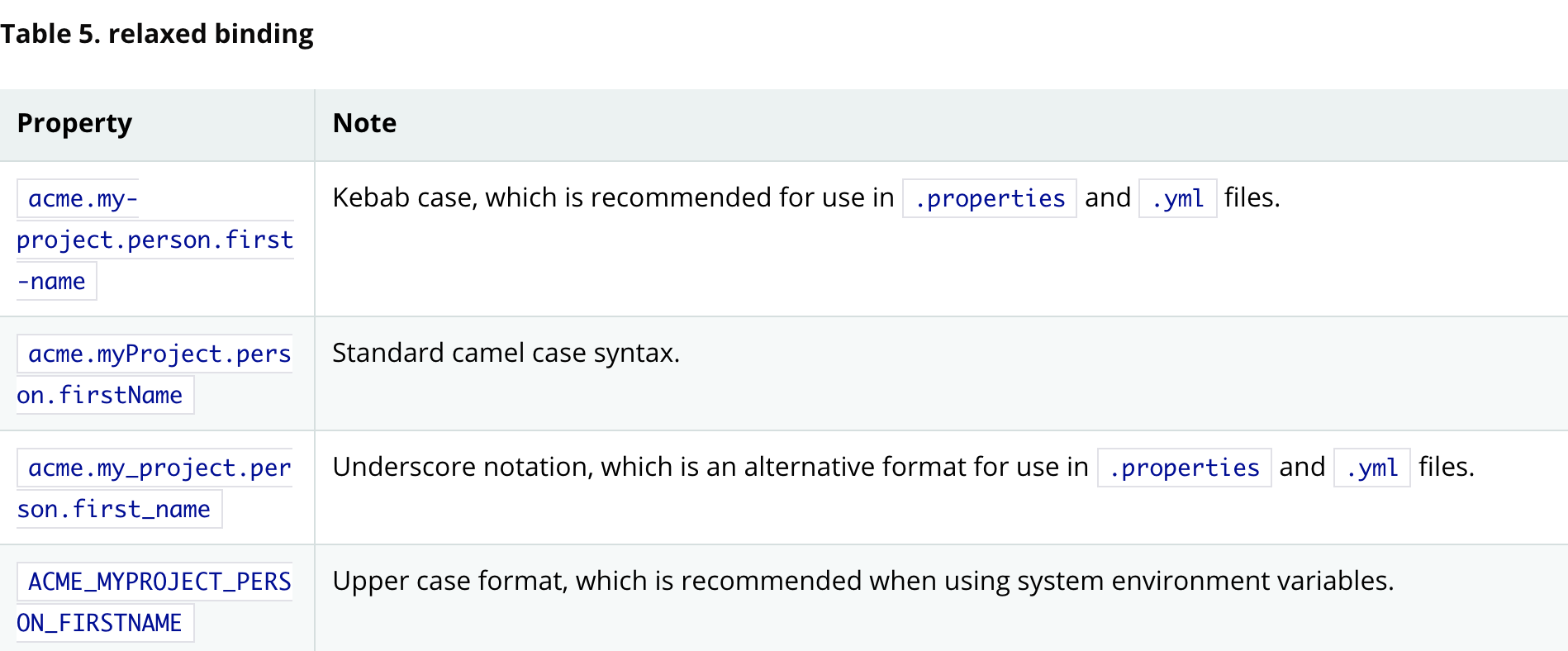
The prefix value for the annotation must be in kebab case (lowercase and separated by -, such as acme.my-project.person).
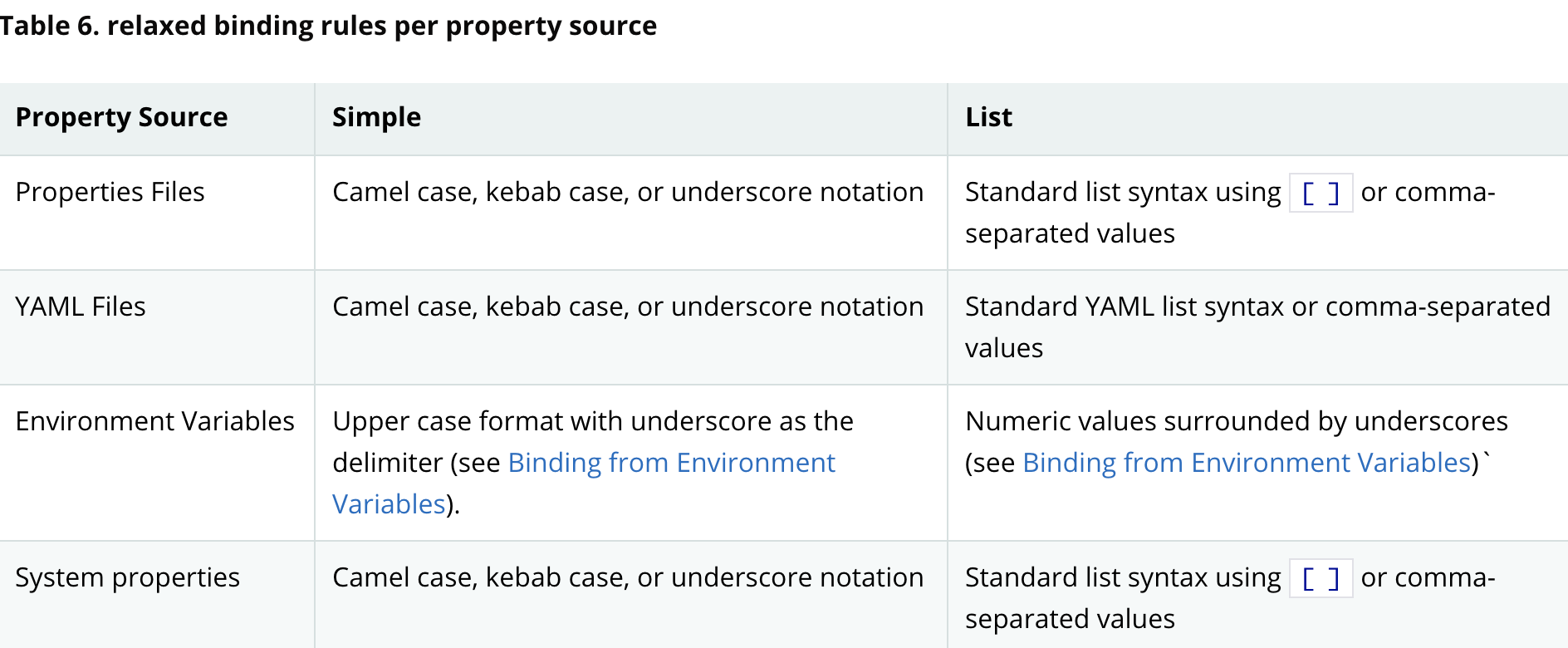
下图是每个文件类型所支持的形式(Upper case format 只适用于操作系统的变量中)
使用配置信息
environment
直接注入

@Autowired

private Environment environment;

environment.getProperty("server.port");
@value
If you do want to use @Value, we recommend that you refer to property names using their canonical form (kebab-case using only lowercase letters). This will allow Spring Boot to use the same logic as it does when relaxed binding @ConfigurationProperties. For example, @Value("{demo.item-price}") will pick up demo.item-price and demo.itemPrice forms from the application.properties file, as well as DEMO_ITEMPRICE from the system environment. If you used @Value("{demo.itemPrice}") instead, demo.item-price and DEMO_ITEMPRICE would not be considered.
建议使用kebab-case形式,这样会配到更多的值
@Component

public class ValueBean {

    @Value("${server.port}")

    private String serverPort;

}
@ConfigurationProperties
@ConfigurationProperties("server")

public class ConfigurationPropertiesBean {

    private Integer port;

}
对于想要注入这个类的话,有以下几种方式
使用@EnableConfigurationProperties

@Configuration

@EnableConfigurationProperties({ConfigurationPropertiesBean.class})

public class Config {

}

使用@ConfigurationPropertiesScan

@Configuration

@ConfigurationPropertiesScan({"com.example.demo.spring.boot.externalized.configuration"})

public class Config {

}

使用@component

@ConfigurationProperties("server")

@Component

public class ConfigurationPropertiesBean {

    private Integer port;

}

使用@Bean

@Bean

@ConfigurationProperties("server")

public ConfigurationPropertiesBean configurationPropertiesBean() {

    return new ConfigurationPropertiesBean();

}
参考
Spring Boot 所有相关的配置信息的更多相关文章
- Spring Boot实践——用外部配置填充Bean属性的几种方法
引用:https://blog.csdn.net/qq_17586821/article/details/79802320 spring boot允许我们把配置信息外部化.由此,我们就可以在不同的环境 ...
- 转-spring boot web相关配置
spring boot web相关配置 80436 spring boot集成了servlet容器,当我们在pom文件中增加spring-boot-starter-web的maven依赖时,不做任何w ...
- Spring Boot 2.X(十六):应用监控之 Spring Boot Actuator 使用及配置
Actuator 简介 Actuator 是 Spring Boot 提供的对应用系统的自省和监控功能.通过 Actuator,可以使用数据化的指标去度量应用的运行情况,比如查看服务器的磁盘.内存.C ...
- Spring boot 基于注解方式配置datasource
Spring boot 基于注解方式配置datasource 编辑 Xml配置 我们先来回顾下,使用xml配置数据源. 步骤: 先加载数据库相关配置文件; 配置数据源; 配置sqlSessionF ...
- Spring Boot 探索系列 - 自动化配置篇
26. Logging Prev Part IV. Spring Boot features Next 26. Logging Spring Boot uses Commons Logging f ...
- Spring Boot 2.0 教程 | 配置 Undertow 容器
欢迎关注个人微信公众号: 小哈学Java, 文末分享阿里 P8 资深架构师吐血总结的 <Java 核心知识整理&面试.pdf>资源链接!! 文章首发于个人网站 https://ww ...
- spring boot @ConditionalOnxxx相关注解总结
Spring boot @ConditionalOnxxx相关注解总结 下面来介绍如何使用@Condition public class TestCondition implements Condit ...
- Spring Boot 2.X(四):Spring Boot 自定义 Web MVC 配置
0.准备 Spring Boot 不仅提供了相当简单使用的自动配置功能,而且开放了非常自由灵活的配置类.Spring MVC 为我们提供了 WebMvcConfigurationSupport 类和一 ...
- Spring Boot2 系列教程(十八)Spring Boot 中自定义 SpringMVC 配置
用过 Spring Boot 的小伙伴都知道,我们只需要在项目中引入 spring-boot-starter-web 依赖,SpringMVC 的一整套东西就会自动给我们配置好,但是,真实的项目环境比 ...
随机推荐
- SpringMVC4——视图、视图解析器、国际化
视图.视图解析器.国际化 视图的顶级接口:View 视图解析器:ViewResolver 常见的视图和解析器: InternalResourceView.InternalResourceViewR ...
- 【Azure DevOps系列】什么是Azure DevOps
DevOps DevOps是一种重视"软件开发人员(Dev)"和"IT运维技术人员(Ops)"之间沟通合作的文化,它促进开发和运营团队之间的协作,以自动化和可重 ...
- 企业项目实战 .Net Core + Vue/Angular 分库分表日志系统 | 前言
介绍 大家好我是初久,一名从业4年的.Net开发攻城狮,从今天开始我会和大家一起对企业开发中常用的技术进行分享,一方面督促自己学习,一方面也希望大家可以给我指点出更好的方案,我们一起进步. 项目背景 ...
- 用C++写一个电话通讯录
目前我也是名初学C++的菜鸟,一直在B站上看的C++的网课,这个的C++电话通讯录是我写的第一个有一些功能的代码,所以在这里想分享给初学C++的小白们,如有任何问题或是建议可以在下方评论或是私信我,下 ...
- Redis哨兵模式的配置
绪论 现有三台设备,192.168.137.11.192.168.137.12和192.168.137.13,要求在三台设备上实现redis哨兵模式,其中192.168.137.11为master,其 ...
- [SCOI2013]摩托车交易 题解
思路分析 为了让交易额尽量大,显然我们需要尽量多地买入.对于每个城市,到达这个城市时携带的黄金受到几个条件的影响:之前卖出的黄金,之前能买入的最多的黄金,前一个城市到当前城市的路径上的最小边权.既然不 ...
- mysql建数据库的字符集与排序规则说明
本文转自https://blog.csdn.net/qq_38224812/article/details/80745868,感谢作者,自己留存已备他日使用 1.字符集说明: 一般选择utf8.下面介 ...
- smtplib文字邮件的发送
今天跟大家讲解一下接口测试框架的知识准备阶段,首先是发送纯文字的电子邮件,会的同学可以忽略,不会的就多敲几遍,直到自己能敲出来为止~~ # coding: utf-8import smtplibfro ...
- 使用【QQ五笔的码表】转成【百度手机自定义码表】
使用[QQ五笔码表]转成[百度手机自定义码表] QQ五笔码表先转成多多格式. 这里选用极点>>多多. 然后去掉空格. 转成GB.去掉没的字. 百度要的是这种格式. 现再用点讯工具转成 de ...
- miniapp基础
文件目录 component 公共组件 img 图片 libs 插件,外部引入 pages 页面 utils 封装公共方法 wxParse html转wxml-->插件 app.js 公共逻辑方 ...