
Centos7 Nginx+PHP7 配置
Centos7 Nginx+PHP7 配置
内容:
- 源码编译安装Nginx和PHP
- 配置PHP和Nginx,实现Nginx转发到PHP处理
- 测试
- 设置Nginx、PHP开机自启
安装的版本:
- Nginx:1.18.0 读音
engine x - PHP:7.4.8
1. 源码编译安装Nginx和PHP
安装是执行源码编译安装,需要有对应的库工具,如gcc编译和zlib压缩这些,执行命令安装:
shell> yum install -y openssl openssl-devel zlib zlib-devel pcre pcre-devel gcc gcc-c++ libxml2-devel libsqlite3x-devel
如果执行配置时,./configure提示缺少某些库时,可以再复制搜索查询所需的库。
过程:下载->解压->配置->编译->安装
shell> wget http://nginx.org/download/nginx-1.18.0.tar.gz #wget下载nginx源码包,或者使用curl下载:curl -O http://nginx.org/download/nginx-1.18.0.tar.gz -O是--remote-name   Write output to a file named as the remote file

shell> tar -zxvf nginx-1.18.0.tar.gz	#解压下载的源码压缩包 -z(--gzip)针对gzip的压缩,-x(--extract)是提取,-f保留原有压缩包的文件结构,-v打印详情

shell> cd nginx-1.18.0 #进入目录

shell> ./configure --prefix=/usr/local/nginx --with-http_ssl_module #执行configure会检查所需的库,成功后会生成一个Makefile文件,--prefix是执行安装的路径,--with-http_ssl_module是添加ssl模块支持,这里不会用到

shell> make -j 8 #编译,-j为--job,开启8个工作任务

shell> make install #执行安装,这里会把编译生成的程序文件拷贝到安装目录下并创建相关的文件夹
过程:下载->解压->配置->编译->安装
shell> wget https://www.php.net/distributions/php-7.4.8.tar.gz #如果下载慢的话,可以用迅雷粘贴url下载,应该会比这样下载快点

shell> tar -zxvf php-7.4.7.tar.gz	#解压

shell> cd cd php-7.4.7/	#进入解压目录

shell> ./configure --prefix=/usr/local/php -with-config-file-path=/usr/local/php/etc --enable-fpm #执行配置检查,--enable-fpm是开启PHP的fpm资源管理,关于fpm可以查阅资料了解一下

shell> make -j 8	#编译,-j为--job,开启8个工作任务

shell> make install #执行安装

shell> cp php.ini-development /usr/local/php/php.ini #拷贝php初始化配置文件,this file is responsible for configuring many of the aspects of PHP's behavior.
2. 配置PHP和nginx,实现Nginx转发到PHP处理
nginx
shell> cd /usr/local/nginx #进入编译安装的nginx目录

shell> vim conf/nginx.conf #修改nginx的配置文件
修改默认的location块:
location / {

	root   html;

        index  index.html index.htm index.php;	#添加PHP的index首页

}
再添加处理以.php结尾的location块:
location ~* \.php$ {

        fastcgi_index   index.php;		        #PHP index页面

        fastcgi_pass    127.0.0.1:9000;			#配置fastcgi服务器,请求会转发到fastcgi服务器(可以理解为PHP解析器),IP和端口在php中配置

        include         fastcgi_params;			#加入fastcgi_params,如下面的fastcgi_param参数

        fastcgi_param   SCRIPT_FILENAME    $document_root$fastcgi_script_name;

        fastcgi_param   SCRIPT_NAME        $fastcgi_script_name;

}
php
shell> cd /usr/local/php #进入编译安装的php目录

shell> cp etc/php-fpm.d/www.conf{.default,} #拷贝默认的的配置文件,相当于执行了cp etc/php-fpm.d/www.conf.default etc/php-fpm.d/www.conf,配置包括了php解析器的IP和端口,用户和用户组等配置

shell> cp etc/php-fpm.conf.default /usr/local/etc/php-fpm.conf #拷贝默认的php-fpm的启动配置文件

shell> groupadd www-data #创建www-data用户组

shell> useradd -g www-data -s /sbin/nologin www-data #创建www-data用户,属于www-data用户组(-g --group),类型为不可登录(-s --shell)
再修改php www的用户和用户组,设置为www-data,www.conf文件:
; Unix user/group of processes

; Note: The user is mandatory. If the group is not set, the default user's group

;       will be used.

user = www-data

group = www-data
再修改php-fpm的配置文件,设置启动的进程pid文件存储位置,后面设置服务需要用到进程运行IDpid,php-fpm.conf文件:
[global]

; Pid file

; Note: the default prefix is /usr/local/php/var

; Default Value: none

 pid = /usr/local/php/var/run/php-fpm.pid
3. 测试
编写测试的php页面
shell> rm /usr/local/nginx/html/index.html  #删除nginx默认的首页文件

shell> echo "<?php phpinfo(); ?>" >> /usr/local/nginx/html/index.php #创建测试文件,使用php的信息函数显示信息
启动php和nginx
shell> /usr/local/php/sbin/php-fpm	#启动php-fpm

shell> /usr/local/nginx/sbin/nginx	#启动nginx
接着,就可以浏览器输入nginx的服务器ip进行http访问了,我的这里是输入http://172.16.11.141:80,如下图所示:
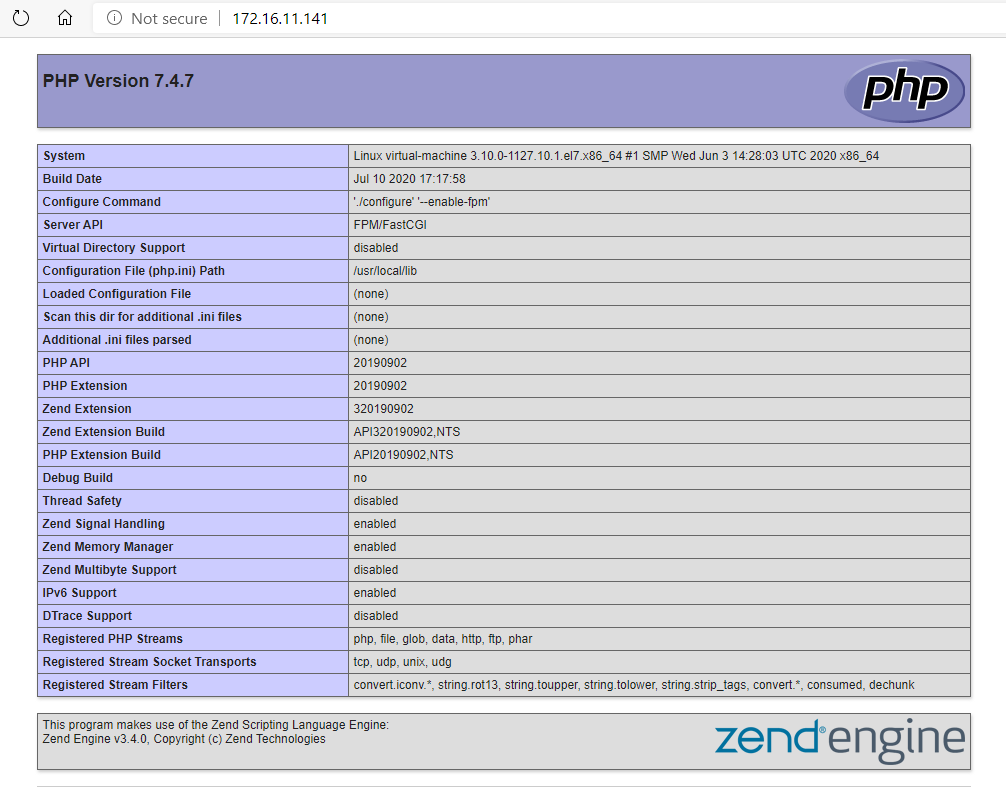
至此,nginx+php的安装和测试成功。
4. 设置Nginx、PHP开机自启
nginx
在centos7中,服务都是使用systemdctl命令而不是service了,即使是使用service命令其实也是链接到systemdctl命令,关于systemd的介绍可以参考阮一峰老师的:Systemd 入门教程:命令篇
shell> cd /lib/systemd/system/	#切换目录到关于系统进程的目录

shell> vim nginx.service	#在目录下新建nginx.service文件,填入以下内容
nginx.service文件
[Unit]

Description=nginx service

After=network.target

[Service]

Type=forking

ExecStart=/usr/local/nginx/sbin/nginx

ExecReload=/usr/local/nginx/sbin/nginx -s reload

ExecStop=/usr/local/nginx/sbin/nginx -s quit

PrivateTmp=true

[Install]

WantedBy=multi-user.target
[Unit]块是这个服务单元的描述;[Service]块是服务的配置,如启动命令,停止命令,其中的Type=forking表示后台执行;[Install]块是安装的配置,multi-user.target是运行级别为3,Linux有0-6歌运行级别。最后,执行命令执行开启开机自启:
shell> systemctl enalbe nginx.service #开启nginx开机自启服务,关闭对应dsiable
关于systemctl的详细使用介绍可以查阅这篇文章:How To Use Systemctl to Manage Systemd Services and Units
php
php的服务也差不多,不过php在5.3.3以后的版本不再支持 (start|stop|reload) 等命令,需要使用Linux的信号量:INT,USR1,USR2,QUIT等。
shell> cd /lib/systemd/system/	#切换目录到关于系统进程的目录

shell> vim php-fpm.service	#在multi-user.target.wants目录下新建php-fpm.service文件,填入以下内容
php-fpm文件:
[Unit]

Description=php-fpm service

After=network.target

[Service]

Type=forking

ExecStart=/usr/local/php/sbin/php-fpm

ExecReload=kill -USR2 $(cat /usr/local/php/var/run/php-fpm.pid)

ExecStop=kill -INT $(cat /usr/local/php/var/run/php-fpm.pid)

PrivateTmp=true

[Install]

WantedBy=multi-user.target
关于Linux的信号量,可以查阅这篇文章介绍:Signals in Linux ,最后开启php-fpm服务:
shell> systemctl enable php-fpm.service #开启php-fpm开机自启服务,关闭对应dsiable
5. 最后
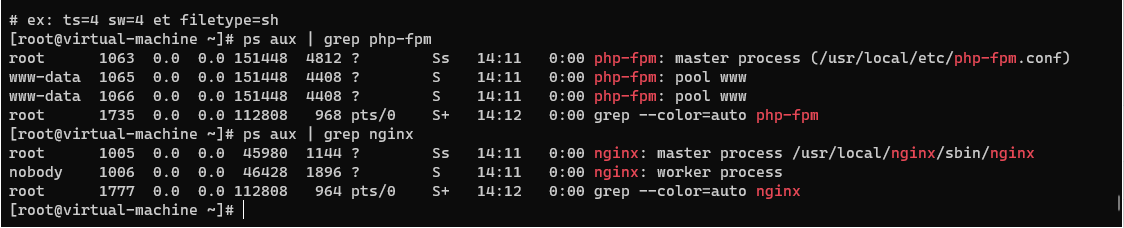
最后重启进行测试:
shell> reboot		#重启

shell> ps aux | grep php-fpm	#查看php-fpm相关进程是否运行

shell> ps aux | grep nginx		#查看nginx相关进程是否运行
Centos7 Nginx+PHP7 配置的更多相关文章
- nginx php7 配置 备用
yum install epel-* -y yum install -y wget unzip gcc gcc-c++ make zlib zlib-devel pcre pcre-devel lib ...
- centos7: nginx安装配置
centos平台编译环境使用如下指令 安装make: yum -y install gcc automake autoconf libtool make 安装g++: yum install gcc ...
- centos7 nginx yum 配置
[nginx] name=nginx repo baseurl=http://nginx.org/packages/centos/7/$basearch/ gpgcheck= enabled=
- CentOS7 nginx简单配置pathinfo模式(ThinkPHP)
location ~ \.php { #去掉$ root H:/PHPServer/WWW; fastcgi_pass 127.0.0.1:9000; fastcgi_in ...
- Vmware搭建LNMP环境(Centos7+Nginx+Mysql+PHP7.1.8)
参考:1.Linux学习之CentOS(一)----在VMware虚拟机中安装CentOS 7(图文教程) 2.Centos7搭建LNMP环境 3.MySQL5.7修改默认root密码 4.CentO ...
- [原创]Centos7 从零配置Nginx+PHP+MySql
序言 这次玩次狠得.除了编译器使用yum安装,其他全部手动编译.哼~ 看似就Nginx.PHP.MySql三个东东,但是它们太尼玛依赖别人了. 没办法,想用它们就得老老实实给它们提供想要的东西. 首先 ...
- Ubuntu17.04配置LNMP(Nginx+PHP7+MySQL)简单教程 快速 易学 简单易懂
我安装的是当前最新的Ubuntu版本17.04,在虚拟机中先试用一下,如果没有什么不稳定的现象,准备以后作为主力操作系统 Ubuntu属于Debian系的Linux系统,拥有着一个很NB的软件包管理器 ...
- CentOS7 Nginx安装及配置反向代理
背景: Mono (Mono JIT compiler version 5.4.0.201 ) jexus-5.8.2-x64(<CentOS7 安装 jexus-5.8.2-x64>) ...
- [Centos7]无法访问配置好的nginx
Centos7无法访问配置好的nginx 临时生效 # 重启虚拟机,将失效 iptables -I INPUT -p TCP --dport 80 -j ACCEPT 永久有效 # 在防火墙中开放80 ...
随机推荐
- P4267 [USACO18FEB]Taming the Herd
说实话感觉不是一道蓝题--感觉挺水的,不过为了水题解,水题就够了(其实是觉得思考的过程比较典型,记录一下) 题解 刚开始看这道题感觉上没什么思路,但是我们可以先考虑用 \(O(n)\) 的时间去枚举发 ...
- Springboot mini - Solon详解(六)- Solon的校验框架使用、定制与扩展
Springboot min -Solon 详解系列文章: Springboot mini - Solon详解(一)- 快速入门 Springboot mini - Solon详解(二)- Solon ...
- 实验楼表关系建立 (课程模块·5张表)
实验楼表关系图 from utils.MyBaseModel import Base from django.db import models # # Create your models here. ...
- .net core 和 WPF 开发升讯威在线客服与营销系统:背景和产品介绍
本系列文章详细介绍使用 .net core 和 WPF 开发 升讯威在线客服与营销系统 的过程.本产品已经成熟稳定并投入商用. 在线演示环境:https://kf-m.shengxunwei.com ...
- 精尽Spring MVC源码分析 - HandlerMapping 组件(二)之 HandlerInterceptor 拦截器
该系列文档是本人在学习 Spring MVC 的源码过程中总结下来的,可能对读者不太友好,请结合我的源码注释 Spring MVC 源码分析 GitHub 地址 进行阅读 Spring 版本:5.2. ...
- Sql Server 数据把列根据指定的内容拆分数据
今天由于工作需要,需要把数据把列根据指定的内容拆分数据 其中一条数据实例 select id , XXXX FROM BIZ_PAPER where id ='4af210ec675927fa016 ...
- java.net.BindException:Problem binding to [hostname:8088]地址已在使用
异常提示端口号被占用 查找被占用的端口 netstat -tln netstat -tln | grep 8083 netstat -tln ## 查看端口使用情况,而netstat -tln | g ...
- 超详细分析Bootloader到内核的启动流程(万字长文)
@ 目录 Bootloader启动流程分析 Bootloader第一阶段的功能 硬件设备初始化 为加载 Bootloader的第二阶段代码准备RAM空间(初始化内存空间) 复制 Bootloader的 ...
- Raft算法系列教程1:Leader选举
1.服务器的三种角色 Raft算法中服务器主要分为三种角色:Leader.Follower.Candidate,并且三种角色相互独立,也就是服务器在同一时间内只可能扮演其中一种角色. Leader:用 ...
- linux下使用vsftp搭建FTP服务器:匿名登录,账号登录,SSL加密传输
目录 一.关于FTP和VSFTP 二.ftp.sftp.vsftp.vsftpd的区别 三.项目一:搭建一台所有人都可以访问的通用FTP服务器 3.1 项目要求 3.2 项目思路分析 3.3 使用vs ...